Cherry MW4500 Wireless Vertical Ergonomic Mouse
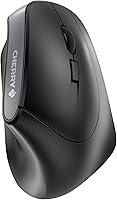
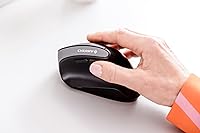
Cherry MW4500 Wireless Vertical Ergonomic Mouse — image 1
Cherry MW4500 Wireless Vertical Ergonomic Mouse — image 2
Cherry MW4500 Wireless Vertical Ergonomic Mouse — image 3
Cherry MW4500 Wireless Vertical Ergonomic Mouse — image 4

Cherry MW4500 Wireless Vertical Ergonomic Mouse — image 5
Cherry MW4500 Wireless Vertical Ergonomic Mouse — image 6
Cherry MW4500 Wireless Vertical Ergonomic Mouse — image 7
76%
24%

Overview

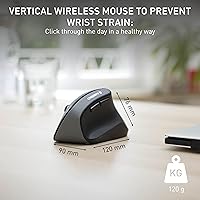
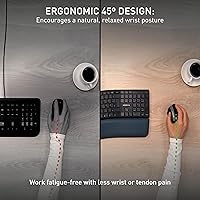
The Cherry MW4500 Wireless Vertical Ergonomic Mouse is Cherry’s answer to a growing problem: hours of flat-mouse use that quietly wrecks your wrist. The vertical mouse category exists because holding a standard mouse forces your forearm into an uncomfortable pronated position all day. This ergonomic mouse tilts your hand to roughly 45 degrees — closer to a natural handshake — which takes real pressure off the tendons and forearm muscles. Cherry, a German peripheral brand with decades of input device experience, keeps this one wireless via a tiny 2.4 GHz USB nano receiver. Worth noting early: it is designed exclusively for right-handed users.

Features & Benefits

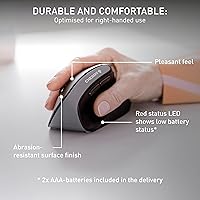
The MW4500 packs more utility into its compact frame than you might expect at this price. You can cycle through three DPI settings — 600, 900, and 1200 — using a dedicated button, which means switching from careful document work to faster browser scrolling without touching any software. Six buttons give you enough flexibility for everyday shortcuts. The battery LED indicator is a small but genuinely useful touch; a quick glance tells you when it is time to swap batteries rather than letting the mouse die mid-task. Two AAA cells power it for roughly six months, and the matte grip surface stays comfortable even during longer sessions.

Best For

This vertical mouse makes the most sense for office workers and remote employees who spend the bulk of their day mousing through documents, spreadsheets, and browser tabs. If you have been fighting wrist or forearm fatigue with a traditional flat mouse, it is a low-cost entry point into ergonomic peripherals without the intimidating price of premium alternatives. It also suits anyone who hates installing drivers — plug the nano receiver in and you are ready on both Windows and Mac in seconds. Frequent travelers will appreciate the long battery life and wireless freedom. Just keep in mind this is not a mouse for gamers or anyone chasing high-precision cursor control.

User Feedback

Buyers consistently report that switching to the MW4500 brings noticeable wrist relief within the first few days — that part lives up to its reputation. Battery life is another win; most users find it lasts at or beyond the six-month claim. The criticism, though, is real: the scroll wheel draws repeated complaints for feeling stiff and slightly imprecise, which stands out compared to pricier rivals. Users with large hands occasionally find the body a touch too compact for all-day comfort. A few people have also misplaced the nano receiver, since it fits snugly into the USB port and disappears easily. Overall the value-to-comfort ratio earns genuine praise, especially from those coming from a standard flat mouse.

Pros

  • The 45-degree vertical grip takes genuine pressure off the wrist and forearm within just a few days of use.
  • Three switchable DPI levels let you adapt cursor speed to the task without opening any software.
  • Battery life routinely meets or beats the six-month estimate, making it nearly maintenance-free.
  • The plug-and-play nano receiver works immediately on both Windows and Mac with no driver installation required.
  • A low-battery LED gives you a clear heads-up before the mouse dies unexpectedly mid-workday.
  • Six buttons cover all the shortcuts most office users actually need day to day.
  • The matte, abrasion-resistant surface holds up well over time and stays comfortable during long sessions.
  • At its price point, this vertical mouse offers an accessible entry into ergonomic computing without a major financial commitment.
  • Wireless 2.4 GHz connectivity stays reliable across a standard desk setup with no noticeable lag.
  • Compact dimensions make it practical for laptop bags and travel without taking up much space.

Cons

  • The scroll wheel feels stiff and imprecise compared to what rivals at higher price points deliver.
  • Users with larger hands may find the body too compact for truly comfortable all-day use.
  • The nano receiver is very small and easy to misplace, with no dedicated storage spot on the mouse.
  • At 1200 DPI maximum, the MW4500 cannot satisfy anyone who needs fine-grained precision beyond standard office tasks.
  • There is no Bluetooth option, so you consume a USB port permanently for the nano receiver.
  • No companion software means you cannot remap buttons or customize behavior beyond what the hardware allows.
  • The mouse is strictly right-handed, which immediately excludes a significant share of potential buyers.
  • Click and button feedback feels functional but not particularly satisfying compared to premium ergonomic alternatives.
  • Running on AAA batteries adds recurring cost and waste compared to mice with built-in rechargeable cells.

Ratings

Our AI scoring system analyzed thousands of verified global purchases of the Cherry MW4500 Wireless Vertical Ergonomic Mouse, actively filtering out incentivized, duplicate, and bot-generated submissions to surface what real daily users actually experience. The scores below reflect both the genuine strengths that keep buyers recommending this ergonomic mouse and the honest pain points that cause hesitation. Nothing has been smoothed over.

Ergonomic Comfort
83%
The 45-degree vertical angle delivers noticeable relief from wrist and forearm fatigue, particularly for people who clock six or more hours a day at a desk. Most users report feeling a real difference within the first few days of switching, which is the core reason this mouse earns repeat recommendations.
Users with larger hands sometimes find the body dimensions a touch cramped for a full workday grip, which can introduce a different kind of fatigue over time. The ergonomic benefit is real but not universal, and hand size matters more here than with a standard flat mouse.
Build Quality
71%
29%
The matte, abrasion-resistant shell holds up well under daily office use and does not develop that greasy sheen that cheaper plastics often show after months of handling. The overall construction feels solid enough for its price tier and does not creak or flex under normal pressure.
The scroll wheel and side buttons feel noticeably plasticky compared to rivals at higher price points, and the click feedback lacks the satisfying tactile response that more expensive ergonomic mice deliver. At this price it is acceptable, but buyers upgrading from premium peripherals will notice the difference immediately.
Scroll Wheel
58%
42%
The scroll wheel does its job reliably for basic document navigation and browser scrolling, which is the primary use case for most office workers using this mouse day to day. It is consistent enough that most users do not find it outright frustrating for standard tasks.
Stiffness and imprecision are the two words that appear repeatedly in buyer feedback about the scroll wheel, and they are hard to ignore. Compared to the smooth, well-damped wheels on Logitech or Microsoft ergonomic mice, this one feels budget-grade in a way that stands out in daily use.
Battery Life
89%
Six months of battery life is the advertised figure, and real-world feedback consistently confirms it holds up in practice, often running close to or slightly beyond that estimate under normal office workloads. Using standard AAA batteries also means you are never hunting for a specific charging cable.
Running on disposable AAA cells does generate ongoing battery waste and minor recurring cost, which increasingly feels like a trade-off compared to rivals with built-in rechargeable batteries. There is no onboard storage slot for a spare battery either, so you need to keep AAAs somewhere accessible.
Wireless Reliability
84%
The 2.4 GHz connection stays stable across a typical desk setup without noticeable dropout or lag during standard office tasks like spreadsheet work, browsing, and document editing. Most users report it simply works without any fiddling after the initial plug-in.
The nano receiver occupies a USB port permanently, which can be an inconvenience on laptops with limited ports. There is no Bluetooth option as a fallback, so if the receiver is lost or the USB port is needed for something else, the mouse becomes unusable.
Setup & Compatibility
92%
Plug-and-play functionality on both Windows and Mac is genuinely effortless, with zero driver installation required. For non-technical users or anyone setting up a new workstation quickly, this no-fuss approach is one of the most consistently praised aspects across buyer feedback.
The absence of any companion software means button remapping or advanced customization is simply not possible, which will frustrate power users who want to configure shortcuts. What you get out of the box is what you get, with no flexibility to adjust behavior beyond the hardware defaults.
DPI & Tracking
67%
33%
The three DPI levels cover the practical range that the vast majority of office workers actually use, and the dedicated DPI toggle button makes switching between cursor speeds quick and convenient during a normal workday. At 900 DPI, the tracking feels accurate and smooth on a standard mouse pad.
The 1200 DPI ceiling is a genuine limitation for anyone doing graphic work, detailed photo editing, or anything requiring fine cursor precision at high screen resolutions. The optical sensor also struggles on glass or highly reflective surfaces, so a mouse pad is a practical necessity rather than an option.
Nano Receiver
62%
38%
The receiver is genuinely tiny and sits flush enough in a USB port that many users leave it plugged in permanently without it getting in the way, which is a reasonable approach for a desktop setup. Signal performance from the receiver is reliable within a standard office distance.
The size that makes it convenient also makes it alarmingly easy to misplace, and buyers frequently flag this as a real-world frustration, particularly when switching between devices. There is no dedicated storage compartment in the mouse body to stow the receiver during travel, which is a noticeable design omission.
Button Layout
76%
24%
Six buttons is enough for the everyday shortcuts most office users actually reach for, and the thumb buttons sit in a position that feels natural without requiring an awkward hand repositioning. The DPI toggle being a standalone button rather than a hold-and-click combination is a small but appreciated detail.
The side buttons require a slightly deliberate press to activate, which some users find less responsive than they would like compared to mice with better-engineered button mechanisms. There is also no ability to remap any of the buttons, so if the default layout does not suit your workflow, you are stuck with it.
Portability
78%
22%
At 4.3 ounces and compact enough to slot into a laptop bag without taking up much room, this vertical mouse travels reasonably well for people who move between home and office or work from different locations. The long battery life reinforces its usefulness as a travel peripheral.
Vertical mice are inherently bulkier in one axis than flat travel mice, and the MW4500 is no exception, meaning it takes up more vertical space in a bag than a flatter alternative. There is also no carry pouch or protective sleeve included, so the finish is vulnerable to scratching in a packed bag.
Value for Money
86%
At its price point, this ergonomic mouse offers a genuinely compelling entry into vertical ergonomic computing without requiring a significant financial commitment. Buyers who compare it to premium alternatives consistently note that the core ergonomic benefit is largely delivered at a fraction of the cost.
Buyers who stretch a little further up the price ladder quickly discover meaningfully better scroll wheels, rechargeable batteries, and Bluetooth connectivity, which makes the MW4500 feel like a solid but clearly entry-level option. It represents good value but not the best value at every possible price point in the category.
Hand Size Fit
64%
36%
For users with average-sized hands, the dimensions feel balanced and the grip angle works as intended during a standard workday without causing hotspots or pressure points. The abrasion-resistant surface helps the mouse stay firmly positioned in the hand even during longer sessions.
Users with large hands repeatedly flag that the body feels undersized, particularly in the palm area, which can cause the wrist to compensate in ways that partially undermine the ergonomic purpose of the design. Cherry does not currently offer a larger variant of this model to address the gap.
Low-Battery Indicator
81%
19%
Having a clear LED warning that the battery is running low is the kind of small, practical feature that genuinely improves day-to-day usability, especially in busy work environments where you do not want an unexpected shutdown mid-task. Users consistently appreciate that it removes the guesswork entirely.
The indicator only tells you the battery is low rather than offering any graduated readout of remaining charge, so you still need to act fairly promptly once the light appears. There is no companion software to check battery status on screen, which would be a useful addition for more precise monitoring.

Suitable for:

The Cherry MW4500 Wireless Vertical Ergonomic Mouse was built with a very specific person in mind: the right-handed desk worker who spends most of their day clicking, scrolling, and navigating documents and feels that familiar ache building in their wrist or forearm by mid-afternoon. If that sounds like you, this ergonomic mouse is genuinely worth considering as a first step into vertical peripherals, especially if you are reluctant to spend heavily on something you are not sure will help. Remote workers and home office setups benefit particularly well here, since the plug-and-play nano receiver means zero configuration headaches on either Windows or Mac. The roughly six-month battery life also makes it a practical travel companion for anyone who moves between offices or works on the road and cannot be bothered hunting for a charging cable. Beginners to ergonomic input devices will find the transition manageable, since the 45-degree grip angle is noticeable but not extreme.

Not suitable for:

The Cherry MW4500 Wireless Vertical Ergonomic Mouse has clear boundaries, and being honest about them will save some buyers a frustrating return. Left-handed users are simply out — there is no ambidextrous or left-handed version of this model, so that is a hard stop. People with large hands have flagged that the body feels slightly undersized for all-day use, which can introduce its own kind of fatigue. If you are a gamer or someone who needs high-precision cursor control, the 1200 DPI ceiling and optical sensor will feel limiting compared to what dedicated gaming mice offer. Those who already own a premium ergonomic mouse from brands like Logitech are unlikely to find a meaningful upgrade here, as the scroll wheel and button quality do not match higher-priced competition. Finally, anyone who frequently loses small accessories should be cautious — the nano receiver is tiny and has no onboard storage slot on the mouse itself.

Specifications

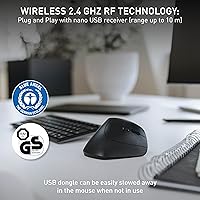
  • Connectivity: The mouse uses a wireless 2.4 GHz radio frequency connection via a compact USB nano receiver included in the box.
  • DPI Range: Three selectable sensitivity levels are available: 600, 900, and 1200 DPI, switchable on the fly with a dedicated button.
  • Buttons: The mouse features six buttons plus a scroll wheel, covering left click, right click, DPI toggle, and two additional thumb buttons.
  • Battery: Two AAA batteries power the mouse, with Cherry rating the battery life at up to six months of typical office use; batteries are included.
  • Battery Indicator: An LED on the mouse body illuminates to signal a low battery charge, giving users advance warning before power runs out.
  • Sensor Type: An optical sensor handles movement detection, suited to standard desk surfaces and mouse pads used in everyday office environments.
  • Grip Angle: The body is angled at 45 degrees to position the hand in a more natural, upright orientation that reduces forearm pronation.
  • Hand Orientation: This mouse is designed exclusively for right-handed users; no left-handed or ambidextrous variant of this model exists.
  • Dimensions: The mouse measures 119 x 72 x 66 mm (4.68 x 2.83 x 2.59 inches), making it compact enough for a laptop bag.
  • Weight: The mouse weighs approximately 4.3 ounces, which provides a balanced, manageable feel without being uncomfortably heavy or too light.
  • Surface Finish: The outer casing uses an abrasion-resistant matte texture designed to maintain a comfortable, non-slip grip over extended daily use.
  • Compatibility: The mouse works with Windows 7, Windows 8.1, Windows 10, and macOS, requiring no driver installation on any of these platforms.
  • Wireless Range: Typical 2.4 GHz wireless mice of this class operate reliably up to around 10 meters from the USB receiver under normal conditions.
  • Brand Origin: Cherry is a German manufacturer with a long history in professional input devices, particularly well known for its mechanical keyboard switches.
  • Power Source: The mouse is entirely battery-powered with no option for wired or USB charging, keeping the setup simple and fully cable-free.

Related Reviews

Lekvey XC-05 Vertical Wireless Mouse
75%
83%
Ergonomic Comfort
66%
Build Quality
88%
Battery Life
54%
Sleep Mode & Wake Responsiveness
81%
Wireless Connectivity
More
Acer OMR241 Ergonomic Vertical Mouse
74%
83%
Ergonomic Comfort
67%
Build Quality
88%
Battery Life
61%
DPI and Precision
43%
Mac Compatibility
More
seenda Ergonomic Vertical Wireless Mouse
86%
90%
Wrist Comfort & Ergonomics
87%
Battery Life & Charging
91%
Quiet Click Performance
85%
Compatibility & Connectivity
88%
Build Quality & Durability
More
Woddlffy RAAVEE Ergonomic Vertical Wireless Mouse
75%
81%
Ergonomic Comfort
54%
Build Quality
83%
Wireless Connectivity
57%
DPI Range
63%
Button Functionality
More
UGREEN Vertical Wireless Ergonomic Mouse

84%
88%
Ergonomic Comfort
84%
Connectivity Performance
80%
Ease of Use
91%
Design and Build Quality
82%
Battery Life
More
SHARE SUNSHINE Ergonomic Vertical Wireless Mouse
74%
83%
Ergonomic Comfort
79%
Adjustable Tilt Angle
71%
Build Quality
74%
Palm Rest Comfort
88%
Wireless Connectivity
More
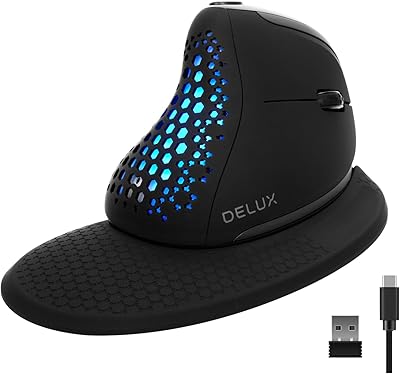
DeLUX Seeker M618XSD Wireless Ergonomic Vertical Mouse
85%
88%
Ergonomics & Comfort
93%
Connectivity Options
85%
Customizability (DPI & RGB)
91%
Display & Functionality
82%
Battery Life
More
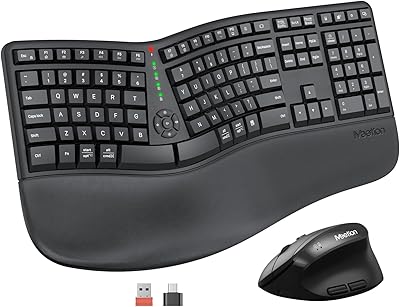
MEETION DirectorC Split Ergonomic Keyboard Mouse Combo
72%
83%
Ergonomic Comfort
71%
Typing Experience
77%
Mouse Performance
66%
Wrist Rest Quality
62%
Build Quality
More
Anker AK-98ANWVM-UBA Wireless Vertical Mouse
78%
83%
Ergonomic Comfort
71%
Build Quality
58%
Scroll Wheel Performance
86%
Wireless Connectivity
93%
Ease of Setup
More
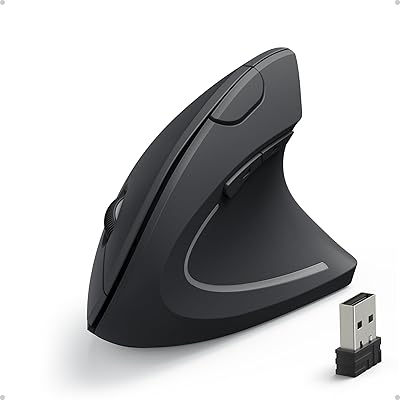
Micropack MP-V01B Vertical Wireless Mouse
74%
84%
Ergonomic Comfort
78%
Multi-Device Switching
61%
Build Quality
83%
Battery Life
91%
Click Noise Level
More

FAQ

It works immediately without any software. Just plug the nano receiver into a free USB port on your PC or Mac and the mouse is ready to use within seconds. There are no drivers to download and no companion app required.

Most people find the first day or two a little unusual, simply because the grip is so different from a traditional flat mouse. By the end of the first week, the position tends to feel natural and many users report that going back to a flat mouse afterward actually feels uncomfortable.

There is a dedicated DPI button on the mouse body. Each press cycles you through 600, 900, and 1200 DPI in sequence, so you can adjust on the fly without touching any software. A quick press is all it takes.

Yes, it works on macOS without any additional setup. Plug in the nano receiver and the operating system recognizes it immediately. The standard buttons and scroll wheel all function as expected, though advanced button remapping is not available without third-party software on either Mac or Windows.

Most users report battery life that meets or even slightly exceeds the six-month estimate, provided they are using the mouse in a typical office capacity rather than for extended gaming or high-intensity use. The low-battery LED gives you a clear heads-up so you are not caught off guard.

That is worth thinking through carefully. The mouse is on the compact side for a vertical design, and some users with larger hands find the fit a little tight over a full workday. If your hands are on the bigger end, it may be worth trying the mouse for a week or two to see how it feels before committing long-term.

Unfortunately, the nano receiver is paired specifically to that mouse and Cherry does not typically offer standalone replacement receivers for this model through retail channels. It is a very small dongle, so it is worth storing it carefully when not in use. Some users keep it plugged in permanently to avoid losing it.

The optical sensor on this mouse is not rated for glass surfaces, so you may get inconsistent tracking without a mouse pad or a textured surface underneath it. A basic mouse pad fixes this completely and is worth the small extra investment.

No, this particular model is designed solely for right-handed users and the shape does not work in reverse. If you are left-handed, you would need to look at a different product entirely, as Cherry does not currently offer a mirrored version of this mouse.

The MW4500 delivers the core ergonomic benefit of a vertical grip at a fraction of the cost of options like the Logitech MX Vertical. The trade-off shows up mainly in scroll wheel feel and the absence of Bluetooth or rechargeable battery options. For someone trying out vertical mice for the first time, it is a sensible starting point without a big financial risk.