Overview

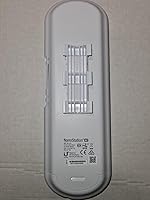
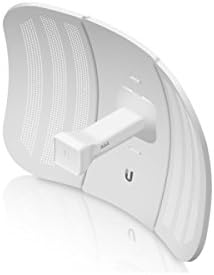
The Ubiquiti NanoStation M5 Outdoor Wireless Access Point has earned a solid reputation among network professionals for good reason — it was built to handle demanding, long-distance wireless links that consumer equipment simply cannot sustain. Unlike home routers, the NanoStation M5 runs Ubiquiti's AirMax TDMA protocol, which coordinates transmissions in a time-sliced fashion to reduce interference and improve throughput in point-to-point and point-to-multipoint deployments. This has kept it relevant with WISPs and network integrators for well over a decade. That said, expect a learning curve: this outdoor CPE assumes you already understand IP addressing, RF fundamentals, and basic link budgeting before you power it on.
Features & Benefits

At the heart of this outdoor CPE is a 16 dBi directional antenna operating on the 5GHz band — a combination that delivers tight beam focus, solid rejection of off-axis interference, and practical link distances well beyond what omnidirectional gear can achieve. Pair that with 27 dBm of transmit power and 802.11a/n support, and you have a capable platform for real-world backhaul work. The dual-port PoE passthrough is genuinely useful in remote installations where running separate power cables is impractical. The weatherproof housing holds up across seasons, and airOS firmware provides a built-in spectrum analyzer, link budget calculator, and audio alignment tone — tools that actually help you nail a clean, stable link on the first attempt.

Best For

The NanoStation M5 is the kind of tool that earns its place in a WISP operator's kit or an IT admin's van. Point-to-point building bridges, rural backhaul over open fields, and campus connectivity without the cost of trenched fiber are all solid use cases. Homesteaders looking to extend internet to a barn or outbuilding across several hundred meters will find it more than capable. Just be clear about what it is not: this is not a device for casual home users, it makes no sense indoors, and anyone without a basic grasp of RF fundamentals will struggle to get decent performance out of it.

User Feedback

People who deploy Ubiquiti's 5GHz directional unit professionally tend to give it high marks for link stability — WISPs running it through years of harsh weather report it holds up well, and distance performance when properly aligned consistently earns praise. The frustrations are real, though. Alignment is genuinely sensitive; even a few degrees off and throughput drops noticeably, which catches first-timers off guard. The airOS interface has a learning curve that frustrates newcomers to the platform. A PoE injector is not included, adding to the total cost and occasionally surprising buyers. Overall, the value proposition is strong for anyone with the technical background to put it to proper use.

Pros

  • Proven link stability at distance — WISPs consistently report reliable performance across long-running outdoor deployments.
  • The 16 dBi directional antenna rejects off-axis interference far better than omnidirectional alternatives.
  • AirMax TDMA protocol reduces latency and handles multiple clients more efficiently than standard Wi-Fi.
  • 27 dBm transmit power provides real headroom for links over challenging or partially obstructed terrain.
  • Weatherproof housing has endured years of harsh outdoor exposure with minimal reported failures.
  • Dual-port PoE passthrough reduces cabling complexity in remote or hard-to-reach mounting locations.
  • Built-in spectrum analyzer and audio alignment tone in airOS make physical installation noticeably more precise.
  • Compact, lightweight form factor makes pole or wall mounting quick and manageable for a single installer.
  • Delivers strong value for the throughput and range it offers within the prosumer outdoor CPE segment.

Cons

  • PoE injector not included, which adds to total cost and catches some buyers off guard.
  • Antenna alignment is highly sensitive — a few degrees off-aim can meaningfully degrade throughput.
  • airOS firmware has a steep learning curve for anyone without prior Ubiquiti platform experience.
  • The 15km range figure assumes clear line-of-sight conditions that many real-world installations cannot guarantee.
  • This outdoor CPE is a mature product; newer Ubiquiti models surpass it for high-throughput backhaul demands.
  • 802.11a/n wireless standards lag behind the capabilities of newer AC and AX-based outdoor CPE alternatives.
  • Official documentation can be thin for complex multi-point setups, pushing newcomers toward community forums.
  • Real-world throughput varies significantly with terrain, interference, and local RF conditions — manage expectations carefully.

Ratings

The scores below reflect AI-driven analysis of verified global buyer reviews for the Ubiquiti NanoStation M5 Outdoor Wireless Access Point, with spam, bot-generated, and incentivized submissions actively filtered out to ensure the ratings represent genuine field experience. Across thousands of real-world deployments — from WISP backhaul installations to rural building bridges — consistent patterns emerged in both what this outdoor CPE does exceptionally well and where it genuinely frustrates users. Both sides of that picture are reflected transparently in every score here.

Link Stability
88%
Once properly aimed and configured, users — especially WISP operators running multi-site networks — consistently report links that stay up through weather events, RF environment changes, and months of continuous uptime without manual intervention. AirMax TDMA scheduling plays a direct role in keeping connections from degrading under load.
A small but notable share of users report intermittent disconnects tied to firmware version mismatches between paired units or aggressive interference from nearby 5GHz deployments, underscoring that link stability is not entirely self-managing out of the box.
Range Performance
79%
21%
In open, unobstructed terrain — rural fields, across rooftops, or between hilltop installations — the NanoStation M5 regularly achieves multi-kilometer links that simply exceed what similarly priced equipment can produce, earning strong praise from users connecting distant outbuildings or delivering internet to remote structures.
The advertised 15km ceiling misleads some buyers; real-world distances involving tree lines, rolling terrain, or suburban clutter often cut practical range to a fraction of that figure, and users who assumed otherwise without line-of-sight planning have been disappointed.
Build Quality
91%
The weatherproof housing is consistently highlighted by long-term deployers as one of the unit's standout traits — installers report units mounted on rooftops and poles for three to five years still functioning without housing degradation, bracket failure, or UV-related plastic brittleness common in cheaper outdoor hardware.
A minor recurring complaint involves the mounting bracket's paint coating, which shows rust or surface corrosion in coastal or high-humidity environments after extended exposure, though this is cosmetic rather than functional in most reported cases.
Ease of Setup
54%
46%
For network professionals already familiar with Ubiquiti's ecosystem, initial configuration is methodical and logical — airOS exposes exactly the parameters you need without burying them in unnecessary menus, and experienced installers can have a point-to-point link functional within 30 to 45 minutes.
First-time Ubiquiti users and general IT staff without RF experience consistently describe a steep learning curve — concepts like link mode selection, frequency planning, output power limits, and security pairing are not self-explanatory, and Ubiquiti's official beginner documentation does not bridge that gap effectively.
Value for Money
84%
Within the prosumer outdoor CPE category, this outdoor CPE sits at a price point that most professionals consider fair for the hardware quality, AirMax protocol access, and long track record of reliable field performance — particularly when compared to the cost of fiber trenching or leased line alternatives for the same connectivity problem.
The missing PoE injector adds a real incremental cost that some buyers only discover at purchase, and those comparing total landed cost against newer competing hardware may find that more recent AirMax AC units offer meaningfully better throughput at only a modest price premium.
Antenna Performance
86%
The 16 dBi directional gain is well-regarded for focusing signal tightly enough to cut through moderate RF clutter, and users in semi-urban deployments specifically call out the antenna's ability to maintain clean links even in environments where omnidirectional gear struggles with co-channel interference from neighboring networks.
The tight beam pattern that makes this unit effective at range also makes precise physical alignment non-negotiable — users who underestimate how critical pointing accuracy is, or who mount the unit on a surface subject to wind movement, report noticeable throughput variability that takes troubleshooting time to diagnose.
Firmware & Software
73%
27%
Experienced users appreciate that airOS includes genuinely useful field tools — the built-in spectrum analyzer, alignment tone, and link test utilities eliminate the need for separate diagnostic equipment during installation and have directly helped deployers optimize links on the first site visit.
The firmware update cycle for the M-series has slowed as Ubiquiti's focus has shifted to newer platforms, and several users report that the interface feels dated compared to newer Ubiquiti products, with some configuration workflows requiring more steps than they should for common tasks.
Throughput & Speed
77%
23%
For the typical workloads this unit is deployed for — bridging buildings, WISP last-mile distribution, or extending enterprise connectivity to remote sites — real-world throughput is sufficient for VoIP, video conferencing, and general internet traffic without notable congestion under normal conditions.
The 802.11n throughput ceiling shows its age when users push bandwidth-intensive applications like large file transfers between buildings or multi-stream 4K video; those use cases are better served by the newer AirMax AC generation, and buyers with high-throughput demands should evaluate accordingly.
Mounting & Installation
76%
24%
The compact form factor and included bracket make single-technician mounting realistic across most common pole and wall installations, and the unit's low weight means it stays securely in position on standard mast hardware without requiring heavy-duty rigging equipment.
The bracket design, while functional, limits fine-tuning of vertical tilt in some mounting configurations, and a few installers note that achieving sub-degree alignment precision on very long links can require aftermarket adjustable mounts for reliable results.
PoE & Power Design
58%
42%
The dual-port PoE passthrough is a genuinely useful design choice for remote deployments, enabling a secondary device — an IP camera or a downstream radio — to draw power through the same cable run and reducing the total cabling burden on rooftop or tower installations.
Not including a PoE injector in the box is the most commonly mentioned buyer frustration across reviews, and the unit's reliance on passive 24V PoE means it is incompatible with 802.3af/at active PoE switches, which catches buyers who assumed standard switch port compatibility off guard.
Interference Rejection
82%
18%
The 5GHz band selection combined with AirMax TDMA scheduling gives Ubiquiti's 5GHz directional unit a meaningful advantage in environments where multiple wireless operators share the same general spectrum — users in semi-dense WISP deployments note it handles nearby co-frequency interference far better than standard 802.11 contention-based devices.
In genuinely congested urban RF environments with many competing 5GHz networks, users report that even AirMax cannot fully eliminate performance degradation, and proper channel planning and output power management are required to realize the interference rejection benefits in practice.
Durability Over Time
93%
Long-term field durability is where this outdoor CPE earns its strongest endorsements — experienced WISPs and network administrators regularly report units running in continuous outdoor service for four to seven years with no hardware failures, which builds real confidence in the platform for new buyers planning extended deployments.
Some users in very high UV environments have noted gradual yellowing of the white plastic housing over multi-year exposure, and a small number of units deployed in coastal salt-air environments have shown early port corrosion where cable management was not properly executed during installation.
Documentation & Support
62%
38%
The broader Ubiquiti community — forums, third-party guides, and the accumulated knowledge base from a decade of real deployments — is extensive, and experienced buyers consistently point to community resources as being more practically useful than any official manual for solving real installation challenges.
Ubiquiti's official documentation for the M-series is thin for complex multi-point or mixed-mode deployments, and the company's formal technical support has a reputation for slow response times — buyers without community forum access or prior platform experience may feel unsupported when troubleshooting edge cases.
Compatibility
74%
26%
Within the AirMax ecosystem, this outdoor CPE pairs reliably with other M-series and compatible AirMax hardware, and the option to disable AirMax mode for standard 802.11a/n interoperability gives deployers flexibility when linking to third-party equipment on remote sites.
Compatibility drops off quickly outside the Ubiquiti ecosystem — passive PoE requirements, proprietary AirMax mode, and airOS management mean integration into non-Ubiquiti infrastructure requires careful planning, and the unit does not support modern 802.3af/at PoE, 802.11ac, or newer security protocols that some enterprise environments mandate.

Suitable for:

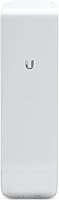
The Ubiquiti NanoStation M5 Outdoor Wireless Access Point is purpose-built for professionals and technically capable enthusiasts who need to bridge significant distances without running cable. Wireless ISPs rely on it for building stable point-to-point or point-to-multipoint backhaul links across open terrain where fiber is too costly or logistically impractical to install. IT administrators tasked with connecting two buildings on a campus or across a rural property will find it delivers the throughput and reliability needed for real workloads. Homesteaders and property owners wanting to extend connectivity to a distant outbuilding — a barn, workshop, or guesthouse several hundred meters away — are a natural fit, provided they have a working grasp of IP networking. Anyone operating where licensed spectrum is out of budget will appreciate how effectively the 5GHz band and AirMax TDMA protocol handle interference in moderately congested environments.
Not suitable for:

The Ubiquiti NanoStation M5 Outdoor Wireless Access Point is not the right tool for everyone, and buying it without the appropriate technical background will lead to real frustration. This is not a device you unbox and have working in twenty minutes — it requires genuine familiarity with IP addressing, RF concepts, and a willingness to work through Ubiquiti's airOS interface before a link comes up cleanly. Casual home users wanting to extend Wi-Fi coverage inside the house should look elsewhere entirely; this outdoor CPE is designed for directional, long-distance links, not general indoor coverage. Buyers sensitive to total ownership cost should note that a PoE injector is sold separately, which adds to setup expense. If your throughput demands are high or your budget stretches to newer generation equipment, it is worth comparing against more recent Ubiquiti airMAX models before committing, as the NanoStation M5 is a mature product with capable successors already in the lineup.

Specifications

  • Frequency Band: Operates exclusively on the 5GHz band, which offers cleaner spectrum and less co-channel interference than the crowded 2.4GHz band in most outdoor environments.
  • Wireless Standards: Supports IEEE 802.11a/n, providing broad compatibility with legacy Ubiquiti AirMax hardware and third-party 5GHz equipment when operating in standard Wi-Fi mode.
  • Antenna Gain: The integrated directional antenna delivers 16 dBi of gain, concentrating signal energy into a narrow beam for extended reach and strong rejection of off-axis interference.
  • Transmit Power: Maximum transmit power of 27 dBm provides substantial signal output for bridging across open terrain or maintaining link margins through moderate environmental obstructions.
  • Max Range: Rated for links up to 15,000 meters under ideal line-of-sight conditions; real-world range is highly dependent on terrain, obstructions, antenna alignment precision, and local RF environment.
  • Channels: Supports 2 configurable channels, giving the unit flexibility to operate in both access point and station modes across a range of 5GHz frequency assignments.
  • Protocol: Uses Ubiquiti's proprietary AirMax TDMA protocol to schedule transmissions and eliminate airtime collisions, delivering lower latency and higher effective throughput than standard CSMA/CA-based Wi-Fi.
  • Firmware: Ships with Ubiquiti's airOS, a browser-based management interface that includes a spectrum analyzer, link budget calculator, and an audible antenna alignment tone for precise physical installation.
  • Dimensions: Measures 11.42 x 3.15 x 1.18 inches — a slim, elongated profile optimized for unobtrusive pole or wall mounting in outdoor network deployments.
  • Weight: Weighs 14.1 ounces, light enough for a single technician to mount and align without requiring additional mechanical support during installation.
  • Housing: Enclosed in a weatherproof outdoor housing built for year-round exposure to rain, wind, UV radiation, and the temperature extremes common in outdoor wireless deployments.
  • Mounting: Compatible with standard pole and wall mounting configurations; a mounting bracket is included in the box to accommodate common mast diameters and flat-surface installations.
  • Power Input: Powered via passive PoE; the unit requires a compatible 24V passive PoE injector for operation, which is sold separately and not included in the package.
  • PoE Passthrough: Features dual-port PoE passthrough on the secondary LAN port, allowing a downstream device such as a secondary radio or camera to draw power through the same cable run.
  • Model Number: The official model identifier is NSM5, referenced across Ubiquiti's firmware release pages, technical documentation, and the broader installer community knowledge base.

Related Reviews

Ubiquiti U6+
Ubiquiti U6+
80%
88%
Wireless Performance
54%
Setup & Configuration
84%
Range & Coverage
82%
Build Quality & Design
91%
PoE+ Implementation
More
Ubiquiti airCube AC Wireless Access Point
79%
93%
Ecosystem Integration
91%
PoE Passthrough
74%
Wireless Coverage
78%
Setup & Installation
82%
Build Quality
More
Ubiquiti UAP-AC-IW-PRO In-Wall Access Point
77%
88%
Wireless Performance
84%
Build Quality & Hardware Design
61%
Installation Experience
47%
PoE Power Requirement Clarity
91%
UniFi Ecosystem Integration
More
Ubiquiti LiteBeam M5-23 Wireless Bridge
78%
93%
Link Stability
88%
Range Performance
61%
Ease of Setup
86%
Value for Money
82%
Build Quality
More
GOOD STORY WB504H Outdoor Wireless Bridge
71%
88%
Ease of Setup
81%
Link Stability
63%
Real-World Range
69%
Throughput Performance
83%
Value for Money
More
NETGEAR WAX615 Wireless Access Point
86%
91%
Performance
88%
Ease of Setup & Installation
93%
Coverage & Range
89%
Security Features
87%
App & Remote Management
More
EnGenius ENH1350EXT Outdoor Wi-Fi Access Point
76%
88%
Build Quality
91%
Weatherproof Performance
83%
Wi-Fi Range (2.4 GHz)
67%
Wi-Fi Range (5 GHz)
54%
Ease of Setup
More
BrosTrend AC1200 Dual-Band WiFi Access Point
76%
88%
Ease of Setup
71%
WiFi Signal Strength
74%
Connection Stability
81%
Build Quality & Design
76%
Dual-Band Performance
More
Cisco WAP4410N Wireless-N Access Point
71%
88%
Build Quality
91%
Long-Term Durability
58%
Wireless Performance
76%
PoE Implementation
62%
Ease of Setup
More
TP-Link EAP653 Wi-Fi 6 Access Point
83%
88%
Wireless Performance
79%
Setup & Installation
83%
Omada App & Controller Experience
91%
Build Quality & Design
84%
Range & Coverage
More

FAQ

Yes, a point-to-point link requires one unit at each end. The Ubiquiti NanoStation M5 Outdoor Wireless Access Point is configured as the access point on one side and as a station on the other, with both units paired through the airOS interface before the link becomes active.
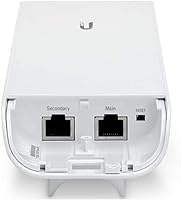
No, it does not. You will need to source a compatible 24V passive PoE injector separately — Ubiquiti's own passive PoE adapter is the most straightforward option. Factor this into your budget before ordering, since the unit cannot power on without it.

Reasonably technical. You should be comfortable assigning static IP addresses, accessing a browser-based admin interface, and understanding basic RF concepts like frequency channels and link modes. This is not something you can configure intuitively by clicking through menus without prior networking experience.

It is achievable, but only under near-ideal conditions — unobstructed line-of-sight, precise antenna alignment on both ends, and minimal RF interference in the surrounding area. Most real-world deployments with trees, terrain variations, or nearby buildings will see practical distances well below that figure.

It is not a good fit for indoor use. The directional antenna throws a narrow, focused beam designed for long-distance outdoor links, not the broad omnidirectional coverage pattern a home network requires. A mesh system or standard dual-band router will serve you far better inside a building.

It can interoperate with third-party 802.11a/n devices when AirMax mode is disabled, but you will forfeit the TDMA scheduling advantages that define the platform's real-world performance. For stable, efficient links, pairing it with another AirMax-compatible radio on the remote end is strongly recommended.

The airOS firmware provides both a real-time signal strength display and an audible alignment tone that changes pitch as you adjust the antenna direction. Most experienced installers use the tone in the field while a second person fine-tunes the mounting bracket until the reading peaks, then locks it down. Getting alignment right makes a noticeable difference in throughput.

Its durability is one of the most consistently praised aspects of the hardware. WISPs and network integrators regularly report these units running without issue through years of exposure to freezing temperatures, driving rain, and intense summer heat. The weatherproof enclosure is a genuine strength, not just a marketing claim.

Ubiquiti has continued supporting the AirMax M-series with firmware releases, though the cadence has slowed as the platform matures. It is worth checking Ubiquiti's official downloads page for the latest available version before deployment. If long-term firmware support is a priority, it is reasonable to compare this against the newer AirMax AC lineup, which is on a more active development track.

Technically yes — airOS supports access point mode — but it is a poor match for that role in practice. The 16 dBi directional antenna focuses signal in one direction at long range rather than distributing it broadly around the mounting point. Using it as a general-purpose access point wastes its strengths and delivers mediocre results compared to gear actually designed for that purpose.