Overview

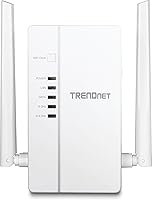
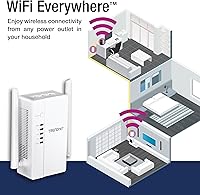
The TRENDnet TPL-430AP Powerline Wireless Access Point takes a practical approach to a common frustration: Wi-Fi dead zones in rooms simply too far from your router, or cut off by thick concrete walls and multiple floors. Instead of drilling holes or running cable, this powerline access point uses your home’s existing electrical wiring to carry network traffic, then broadcasts a local Wi-Fi signal at the destination. It handles both jobs in one unit. Launched in 2017, the specs still hold up for everyday household use — just don’t expect it to replace a whole-home mesh system. It’s a targeted coverage solution, not a network overhaul.
Features & Benefits

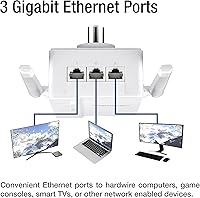
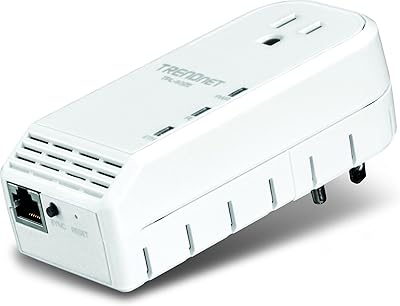
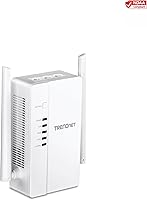
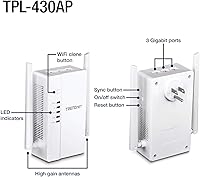
The AV2 1200 powerline standard is the backbone here — though the 1200 Mbps figure is a theoretical maximum across the combined powerline link. Real-world throughput depends heavily on your home’s wiring age, circuit distance, and whether the two adapters share the same electrical circuit. On the wireless side, the TPL-430AP broadcasts concurrent dual-band AC1200 Wi-Fi: 300 Mbps on 2.4 GHz and up to 867 Mbps on 5 GHz, giving nearby devices genuine flexibility. Three gigabit ports let you hardwire a smart TV, desktop, or console without competing for wireless bandwidth. MIMO with Beamforming helps focus the signal rather than scatter it, and setup is fully automatic — no app or configuration page required.

Best For

This TRENDnet adapter makes the most sense for renters and homeowners who want reliable connectivity in a distant room without touching the walls. If your router lives at one end of the house and your home office or entertainment setup lives at the other, this powerline access point bridges that gap cleanly. It’s especially useful in older homes where thick plaster or brick walls kill wireless signals before they reach the back bedroom. Anyone needing to hardwire multiple devices — a TV, a NAS, a gaming console — while also blanketing the room with local Wi-Fi will find the three-port layout genuinely practical. Small home offices benefit from a stable, dedicated connection well away from router congestion.

User Feedback

With 465 ratings averaging 4.0 stars, the overall sentiment around this powerline access point leans positive but carries real caveats worth knowing. Most buyers highlight how quickly it pairs out of the box and how consistently the wired Ethernet ports perform once the link is established. Coverage improvement in hard-to-reach rooms comes up repeatedly as a genuine win. The recurring friction point is powerline speed variability — users in homes with older or complex wiring often see noticeably lower throughput than the spec sheet suggests, which reflects a technology limitation rather than a unit defect. Some buyers also note the adapter’s physical footprint and warmth during extended use. Long-term reliability is solid for most, with TRENDnet’s three-year warranty providing a reasonable safety net.

Pros

  • Plug-and-play pairing works genuinely well — most users are up and running in under two minutes.
  • Three gigabit Ethernet ports let you hardwire a TV, console, and PC simultaneously without a separate switch.
  • Concurrent dual-band Wi-Fi means older 2.4 GHz devices and newer 5 GHz devices can coexist without fighting for bandwidth.
  • The TPL-430AP delivers a consistent, stable link in newer homes with clean single-circuit wiring.
  • MIMO with Beamforming produces a noticeably tighter, more focused signal compared to older powerline-era access points.
  • A three-year manufacturer warranty provides meaningful long-term coverage at this price tier.
  • Desktop form factor keeps all ports accessible and cables tidy without blocking adjacent wall outlets.
  • Long-term owners consistently report multi-year reliable operation in typical home and small office environments.
  • NDAA compliance adds quiet credibility for government-adjacent or regulated-environment deployments.

Cons

  • Real-world powerline speeds often fall well short of the advertised 1200 Mbps, especially in older or complex wiring setups.
  • No management interface means zero ability to customize band names, channels, or device prioritization.
  • Performance is entirely dependent on home wiring quality — something you cannot verify before buying.
  • The unit runs noticeably warm under sustained heavy load, which is a concern in poorly ventilated spaces.
  • Physical size is larger than most buyers expect; the desktop form factor plus power cable adds clutter.
  • Band steering is passive and cannot be overridden, so stubborn devices may not connect to the optimal frequency.
  • A vocal minority of buyers report early hardware failures within the first year, suggesting some batch inconsistency.
  • Mixing this adapter with non-TRENDnet powerline gear can introduce speed penalties and pairing instability.
  • No wall-plug option limits placement flexibility in rooms where floor or shelf space near an outlet is tight.

Ratings

The TRENDnet TPL-430AP Powerline Wireless Access Point earns its place near the top of its category by solving a real-world problem cleanly and affordably. The scores below are generated by AI after systematically analyzing verified global user reviews, with spam, incentivized, and bot-flagged submissions actively filtered out. Both the genuine strengths and the frustrating edge cases are reflected honestly in every category.
Ease of Setup
91%
Out-of-the-box pairing is genuinely painless — plug both units in, press the sync button once, and the connection establishes within a minute. No app download, no browser-based configuration portal, no account creation. Users with zero networking experience consistently report having it running before they finish reading the box.
The simplicity is a double-edged sword for advanced users who want to customize SSIDs, set channels, or adjust output power. There is no management interface to speak of, so if the auto-configuration produces a suboptimal result, your troubleshooting options are limited.
Powerline Throughput
64%
36%
In homes built after the late 1990s with clean, single-circuit wiring, the TPL-430AP delivers solid mid-range speeds that are more than sufficient for 4K streaming, video calls, and casual online gaming. Users on favorable wiring consistently report a meaningful improvement over a stretched Wi-Fi signal.
The advertised 1200 Mbps is a theoretical ceiling that almost no real-world installation reaches. Older homes, split electrical panels, or long wiring runs can cut actual throughput to a fraction of the spec, and there is no way to predict performance before you buy. This is the single most common source of buyer disappointment.
Wi-Fi Coverage & Signal Quality
78%
22%
The dual-band AC1200 radio does a respectable job blanketing a single room and its immediate neighbors. The 5 GHz band handles bandwidth-hungry devices nearby, while the 2.4 GHz band reaches farther through walls — a combination that works well for a bedroom, home office, or garage workshop.
Coverage expectations need to be calibrated. This is a room-level access point, not a whole-floor solution. In open-plan spaces or larger rooms, signal quality drops off at the edges, and users hoping to cover two or three rooms from one unit are often left wanting more.
Wired Port Performance
88%
Three gigabit Ethernet ports is a genuine differentiator at this price tier, and users make good use of them. Connecting a smart TV, a desktop PC, and a NAS simultaneously without any noticeable contention is a setup that comes up repeatedly in positive feedback. The ports feel solid and hold cables securely.
Wired performance is still ultimately bottlenecked by the quality of the powerline link itself. If the electrical wiring between the two adapters is weak, the gigabit ports cannot compensate — so buyers expecting gigabit-speed wired transfers across the house may be surprised by the real-world ceiling.
Build Quality & Durability
74%
26%
The plastic housing feels sturdy enough for a device that sits in one spot indefinitely. Long-term owners — some reporting two to four years of continuous operation — rarely cite hardware failure as a concern, and the unit holds up well in typical home or small office environments.
The casing picks up dust and minor scuffs visibly on the white finish, and the unit generates a moderate level of warmth during extended use. It is not alarmingly hot, but buyers who plan to install it in an enclosed cabinet or poorly ventilated space should account for passive heat dissipation.
Physical Design & Footprint
61%
39%
The horizontal desktop form factor keeps the unit stable and makes cable routing straightforward. For users placing it on a shelf, media console, or desk corner, the flat profile is actually more convenient than a wall-plug design that blocks adjacent outlets.
At roughly 10 inches long and 1.5 pounds, this is a noticeably large adapter. It does not plug directly into a wall outlet and requires a power cable, which adds clutter. Buyers expecting a compact plug-in form factor are often caught off guard by the physical size when it arrives.
Value for Money
77%
23%
For buyers whose home wiring cooperates, the combination of a powerline link, dual-band Wi-Fi, and three gigabit ports in one unit represents solid value. Purchasing separate adapters and an access point to achieve the same result would cost considerably more and create more clutter.
Buyers with older or complicated electrical wiring may find they have paid a mid-range price for budget-tier real-world speeds. The value proposition is genuinely contingent on factors you cannot fully verify before installation, which introduces meaningful purchasing risk.
MIMO & Beamforming Effectiveness
72%
28%
Compared to older AV500 or AV600 powerline units, the MIMO-equipped radio in the TPL-430AP produces a more consistent signal that handles interference from neighboring networks better. Users upgrading from first-generation powerline gear notice a tangible improvement in stability at range.
The practical benefit of Beamforming is modest at close range and in smaller spaces where the signal is already strong. In real-world conditions with a single laptop or phone, the gains are subtle enough that many users would not notice the difference in everyday browsing or streaming.
Compatibility & Interoperability
83%
The AV2 standard ensures backward compatibility with a wide range of existing TRENDnet and third-party HomePlug AV adapters, which is useful for households already invested in powerline infrastructure. The unit integrates cleanly into most standard home network setups without requiring router configuration changes.
Mixing adapter brands in a powerline network can introduce speed penalties, and AV2 does not guarantee interoperability at maximum rated speeds with all AV or AV2 devices from other manufacturers. Buyers building a hybrid multi-brand powerline setup may encounter inconsistent pairing or reduced throughput.
Long-Term Reliability
76%
24%
The majority of owners report consistent, trouble-free operation over extended periods. The three-year manufacturer warranty provides a reasonable safety net, and TRENDnet’s English-speaking support team gets reasonably positive marks for responsiveness compared to budget-tier competitors.
A notable minority of buyers report early unit failures within the first six to twelve months, typically manifesting as sudden drops in powerline link speed or a complete loss of pairing. Whether this reflects a batch quality issue or marginal electrical environments is hard to determine, but it is a recurring enough pattern to flag.
Heat Management
66%
34%
Under typical operating conditions — one or two devices streaming or browsing — the unit stays at a manageable temperature. For standard open-shelf or desktop placement, thermal output is not a daily concern for most users.
Under sustained heavy load, particularly when all three wired ports are active simultaneously with wireless traffic, surface warmth increases noticeably. Users running it in enclosed AV cabinets or tight entertainment center shelving have flagged this as a real concern for long-term hardware health.
Wireless Band Flexibility
79%
21%
Having both 2.4 GHz and 5 GHz running concurrently gives connected devices real choice. Smart home sensors and older gadgets can use the longer-range 2.4 GHz band while phones and laptops grab the faster 5 GHz signal automatically, which reduces the usual crowding on a single band.
Without a management interface, users cannot manually steer devices to a specific band or set different SSIDs for each frequency. Band steering happens passively, and in practice some older devices stubbornly cling to 2.4 GHz even when 5 GHz would serve them better.
Installation Flexibility
69%
31%
The desktop form factor and standard power cable give you some freedom in where you place the unit within a room. It can sit behind a TV, under a desk, or on a shelf without needing to occupy a wall outlet directly, which is genuinely helpful in rooms with limited or awkward outlet placement.
The requirement for a dedicated power outlet and a separate power cable reduces placement options compared to a true wall-plug design. In rooms where outlets are scarce or already occupied, finding a practical home for this adapter takes more planning than the marketing implies.

Suitable for:

The TRENDnet TPL-430AP Powerline Wireless Access Point is the right call for anyone who has a dead zone in their home and no practical way to run Ethernet cable to fix it. Renters who cannot drill through walls, homeowners dealing with thick plaster or concrete construction, and anyone whose router is stuck in one corner of a multi-floor house will find this adapter solves a real, specific problem without requiring an electrician or a full network overhaul. It is particularly well-suited for home office workers who need a stable, low-latency connection in a back bedroom or converted garage, where a stretched Wi-Fi signal keeps dropping during video calls. Households looking to hardwire a TV, a streaming box, and a game console in the living room while also giving nearby phones and laptops a local Wi-Fi signal will get genuine mileage from the three gigabit ports plus dual-band radio combination. Small offices with newer building wiring and a clear need for a satellite access point away from the main router are also squarely in its wheelhouse.
Not suitable for:

The TRENDnet TPL-430AP Powerline Wireless Access Point is not the answer if you are hoping to blanket an entire home with seamless, roaming-capable Wi-Fi — that is a job for a proper mesh system, and this unit cannot replicate that experience. Buyers living in pre-1980s homes with aging or complex electrical wiring should approach with real caution, because real-world powerline throughput in those environments can be dramatically lower than the spec sheet suggests, sometimes enough to make the purchase feel like a mistake. Anyone who needs fine-grained network control — custom SSIDs per band, channel selection, transmit power adjustment, or a management dashboard — will hit a wall almost immediately, as there is no configuration interface of any kind. Power users who transfer large files between rooms regularly, or households with multiple 4K streams running concurrently, may find the real-world bandwidth ceiling frustrating. And if you are expecting a compact, discreet plug-in unit, the sizable desktop footprint and separate power cable may be an unwelcome surprise.
Specifications

  • Model Number: The unit is officially designated as model TPL-430AP by TRENDnet.
  • Powerline Standard: Uses the HomePlug AV2 1200 standard for transmitting network data over existing household electrical wiring.
  • Wi-Fi Standard: Broadcasts concurrent dual-band AC1200 Wi-Fi, combining both 2.4 GHz and 5 GHz bands simultaneously.
  • 2.4 GHz Speed: The 2.4 GHz band delivers wireless speeds of up to 300 Mbps under ideal conditions.
  • 5 GHz Speed: The 5 GHz band delivers wireless speeds of up to 867 Mbps under ideal conditions.
  • Ethernet Ports: Equipped with three gigabit Ethernet ports for hardwiring desktop computers, smart TVs, gaming consoles, or other networked devices.
  • MIMO & Beamforming: Incorporates MIMO antenna technology with Beamforming to focus the wireless signal toward connected devices and reduce interference.
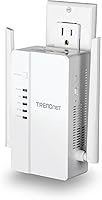
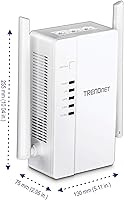
  • Dimensions: The unit measures 10.04″ in length, 5.11″ in width, and 2.95″ in height.
  • Weight: The adapter weighs 1.5 pounds, reflecting its desktop form factor and internal hardware.
  • Color & Finish: Ships in a white matte plastic finish intended to blend into typical home or office environments.
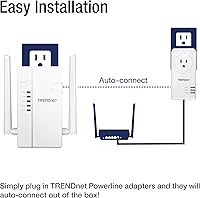
  • Pairing Method: Auto-pairs with a compatible TRENDnet powerline adapter out of the box, requiring no software, app, or browser-based setup.
  • NDAA Compliance: Certified NDAA compliant for use in government and regulated-environment network installations in the United States and Canada.
  • Warranty: Covered by a 3-year TRENDnet Manufacturer Protection warranty with English-speaking technical support available during business hours.
  • First Available: The TPL-430AP was first made available for purchase in June 2017 and has not been discontinued by the manufacturer.
  • Data Link Protocol: Operates using the Gigabit Ethernet data link protocol for wired port connections.
  • Compatibility: Compatible with HomePlug AV and AV2 standard powerline adapters, including backward-compatible TRENDnet models from earlier generations.
  • Power Input: Connects to a standard AC wall outlet via an included power cable rather than plugging directly into the outlet face.
  • Market Rank: Holds a Best Sellers Rank of number 89 in the Powerline Network Adapters category on Amazon at time of publication.

Related Reviews

Ubiquiti U6+
Ubiquiti U6+
80%
88%
Wireless Performance
54%
Setup & Configuration
84%
Range & Coverage
82%
Build Quality & Design
91%
PoE+ Implementation
More
NETGEAR WAX615 Wireless Access Point
86%
91%
Performance
88%
Ease of Setup & Installation
93%
Coverage & Range
89%
Security Features
87%
App & Remote Management
More
BrosTrend AC1200 Dual-Band WiFi Access Point
76%
88%
Ease of Setup
71%
WiFi Signal Strength
74%
Connection Stability
81%
Build Quality & Design
76%
Dual-Band Performance
More
Cisco WAP4410N Wireless-N Access Point
86%
87%
Performance
92%
Setup and Installation
78%
Wireless Range
88%
Build Quality
94%
Security Features
More
TP-Link EAP653 Wi-Fi 6 Access Point
83%
88%
Wireless Performance
79%
Setup & Installation
83%
Omada App & Controller Experience
91%
Build Quality & Design
84%
Range & Coverage
More
EnGenius EAP350 N300 Wireless Access Point
82%
88%
Range & Coverage
81%
Ease of Setup
92%
Value for Money
85%
Reliability
87%
Signal Stability
More
TP-Link TL-WA1201 AC1200 Wireless Access Point
75%
88%
Value for Money
81%
Wi-Fi Coverage & Range
83%
Ease of Setup
86%
Multi-Mode Flexibility
58%
PoE Implementation
More
TRENDnet TPL-423E2K Powerline 1300 AV2 Adapter Kit
75%
88%
Ease of Setup
63%
Real-World Data Speed
74%
Connection Stability
91%
Pass-Through Outlet
67%
Build Quality & Durability
More
TRENDnet TPL-402E 500 Mbps Powerline Adapter
73%
88%
Setup & Ease of Use
58%
Real-World Speed Performance
71%
Connection Stability
84%
Pass-Through Outlet Design
81%
Compatibility & Standards
More
Ubiquiti UAP-AC-IW-PRO In-Wall Access Point
77%
88%
Wireless Performance
84%
Build Quality & Hardware Design
61%
Installation Experience
47%
PoE Power Requirement Clarity
91%
UniFi Ecosystem Integration
More

FAQ

The TPL-430AP is an access point unit, which means it needs a separate compatible powerline adapter connected to your router to function. If you are buying this on its own, you will need at least one additional HomePlug AV2 adapter plugged in near your router and linked via Ethernet. TRENDnet sells starter kits that include both pieces, which is the easier route if you are starting from scratch.

Setup is about as straightforward as it gets. You plug the companion adapter into an outlet near your router and connect it to the router with an Ethernet cable, then plug this unit into an outlet in the room where you need coverage and press the sync button on both within two minutes. They pair automatically, and your new Wi-Fi network appears without any app or login required. Most people have it running in under five minutes.

Almost certainly not, and it is worth setting realistic expectations here. The 1200 Mbps figure is a theoretical maximum under perfect lab conditions. In a real home, actual powerline throughput depends heavily on the age and quality of your electrical wiring, the distance between the two adapters, and whether they share the same electrical circuit. Most users in newer homes see speeds well below 300 Mbps, which is still enough for streaming, calls, and general browsing, but not what the spec sheet implies.

In theory, yes — HomePlug AV2 is a cross-brand standard and the TRENDnet TPL-430AP Powerline Wireless Access Point should pair with other AV2-certified adapters. In practice, mixing brands can sometimes result in reduced speeds or inconsistent pairing behavior. If maximum performance matters to you, sticking with the same brand across your powerline network is the safer bet.
It might, but this is genuinely the highest-risk scenario for powerline technology. Older homes often have wiring that runs across multiple electrical circuits, which can significantly degrade or completely block the powerline signal. The honest answer is that there is no way to know for certain without trying. If possible, look for a retailer with a reasonable return window so you can test it in your actual home before committing.

By default, the unit broadcasts its own Wi-Fi network, which will have a different name from your main router. Since there is no configuration interface, you cannot rename it during setup out of the box — though TRENDnet does offer a separate utility software that allows some users to adjust the SSID. For most people, having a second network name in a specific room is a minor inconvenience rather than a dealbreaker.

Yes, some warmth is normal and expected. Under light to moderate use, the surface temperature stays at a manageable level. If you are running all three wired ports simultaneously alongside active Wi-Fi, it will get noticeably warmer. The main practical advice is to avoid placing it in an enclosed cabinet or shelf with no airflow, as sustained heat buildup over time is not ideal for any networking hardware.

Absolutely — that is one of the most common use cases for this powerline access point. With three gigabit ports on one unit, you can connect a smart TV, a game console, and a desktop or streaming stick simultaneously without needing a separate switch. All three devices share the available powerline bandwidth, so very heavy simultaneous use may show some slowdown, but for typical mixed usage it handles the load well.

Many users report running this adapter continuously for two to four years without any issues. The three-year warranty gives you solid manufacturer coverage for the most likely failure window. That said, a small number of buyers have reported hardware failures within the first year, so it is worth registering your warranty with TRENDnet promptly after purchase just to be covered if you happen to receive a faulty unit.

For many people, yes — and the difference comes down to how each technology works. A standard Wi-Fi extender rebroadcasts your existing wireless signal, which means it is already working with a degraded input before it extends anything. This powerline access point delivers the signal over your electrical wiring instead, so it arrives at the destination with far less degradation before broadcasting locally. If your dead zone is far from the router or separated by thick walls, the powerline approach typically produces a more reliable result than a repeater-style extender.

Where to Buy