Overview

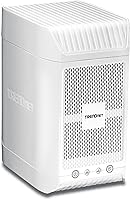
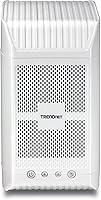
The TRENDnet TN-200 2-Bay NAS Enclosure is a no-frills home storage device that has been quietly doing its job since 2013. It holds two 3.5-inch SATA drives — sold separately — and can reach up to 8TB of combined capacity depending on which drives you install. The metal chassis feels solid for the price point, and the Gigabit Ethernet port makes local network transfers genuinely quick. What this home storage unit is not, however, is a full-featured NAS platform. Think of it more as a shared media hub — approachable for everyday users who just want centralized storage without wrestling with advanced software.

Features & Benefits

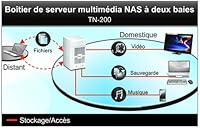
The DLNA media server capability is where this two-bay media server earns its keep for most households. Point a compatible smart TV at the device and you can browse and stream locally stored HD video without subscriptions or cloud middlemen. The iTunes sharing function is similarly handy — it keeps one central music library accessible to every device on your network, which is genuinely useful in a multi-device home. A USB 2.0 share port lets you plug in an external drive for additional storage overflow. The energy-saving controls are a small but practical touch, reducing power draw when nothing is actively streaming. Windows 10 compatibility has also been patched in, so modern PCs can connect without driver headaches.

Best For

This NAS enclosure makes most sense for casual home users who want a shared drive on their local network without diving into complex dashboards or paid subscriptions. If you are a cord-cutter or media enthusiast who keeps a library of local video files, the DLNA streaming support turns your TV into a proper media client. It also suits small households building a central iTunes collection or consolidating photos and documents into one accessible location. One practical note: because drives are not included, you will need to budget for one or two 3.5-inch SATA drives separately. Users comfortable with basic hardware installation will have no trouble getting it running.

User Feedback

Among buyers who have put this home storage unit to use, the most consistent praise centers on easy setup — most users describe installing drives and getting the device on the network as refreshingly straightforward. Long-term reliability for basic media streaming also gets favorable mentions. On the downside, users familiar with Synology or QNAP gear often point out the noticeable gap in software depth; the web interface is functional but dated, lacking the app ecosystems or advanced permission controls found on pricier platforms. Customer support draws mixed reactions, with some reporting helpful responses and others frustrated by slow firmware updates. For anyone expecting a polished modern NAS experience, the trade-off in features versus cost deserves careful consideration.

Pros

  • Straightforward drive installation means most users are up and running within an hour, no technical background required.
  • The metal chassis feels durable and well-constructed for an entry-level home storage unit.
  • Gigabit Ethernet delivers fast local transfers, making large file moves across the network noticeably quicker than Wi-Fi solutions.
  • DLNA streaming works reliably for households that just want to watch local video on a smart TV.
  • iTunes server support is a genuine convenience for Apple-heavy households with large music libraries.
  • The USB share port provides a flexible overflow option when the internal bays are filling up.
  • Energy-saving controls reduce idle power draw, which adds up over months of always-on use.
  • Windows 10 compatibility has been addressed, so modern PCs connect without driver frustration.
  • The compact footprint fits easily on a shelf or media cabinet without demanding dedicated desk space.
  • For users with modest storage needs, the two-bay configuration supporting up to 8TB is more than adequate.

Cons

  • The web interface looks and feels dated, lacking the polish expected from modern NAS dashboards.
  • No meaningful app ecosystem means you cannot add functionality like cloud backup or media transcoding later.
  • Firmware updates have been sparse, raising concerns about long-term security and compatibility with newer hardware.
  • Remote access options are very limited, making it difficult to reach files from outside your home network.
  • Customer support responsiveness has drawn consistent criticism from buyers encountering technical issues.
  • The product debuted in 2013, so it competes poorly on features against current entry-level NAS devices at similar price points.
  • Drives are sold separately, meaning the real out-of-pocket cost is noticeably higher than the enclosure price alone.
  • No support for RAID configurations beyond basic mirroring limits data redundancy options for cautious users.
  • The USB 2.0 share port is slow by current standards, making large external drive transfers a patience-testing exercise.
  • Limited community documentation and forum support make troubleshooting harder than with more popular NAS brands.

Ratings

The scores below for the TRENDnet TN-200 2-Bay NAS Enclosure were generated by our AI after analyzing verified buyer reviews from multiple global markets, with spam, bot submissions, and incentivized feedback actively filtered out. Each category reflects both what real users genuinely appreciated and where they ran into frustration, giving you an honest, balanced picture before you decide.

Ease of Setup
83%
A consistent theme across user feedback is how approachable the initial installation is. Most buyers report sliding in their drives, connecting the unit to their router, and accessing the web interface within under an hour — no networking expertise required.
A small but vocal group of users encountered hiccups during network discovery on certain routers, requiring manual IP configuration to get the device visible on their network. The setup guide could also be more detailed for complete beginners.
Build Quality
78%
22%
The metal chassis gives this home storage unit a reassuringly solid feel that is uncommon at this price tier. Users frequently comment that it does not wobble or flex, and the overall fit of the panels feels intentional rather than flimsy.
The drive trays lack the tool-free convenience found on newer enclosures, requiring a screwdriver for installation. A few buyers also noted the ventilation design feels a bit dated, which can be a mild concern during extended periods of heavy use.
DLNA Streaming
74%
26%
For users whose primary goal is playing locally stored video on a DLNA-compatible smart TV, the experience is reliable and low-maintenance. Setting up a media library and browsing it from a TV remote works the way it should for everyday home use.
The DLNA implementation is basic — there is no on-the-fly transcoding, so files in unsupported formats will simply not play on certain TVs. Users accustomed to Plex or modern NAS media servers will find the feature set noticeably thin.
iTunes Sharing
71%
29%
Households with large Apple music libraries appreciate having one central source that all their devices pull from, eliminating the hassle of syncing collections across multiple computers or phones. It works reliably for audio content in standard formats.
The iTunes server has not kept pace with Apple's own software evolution, and some users on newer versions of macOS report inconsistent behavior. Video library sharing through iTunes is unreliable compared to dedicated media server software.
Network Performance
81%
19%
The Gigabit Ethernet port makes a real difference when transferring large batches of files across a home network. Users copying entire photo archives or video libraries report transfer speeds that feel noticeably faster than USB-attached storage shared wirelessly.
Performance is entirely dependent on wired connection; there is no Wi-Fi built in, so placement near your router or a network switch is essential. Users on older 100Mbps switches will not realize the full benefit of the Gigabit port.
Software & Interface
47%
53%
The web interface is functional enough for its intended purpose — setting share names, enabling DLNA, and adjusting power settings does not require any technical expertise. For users who just want to flip a few switches and walk away, it gets the job done.
Compared to the polished dashboards on Synology DSM or QNAP QTS, this interface looks like it belongs in another decade — because it does. There are no app extensions, no meaningful user permission controls, and the overall experience feels frozen in 2013.
Value for Money
58%
42%
The enclosure itself occupies a lower price point than branded NAS units, which initially appears attractive for budget-conscious buyers wanting shared home storage without a large upfront commitment.
Once you factor in the separate cost of two 3.5-inch drives, the total outlay competes with newer NAS bundles that include significantly better software, remote access, and long-term support. The age of the platform makes it a harder value case than it once was.
Remote Access
38%
62%
For users who only ever access their files from inside their home network, the absence of robust remote access is not a daily problem, and the local streaming performance is unaffected by this limitation.
Anyone wanting to pull files from their storage unit while traveling or away from home will find this two-bay media server severely lacking. There is no polished remote access client, no modern cloud sync, and setting up external access requires manual port configuration.
Long-Term Reliability
76%
24%
Users who have run this home storage unit continuously for several years report that it just keeps working without drama, provided the drives themselves remain healthy. The metal enclosure and simple firmware appear to contribute to a stable long-term operation.
With firmware updates becoming increasingly rare, there is a growing concern around long-term security and compatibility with evolving operating systems. Users planning to rely on it for another five-plus years are taking a calculated risk on software stagnation.
Drive Compatibility
72%
28%
Standard 3.5-inch SATA desktop drives from major brands like Seagate and Western Digital install and operate without issues, giving users plenty of affordable drive options to choose from when building out their storage.
Support is limited to SATA I and SATA II interfaces, meaning newer high-performance SATA III drives will work but will not reach their full potential speeds. Solid-state drives and 2.5-inch form factors are not supported, limiting future upgrade flexibility.
Power Efficiency
69%
31%
The energy-saving controls do make a measurable difference for users who leave the device on around the clock. Several buyers noted a reduction in idle power draw compared to always-on desktop PCs being used as makeshift file servers.
The power management options are limited to basic scheduled sleep controls and do not include the more granular drive spin-down customization found on more advanced NAS platforms. Users with specific low-power requirements may find the options insufficient.
Customer Support
44%
56%
When support interactions go well, users report that TRENDnet staff have basic technical knowledge and can assist with standard setup questions. The product does have a support page with firmware downloads and a user manual available.
Mixed feedback on support is one of the more consistent complaints across buyer reviews. Response times are reported as slow, and for a product of this age, the likelihood of receiving meaningful help with edge-case firmware or compatibility issues is low.
Windows Compatibility
77%
23%
The Windows 10 compatibility patch resolved the connectivity issues that plagued earlier firmware versions, and most Windows 10 users now report smooth network discovery and share mapping without manual workarounds.
Windows 11 compatibility is not officially confirmed, and user reports are inconsistent. Buyers on the latest Windows builds should verify current firmware status before purchasing, as official documentation has not kept pace with Microsoft's update cadence.

Suitable for:

The TRENDnet TN-200 2-Bay NAS Enclosure is a practical pick for everyday home users who want shared network storage without the learning curve of more complex NAS systems. If your goal is to stop juggling USB drives and instead have one centralized place where family members can access photos, videos, and documents from any device on the home network, this two-bay media server checks that box reliably. Cord-cutters who maintain a personal library of locally stored movies or TV shows will appreciate the built-in DLNA support, which lets a compatible smart TV browse and play that content directly. It also suits households with a large iTunes music collection who want every phone, tablet, and laptop pulling from the same source rather than syncing individual libraries. As long as you are comfortable installing a pair of standard 3.5-inch SATA drives yourself, the initial setup is genuinely approachable even for non-technical users.

Not suitable for:

The TRENDnet TN-200 2-Bay NAS Enclosure is a poor fit for anyone expecting the kind of feature-rich experience that modern NAS platforms deliver. If you want Docker containers, surveillance camera recording, cloud sync apps, granular user permissions, or a polished app ecosystem, this home storage unit simply was not designed for any of that — and no firmware update is going to change that reality given the hardware is over a decade old. Power users who regularly back up critical business data or need robust RAID management with detailed reporting will find the web interface frustratingly basic. Remote access capabilities are limited compared to current competitors like Synology or QNAP, which matters if you want to reach your files from outside your home network. Anyone factoring in the added cost of purchasing two drives separately should also weigh whether a newer, more capable unit at a comparable total price might serve them better in the long run.

Specifications

  • Drive Bays: Houses two 3.5-inch SATA I/II internal hard drives, both sold separately.
  • Max Capacity: Supports up to 8TB of total storage depending on the drives installed in both bays.
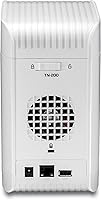
  • Ethernet Port: Equipped with one Gigabit Ethernet port for fast, stable wired connections to your home network.
  • USB Port: Includes one USB 2.0 share port for connecting an external drive as supplemental storage.
  • Dimensions: The enclosure measures 9 x 11 x 8 inches (L x W x H).
  • Weight: The enclosure itself weighs approximately 1 pound before drives are installed.
  • Chassis Material: Built with a metal chassis construction in a black finish for durability and heat dissipation.
  • DLNA Support: Integrated DLNA media server allows HD video streaming to compatible smart TVs on the local network.
  • iTunes Server: Built-in iTunes server support enables centralized music library sharing across all devices on the network.
  • OS Compatibility: Compatible with Windows 10 and earlier Windows versions following firmware updates from TRENDnet.
  • Power Management: Features energy-saving controls that reduce power consumption during periods of inactivity.
  • Model Number: Official TRENDnet model designation is TN-200.
  • Manufacturer: Designed and sold by TRENDnet, a networking hardware brand based in the United States.
  • Release Date: First made available in June 2013, making it an older but still actively sold product.
  • Drive Interface: Compatible with standard 3.5-inch SATA I and SATA II hard drives only; SSDs and 2.5-inch drives are not supported.

Related Reviews
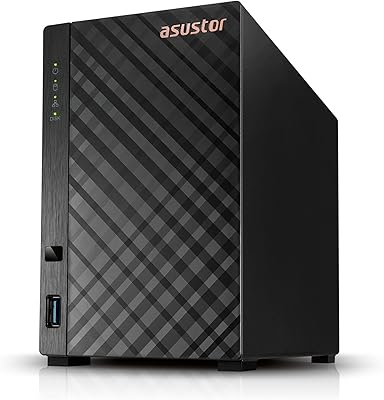
Asustor Drivestor 2 Lite AS1102TL NAS
76%
88%
Ease of Setup
83%
Build Quality
74%
Performance for Everyday Use
71%
Software (ADM OS) Usability
69%
4K Media Streaming
More
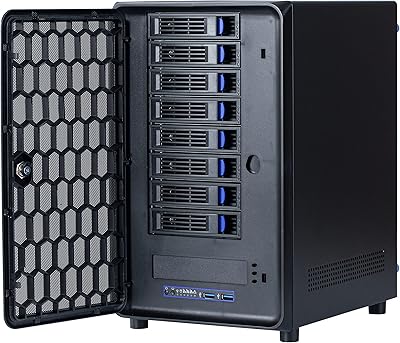
KCMconmey NAS-812 8+2 Bay DIY NAS Case
84%
86%
Build Quality
62%
Cooling Performance
88%
Ease of Use
90%
Compatibility with PSU Types
91%
Customization Options
More
Asustor Drivestor 2 Pro Gen2 2-Bay NAS


76%
83%
Setup & Initial Configuration
89%
Network Performance (2.5GbE)
71%
4K Transcoding Performance
67%
Software & ADM Ecosystem
86%
Build Quality & Physical Design
More
TerraMaster D4-320
TerraMaster D4-320
80%
93%
Ease of Setup
86%
Transfer Speed
71%
Build Quality
88%
Noise Level
82%
Thermal Management
More
IO CREST SY-ENC50127 USB 3.2 Type-C Dual Bay HDD + M.2 NVMe External Enclosure

83%
88%
Performance
93%
Ease of Setup
91%
Build Quality
87%
Data Transfer Speed
90%
Cooling/Heat Management
More
ICY DOCK ToughArmor MB998SP-B 8-Bay 2.5” SATA/SAS HDD/SSD Mobile Rack Enclosure for 5.25″ Bay
87%
91%
Performance
88%
Cooling Efficiency
89%
Build Quality
93%
Ease of Installation
72%
Noise Level
More
Asustor AS5402T 2-Bay NAS Enclosure
78%
88%
Hardware Value
82%
Processing Performance
86%
Network Throughput
84%
Thermal Management
63%
Software & OS Experience
More
Synology DS223
Synology DS223
77%
94%
Software & OS Experience
88%
Setup & Initial Configuration
61%
CPU & Processing Performance
67%
Network Connectivity
83%
Build Quality & Design
More
QNAP TS-233 2-Bay NAS Drive
77%
83%
Ease of Setup
78%
Software & App Ecosystem
76%
Performance for File Sharing
87%
Backup Reliability
58%
Media Streaming
More
Synology DS420+ 4-Bay NAS Enclosure
80%
93%
Software Experience
88%
Build Quality
84%
Thermal Management & Noise
91%
Storage Flexibility
62%
Network Performance
More

FAQ

Hard drives are not included with this enclosure. You will need to purchase one or two 3.5-inch SATA I or SATA II hard drives separately before the unit has any usable storage. Most standard desktop hard drives in that format are compatible.

Honestly, it is one of the simpler NAS enclosures to get started with. Physical drive installation involves sliding the drives into the bays and connecting the SATA and power connectors. The web-based setup interface walks you through the rest, and most users report being fully operational within an hour.

Yes, that is one of its strongest use cases. The built-in DLNA server lets compatible smart TVs browse and play video files stored on the device over your home network. Just keep in mind this is a basic DLNA implementation, so advanced features like on-the-fly transcoding are not available.

Windows 10 compatibility was specifically addressed in a firmware update, and most users report it working fine on that platform. Windows 11 compatibility is not officially documented, though users have reported mixed results, so it is worth checking TRENDnet's support page for the latest firmware before purchasing.

Remote access options on this home storage unit are quite limited compared to modern NAS systems. It was not designed with robust remote access in mind, so if accessing your files while traveling is a priority, a newer device with dedicated remote access or cloud sync features would serve you better.

The two bays can hold up to 4TB per drive, giving you a maximum of 8TB of combined raw storage. Keep in mind that if you use any form of mirroring for redundancy, your usable space will be reduced accordingly.

Yes, it can function as a network backup target for computers on the same local network. It works with standard backup software that supports network-attached storage. That said, do not expect Time Machine-level polish or deep integration — it is a functional but basic backup destination.

Noise levels depend largely on the drives you install rather than the enclosure itself. The unit does not have an exceptionally loud fan, and users generally describe it as quiet enough for a living room or home office when paired with standard desktop hard drives.

This two-bay media server is noticeably behind current Synology and QNAP offerings in terms of software depth. Those brands offer full NAS operating systems with app stores, advanced RAID options, and polished remote access. This device is simpler by design, which suits casual users, but anyone wanting those advanced features should budget for a more capable platform.

TRENDnet has issued updates in the past, including the Windows 10 compatibility patch, but firmware activity on this older model has slowed considerably. Buyers should check TRENDnet's official support page to see the date of the most recent firmware release before committing, particularly if long-term security support is a concern.