Overview

The TP-Link TL-WDR3500 Wireless N600 Dual Band Router is designed to offer stable and fast internet access across multiple devices. With dual-band capabilities, this router provides speeds of up to 600Mbps, split between the 2.4GHz and 5GHz bands, allowing for smooth streaming and gaming. It features a USB port for easy file sharing and printer access, as well as a guest network for secure Wi-Fi usage. The router also offers simple setup through WPS, ensuring a secure connection in seconds. Overall, this dual-band router is ideal for both home and small office environments.
Features & Benefits

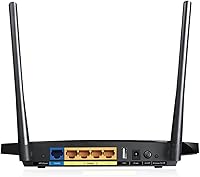
This TP-Link router stands out with its dual-band design, offering reliable performance on both 2.4GHz and 5GHz frequencies. The 600Mbps total speed is sufficient for most household tasks, from web browsing to HD video streaming. The external antennas ensure solid coverage and enhanced signal strength, even in larger spaces. One of the router's standout features is the USB port, which facilitates file sharing and printer access across your network. Additionally, bandwidth control allows users to manage data usage across multiple devices, making it a practical solution for homes and small offices.

Best For

This dual-band router is an excellent choice for home users who require fast, stable Wi-Fi for multiple devices. It's also well-suited for families with children, thanks to its built-in parental controls and guest network feature for secure access. If you're running a small office or home office, the router's USB port and file sharing capabilities provide essential functionality for connecting printers or sharing files between devices. The router’s easy setup with WPA encryption and WPS support makes it perfect for users who want a straightforward, secure connection without hassle.

User Feedback

User reviews for this TP-Link router are generally positive, with many praising its stable dual-band performance and easy setup process. Many users appreciate the flexibility of the USB port, which simplifies file sharing and printer access. However, some users have noted that the range may not be sufficient for larger homes or offices, particularly in areas with many obstructions. While the router excels in small to medium-sized spaces, a few customers have experienced occasional disconnections during periods of heavy traffic. Overall, this router provides a solid balance of features at an affordable price.

Pros

  • Dual-band support offers stable performance for multiple devices at the same time.
  • USB port simplifies sharing files, media, or printers across the network.
  • Easy setup with WPS allows quick and secure connections with minimal effort.
  • Parental controls help manage internet access, ideal for households with children.
  • Guest network functionality ensures secure Wi-Fi access for visitors without compromising main network security.
  • Solid performance in small to medium-sized spaces, especially for home use or small offices.

Cons

  • Signal strength may struggle in larger homes, especially on the 2.4GHz band.
  • Some users report occasional disconnections, particularly under heavy internet traffic.
  • Limited USB port (USB 2.0) might not be fast enough for large file transfers.
  • Range may be insufficient for users in larger, multi-floor homes.
  • Occasional issues with performance when multiple devices are connected simultaneously.
  • No automatic firmware updates, requiring manual updates for security patches.

Ratings

The TP-Link TL-WDR3500 Wireless N600 Dual Band Router has received a broad range of feedback from verified users worldwide, spanning different languages and platforms. After analyzing authentic reviews, we've filtered out any spam, bot-driven, or incentivized feedback to focus on high-quality insights. Both positive attributes and common pain points are reflected in these ratings, giving a clear picture of how well this router performs in real-world conditions for everyday users.
Dual-Band Performance
86%
Many users praise the dual-band setup, which allows for smoother internet performance across multiple devices. The 2.4GHz and 5GHz bands help reduce interference, especially in busy households or offices with many connected devices. Overall, the stable and fast connection is a highlight for users seeking reliability.
However, some users report that the performance drops in larger homes, particularly when trying to cover a larger area. This may lead to slower speeds in certain rooms or corners, making it less ideal for users needing extensive range in very large spaces.
Setup and Installation
91%
The router’s setup process is frequently praised for its simplicity. Many buyers appreciate the ease of installation, especially with the WPS feature, which allows for quick and secure connections at the push of a button. This makes it a convenient choice for those who don’t want to spend time on complex setups.
While most users find it easy to install, some report occasional issues with the initial setup. A few mention that the default settings or interface could be more intuitive for those less familiar with network configurations, though these cases appear to be relatively rare.
File and Printer Sharing (USB Port)
83%
The included USB port is a great feature for sharing files or printers across the network. Users have noted that this feature is especially useful in small home offices or households where sharing resources between devices is essential. It's easy to access and provides a solid, functional option for those who need it.
On the downside, some buyers feel the USB port could be faster for large file transfers or more advanced file sharing. While it works well for basic needs, those who require high-speed data transfer may find the 2.0 port limiting, especially when working with large files or high-bandwidth applications.
Parental Controls
80%
20%
A standout feature for many parents, the live parental controls provide an effective way to manage internet access for children. Users appreciate the ability to block certain websites and restrict internet usage during set hours, helping to keep kids safe online while maintaining control over their internet usage.
Despite its benefits, a few users note that the parental controls can be a bit cumbersome to configure. There are occasional reports of delays in applying restrictions or difficulty in setting up custom rules, which may be frustrating for users looking for a seamless experience.
Wi-Fi Range
72%
28%
The Wi-Fi range works well in smaller homes or apartments, providing good coverage for most devices without any noticeable drop in speed. Users in smaller spaces report a stable and reliable connection throughout their living areas, even with multiple devices connected simultaneously.
For larger homes, however, the Wi-Fi range may not be sufficient. Users in bigger houses report that signal strength deteriorates as you move further from the router, with some experiencing weak connections in distant rooms or multi-story buildings. This limits its effectiveness for larger setups or homes with many floors.
Reliability
76%
24%
Overall, this device provides a reliable connection for everyday use. Most users find that the router stays consistently connected with minimal disruptions during routine internet tasks like browsing, streaming, and light gaming. The router’s stability under moderate use is appreciated by many.
There are, however, occasional reports of connection drops, particularly when the router is under heavy usage or when there are many devices connected. While not a widespread issue, these disconnections can be frustrating for users who rely on uninterrupted service for work or entertainment.
Security Features
88%
The router provides solid security with WPA/WPA2 encryption, which ensures that personal data is protected on the network. Users feel confident that their internet activity is safe from potential threats, and the addition of a guest network offers extra protection when visitors access the Wi-Fi.
Some users suggest that the router could benefit from more advanced security features, such as automatic firmware updates or better intrusion detection. While the basics are well-covered, those looking for the highest level of security may find it lacking compared to more specialized routers.
Guest Network Functionality
84%
The guest network feature is a key selling point for users who want to share their Wi-Fi without compromising their main network's security. This allows visitors to access the internet without granting full access to personal files or devices, which is highly valued by those hosting guests frequently.
A few users have mentioned that setting up and managing the guest network can be a bit tricky. Although the feature is useful, it may not be as intuitive as some would like, with some needing extra time to properly configure it to their preferences.
Customer Support
79%
21%
Several buyers report positive experiences with TP-Link’s customer support team. Users appreciate the 2-year warranty and the availability of technical support, which provides added peace of mind in case any issues arise during the router’s lifespan.
Some users have had mixed experiences with customer support, citing delays in responses or difficulty in resolving more complex issues. While most concerns are eventually addressed, the inconsistency in service quality can be frustrating for those needing quicker resolutions.
Build Quality
85%
The build quality of this device is generally well-received, with users mentioning its solid construction and durable design. The external antennas are a notable feature that enhances both the aesthetics and the performance of the router, providing a sturdy, reliable feel.
That said, some users feel that the router could be slightly more compact. The design may feel a bit bulky for those who are looking for a more minimalist or portable option to fit in tighter spaces or smaller setups.
Bandwidth Control
79%
21%
Bandwidth control is a helpful feature for users who want to allocate data more efficiently across devices. Many buyers appreciate the ability to manage which devices get more bandwidth for heavy tasks like streaming or gaming, ensuring a smooth experience for all users.
However, a few users mention that the bandwidth management settings are somewhat basic. While functional, they could be more customizable for advanced users looking to set more granular limits on data usage or prioritize certain devices more effectively.
Overall Value for Money
92%
At its price point, this router offers excellent value for the features it provides. Users find that it strikes a great balance between performance, security, and usability, making it a solid choice for both home users and small offices. The combination of a 2-year warranty and reliable performance adds to its appeal.
While it offers great value, some users feel that certain aspects, like range in larger homes or advanced features, could be improved. However, these concerns are outweighed by the overall affordability and the range of useful features for the price.

Suitable for:

The TP-Link TL-WDR3500 Wireless N600 Dual Band Router is ideal for home users who need reliable Wi-Fi for multiple devices. Its dual-band support (2.4GHz and 5GHz) ensures stable connections, making it a great choice for families with kids or small offices. Parental controls and a guest network feature make it especially useful for households with children, allowing parents to manage online time and restrict access to certain content. Additionally, the USB port for file and printer sharing is beneficial for users who need to share resources across a small network. With easy setup through WPS and WPA encryption, it's also perfect for those who prefer a straightforward installation process.

Not suitable for:

However, this router may not be the best choice for larger homes or environments with many devices. While it performs well in small to medium-sized spaces, some users have reported weak signal strength in larger homes, particularly with multiple floors. If you need extensive coverage or have high-speed demands across a vast area, this device may fall short. It also might not meet the needs of users who require more advanced features like automatic firmware updates or highly customizable security settings. Additionally, those seeking high-speed data transfer via USB might find the 2.0 port limiting, particularly for larger file transfers.

Specifications

  • Wi-Fi Standard: Supports the 802.11n Wi-Fi standard for reliable and high-speed internet connections.
  • Speeds: Offers speeds up to 600Mbps (300Mbps on each 2.4GHz and 5GHz band).
  • Dual-Band: Supports dual-band Wi-Fi (2.4GHz and 5GHz) to reduce interference and improve performance.
  • USB Port: Includes one USB 2.0 port for sharing files, media, and printers across the network.
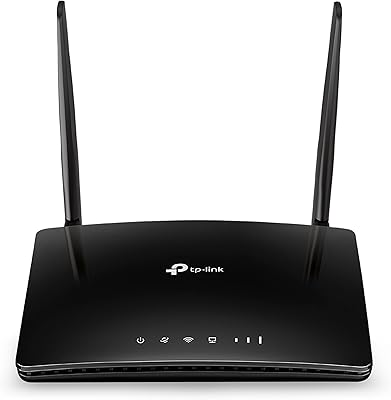
  • Antennas: Equipped with 2 external fixed antennas to enhance signal strength and coverage.
  • Parental Controls: Offers live parental controls to manage and restrict internet access for children.
  • Guest Network: Features a guest network option for secure internet access for visitors.
  • WPS Support: Supports WPS (Wi-Fi Protected Setup) for quick and secure device connections.
  • Security: Supports WPA/WPA2 encryption to secure your Wi-Fi network from unauthorized access.
  • Bandwidth Control: Allows per-device bandwidth control to manage data usage across connected devices.
  • Warranty: Comes with a 2-year warranty for added peace of mind.
  • Dimensions: Measures 11.22 x 2.68 x 8.78 inches, making it compact enough for home and office use.
  • Power Supply: Powered by a 12V/1A power adapter, ensuring efficient performance.
  • Interface: Equipped with 4 Ethernet ports (1 WAN, 3 LAN) for wired connections.
  • Setup Method: Supports both WPS setup and a web-based interface for easy installation and management.
  • Frequency Bands: Supports 2.4GHz and 5GHz frequencies for better coverage and faster speeds.
  • Operating Temperature: Designed to operate in temperatures between 0°C and 40°C (32°F to 104°F).
  • Humidity: Works within a humidity range of 10% to 90% non-condensing.

FAQ

Setting up this router is simple, thanks to the WPS feature that allows you to connect devices with just the push of a button. You can also use the web-based setup interface for more advanced configuration options.

The TP-Link TL-WDR3500 supports both 2.4GHz and 5GHz bands, offering speeds of up to 600Mbps (300Mbps on each band). This helps reduce interference and improves performance for multiple devices in your home or office.

Yes, the TP-Link TL-WDR3500 includes a USB 2.0 port that allows you to share files, media, or printers across your network. This is a convenient feature for small offices or home use.

While the TP-Link TL-WDR3500 performs well in small to medium-sized spaces, it may struggle with range in larger homes, particularly if there are multiple floors or thick walls. Additional range extenders or mesh systems might be necessary for larger areas.

Yes, the TP-Link TL-WDR3500 has live parental controls that allow you to manage and restrict internet access for children. This feature is useful for families who want to limit screen time or block inappropriate content.

The TP-Link TL-WDR3500 comes with a 2-year warranty, along with unlimited technical support. This provides peace of mind in case any issues arise during its use.

Some users have reported occasional disconnections or reduced performance during heavy traffic, particularly when multiple devices are connected at once. However, this is typically more of an issue in high-demand situations rather than day-to-day use.

The TP-Link TL-WDR3500 uses WPA/WPA2 encryption for secure Wi-Fi connections, ensuring your network is protected from unauthorized access. Additionally, the guest network feature allows visitors to connect without compromising the main network's security.

This router includes bandwidth control, allowing you to manage data usage for each connected device. You can prioritize traffic to specific devices or limit bandwidth for others, making it ideal for controlling network load.

Yes, the TP-Link TL-WDR3500 supports a guest network feature. This lets visitors access the internet without giving them access to your main network, adding an extra layer of security.