Overview

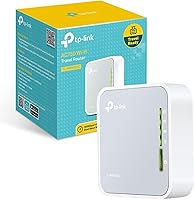
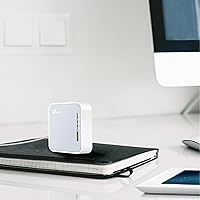
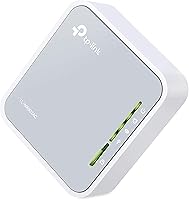
The TP-Link TL-WR902AC has been quietly holding its ground as one of the most practical travel routers on the market since it launched in 2017. Smaller than a deck of cards and light enough to forget it's in your bag, this travel router packs six operating modes into a device you can power from a standard USB port. The AC750 dual-band spec sounds modest on paper, and honestly, it is — but for what this nano router is designed to do, it doesn't need to be blazing fast. It needs to be reliable, portable, and simple. On those fronts, it consistently delivers.

Features & Benefits

The six modes are where this travel router earns its keep. Router mode is the obvious starting point — plug in an Ethernet cable, broadcast your own network. But Range Extender and Hotspot modes are genuinely useful too, especially in hotels where the in-room signal barely reaches the desk. The 5 GHz band handles video calls and light streaming without much interference, while 2.4 GHz stretches further for general browsing. Worth stating plainly: the single Ethernet port is capped at 100 Mbps, so it won't unlock a gigabit hotel connection. Power arrives via Micro USB, meaning your existing phone charger or any power bank works — no proprietary adapter required.

Best For

This nano router is built for a specific kind of traveler: someone who checks into a hotel room and immediately hunts for an Ethernet port. If you need to branch a single wired connection into Wi-Fi for a laptop, tablet, and phone simultaneously, it handles that cleanly. Remote workers on the road will also value the ability to create a private network rather than trusting shared hotel Wi-Fi. That said, it's not for everyone. If you're streaming 4K on multiple screens or need coverage across a large space, look elsewhere. Think of it as a focused travel tool — video calls, email, and standard streaming — where size and flexibility matter more than raw speed.

User Feedback

Owners consistently highlight easy initial setup as a standout experience — most report being connected within minutes via the browser-based interface or the TP-Link app. Many reviewers mention having relied on the TL-WR902AC for multiple years without hardware failure, which speaks well of its build quality at this price tier. The USB power flexibility draws recurring praise; running it off a power bank is a genuinely appreciated convenience. On the downside, some users encounter firmware quirks, particularly after resets or mode switches. Range limitations in larger rooms also surface regularly, and those expecting full-size router coverage will be disappointed. Calibrate expectations and it tends to satisfy.

Pros

  • Fits in a shirt pocket and weighs almost nothing — genuinely one of the smallest travel routers available.
  • Six operating modes in one device covers nearly every connectivity scenario a traveler encounters.
  • Powers directly from any standard power bank, eliminating the need for a dedicated wall adapter.
  • Setup takes under ten minutes for most users, even without prior networking experience.
  • Dual-band Wi-Fi lets newer devices use the cleaner 5 GHz band while older hardware defaults to 2.4 GHz.
  • Long-term owners frequently report years of reliable use without hardware failure.
  • Creates a private, isolated network from shared hotel Wi-Fi — a real benefit for remote workers handling sensitive data.
  • Universal 120–240 V input means it works in any country without a voltage converter.
  • Two-year warranty with 24/7 support is a meaningful safety net for a travel-focused device.
  • Physical mode-switch button makes changing configurations fast and intuitive without logging into any interface.

Cons

  • The Ethernet port is hard-capped at 100 Mbps, bottlenecking faster upstream connections.
  • Firmware bugs after updates are a recurring complaint, occasionally requiring a manual hard reset.
  • Wi-Fi range drops off noticeably beyond 20 to 25 feet, especially through walls.
  • Certain hotel networks using enterprise authentication can block the router entirely without a manual workaround.
  • The included Micro USB cable feels thin and wears out faster than expected under daily travel use.
  • Switching between some modes requires a reboot that the interface does not always clearly communicate.
  • Real-world throughput falls noticeably below the theoretical AC750 headline figure in congested environments.
  • The printed quick-start guide covers only basic Router mode, leaving other modes underdocumented out of the box.
  • The plastic chassis feels noticeably lightweight and can develop a loose Micro USB port over extended use.
  • Running multiple simultaneous heavy-use devices causes thermal throttling and speed degradation over time.

Ratings

The TP-Link TL-WR902AC has accumulated thousands of verified purchases over nearly a decade, giving us a rich pool of real-world buyer experiences to draw from. Our AI scoring system analyzed authenticated global reviews, actively filtering out incentivized submissions and bot-generated feedback, to surface honest signal from frequent travelers, remote workers, and hotel-room warriors alike. The scores below reflect both where this nano router genuinely earns its reputation and where it falls short of expectations.

Portability & Form Factor
96%
Owners repeatedly describe slipping this travel router into a shirt pocket or tucking it between a laptop charger and a notebook without a second thought. At under three inches on its longest side, it is genuinely smaller than most buyers expect when it arrives. Frequent fliers and backpack travelers treat its size as a near-perfect design decision.
A small number of users with larger hands find the single Ethernet port fiddly to plug in without a stable surface underneath. The compact chassis also means there is no room for external antennas, which has a direct knock-on effect on range.
Setup & Ease of Use
83%
Most buyers report being fully connected within five to ten minutes using the browser-based admin panel, and TP-Link's mobile app smooths the process further for less technical users. The physical mode-switch button is a genuine convenience — switching from Router to Range Extender mid-trip requires no logging into any interface.
A meaningful portion of reviewers hit confusion when the web UI behaves differently depending on which mode is active, and a factory reset occasionally fails to fully restore default settings without a manual hard reset. First-time router users sometimes find the IP address login step unexpectedly intimidating.
Wi-Fi Performance
71%
29%
For video calls, light streaming, and everyday browsing across two or three devices, the TL-WR902AC delivers reliably stable connections. The 5 GHz band handles hotel rooms cleanly when the source signal is decent, and buyers using it for remote work Zoom calls report minimal drops during normal sessions.
This is not a speed demon — real-world throughput sits well below the theoretical AC750 ceiling, and users expecting near-gigabit performance will be disappointed. On the 2.4 GHz band especially, congested hotel environments can drag speeds noticeably, and it struggles to keep multiple simultaneous heavy-streaming devices happy.
Multi-Mode Flexibility
88%
Having six functional modes in a device this small is the core reason many buyers choose the TL-WR902AC over simpler travel routers. Switching from a wired hotel Ethernet setup to a Range Extender in a large Airbnb, or flipping to Hotspot mode on a road trip, all work reliably without requiring a fresh install or complex reconfiguration.
A recurring complaint is that certain mode transitions — particularly switching from Access Point back to standard Router mode — require a manual reboot that is not always clearly signaled in the UI. Users who switch modes frequently report that remembering the correct admin address per mode adds unnecessary friction.
Range & Coverage
58%
42%
Within a single hotel room or a small studio apartment, signal coverage is adequate and consistent. For the target use case — a contained personal network rather than whole-floor coverage — buyers generally feel the range is proportional to the device's size and purpose.
Coverage drops off noticeably beyond 20 to 25 feet, and walls or furniture cause signal degradation faster than expected. Users in larger suites or open-plan spaces frequently report dead zones and are advised to set expectations accordingly. This is one of the clearest hardware trade-offs of the nano form factor.
Ethernet Port & Wired Performance
62%
38%
The single WAN/LAN port handles the most common travel scenario well: converting a wired hotel Ethernet drop into a shareable Wi-Fi network. It is dual-purpose, flipping between WAN and LAN depending on the active mode, which is a clever design choice that avoids needing multiple ports.
The 100 Mbps hard cap on the Ethernet port is a real limitation that technically aware buyers flag consistently. If your hotel or accommodation offers a gigabit wired connection, this router becomes the bottleneck, capping your actual speeds regardless of what the upstream line can deliver.
Power Flexibility
91%
Powering this nano router from a standard power bank is one of the most frequently praised real-world conveniences in user reviews. Travelers who already carry a battery pack for their phone can run this router without any additional adapter, which removes a meaningful barrier to using it in airports, trains, or vehicles.
The included power adapter works fine but some users note the Micro USB cable feels thin and low-quality for repeated travel use. A small number of reports mention the router behaving erratically when powered by very low-output USB ports, so a power bank with at least 1A output is advisable.
Build Quality & Durability
78%
22%
A notable share of long-term reviewers — some reporting two to four years of regular travel use — describe the unit still functioning without hardware faults. The matte plastic shell resists minor scratches well and does not attract fingerprints noticeably, holding up reasonably in a bag pocket alongside other gear.
The plastic chassis feels noticeably lightweight, and a few buyers describe it as slightly cheap-feeling in hand. The Ethernet port shows wear over time with very heavy use, and the Micro USB power port can feel loose after extended daily plug-and-unplug cycles.
Firmware & Software Stability
64%
36%
Under stable, single-mode use the firmware runs without issues for extended periods, and TP-Link has pushed periodic updates since the product launched. For users who configure it once and leave it in the same mode, the experience is largely set-and-forget.
Firmware-related complaints are among the most consistent criticisms across reviews. Bugs after updates, failure to save custom settings across reboots, and the occasional need to re-flash firmware manually are reported often enough to be considered a genuine product weakness rather than isolated incidents.
Hotel & Travel Compatibility
87%
Buyers who travel frequently for work describe this as a reliable solution for hotels that use captive portal login pages, which can otherwise block device connections. Being able to authenticate once through the router and then share that connection to all personal devices is a genuinely practical travel benefit.
Some newer hotels with 802.1X enterprise authentication or MAC address restrictions can block or complicate the router's connection, and the workaround process requires a degree of technical comfort most casual users lack. It is not a universal solution for every hotel network configuration.
Value for Money
82%
18%
Relative to comparable travel routers with similar mode flexibility, the TL-WR902AC sits in a reasonable price bracket for what it offers. Buyers who use it regularly across multiple trips tend to see clear per-use value, and the two-year warranty with 24/7 support adds meaningful peace of mind at this tier.
Occasional travelers who use it only once or twice a year may question whether the cost is justified against simply using a phone hotspot. A small segment of reviewers feel that given the 100 Mbps Ethernet cap and modest Wi-Fi range, the price could be lower to better match the hardware's real-world ceiling.
Device Compatibility
85%
Works without driver installation on Windows, macOS, iOS, and Android devices, which buyers appreciate especially when connecting a mix of personal and work hardware. The dual-band nature means older devices default cleanly to 2.4 GHz while newer ones can grab the less congested 5 GHz band.
A minor segment of users report issues with certain smart TVs or older streaming sticks that struggle to authenticate through the router's network, requiring manual DNS or IP configuration adjustments. These edge cases are infrequent but worth noting for buyers planning media-heavy travel setups.
Documentation & Support
73%
27%
TP-Link's online knowledge base covers the TL-WR902AC with detailed setup guides across all six modes, and the 24/7 support line receives generally positive marks for resolving firmware and configuration issues. The quick-start guide in the box handles basic Router mode clearly.
The included printed guide is minimal and does not adequately cover the less common modes like Bridge or Client, leaving buyers to navigate the online documentation independently. Response times from support can be inconsistent, and some users report being walked through generic troubleshooting steps that do not address mode-specific issues.
Thermal Management
76%
24%
Under typical travel workloads — a few connected devices, standard browsing and video calls — the unit runs warm but not uncomfortably hot. Most users who place it on a desk or nightstand report no heat-related concerns during normal sessions.
Extended use under heavier load, such as multiple devices streaming simultaneously for several hours, causes the chassis to get noticeably warm. A handful of reviewers report occasional slowdowns they attribute to thermal throttling during prolonged heavy use, though this is not a widespread complaint.

Suitable for:

The TP-Link TL-WR902AC was built with a very specific traveler in mind, and for that person it is genuinely hard to beat. If you regularly check into hotels or Airbnbs that offer a single wired Ethernet connection and need to share it across a laptop, phone, and tablet simultaneously, this nano router solves that problem cleanly and without hassle. Remote workers who travel frequently will also appreciate the ability to create a private, isolated network rather than exposing work devices to whatever else is lurking on a shared hotel Wi-Fi. Minimalist packers who already carry a power bank will find the Micro USB power input a natural fit — no extra adapter bulk, no hunting for a wall socket just for the router. It also works well as a range extender in a large Airbnb where the host router is stuck in a far corner of the property, or as a dedicated hotspot when you want a more stable connection than your phone's tethering provides. For light workloads — video calls, email, standard definition streaming, general browsing — this travel router handles the job reliably across years of regular use.

Not suitable for:

Anyone expecting home-router performance from the TL-WR902AC is going to be frustrated fairly quickly. The 100 Mbps cap on the Ethernet port means that even if your hotel offers a fast gigabit connection, this device will cut your ceiling to a fraction of that — a hard limitation worth understanding before purchase. It is also not well-suited for households or travel parties with heavy simultaneous demands: four people trying to stream different 4K content through a single nano router will run into congestion and speed drops. The compact chassis means limited antenna range, so if you need coverage across a large vacation rental, multiple rooms, or an open-plan office space, you will find dead zones where you do not expect them. Users who are uncomfortable navigating a browser-based admin interface or troubleshooting IP address conflicts may find the occasional firmware quirk more aggravating than it is worth. And if your accommodations use enterprise-grade network authentication — the kind some large hotels and corporate properties deploy — this router may simply fail to connect without technical workarounds.

Specifications

  • Brand & Model: Manufactured by TP-Link under the model designation TL-WR902AC, part of the travel router product line.
  • Dimensions: The unit measures 2.64 x 2.91 x 0.87 inches, making it genuinely pocket-sized for daily carry.
  • Weight: Weighs 8 oz including the chassis, light enough to carry without noticing it in a bag or jacket pocket.
  • Wi-Fi Standard: Supports 802.11ac/n/a on the 5 GHz band and 802.11b/g/n on the 2.4 GHz band for broad device compatibility.
  • Wi-Fi Speed: Delivers up to 433 Mbps on 5 GHz and up to 300 Mbps on 2.4 GHz under ideal theoretical conditions.
  • Frequency Bands: Dual-band AC750 design broadcasts simultaneously on both 2.4 GHz and 5 GHz for flexible device allocation.
  • Ethernet Port: Includes one 10/100 Mbps WAN/LAN port that switches function automatically depending on the active operating mode.
  • USB Port: Features one USB 2.0 port that supports both device power input and basic file sharing from a connected USB drive.
  • Power Input: Powered via Micro USB, compatible with standard phone chargers, power banks, laptop USB ports, and wall adapters.
  • Voltage Range: Supports universal 120–240 V input, making it compatible with electrical systems in countries worldwide without a converter.
  • Operating Modes: Supports six distinct modes: Router, Hotspot, Range Extender, Access Point, Bridge, and Client, selectable via a physical switch.
  • Firmware: Runs on TP-Link's ZyNOS firmware platform, configurable through a browser-based admin panel or the TP-Link mobile app.
  • Color: Available in a two-tone Grey and White finish with a matte plastic surface that resists minor scratches and fingerprints.
  • Warranty: Backed by a two-year limited warranty from TP-Link, with 24/7 unlimited technical support included at no extra cost.
  • In the Box: Package includes the AC750 travel router, a power adapter, one RJ45 Ethernet cable, and a quick installation guide.
  • Release Date: First made available in February 2017, with the product remaining in active production and supported as of the current date.

Related Reviews
TP-Link TL-SG3428XMP
88%
91%
Performance
88%
Build Quality
90%
Cloud Management & Software
87%
Ease of Setup
85%
Power Efficiency
More
TP-Link N300 WiFi Extender TL-WA855RE
82%
91%
Value for Money
96%
Ease of Setup
75%
WiFi Performance (Range)
80%
Build Quality
88%
Compatibility with Devices
More
TP-Link TL-WA1201 Wireless Access Point
85%
91%
Ease of Installation
88%
Wi-Fi Performance
85%
Signal Range & Coverage
89%
Multi-Device Performance
81%
Build Quality
More
TP-Link TL-MR6400 4G LTE Router
82%
88%
Setup & Installation
91%
4G LTE Performance
83%
Wi-Fi Speed & Reliability
85%
Portability
82%
Bandwidth Management (QoS)
More
TP-Link TL-PA411KIT Powerline Network Adapter
85%
91%
Setup and Installation
84%
Connection Stability
87%
Power Efficiency
89%
Speed and Performance
80%
Build Quality
More
TP-Link TL-SG1024DE 24-Port Gigabit Switch
85%
94%
Ease of Setup
89%
Performance & Speed
91%
Quiet Operation
88%
Reliability & Durability
83%
VLAN Features
More
TP-Link TL-SF1016D 16-Port Ethernet Switch
86%
91%
Ease of Setup
87%
Performance & Speed
92%
Energy Efficiency
80%
Build Quality
94%
Fanless Design (Noise Level)
More
TP-Link TL-WPA8631P Powerline WiFi Extender Kit
84%
92%
Ease of Setup
85%
Performance & Speed
88%
WiFi Coverage
78%
Build Quality
90%
Compatibility with Devices
More
TP-Link TL-SF1005P
TP-Link TL-SF1005P
82%
96%
Ease of Setup
81%
PoE Power Delivery
88%
Build Quality
94%
Fanless & Noise Level
67%
Extend Mode Performance
More
TP-Link TL-SF1009P 9-Port PoE Switch
87%
88%
Performance
92%
Build Quality
94%
Ease of Installation
80%
PoE Range (Extend Mode)
85%
Network Security Features
More

FAQ

A power bank works perfectly — it is one of the most genuinely useful things about this nano router. As long as your power bank outputs at least 1A over a standard Micro USB cable, the router runs stably. Most modern power banks comfortably meet that threshold, so you likely already have everything you need.

Yes, that is exactly the scenario this travel router was designed for. Plug the Ethernet cable into the router, set it to Router mode, and within a few minutes you have a private Wi-Fi network that your laptop, phone, and tablet can all join simultaneously. Just be aware the Ethernet port is capped at 100 Mbps, so very fast hotel connections will be bottlenecked at that ceiling.

It is straightforward for most people. You connect to the router's default Wi-Fi network, open a browser, and follow a short wizard to configure your preferred mode. TP-Link also has a mobile app that walks you through the process visually. Most first-time users are up and running in under ten minutes, though the login step via IP address can catch complete beginners off guard.

Yes, the universal 120–240 V input means it handles international voltages without a converter. You may need a plug adapter for different outlet shapes, but the router itself will not be damaged by different voltage standards. It is a genuine travel-ready device in that respect.

In an open space with no obstructions, you can reasonably expect reliable coverage up to about 20 to 25 feet. Through walls or furniture, that drops noticeably. This is a known trade-off of the compact form factor — there is simply no room for the kind of antennas that push range further. Think of it as a personal-bubble router, not a whole-floor solution.

Yes, there is a physical mode-switch button on the device that handles the most common transitions. Flipping from Router to Range Extender, for example, does not require touching the web interface at all. That said, some mode changes do trigger an automatic reboot, and the interface does not always notify you clearly that this will happen.

Unfortunately, firmware instability after updates is one of the more consistent criticisms from long-term users. If a recent update caused problems, a manual hard reset followed by fresh configuration — rather than restoring saved settings — tends to resolve most issues. Checking TP-Link's support forums before applying any update is also worthwhile, as other users often flag problems before you encounter them.

In most cases, yes. You authenticate once through the router's browser interface using the hotel's captive portal, and all devices connected to your router then share that authenticated session. It is a practical workflow that many remote workers use to avoid re-authenticating every individual device. That said, hotels using enterprise-grade 802.1X authentication — common at larger corporate properties — can present additional hurdles that require more technical configuration.

For light to moderate use — a couple of devices on video calls or browsing — two to three simultaneous connections work well. Push beyond that with heavier workloads like multiple streams and you will notice congestion, particularly on the 2.4 GHz band. This nano router is not built for bandwidth-heavy households; it is built for a solo traveler or small remote work setup.

It can be used to connect a USB flash drive and share files across your local network, which some users find handy for transferring documents between devices while traveling. In practice though, most buyers use the USB port almost exclusively for power. The file-sharing function works, but it is limited and not particularly fast — treat it as a secondary bonus rather than a core feature.