Overview

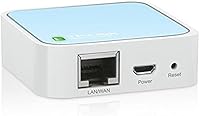
The TP-Link TL-WR802N N300 Travel Router has been quietly solving a very specific travel headache since 2015: what do you do when your hotel room only offers a single wired Ethernet port and you have three devices that need Wi-Fi? This nano travel router fits in a shirt pocket, weighs just over an ounce, and supports five operating modes — Router, Access Point, Client, Repeater, and WISP — giving it real flexibility for different networking situations. With over 10,000 ratings and a solid 4-star average, it has earned a loyal following among budget-conscious travelers who just need something that reliably works.

Features & Benefits

At 2.2 x 2.2 x 0.7 inches and powered by a standard Micro-USB cable, this compact Wi-Fi device is genuinely easy to carry anywhere — you can run it off a power bank, a laptop port, or a hotel room USB adapter. It delivers up to 300Mbps on the 2.4GHz band, which covers email, video calls, and Chromecast streaming without trouble. A single Ethernet port doubles as either WAN or LAN depending on your chosen mode. The pre-encryption setup means it ships with an SSID and password already configured, and it also supports guest networking and basic parental controls for anyone sharing the connection.

Best For

This pocket router makes the most sense for people who travel frequently and deal with the all-too-common hotel situation: one wired port, multiple devices needing Wi-Fi. Plug in the Ethernet cable, connect your phone and laptop wirelessly, and you are done in minutes. It is also a solid pick for Chromecast users who need a stable local network their streaming device can reliably find. Remote workers traveling light will appreciate how little space it occupies. That said, if you need to support a household streaming 4K video on several devices at once, look elsewhere — this is built for travel-specific scenarios where portability matters most.

User Feedback

Across more than 10,000 reviews, buyers consistently praise the easy initial setup and how well it handles the everyday task of sharing a single hotel Ethernet connection among multiple devices. The compact size surprises people in a good way — many note they did not expect something this small to perform as reliably as it does. The criticism that surfaces most regularly is the absence of 5GHz support, which can hurt throughput on congested 2.4GHz hotel networks. Some long-term users have also noted occasional firmware hiccups requiring a reboot. Overall, the consensus is fair: for the price and the intended use case, it punches above its weight.

Pros

  • Fits in a shirt pocket and weighs barely over an ounce — genuinely one of the smallest routers available.
  • Powered by Micro-USB, so a phone charger or power bank is all you need to run it.
  • Five operating modes give it real flexibility across hotel, office, and field networking situations.
  • Pre-configured with a default SSID and password right out of the box — no setup headaches on arrival.
  • Compatible with Chromecast and other streaming devices that require a dedicated local network.
  • Solid 4-star average across more than 10,000 real buyer reviews speaks to consistent reliability.
  • Guest networking support lets you share access without exposing your main connection.
  • At its price point, it is hard to find a more versatile travel networking tool.

Cons

  • Single-band 2.4GHz only — no 5GHz option, which hurts performance on congested hotel networks.
  • The 10/100Mbps Ethernet port caps wired throughput and cannot take advantage of gigabit hotel connections.
  • Some long-term users report occasional firmware instability requiring a manual reboot to restore connectivity.
  • No USB data port means no option to connect a drive or share local storage across the network.
  • The internal antenna cannot be upgraded or repositioned, limiting range flexibility in larger rooms.
  • 802.11n is an aging wireless standard — newer devices optimized for 802.11ac or Wi-Fi 6 will not benefit from their faster radios.
  • Setup via the web interface can confuse non-technical users switching between operating modes.
  • No dedicated WAN and LAN ports — the single Ethernet port changes function depending on mode, which occasionally trips up first-time users.

Ratings

The TP-Link TL-WR802N N300 Travel Router has been scored by our AI after parsing thousands of verified global buyer reviews, with spam, bot activity, and incentivized feedback actively filtered out. The result reflects what real users actually experienced — both the genuine strengths that earned this nano travel router a loyal following and the honest limitations that caused frustration. Scores are distributed across every meaningful performance category so you can weigh what matters most for your specific needs.

Portability
97%
Reviewers consistently describe this as one of the few routers small enough to toss into a jacket pocket and forget about until needed. At just over an ounce and barely larger than a matchbox, it disappears into any travel bag without taking up meaningful space or adding noticeable weight.
A small number of users found the compact size worked against them — the single port and Micro-USB connection can feel fiddly when setting up in a dim hotel room, and the unit can be easy to misplace in a larger bag.
Setup Ease
83%
For the most common use case — plugging into a hotel Ethernet port and sharing Wi-Fi — the majority of buyers report being up and running in under five minutes. The pre-configured default network name and password remove the need to touch the web interface for basic deployments.
Switching between the five operating modes requires logging into the admin panel, and several reviewers noted the interface feels dated and can be confusing for non-technical users. First-time router owners occasionally needed multiple attempts to get Repeater or Client mode configured correctly.
Value for Money
91%
At its price point, buyers repeatedly describe it as one of the best-value travel networking tools available. The combination of five operating modes, pre-encryption, and guest networking in a device this size would cost significantly more from competing brands.
A handful of users felt the lack of 5GHz support made the price harder to justify as newer budget travel routers with dual-band capabilities have entered the market at similar price levels.
Wi-Fi Performance
62%
38%
For light tasks — video calls, standard-definition streaming, email, and general browsing — the 300Mbps ceiling is rarely a bottleneck in practice. Users traveling solo or in pairs consistently report satisfactory speeds for everyday work and entertainment.
In crowded hotel environments where dozens of devices compete on 2.4GHz channels, real-world throughput drops noticeably. Users attempting to stream 4K content or support more than three simultaneous devices frequently reported sluggish performance that the hardware simply cannot overcome.
Build Quality
74%
26%
The plastic shell feels sturdy enough for regular travel use, and reviewers who have carried this router for years note it holds up well to the bumps and pressure of living in a bag. The compact, sealed design has no external antennas to snap off.
The casing does feel lightweight in a way that reads as inexpensive rather than premium, and a few long-term users noted the Micro-USB port becoming slightly loose after extended daily use over a year or more.
Operating Mode Versatility
86%
Five distinct modes — Router, Access Point, Client, Repeater, and WISP — cover an impressive range of real-world networking scenarios for a device this size. Frequent travelers appreciated being able to repurpose the same hardware for hotel rooms, conference spaces, and field deployments.
While the modes exist, switching between them is not always intuitive, and the behavior of the single Ethernet port changes depending on which mode is active — something that trips up users who expect consistent port behavior across configurations.
Range
61%
39%
Within a standard hotel room or small studio apartment, the internal antenna provides adequate coverage for the devices most travelers carry. For its intended single-room use case, the range is generally sufficient.
Signal strength degrades quickly through walls, making this a poor choice for covering a suite, a large Airbnb, or any multi-room environment. Several users noted drop-offs at distances that a mid-range home router would handle comfortably.
Compatibility
88%
Broad OS compatibility — Windows, macOS, Linux — means configuration works on virtually any laptop a traveler might carry. Chromecast and streaming device users in particular praised how reliably the pocket router created a stable local network for casting.
A small subset of users encountered issues with specific ISP-managed hotel networks that use client isolation or captive portals, which occasionally prevented the router from correctly sharing the upstream connection without manual workarounds.
Firmware & Stability
66%
34%
Most users report stable day-to-day operation with no need to interact with the firmware at all. When TP-Link has issued updates, reviewers noted they addressed specific connectivity bugs and improved reliability in Repeater mode.
A recurring complaint across long-term owners involves the router locking up or dropping connections after extended uptime, requiring a physical reboot to restore. Firmware releases have been infrequent given the product's age, leaving some known quirks unresolved.
Power Flexibility
89%
Micro-USB power compatibility with standard phone chargers and power banks was one of the most praised practical details in user reviews. Travelers who already carry a power bank effectively get a router that runs without needing a wall outlet.
The 5V/1A power requirement means lower-output USB ports on older laptops or cheap power banks can occasionally cause instability. A few users reported intermittent disconnects traced back to underpowered USB sources.
Security Features
77%
23%
Pre-encryption out of the box, guest network isolation, and basic parental controls give this compact Wi-Fi device a credible security posture for a travel tool. Users appreciated not having to configure WPA2 encryption manually before their first connection.
Security-conscious users pointed out that the default admin credentials are well-documented online, and many buyers never change them — a meaningful vulnerability if someone gains local network access. There is no built-in VPN client support.
Thermal Management
79%
21%
Under typical travel workloads — a few devices streaming or browsing simultaneously — the unit runs warm but not hot, and thermal throttling was rarely mentioned as an issue by casual users.
Running the router continuously for many hours, particularly in a warm environment like a bag or enclosed space, occasionally caused it to overheat and drop connections. This is more of a concern for users who leave it running 24/7 than for typical travelers.
Documentation & Support
71%
29%
The included quick installation guide covers the most common Router mode setup clearly enough for most users to get started without going online. TP-Link's support website offers downloadable manuals and firmware for this model.
The documentation for advanced modes like WISP and Client is thin, and several technically inclined users noted having to rely on third-party forum posts to correctly configure less common setups. Phone support quality from TP-Link USA received mixed reviews.

Suitable for:

The TP-Link TL-WR802N N300 Travel Router was practically designed for the frequent traveler who has ever stared at a single Ethernet port in a hotel room with a laptop, phone, and Chromecast all needing a connection. If you stay in business hotels regularly, carry streaming devices, or work remotely from locations where wired-only internet is common, this nano travel router solves that problem without adding meaningful weight or bulk to your bag. It is equally useful for Airbnb guests who want to create a private, password-protected network rather than sharing the host's open Wi-Fi with strangers. Travelers who carry power banks will appreciate that the router can be powered directly from one, making it fully functional even in rooms with limited outlets. Light users — checking email, joining video calls, streaming at standard definition — will find the 300Mbps throughput more than adequate for their on-the-road needs.

Not suitable for:

The TP-Link TL-WR802N N300 Travel Router is a poor fit for anyone expecting home-router-level performance or modern wireless standards. Its single-band 2.4GHz radio means it cannot access the less congested 5GHz spectrum, which becomes a real problem in dense urban hotels where dozens of nearby networks are competing on the same frequencies. Households or shared spaces with multiple simultaneous heavy users — think 4K streaming, large file transfers, or cloud backups running in the background — will hit the ceiling of what this compact Wi-Fi device can comfortably handle. It also lacks USB data ports, so there is no option to share storage or set up a basic media server. If you need a router that can keep up with a modern multi-device home environment, or one that supports Wi-Fi 5 or Wi-Fi 6 speeds, this pocket router simply is not built for that role.

Specifications

  • Wi-Fi Standard: This router uses the 802.11n wireless standard, operating exclusively on the 2.4GHz frequency band.
  • Max Speed: It supports wireless speeds of up to 300Mbps, suitable for streaming, browsing, and video calls.
  • Dimensions: The unit measures 2.2 x 2.2 x 0.7 inches, making it one of the most compact routers in its class.
  • Weight: At just 1.06 ounces, it adds virtually no noticeable weight to a travel bag or laptop case.
  • Ethernet Port: A single 10/100Mbps WAN/LAN port serves as either the internet input or wired output depending on the selected operating mode.
  • Power Input: The device is powered via a Micro-USB port rated at 5V/1A, compatible with standard phone chargers and power banks.
  • Operating Modes: Five modes are supported: Router, Access Point, Client, Repeater, and WISP, covering most common travel and field networking scenarios.
  • Antenna: An on-board internal antenna handles all wireless transmission, with no external antenna to adjust or replace.
  • Frequency Band: Single-band 2.4GHz only — there is no 5GHz radio, which is an important consideration for congested network environments.
  • Guest Networking: A guest network feature allows secondary users to access the internet without exposure to the primary network.
  • Parental Controls: Basic parental control functionality is built in, allowing the primary user to restrict access to specific websites or content categories.
  • Pre-Encryption: The router ships pre-configured with a default SSID and password, so it is ready to use immediately after connecting.
  • Chromecast Support: The device is officially compatible with Chromecast and other streaming devices that require a dedicated local Wi-Fi network.
  • Memory Type: The router uses DDR3 SDRAM for its internal memory, which is standard for this class of compact networking hardware.
  • Voltage Range: It supports a wide input voltage range of 100–240V, making it fully compatible with international power standards.
  • Manufacturer: The TL-WR802N is designed and sold by TP-Link USA, a globally recognized networking hardware brand.
  • Box Contents: The package includes the router, a power adapter, a Micro-USB cable, an RJ45 Ethernet cable, a quick installation guide, and a resource CD.
  • OS Compatibility: Compatible with Windows (XP through 8.1), macOS, Linux, UNIX, and NetWare for web-based configuration.

Related Reviews
TP-Link BE3600 Wi-Fi 7 Travel Router TL-WR3602BE
85%
88%
Performance & Speed
94%
Portability & Size
85%
Wi-Fi Range & Connectivity
92%
Security Features
90%
Ease of Use & Setup
More
TP-Link TL-WR902AC
TP-Link TL-WR902AC
78%
96%
Portability & Form Factor
83%
Setup & Ease of Use
71%
Wi-Fi Performance
88%
Multi-Mode Flexibility
58%
Range & Coverage
More
TP-Link TL-WR3002X AX3000 Wi-Fi 6 Travel Router
81%
83%
Ease of Setup
88%
VPN Performance
79%
Captive Portal Handling
93%
Portability & Form Factor
74%
Wi-Fi Speed & Range
More
TP-Link TL-WR1502X Travel Router
81%
91%
Ease of Setup
94%
Portability & Form Factor
88%
Captive Portal Handling
79%
Wi-Fi Performance
86%
Multi-Mode Versatility
More
TP-Link TL-MR6400 4G LTE Router
82%
88%
Setup & Installation
91%
4G LTE Performance
83%
Wi-Fi Speed & Reliability
85%
Portability
82%
Bandwidth Management (QoS)
More
TP-Link N300 WiFi Extender TL-WA855RE
82%
91%
Value for Money
96%
Ease of Setup
75%
WiFi Performance (Range)
80%
Build Quality
88%
Compatibility with Devices
More
TP-Link TL-WDR3500 Wireless N600 Dual Band Router
83%
86%
Dual-Band Performance
91%
Setup and Installation
83%
File and Printer Sharing (USB Port)
80%
Parental Controls
72%
Wi-Fi Range
More
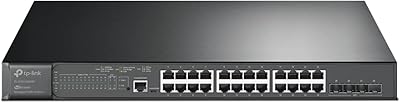
TP-Link TL-SG3428XMP 24-Port Managed PoE Switch
80%
88%
PoE Performance & Budget Reliability
91%
10G Uplink Throughput
83%
Omada SDN Integration
67%
Setup & Initial Configuration
86%
Build Quality & Hardware Durability
More
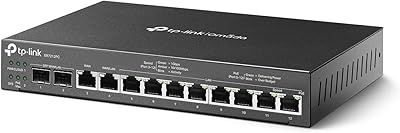
TP-Link ER7212PC 3-in-1 Gigabit VPN Router
73%
83%
Value for Money
74%
PoE Power Delivery
86%
Omada Controller Integration
81%
Multi-WAN & Failover
77%
VPN Performance
More
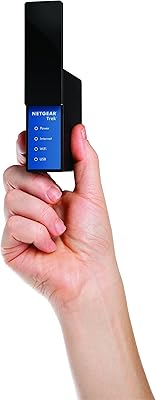
NETGEAR Trek N300 Travel Router
83%
88%
Value for Money
93%
Portability
79%
Wi-Fi Performance
85%
Ease of Setup
91%
Power Flexibility
More

FAQ

Yes, that is exactly the scenario this nano travel router was built for. Plug the included Ethernet cable into the hotel's wall port and the router, switch it to Router mode, and your devices can connect wirelessly within minutes. It is one of the most straightforward setups you will find on any travel router.

It does. Chromecast and similar devices require all your gadgets to be on the same local network, which hotel Wi-Fi typically does not allow. This pocket router creates its own private network, so your phone and Chromecast can communicate normally.

Yes. The Micro-USB power input is fully compatible with standard USB power banks, which makes it especially practical for travel. Just make sure your power bank can deliver a steady 5V/1A output.

For basic Router mode — the most common use case — setup is pretty straightforward. The router comes pre-configured with a default network name and password, so in many cases you just plug it in and connect. Switching between the five operating modes does require logging into the web interface, which can be a little confusing if you have never done it before, but TP-Link provides a quick installation guide in the box.

No, it does not. This is a single-band 2.4GHz device only. If you are in a location with heavy wireless congestion — like a large conference hotel — the 2.4GHz band can feel sluggish. For occasional travel use it is usually fine, but it is worth knowing before you buy.

TP-Link does not publish a hard limit, but in practice this compact Wi-Fi device handles three to five simultaneous light-use connections comfortably. Pushing more devices onto it, especially for video streaming, will likely cause noticeable slowdowns.

It does add a layer of separation. Rather than connecting your devices directly to an open hotel network, you are connecting them to a private network you control, with your own password. It is not a VPN and should not replace one if security is a top concern, but it is meaningfully safer than exposing your devices directly.

For a standard hotel room or small suite, the range is adequate. Do not expect it to blanket a large floor or cover multiple rooms — the internal antenna and compact hardware are optimized for close-range use. Think of it as a personal hotspot, not a long-range access point.

As of the latest available information, TP-Link has not discontinued this model. Firmware updates have been issued over the years, though they tend to be infrequent for a device this mature. It is worth checking the TP-Link support site periodically to make sure you are running the latest version, especially since some users have reported stability improvements after updating.

It can do both. In Repeater or WISP mode, this router can connect to an existing wireless network and rebroadcast it, which is useful when the original signal is weak in your room. Router mode is for sharing a wired connection, while Client mode lets the router join a wireless network on behalf of a wired device — so there are several practical configurations beyond the basic hotel Ethernet use case.

Where to Buy