Overview

The TP-Link CPE710 Outdoor Wireless Bridge sits in an interesting spot in the market — capable enough to satisfy small ISPs and IT contractors, yet priced well below the enterprise gear most professionals default to. If you need to push internet across a field, between buildings, or over a rural property without digging trenches or leasing fiber, this outdoor bridge fills that gap convincingly. It runs on 802.11ac Wave 2, which sets realistic expectations: solid, modern wireless performance rather than bleeding-edge speeds. Just understand upfront — this is a professional-grade tool, not something you plug in and forget about.
Features & Benefits

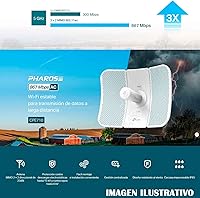
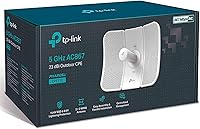
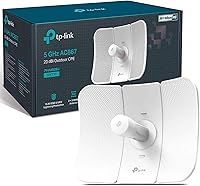
The hardware here is well-thought-out for long-distance work. The 23 dBi directional antenna produces a focused beam capable of stable links across several kilometers — provided you have clear line of sight. Theoretically rated at 867 Mbps, real-world throughput lands lower, but remains more than adequate for most backhaul applications. The three-axis pole mount deserves a mention: at distance, minor misalignment tanks signal quality, and this mounting system makes precise aiming practical rather than tedious. Cabling stays simple through passive PoE — one Ethernet run handles both data and power. Pharos Control rounds things out by letting installers manage multiple units from a single dashboard, useful on any multi-site deployment.

Best For

This long-range wireless link is a strong match for rural property owners who need to bridge internet between buildings without running underground cable — a barn, a workshop, a guest house. It also fits naturally into small WISP deployments and campus-style security camera backhaul setups where cost-effective coverage matters more than raw throughput. Network enthusiasts upgrading from older 2.4GHz bridges will notice a meaningful improvement in speed and spectral efficiency. That said, it is not the right pick for anyone expecting consumer-style ease of setup, and dense urban environments with heavy interference or physical obstructions will undercut this outdoor bridge considerably. Know your environment before committing.

User Feedback

Across a solid body of owner reviews, a few consistent themes stand out. Buyers running line-of-sight links between one and three kilometers report reliable, stable connections — often noting that build quality holds up through months of heat, rain, and wind exposure. The friction points, though, are real: alignment is demanding, and first-time installers frequently underestimate how sensitive the antenna is to small pointing errors. The PharOS interface has a learning curve that trips up less experienced users. One recurring concern involves the bundled PoE injector, with reports of inconsistent quality across production batches. Buyers expecting 5GHz to punch through trees or walls will also be disappointed.

Pros

  • Delivers rock-solid link stability at one to three kilometers in clear line-of-sight conditions.
  • IP65 weatherproofing holds up through sustained rain, heat, and wind without meaningful degradation.
  • Built-in 15kV ESD and 6kV lightning protection adds real peace of mind in storm-prone areas.
  • The three-axis pole mount makes precise antenna alignment genuinely achievable rather than a guessing game.
  • Single Ethernet run for both power and data keeps installations clean and cable management simple.
  • Pharos Control lets experienced installers manage multiple units from one dashboard across different sites.
  • Competitive value compared to enterprise-grade alternatives for small WISP and rural backhaul use cases.
  • The 23 dBi directional antenna naturally rejects off-axis interference, keeping links cleaner in semi-rural settings.
  • Upgraders from aging 2.4GHz bridges notice a real improvement in throughput and connection quality.

Cons

  • Antenna alignment is highly sensitive — even a small pointing error noticeably hurts signal quality at distance.
  • The PharOS web interface has a dated layout that frustrates first-time CPE installers.
  • The bundled PoE injector has a history of inconsistent build quality and premature failure across some batches.
  • 5GHz does not punch through foliage, terrain, or buildings — obstacles kill performance quickly.
  • Official documentation drops off sharply beyond basic setup, pushing users toward community forums for advanced configs.
  • Advertised five-kilometer range is theoretical; most real-world deployments land well below that ceiling.
  • No meaningful support for dense urban environments where multipath interference undermines directional performance.
  • Physical mounting can require supplemental hardware on non-standard poles or high-vibration industrial structures.

Ratings

The TP-Link CPE710 Outdoor Wireless Bridge has been evaluated by our AI rating system after processing hundreds of verified global buyer reviews, with spam, bot-submitted, and incentivized feedback actively filtered out before scoring. The result is a transparent look at where this long-range outdoor bridge genuinely excels and where real installers and property owners have hit friction. Scores reflect the full spectrum of user experience — the wins and the frustrations alike.
Link Stability
88%
Owners running clean line-of-sight links between one and three kilometers consistently report rock-solid connections that hold up over weeks and months of continuous use. For rural backhaul applications — bridging a farmhouse to an outbuilding, for example — the stability is one of the CPE710s most praised traits.
Stability drops noticeably when the path is not perfectly clear. Even partial foliage obstruction or terrain changes between endpoints can introduce packet loss that frustrates users who assumed the rated range applied to non-ideal conditions.
Range Performance
83%
The 23 dBi directional antenna punches well for its price class, with many installers achieving reliable links at two to four kilometers in open environments. For a mid-range outdoor bridge, this kind of real-world range output is genuinely competitive.
The five-kilometer maximum figure is theoretical and requires near-perfect conditions that most deployments cannot guarantee. Users in hilly terrain or areas with scattered tree lines report that usable range is often closer to half the advertised ceiling.
Build Quality & Durability
91%
The IP65-rated enclosure holds up well in extended outdoor use — reviewers in wet climates and high-heat regions note that the housing shows minimal degradation after a year or more of exposure. The structural design feels deliberate and sturdy rather than hollow or flimsy.
A small number of buyers noted that the plastic mounting hardware, while functional, feels slightly less robust than the main unit itself. Over time in very high-wind installations, some users recommend supplementing the included mount with additional securing hardware.
Ease of Installation
61%
39%
The three-axis pole mount is a well-designed piece of hardware that makes physical alignment far more manageable than fixed-angle competitors. The snap-lock assembly reduces time on the pole, and the single PoE cable run keeps the physical install tidy.
The overall setup process is not beginner-friendly. First-time CPE installers frequently struggle with the PharOS web interface and the precision required for antenna alignment. Users expecting a consumer-router experience will find the learning curve steep enough to cause real frustration.
Antenna Alignment Precision
74%
26%
Experienced network installers appreciate how the three-axis mount gives them meaningful control over beam direction. Getting the antenna dialed in correctly pays off in noticeably better signal quality and throughput compared to rough positioning.
Alignment sensitivity is the single most common complaint across user reviews. At longer distances, even a small pointing error measurably degrades performance, and without a second person or a live signal strength display nearby, the alignment process becomes time-consuming and trial-heavy.
Throughput & Speed
77%
23%
For typical backhaul use cases — streaming video feeds from security cameras, sharing broadband between buildings, or supporting a small office extension — the real-world throughput is more than sufficient and holds consistently once the link is properly established.
The 867 Mbps headline figure is theoretical and relies on ideal RF conditions. In practice, most users see considerably lower speeds, and throughput can degrade further with distance or marginal alignment. Buyers expecting near-gigabit performance in real conditions will be disappointed.
Weather & Surge Protection
89%
The combination of IP65 weatherproofing, 15kV ESD protection, and 6kV lightning protection gives installers meaningful confidence in exposed deployments. Users in storm-prone regions specifically call out the lightning protection as a practical feature rather than a marketing checkbox.
Even with built-in protection, TP-Link and most experienced installers still recommend external grounding and surge arrestors at the cable entry point. The onboard protection is solid but should be treated as a secondary layer rather than a complete solution on its own.
Software & Management Interface
63%
37%
Pharos Control is a capable centralized management platform for installers overseeing multiple units across different sites. Experienced network professionals find the PharOS web interface gives them access to detailed configuration options that consumer-grade tools do not expose.
For first-time users, PharOS has a dated, unintuitive layout that adds friction to an already technical setup process. Documentation is functional but sparse, and several reviewers noted they had to rely on community forums to work through initial configuration challenges.
PoE Injector Quality
58%
42%
The included passive PoE injector means buyers do not need to source additional hardware to get the unit running, which keeps the out-of-box experience relatively complete for a professional-class device at this price point.
The PoE injector is the most consistently criticized accessory in user reviews, with reports of early failure, inconsistent build quality between batches, and inadequate cable retention. A meaningful share of buyers ended up replacing it with a third-party injector as a precaution.
5GHz Band Suitability
71%
29%
The 5GHz band delivers cleaner, less congested signals in rural and semi-rural environments where 2.4GHz interference from neighboring networks is common. Users upgrading from older 2.4GHz bridges notice real improvements in throughput and link cleanliness in these settings.
5GHz is inherently less forgiving of obstacles than 2.4GHz. Buyers who underestimate this — particularly those with trees, buildings, or uneven terrain between endpoints — find that the CPE710 underperforms relative to their expectations, leading to misplaced disappointment.
Value for Money
82%
18%
Positioned between no-name budget clones and premium enterprise hardware, the CPE710 hits a sweet spot for cost-conscious professionals who need reliable performance without paying for features they will never use. For rural bridging or small WISP work, the price-to-capability ratio is strong.
Buyers who run into setup difficulties or PoE injector failures can quickly feel the value proposition erode, especially if they factor in the time cost of troubleshooting. For total beginners, the hidden cost of the learning curve can outweigh the upfront savings.
Mounting & Physical Flexibility
84%
Three-axis adjustment is the right design choice for this category of device, and most installers agree it makes a meaningful difference on deployment day. The pole mount hardware feels solid and the range of motion accommodates most real-world installation angles without issue.
The mount works well on standard round poles but is less convenient on square posts or non-standard structures without additional adapters. A small number of users in high-vibration environments, such as industrial sites, noted that the mount needed periodic re-tightening over time.
Interference Resistance
76%
24%
The tight directional beam of the 23 dBi antenna naturally rejects off-axis interference, which is a practical advantage in semi-rural areas where some neighboring 5GHz traffic exists. Users report that the CPE710 maintains cleaner links than wider-beam alternatives in moderately busy RF environments.
In dense urban deployments with heavy 5GHz congestion and reflective surfaces causing multipath interference, this outdoor bridge struggles. The design assumptions favor open-space point-to-point links, and city-based users tend to report less satisfying results as a pattern.
Documentation & Support
54%
46%
TP-Link does provide basic setup guides and a web-based knowledge base that covers the fundamentals. For straightforward deployments, a technically inclined user can work through the setup process using the available official resources without too much detour.
The documentation quality drops off quickly once users move past basic setup into more advanced configurations like PtMP topology or Pharos multi-site management. Community forums and third-party guides end up filling gaps that the official documentation leaves open, which is a recurring frustration.

Suitable for:

The TP-Link CPE710 Outdoor Wireless Bridge is purpose-built for people who need to move data across distance without running cable underground or negotiating fiber contracts. Rural property owners are a natural fit — if you need reliable internet in a barn, a detached workshop, or a guest cottage a kilometer or two from the main house, this outdoor bridge handles that job without overcomplicating it. Small wireless internet service providers and IT contractors will also find real value here: the Pharos Control management layer and the hardware's point-to-multipoint capability make it practical to scale across multiple client sites without investing in enterprise-class gear. Security integrators who need a dependable backhaul link between camera clusters and a central NVR across a large campus or industrial yard will appreciate the link stability and weatherproofing. Network-savvy enthusiasts upgrading from older, slower 2.4GHz bridges will notice a meaningful step up in both speed and spectral cleanliness — provided they go in with realistic expectations about setup complexity.
Not suitable for:

The TP-Link CPE710 Outdoor Wireless Bridge is not the right tool if you are looking for something that configures itself or behaves like a consumer router. Buyers who are not comfortable logging into a web-based management interface, adjusting RF settings, and physically fine-tuning antenna alignment will likely end up frustrated rather than connected. This long-range wireless link is also a poor choice for environments where a clear line of sight between endpoints cannot be guaranteed — trees, buildings, rolling terrain, or even dense hedgerows between the two units can seriously degrade performance in ways that the spec sheet does not warn you about. Urban and dense suburban deployments are similarly problematic: 5GHz in a signal-saturated environment with lots of reflective surfaces tends to behave unpredictably compared to open rural settings. If your goal is simply to extend Wi-Fi coverage around a home or small office, a mesh system or a standard access point will serve you far better and with far less setup effort.
Specifications

  • Frequency Band: Operates exclusively on the 5 GHz band, providing cleaner, less congested signals compared to 2.4 GHz in most rural and semi-rural environments.
  • Wi-Fi Standard: Built on 802.11ac Wave 2, delivering modern wireless performance with improved spectral efficiency over older ac Wave 1 and legacy 802.11n hardware.
  • Max Throughput: Rated at up to 867 Mbps under ideal conditions using 80 MHz channel width and 256-QAM modulation; real-world throughput will be lower depending on distance and link quality.
  • Antenna Gain: Equipped with a 23 dBi directional antenna that produces a highly focused beam, enabling kilometer-scale point-to-point links with strong noise rejection.
  • Antenna Type: Dual-polarization 2x2 MIMO directional antenna with 50 Ohm impedance, optimized for long-distance outdoor wireless transmission.
  • Max Range: Rated for links up to 5 km under clear line-of-sight conditions; practical usable range in typical deployments is commonly between 1 and 3 km.
  • Weatherproofing: IP65-rated enclosure protects against dust ingress and low-pressure water jets, making it suitable for permanent outdoor installation in most climates.
  • Surge Protection: Integrated 15kV electrostatic discharge protection and 6kV lightning protection reduce the risk of hardware damage from electrical surges and nearby strikes.
  • Power Input: Powered via passive PoE at 24V DC; a compatible PoE injector is included in the box, eliminating the need for a separate power source at the installation point.
  • Management Software: Compatible with Pharos Control centralized management software and the PharOS web-based interface for detailed per-device configuration and monitoring.
  • Mounting System: Ships with a three-axis pole mount kit that allows independent adjustment of azimuth, elevation, and polarization for precise antenna alignment on standard round poles.
  • Operating Modes: Supports multiple operating modes including Access Point, Client, Bridge, and Repeater, enabling flexible deployment in both point-to-point and point-to-multipoint network topologies.
  • Channel Width: Supports 20 MHz, 40 MHz, and 80 MHz channel widths, with 80 MHz delivering the highest throughput at the cost of greater spectrum usage.
  • Dimensions: Unit measures 14.25″ long by 11.02″ wide by 8.11″ deep, sized appropriately for pole-mounted outdoor installation rather than discreet consumer placement.
  • Weight: Weighs 2.2 pounds without mounting hardware, light enough for a single installer to manage safely during pole-top installation.
  • Ethernet Port: Features a single Gigabit Ethernet port that carries both data and passive PoE power over a single cable run, simplifying wiring between the unit and the indoor network equipment.
  • Voltage: Designed to operate at 24V passive PoE input voltage; use of active 802.3af or 802.3at PoE switches without a passive adapter is not recommended and may damage the unit.
  • Wireless Security: Supports WPA/WPA2-PSK encryption along with wireless isolation and MAC address filtering for network access control in professional deployments.

Related Reviews
TP-Link CPE210 2.4GHz N300 Outdoor Wireless Bridge
84%
88%
Performance
92%
Value for Money
91%
Ease of Installation
86%
Build Quality
83%
Weather Resistance
More
TP-Link Deco X50-Outdoor
89%
95%
Outdoor Coverage
92%
WiFi Performance
88%
Setup & Installation
93%
Durability & Weatherproofing
90%
PoE & Power Options
More
TP-Link EAP110-Outdoor V3
87%
89%
Wi-Fi Range
94%
Ease of Setup
92%
Weatherproofing
85%
Speed & Stability
80%
App & Cloud Management
More
TP-Link EAP653 Wi-Fi 6 Access Point
83%
88%
Wireless Performance
79%
Setup & Installation
83%
Omada App & Controller Experience
91%
Build Quality & Design
84%
Range & Coverage
More
EnGenius ENH500-AX Outdoor Wireless Bridge
85%
93%
Long-Range Performance
90%
Weatherproofing & Durability
78%
Installation & Setup
85%
Wi-Fi Speed & Stability
88%
Signal Strength
More
EnGenius EnStation6-KIT Outdoor Wireless Bridge
86%
89%
Signal Strength
91%
Range Performance
85%
Ease of Setup
93%
Build Quality
95%
Weatherproof Durability
More
eoqo CPE355 Outdoor Wireless Bridge
69%
84%
Ease of Setup
67%
Real-World Range
58%
Throughput & Data Speed
79%
Build Quality & Weatherproofing
71%
PoE Camera Output
More
TP-Link Omada EAP225-Outdoor
82%
88%
Outdoor Range
91%
Build Quality & Weatherproofing
84%
Wi-Fi Performance & Stability
67%
Setup & Installation
83%
Omada Ecosystem Integration
More
TP-Link CPE510 5GHz N300 Outdoor CPE
85%
92%
Range Performance
88%
Weather Resistance
75%
Ease of Setup
90%
Reliability
85%
Signal Stability
More
3-Link TW1 Solar Camera Outdoor Wireless
84%
91%
Solar Charging Efficiency
87%
Night Vision Performance
75%
Motion Detection Accuracy
93%
Ease of Setup
89%
Build Quality & Durability
More

FAQ

Yes, you need one unit at each end. One is configured as an access point and the other as a client or bridge, and together they form the point-to-point link. Make sure both endpoints have a clear line of sight to each other before mounting.

Not reliably. The 5 GHz band does not penetrate solid obstacles or dense foliage the way 2.4 GHz can, and this outdoor bridge is specifically designed for open line-of-sight paths. If you have trees, a hill, or buildings between your two endpoints, you are likely to see poor or inconsistent performance regardless of distance.

Honest answer: it takes some patience and basic networking knowledge. The physical mounting and cabling are straightforward, but configuring the PharOS web interface and properly aligning the antenna requires more effort than a typical consumer device. If you have set up a router or access point before and are comfortable with IP addressing, you can work through it — but expect a learning curve the first time.

Not directly. The CPE710 uses passive PoE at 24V, which is different from the active 802.3af standard that most managed switches output. Plugging it into an active PoE switch without a passive adapter can potentially damage the unit. Use the included injector or a compatible passive PoE source.

Most installers plan for one to three kilometers of reliable operation in real-world conditions. The five-kilometer ceiling is achievable in ideal circumstances, but elevation changes, any vegetation, or atmospheric conditions can reduce that significantly. For critical links, it is safer to verify line of sight with mapping tools before purchasing and to install closer to three kilometers or under when possible.

It can interoperate with third-party devices in standard Wi-Fi client or access point mode, but advanced features like Pharos Control management and airMAX-style TDMA protocol are proprietary to their respective ecosystems. For best performance and management capability, pairing two CPE710 units together is the recommended approach.

The PharOS interface displays a live signal strength indicator that you can use during alignment. The process typically works best with two people — one on each end communicating by phone — adjusting the mount in small increments and watching the signal level improve. Getting alignment right is one of the most important steps and directly affects your throughput and link stability.

The included injector works for most buyers, but it has a mixed track record in user reviews, with reports of early failures in some production batches. If you are doing a critical permanent installation, it is worth having a quality spare injector on hand. For temporary or test setups, the included one is fine to start with.

Yes, the hardware supports point-to-multipoint topology where one unit acts as the central access point and multiple client units connect to it. Pharos Control makes managing this kind of deployment more practical. Keep in mind that throughput is shared across all connected clients, so plan your bandwidth needs accordingly.

Generally well, based on user reports across different climates. The IP65 enclosure keeps moisture and dust out effectively, and owners in both high-heat and freezing conditions report the hardware performing normally through extended outdoor exposure. The surge and lightning protection also adds useful resilience in areas with frequent electrical storms, though adding an external surge arrestor at the cable entry point is still good practice.