Overview

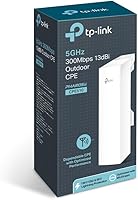
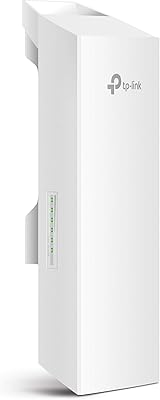
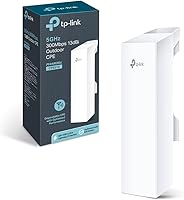
The TP-Link CPE510 Outdoor Point-to-Point Wireless Bridge is a purpose-built networking device for anyone who needs to push a reliable signal across real distance — think hundreds of meters to several kilometers — without paying enterprise prices. This outdoor wireless bridge occupies a practical sweet spot: affordable enough for tight budgets, yet capable enough to satisfy small ISPs, rural network builders, and IT professionals setting up campus or industrial backhaul links. Its weatherproof enclosure and passive PoE delivery mean a single Ethernet cable handles both data and power, so installation on a rooftop or pole stays clean. That said, if you're not comfortable with networking fundamentals, expect a genuine setup challenge before things run smoothly.
Features & Benefits

The CPE510's headline spec is its 13dBi directional MIMO antenna, which in clear line-of-sight conditions can hold a stable link well beyond 10 kilometers — the 15km figure is real but requires two perfectly aligned units with no obstructions between them. Transmit power runs from zero up to 27dBm, useful for both maximizing range and dialing back output to stay within regional regulations. The included passive PoE injector keeps the install tidy: one Ethernet run up the mast carries data and power, with up to 60 meters of cable supported. Pharos MaxStream TDMA technology earns its keep in multi-client deployments, actively reducing interference and keeping latency manageable. The Pharos Control software then lets you manage several units from one dashboard — handy for WISPs or larger installations.

Best For

This long-range CPE is a natural fit for anyone trying to connect two buildings wirelessly — the classic scenario being a barn, workshop, or outbuilding sitting several hundred meters from the main house, where trenching cable would cost far more than mounting a pair of these units. Small wireless ISPs building last-mile distribution networks will find real value in the point-to-multipoint mode, which lets one access point serve multiple client radios without the throughput degradation typical of standard Wi-Fi. IT teams at schools, warehouses, or industrial sites can deploy it as affordable wireless backhaul between structures. Hobbyists chasing long-distance 5GHz experiments will also appreciate the combination of solid performance and accessible pricing.

User Feedback

Long-term users consistently highlight two things: strong link stability once the antennas are properly dialed in, and a price-to-performance ratio that is hard to beat anywhere near this price class. The build quality earns solid marks as well — many report zero problems after years of exposure to rain, heat, and freezing temperatures. The main frustration, mentioned repeatedly, is antenna alignment: even a slight angular deviation can noticeably drop throughput, so this is not something you set up casually. The Pharos web interface works but feels dated, and new users regularly describe a steep learning curve during initial configuration. Firmware updates have slowed in recent years, which experienced users tend to view as maturity while newcomers sometimes read as neglect.

Pros

  • Delivers reliable, stable links across hundreds of meters to several kilometers when properly aligned.
  • Exceptional value compared to enterprise-grade outdoor CPE hardware with similar range capability.
  • Passive PoE means a single Ethernet cable handles power and data, keeping rooftop installs clean.
  • The weatherproof housing holds up well through years of rain, heat, and freezing temperatures.
  • Adjustable transmit power lets you fine-tune output to meet local regulatory limits.
  • Point-to-multipoint mode makes it genuinely scalable for small WISP deployments.
  • Pharos Control software enables centralized management of multiple units from one dashboard.
  • Pole mounting hardware is included in the box, so you are not hunting for extra parts.
  • Multiple operation modes — AP, Client, WISP — cover a wide range of real-world network topologies.
  • Long production lifespan means replacement units and community support remain easy to find.

Cons

  • Antenna alignment is unforgiving — even a small angular error can noticeably degrade throughput.
  • The Pharos web interface feels dated and has a real learning curve for first-time users.
  • The 15km range claim only holds under ideal, unobstructed line-of-sight conditions.
  • 802.11n tops out at N300, which limits peak throughput on demanding long-distance links.
  • Firmware updates have become infrequent, leaving some known edge-case bugs unresolved.
  • Non-technical users will likely need professional help or significant research time to configure it correctly.
  • The CPE510 operates only on 5GHz, which is more susceptible to obstruction than 2.4GHz over very long paths.
  • No built-in mounting mast included — you need to source your own pole or bracket for the install.
  • Customer support for configuration issues can be limited once the device is out of its initial warranty window.

Ratings

Our AI rating system analyzed thousands of verified global reviews for the TP-Link CPE510 Outdoor Point-to-Point Wireless Bridge, actively filtering out incentivized, bot-generated, and duplicate submissions to surface what real buyers genuinely experienced. The scores below reflect a balanced synthesis of both enthusiastic praise and recurring frustrations — nothing is glossed over. Whether this long-range CPE earns a place in your deployment or falls short of your needs, these scorecards will give you an honest picture.

Wireless Range
91%
For a device in this price class, the real-world range performance consistently impresses experienced users. Farm-to-barn links spanning 800 meters, campus backhaul runs pushing 2 kilometers, and rural WISP deployments all report stable, usable connections that would cost several times more with competing hardware.
The widely cited 15km figure requires near-perfect line-of-sight conditions that most real installations cannot guarantee. Users with any tree cover, rolling terrain, or building obstructions between endpoints frequently see effective range drop to a fraction of that ceiling, which can catch first-time buyers off guard.
Link Stability
88%
Once the antennas are properly dialed in and the configuration is solid, users across multiple continents consistently describe links that run for months without dropping. IT professionals managing remote monitoring sites and agricultural operations appreciate that this long-range CPE rarely demands attention after the initial setup.
Stability is tightly coupled to alignment quality — a mount that shifts slightly in high winds can degrade an otherwise reliable link. A handful of users also report occasional unexplained reboots on older firmware versions that TP-Link has been slow to address in recent update cycles.
Value for Money
94%
This is arguably where the CPE510 earns its strongest and most unanimous praise. Buyers regularly compare it favorably to enterprise-grade outdoor CPEs costing three to five times more, making it the go-to recommendation in community networking forums and WISP operator groups worldwide.
The value argument does depend on the buyer having the technical skill to extract full performance from the hardware. For someone who ends up hiring a network installer to configure and align it, the total cost of ownership climbs and the price advantage narrows considerably.
Build Quality
86%
The weatherproof enclosure earns consistent praise from users in demanding climates — northern Canadian winters, tropical monsoon regions, and coastal salt-air environments all feature in positive long-term reports. The physical housing feels solid and purposeful, not flimsy like some budget outdoor units.
A small but notable portion of users report that the mounting bracket hardware shows corrosion over multi-year outdoor exposure, particularly in high-humidity or coastal environments. The plastic enclosure also shows UV discoloration over time, though this appears to be cosmetic rather than functional.
Ease of Setup
51%
49%
Users with a networking background — even at a hobbyist level — generally find the Pharos web interface logical once they spend time with it. The documentation is comprehensive, and a large community of experienced users has produced video guides and forum threads that simplify the learning process considerably.
For buyers without prior networking experience, setup is genuinely difficult. Configuring IP addressing, selecting the correct operation mode, and physically aligning the antenna while monitoring signal strength in the interface simultaneously is a multi-person, multi-step process that frustrates a meaningful share of new buyers.
Antenna Alignment
63%
37%
The Pharos interface includes a real-time signal strength indicator that experienced installers use effectively during alignment, turning what could be a guesswork process into a measurable one. Professionals who have deployed multiple units report that alignment becomes faster and more intuitive with practice.
The directional antenna's tight beam is both its strength and its biggest practical headache. Even minor mount movement from wind or thermal expansion can push signal quality below acceptable thresholds, and re-aligning a unit mounted on a rooftop or high pole is not a quick or convenient task.
Throughput Performance
72%
28%
For the types of tasks this outdoor wireless bridge is typically deployed for — remote security camera feeds, basic internet sharing, SCADA system connectivity, and farm network backhaul — the real-world throughput is more than adequate. Most users in these scenarios never come close to saturating the available bandwidth.
The 802.11n N300 standard is aging, and buyers expecting modern Wi-Fi throughput speeds will be disappointed. Bandwidth-heavy use cases like 4K video streaming or large file transfers across the link can highlight the ceiling, and there is no upgrade path to faster wireless standards within this product line.
Software & Interface
58%
42%
The Pharos Control management platform provides a centralized view of all deployed units, which WISP operators and IT managers running multiple links find genuinely useful. Basic configuration tasks are logically organized once users invest time in understanding the interface layout.
The interface design feels like it has not been meaningfully updated in years, and first-time users frequently describe it as unintuitive and visually dated. Error messages are sometimes cryptic, and the lack of a modern mobile-friendly management view is a recurring complaint among newer buyers.
Firmware & Updates
61%
39%
Long-term users who have been running the CPE510 for several years tend to view the slowed update cadence as a sign of platform maturity rather than neglect. The existing firmware is considered stable enough for production deployments by the majority of experienced operators.
Newer buyers expecting active development and regular security patches are often disappointed. Some known edge-case bugs have remained unresolved across multiple firmware versions, and TP-Link's official communication about the update roadmap for this device line is minimal.
PoE Implementation
79%
21%
The passive PoE system is genuinely practical in the field — running a single Ethernet cable up a mast to handle both power and data simplifies outdoor installs significantly. The included injector works reliably, and the 60-meter cable run allowance covers the vast majority of real-world mounting scenarios.
The non-standard passive PoE implementation (24V) is incompatible with conventional 802.3af/at PoE switches, which means buyers with existing managed switch infrastructure cannot power the unit directly from their switch. This requires an extra injector per unit and adds a small but real complexity to rack-mounted deployments.
Weather & UV Resistance
83%
Multiple years of real-world outdoor exposure reports paint a reassuring picture — the unit handles sustained rain, freeze-thaw cycles, and summer heat reliably. Users in harsh climates like the Canadian Prairies and Southeast Asian monsoon zones consistently report functional hardware with no ingress or failure issues.
Surface yellowing from prolonged UV exposure is commonly reported on older units, and while purely cosmetic, it signals that the plastic compound used is not fully UV-stabilized. Some users also note that the mounting bracket steel shows surface rust after extended outdoor exposure in humid or coastal conditions.
Point-to-Multipoint Capability
76%
24%
The Pharos MaxStream TDMA engine makes the CPE510 a credible option for small WISP operators serving multiple client radios from a single access point. Users managing between three and eight client connections from one unit generally report acceptable throughput distribution and latency levels.
As the client count grows beyond a handful, per-client throughput drops noticeably and the TDMA scheduling becomes more apparent. This is not an enterprise-grade platform, and operators expecting to scale a dense multipoint network will hit real limitations before long.
Mounting & Installation Hardware
74%
26%
The included pole mounting straps are a thoughtful inclusion that covers the most common installation scenario without forcing buyers to source additional hardware. The unit is light enough that a single installer can handle rooftop or pole mounting without requiring a second person to hold the unit in place.
The mounting straps are adequate but not particularly robust for long-term outdoor duty — several users report replacing them with heavier-duty alternatives after a year or two of exposure. There is also no included mast or wall-mount bracket, so installations on flat surfaces require aftermarket hardware.
Documentation & Support
67%
33%
The printed installation guide and online Pharos knowledge base cover the fundamentals competently, and the large global user community has produced a rich library of third-party tutorials, forum threads, and YouTube walkthroughs that fill in the gaps where official documentation falls short.
TP-Link's direct technical support for this device is inconsistent — response times vary widely and support agents sometimes provide generic answers that do not address the specific configuration issue at hand. Users tackling non-standard deployment scenarios often find community forums more helpful than official support channels.

Suitable for:

The TP-Link CPE510 Outdoor Point-to-Point Wireless Bridge is purpose-built for anyone who needs to move data across meaningful distances without trenching cable or paying enterprise prices. It is an ideal pick for rural property owners who want to extend internet from a farmhouse to a barn, workshop, or guest cabin sitting hundreds of meters away. Small wireless ISPs and community network operators building last-mile distribution links will find the point-to-multipoint mode and Pharos Control management genuinely useful at this price point. IT staff managing multi-building campuses, warehouses, or industrial sites on a constrained budget can rely on it for stable wireless backhaul between structures. Technically confident hobbyists who enjoy experimenting with long-distance 5GHz links will also get a lot of mileage out of this hardware.

Not suitable for:

The TP-Link CPE510 Outdoor Point-to-Point Wireless Bridge is not a good fit for buyers who want a plug-and-play experience with minimal configuration. The Pharos interface, antenna alignment requirements, and networking concepts like TDMA modes and WISP routing are not beginner-friendly, and someone without a basic grasp of IP networking will likely struggle to get it running correctly. It is also the wrong tool for anyone hoping to broadcast a general Wi-Fi signal to mobile devices across a large area — this is a directional, point-focused radio, not a conventional access point. The 802.11n standard means throughput is capped well below what modern Wi-Fi 5 or Wi-Fi 6 gear can offer, so bandwidth-hungry applications over very long links may hit a ceiling. If your buildings are less than 100 meters apart and cable is feasible, a simple Ethernet run will almost always outperform any wireless bridge.

Specifications

  • Frequency Band: Operates exclusively on the 5GHz band, which offers cleaner airspace than 2.4GHz in most outdoor environments but is more sensitive to physical obstructions.
  • Wireless Standard: Complies with the IEEE 802.11n (N300) standard, delivering a maximum theoretical throughput of 300Mbps under ideal conditions.
  • Antenna Gain: Features a built-in 13dBi dual-polarized 2x2 directional MIMO antenna designed to concentrate signal energy in a focused beam for long-distance links.
  • Max TX Power: Transmit power is adjustable from 0 to 27dBm (500mW), allowing operators to optimize signal strength or reduce output to comply with local regulations.
  • Max Range: Rated for 15km+ transmission distance in clear, unobstructed line-of-sight point-to-point configurations only; real-world range varies with terrain and interference.
  • Power Method: Powered via passive PoE using the included 24V 1A injector, which carries both data and power over a single Ethernet cable — no separate power outlet required at the mount point.
  • PoE Cable Run: The passive PoE system supports Ethernet cable runs of up to 60 meters between the injector and the unit.
  • Operation Modes: Supports AP, Client, AP Router, and AP Client Router (WISP) modes, covering a broad range of point-to-point and point-to-multipoint deployment scenarios.
  • TDMA Technology: Pharos MaxStream TDMA (Time-Division Multiple Access) technology actively manages channel time to reduce interference and improve throughput and latency in multi-client deployments.
  • Management: Compatible with TP-Link Pharos Control software, which provides a centralized dashboard for configuring and monitoring multiple CPE units across a single network.
  • Weather Resistance: Housed in an outdoor-rated weatherproof enclosure designed to withstand sustained exposure to rain, UV radiation, and temperature extremes.
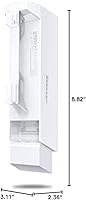
  • Dimensions: Measures 8.82 x 3.11 x 2.36 inches, making it a compact unit well-suited for pole or wall mounting in space-constrained outdoor locations.
  • Weight: Weighs 1.69 pounds (approximately 0.77 kg), light enough for single-person installation on a standard mounting pole.
  • Mounting: Pole mounting straps are included in the box, allowing the unit to be secured to standard mast or pipe diameters without additional hardware purchases.
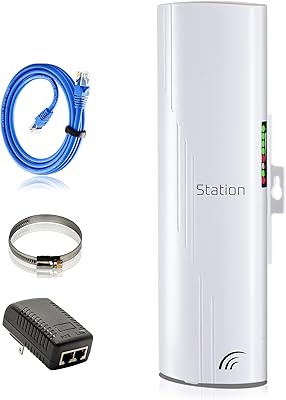
  • In-Box Contents: Package includes the outdoor CPE unit, a 24V 1A passive PoE adapter, pole mounting straps, an AC power cord, and a printed installation guide.

Related Reviews

TP-Link CPE210 Outdoor Wireless Access Point
75%
88%
Long-Range Performance
91%
Value for Money
83%
Build Quality
58%
Ease of Setup
86%
Antenna & Signal Focus
More
GOOD STORY WB504H Outdoor Wireless Bridge
71%
88%
Ease of Setup
81%
Link Stability
63%
Real-World Range
69%
Throughput Performance
83%
Value for Money
More
TP-Link EAP653 Wi-Fi 6 Access Point
83%
88%
Wireless Performance
79%
Setup & Installation
83%
Omada App & Controller Experience
91%
Build Quality & Design
84%
Range & Coverage
More
TP-Link Omada EAP225-Outdoor
82%
88%
Outdoor Range
91%
Build Quality & Weatherproofing
84%
Wi-Fi Performance & Stability
67%
Setup & Installation
83%
Omada Ecosystem Integration
More
TP-Link TL-WA1201 AC1200 Wireless Access Point
75%
88%
Value for Money
81%
Wi-Fi Coverage & Range
83%
Ease of Setup
86%
Multi-Mode Flexibility
58%
PoE Implementation
More
TP-Link Omada EAP720 WiFi 7 Access Point
81%
88%
Wireless Performance
91%
Value for Money
83%
Setup & Installation
79%
Build Quality & Design
86%
Omada Ecosystem Integration
More
TP-Link EAP650-Outdoor WiFi 6 Outdoor Access Point
80%
91%
Wireless Range
88%
Wi-Fi 6 Performance
93%
Build & Weather Resistance
67%
Ease of Setup
84%
Omada SDN Integration
More
TP-Link TL-WA3001 AX3000 WiFi 6 Access Point
75%
83%
Wireless Performance
81%
Setup & Ease of Use
78%
Range & Coverage
74%
Build Quality & Design
61%
Thermal Management
More
TP-Link Festa F65-Outdoor AX3000 Wi-Fi 6 Access Point
84%
88%
Performance
94%
Outdoor Durability
85%
Ease of Setup
82%
Signal Strength
79%
Cloud Management & App
More
TP-Link Deco X50-Outdoor WiFi 6 Mesh Node
80%
88%
Wireless Performance
74%
Weatherproofing
83%
Setup & Installation
71%
Value for Money
91%
Ecosystem Integration
More

FAQ

Yes, in a standard point-to-point setup you need one unit at each end — one configured as an access point and one as a client. Both units need clear line of sight between them for the link to work reliably. Many buyers order a two-pack specifically for this reason.

That figure is achievable, but only under very specific conditions: two units perfectly aligned, no obstacles between them, and minimal radio interference in the area. In typical rural or suburban environments with trees, hills, or buildings in the path, realistic usable range is considerably shorter. For most farm or campus deployments spanning a few hundred meters to a couple of kilometers, range is rarely the limiting factor.

Honestly, yes — it takes more effort than a standard home router. You need to access a web-based interface, configure IP addresses, choose operating modes, and physically align the antennas, which requires some patience and basic networking knowledge. If you have never set up a router beyond plugging it in, expect to spend time with the manual or watch setup videos before everything clicks.

Passive PoE means power is sent over the Ethernet cable at a fixed 24V regardless of whether the connected device negotiates for it. This is different from 802.3af/at active PoE standards used on most managed switches. You should only power the CPE510 through the included injector — plugging it directly into an active PoE switch port risks damaging the unit or the switch.

The TP-Link CPE510 Outdoor Point-to-Point Wireless Bridge has a strong track record in real-world outdoor conditions. Users in regions with heavy seasonal rain and freezing winters consistently report the hardware running without issue for multiple years. The enclosure is purpose-built for permanent outdoor exposure, not just light weather protection.

Not in the way you might expect. This is a directional point-to-point radio, not a conventional access point broadcasting a wide coverage bubble. It sends and receives signal in a narrow beam. To use it as a traditional wireless access point for devices like phones or laptops, you would need to connect a standard Wi-Fi router to the Ethernet output on the receiving end.

Quite precisely. The 13dBi directional antenna has a relatively tight beam width, so even a few degrees off-axis can result in noticeably weaker signal or an unstable link. Most experienced installers use a signal strength indicator in the Pharos interface in real time while physically adjusting the mount. Take your time with alignment — it makes a bigger difference than almost any other factor.

Yes, in point-to-multipoint (PtMP) mode, a single unit acting as the access point can connect to several client units simultaneously. The Pharos MaxStream TDMA technology helps manage the shared airtime so throughput does not collapse as you add more clients. This is a key reason the CPE510 is popular with small WISPs distributing connectivity across a neighborhood or rural area.

The Pharos Control software is TP-Link's own platform and works best with other Pharos-compatible devices. For basic configuration, you can always use the built-in web interface without any additional software. However, it does not natively support SNMP-based enterprise management platforms or third-party NMS tools in the way that some competing commercial-grade CPEs do.

This outdoor wireless bridge has been on the market since 2014 and remains actively sold, which is a good sign for a networking product — it means spare units, community forums, and configuration guides are widely available. Firmware updates have slowed significantly in recent years, which the long-term user community generally interprets as the platform being stable rather than abandoned. Support from TP-Link's official channels is still available within standard warranty terms.