Overview

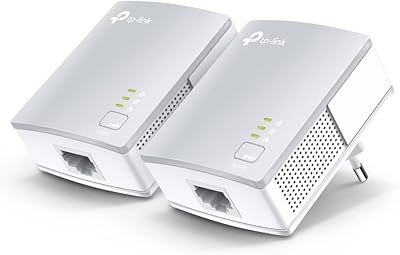
The TP-Link TL-PA4010 AV500 Powerline Adapter solves a problem many households run into: getting a reliable wired connection to a room that's too far from the router to bother running cable. The idea is straightforward — plug one adapter near your router, connect it via Ethernet, then plug a second unit anywhere else in the house, and your existing electrical wiring carries the signal between them. Before buying, one thing to know upfront: this listing is one unit only. You'll need a second compatible adapter to form a working pair. Real-world speeds also won't hit the theoretical 500Mbps ceiling — actual throughput depends heavily on your home's wiring age and layout.
Features & Benefits

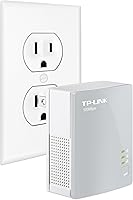
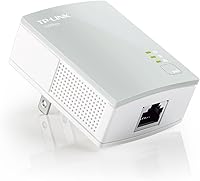
Setup takes about a minute. Plug-and-play is genuinely accurate here — connect one adapter to your router with an Ethernet cable, plug the second wherever you need connectivity, and you're done. No software, no configuration screens. The compact design sits at just 28.5mm thick, so it doesn't jut awkwardly from the wall or block adjacent outlets. Coverage can technically reach up to 300 meters through your home's electrical circuits, handling thick walls and multiple floors better than most Wi-Fi extenders can. An automatic power-saving mode kicks in during idle periods, trimming energy consumption noticeably. Data traveling across the network is also protected by 128-bit AES encryption, a reasonable security layer for home use.

Best For

This powerline adapter is a strong fit for anyone who needs a stable wired connection in a far-flung room but doesn't want to drill holes or snake cables through walls. Renters especially benefit — there's nothing permanent about this setup, and you can take it along when you move. Gaming console and smart TV users tend to see real gains here, since even moderate, consistent bandwidth beats the stuttering Wi-Fi causes in interference-heavy homes. It also works well for a small home office where you want one reliable wired drop without calling an electrician. Homes with older wiring or circuits on separate breakers may see variable results, but most modern setups handle it well.

User Feedback

The TL-PA4010 holds a solid four-star average, and the split between praise and frustration is fairly predictable. Buyers consistently highlight how quickly it's running — most report being connected within minutes of opening the box, no troubleshooting required. Long-term owners also mention years of trouble-free performance under normal home conditions. The frustrations, though, are worth knowing. Speed complaints come up often, particularly from users in older homes where the wiring doesn't carry signal efficiently. A notable chunk of negative reviews also trace back to one avoidable issue: buying a single unit without realizing a second is required. TP-Link does maintain a direct manufacturer return program, which serves as a practical backstop if something goes wrong down the line.

Pros

  • Plug-and-play setup works immediately — no apps, accounts, or configuration screens required.
  • Compact 28.5mm housing sits flush at the wall without blocking nearby outlets.
  • Carries signal through floors and thick walls where Wi-Fi extenders consistently fail.
  • Automatic power-saving mode reduces idle energy draw without any manual adjustment.
  • 128-bit AES encryption runs in the background with zero setup from the user.
  • Long-term owners frequently report years of trouble-free daily use under normal home loads.
  • Lower and more consistent latency than Wi-Fi makes it a real upgrade for gaming and streaming.
  • TP-Link offers a direct manufacturer return program regardless of where or when it was purchased.
  • Works with a wide range of devices via standard Ethernet — no driver installation needed.

Cons

  • Real-world speeds rarely approach the 500Mbps spec, especially in homes with older wiring.
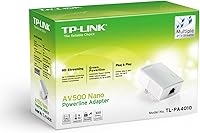
  • This listing ships one adapter only — buyers need a second unit before it does anything.
  • Performance varies significantly based on home wiring age and circuit layout, which is impossible to predict before buying.
  • Must be plugged directly into a wall outlet — power strips and surge protectors degrade the signal.
  • Some units have failed within the first year, pointing to inconsistent manufacturing quality across batches.
  • The adapter runs noticeably warm during sustained use, which can be concerning in enclosed spaces.
  • Pairing with powerline adapters from other brands is unreliable and often fails entirely.
  • Contacting manufacturer support requires a phone call rather than a convenient online or chat option.

Ratings

The TP-Link TL-PA4010 AV500 Powerline Adapter has been evaluated by our AI rating system after parsing hundreds of verified global buyer reviews, with spam, incentivized, and bot-generated submissions actively filtered out. Scores reflect the full picture — where this networking plug genuinely delivers and where it falls short — so you can make an informed decision before purchasing.
Ease of Setup
93%
Nearly every buyer who reviewed setup described the process as effortless — plug in, connect an Ethernet cable, and the adapters find each other automatically. There is no app, no login screen, and no configuration required. For non-technical users, this is the single biggest selling point.
A small number of users reported that units failed to pair on the first attempt and required a reset cycle. This is infrequent, but it can be disorienting for buyers who expected absolutely zero friction.
Real-World Network Speed
58%
42%
For everyday tasks like streaming HD video, browsing, or running a smart TV, the TL-PA4010 delivers plenty of stable throughput. Users in homes with newer wiring consistently report a noticeable improvement over Wi-Fi in distant rooms.
The 500Mbps figure is a theoretical ceiling that real-world conditions rarely approach. Homes with older or mixed electrical circuits often see speeds well under 100Mbps, and performance can vary dramatically from outlet to outlet — something buyers on older construction frequently flag.
Range & Wall Penetration
78%
22%
One of the more convincing use cases for this networking plug is reaching rooms that are simply too far or too structurally complex for Wi-Fi. Users in multi-floor homes report consistent connectivity where extenders had previously failed.
Performance depends entirely on whether both adapters share the same electrical circuit. Users whose homes have older wiring split across multiple breaker circuits have reported weak or inconsistent connections that no amount of repositioning could fix.
Build Quality & Durability
74%
26%
The housing feels solid for its size, and long-term owners frequently mention units running without issues for several years under continuous use. The compact form factor holds up well physically with no reports of casing warping or port degradation over time.
A portion of reviews mention units that failed within the first year, suggesting some batch inconsistency. The adapter also runs noticeably warm during sustained use, which a few users found concerning even if it never caused a practical problem.
Design & Form Factor
87%
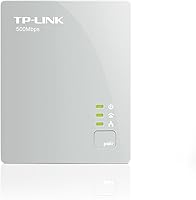
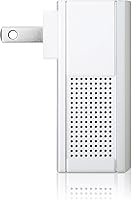
At just 28.5mm thick, this powerline adapter is one of the slimmer options in its class. It sits flush against most wall outlets without blocking adjacent sockets, which matters in rooms where outlet space is limited.
The white finish shows scuff marks easily in high-traffic areas, and the fixed orientation means it may not sit ideally in every outlet type or location. It's a minor gripe, but worth noting for tidier installations.
Value for Money
71%
29%
For users who simply need a stable wired connection in one additional room, the price-to-performance ratio is reasonable. It costs less than a professional Ethernet installation and outperforms most Wi-Fi extenders in terms of latency consistency.
The single-unit listing trips up a lot of buyers who expect a working pair out of the box. Effectively, the real cost is double once you account for needing two adapters, which changes the value equation meaningfully for budget-conscious shoppers.
Packaging Clarity
41%
59%
For buyers who read the product listing carefully, the single-unit nature of this package is technically disclosed. Those who understood this going in had no complaints about what arrived.
This is one of the most frequently cited frustrations in the review pool. Many buyers assumed the box contained a pair, only to discover one adapter on arrival. The disconnect between the product page and buyer expectations has generated a disproportionate share of negative feedback that has nothing to do with the hardware itself.
Long-Term Reliability
69%
31%
A meaningful segment of reviewers describe using the same units daily for two to four years without any issues. For home streaming and general browsing loads, the adapter appears to handle sustained use without degrading.
Early failures do appear in the data at a higher-than-average rate for this category. Some units stop responding or lose pairing after several months, and while TP-Link's return program exists, the process requires direct contact with the manufacturer rather than a simple retailer exchange.
Energy Efficiency
83%
The automatic power-saving mode is a genuine feature, not a marketing afterthought. Users who monitor home energy draw have noted the adapter consumes very little during periods of inactivity, which adds up in always-on home network setups.
The power-saving mode occasionally introduces a brief reconnection delay when the network wakes back up, which a handful of users found mildly disruptive during tasks that require an always-ready connection.
Network Security
81%
19%
128-bit AES encryption runs automatically without any setup required, which is a meaningful baseline for a device that transmits data through shared electrical infrastructure. Most home users will never need to think about it.
There is no user-accessible security dashboard or pairing confirmation indicator, so technically inclined users who want visibility into the encryption handshake have no way to verify it independently from the device itself.
Compatibility
77%
23%
The TL-PA4010 works across Windows XP through Windows 10 and Linux, covering a wide range of home and small office hardware. It pairs with other TP-Link AV500 adapters without issue, and the Ethernet interface means it connects to virtually any device with a wired port.
Compatibility with non-TP-Link powerline adapters is hit or miss. Buyers trying to expand an existing network from a different brand sometimes find that pairing is unreliable or fails entirely, limiting flexibility for mixed-brand setups.
Manufacturer Support
66%
34%
TP-Link operates a direct return program for this product line that isn't tied to the original purchase date or retailer — a genuinely useful safety net for buyers who acquired the adapter secondhand or as a gift.
Reaching that support channel requires calling a phone hotline rather than using a self-service portal, which users in non-US regions or different time zones have found inconvenient. Response times also appear inconsistent based on review feedback.
Latency Performance
76%
24%
For gaming console and streaming device users, the latency improvement over Wi-Fi is real and consistent in most home environments. Ping times through a powerline connection are typically more stable than wireless, even when raw speed is modest.
Latency can spike intermittently in homes with heavy appliance loads on the same circuit — refrigerators cycling, microwaves running, or HVAC systems starting up can briefly disrupt signal quality in ways that Wi-Fi users would never notice.
Installation Flexibility
72%
28%
The plug-and-play nature means this powerline adapter can be repositioned, repurposed, or moved to a new home without any reconfiguration. Renters in particular benefit from a networking solution that leaves zero physical trace behind.
Outlet placement is a real constraint. The adapter needs to be plugged directly into a wall outlet for best performance — using it through a power strip or surge protector can significantly degrade signal, a caveat that is not prominently communicated upfront.

Suitable for:

The TP-Link TL-PA4010 AV500 Powerline Adapter is a practical fit for anyone who needs a stable wired internet connection in a room that's simply too far from the router to reach comfortably with a cable. Renters are an ideal audience — there's no drilling, no permanent installation, and the whole setup can be unplugged and taken to the next place without leaving a trace. Homeowners dealing with thick concrete or brick walls that choke Wi-Fi signals will also find real value here, since the signal travels through the electrical wiring rather than through air. Smart TV owners, console gamers, and anyone running a media streaming box in a back bedroom or basement will appreciate the lower, more consistent latency compared to wireless. A small home office that needs one reliable wired drop without calling an electrician is another genuinely good use case for this networking plug.
Not suitable for:

Buyers chasing high throughput for large file transfers, 4K multi-stream households, or work-from-home setups demanding consistent gigabit-class speeds should look elsewhere — the TP-Link TL-PA4010 AV500 Powerline Adapter is not built for that workload, and real-world speeds through aging or split-circuit wiring can fall well short of what modern demanding tasks require. Homes built several decades ago with older electrical infrastructure are particularly risky, as signal degradation on those circuits can make performance unpredictable regardless of outlet placement. Anyone expecting a complete, ready-to-use pair out of the box will also be disappointed — this listing contains a single adapter, meaning a second compatible unit is required before anything actually works. Users who need plug-in flexibility through power strips or surge protectors should know that doing so can significantly weaken the signal, limiting where the adapter can realistically be placed. Finally, anyone who wants to mix this with powerline adapters from other brands may run into pairing issues, as cross-brand compatibility is unreliable in practice.
Specifications

  • Brand: Manufactured by TP-Link USA, a widely distributed networking hardware brand with broad retail and direct support presence.
  • Model: The model designation is TL-PA4010, part of TP-Link's AV500 powerline adapter series.
  • Powerline Standard: Uses the HomePlug AV500 standard, enabling data transmission over standard home electrical wiring.
  • Max Speed: Theoretical maximum data transfer rate is 500 Mbps, though real-world throughput is typically lower depending on wiring conditions.
  • Interface: Equipped with one standard RJ-45 Ethernet port for connecting a router, computer, console, or other wired device.
  • Range: Rated for up to 300 meters of coverage transmitted through a home or building's existing electrical circuitry.
  • Encryption: Implements 128-bit AES encryption automatically to secure all data traveling across the powerline network.
  • Form Factor: Nano wall-plug design measuring approximately 28.5mm in thickness, built to sit flush against standard wall outlets.
  • Dimensions: Overall unit dimensions are 6.7 x 4.7 x 3.3 inches as packaged, with a compact housing suited for discreet installation.
  • Item Weight: The adapter weighs 9.6 ounces, making it lightweight and easy to reposition between rooms or locations.
  • Color: Available in white, designed to blend unobtrusively into typical residential and office wall outlet surroundings.
  • Power Saving: Features an automatic power-saving mode that can reduce energy consumption by up to 85% during periods of network inactivity.
  • OS Compatibility: Compatible with Windows XP, Windows Vista, Windows 10, and Linux operating systems without requiring additional driver installation.
  • Package Contents: This listing contains one single adapter only; a second compatible AV500 adapter is required to establish a functioning powerline network.
  • Data Protocol: Supports Ethernet and IEEE 802.3 data link protocols for broad compatibility with standard networking equipment.
  • Manufacturer Support: TP-Link USA offers a direct product return program allowing customers to return any AV500 powerline adapter regardless of original purchase date or retailer.
  • Compatible Devices: Primarily designed for desktop computers but works with any device featuring a standard Ethernet port, including smart TVs, consoles, and routers.
  • First Available: This product was first listed for sale in October 2017 and has not been discontinued by the manufacturer as of available data.

Related Reviews

TP-Link TL-PA411KIT Powerline Network Adapter Kit
78%
94%
Ease of Setup
61%
Real-World Speed Performance
83%
Build Quality & Durability
88%
Compatibility
91%
Physical Footprint
More
TP-Link TL-PA9020P KIT AV2000 Powerline Adapter
77%
72%
Real-World Throughput
88%
Setup & Installation
76%
Connection Stability
74%
Value for Money
86%
Passthrough Outlet
More
TP-Link AC750 Powerline Wi-Fi Adapter
77%
93%
Ease of Setup
61%
Real-World Speed Performance
72%
Wi-Fi Coverage & Signal Quality
84%
Wired Ethernet Reliability
58%
Compatibility with Home Wiring
More
TP-Link TL-WPA7617 Powerline WiFi Extender Kit
70%
91%
Ease of Setup
67%
Real-World Throughput
88%
Wired Ethernet Performance
72%
Wi-Fi Coverage & Signal Quality
38%
Surge Protector Compatibility
More
TP-Link TL-WPA8631P KIT Powerline WiFi Extender
77%
91%
Ease of Setup
67%
Real-World Throughput
61%
Wiring Compatibility
83%
Long-Term Reliability
72%
Wi-Fi Coverage & Performance
More
TP-Link TL-WPA7817 Powerline Wi-Fi 6 Extender Kit
86%
88%
Wi-Fi Performance
94%
Setup & Installation
91%
Value for Money
85%
Powerline Range
89%
Dual-Band Speeds
More
TP-Link TL-SG3428XMP 24-Port Managed PoE Switch
80%
88%
PoE Performance & Budget Reliability
91%
10G Uplink Throughput
83%
Omada SDN Integration
67%
Setup & Initial Configuration
86%
Build Quality & Hardware Durability
More
TP-Link TL-WA1201 AC1200 Wireless Access Point
75%
88%
Value for Money
81%
Wi-Fi Coverage & Range
83%
Ease of Setup
86%
Multi-Mode Flexibility
58%
PoE Implementation
More
TP-Link N300 WiFi Extender TL-WA855RE
82%
91%
Value for Money
96%
Ease of Setup
75%
WiFi Performance (Range)
80%
Build Quality
88%
Compatibility with Devices
More
TP-Link TL-MR6400 4G LTE Router
82%
88%
Setup & Installation
91%
4G LTE Performance
83%
Wi-Fi Speed & Reliability
85%
Portability
82%
Bandwidth Management (QoS)
More

FAQ

No, and this is the most important thing to know before ordering. This listing contains a single adapter only. To actually use powerline technology, you need at least two adapters — one connected near your router and one at the destination room. You can buy the starter kit that includes a pair, or purchase a second TL-PA4010 separately if you already own a compatible unit.

Your home already has electrical wiring running through every wall and floor to power your outlets. A powerline adapter sends network data along those same wires. You plug one adapter near your router and connect them with an Ethernet cable, then plug a second adapter wherever you need internet and connect your device to it. No new wiring, no drilling — it just uses the infrastructure that's already there.

Yes, that's one of the main reasons people choose powerline over Wi-Fi extenders. The signal travels through the electrical wiring itself rather than through air, so physical obstacles like thick walls, concrete, or floors don't affect it the way they would a wireless signal. That said, performance can drop if the two adapters are on separate electrical circuits within the home.

The 500Mbps rating is a theoretical maximum under ideal lab conditions. In most real homes, you'll see something considerably lower — often anywhere from 50Mbps to 150Mbps depending on the age and condition of your wiring. For streaming HD video, casual gaming, or general browsing, that's usually more than sufficient. If you need to regularly transfer large files or run multiple simultaneous heavy workloads, manage expectations accordingly.

It's not reliably compatible with adapters from other manufacturers. While HomePlug AV is a shared standard, real-world cross-brand pairing is inconsistent and frequently fails. For a stable setup, it's best to stick with TP-Link AV500 adapters on both ends.

No setup is required at all. Plug the first adapter into a wall outlet near your router, connect it to the router with an Ethernet cable, plug the second adapter in the destination room, and connect your device. The TP-Link TL-PA4010 AV500 Powerline Adapter pairs automatically and is ready to use within seconds.
Technically you can, but you really shouldn't. Plugging a powerline adapter into a power strip or surge protector significantly degrades the signal because those devices filter out the electrical frequencies the adapter relies on to carry data. For best performance, it needs to go directly into a wall outlet.

It does run noticeably warm to the touch under sustained use, which is typical for powerline adapters. This is generally within normal operating range and shouldn't cause concern in open, ventilated outlet locations. Avoid placing it in enclosed spaces where heat has nowhere to go.

TP-Link USA runs a direct return program specifically for their AV500 powerline adapters. You can return a faulty unit directly to TP-Link regardless of when you bought it or which retailer you used. You'll need to contact their support line to initiate the process. It's a useful backstop, especially if you bought the adapter a while ago and no longer have a receipt.

For most people, yes. Wi-Fi extenders rebroadcast a wireless signal, which still introduces latency and can suffer from interference. This powerline adapter provides a proper wired connection, which means lower and more consistent ping times — something that matters for gaming in particular. If your TV or console is in a room with weak Wi-Fi and you can't run a cable, a powerline setup is usually the more reliable fix.