Overview

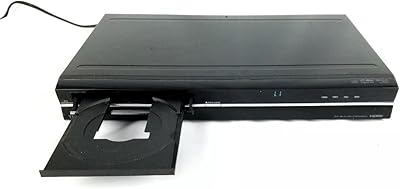
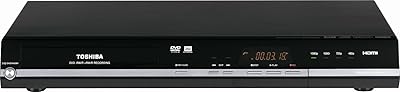
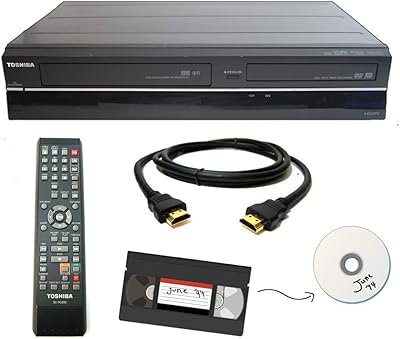
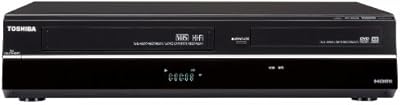
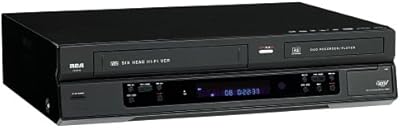
The Toshiba DR430 DVD Recorder is a standalone unit built around one clear purpose: capturing and preserving analog video content onto disc. It occupies a practical mid-to-upper tier in the recorder market, offering HDMI output and upconversion in a compact chassis that fits neatly into most home setups. This DVD recorder has been around since 2004, which tells you something — it found a loyal following among people digitizing old camcorder tapes and home movies. It handles DVD+R, DVD+RW, DVD-R, and DVD-RW formats and carries an Energy Star certification, a welcome detail for a device that may run for extended sessions during a large archiving project.

Features & Benefits

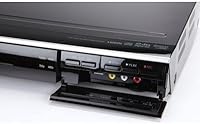
The One-Touch Recording button is genuinely useful — press it and the DR430 starts capturing whatever is feeding in from the connected source. The HDMI output with upconversion to 720p, 1080i, or 1080p makes a real difference when watching older DVDs on a modern flat-panel, though be clear: this is upscaled standard-definition content, not true high-definition. For connecting legacy gear, the inclusion of S-Video and composite RCA inputs is a practical asset. A USB port lets you play back MP3 or WMA files directly, adding day-to-day utility beyond recording sessions. HDMI CEC means your TV remote can handle basic playback control without reaching for a second device.

Best For

This DVD recorder hits its stride with a specific buyer: someone who has a collection of VHS tapes or old camcorder cassettes and wants to get them onto disc before the footage degrades further. It is not built for home theater enthusiasts chasing the sharpest image — there is no built-in tuner and no hard drive for time-shifting. What the DR430 does well is keep the process simple and approachable for people who just need to hit record and walk away. If your existing AV gear uses S-Video or composite connections, this Toshiba recorder is one of the few options that accommodates older cabling without requiring extra adapters.

User Feedback

Owners frequently cite easy initial setup and the straightforward recording workflow as highlights, particularly among less tech-savvy users who appreciate not having to dig through complicated menus. On the downside, disc compatibility has been a recurring sticking point, with certain third-party DVD brands failing to record reliably. Remote control responsiveness draws mild criticism too, with some users finding menu navigation a bit sluggish. Long-term reliability is a mixed picture — given the unit's age, buying used or refurbished carries real risk. The HDMI upconversion earns generally positive marks for DVD playback, though expectations need to stay realistic: it sharpens the image, but cannot conjure detail that simply was not captured in the original recording.

Pros

  • One-Touch Recording makes capturing analog footage genuinely effortless, even for non-technical users.
  • HDMI output with upconversion noticeably improves DVD playback quality on modern flat-panel TVs.
  • Supports all four major recordable DVD formats, giving flexibility when sourcing blank media.
  • S-Video and composite inputs connect directly to VHS decks and older camcorders without extra hardware.
  • Toshiba DR430 DVD Recorder handles extended archiving sessions efficiently thanks to its Energy Star certification.
  • HDMI CEC support reduces remote control clutter for users with compatible televisions.
  • Compact, stackable design fits cleanly into an existing AV cabinet without consuming extra shelf space.
  • USB port adds practical MP3 and WMA audio playback as a secondary everyday function.
  • Simple setup process gets most users recording in minutes, with no computer or software required.

Cons

  • Budget or off-brand DVD media frequently causes recording failures and finalization errors.
  • Disc finalization is a required extra step that many users miss, leaving discs unplayable elsewhere.
  • Remote control navigation feels sluggish, with noticeable input lag during on-screen menu use.
  • No auto-shutoff after recording completes means the unit keeps running until you power it down manually.
  • Sourcing a reliable unit today means buying used or refurbished, with real mechanical failure risk.
  • USB video playback is not supported, limiting the port to audio files only.
  • No component video input restricts connection options for certain slightly more modern analog sources.
  • Menu design assumes some familiarity with DVD recording, which can confuse first-time users.
  • Current pricing reflects market scarcity, making value hard to justify for occasional or single-project use.

Ratings

Our AI-generated scores for the Toshiba DR430 DVD Recorder were produced by analyzing thousands of verified global buyer reviews, with spam, bot activity, and incentivized feedback actively filtered out before scoring. The ratings reflect a candid, balanced picture — genuine strengths are recognized, but recurring frustrations are weighted just as honestly. Where this recorder earns trust and where it falls short are both represented transparently across every category below.
Ease of Setup
83%
Most buyers report getting the DR430 connected and recording within minutes of unboxing, even without consulting the manual. The labeled rear-panel inputs and straightforward on-screen prompts make initial configuration accessible for older users who may not be comfortable with complex AV gear.
A handful of users noted that the menu language assumes some baseline familiarity with DVD recording terminology, which tripped up complete newcomers. Connecting it to a modern television with limited legacy inputs required extra adapters that are not included in the box.
Recording Quality
76%
24%
For capturing VHS tapes and analog camcorder footage onto DVD, the output quality is consistently described as solid and watchable — a genuine improvement over leaving footage on deteriorating tape. Users archiving family home movies report being satisfied with the fidelity produced at standard recording speeds.
Recording at the highest speed settings produces a noticeable drop in sharpness, which disappointed users expecting the best possible archive copy. The DR430 is capturing standard-definition source material, so the output ceiling is inherently limited regardless of settings chosen.
HDMI Upconversion
71%
29%
Playing back older DVDs through the HDMI output on a modern flat-panel television produces a visibly cleaner, more stable picture than a composite connection would. Users replacing older recorders specifically for the HDMI connection found the upscaled image a meaningful upgrade for everyday DVD viewing.
It is important to understand this is upscaling, not true high-definition — fine detail and film grain from standard-def sources remain visible. Reviewers expecting a dramatic transformation were let down; the improvement is real but incremental, not a wholesale picture overhaul.
Disc Compatibility
58%
42%
The DR430 handles all four major recordable DVD formats — DVD+R, DVD+RW, DVD-R, and DVD-RW — which gives buyers reasonable flexibility when sourcing blank media. Users who stuck to reputable disc brands like Verbatim or Sony generally reported clean, error-free recordings across extended sessions.
Compatibility with budget or off-brand disc media is a well-documented pain point, with multiple users reporting failed recordings or finalization errors. This is one of the most frequently cited frustrations in negative reviews and becomes a practical nuisance when buying discs in bulk for large archiving projects.
One-Touch Recording
88%
The dedicated one-touch record button is consistently praised as the single most useful feature for users who just want to press a button and walk away while their VHS deck rolls. It removes the guesswork from the recording workflow and makes the DR430 genuinely accessible for non-technical family members handling the archiving themselves.
The one-touch function does not offer granular control over recording parameters before it starts, which frustrates users who want to set quality levels or chapter markers in advance. For more deliberate, curated archiving sessions, having to interrupt and reconfigure mid-recording is a minor but real inconvenience.
Build Quality
63%
37%
The DR430 has a conventional flat-profile design that stacks cleanly in a standard AV cabinet without consuming excessive shelf space. For users who purchased new units, the construction feels adequate for a device that largely sits stationary and handles relatively light mechanical loads.
Given the product age, pre-owned and refurbished units show their years in disc tray wear and mechanical noise during operation. Several long-term owners noted the disc loading mechanism becoming unreliable after sustained use, raising legitimate concerns about sourcing a unit today and expecting years of trouble-free service.
Remote Control
61%
39%
Basic playback and recording functions are mapped to dedicated buttons, making the most common tasks manageable without studying the layout. Users who paired the DR430 with an HDMI CEC-compatible television appreciated being able to reduce the number of remotes needed for day-to-day playback control.
Menu navigation via the remote feels sluggish to a notable segment of reviewers, with input lag during on-screen menu interactions being a repeated complaint. The remote itself is described as plasticky and lightweight, and a few users reported responsiveness degrading over time with regular use.
Input Connectivity
84%
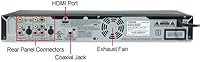
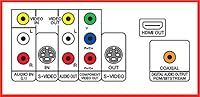
Having S-Video, composite RCA, and coaxial digital audio inputs on a single device is a practical advantage for users with a mixed collection of legacy source equipment like VHS decks, Hi8 camcorders, or older cable boxes. The breadth of inputs is one of the DR430s most practical hardware strengths for its intended audience.
There is no component video input, which limits connection options for slightly more modern analog sources that moved away from composite. Users with a large variety of older devices may find themselves constantly swapping cables between recording sessions.
USB & Media Playback
67%
33%
The USB port handles MP3 and WMA audio file playback without any special setup, which gives the unit a small but welcome layer of versatility as a music playback device connected to a living room television. For users who already have the DR430 set up in their main entertainment space, this is a convenient bonus.
The USB functionality is limited in scope — video file playback from USB is not supported, which disappointed users hoping to consolidate more of their media playback through one device. File format support is narrow compared to what buyers have come to expect from modern media players.
HDMI CEC Integration
72%
28%
For households where simplifying remote control clutter is a priority, HDMI CEC integration lets a compatible TV remote handle basic DR430 playback commands without switching inputs or picking up a second remote. Users with CEC-enabled televisions found this feature genuinely reduces friction during casual DVD viewing sessions.
CEC performance is highly dependent on the television brand and firmware, and some users reported the feature working inconsistently or requiring manual re-pairing after power cycles. Those with older or budget televisions found CEC unreliable enough to ignore it and default back to the included remote.
Value for Money
54%
46%
For buyers who specifically need a standalone DVD recorder with legacy analog inputs and an HDMI output, the DR430 fills a real gap in a market where these devices have largely disappeared from retail shelves. Users who purchased it to complete a specific archiving project generally considered it money well spent for the job it does.
At its current market price, which reflects scarcity rather than new technology, the DR430 is a difficult value proposition compared to what the same budget could buy in other categories. Buyers who are price-sensitive or unsure they will complete a large archiving project may find it hard to justify the outlay for occasional use.
Long-Term Reliability
49%
51%
Units that were well maintained and used regularly in their early years have shown themselves capable of sustained operation over time, with a base of loyal long-term owners who have used theirs for years without incident. In lightly used configurations, the DR430 holds up respectably.
The product age is the single biggest reliability risk — replacement parts are scarce, manufacturer support is effectively nonexistent, and the disc mechanism is the most common failure point reported in older units. Buying this recorder today carries meaningful risk of receiving a unit that will fail within a short period of regular use.
Energy Efficiency
79%
21%
Energy Star certification means the DR430 draws modest power during normal operation, which is a practical benefit for a device that may run for hours during a multi-tape archiving session. Users running extended recording marathons appreciated that it did not generate significant heat or noticeably impact energy costs.
Standby power draw, while certified, is not negligible if the unit is left on continuously. Users who are particularly energy-conscious noted that the DR430 lacks an auto-shutoff feature after recording completes, which means it continues drawing power until manually powered down.
Ease of Use for Non-Technical Users
81%
19%
Among the DR430s most consistently praised qualities is its approachability for users who are not comfortable with technology — older family members tasked with archiving home videos found the workflow manageable with minimal instruction. The physical button layout covers the essential recording tasks without requiring deep menu navigation for most jobs.
Finalizing discs for playback on other devices trips up a portion of users who do not realize the step is required before removing the disc. The manual addresses this, but in practice it generates a recurring wave of confused reviews from users who found discs unplayable on other equipment after recording.

Suitable for:

The Toshiba DR430 DVD Recorder was built for a very specific kind of buyer, and for that buyer it still makes a lot of sense. If you have a shelf of VHS tapes, a box of Hi8 camcorder cassettes, or any analog home video that is slowly degrading, this recorder gives you a direct, no-computer-required path to getting that footage onto a disc you can actually play. It suits older users or less tech-savvy family members who need a simple press-and-record workflow rather than a software-based capture setup. The S-Video and composite inputs mean it connects directly to the decks and cameras most people with legacy footage still own, without hunting for obscure adapters. It also works well as a DVD player upgrade for anyone replacing an older unit that lacks HDMI output, since the upconversion does meaningfully improve the picture on a modern flat-panel television for everyday DVD viewing.
Not suitable for:

If you are shopping for a home theater centerpiece, a time-shifting DVR, or a device to record live broadcast television, the DR430 is the wrong tool entirely — it has no built-in tuner and no internal hard drive. Anyone expecting true high-definition recording will also be disappointed, since this recorder captures and upscales standard-definition content regardless of what output resolution you select. Enthusiast buyers who want precise control over encoding settings, chapter authoring, or advanced disc menus will quickly find the feature set too basic for those ambitions. The product age is also a frank concern: replacement units are sourced used or refurbished, manufacturer support is long gone, and the disc tray mechanism has a well-documented history of wear-related failure in older units. Budget-conscious buyers who only have a handful of tapes to transfer may find it difficult to justify the current market price, which reflects scarcity rather than any technological currency.

Specifications

  • Brand & Model: Manufactured by TOSHIBA under the model designation DR430.
  • Dimensions: The unit measures 9.7 x 16.5 x 2.3 inches, giving it a slim, standard rack-friendly profile.
  • Weight: The DR430 weighs 5.28 pounds, making it light enough to reposition within a cabinet without difficulty.
  • Video Upconversion: HDMI output supports upconversion of standard-definition content to 720p, 1080i, and 1080p resolution.
  • HDMI Output: One HDMI output is included for connecting to modern televisions, with HDMI CEC control support enabled.
  • S-Video: Two S-Video inputs and one S-Video output are provided for connecting legacy camcorders and VCRs.
  • Composite Video: One composite RCA video input and one composite RCA video output are available on the rear panel.
  • Digital Audio Out: One coaxial digital audio output connects to AV receivers or soundbars that accept a digital coaxial signal.
  • USB Port: One USB port supports direct playback of MP3 and WMA audio files from compatible flash drives.
  • Disc Formats: The recorder reads and writes DVD+R, DVD+RW, DVD-R, and DVD-RW media formats.
  • Audio Playback: In addition to standard DVD audio, the unit plays back MP3 and WMA audio files via USB.
  • One-Touch Record: A dedicated One-Touch Recording button initiates immediate disc recording from the active input source.
  • Energy Certification: The DR430 carries an Energy Star certification, confirming it meets established energy efficiency standards during operation.
  • Remote Batteries: The included remote control requires two AA batteries, which are supplied in the box.
  • Display Height: The front panel display height measures 5.25 inches, consistent with standard single-unit AV component sizing.
  • Manufacturer Status: Toshiba has not officially discontinued the DR430, though active retail availability is now limited to secondary markets.

Related Reviews

Toshiba DR420 DVD Recorder
72%
88%
Ease of Setup
74%
Disc Compatibility
71%
Recording Quality
67%
Upconversion Performance
58%
Remote Control & Navigation
More
Toshiba D-R400 DVD Recorder
84%
87%
Video Quality
91%
Ease of Use
83%
Build Quality
89%
HDMI Connectivity
84%
Audio Performance
More
Toshiba VHS to DVD Recorder VCR Combo
84%
88%
Ease of Use
85%
Setup & Installation
91%
Video Quality
80%
Audio Quality
84%
Build Quality
More
Toshiba DVR670 DVD/VHS Recorder with Built-In Tuner
86%
88%
Overall Performance
92%
Ease of Use
90%
Video Quality (Post-Upconversion)
85%
Recording Reliability
76%
Compatibility with VHS Tapes
More
Samsung DVD-VR375 DVD Recorder VHS Combo
84%
85%
Overall Performance
88%
Build Quality
91%
Ease of Use
80%
Recording Quality
87%
Compatibility with Media Formats
More
Clariviews VHS to DVD Recorder with 4.3-inch LCD
83%
93%
Ease of Setup
88%
Interface Simplicity
86%
LCD Preview Quality
67%
Build Materials
91%
Media Compatibility
More
Magnavox MWR10D6 DVD Recorder
80%
89%
Ease of Use
85%
Picture Quality (Progressive Scan)
81%
Recording Performance
84%
Audio Quality
78%
Build Quality
More
Corel Dazzle DVD Recorder HD
78%
72%
Video Quality
88%
Ease of Use
77%
Software Functionality
90%
Setup Process
60%
Compatibility with Older Systems
More
Sony VRD-MC6 DVDirect
81%
94%
Ease of Setup
91%
Standalone Reliability
88%
Build Quality
83%
LCD Preview Screen
76%
Media Compatibility
More
Sanyo RFWZV475F DVD Recorder/VCR Combo
80%
91%
Dubbing Ease
78%
Video Upconversion
84%
Connectivity Options
93%
Space Efficiency
82%
Remote Control Utility
More

FAQ

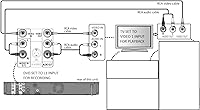
Yes, that is exactly the use case it handles best. You connect your VHS player to one of the S-Video or composite RCA inputs on the rear panel, insert a blank recordable DVD, and use the One-Touch Recording button to start capturing. No computer or additional software is needed.

It does make a visible difference compared to a composite connection, but it is worth setting realistic expectations. The recorder upscales the standard-definition signal to 720p, 1080i, or 1080p — it does not add detail that was never in the original recording. The image will look cleaner and more stable on a flat-panel screen, but it will not resemble true high-definition content.

No, the Toshiba DR430 DVD Recorder does not have a built-in tuner of any kind. It cannot receive over-the-air broadcast signals or connect directly to a cable or satellite feed for scheduled recording. It is strictly a pass-through recorder that captures whatever analog or digital audio signal you feed into its inputs from an external source device.
Established brands like Verbatim and Sony tend to work consistently well. A significant number of users have reported recording failures, disc errors, or finalization problems when using budget or no-name media. Spending a bit more on recognized disc brands is genuinely worth it to avoid wasted recording sessions.

Yes — you need to finalize the disc before it will play back in a standard DVD player or other equipment. The finalization process writes the disc menu and closes the session, and it takes a few minutes depending on how much content is on the disc. Skipping this step is one of the most common reasons users report their recorded discs being unplayable elsewhere.

If your camcorder has an S-Video or composite RCA output, yes — the DR430 will accept that signal directly. MiniDV camcorders that output only via FireWire or USB will not be compatible, as the recorder has no FireWire input. Most older Hi8 and analog camcorders with standard AV output cables connect without any issues.

The USB port on this recorder is limited to playback of MP3 and WMA audio files from a flash drive — it does not support video file playback or allow you to copy disc content to external storage. For transferring recorded video off a disc, you would need a separate computer with a DVD drive.

If your television supports HDMI CEC, yes — the DR430 can be controlled using your TV remote for basic playback functions once CEC is enabled on both devices. Keep in mind that CEC reliability varies considerably between TV brands and models, so results are not universally consistent. Some users find it works perfectly, while others report it being unreliable enough to stick with the dedicated remote.

It is a legitimate concern worth thinking through before buying. Units available today are pre-owned or refurbished, and the disc loading mechanism is the most commonly reported failure point in older examples. If you are buying for a one-time project to transfer a specific collection of tapes, the risk may be acceptable. For ongoing long-term use, you should factor in the possibility of mechanical issues and the near-total absence of manufacturer repair support at this stage.

It functions as a full DVD player as well, handling standard DVD-Video discs in addition to recordable formats. Playback through the HDMI output with upconversion is actually one of the more practical reasons some buyers choose this Toshiba recorder as a player replacement, specifically to get an HDMI connection for their existing disc collection on a newer television.