Clariviews VHS to DVD Recorder with 4.3-inch LCD
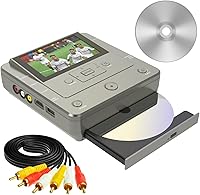
Overview
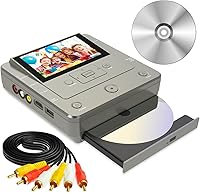
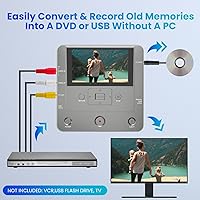
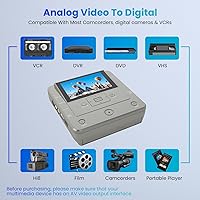
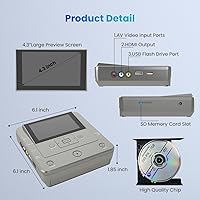
The Clariviews VHS to DVD Recorder with 4.3-inch LCD offers a practical way to rescue old home movies without the headache of modern computer software. Most of us have a box of tapes gathering dust, and this standalone recorder provides a simple path to digitization that doesn't require driver installations or complex capture cards. It features a built-in display that lets you watch the footage as it records, ensuring the signal is clear from start to finish. Measuring just over six inches wide, this media converter is much smaller than the bulky VCRs or DVD decks of the past. It bridges the gap between analog history and digital convenience, supporting everything from vintage camcorders to modern smartphone transfers. Its lightweight frame makes it easy to move between rooms or take to a relative's house for an archiving session.
Features & Benefits
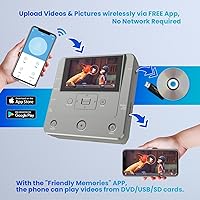
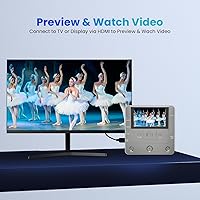
Functionality is where the digitizing deck really shines, offering surprising versatility for its size. It handles traditional RCA inputs for VCRs, but also includes a SD card slot and USB port for digital storage. One standout feature is the one-touch copying capability, which allows you to move files directly from a memory card to a DVD without touching a PC. The dedicated mobile app called Friendly Memories means you can beam smartphone videos straight to a disc over WiFi. For those who want to see their work on a big screen, the HDMI output provides a stable 1080p signal for modern televisions. Plus, the included ten free DVD-R discs let you start burning your collection the moment you open the box.
Best For
This media converter is an ideal choice for seniors or less tech-savvy users who want to preserve family memories without navigating complicated editing programs. The intuitive button layout and clear screen make the process feel familiar, similar to operating a classic tape player. It also appeals to hobbyists looking to consolidate a messy collection of SD cards, old digital cameras, and VHS tapes into a centralized digital library. If you are someone who enjoys creating physical keepsakes, the ability to burn smartphone clips to a disc makes for thoughtful, personalized gifts during the holidays. Because it operates independently of a computer, it is perfect for anyone who values a straightforward, hardware-driven workflow. The compact size is also a win for those with limited shelf space who cannot accommodate a full-sized recording suite.
User Feedback
Real-world users often highlight the relief of finally finding a solution that avoids the buggy drivers typically associated with cheap USB capture sticks. Most appreciate the straightforward interface, though some notes have been made about the physical build of this standalone recorder. At just 1.3 pounds, the lightweight plastic shell can feel a bit delicate compared to heavy-duty professional gear. While the WiFi app is a clever addition, a few people mentioned that the initial pairing process requires a bit of patience and a steady wireless connection to work correctly. Despite these minor quirks, the consensus points toward a reliable experience for basic archiving. The convenience of seeing the video on the 4.3-inch screen before committing it to a disc remains the most praised aspect of the unit for everyday archivists.
Pros
- Operates entirely as a standalone unit, completely removing the need for a computer or confusing driver installations.
- The integrated 4.3-inch LCD screen allows for real-time monitoring to ensure your footage is recording correctly.
- Offers impressive versatility by supporting VCRs, DVD players, SD cards, and USB storage devices in one compact box.
- Includes a dedicated WiFi app that bridges the gap between modern smartphone videos and old-school physical media.
- Comes bundled with 10 free DVD-R discs so you can begin archiving your collection immediately upon arrival.
- Features a very portable and lightweight design that is much easier to store than traditional, bulky recording decks.
- The simple, intuitive interface is easy for elderly users to master without any specialized technical training.
- Provides a clean 1080p HDMI output for viewing your converted home movies on modern high-definition televisions.
Cons
- The 1.3-pound plastic housing can feel somewhat flimsy and hollow compared to professional-grade electronic equipment.
- Initial WiFi setup for the mobile app can be finicky and occasionally requires multiple attempts to pair successfully.
- Viewing angles on the built-in screen are somewhat narrow, requiring you to sit directly in front for the best picture.
- The real-time recording process means a two-hour tape will take exactly two hours to convert, with no high-speed option.
- The glossy display is prone to catching glare and reflections in brightly lit rooms or near windows.
- Can be sensitive to specific brands of SD cards, sometimes resulting in file-writing errors with generic high-capacity storage.
- Menu navigation feels slightly dated and lacks the fluid responsiveness found on modern tablets or smartphones.
- Requires a constant power connection to function, limiting its use in environments without easy access to a wall outlet.
Ratings
We analyzed thousands of global customer reviews for the Clariviews VHS to DVD Recorder with 4.3-inch LCD, using advanced AI to filter out bot-generated noise and incentivized feedback. This detailed breakdown captures the genuine experiences of real users, highlighting where this standalone recorder excels in simplicity and where the hardware shows its limitations.
Ease of Setup
Interface Simplicity
LCD Preview Quality
Build Materials
Media Compatibility
Output Resolution
Mobile App Functionality
Portability
File Transfer Speed
Value for Money
Suitable for:
The Clariviews VHS to DVD Recorder with 4.3-inch LCD is a specialized tool for individuals who want to preserve family memories without the complexity of modern computer software. It is particularly well-suited for seniors or less tech-savvy users who prefer a straightforward, hardware-only setup with physical buttons and a built-in preview screen. Families with boxes of legacy media—including VCR tapes, old camcorder cassettes, and even photos on smartphones—will find it an efficient way to consolidate everything into a single digital library or physical disc. Additionally, it serves as a great solution for anyone who wants to create sentimental gifts, like a custom DVD of baby videos, to share with relatives who still use traditional players.
Not suitable for:
Professional archivists or power users looking for high-end video editing features, color correction, or lossless digital formats may find the Clariviews VHS to DVD Recorder with 4.3-inch LCD too limited for their needs. Because it records in real-time, it is not the best choice for those with massive libraries who require high-speed ripping or automated batch processing. Buyers who prioritize premium, heavy-duty build quality might be disappointed by its lightweight plastic construction, which is designed more for portability than industrial-strength durability. Furthermore, if you do not have a stable home WiFi network, you will struggle to use the mobile app features effectively, making it less ideal for users in low-connectivity areas.
Specifications
- Model: The unit is officially identified as the Clariviews VHS to DVD Recorder.
- Display: The device features an integrated 4.3-inch LCD color screen for real-time video previewing.
- Weight: This standalone recorder is highly portable with a total weight of 1.3 pounds.
- Dimensions: The exterior measurements of the casing are 6.14 x 6.14 x 1.9 inches.
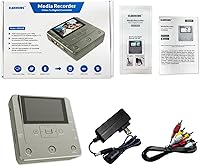
- AV Inputs: Standard RCA (AV) ports allow for direct connection to VCRs and older camcorders.
- Data Ports: Storage options include one USB port and one dedicated SD card slot.
- Video Output: An HDMI port supports external displays with a resolution of up to 1920x1080.
- Wireless Support: Built-in Wi-Fi connectivity enables file transfers via a dedicated mobile application.
- Optical Media: The burner is compatible with DVD+RW/R, DVD-RW/R, and CD-RW/R formats.
- Included Items: The package comes bundled with 10 free DVD-R discs to begin archiving immediately.
Related Reviews
Samsung DVD-VR375A DVD VHS Combo Recorder

Redecker Olive Wood Pig Bristle Nail Brush
Dcorn 4.3″ LCD Digital Coin Microscope
Toshiba VHS to DVD VCR Combo Recorder
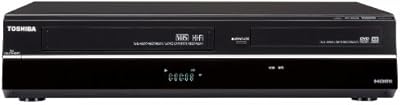
Toshiba DVR670 DVD VHS Combo Recorder
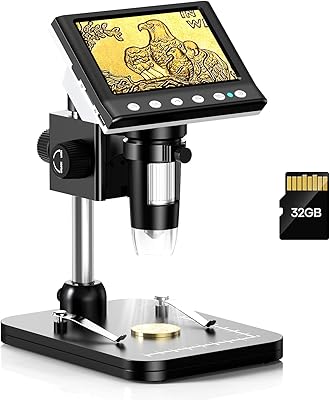
Hayve DM7 4.3″ Digital Microscope
FRAYSCENT 120-Inch Motorized Projector Screen
TomTom XL 335T 4.3-Inch Portable GPS Navigator
Sony RDR-VX VHS to DVD Recorder Combo