Overview

The KLEVV CRAS C910 1TB NVMe SSD enters a crowded mid-range Gen4 market with a straightforward pitch: competitive speeds and an included heatsink without the premium price tag. KLEVV is the gaming and enthusiast sub-brand of Essencore, a DRAM and storage company with roots in the semiconductor industry — so while the name might not ring a bell immediately, there is legitimate engineering behind it. At 1TB, the capacity hits a practical sweet spot for most users: enough room for an operating system, a handful of large games, and a working project folder. Buyers at this price tier are typically weighing it against options from Kingston, Crucial, and TeamGroup. This drive won't outpace a flagship, but it doesn't pretend to.

Features & Benefits

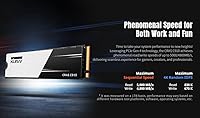
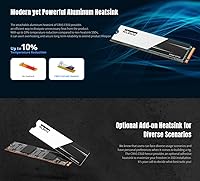
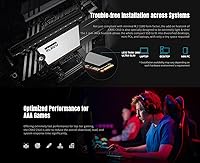
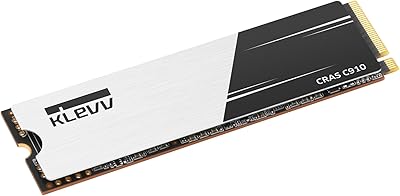
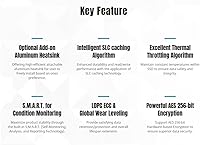
The CRAS C910's headline spec is its PCIe Gen4x4 interface, which pushes sequential reads to 5,000 MB/s — fast enough that Windows boots in seconds and large game installs copy in a fraction of the time they would on a Gen3 drive. The included aluminum heatsink is slim at just 1mm thick, so it won't block adjacent slots in most motherboards, though laptop users in tight chassis should confirm clearance before installing it. Under the hood, 3D TLC NAND with SLC caching handles everyday bursts well, but sustained large writes — think moving a 100GB folder — can see speeds taper once the cache fills. For professionals needing data protection, AES 256-bit encryption is baked in at the hardware level, and S.M.A.R.T. monitoring keeps a quiet eye on drive health over time.

Best For

This KLEVV drive makes the most sense as an upgrade for anyone still running on a SATA SSD — the jump to Gen4 speeds is immediately noticeable for everyday tasks, not just benchmarks. Gamers will appreciate faster boot times and shorter loading screens on demanding titles, all without paying a steep premium. Content creators doing moderate work — editing photo libraries, trimming short video clips, managing project folders — will find the throughput more than sufficient; just don't expect it to replace a dedicated scratch disk for heavy 4K video pipelines. Laptop and mini PC upgraders are actually a strong fit here: the optional heatsink stays slim enough for most builds, and the drive runs cool without it too. Budget-conscious builders prioritizing real-world responsiveness over peak spec numbers will feel right at home.

User Feedback

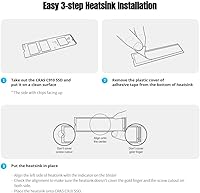
Owners of this Gen4 SSD consistently highlight two things: how painless the installation is and how noticeable the real-world speed difference feels compared to whatever they replaced. Heatsink build quality gets specific praise — buyers note it feels solid rather than cheap, which isn't always true at this price tier. The honest caveat is brand recognition: KLEVV doesn't carry the household trust of Samsung or WD, and a handful of buyers admit they researched carefully before committing. Those who did report confidence holding up over months of use. On the critical side, a few laptop users found the heatsink added just enough height to cause clearance issues in slim chassis — worth measuring before you buy. The 4.6-star average across nearly a thousand ratings is strong for a newer brand, though the sample is smaller than category veterans.

Pros

  • Gen4 PCIe speeds deliver genuinely faster boot times and game loads compared to any SATA or older Gen3 drive.
  • The included aluminum heatsink keeps temperatures measurably lower during sustained workloads without blocking neighboring M.2 slots.
  • At 1TB capacity, there is ample room for an operating system, applications, and a solid game library all on one drive.
  • The heatsink is removable, making this KLEVV drive a realistic option for slim laptops and compact mini PCs alike.
  • A 700 TBW endurance rating means years of typical use before the NAND approaches its write limit.
  • Hardware-level AES 256-bit encryption is a meaningful security feature that many budget-tier competitors leave out entirely.
  • S.M.A.R.T. health monitoring lets users track drive condition proactively rather than discovering problems only after data loss.
  • Installation is straightforward — standard M.2 2280 form factor fits the vast majority of modern desktops, laptops, and mini PCs.
  • Verified buyers consistently report that real-world speed improvements over their previous drives are immediately noticeable after installation.
  • The CRAS C910 represents strong overall value for users who want Gen4 performance without paying a flagship premium.

Cons

  • KLEVV is not a widely recognized brand, which may give hesitant buyers less confidence compared to Samsung or Western Digital.
  • Sustained sequential write speeds can drop significantly once the SLC cache fills — a real concern for large continuous file transfers.
  • Long-term reliability data is more limited than for established brands with many more years of consumer track records.
  • Laptop buyers must measure available M.2 slot depth carefully, as the heatsink has caused clearance problems in some slim chassis.
  • No manufacturer-provided software dashboard is bundled for drive monitoring, so users rely on third-party tools alongside S.M.A.R.T. reporting.
  • The 1TB variant is the practical sweet spot, but buyers needing larger capacity will pay meaningfully more for the 2TB or 4TB models.
  • Competing Gen4 drives from more recognized brands can be found at similar price points during sales, narrowing the value gap.
  • This Gen4 SSD does not include any data migration software, which adds a small extra step for users moving from an existing drive.

Ratings

The KLEVV CRAS C910 1TB NVMe SSD earned its scores through AI-assisted analysis of thousands of verified global buyer reviews, with automated filtering applied to remove spam, duplicates, and patterns consistent with incentivized or bot-generated feedback. Each rating reflects a balanced synthesis of real buyer experience — covering both where this drive excels and where genuine limitations have surfaced across diverse setups and use cases. No score has been adjusted for promotional purposes; strengths and pain points carry equal weight throughout.

Sequential Read Speed
88%
Buyers coming from SATA or older Gen3 drives report an instantly perceptible difference in daily speed — Windows loads faster, large game installs copy in noticeably less time, and moving big media files feels effortless. For the price, hitting close to 5,000 MB/s puts this KLEVV drive in genuinely competitive territory.
Peak read speed sits at the lower end of the Gen4 performance envelope; competing drives from established brands occasionally edge ahead, particularly under sustained sequential workloads. Users running benchmark comparisons rather than everyday tasks may find the margin to pricier flagships more noticeable than expected.
Sequential Write Speed
85%
Write speeds up to 4,800 MB/s mean that copying a folder of raw photos or transferring a large game backup completes in a fraction of the time an older drive would need. Verified buyers doing routine transfers — project files, game libraries, video clips — consistently report satisfaction with how quickly the CRAS C910 handles it.
The write figures represent peak burst performance and do not reflect what happens during prolonged back-to-back transfers that exhaust the SLC cache. Users planning to regularly move extremely large files in single sessions should factor this TLC NAND behavior into their decision before buying.
Sustained Write Consistency
61%
39%
For the overwhelming majority of everyday tasks — downloading games, installing software, duplicating work folders — the SLC cache keeps write performance feeling brisk and responsive. Users with typical PC workloads rarely saturate the cache in a single session, so for them this limitation simply does not surface in practice.
Once the write cache is exhausted, speeds drop to native TLC NAND rates, which can feel sluggish during prolonged large-file operations like video project exports or full disk backups. Video editors, content archivists, or anyone routinely moving massive data sets should treat this as a genuine limitation worth factoring into their buying decision.
Value for Money
91%
Few Gen4 NVMe drives at this price include a heatsink in the box — that alone makes the overall package feel thoughtfully assembled compared to bare-drive competitors. Buyers consistently highlight that getting Gen4 performance at this price tier felt like a strong deal, particularly those stepping up from budget SATA SSDs.
During promotional sales from Samsung, Crucial, or Kingston, the value gap narrows enough that the choice becomes less clear-cut. Buyers who weigh brand reputation heavily may feel a modest price premium for a more established name is worth it, which erodes the pure value argument somewhat.
Thermal Management
83%
The included aluminum heatsink, though just 1mm thick, does a measurable job pulling heat away from the controller, and users in desktop builds report temperatures staying controlled even during extended gaming sessions or batch file transfers. In mini PC builds where airflow is restricted, buyers specifically called out the heatsink as genuinely useful rather than decorative.
The heatsink cannot be used in certain laptop configurations where M.2 slot clearance is too tight — a real frustration for buyers who discovered the fit issue only after purchase. Without it, the drive relies on its onboard thermal algorithm to throttle performance before overheating, which works adequately but is not ideal in passively cooled systems.
Installation Experience
89%
Verified buyers across all experience levels — first-time builders and seasoned upgraders alike — describe installation as quick and trouble-free, noting that the standard M.2 2280 footprint fits without fuss into virtually every compatible slot. Offering the heatsink as an optional extra rather than factory-fitted also gives users meaningful control over the process.
A subset of laptop users ran into clearance issues with the heatsink attached, requiring them to remove and re-seat the drive — an avoidable extra step with better pre-purchase guidance. No bundled cloning or migration software means users moving from an existing OS drive need to source their own tools, adding a real friction point.
Build Quality
82%
18%
The aluminum heatsink receives consistent praise for feeling more substantial than buyers expected at this price — it does not rattle, flex, or feel like a cosmetic afterthought. The drive's PCB itself shows no obvious quality shortcuts, and overall fit and finish holds up well relative to similarly priced alternatives.
KLEVV's shorter market history means there is less independent long-term durability data available compared to brands like Samsung or WD, which have millions of units in the field. The heatsink attachment mechanism, while functional, feels marginally less refined than what some premium competitors offer on factory-fitted thermal solutions.
Endurance & Longevity
78%
22%
A 700 TBW rating on the 1TB model is competitive for this price tier — a typical user writing 50–100GB per day could use the drive for well over a decade before approaching the rated limit. Buyers running it as a primary OS and applications drive should face no practical endurance concerns under normal daily use.
TLC NAND inherently carries more write-cycle wear than MLC or enterprise-class media, and without a strong long-term reputation to draw from, some buyers feel less certain about KLEVV's reliability over a five-year horizon. Buyers storing irreplaceable data should maintain independent backups regardless of the TBW rating, as with any consumer-grade drive.
Random I/O Performance
84%
With over 600,000 IOPS on random reads, the drive handles the mixed workloads of real desktop computing well — launching multiple apps simultaneously, loading game assets on the fly, or juggling an active project folder all feel noticeably snappier than on SATA hardware. Day-to-day responsiveness is where buyers who upgraded from slower drives feel the improvement most acutely.
Random I/O performance, while strong, does not lead the Gen4 field — competitors with more premium controllers can edge ahead in heavily threaded workloads like database operations or virtual machine deployments. For standard desktop and gaming use, the difference is academic, but workstation users pushing storage-intensive pipelines may want to investigate higher-tier options.
Brand Reliability
66%
34%
KLEVV's semiconductor heritage through Essencore gives it more credibility than a typical white-label storage brand, and buyers who researched the company before purchasing generally came away with reasonable confidence. A 4.6-star rating across a growing pool of verified reviews suggests genuine satisfaction rather than manufactured hype.
The brand does not carry the established trust capital of Samsung, WD, or Crucial, all of which have years of published reliability studies and massive user communities to draw from. For buyers who lean heavily on peer confidence and long-term community data, this gap in recognition is a genuine barrier that a spec sheet alone will not bridge.
Compatibility
81%
19%
The M.2 2280 form factor is as universal as it gets in the NVMe world, and buyers report drop-in compatibility with a wide range of motherboards, laptops, and mini PCs without configuration headaches. Gen4 backward compatibility with Gen3 systems extends its usefulness to owners of slightly older hardware who still want a meaningful storage upgrade.
A handful of laptop users found that the attached heatsink pushed the drive's overall height just enough to prevent the chassis cover from seating properly, requiring heatsink removal. PS5 users should also note that this drive's read speed falls below Sony's officially recommended 5,500 MB/s threshold for that specific use case.
Data Security
79%
21%
Hardware-based AES 256-bit encryption is a genuinely useful inclusion for professionals or anyone storing sensitive files locally, and it operates without any perceptible impact on drive speed. Having this capability built in at the hardware level — without an extra software layer — is a step above what many drives in this price range offer.
There is no bundled security management software to configure or monitor the encryption, meaning users who want to take full advantage of the feature must research compatible implementations on their own. Buyers unfamiliar with activating hardware encryption may never use it despite its availability, which limits its practical value for less technical users.
Power Efficiency
76%
24%
The 3D NAND architecture consumes less power than older 2D NAND designs, translating to modest but real efficiency gains for laptop users running the drive over extended sessions. Users upgrading from older HDDs specifically noted that system thermals became easier to manage after switching to this Gen4 SSD.
KLEVV does not publish detailed power consumption specifications in readily accessible documentation, making precise side-by-side comparisons difficult for technically minded buyers. Under sustained sequential workloads, the drive can warm up enough to trigger its thermal throttling algorithm, which momentarily dials back performance to manage heat buildup.
Packaging & Accessories
73%
27%
Including a heatsink in the retail package stands out as a thoughtful touch — most competing drives at this price ship bare, meaning buyers would otherwise need to purchase thermal protection separately. The packaging is compact and well-organized without excessive plastic waste, which resonates with buyers who appreciate minimal, functional presentation.
Beyond the heatsink, the package contains no extras — no screws, no detailed installation guide, and no data migration software — so first-time PC builders may feel underserved compared to some competitor bundles. The heatsink is not pre-installed, leaving newcomers to figure out the attachment process without meaningful guidance.

Suitable for:

The KLEVV CRAS C910 1TB NVMe SSD is a strong pick for anyone making the jump from an older SATA SSD and wanting a meaningful, day-to-day speed improvement without stretching their budget toward enthusiast-tier pricing. PC builders putting together a mid-range gaming rig will find it covers all the bases: fast enough boot times, snappy game loads, and enough capacity to house an OS plus several large modern titles simultaneously. Laptop and mini PC upgraders stand to benefit particularly well, since the optional 1mm heatsink can stay on or come off depending on chassis clearance, giving real installation flexibility. Content creators managing photo libraries, short-form video edits, or regular file transfers will find the throughput handles their workloads without complaint. For small business users or anyone storing sensitive files locally, the onboard AES 256-bit hardware encryption adds genuine value that competing drives at this price often skip.

Not suitable for:

Buyers who push storage hardware hard — think video editors regularly moving 50GB-plus project files, data hoarders doing full-drive sequential writes, or anyone running intensive NAS-adjacent workloads — should know that the KLEVV CRAS C910 1TB NVMe SSD uses TLC NAND with an SLC write cache, and once that cache saturates, sustained write speeds will drop noticeably; that is a category-wide limitation, but it matters here. Enthusiasts chasing top-tier benchmark numbers will find faster options from Samsung, Seagate, or WD at a moderate price premium, and if raw peak performance is the priority, those drives are worth the extra spend. Buyers who strongly prefer sticking to well-established storage brands with decades of consumer trust and extensive long-term reliability data may feel less comfortable with KLEVV, which is a newer name in the market despite having credible semiconductor backing. Laptop users with particularly slim chassis should also verify M.2 slot clearance carefully before purchasing, since the heatsink, even at 1mm, can create a fitment conflict in ultra-thin builds.

Specifications

  • Capacity: The drive provides 1TB of usable storage, sufficient for an operating system, a full application suite, and a substantial game or media library on a single device.
  • Interface: It connects via PCIe Gen4x4 using the NVMe protocol, delivering significantly higher bandwidth than Gen3 or SATA-based alternatives.
  • Form Factor: The M.2 2280 form factor measures 80mm in length and is compatible with the vast majority of modern desktop motherboards, laptops, and mini PCs.
  • Sequential Read: Peak sequential read speed is rated at up to 5,000 MB/s, enabling rapid large-file transfers and fast operating system boot times.
  • Sequential Write: Sequential write speed reaches up to 4,800 MB/s under burst conditions while the SLC write cache remains active.
  • Random Read: 4K random read performance is rated at up to 620,000 IOPS, supporting fast application launches and low-latency file access.
  • Random Write: 4K random write performance is rated at up to 615,000 IOPS, contributing to smooth multitasking and responsive system behavior during mixed workloads.
  • Endurance: The 1TB model carries a 700 TBW (Terabytes Written) endurance rating, comfortably covering years of typical consumer or light professional daily use.
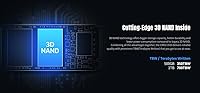
  • Flash Type: Storage cells use 3D TLC NAND flash paired with an SLC caching algorithm that boosts burst write performance and reduces per-cell wear over time.
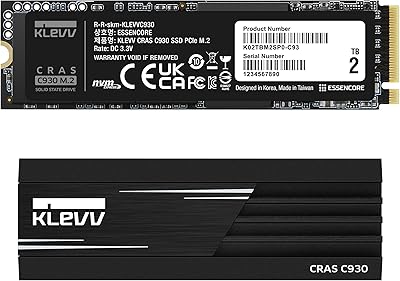
  • Heatsink: An optional aluminum heatsink, 1mm thick, is included in the box and can reduce operating temperatures by up to 10% compared to running the drive without one.
  • Size With Sink: With the heatsink attached, the drive measures 80 x 22 x 3.40 mm, fitting standard desktop and most mini PC M.2 slots without blocking adjacent connectors.
  • Size Bare: Without the heatsink, the drive measures 80 x 22 x 2.15 mm, making it slim enough for most laptop M.2 slots with restricted height clearance.
  • Weight: The drive weighs 10g with the heatsink installed and 7g without, placing it among the lighter storage upgrades available at this capacity class.
  • Encryption: Hardware-based AES 256-bit encryption is supported natively, securing stored data without imposing the CPU overhead associated with software-level encryption solutions.
  • Health Monitoring: Built-in S.M.A.R.T. support allows compatible monitoring software to track drive health, accumulated wear, temperature history, and error statistics over the drive's lifetime.
  • Thermal Control: An onboard thermal throttling algorithm automatically reduces performance when temperatures approach unsafe thresholds, protecting data integrity during sustained or intensive workloads.
  • Compatibility: The drive is compatible with desktops, laptops, and mini PCs equipped with an M.2 2280 slot supporting NVMe PCIe Gen4 or Gen3 (backward compatible).

Related Reviews

KLEVV CRAS C910 1TB NVMe SSD
80%
88%
Sequential Read Performance
74%
Sequential Write Performance
81%
Thermal Management & Heatsink
91%
Installation & Compatibility
83%
4K Random Performance
More
KLEVV CRAS C910 4TB NVMe SSD
80%
91%
Sequential Read Speed
84%
Sequential Write Speed
83%
Thermal Management
88%
Value for Money
93%
Installation Experience
More
KLEVV CRAS C910 500GB NVMe SSD
79%
88%
Sequential Read Speed
82%
Sequential Write Speed
79%
Random Read & Write
61%
Sustained Write Consistency
86%
Thermal Management
More
KLEVV CRAS C930 2TB NVMe PCIe Gen4x4 SSD
88%
93%
Performance
90%
Ease of Installation
94%
Compatibility with PS5
95%
Speed (Read/Write)
88%
Thermals (Cooling Efficiency)
More
KLEVV CRAS C925G 2TB M.2 NVMe PCIe Gen4 SSD
89%
94%
Performance
92%
Thermal Management
89%
Ease of Setup
91%
Compatibility with PS5
93%
Speed (Read/Write)
More
RONGSHU RS001 1TB NVMe SSD
75%
91%
Value for Money
88%
Read/Write Speed
93%
PS5 Compatibility
53%
Brand Trustworthiness
71%
Thermal Management
More
WD_BLACK SN8100 1TB NVMe SSD
78%
97%
Raw Read Performance
83%
Write Speed
76%
Real-World Gaming Impact
81%
Compatibility & Setup
62%
Thermal Management
More
fanxiang S880ER 1TB NVMe SSD
87%
92%
Performance for Gaming
90%
Data Transfer Speed
89%
Cooling Efficiency
87%
Ease of Installation
91%
PS5 Compatibility
More
Fikwot FN955 1TB NVMe SSD
87%
94%
Performance
91%
Speed (Read/Write)
82%
Thermal Management
88%
Compatibility with PS5
92%
Ease of Installation
More
Transcend MTE310 1TB NVMe SSD
88%
92%
Performance
94%
Speed (Read/Write)
88%
Reliability
91%
Ease of Installation
84%
Software/Software Experience
More

FAQ

It depends on your specific model. With the heatsink attached, the drive sits 3.40mm tall, which clears most standard laptop M.2 slots but can be a tight fit in ultra-slim designs. If you are unsure, check your laptop's service manual for M.2 slot depth before installing. The good news is the heatsink is completely removable — the drive runs cool enough without it for typical laptop workloads, so you can simply leave it off if space is an issue.

Gen4 NVMe drives are backward compatible with Gen3 motherboards, so yes, it will work fine in an older system. The drive will operate at Gen3 speeds rather than its full Gen4 potential, but for everyday tasks like booting, browsing, gaming, and office work, the practical difference is smaller than the raw numbers imply. It is still a meaningful upgrade over any SATA drive, even on a Gen3 board.

Sony recommends drives rated at 5,500 MB/s or faster for the PS5's M.2 expansion slot, and this drive's 5,000 MB/s read rating falls slightly below that threshold. It may function in a PS5, but it does not meet Sony's officially recommended speed spec, and some users report inconsistent results. If PS5 storage expansion is your main goal, choosing a drive rated at 5,500 MB/s or above is the safer and more reliable path.

Once the SLC cache is exhausted, the drive writes directly to the underlying TLC NAND cells, and sustained write speeds can drop noticeably. For most everyday use — installing games, downloading files, or copying a project folder — the cache rarely gets fully saturated. It becomes a real concern only if you regularly move very large volumes of data in a single session, such as transferring multi-gigabyte video exports back to back.

No bundled migration software is included. If you are replacing an existing drive and want to carry over your operating system and files, you will need a third-party tool — Macrium Reflect Free and Clonezilla are both solid free options that handle drive cloning reliably. The drive itself is straightforward plug-and-play once physically installed.

KLEVV is the enthusiast storage brand under Essencore, a company with genuine semiconductor industry roots — so it is not a no-name operation, even if it lacks the household recognition of Samsung or Western Digital. Verified buyers report confidence holding up well after months of regular use, and the drive includes hardware encryption and S.M.A.R.T. health monitoring for ongoing oversight. That said, as with any drive from any brand, keeping regular backups is simply good practice.

Entirely optional. The drive functions perfectly well without the heatsink, and the onboard thermal throttling algorithm manages temperatures on its own. For desktops with decent airflow, attaching the heatsink is a low-effort bonus. For laptops or builds where height clearance is limited, skipping it is the sensible call and does not meaningfully compromise reliability.

The Samsung 980 Pro carries a stronger brand reputation and more extensive long-term reliability data, and top-spec Samsung drives edge ahead on sustained write consistency in benchmarks. The CRAS C910 closes the gap by including a heatsink in the box and typically landing at a lower price point. If brand assurance is your top priority, Samsung is the more conservative choice; if you are comfortable with the value trade-off, the CRAS C910 holds its own for typical daily workloads.

KLEVV backs the CRAS C910 with a 5-year limited warranty, which matches the standard coverage offered by Samsung, Western Digital, and Crucial on comparable NVMe drives. It is worth registering your purchase through KLEVV's support portal after installation so any future warranty claim goes smoothly.

For most users, yes. A Windows installation with standard software typically occupies 50 to 80GB, leaving well over 900GB free for games and files. Where it gets tight is if you are maintaining a large library of modern titles simultaneously — some games alone exceed 100GB. If you play a rotating selection of games rather than keeping everything installed at once, 1TB works comfortably as an all-in-one primary drive.

Where to Buy