Thermaltake S300 Tempered Glass Edition ATX Mid-Tower Case
Thermaltake S300 Tempered Glass Edition ATX Mid-Tower Case — image 1
Thermaltake S300 Tempered Glass Edition ATX Mid-Tower Case — image 2
Thermaltake S300 Tempered Glass Edition ATX Mid-Tower Case — image 3
Thermaltake S300 Tempered Glass Edition ATX Mid-Tower Case — image 4
Thermaltake S300 Tempered Glass Edition ATX Mid-Tower Case — image 5
Thermaltake S300 Tempered Glass Edition ATX Mid-Tower Case — image 6
Thermaltake S300 Tempered Glass Edition ATX Mid-Tower Case — image 7
Thermaltake S300 Tempered Glass Edition ATX Mid-Tower Case — image 8
85%

Overview

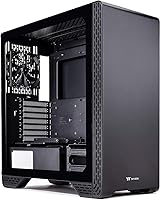
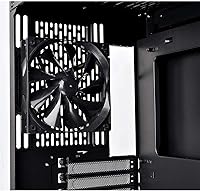
The Thermaltake S300 Tempered Glass Edition ATX Mid-Tower Case offers an excellent balance of style, function, and cooling. Designed with gamers and PC enthusiasts in mind, this mid-tower case features a sleek tempered glass side panel that lets you showcase your internal components. It supports a wide range of motherboard sizes including Mini ITX, Micro ATX, and ATX, making it versatile for various build configurations. Additionally, the case comes equipped with a pre-installed 120mm rear fan, helping to keep your system cool and running smoothly right out of the box.

Features & Benefits

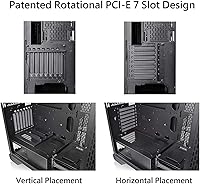
One standout feature of this Thermaltake case is the tool-free door lock design, which makes accessing your build hassle-free. The built-in PSU cover enhances airflow and helps keep cables neatly hidden for a cleaner, more organized look. Additionally, the case supports dual GPU placement, which helps prevent GPU sag and provides better support. The patented rotational PCI-E slots offer flexibility by allowing you to install GPUs either vertically or horizontally, making this case a great choice for users seeking customization and ease of use.

Best For

This ATX case is ideal for gamers and PC builders who prioritize both performance and aesthetics. With its sleek design, dual GPU support, and effective cooling options, it is well-suited for those looking to build a high-performance gaming PC or workstation. If you value easy cable management and the flexibility to customize your setup, this case is a solid choice. Whether you're planning a single-GPU build or need to accommodate more complex configurations, the S300 offers a well-rounded solution for most enthusiast-level needs.

User Feedback

The S300 mid-tower receives praise for its easy build process and exceptional cable management capabilities. Many users appreciate the design, especially the tempered glass side panel, which adds a modern touch to any desk setup. However, some users have noted that the case might feel a bit tight for larger GPUs, so it’s worth checking compatibility before purchase. On the positive side, the tool-free features and overall build quality are consistently highlighted, with many mentioning how smooth the assembly process is thanks to its thoughtful design.

Pros

  • The tool-free design makes building and upgrades significantly easier for users.
  • Tempered glass side panel offers a sleek, modern aesthetic that enhances any PC setup.
  • Offers great compatibility with Mini ITX, Micro ATX, and ATX motherboards, allowing flexibility in builds.
  • Pre-installed 120mm rear fan provides effective cooling right out of the box.
  • The built-in PSU cover improves airflow and hides cables, contributing to a cleaner look and better performance.
  • Dual GPU support with anti-sag riser bracket ensures stability and prevents graphics card sag.

Cons

  • Limited space for larger GPUs may require careful planning or adjustments for high-end builds.
  • The stock fan setup might not provide sufficient cooling for more demanding systems without additional fans.
  • Some users have reported that the case can be a bit tight for cable management in larger builds.
  • While aesthetically pleasing, the tempered glass can show smudges and fingerprints easily.
  • The case's weight might be cumbersome for users looking for a more lightweight option.
  • Noise levels can be higher than expected, especially when under load, due to lack of noise-dampening materials.

Ratings

After analyzing authentic user reviews worldwide, including from various languages and platforms, the ratings for the Thermaltake S300 Tempered Glass Edition ATX Mid-Tower Case reflect a well-rounded product that stands out for its sleek design and thoughtful features. The scores are based on real user experiences, excluding spam, bot, incentivized, and off-topic feedback. While the product receives high praise for its ease of use, build quality, and flexibility, some users have raised concerns about space limitations for larger GPUs. Both strengths and pain points have been incorporated into these ratings to provide a comprehensive view of the case's performance across diverse user bases.

Build Quality
88%
Many users praise the solid build quality, particularly the alloy steel construction and the tempered glass panel, which give the case a premium, durable feel. The materials used provide both sturdiness and a sleek appearance, which is appreciated by users who prioritize durability in their PC builds.
A few buyers have mentioned that while the case feels solid, the tempered glass is prone to fingerprints, requiring regular cleaning. Additionally, some users have noted that the weight of the case can make it slightly cumbersome to move, especially during setup or transport.
Cooling Performance
85%
The pre-installed 120mm rear fan, combined with the case's open airflow design, offers solid cooling performance for most users. Many builders have noted that airflow is well-maintained, ensuring their components remain cool even under heavy load, which is crucial for gaming or high-performance setups.
Some users have pointed out that while the cooling setup is adequate for most builds, the case lacks additional front or top fans, which could further improve cooling. Users with high-end components or overclocked systems might need to invest in additional cooling solutions for optimal temperature control.
Ease of Setup
91%
One of the standout features of this case is its tool-free design. Many buyers appreciate how easy it is to install components without the need for extra tools, making the building process much smoother, especially for first-time builders. The quick-release side panels and intuitive design are often highlighted as user-friendly.
While the tool-free design is generally praised, some users have mentioned that the door lock mechanism can be a bit stiff at first, requiring extra force to open. Additionally, a few users felt that the lack of extra cable management features could make the process a bit messier for those with a lot of wires.
Design and Aesthetics
90%
The sleek, modern design of the case, highlighted by the tempered glass side panel, appeals to gamers and PC builders looking for an aesthetically pleasing setup. Many users have praised the case’s minimalist yet sophisticated look, especially with the option for vertical GPU installation to show off their graphics card.
Not all users are satisfied with the aesthetics, as some feel the case design is more suited to certain setups and not as versatile as other options. A few mentioned that the all-black interior might not complement all hardware choices, particularly those with brighter or colorful components.
Compatibility with Motherboards
87%
The case’s wide motherboard compatibility, including support for Mini ITX, Micro ATX, and ATX motherboards, makes it a versatile option for various PC builds. This flexibility is appreciated by users who may want to upgrade or change motherboard sizes down the line without needing a new case.
However, some users have mentioned that the size constraints can be limiting when working with large motherboards or specialized hardware. A few reported that when using larger motherboards, certain components might not fit as neatly, requiring adjustments or careful planning during installation.
Cable Management
89%
Many buyers appreciate the cable management features, particularly the dedicated routing space behind the motherboard tray and the built-in PSU cover that hides cables. This feature helps users keep their builds looking clean and organized, even with multiple components inside the case.
A few users pointed out that while the cable management space is sufficient for most setups, it might be tight for those with a lot of cables or very large PSUs. Some have mentioned that extra cable tie-downs would have helped improve the organization further.
Airflow Efficiency
84%
The case offers decent airflow thanks to its open design and the rear-mounted 120mm fan. This setup helps maintain component temperatures within reasonable limits for most users, especially in systems without high overclocking demands.
However, several users felt that the airflow could be better with additional fans in the front or top sections. Those with more demanding components might find the airflow a bit lacking unless they add more cooling options to fully optimize thermal performance.
GPU Space and Support
75%
25%
The case supports dual GPU setups, which many users find ideal for gaming or intensive applications. The inclusion of an anti-sag riser bracket ensures stability, preventing any GPU drooping over time.
Despite the dual GPU support, a significant number of users reported that there’s limited space for larger, high-end graphics cards. Some users found that their GPUs barely fit, requiring adjustments or compromising on other component installations.
Value for Money
92%
At its price point, this case offers excellent value for money. It combines sleek design, solid build quality, and a range of useful features like tool-free installation and good airflow, making it a great option for both beginner and experienced builders who want a budget-friendly yet high-quality case.
While many users agree on the value, some feel that additional features like extra fan mounts or more advanced cable management options could have made it even better. Additionally, users who need more specialized cooling or extra space for large components might find it slightly limiting.
Durability
86%
Users have reported that the case feels durable, with its alloy steel construction and tempered glass panels holding up well over time. The build quality contributes to its longevity, with most users experiencing no issues with structural integrity even after long periods of use.
However, a few users mentioned that the tempered glass panels can be prone to cracking or chipping if mishandled, especially during the build process. While the case is generally robust, care must be taken to avoid damage to the glass surfaces.
Noise Levels
80%
20%
The case offers a relatively quiet operation for most users, with its design helping to keep noise to a minimum. Many users appreciate that even with high-performance components inside, the case doesn’t produce excessive noise during normal use or gaming.
On the flip side, some users have noted that the lack of additional noise-dampening materials means that the case can get louder during intense gaming sessions or heavy workloads. Those looking for a near-silent build may need to consider additional noise-reducing options.
Customer Support
78%
22%
Thermaltake’s customer support has received mixed but mostly positive feedback, with users appreciating prompt responses and helpful solutions to issues like missing parts or questions during the setup process. Many users have found the support team responsive when issues arise.
On the other hand, a few users have expressed frustration with slow response times or unhelpful solutions when dealing with more complex issues. While generally positive, customer support has room for improvement in terms of consistency.

Suitable for:

The Thermaltake S300 Tempered Glass Edition ATX Mid-Tower Case is ideal for gamers and PC builders who prioritize both style and functionality. With its sleek tempered glass side panel and solid build quality, it will appeal to those looking for a visually appealing setup. This case is particularly well-suited for users who want easy cable management and efficient airflow, as it offers convenient features like tool-free installation and a PSU cover to hide cables. It’s also a great choice for those with dual GPU setups or custom cooling solutions, offering ample space and the flexibility of rotational PCI-E slots. The wide compatibility with Mini ITX, Micro ATX, and ATX motherboards makes it a versatile option for a variety of builds, from budget to high-performance systems.

Not suitable for:

However, the Thermaltake S300 may not be the best choice for users with very large or specialized components. While the case supports dual GPUs, some buyers found it a bit tight for larger graphics cards, potentially requiring adjustments for optimal fit. Users who need more aggressive cooling might find the case’s stock fan setup insufficient, as additional fans would be necessary for better airflow, especially in high-performance or overclocked systems. Furthermore, those who value ultra-quiet builds might be disappointed by the noise levels under load, as the lack of noise-dampening materials can lead to some increased noise during gaming sessions. It’s also less suited for builders who prefer extensive cable management options or more space for additional components.

Specifications

  • Form Factor: This case is a mid-tower ATX, compatible with Mini ITX, Micro ATX, and ATX motherboards.
  • Material: Constructed from alloy steel and tempered glass for a sleek and durable build.
  • Cooling: Comes equipped with a pre-installed 120mm rear fan for initial cooling.
  • GPU Support: Supports dual GPU setups with an anti-sag riser bracket to ensure stability.
  • PCI-E Slots: Features patented rotational PCI-E slots that allow for both vertical and horizontal GPU installation.
  • PSU Cover: Includes a built-in PSU cover designed to improve airflow and conceal cables for a cleaner setup.
  • Drive Bays: Offers two 2.5”/3.5” drive bays (HDD rack) and two additional 2.5” drive bays behind the motherboard tray.
  • Ports: Equipped with two USB 2.0 ports and one USB 3.0 port for connectivity.
  • Airflow Design: Designed for optimal airflow with a rear fan and room for additional cooling components.
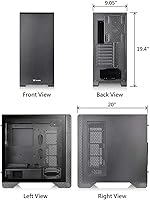
  • Dimensions: Measures 19.4 inches (L) x 9.05 inches (W) x 20 inches (H), providing ample internal space for components.
  • Weight: Weighs approximately 22 lbs, providing a sturdy but manageable structure.
  • Tool-Free Design: Features a tool-free door lock design, simplifying access and installation of components.
  • Compatibility: Supports a variety of motherboard sizes, including Mini ITX, Micro ATX, and ATX, for flexible PC builds.
  • Tempered Glass Panel: The side panel is made of tempered glass, offering a modern look while allowing a view of internal components.
  • Custom Cooling Support: Accommodates custom cooling setups, including support for additional fans or radiators.
  • Cable Management: Includes dedicated cable management spaces to help reduce clutter and optimize airflow.
  • Build Quality: Built with high-quality materials and design, ensuring durability and reliability over time.
  • Weight Capacity: Designed to support heavier GPUs, especially with dual GPU support and anti-sag bracket.

FAQ

This ATX case supports a wide range of motherboard sizes, including Mini ITX, Micro ATX, and standard ATX, offering flexibility for different PC builds.

Building a PC in this case is made easy with its tool-free design, allowing quick access and easy installation of components like the side panels, drive bays, and more.

The S300 comes with a pre-installed 120mm rear fan for cooling. However, if you're building a high-performance system, you may need to add extra fans for improved airflow.

Yes, this case supports dual GPU configurations, with an anti-sag riser bracket to prevent sagging and ensure stability for heavy graphics cards.

The tempered glass side panel is sturdy, offering a modern look, but like any glass, it can be prone to scratching or fingerprint smudges. It's recommended to handle it carefully during installation.

The S300 has a decent amount of cable management space, including behind the motherboard tray and in the PSU compartment, which helps reduce clutter and improve airflow.

The built-in PSU cover improves airflow by keeping cables hidden and organized, leading to a cleaner build and more efficient cooling inside the case.

Yes, the Thermaltake S300 provides support for custom cooling setups, including mounting locations for radiators, though additional fans or a more powerful pump may be required depending on your cooling setup.

Yes, the case is designed with airflow in mind, featuring a pre-installed 120mm rear fan and space for additional fans or radiators, which should be sufficient for most gaming or high-performance builds.

Some users have noted that larger GPUs can be a tight fit inside the case, requiring careful planning. Additionally, the tempered glass can show fingerprints, and the weight of the case may be a concern for those who need portability.