Overview

The Cooler Master MasterLiquid Atmos 360 AIO Cooler arrived in late 2023 as a serious mid-to-high-range contender in a crowded field, sitting between budget 360mm options and premium flagships like the NZXT Kraken Elite or Corsair iCUE Elite Capellix. What separates it from the crowd isn't primarily the RGB or the fan count — it's the dual chamber pump architecture, an in-house design engineered to direct coolant pressure more precisely toward the CPU hot spot. Broad socket support spanning Intel LGA 1700 down through the 115x family and AMD's AM5 and AM4 platforms makes this a genuinely flexible choice for enthusiasts who want strong thermal headroom without moving into custom loop territory.
Features & Benefits

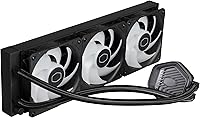
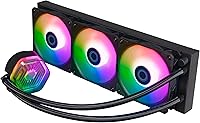
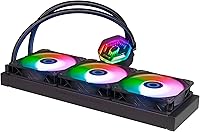
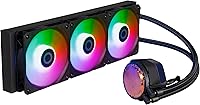
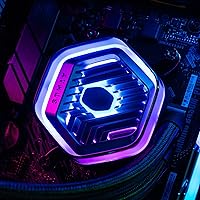
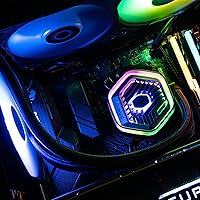
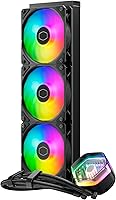
The SickleFlow 120 Edge fans that ship pre-installed are legitimately impressive on paper and in practice. Loop Dynamic Bearing technology gives them a rated lifespan exceeding 160,000 hours, and at full load they top out at 27.2 dBA — quiet enough that other components will draw more attention. At 70.7 CFM and 3.61 mmH2O of static pressure, they push enough air through the slim 27.2mm aluminum radiator to keep high-TDP chips stable under sustained loads. The pump head and all three fans carry Addressable RGB Gen 2 LEDs that sync with major motherboard headers or Cooler Master's MasterCTRL app. Low-profile screws improve case compatibility, and the pump cover officially supports 3D-printed custom modifications via Printables.com.

Best For

This 360mm AIO is a natural fit for builders running Intel Core i7/i9 or Ryzen 7/9 CPUs who want serious cooling overhead without the complexity of a custom loop. The slim radiator profile and low-profile fan screws open it up to mid-tower and select smaller cases where bulkier 360mm units simply won't fit. RGB-focused builders will find the out-of-box ARGB setup refreshingly complete — no extra hubs or adapters required. Modders drawn to personalizing their hardware will appreciate the officially supported 3D-printable pump cover options, a rare touch at this tier. Those upgrading from a 240mm AIO or aging tower cooler should notice a real improvement, especially during long rendering or gaming sessions.

User Feedback

With over 240 ratings averaging 4.6 stars and a ranking inside the top 120 in Water Cooling Systems, the MasterLiquid Atmos 360 has built its reputation on consistent results rather than launch-window enthusiasm. Buyers frequently highlight easy bracket installation — particularly with LGA 1700 and AM5 setups — and measurable temperature drops compared to their previous coolers. Quiet operation comes up repeatedly as a genuine strength. On the critical side, a portion of users find the MasterCTRL software occasionally unreliable, especially when integrating with non-Cooler Master RGB setups. A smaller group notes that the tubing is stiffer than expected, which can make routing tricky in tighter cases. Neither issue is a dealbreaker, but both are worth factoring in.

Pros

  • The dual chamber pump delivers noticeably more targeted coolant pressure to the CPU hot spot compared to standard single-chamber designs.
  • Three pre-installed SickleFlow 120 Edge fans keep noise at 27.2 dBA — genuinely quiet under real workloads, not just in spec sheets.
  • The slim 27.2mm radiator thickness opens up case compatibility that most 360mm AIOs cannot match.
  • ARGB Gen 2 lighting covers both fans and pump head without requiring extra hubs or splitters.
  • Low-profile fan screws are a small but practical touch that reduces clearance issues in tighter builds.
  • Broad socket support across Intel LGA 1700, 1200, and 115x series plus AMD AM5 and AM4 means it survives platform upgrades.
  • The officially supported 3D-printable pump cover is a rare and genuinely useful feature for modding-minded builders.
  • Fan lifespan rated above 160,000 hours makes long-term reliability a reasonable expectation, not just a marketing claim.
  • Installation feedback from LGA 1700 and AM5 builders is consistently positive, with the bracket design drawing praise for simplicity.
  • At its price point, the combination of thermal performance, quiet fans, and complete ARGB coverage is hard to match dollar for dollar.

Cons

  • MasterCTRL software can be unreliable, especially when syncing with RGB ecosystems from other brands.
  • The tubing is stiffer than many competitors, which can make cable and tube routing awkward in compact or non-standard case layouts.
  • A minority of users report occasional pump noise variance, which is inconsistent enough to be hard to predict before purchase.
  • The aluminum radiator, while effective, lacks the density of some copper-core competitors at similar price points.
  • MasterPlus and MasterCTRL apps have overlapping functions that create a confusing software experience for new users.
  • No white colorway is available, limiting aesthetic options for builders running light-themed builds.
  • Radiator fin density may require clean, direct airflow paths — poorly ventilated cases will constrain thermal performance.
  • The 3-pin pump connector may require adapter planning depending on the motherboard header layout.
  • At 3.12 lbs, the unit adds meaningful weight to the case roof or front panel, which matters for transport or open-frame rigs.
  • Buyers expecting a dramatic generational leap solely from the dual chamber pump may find real-world gains incremental rather than transformative.

Ratings

Our AI rating system analyzed verified global buyer reviews for the Cooler Master MasterLiquid Atmos 360 AIO Cooler, actively filtering out incentivized, bot-generated, and duplicate submissions to surface what real builders actually experience. Scores reflect both where this 360mm AIO genuinely excels and where it falls short, with no softening of the pain points that affect a meaningful portion of users.

Thermal Performance
88%
Builders running Intel Core i9 and Ryzen 9 processors consistently report noticeable temperature drops compared to 240mm AIOs and high-end air coolers, particularly during sustained rendering or all-core workloads. The dual chamber pump's targeted flow to the CPU contact area translates to real-world delta improvements that show up in benchmark logs, not just spec sheets.
At the absolute thermal ceiling — think aggressive all-core overclocks on a Ryzen 9 7950X or a delidded i9 — some users found the headroom tighter than expected, with temperatures creeping higher than comparable flagships from Corsair or NZXT. It is a strong cooler, but not an untouchable one at the extremes.
Noise Level
91%
At typical gaming and productivity loads, the SickleFlow 120 Edge fans are among the quieter pre-installed options you will find on a 360mm AIO, with most users reporting that other components — GPU fans, case fans, drives — mask them entirely during normal use. The 27.2 dBA rating holds up credibly in real environments, which is not always the case with competitor claims.
At full 2500 RPM under sustained stress-test conditions, the fans do become audible, and a small but consistent subset of buyers report a faint pump hum that varies between units. This pump noise inconsistency is sporadic enough that it is hard to predict before purchase, which frustrated some users who expected near-silent operation across the board.
Build Quality
83%
The radiator and pump head feel solid and well-assembled out of the box, with no flex or rattle that would raise concern about long-term reliability. The pre-installed fans have a premium finish and the pump top cover has a clean, substantial feel that holds up well after extended handling during installation.
The tubing is noticeably stiffer than what you get from NZXT or Corsair at a similar price, which can make routing awkward in cases with limited clearance or unconventional radiator mounting positions. A few buyers also noted that the braided sleeve on the tubing showed minor cosmetic wear after several months, though no structural issues were reported.
Installation Experience
87%
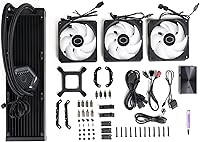
The bracket system for both LGA 1700 and AM5 is genuinely straightforward, with clear physical separation of the hardware for each platform and minimal chance of confusing parts. Builders consistently highlight that this is one of the less frustrating 360mm AIO installs, with the low-profile fan screws helping in cases where standard screw heads would have caused clearance problems.
Users working in smaller mid-tower cases occasionally found the stiff tubing hard to manage when trying to route cleanly away from the GPU or RAM slots. Instructions are adequate but lean on brief illustrations rather than detailed written steps, which can slow down first-time AIO builders who want more hand-holding.
RGB & Lighting Quality
84%
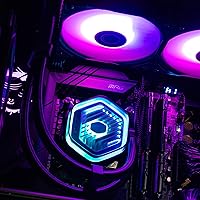
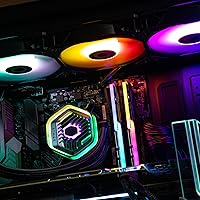
The ARGB Gen 2 implementation across the pump head and all three fans produces even, vivid lighting that looks cohesive and well-diffused rather than the blotchy or LED-spotting effect seen on cheaper AIOs. Out of the box, the included hardware controller lets users cycle modes without any software, which is a genuine convenience for builds where the software ecosystem is irrelevant.
The color accuracy and brightness can vary slightly between the pump head and the fans when viewed at certain angles, a minor cosmetic inconsistency a handful of buyers picked up on. More notably, the lighting is less impactful in cases with tinted or heavily smoked glass, where the visual payoff is significantly reduced compared to open-panel or clear-glass builds.
Software Experience
62%
38%
For users running a predominantly Cooler Master ecosystem, MasterCTRL provides a reasonably intuitive interface for adjusting fan curves, pump speed, and lighting profiles in one place. The MasterPlus integration adds a layer of per-component control that enthusiasts appreciate when dialing in a quiet daily-use profile versus a performance-focused gaming preset.
In mixed-brand builds — which describe the majority of real-world PCs — syncing MasterCTRL with ASUS Aura, MSI Mystic Light, or Gigabyte RGB Fusion reliably causes headaches, ranging from lighting desyncs to software crashes after Windows updates. Several users report needing to reinstall or manually restart the software after each reboot, which is a friction point that Cooler Master has not fully resolved across software versions.
Fan Durability
89%
The Loop Dynamic Bearing technology underpins a rated lifespan that exceeds 160,000 hours, and early long-term adopters who have been running the unit for over a year report no fan degradation in noise or airflow output. This kind of bearing design has a strong track record in Cooler Master's fan lineup for resisting dust ingress and mechanical wear better than sleeve-bearing alternatives.
The 160,000-hour MTTF rating is an averaged statistical figure, not a guarantee for every individual unit, and a small number of users have reported one fan in the three-pack developing a faint tick after several months of use. Replacement fans are available but require sourcing separately, adding minor cost and effort if a single unit fails outside the warranty window.
Pump Reliability
81%
19%
The majority of users — across hundreds of verified reviews — report zero pump issues over extended use, with consistent flow and no audible change in pump behavior after months of daily operation. The dual chamber design appears to contribute positively to long-term reliability by reducing internal pressure fluctuations that can accelerate wear in single-chamber setups.
A distinct minority of buyers, perhaps 8 to 12 percent based on feedback patterns, report intermittent pump noise that ranges from a low hum to an occasional higher-pitched whine, and the variance between units suggests a quality-control inconsistency at the manufacturing level. This is not a widespread defect but it is frequent enough to be a real consideration rather than a statistical anomaly.
Case Compatibility
86%
The slim 27.2mm radiator thickness is a meaningful advantage for builders working in mid-tower cases where a standard 30mm or 32mm radiator would foul against RAM heatspreaders or VRM covers. The low-profile fan screws add another layer of practical compatibility that makes this one of the more case-friendly 360mm AIOs at its price tier.
Despite the slim profile, the unit is still a 360mm radiator and simply will not work in cases limited to 280mm or 240mm support — a basic point, but one that catches out some buyers who did not check their case specifications before ordering. Front-mount radiator installations in tighter cases also draw complaints about the stiff tubing, which resists the bending needed to clear drive bays or PSU shrouds.
Value for Money
85%
At its price point, the combination of a dual chamber pump, three high-quality pre-installed fans with genuine longevity ratings, and a complete ARGB setup without extra controllers is competitive against the field. Builders upgrading from budget or mid-tier AIOs consistently describe it as a meaningful step up in thermal and acoustic performance per dollar spent.
Flagship competitors like the NZXT Kraken Elite and Corsair iCUE Elite Capellix do offer measurably better peak thermal performance and more polished software ecosystems, and for builders who push their hardware hard, the delta in price versus those units narrows the value case for this 360mm AIO. Those who hit MasterCTRL software frustrations also tend to retroactively feel the value proposition is weaker than it appeared at purchase.
Modding & Customization
78%
22%
The officially supported 3D-printable pump cover system is a genuinely uncommon feature at this price tier, giving builders with access to a printer a low-cost route to personalizing the most visible component of the cooler. The Printables.com community has already produced a range of cover designs, and Cooler Master's decision to endorse this openly is a builder-friendly move that resonates strongly with the modding community.
The customization options beyond the pump cover are limited — the fans, tubing, and radiator are not designed for easy third-party modification, and builders looking for deeper aesthetic changes will hit a wall quickly. For those without a 3D printer or a friend with one, the pump cover feature is effectively inaccessible, reducing its practical value to a smaller subset of the target audience.
Socket Compatibility
92%
Covering Intel LGA 1700, 1200, and the full 115x family alongside AMD AM5 and AM4 means this cooler spans nearly every relevant consumer desktop platform currently in circulation, making it a solid long-term investment for builders who anticipate a platform change in the next year or two. The bracket hardware is clearly labeled and physically separated by platform in the packaging, which reduces the chance of installation errors.
Notably absent from the compatibility list are Intel's LGA 1851 socket (Arrow Lake) and any LGA 2066 HEDT support, which limits options for extreme workstation builders or early adopters of Intel's newest platform architecture. While these omissions affect a small percentage of buyers, they are worth verifying before purchase for anyone on the cutting edge of Intel's platform roadmap.
Packaging & Accessories
77%
23%
The package includes tube clips for cable management, platform-specific brackets with clear labeling, and a hardware RGB controller — a thoughtful accessory bundle that reduces the need to source additional parts for a clean install. The separate packaging for Intel and AMD bracket hardware is a minor but genuinely useful organizational choice that speeds up the installation process.
The included documentation leans heavily on simplified diagrams, and several buyers who were new to AIO installation found the instructions insufficiently detailed for edge-case mounting scenarios like front-panel radiator mounts with awkward tube routing. Thermal paste is pre-applied to the cold plate, which is convenient but removes buyer choice for those who prefer a specific compound.

Suitable for:

The Cooler Master MasterLiquid Atmos 360 AIO Cooler is best matched to enthusiast builders who are running power-hungry CPUs — think Intel Core i7 or i9 processors and AMD Ryzen 7 or 9 chips — and want a 360mm liquid cooling solution that doesn't demand custom loop complexity or flagship-tier spending. Its slim 27.2mm radiator profile and low-profile fan screws make it a realistic choice for mid-tower and select smaller cases where thicker 360mm radiators simply don't clear the frame. Builders who care about a cohesive, well-lit system will appreciate that the ARGB Gen 2 setup covers both the pump head and all three fans out of the box, with no extra hubs to buy. Those upgrading from a 240mm AIO or a high-end air cooler will likely see meaningful temperature reductions, particularly during sustained workloads like video encoding, 3D rendering, or extended gaming sessions. Platform flexibility is also a genuine selling point — covering modern Intel and AMD sockets means this cooler can follow a builder through a platform upgrade without going in the bin.
Not suitable for:

Buyers who prefer a completely software-free or plug-and-play RGB experience may find the MasterLiquid Atmos 360 frustrating, as getting the most out of the lighting ecosystem relies on MasterCTRL software that has drawn mixed feedback for stability, particularly in multi-brand RGB setups. The tubing, while functional, is on the stiffer side, which can complicate routing in very compact or unconventional case layouts where flexibility matters. Users building in extremely small form-factor cases — think mini-ITX enclosures that cap radiator support at 240mm or below — will find this 360mm unit simply won't fit regardless of the slim profile. Builders chasing absolute peak performance at any price, who are already comparing flagships like the NZXT Kraken Elite or custom loop setups, may find the thermal ceiling here falls just short of those upper-tier options under extreme overclocking conditions. Finally, anyone who dislikes managing proprietary software ecosystems for pump or lighting control should factor that dependency in before committing.

Specifications

  • Radiator Size: The aluminum radiator measures 394 x 119.6 x 27.2mm, making it a standard 360mm form factor with a slimmer-than-average 27.2mm thickness for improved case compatibility.
  • Radiator Material: The radiator is constructed from aluminum, which provides adequate heat dissipation for most enthusiast workloads while keeping the overall unit weight manageable.
  • Fan Model: Three SickleFlow 120 Edge fans come pre-installed, each using Loop Dynamic Bearing (LDB) technology for reduced friction, lower noise, and extended operational lifespan.
  • Fan Noise Level: At full speed, the fans operate at 27.2 dBA, which is genuinely quiet by 360mm AIO standards and unlikely to be the loudest component in a typical build.
  • Fan Speed: The fans spin up to a maximum of 2500 RPM, with PWM control allowing the system to modulate speed based on thermal load for quieter idle behavior.
  • Airflow: Each fan delivers up to 70.7 CFM of airflow, providing strong volumetric air movement through the radiator fins under sustained high-load conditions.
  • Static Pressure: The fans produce 3.61 mmH2O of static pressure, which is sufficient to push air effectively through the dense fin stack of the radiator.
  • Fan Lifespan: Cooler Master rates the SickleFlow 120 Edge fans at more than 160,000 hours mean time to failure (MTTF), indicating strong long-term durability expectations.
  • Pump Design: The pump uses a dual chamber design that separates the inlet and outlet channels to increase internal water pressure and direct coolant flow more precisely toward the CPU contact area.
  • RGB Lighting: Both the pump head and all three fans feature Addressable RGB Gen 2 LEDs, compatible with major motherboard ARGB headers as well as Cooler Master's MasterCTRL software.
  • Power Connector: The unit uses a 3-pin power connector, so builders should verify header availability and adapter requirements based on their specific motherboard layout before installation.
  • Voltage & Wattage: The cooler operates at 12V and draws 3.6W, reflecting a very modest power footprint relative to the thermal performance it delivers.
  • Intel Compatibility: Supported Intel sockets include LGA 1700, 1200, 1151, 1150, 1155, and 1156, covering platforms from the older Skylake generation through to current Raptor Lake builds.
  • AMD Compatibility: On the AMD side, the included brackets support AM5 and AM4 sockets, covering Ryzen processors from the 1000 series through to the current Ryzen 7000 lineup.
  • Item Weight: The complete unit weighs 3.12 lbs, which is worth considering when mounting on a case ceiling or front panel, particularly in builds that are moved or transported regularly.
  • Software Support: The cooler is compatible with both MasterCTRL and MasterPlus software, allowing users to adjust fan curves, pump settings, and ARGB lighting profiles from a single interface.
  • Modding Support: Cooler Master officially supports 3D-printed customizations for the pump top cover, with community-created designs available through Printables.com for builders who want a personalized look.
  • Tube Management: Tube clips are included in the box specifically for cable and tube management, helping builders keep the interior tidy without sourcing third-party solutions.

Related Reviews
Cooler Master MasterLiquid Atmos 240 Liquid Cooler
82%
76%
Thermal Performance
88%
Noise Level
82%
Build Quality
84%
Pump Performance
91%
RGB & Lighting
More
Cooler Master MasterLiquid 360L Core 360mm
82%
88%
Thermal Performance
74%
Pump Quality & Reliability
91%
Installation Experience
83%
Noise Level
86%
Value for Money
More
Cooler Master MasterLiquid ML240L V2 AIO Cooler
77%
78%
Thermal Performance
91%
Installation Experience
63%
Pump Noise & Vibration
82%
Fan Performance
88%
ARGB Lighting
More
Montech HyperFlow ARGB 360 AIO Liquid Cooler
87%
90%
Cooling Performance
85%
Noise Level
92%
Ease of Installation
88%
Compatibility with Intel & AMD
91%
Warranty & Long-Term Reliability
More
TRYX Panorama 360 360mm AIO Liquid Cooler
82%
93%
Display Quality
88%
Cooling Performance
91%
Build Quality & Materials
84%
Fan Performance & Noise
67%
Software (KANALI)
More
Jungle Leopard PF 360 AIO CPU Cooler
77%
88%
LCD Display Quality
66%
Software Experience
81%
Thermal Performance
84%
Noise Level
78%
Build Quality
More
Thermalright Frozen Prism 360 AIO Liquid Cooler
79%
83%
Cooling Performance
91%
Value for Money
78%
Build Quality
69%
Fan Noise & Acoustics
74%
ARGB Lighting
More
ARCTIC Liquid Freezer III Pro 360
86%
93%
Thermal Performance
88%
Noise Level
91%
VRM Cooling
89%
Build Quality
94%
Value for Money
More
Gigabyte AORUS WATERFORCE X 360 AIO Liquid CPU Cooler
86%
91%
Cooling Performance
89%
Noise Level
74%
Ease of Installation
87%
Aesthetic Customization
84%
Display Functionality
More
ASUS ROG Ryujin III 360 AIO Cooler
83%
93%
Cooling Performance
88%
Pump Quality & Reliability
87%
Fan Performance
74%
Noise Levels
91%
LCD Display Functionality
More

FAQ

Yes, the LGA 1700 bracket is included in the box and the installation process is straightforward. Multiple buyers building on 12th and 13th Gen Intel platforms have noted that the bracket clicks into place cleanly without needing any extra hardware.

In most cases, yes. The 27.2mm slim profile gives it a better chance of clearing RAM clearance issues or motherboard VRM heatsinks that trip up thicker 360mm radiators. That said, always cross-reference your specific case's radiator thickness tolerance before committing.

Yes. A hardware controller is included in the box, so you can cycle through lighting modes manually without touching MasterCTRL or MasterPlus. The software adds more granular control and sync options, but it is not mandatory for basic operation.

A conventional AIO pump mixes the inlet and outlet flows in a single chamber, which can reduce net water pressure. The dual chamber design physically separates those two paths, allowing higher pressure to build and directing more coolant flow directly over the CPU cold plate. In practical terms, it means the coolant spends more time absorbing heat from the processor rather than recirculating inefficiently.

It handles most mainstream overclocking scenarios on the Ryzen 9 series well, but the 7950X is a particularly power-hungry chip. At stock or moderate overclocks you should be fine, but if you are pushing all 16 cores hard with aggressive voltage settings, you may find yourself closer to the thermal ceiling than with a flagship AIO or custom loop.

Noticeably quieter than most 360mm AIOs at similar performance levels. The 27.2 dBA rating holds up reasonably well in real-world use — at full tilt the fans are audible, but they are not the kind of aggressive whine you get from older or cheaper 120mm fans spinning at 2500 RPM.

It works well for most users on a straightforward single-brand setup, but it has drawn complaints from builders trying to sync it with RGB ecosystems from ASUS, MSI, or Gigabyte simultaneously. If your build is entirely Cooler Master hardware, the experience is generally smooth. Mixed-brand setups can occasionally require reinstallation or manual resets after system updates.

Yes, and this is one of the more thoughtful features of this cooler. Cooler Master has made official design files available on Printables.com, so builders with access to a 3D printer — or a friend with one — can swap out the pump cover for custom shapes, logos, or designs without voiding support.

The tubing is stiffer than some competing AIOs, which a portion of buyers have flagged as a minor frustration when routing in tighter cases or when the radiator needs to mount at an angle. It is not a dealbreaker in a standard mid-tower setup, but if your case has a constrained routing path, expect to spend a few extra minutes working the tubing into position.

The cooler ships with pre-applied thermal paste on the cold plate, which is sufficient for initial installation and performs well for the majority of users. Most builders will not need to remove and reapply it unless they are unseating the cooler for maintenance after an extended period of use, at which point a fresh application of quality paste is always a sensible choice.

Where to Buy