Overview

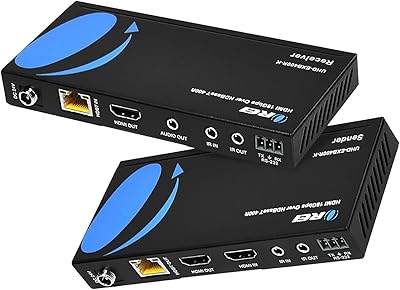
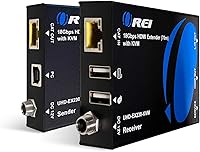
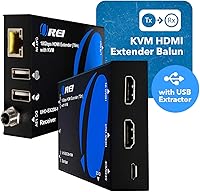
The OREI EX-230PRO-KVM 4K HDMI KVM Extender is built to solve one specific headache: getting a clean 4K signal from a source to a display that sits much farther away than a standard HDMI cable can reasonably handle. Instead of one long, expensive HDMI run, this HDMI extender uses ordinary Cat6/7 network cable to carry the signal, which keeps installation costs sane for home theaters, classrooms, or small offices. In the box you get a sender, a receiver, a power adapter, and instructions that do not require an engineering degree to follow. What sets this OREI extender apart from a basic point-to-point unit is the added USB KVM function, letting you control a distant PC's keyboard and mouse from the receiver side. A 1-year warranty backs it up, signaling OREI built this for sustained use, not just occasional hookups.
Features & Benefits

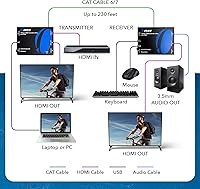
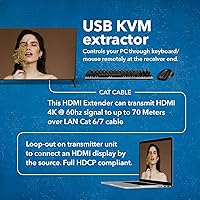
On the technical side, this KVM extender kit handles 4K at 60Hz over distances up to 230 feet, provided you are running solid Cat6/7 cable end to end. HDCP 2.2 and HDMI 2.0b compliance mean it plays nicely with streaming boxes, Blu-ray players, and most modern HDR sources, including HDR10 and Dolby Vision content. EDID pass-through quietly handles the handshake between source and display, which cuts down on the blank-screen guessing game that plagues cheaper extenders. The transmitter's HDMI loop-out lets you keep a local screen running while the signal heads off to the receiver, and a 3.5mm audio jack pulls sound out for local speakers or headphones. The USB 1.1 KVM link extends keyboard and mouse control to the far end, but it is limited to input devices, not file transfer or faster peripherals.

Best For

This KVM extender kit fits a specific kind of buyer, not just anyone with an HDMI cable. Home theater enthusiasts running a projector or TV well outside normal cable range are an obvious fit, since one network cable beats fishing a bulky HDMI line through walls. Small conference rooms and training spaces benefit too, especially when a PC at one end needs to drive a display at the other without extra gear cluttering the room. Digital signage and kiosk installs, where a single cable run is far easier to manage than a long HDMI cable, are another natural match. Gamers wanting a console or PC tucked away in another room, free of visible cable clutter, will appreciate it as well. Anyone who needs basic remote keyboard and mouse access alongside the video link rounds out the list.

User Feedback

Feedback on this OREI extender tends to split along predictable lines. On the positive side, buyers who stuck with quality Cat6 or Cat7 cable report a noticeably stable picture at or near the rated distance, and most describe setup as genuinely plug-and-play rather than a fight with menus. The keyboard and mouse extension also draws praise from people who did not expect a budget-friendly extender to include it at all. On the downside, a handful of owners ran into handshake hiccups, where a particular TV or projector needed a reboot or two before EDID and HDCP settled into agreement. Cable quality matters more than buyers expect going in, and skimping on the run length or category tends to be the first thing that goes wrong, more so than the unit itself.

Pros

  • Extends a 4K signal up to 230 feet using affordable Cat6/7 cable instead of pricey long HDMI runs.
  • Built-in USB KVM support lets you control a distant PC's keyboard and mouse without extra cabling.
  • HDCP 2.2 and HDMI 2.0b compliance keeps it working smoothly with modern streaming boxes and Blu-ray players.
  • EDID pass-through cuts down on blank-screen guesswork when matching source and display resolutions.
  • HDMI loop-out on the transmitter lets you keep a local screen active while extending the signal elsewhere.
  • Plug-and-play setup is frequently described as straightforward, even for non-technical buyers.
  • Supports HDR10, Dolby Vision, and HLG, so picture quality holds up on demanding sources.
  • A 1-year warranty gives buyers reasonable peace of mind for a semi-professional AV tool.

Cons

  • Performance leans heavily on cable quality, so cheap or marginal Cat6 runs can undercut the rated distance.
  • USB KVM support is limited to keyboard and mouse, not external drives or higher-speed peripherals.
  • Some users report EDID or HDCP handshake quirks with specific TVs or projectors that take a reboot to clear.
  • Running new Cat6/7 cable through walls or ceilings adds installation effort that a simple HDMI cable would not.
  • It is overkill, and overpriced, for buyers who only need a short HDMI extension within a single room.
  • The dual-voltage power supply still relies on a wall adapter at each end, adding cords to manage.
  • Audio output is limited to basic formats through the 3.5mm jack, not a full home theater audio pass-through.
  • Buyers expecting zero setup friction may be surprised that resolution or handshake settings occasionally need attention.

Ratings

These scores for the OREI EX-230PRO-KVM 4K HDMI KVM Extender are generated by AI after analyzing verified user reviews from buyers worldwide, with spam, bot activity, and incentivized feedback filtered out before scoring. Each category reflects a balance of what real owners praised and where they ran into trouble, rather than a single averaged star rating. The goal is a transparent breakdown you can actually use to decide if this extender fits your setup.
4K Picture Quality at Range
86%
Owners running solid Cat6/7 cable consistently describe a sharp, stable 4K picture, even pushing the extender close to its rated distance for home theater and gaming setups. HDR10 and Dolby Vision content reportedly comes through without noticeable banding or color shifts.
Picture quality drops noticeably once cable length or quality falls outside the sweet spot, with some buyers noticing minor artifacts or dropouts on longer, lower-grade runs. It is not a guaranteed flawless image regardless of installation conditions.
Maximum Distance Reliability
78%
22%
Most buyers confirm the unit holds a clean signal well past typical extension distances when paired with quality cable, making it a real option for projectors mounted across large rooms or basements far from the source gear.
Reaching the full 230-foot rating consistently is not guaranteed, and a few owners report softer reliability or occasional dropouts near the upper end of that range. Distance claims should be treated as a best-case figure rather than a fixed guarantee.
Cable Sensitivity
61%
39%
When buyers invest in proper Cat6 or Cat7 cable rated for the run length, performance is consistently described as rock-solid, which rewards a little upfront planning rather than grabbing whatever cable is on hand.
This is the single biggest variable in real-world performance, and budget or undersized cable is the most common reason buyers report dropouts, flicker, or a weaker signal than expected. It puts more responsibility on the installer than a typical HDMI cable would.
Setup & Installation Ease
84%
Non-technical buyers repeatedly describe the process as genuinely plug-and-play: connect sender and receiver, run the network cable, power both ends, and the picture just appears. No menus, apps, or special configuration are required for a typical setup.
A subset of users run into an EDID or HDCP handshake hiccup with a particular TV or projector, requiring a reboot or power cycle before the signal locks in cleanly. It is rare, but it does mean setup is not flawless for every display.
HDCP & Streaming Compatibility
88%
HDCP 2.2 and HDMI 2.0b compliance means buyers can run modern streaming boxes, Blu-ray players, and HDR content through it without the copy-protection errors that plague cheaper extenders. This compatibility is repeatedly called out as a reason to trust it for current gear.
Compatibility is strong but not bulletproof: a small number of very new or unusual display firmware versions can still trigger brief authentication errors. It is a minor and infrequent complaint compared to most points in this review.
EDID & Resolution Handling
73%
27%
EDID pass-through generally lets the source and display agree on resolution automatically, which cuts down on the blank-screen guesswork that often comes with manual extenders. Most users plug in and get the right resolution without touching a settings menu.
Some buyers report the handshake getting confused with specific displays, leading to a temporary blank screen or wrong resolution until the units are restarted. It is not the most consistent part of the experience and can require a bit of trial and error.
USB KVM Performance
79%
21%
The added keyboard and mouse extension is consistently called a standout, letting buyers control a PC sitting in another room without running a separate USB cable or setting up remote desktop software. It is a genuinely useful bonus most competing extenders skip.
Because it runs over USB 1.1, the connection is strictly for input devices, not flash drives, webcams, or other higher-speed peripherals. Buyers expecting broader USB functionality are sometimes caught off guard by that limit.
HDMI Loop-Out Function
82%
18%
The transmitter's loop-out port lets buyers keep a local monitor or TV active for monitoring while simultaneously sending the signal to a distant receiver, which control room and dual-display setups specifically call out as valuable.
A few users wish the loop-out supported independent resolution settings rather than mirroring the extended signal exactly. It is a small limitation that mostly matters for more advanced multi-display arrangements.
Audio Output Quality
68%
32%
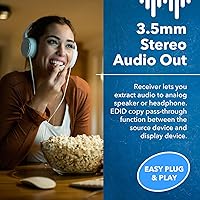
The 3.5mm output on the receiver gives a quick, no-fuss way to pipe sound to local speakers or headphones without touching the main AV chain, which buyers in simple desk or classroom setups find genuinely convenient.
It is stereo only, so anyone wanting true surround sound at the receiver end has to rely on the HDMI output to a separate AV receiver instead. Home theater buyers chasing a full audio setup may find this output a bit basic.
Build Quality
81%
19%
The metal housing on both units feels noticeably sturdier than the plastic shells found on many budget extenders, giving buyers more confidence leaving it mounted behind a TV or tucked into an equipment rack long-term.
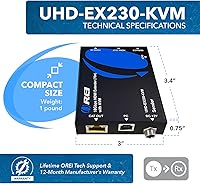
At roughly 1 pound and a compact 3.4 by 3 inch footprint, the units feel solid but not heavy-duty enough for rough outdoor or industrial use, which lines up with their indoor-only design intent.
Latency & Lag
85%
Buyers running gaming consoles and PCs through it generally report no perceptible lag or input delay, which matters a lot for anyone extending a setup used for fast-paced games rather than just passive video playback.
On longer cable runs closer to the rated maximum, a handful of users notice a very slight delay compared to a direct HDMI connection. It is rarely enough to matter outside of competitive gaming scenarios.
Value for Money
76%
24%
For a unit that bundles 4K extension, USB KVM control, loop-out, and audio breakout into one box, buyers in the mid-range price tier generally feel they are getting more functionality than a basic point-to-point extender at a similar cost.
The Ethernet cable itself is sold separately, so the real total cost climbs once you factor in a quality Cat6 or Cat7 run, which some buyers do not anticipate going in. Budget shoppers who only need basic extension may find cheaper, single-purpose units elsewhere.
Warranty & Support
83%
A 1-year manufacturer warranty signals OREI expects this to handle ongoing, semi-professional use rather than occasional plug-and-forget duty, and buyers who have needed support generally describe the response as responsive and easy to deal with.
A 1-year term is fairly standard for this category, but it is on the shorter side compared to extenders that offer multi-year coverage. Buyers planning years of heavy daily use may want to weigh that against the price.

Suitable for:

The OREI EX-230PRO-KVM 4K HDMI KVM Extender is a smart pick for home theater owners running a projector or TV that sits well beyond the reach of a normal HDMI cable. It also suits small business and conference room setups where a PC needs to drive a display across a room or down a hallway without a tangle of cabling. Digital signage installers and anyone managing kiosks will appreciate routing a single Cat6/7 run instead of fishing a long, bulky HDMI cable through walls or ceilings. Gamers who want a console tucked into a media closet, away from the living room clutter, get a clean way to keep that connection alive. It is also a solid match for anyone who occasionally needs to operate a distant PC's keyboard and mouse without setting up a full remote desktop session. Buyers comfortable running their own network cable, or who already have structured cabling in place, will get the most reliable results.
Not suitable for:

This HDMI extender will frustrate buyers who expect plug-in-and-forget performance regardless of cable quality, since results drop off quickly with budget Cat5e cable or runs that exceed the rated distance. It is not built for anyone who needs true high-speed USB extension, since the KVM link only handles keyboard and mouse, not external drives, webcams, or audio interfaces. The OREI EX-230PRO-KVM 4K HDMI KVM Extender is also not the right tool for casual users who just want a short HDMI extension across a single room, where a basic cable would be cheaper and simpler. Renters or anyone unwilling to run new Cat6/7 cable through walls may find the installation more involved than expected. Buyers chasing a flawless out-of-box experience on every TV or projector should know that some HDCP or EDID handshake troubleshooting is occasionally part of the deal. Finally, anyone on a tight budget who only needs basic video extension without KVM features may be paying for capability they will not use.
Specifications

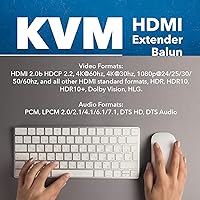
  • Video Resolution: The extender supports 4K video at 60Hz as well as standard 1080p and lower resolutions.
  • Transmission Distance: It can carry a signal up to 230 feet (70 meters) over a single Cat6 or Cat7 cable run.
  • HDMI Standard: It is built to the HDMI 2.0b specification and is HDCP 2.2 compliant for protected content.
  • HDR Support: It passes through HDR10, HDR10+, Dolby Vision, and HLG content without stripping the metadata.
  • KVM Function: A USB 1.1 connection extends keyboard and mouse control from the receiver end to a PC at the source.
  • Loop-Out Port: The transmitter includes an HDMI loop-out so a local display can stay active while the signal is also extended.
  • EDID Handling: EDID pass-through automatically matches resolution settings between the source and the connected display.
  • Audio Output: A 3.5mm stereo jack on the receiver lets you route audio to external speakers or headphones.
  • Audio Formats: Supported audio formats include PCM, LPCM up to 7.1, DTS-HD, and standard DTS.
  • Power Supply: Each unit uses a dual-voltage power adapter with a US plug, plus an included international adapter.
  • Housing Material: The sender and receiver units are housed in metal enclosures.
  • Weight: The unit weighs approximately 1 pound.
  • Dimensions: Each unit measures 3.4 x 3 x 0.75 inches.
  • Model Number: The product is identified by the model number EX-230PRO-KVM.
  • Warranty: OREI backs the extender with a 1-year manufacturer warranty.
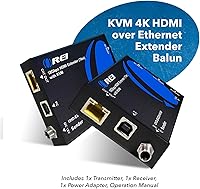
  • Box Contents: The package includes one HDMI sender, one HDMI receiver, a power adapter, and an instruction manual.
  • Cable Requirement: A Cat6 or Cat7 Ethernet cable, sold separately, connects the sender and receiver units.

Related Reviews

OREI EX-500IR HDMI Extender
88%
94%
Transmission Distance
92%
Signal Quality
89%
Ease of Installation
85%
Build Quality
88%
Power over Cable (PoC) Functionality
More
AV Access 4KIP100-KVM HDMI KVM Extender
76%
83%
Video Signal Quality
88%
Transmission Range
79%
USB Hub Functionality
61%
Network Compatibility & Setup
67%
DIP Switch Configuration
More
OREI UHD14-EXB400-K 1x4 HDBaseT HDMI Extender Splitter
77%
91%
Signal Quality & Stability
88%
4K & HDR Performance
83%
Transmission Range
47%
Ecosystem Compatibility
78%
Ease of Setup
More
J-Tech Digital JTECH-KVE2 KVM HDMI Extender
74%
83%
Signal Quality
91%
Ease of Setup
54%
USB Functionality
76%
Video Resolution
78%
Build Quality
More
OREI UHD-EXB400R-K 4K HDMI Extender over Ethernet
86%
91%
Long-Range HDMI Performance
87%
Ease of Installation
93%
Video Quality (4K, HDR)
85%
Compatibility with Devices
89%
Power over Cable (PoC) Effectiveness
More
OREI EX-165C HDMI Extender over Cat6
79%
86%
Signal Quality
88%
Setup & Installation
83%
IR Passthrough
79%
Value for Money
77%
Range Performance
More
OREI HD14-EX165-K
OREI HD14-EX165-K
78%
84%
Signal Stability
62%
4K Performance
88%
1080p Performance
91%
Installation Ease
93%
Power Over Cable
More
OREI UHD18-EX115-K 1x8 HDMI Extender Splitter
78%
91%
Signal Quality
84%
Installation Ease
76%
Transmission Range
53%
Cable Dependency
82%
IR Passback Performance
More
OREI UHD48-EX230-K 4x4 HDMI Matrix Extender
78%
88%
Signal Stability
84%
4K & HDR Performance
61%
Installation Experience
82%
IR Control Functionality
79%
Build Quality & Enclosure
More
OREI HD12-EX165-K 4K HDMI Over Ethernet Extender Splitter
85%
88%
Ease of Setup
91%
Signal Quality and Performance
89%
Long-Distance HDMI Transmission
84%
IR Control Functionality
87%
Power Over Cable (PoC) Feature
More

FAQ

Officially, this HDMI extender is rated for up to 230 feet over a single Cat6 or Cat7 cable. In real-world use, hitting that distance reliably depends a lot on cable quality, so a cheap or marginal cable run can cause issues well before you reach the rated limit. If you are pushing close to the max distance, it is worth spending a bit more on a solid cable.

OREI specifies Cat6 or Cat7 cable for this setup, and that is the safer bet for stable 4K performance. Cat5e might work over short distances, but it was not designed for this kind of bandwidth, so picture quality and reliability can suffer as the run gets longer.

No, the USB 1.1 KVM connection is built specifically for keyboard and mouse signals, not general data transfer. It will not work for flash drives, webcams, or other high-speed peripherals, so plan on a separate solution if you need that.

Yes, it is built to the HDMI 2.0b standard and is HDCP 2.2 compliant, which covers most current streaming devices and Blu-ray players. It also passes through HDR10, Dolby Vision, and HLG, so picture quality on supported sources should not take a hit.

Most buyers describe setup as straightforward: connect the sender to your source, the receiver to your display, run the Ethernet cable between them, and power both units. It is genuinely closer to plug-and-play than most AV gear, though an occasional handshake hiccup with a specific TV or projector can require a quick reboot.

This is usually an EDID or HDCP handshake issue, where the source and display have not fully agreed on resolution yet. Power cycling the receiver, and sometimes the source device, usually resolves it within a minute or two. It is one of the more common quirks reported with this kind of extender, especially on certain TV or projector models.

Yes, the transmitter has an HDMI loop-out specifically for that. You can keep a local display active at the source while the same signal is also extended to the receiver, which is handy for monitoring or dual-room setups.

Over HDMI, this OREI extender passes through PCM, multi-channel LPCM, DTS-HD, and standard DTS, so surround formats are covered through the HDMI connection itself. The separate 3.5mm output on the receiver is stereo only, intended for simple speaker or headphone setups, not full surround.

You get the HDMI sender unit, the HDMI receiver unit, a power adapter, and a printed instruction manual. The Cat6/7 Ethernet cable connecting the two units is not included, so factor that into your budget if you do not already have one.

The OREI EX-230PRO-KVM 4K HDMI KVM Extender comes with a 1-year manufacturer warranty, which is fairly standard for this category of AV equipment. It is worth registering your purchase and keeping the receipt handy in case you need to make a claim.