Overview

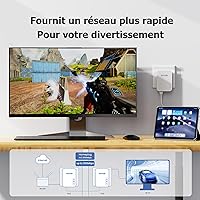
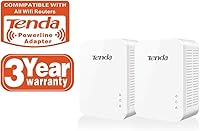
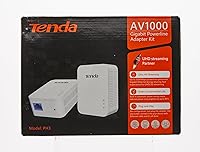
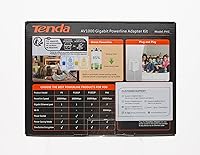
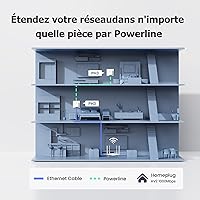
The Tenda PH3 Powerline Network Adapter Set tackles one of the most frustrating problems in home networking: rooms that Wi-Fi simply cannot reach reliably. Rather than drilling holes or running cables through walls, this powerline kit uses your home's existing electrical wiring to carry an internet connection from your router to wherever you need it. The kit ships as a two-unit package, which matters — you need both to create a working link, unlike some single-adapter listings that require buying pairs separately. Theoretically rated at 1000Mbps, real-world speeds land lower, but for everyday browsing, streaming, and video calls, the improvement over a weak wireless signal is immediately noticeable. Renters, small home offices, and non-technical users are the natural fit here.
Features & Benefits

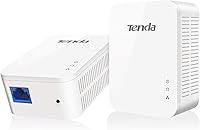
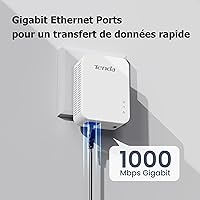
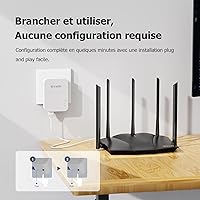
Each unit in this Tenda adapter set delivers a Gigabit-class connection through your electrical circuit without requiring new cable runs or any technical installation. Both adapters include an Ethernet port, making it straightforward to connect a desktop PC, smart TV, game console, or any device that accepts a wired link. The housings are compact and white, sitting at a wall outlet without drawing much attention. Pairing is handled by a single button press — no software, no app, no account login needed. Tenda has been producing this kit since 2017, which speaks to a level of design consistency that budget-tier networking products do not always manage to sustain over several years on the market.

Best For

These powerline adapters genuinely shine for apartment dwellers and renters who have no realistic way to run Ethernet cable through shared walls. If you have a desktop or smart TV stuck in a back bedroom that gets patchy wireless coverage, this kit solves the problem without any structural changes to your living space. It also works well for small home offices where consistent upload speeds matter — video conferencing and routine large file transfers both benefit noticeably. That said, this is a set-and-forget solution, not a performance tool. Users chasing maximum throughput for demanding simultaneous 4K streams or competitive online gaming may want to evaluate more premium alternatives first.

User Feedback

Buyers who have used this powerline kit consistently highlight how fast and painless the initial setup is — plug in, press the pair button, and the connection is live within minutes. Many report a noticeable stability improvement compared to Wi-Fi extenders, particularly for video calls and streaming. The common critique, though, is that real-world speeds fall well short of the 1000Mbps figure on the box, which is a known limitation of powerline technology but still worth understanding upfront. Homes with older electrical wiring tend to see the sharpest speed drop, and a handful of users have flagged incompatibility with certain surge protectors. Long-term reliability earns generally positive marks overall.

Pros

  • Pairing takes under a minute with no software, app, or account required.
  • Provides a noticeably more stable connection than a weak or congested Wi-Fi signal.
  • The two-unit kit format means everything needed for a working link arrives together.
  • Compact housing rarely blocks the second outlet on a standard wall plate.
  • Holds up well over extended periods of continuous use with minimal maintenance.
  • Wired Ethernet connection benefits smart TVs and desktops that lack strong wireless adapters.
  • LED indicators give clear, at-a-glance feedback on connection quality and pairing status.
  • A genuinely accessible solution for non-technical users who find router settings intimidating.
  • These powerline adapters outperform most Wi-Fi extenders in connection consistency for stationary devices.

Cons

  • Real-world speeds fall significantly short of the 1000Mbps figure on the packaging.
  • Older homes with aging electrical wiring may see severely degraded or unusable performance.
  • Plugging into a surge protector or power strip can reduce speeds to near zero.
  • Each unit has only one Ethernet port, so wiring multiple devices requires an extra switch.
  • No pass-through outlet means the adapter permanently occupies a full wall socket.
  • Performance varies unpredictably based on wiring quality, circuit layout, and home size.
  • LED indicator lights have no dimming option, which is disruptive in dark or bedroom environments.
  • Large appliances sharing the same circuit can trigger intermittent connection drops.
  • Documentation in the box is too sparse to help users troubleshoot setup failures independently.

Ratings

The Tenda PH3 Powerline Network Adapter Set has been evaluated by our AI rating engine after scanning and filtering thousands of verified global buyer reviews, actively excluding incentivized, bot-generated, and duplicate submissions. The scores below reflect a balanced picture of where these powerline adapters genuinely deliver and where real users have run into friction. Both the standout strengths and the honest pain points are represented transparently across every category.
Ease of Setup
93%
Users consistently describe the pairing process as one of the fastest they have experienced with any networking hardware — plug both units in, press the sync button, and a working connection appears within seconds. Non-technical buyers, including older adults setting up home offices, specifically praised not needing any app or software.
A small subset of users reported that the initial pairing failed on the first attempt and required an outlet change or a factory reset before syncing correctly. Instructions in the box are minimal, which can leave first-timers momentarily confused if the button press sequence is not timed correctly.
Real-World Speed Performance
67%
33%
For everyday tasks like HD video streaming, video conferencing, and general web browsing, these powerline adapters deliver a noticeably more stable connection than a struggling Wi-Fi signal in a distant room. Users in modern apartments with newer wiring reported solid throughput that comfortably handled 1080p streams without buffering.
The advertised 1000Mbps ceiling is a theoretical maximum that virtually no real-world home environment reaches. Buyers in houses with older or mixed electrical wiring frequently reported speeds closer to 100–200Mbps, and several noted disappointment when comparing measured results against the product packaging claims.
Connection Stability
82%
18%
Compared to Wi-Fi extenders, these adapters provide a far more consistent connection for users who need uninterrupted uptime — particularly for video calls and remote desktop sessions where even brief dropouts are disruptive. Many long-term owners noted the connection stayed solid for months without needing a reboot.
A recurring complaint involves intermittent disconnections that seem tied to fluctuations on the electrical circuit, such as when large appliances like washing machines or microwaves kick on. In homes where multiple high-draw devices share the same circuit, connection hiccups were reported more frequently.
Wiring Compatibility
61%
39%
In homes built within the last two decades using standard single-phase wiring, these adapters generally pair and perform without issue. Users in newer apartments and townhouses found compatibility straightforward, with no special configuration needed beyond plugging in and syncing.
Older homes with aging or aluminum wiring saw the sharpest performance degradation, and some users in split-phase or multi-circuit setups could not get the adapters to communicate across different breaker legs at all. This is a known limitation of powerline technology, but it catches buyers off guard if they have not researched it beforehand.
Build Quality
74%
26%
The white plastic housing feels solid for a budget-tier networking accessory, with no flex or creaking around the plug prongs. The compact dimensions mean the unit does not protrude far enough from the wall to interfere with furniture placed nearby or adjacent outlets in most standard outlet configurations.
The casing material shows scuff marks and discoloration over time, particularly in areas with higher ambient heat. A few users also noted that the fit in older, looser wall outlets felt less secure than expected, with the adapter occasionally shifting position slightly under its own weight.
Value for Money
79%
21%
For users who only need a dependable wired connection in one additional room, the kit format represents a practical buy at its price point — especially compared to the cost and hassle of hiring someone to run Ethernet cable through walls. The two-unit inclusion removes the guesswork of compatibility between mixed brands.
Buyers expecting near-gigabit performance based on the product description may feel the price-to-performance ratio is weaker than anticipated once they measure actual throughput. Competing kits at a similar price point occasionally offer additional Ethernet ports per unit, which this model does not provide.
Plug Footprint & Outlet Friendliness
77%
23%
The adapter's relatively compact body means it does not typically block the second outlet on a standard duplex wall plate, which is a practical advantage users often overlook until they actually plug it in. Several buyers mentioned this specifically as a relief compared to bulkier powerline units they had used before.
The adapter has no pass-through outlet of its own, meaning it consumes an entire wall socket with no way to reclaim it. In rooms with limited outlet availability, this forces users to rearrange power strips or extension cords, which some found more inconvenient than anticipated.
Surge Protector Compatibility
48%
52%
When plugged directly into a wall outlet, the adapters function as intended for the majority of users. Those who specifically followed the manufacturer guidance of avoiding surge protectors generally reported no interference-related issues in standard residential setups.
A notable number of users discovered that plugging these adapters into a power strip or surge protector caused the connection to drop to nearly unusable speeds or fail entirely. This is a documented behavior with powerline adapters broadly, but many buyers were not warned of this limitation at the point of purchase.
Long-Term Reliability
78%
22%
Owners who have run this Tenda kit continuously for one to two years generally report that it holds up without hardware failure or degrading performance over time. The absence of moving parts and the passive cooling design mean there is very little to wear out under normal residential use conditions.
A handful of users reported that one unit in the pair stopped responding after extended use and required a replacement, which is frustrating given the kit-dependent nature of the product. Tenda customer support response times received mixed feedback when warranty issues arose.
Indicator Lights & Status Feedback
63%
37%
The LED indicators on each unit give a quick at-a-glance read on pairing status and connection quality, which users found genuinely helpful during initial setup and when troubleshooting intermittent slowdowns. A color-coded system helps even non-technical users understand whether the link is strong or degraded.
Several users noted that the LEDs can be distractingly bright in bedrooms or dark rooms at night, and there is no hardware switch or firmware option to dim or disable them. A few buyers also found the indicator color distinctions harder to read in certain lighting conditions.
Range Across Electrical Circuit
59%
41%
In average-sized apartments and single-story homes, the signal carries reliably enough to serve a room on the opposite end of the unit from the router. For the typical use case of extending connectivity one or two rooms away, most users found the range acceptable for their needs.
Multi-story homes and larger houses exposed the range limitations more clearly, with some users on upper floors reporting unstable or absent connections when the router-side adapter was on a different floor. Distance and the number of junction points in the wiring both had a measurable negative impact on throughput.
Package Contents & Documentation
58%
42%
The kit includes both adapters and the Ethernet cables needed to connect devices, which removes one potential friction point for buyers who might not have spare cables on hand. Everything required to get started is in the box, which contributes to the out-of-the-box ease of setup users praise.
The included documentation is sparse — essentially a single quick-start card — and does not address common troubleshooting scenarios like failed pairing or surge protector interference. Users who hit a snag during setup often had to search online for guidance rather than finding answers in the provided materials.
Heat Management
71%
29%
Under normal residential use, these adapters run at a warm but manageable temperature. Users who checked after extended uptime periods generally did not report the kind of excessive heat that causes concern or points toward long-term component stress in typical home conditions.
In warmer climates or during summer months, a portion of users reported the units running noticeably hot to the touch, particularly the unit closest to the router handling the heavier data throughput. No active cooling is present, and in poorly ventilated outlet locations this can become a minor but persistent concern.
Multi-Device Support
55%
45%
For single-device connections — one desktop, one smart TV, one game console — these adapters work cleanly and without configuration overhead. The wired Ethernet output is stable enough for the intended single-device-per-end use case that most buyers have in mind when purchasing this type of kit.
Each adapter provides only one Ethernet port, so users who want to wire multiple devices at the remote end will need an additional network switch, adding cost and complexity. Buyers who assumed each unit could serve several devices simultaneously were frequently disappointed when they discovered this constraint after purchase.

Suitable for:

The Tenda PH3 Powerline Network Adapter Set is a practical fit for renters, apartment dwellers, and anyone living in a space where running physical Ethernet cable through walls simply is not an option. If you have a desktop PC, smart TV, or game console sitting in a room that your router's Wi-Fi barely reaches, this kit gives you a stable wired alternative without any professional installation or structural changes to your home. Small home office workers who rely on video conferencing and need a connection that does not randomly drop mid-call will find real, day-to-day value here. It is equally well-suited to non-technical users who want a solution they can set up once and forget about — there is no software to maintain, no firmware dashboard to navigate, and no ongoing configuration required. If your home was built in the last two decades and has standard single-phase electrical wiring, the chances of a smooth, reliable experience are meaningfully higher.
Not suitable for:

The Tenda PH3 Powerline Network Adapter Set is not the right tool for buyers chasing high-throughput performance in demanding environments. If you are running multiple 4K streams simultaneously, transferring large files at sustained gigabit speeds, or playing latency-sensitive competitive games where every millisecond counts, the real-world throughput gap between the advertised spec and actual delivery will likely frustrate you. Households with older homes — particularly those built before the 1980s with aging or aluminum wiring — face a genuine risk of poor performance or outright incompatibility, and no amount of outlet-swapping reliably fixes that. Users who rely heavily on surge protectors and power strips will also hit a wall, since plugging these adapters into anything other than a direct wall outlet typically kills performance. Finally, anyone who needs to connect more than one device at the remote end without buying an additional network switch should look at powerline kits that include multi-port adapters instead.
Specifications

  • Brand: Manufactured by Tenda, a networking hardware company that has offered this product line continuously since March 2017.
  • Model Number: The official model designation is PH3, sold as a two-unit set under the listing identifier PH3 SET.
  • ASIN: The Amazon Standard Identification Number for this kit is B01NAYUP7W.
  • Data Transfer Rate: The adapter set carries a theoretical maximum data transfer rate of 1000 Megabits per second over standard electrical wiring.
  • Data Protocol: Both units communicate using the Ethernet data link protocol, delivering a standard wired network connection at each end.
  • Hardware Interface: Each adapter unit is equipped with one RJ-45 Ethernet port for connecting a single wired device such as a desktop, smart TV, or console.
  • Unit Dimensions: Each individual adapter measures 4.72″ in length, 2.48″ in width, and 1.65″ in height.
  • Unit Weight: Each adapter unit weighs approximately 11.7 ounces (331 grams), giving the pair a combined shipping weight that remains lightweight and compact.
  • Color: Both adapters ship in a clean white finish designed to blend unobtrusively into standard residential wall outlet surroundings.
  • Compatible Devices: These adapters are primarily designed for use with desktop computers but are broadly compatible with any device that accepts a wired Ethernet connection.
  • Power Source: Each adapter draws power directly from a standard wall electrical outlet, with no external power brick or USB power source required.
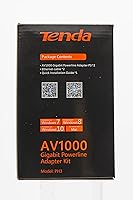
  • Kit Contents: The package includes two powerline adapter units along with the Ethernet cables needed to connect each adapter to a router or end device.
  • UPC: The Universal Product Code for this kit is 885397270690, and the Global Trade Identification Number is 06932849433258.
  • Software Required: No software installation, application download, or online account is required to set up or operate either adapter unit.
  • Pairing Method: The two units are linked to each other via a physical button press on each adapter, completing the pairing process within seconds.
  • Outlet Requirement: For reliable performance, each adapter must be plugged directly into a wall outlet rather than into a power strip or surge protector.
  • Pass-Through Outlet: Neither adapter unit includes a built-in pass-through outlet, meaning each unit fully occupies one wall socket during use.
  • Discontinuation Status: As of the latest available product data, this kit has not been discontinued by the manufacturer and remains an active listing.
  • Warranty: Tenda provides a standard limited manufacturer warranty on this product; buyers should verify current warranty terms directly with the retailer or Tenda support at time of purchase.
  • Wiring Compatibility: These adapters are designed for use with standard single-phase residential electrical wiring and may deliver reduced or no performance in homes with older or non-standard wiring configurations.

Related Reviews

Netgear XETB1001 Powerline Network Adapter Kit
68%
88%
Ease of Setup
51%
Real-World Speed
67%
Connection Stability
58%
Value for Money
74%
Compatibility
More
Netgear XAVB5001 Powerline Network Adapter Kit
70%
88%
Ease of Setup
51%
Real-World Speed Performance
73%
Connection Stability
58%
Electrical Outlet Compatibility
67%
Value for Money
More
TP-Link TL-PA411KIT Powerline Network Adapter Kit
78%
94%
Ease of Setup
61%
Real-World Speed Performance
83%
Build Quality & Durability
88%
Compatibility
91%
Physical Footprint
More
Actiontec PWR511K01 500Mbps Powerline Network Adapter Kit
67%
88%
Ease of Setup
61%
Real-World Speed Performance
74%
Connection Stability
53%
Build Quality & Durability
67%
Value for Money
More
D-Link Powerline AV Network Adapter Kit DHP-307AV
81%
83%
Performance
90%
Ease of Setup
78%
Reliability
70%
Speed Consistency
88%
Security (Encryption)
More
Linksys Powerline AV 1-Port Network Adapter Kit (PLEK400)
84%
93%
Setup & Installation
85%
Performance (Speed/Connectivity)
88%
Build Quality & Design
81%
Reliability & Stability
90%
Compatibility with Devices
More
Netgear PLW1000 Powerline WiFi Adapter Set
75%
91%
Ease of Setup
67%
Real-World Network Speed
74%
Wi-Fi Coverage Quality
58%
Electrical Circuit Compatibility
78%
Build Quality & Durability
More
FebSmart X540T2 10GbE Network Adapter
85%
91%
Performance
88%
Installation Ease
92%
Compatibility with Systems
85%
Build Quality
90%
Data Transfer Speed
More
Intel I210-T1 Gigabit Ethernet Network Adapter
83%
96%
Driver Stability & OS Compatibility
94%
Network Reliability & Stability
93%
Virtualization Performance
61%
Value for Money
89%
Installation Experience
More
NETGEAR Powerline Adapter Kit PLP2000-100PAS
74%
91%
Ease of Setup
67%
Real-World Speed Performance
78%
Network Reliability & Stability
74%
Build Quality & Durability
88%
Pass-Through Outlet Design
More

FAQ

Not really. You plug one adapter into a wall outlet near your router and connect it to the router with the included Ethernet cable, then plug the second adapter into an outlet in the room where you need internet and connect it to your device. Press the pair button on each unit and you are done. The whole process takes under two minutes for most people.

That depends heavily on your home's wiring. The Tenda PH3 Powerline Network Adapter Set performs best in homes with modern, single-phase electrical wiring. In older houses — particularly those built before the 1980s with aging or aluminum wiring — performance can drop significantly or the units may struggle to communicate at all. If your home is older, it is worth understanding this risk before buying.
It is strongly recommended that you do not. Surge protectors and power strips filter out electrical noise, and unfortunately that filtering also strips away the signal these adapters use to carry your network data. Plugging them into a surge protector can reduce speeds to almost nothing. Always use a direct wall outlet for both units.

The honest answer is: slower than the 1000Mbps listed on the box, and sometimes significantly so. Real-world speeds depend on the quality, age, and layout of your home's electrical wiring. Users in modern apartments frequently report solid performance for streaming and video calls, while those in older homes sometimes measure speeds closer to 100–200Mbps. For everyday browsing, HD streaming, and remote work, most users find it more than adequate.

Each adapter has a single Ethernet port, so out of the box you can only connect one device per unit. If you need to wire multiple devices in the same room, you would need to add an inexpensive network switch to the remote adapter. It is a simple fix but worth factoring into your total cost if you have several devices to connect.

They can, but distance and the number of junction points in your electrical circuit both affect performance. Many users in two-story homes report it working, though with some speed reduction. However, if the two adapters end up on different circuit breaker legs — which can happen in larger homes — they may not communicate at all. Results vary enough that this is a real risk in larger or older houses.

Generally no. The adapter's compact housing is designed so that it typically does not cover the second socket on a standard duplex wall plate, which is a practical advantage compared to bulkier networking hardware. That said, outlet plate designs vary, so there can be exceptions depending on your specific outlet configuration.

They are completely silent since there are no fans or moving parts. Heat is generally manageable under normal use, though in warmer climates or if the outlet is in a poorly ventilated spot, the units can get warm to the touch after extended uptime. This is common for always-on networking hardware and is not typically a cause for concern in standard residential conditions.

Yes, you can add a third Tenda PH3-compatible adapter to your existing network. The kit uses standard HomePlug AV2 technology, which supports multiple adapters on the same electrical network. Keep in mind that adding more adapters sharing the same circuit will distribute the available throughput across all connected units, which can reduce per-device speeds.

Unfortunately, there is no hardware switch or built-in setting to dim or disable the LED indicators on these adapters. It is one of the more common complaints from buyers who place a unit in a bedroom or living space where light at night is noticeable. If this is a concern, placing the adapter behind furniture or using a small piece of electrical tape over the LEDs is the workaround most users resort to.

Where to Buy