Overview

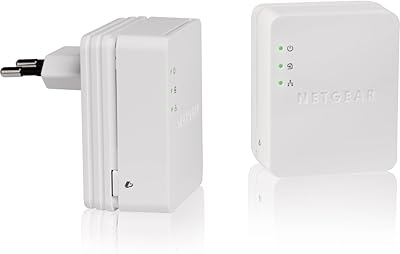
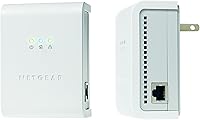
The Netgear XETB1001 Powerline Network Adapter Kit takes a straightforward approach to a common home networking headache: dead zones where Wi-Fi just won't reach. Instead of adding another wireless extender competing for airspace, this powerline adapter kit routes your internet signal through the electrical wiring already inside your walls. Plug one adapter near your router, connect it via Ethernet, then plug the second wherever you need a connection — that's genuinely it. It runs on the HomePlug 1.0 standard, which launched in 2008 and has since been surpassed by faster specs. Older doesn't automatically mean useless, but expectations need to be set accordingly before you buy.
Features & Benefits

On paper, this powerline adapter kit tops out at 85 Mbps — enough headroom for HD streaming, casual gaming, and everyday browsing when conditions cooperate. Setup is refreshingly simple: plug in, connect the Ethernet cable, and the two adapters find each other automatically with no software required for basic use. The single-plug form factor is a genuinely practical touch, combining the network connection and power supply into one outlet instead of two. There's also built-in encryption to keep your traffic private across shared wiring. Three LED indicators covering power, link status, and Ethernet activity give you an at-a-glance read on what's happening without digging through any app or interface.

Best For

The Netgear powerline set makes the most sense for home users who need a stable wired connection in rooms where drilling holes and running cable just isn't practical — think a bedroom TV, a basement game console, or a home office on the opposite side of the house from the router. It also tends to perform reasonably well in older homes where newer HomePlug AV2 adapters sometimes struggle with dated electrical infrastructure. Light streamers, casual gamers, and anyone connecting a single device will find it adequate. If you're after gigabit speeds or running a demanding home network, this network adapter pair isn't the right tool — but for basic, reliable connectivity without Wi-Fi headaches, it still earns its place.

User Feedback

Across 207 ratings averaging 3.7 out of 5 stars, the sentiment is genuinely split. Plenty of buyers report years of trouble-free operation for light tasks — basic browsing, standard-definition streaming, and keeping a set-top box or print server online. Where things get contentious is speed. Real-world throughput rarely approaches the rated ceiling, and users on older circuits, homes with multiple electrical panels, or shared wiring often see noticeably weaker performance. A handful of reviewers mention early unit failures, while others have run the same pair for years without a hiccup. The most recurring criticism is that newer HomePlug AV2 kits deliver far better speed and reliability for a comparable price, making this powerline adapter kit a harder sell for anyone starting fresh today.

Pros

  • No configuration needed out of the box — just plug in and the two adapters connect automatically.
  • Single-plug form factor keeps outlet usage tidy, combining power and network in one unit.
  • Built-in encryption protects traffic passively, with nothing for the user to configure or manage.
  • Three LED indicators make it easy to spot connection or link issues at a glance.
  • Works with a wide range of existing devices including consoles, DVRs, desktops, and print servers.
  • Performs adequately for everyday browsing and standard-definition streaming in favorable conditions.
  • Compact, silent, and runs cool during normal single-device usage.
  • Buyers extending an older HomePlug 1.0 setup will find it compatible without any reconfiguration.
  • Includes everything needed to get started, with a printed guide and Ethernet cable in the box.

Cons

  • Real-world speeds fall well short of the 85 Mbps spec in most home environments.
  • Performance degrades sharply when the two adapters are on separate circuit breakers.
  • Heavy appliances sharing the same circuit can cause intermittent drops and unstable links.
  • Not compatible with newer HomePlug AV or AV2 adapters, limiting expandability significantly.
  • The included Ethernet cable is too short to offer useful placement flexibility near the router.
  • Some units showed early hardware failure, suggesting inconsistent build quality across batches.
  • The software CD is obsolete for any computer without an optical drive.
  • Online support resources for this aging product line are sparse and hard to navigate.
  • Buyers comparing it to current-generation alternatives will find the value proposition difficult to justify at full price.

Ratings

The scores below for the Netgear XETB1001 Powerline Network Adapter Kit were generated by our AI engine after parsing and filtering verified buyer reviews from multiple global markets, with spam, incentivized, and bot-flagged submissions actively excluded. What remains reflects genuine, real-world experience from hundreds of users in varied home and small-office environments. Both the strengths that keep buyers satisfied and the friction points that generate complaints are transparently weighted in every score.

Ease of Setup
88%
Most buyers are up and running within minutes. The two adapters find each other automatically once plugged in and connected via the included Ethernet cable, with no router configuration or software installation needed for basic use. Users with zero networking knowledge consistently praised how little effort the initial setup demanded.
A small but vocal group of reviewers ran into pairing issues, particularly when outlets on different electrical circuits were involved. In those cases, troubleshooting with no meaningful on-device feedback beyond the LED lights proved frustrating for less technical users.
Real-World Speed
51%
49%
For low-demand tasks like web browsing, standard-definition video streaming, and keeping a smart TV or set-top box online, the throughput holds up adequately. Users in apartments or smaller homes with clean, modern wiring reported the most consistent performance for these lightweight workloads.
The 85 Mbps ceiling is a theoretical maximum that most users never see in practice. Actual speeds in real homes, especially those with older wiring or outlets on separate breaker legs, often land well below half that figure, making it a poor fit for 4K streaming, large file transfers, or low-latency gaming.
Connection Stability
67%
33%
When conditions are right, meaning a single electrical circuit and limited interference from other appliances, the connection holds steady for hours without dropping. Long-term owners who use it for a single device like a desktop or media player report months of uninterrupted service.
Stability is heavily dependent on the home's electrical environment. Users sharing circuits with heavy appliances like refrigerators, microwaves, or HVAC systems frequently reported intermittent drops. Homes with multiple electrical panels were particularly problematic, sometimes rendering the adapters unable to maintain a consistent link.
Value for Money
58%
42%
For buyers who pick this up at a steep discount or secondhand, and only need basic connectivity for one device, the value proposition is reasonable. It does deliver a functional wired connection without any recurring costs or complex installation, which has its own quiet appeal for non-technical households.
At or near its original retail price, this network adapter pair is a difficult sell given that newer HomePlug AV2 kits offer dramatically faster real-world speeds, better range across circuits, and similar plug-and-play ease for a comparable or only slightly higher cost. Reviewers who shopped around before buying were almost universally critical on this point.
Compatibility
74%
26%
Works reliably with any device that has a standard 10/100 Mbps Ethernet port, covering a wide range of routers, desktop computers, game consoles, DVRs, and print servers. Users who had older networking gear around the house found it slotted in without any compatibility friction.
HomePlug 1.0 compatibility with newer HomePlug AV and AV2 devices is not guaranteed and in practice often inconsistent. Buyers who tried to mix this kit with a newer adapter from a different brand or generation frequently reported failed pairing, limiting its expandability significantly.
Build Quality & Durability
63%
37%
The adapter housing feels reasonably solid for its class, and a portion of long-term owners report several years of continuous use without any hardware failure. The compact white casing fits unobtrusively into most home environments and does not run excessively hot during normal operation.
Early failures were mentioned often enough in the review pool to be a genuine concern. Some units stopped linking reliably within the first year, and a few stopped working entirely. The internal components appear to have some quality variance across production batches, making durability something of a lottery.
Outlet & Space Efficiency
82%
18%
The single-plug design that combines both power passthrough and the network connection into one unit is a genuinely thoughtful detail. It keeps outlet usage minimal, which matters in rooms where free sockets are scarce, and avoids the cluttered look of a separate power brick alongside an adapter.
The adapter body itself is somewhat bulky and can partially obstruct an adjacent outlet depending on the wall plate configuration. In tightly spaced outlet pairs, users found the adapter blocked access to the second socket entirely, which was an unexpected annoyance in otherwise convenient locations.
LED Status Indicators
77%
23%
Having three dedicated LEDs covering power, powerline link strength, and Ethernet activity gives users a quick and practical way to diagnose connection issues without opening any app or logging into a router. Several reviewers specifically appreciated being able to glance at the adapter and immediately know if the link was active.
The indicators offer no granular feedback beyond basic on and off states. When the powerline link LED showed a weak or absent signal, users had no way to understand whether the issue was circuit-related, distance-related, or a hardware fault, leaving troubleshooting largely to trial and error.
Security & Encryption
79%
21%
Built-in data encryption adds a meaningful layer of protection, particularly relevant in apartment buildings or rental properties where electrical wiring may be shared across units. The encryption runs passively without any configuration required, which is the right approach for a device aimed at non-technical users.
The encryption standard implemented here predates more robust modern protocols, and security-conscious reviewers noted that it should not be considered enterprise-grade protection. There is also no user-facing control to verify the encryption is active beyond assuming the default behavior is working as documented.
Range Across the Home
59%
41%
In smaller homes or apartments where all outlets share a single electrical circuit, the signal carries consistently between rooms and across floors. Users in those scenarios reported no meaningful drop in link quality regardless of physical distance within the property.
Range deteriorates sharply in larger homes, multi-story houses with sub-panels, or any setup where the two adapters end up on separate circuit breakers. This is a fundamental limitation of the HomePlug 1.0 standard rather than a defect per se, but it catches a significant number of buyers off guard.
Package Contents & Documentation
72%
28%
The kit includes everything needed to get started: both adapters, an Ethernet cable, a printed installation guide, and a software CD for users who want the configuration utility. Having physical documentation included is increasingly rare and was appreciated by buyers who prefer not to hunt for PDFs online.
The included Ethernet cable is short, limiting placement flexibility near the router. The software CD is effectively obsolete for most modern computers that lack optical drives, and the online support resources for a product of this age are sparse and difficult to navigate on the Netgear website.
Performance on Older Wiring
61%
39%
Counterintuitively, a subset of users in older homes reported that this HomePlug 1.0 kit outperformed or at least matched newer AV-standard adapters on aging electrical infrastructure. The older standard appears to negotiate more gracefully on wiring with higher resistance or noise in certain cases.
Older wiring is also where this powerline adapter kit is most unpredictable. Aluminum wiring, knob-and-tube remnants, or heavily loaded circuits can degrade performance to barely functional levels. There is no reliable way to predict behavior before purchase, which makes buying this kit for an older home a calculated gamble.
Noise & Heat Output
81%
19%
The adapters operate silently and run cool to the touch during typical usage. Buyers who had prior experience with noisier or warmer networking gear noted this as a welcome characteristic, particularly for units placed in bedrooms or living rooms where ambient noise matters.
Under sustained heavy load, the units do generate a bit more warmth than during idle operation, though no reviewers reported anything approaching unsafe temperatures. The lack of ventilation slots on the casing means heat has nowhere to dissipate actively, which likely contributes to the early failures some users experienced.
Interoperability with Other Brands
44%
56%
Within its own HomePlug 1.0 ecosystem and when paired with other Netgear adapters of the same generation, the kit works as expected. Buyers who needed a like-for-like replacement unit for an existing older Netgear powerline setup found it dropped in without issues.
Mixing this powerline adapter kit with adapters from other brands or newer HomePlug AV2 hardware almost universally resulted in pairing failures or severely degraded performance. The standard fragmentation in powerline networking makes cross-brand compatibility unreliable, and this older kit sits at the bottom of that compatibility chain.

Suitable for:

The Netgear XETB1001 Powerline Network Adapter Kit is a practical pick for home users who need a dependable wired connection in a room where stringing Ethernet cable simply isn't an option — think a basement office, a bedroom TV setup, or a living room console that sits too far from the router to rely on Wi-Fi. It works particularly well for light, single-device use cases: keeping a desktop connected for general browsing, getting a DVR or set-top box online, or giving a print server a stable link without the headaches of wireless dropout. Users in smaller homes or apartments where all outlets share one electrical circuit tend to get the most consistent results from this powerline adapter kit. Those inheriting or extending an existing HomePlug 1.0 network will also find it slots in without friction. If your needs are modest and your expectations are calibrated to the technology's age, it can still do a quiet, reliable job.

Not suitable for:

Anyone building a home network from scratch in 2024 should think carefully before committing to the Netgear XETB1001 Powerline Network Adapter Kit, because the HomePlug 1.0 standard it runs on has been broadly superseded by AV and AV2 alternatives that offer meaningfully faster real-world speeds and better cross-circuit performance at comparable or only slightly higher prices. Households with larger floor plans, multiple electrical panels, or separate breaker legs between rooms will likely find the connection unreliable or unusably slow, since that is where the older standard struggles most visibly. Competitive online gamers and 4K streaming households should look elsewhere entirely — the real-world throughput here rarely supports those demands consistently. Buyers who intend to expand their powerline network with adapters from other brands or newer generations will almost certainly run into pairing incompatibility. And for anyone who has already experienced the performance headroom of a modern AV2 kit, going back to this network adapter pair would feel like a noticeable step backward.

Specifications

  • Brand: Manufactured and sold under the Netgear brand, a well-established networking hardware company.
  • Model Number: The exact model identifier for this kit is XETB1001-100NAS.
  • Powerline Standard: Operates on the HomePlug 1.0 standard, an older but widely deployed powerline networking specification.
  • Max Data Rate: Rated for a maximum theoretical throughput of 85 Mbps over existing home electrical wiring.
  • Network Interface: Each adapter connects to devices via a standard 10/100 Mbps Ethernet port.
  • Encryption: Built-in data encryption is included to help protect traffic from unauthorized interception on shared wiring.
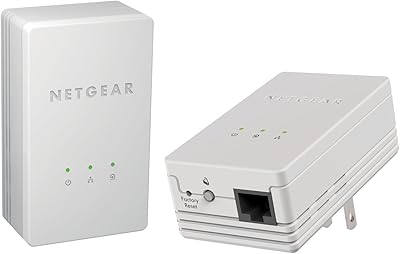
  • Form Factor: Single-plug design integrates both the power supply and network connection into one wall outlet footprint.
  • LED Indicators: Three LEDs per unit display the status of power, powerline link strength, and Ethernet link and activity.
  • Kit Contents: Each package includes two powerline adapters, one Ethernet cable, a printed installation guide, and a software CD-ROM.
  • Compatible Devices: Works with desktops, routers, game consoles, DVRs, set-top boxes, and print servers equipped with Ethernet ports.
  • Package Dimensions: The retail box measures 8.5 x 6.5 x 4 inches.
  • Item Weight: The complete kit weighs approximately 1 pound including both adapters and accessories.
  • Color: Both adapter units ship in a white finish.
  • PC Compatibility: Designed for use with PC-based systems; Mac compatibility is not officially listed in product documentation.
  • Release Date: This product was first made available for purchase in June 2008.
  • Manufacturer: Netgear, Inc. is the original manufacturer and is listed as the responsible party for this product line.
  • Seller Rank: Holds a ranking of number 451 in the Powerline Network Adapters category on Amazon at time of review.
  • Discontinuation Status: As of the latest available product listing data, this item has not been officially discontinued by Netgear.

Related Reviews
Netgear XAVB5001 Powerline Network Adapter Kit
70%
88%
Ease of Setup
51%
Real-World Speed Performance
73%
Connection Stability
58%
Electrical Outlet Compatibility
67%
Value for Money
More
NETGEAR Powerline Adapter Kit PLP2000-100PAS
74%
91%
Ease of Setup
67%
Real-World Speed Performance
78%
Network Reliability & Stability
74%
Build Quality & Durability
88%
Pass-Through Outlet Design
More
NETGEAR Powerline AV+ 200 Adapter Kit XAVB2501
82%
86%
Performance
92%
Ease of Setup
82%
Connectivity Reliability
78%
Speed Stability
88%
Value for Money
More
Actiontec PWR511K01 500Mbps Powerline Network Adapter Kit
67%
88%
Ease of Setup
61%
Real-World Speed Performance
74%
Connection Stability
53%
Build Quality & Durability
67%
Value for Money
More
NETGEAR XAVB2101 Powerline Network Adapter Kit
71%
91%
Ease of Setup
61%
Real-World Speed Performance
88%
Physical Design & Form Factor
72%
Network Stability
67%
Value for Money
More
D-Link Powerline AV Network Adapter Kit DHP-307AV
81%
83%
Performance
90%
Ease of Setup
78%
Reliability
70%
Speed Consistency
88%
Security (Encryption)
More
Linksys Powerline AV 1-Port Network Adapter Kit (PLEK400)
84%
93%
Setup & Installation
85%
Performance (Speed/Connectivity)
88%
Build Quality & Design
81%
Reliability & Stability
90%
Compatibility with Devices
More
Zyxel PLA5456 AV2000 Powerline Adapter Kit
74%
91%
Ease of Setup
67%
Real-World Throughput
74%
Network Stability
61%
Hardware Reliability
88%
Port Configuration
More
Actiontec PWR514K01 Powerline Network Adapter Kit
73%
91%
Ease of Setup
88%
Multi-Device Connectivity
57%
Real-World Throughput
74%
Connection Stability
69%
Value for Money
More
Netgear XAVB1301 Powerline 200Mbps Mini Adapter Kit
71%
91%
Ease of Setup
62%
Real-World Speed Performance
78%
Connection Stability
86%
Physical Design & Footprint
77%
Security Features
More

FAQ

For basic use, no software is needed at all. You plug one adapter into an outlet near your router, connect it with the Ethernet cable, then plug the second adapter wherever you need the connection. The two units find each other automatically. The included CD is only necessary if you want to use the optional configuration utility, which most users never need to touch.

Probably not reliably, and this is one of the most common complaints from buyers. Powerline adapters using the HomePlug 1.0 standard have a hard time bridging across separate circuit breakers or electrical panels. If you are unsure whether your outlets share a circuit, it is worth checking before purchasing, because performance on split circuits can range from slow and unstable to completely non-functional.

The 85 Mbps figure is a theoretical ceiling that very few users actually reach. In practice, most people see considerably lower throughput depending on the age and quality of their home wiring, the distance between adapters, and what else is drawing power on the same circuit. For standard web browsing or SD video streaming, the real-world speeds are typically adequate. For 4K video or heavy file transfers, you may find them frustratingly inconsistent.

It depends entirely on what standard your existing adapter uses. This kit runs on HomePlug 1.0, which is compatible with other HomePlug 1.0 devices but not reliably interoperable with the newer HomePlug AV or AV2 standard that most modern adapters use. If your existing adapter is a newer model from any brand, pairing it with this one is likely to fail or produce very poor results.

It runs automatically without any user configuration. The encryption is enabled by default, which is the right call for a device aimed at everyday home users. You do not need to enter any passwords or access a settings page to activate it.

The core difference is that this powerline adapter kit uses your home's electrical wiring to carry the network signal, while a Wi-Fi extender rebroadcasts a wireless signal. In ideal conditions, the powerline approach tends to give you a more stable, lower-latency connection since it is wired at both ends. The trade-off is that performance depends heavily on your home's electrical layout, whereas a Wi-Fi extender works anywhere it gets a wireless signal, even if that signal is weaker than you would like.

Each adapter has a single Ethernet port, so it connects directly to one device. If you want to connect multiple devices at the receiving end, you would need to plug a small network switch into the adapter's Ethernet port. The adapter itself does not have built-in switching or multiple ports.

Yes, and this is a well-documented limitation of older HomePlug 1.0 technology. High-draw appliances on the same circuit can introduce electrical noise that degrades or temporarily interrupts the powerline signal. Plugging the adapters into outlets that are not shared with major kitchen or HVAC appliances can help, but it does not eliminate the risk entirely on busy circuits.

It can work for casual online gaming in favorable conditions, where the wiring is clean and on a single circuit. The latency advantage over Wi-Fi is real, but the limited throughput ceiling means that bandwidth-heavy online games or those requiring very low and consistent ping may occasionally experience issues. If competitive gaming is the primary use case, a more modern powerline kit or a direct Ethernet run to your router would serve you better.

The three LEDs give you a basic starting point for diagnosing problems. If the powerline link LED is off or flashing erratically, the two adapters are not communicating, which usually points to a circuit mismatch, too much distance, or electrical interference. If the Ethernet LED is off, the cable connection between the adapter and your device is the likely culprit. Beyond those basic signals, the LEDs do not provide detailed diagnostic information, so troubleshooting beyond that requires some trial and error with outlet placement.

Where to Buy