Overview

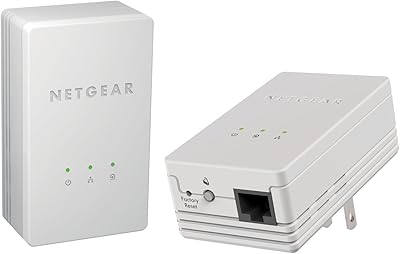
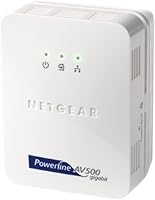
The Netgear XAVB5001 Powerline Network Adapter Kit is a straightforward solution for anyone who has wrestled with dead Wi-Fi zones and doesn't want to run Ethernet cable through walls. It works by sending network traffic through your home's existing electrical wiring — plug one adapter near your router, connect it via Ethernet, then plug the second adapter wherever you need a wired connection. No software, no configuration headaches. Worth noting: this network extender launched in 2010, so its 500 Mbps theoretical ceiling should be understood in that context. For casual home networking, it still does the job, but it's firmly a budget-tier pick, not a high-performance powerhouse.

Features & Benefits

Two features stand out on this powerline adapter kit. The Pick-a-Plug LED indicator — green for strong signal, red for poor — lets you test different outlets before committing to a spot, which is more useful than it sounds when your home's wiring isn't consistent. Security is handled by a Push-and-Secure button that applies AES encryption with a single press, no passwords required. Each adapter is compact enough to not monopolize an outlet strip, and the Ethernet port connects to virtually anything: gaming consoles, smart TVs, desktop PCs. The advertised 500 Mbps is theoretical — real-world throughput will land noticeably lower, depending on your home's wiring age and circuit layout.

Best For

This network extender makes the most sense for renters and non-technical users who need a wired connection in a specific room without the hassle of drilling walls or hiring someone to run cable. It's a practical pick for console gamers dealing with lag from a weak wireless signal — a stable Ethernet connection in the living room or bedroom can make a real difference in online play. HD video streaming on a smart TV or set-top box is another solid use case. That said, if you're chasing high-bandwidth tasks like large file transfers, the gap between advertised and actual speeds may frustrate you. Manage expectations accordingly.

User Feedback

The XAVB5001 sits at a 3.0-star average across nearly 150 ratings, which signals a genuinely mixed reception. On the positive side, buyers frequently praise how fast it sets up — most report being online within minutes, with no technical knowledge required, and basic browsing or HD streaming over the connection earns decent marks. The frustration tends to center on speed: many users report actual throughput well below what the packaging implies, sometimes dramatically so. A smaller but notable group ran into compatibility issues tied to their electrical panel configuration — homes with older or mixed circuits seem more prone to problems. Given the product's age, some complaints likely reflect infrastructure that has simply moved on.

Pros

  • Plug-and-play setup that most users complete in under five minutes with zero software involved.
  • Pick-a-Plug LED indicator takes the guesswork out of finding the strongest outlet in the room.
  • One-touch AES encryption via Push-and-Secure button keeps the network link private without any password management.
  • Stable enough for HD streaming and casual gaming in homes where Wi-Fi simply does not reach.
  • Compact units that typically do not block the adjacent outlet on a standard wall plate.
  • Works with virtually any Ethernet-equipped device — consoles, smart TVs, desktops, media streamers.
  • Eliminates the need to drill walls or negotiate with landlords about running permanent cable.
  • A genuinely low-friction entry point into wired networking for non-technical household users.

Cons

  • Real-world speeds fall far short of the 500 Mbps figure printed on the box — often by a wide margin.
  • Performance is heavily dependent on your home's electrical wiring layout, which buyers cannot easily assess before purchase.
  • Homes with split electrical panels or older wiring may experience poor signal or complete pairing failure.
  • The Fast Ethernet interface hard-caps device-side throughput, limiting speeds regardless of powerline signal quality.
  • No active firmware updates or meaningful manufacturer support remain for this aging hardware.
  • Appliances sharing the same circuit — fridges, microwaves, AC units — can cause noticeable connection drops.
  • Troubleshooting resources online are sparse and increasingly outdated given the product's age.
  • Units run noticeably warm during extended continuous use, with no visible thermal management indicators.

Ratings

The Netgear XAVB5001 Powerline Network Adapter Kit earns a candid, composite score derived from AI analysis of verified global buyer reviews — with spam, incentivized, and bot-flagged submissions actively filtered out before scoring. Ratings reflect what real home users consistently experienced across setup, daily performance, and long-term reliability. Both the genuine strengths and the frustrations buyers ran into are represented transparently below.
Ease of Setup
88%
Most buyers got this network extender running in under five minutes flat. Plug one adapter into the router, the second into a distant outlet, connect both via Ethernet, and you are done — no login portals, no driver discs, no configuration menus to wade through. For non-technical users, that simplicity is a genuine relief.
A small number of users reported that the two adapters failed to pair on the first attempt, requiring an unplugging cycle or a manual reset before they would talk to each other. Nothing catastrophic, but it undermines the promise of a completely frictionless experience.
Real-World Speed Performance
51%
49%
For light tasks — browsing, standard-definition streaming, casual online gaming — the XAVB5001 delivers a noticeably more stable connection than spotty Wi-Fi in the same room. Users in close proximity to the router, on the same electrical circuit, reported acceptable throughput for day-to-day use.
The 500 Mbps figure on the box is a theoretical maximum that almost no real home environment achieves. Most users reported actual speeds a fraction of that ceiling, and buyers expecting near-gigabit performance were consistently disappointed. Older home wiring and multi-circuit setups make the gap even wider.
Connection Stability
73%
27%
When the adapters pair successfully and the electrical circuit cooperates, the connection holds up well for extended periods. Console gamers and HD streaming households noted that drop-outs were far less frequent than with their previous Wi-Fi setup, which was the core problem they were trying to solve.
Stability is heavily dependent on your home's wiring layout. Users whose outlets share a circuit with high-draw appliances — refrigerators, microwaves, air conditioners — reported intermittent drops and inconsistent throughput that made the connection unreliable for anything latency-sensitive.
Electrical Outlet Compatibility
58%
42%
The Pick-a-Plug LED system is a genuinely practical touch — the color-coded signal strength indicator lets you test multiple outlets before settling on a spot, saving real trial-and-error frustration. In homes with straightforward single-panel wiring, most outlets tested green without issue.
Homes with split electrical panels, older wiring standards, or circuits running through surge-protected power strips often saw the adapters fail to communicate at all. This is a known limitation of powerline technology broadly, but it caught enough buyers off guard to be a recurring complaint thread.
Value for Money
67%
33%
At its price point, this powerline adapter kit asks very little and delivers a functional wired extension for users with modest needs. If your goal is stable HD streaming or basic gaming in a Wi-Fi dead zone, the cost-to-utility ratio holds up reasonably well for a casual household.
Buyers who compared it against more current powerline standards felt the age of the hardware was reflected in performance that newer, similarly priced kits now exceed. For the use case it serves, the value is acceptable — but it is no longer a standout deal in a more competitive market.
Build Quality & Durability
74%
26%
The adapters feel solid for their size and weight class. At under 5 ounces each, they are light without feeling flimsy, and the plug prongs seat firmly in standard outlets without wobbling. Several long-term users noted the units had been running continuously for years without physical failure.
The plastic housing shows scuff marks and discoloration over time, especially in warmer outlet locations. There is no indicator of internal temperature management, and a few users in warmer climates noted the units ran noticeably warm after extended continuous use.
Security Features
78%
22%
The Push-and-Secure AES encryption is one of the more thoughtful features on this kit. Pressing the button on both adapters within two minutes establishes an encrypted network link — no app, no password to forget. For home users who would otherwise leave the connection unsecured, it is a meaningful safeguard.
Security-conscious users noted there is no way to verify the encryption status at a glance after initial setup, and the process requires physical access to both units simultaneously, which can be awkward depending on where the second adapter is installed.
Latency for Gaming
69%
31%
Compared to a weak Wi-Fi signal two rooms away from the router, this network extender offers a meaningfully lower and more consistent ping for online play. Console gamers in particular found that wired latency through the powerline link reduced the rubber-banding and disconnects they were experiencing over wireless.
It does not match the latency of a direct Ethernet run from router to console — real-world powerline adds some overhead that a clean cable connection avoids. Competitive players who scrutinize ping values will notice the difference, even if casual gamers likely will not.
Streaming Performance
72%
28%
HD streaming on smart TVs and set-top boxes is where this adapter kit earns its most consistent praise. Users who had been battling buffering on 1080p content over Wi-Fi found that switching to this powerline connection largely resolved the problem, producing smooth, uninterrupted playback.
4K streaming is more hit-or-miss, particularly in homes where real-world speeds land on the lower end. Users attempting to stream 4K HDR content reported occasional buffering and quality drops that would not occur over a direct or higher-bandwidth powerline connection.
Compatibility with Devices
83%
The standard Ethernet output means this extender connects to virtually anything with a network port — gaming consoles, desktop PCs, smart TVs, media streamers, and network-attached storage devices all work without any adapter or driver considerations. Plug in the cable and the device sees a wired network.
The Fast Ethernet interface caps throughput at 100 Mbps on the device side in practice, which is a hardware ceiling some buyers did not notice until after purchase. For users with Gigabit-capable devices expecting full throughput to the LAN, this is a limiting factor worth knowing upfront.
Physical Footprint
81%
19%
The compact dimensions mean the adapters do not block the second outlet on a standard wall plate in most cases, which is a small but appreciated detail. Light enough to hold without the plug straining the outlet, and the black finish blends into most home decor without drawing attention.
The plug position on the adapter does occupy enough vertical space that certain outlet placements — particularly low-to-the-floor or close to baseboards — can make the adapter sit at an awkward angle. Not a dealbreaker, but worth checking your specific outlet location before assuming it will sit flush.
Long-Term Reliability
62%
38%
A segment of buyers reported running these adapters continuously for multiple years without hardware failure, which speaks to basic build durability. For users with a compatible electrical setup who hit a stable configuration early on, the units tend to stay consistent without needing attention.
The product's age is a real factor here. Firmware has not been actively updated in years, and buyers who encountered pairing or performance degradation issues had little recourse beyond a reset. There is no cloud management or modern diagnostic tool to troubleshoot problems remotely.
Documentation & Support
54%
46%
The physical quick-start guide included in the box is clear enough for the basic setup case, and the plug-and-play nature of the hardware means most users never need to look beyond it. For a simple two-adapter install, the documentation does exactly what it needs to.
Netgear's online support resources for this aging model are thin, and community forum threads addressing its specific quirks are dated. Buyers who ran into electrical compatibility issues or persistent pairing failures found very little actionable guidance from official channels.

Suitable for:

The Netgear XAVB5001 Powerline Network Adapter Kit is a practical fit for renters, non-technical households, and anyone who has hit a wall — literally — trying to get a reliable wired connection into a distant room without drilling or running cable. If your main pain point is a Wi-Fi dead zone in a bedroom, living room, or home office, and you need something that works without touching a router settings page, this kit addresses that problem directly. Console gamers who are tired of lag spikes during online play will find that a stable powerline connection, even at modest real-world speeds, is a meaningful upgrade over a weak wireless signal two rooms from the router. It also suits households where HD streaming keeps buffering on a smart TV or set-top box — swapping that device onto a wired powerline link tends to resolve the problem. Budget-conscious buyers who do not need cutting-edge throughput and just want a dependable, low-effort network extension will get reasonable utility out of this adapter kit in a home with modern, single-panel electrical wiring.
Not suitable for:

The Netgear XAVB5001 Powerline Network Adapter Kit is the wrong tool for anyone expecting speeds anywhere close to its 500 Mbps advertised ceiling — real-world throughput falls well short of that figure in most homes, and buyers chasing high-bandwidth tasks like large file transfers, 4K streaming, or low-latency competitive gaming at a serious level will likely be left frustrated. Homes with older electrical infrastructure, split panels, or circuits shared with high-draw appliances are particularly risky territory, as powerline signal quality degrades significantly under those conditions — and there is no way to know upfront whether your specific wiring will cooperate. Given that the hardware dates to 2010, it also lacks the firmware support, management tools, and raw performance standards that more current powerline or mesh Wi-Fi alternatives now offer at comparable price points. If you are already running Gigabit internet and want to extend that full-speed experience to another room, the Fast Ethernet interface on this network extender creates a hard throughput ceiling that will cap your connection well below what your service plan delivers. Power users, home lab builders, and anyone who needs a reliable solution for multiple simultaneous high-demand devices should look at newer hardware rather than settling for this aging kit.

Specifications

  • Brand: Manufactured by Netgear, a well-established networking hardware company based in the United States.
  • Model Number: The exact model identifier is XAVB5001-100NAS, used for support lookups and compatibility verification.
  • Networking Standard: Operates on the HomePlug AV powerline standard, which was the prevailing home powerline specification at the time of release.
  • Theoretical Speed: Advertised maximum throughput is 500 Mbps, though real-world speeds in typical home environments will be significantly lower.
  • Network Interface: Each adapter features a single Fast Ethernet (10/100 Mbps) port for connecting to devices via a standard RJ-45 Ethernet cable.
  • Kit Contents: The kit includes two powerline adapters, allowing one to connect at the router end and one at the remote device location.
  • Dimensions: Each adapter measures 1.57 x 2.64 x 3.39 inches, compact enough to fit most standard wall outlets without blocking adjacent sockets.
  • Weight: Each unit weighs approximately 4.6 ounces, making it light enough that the plug prongs carry the load without straining the outlet.
  • Color: Both adapters are finished in black, suitable for blending into most home or office outlet environments.
  • Security: Network encryption is handled via 128-bit AES, activated by pressing the Push-and-Secure button on both adapters within a two-minute window.
  • Outlet Testing: The Pick-a-Plug feature uses a tri-color LED indicator (green, amber, red) to display signal strength at any given electrical outlet.
  • Setup Method: Installation is fully plug-and-play with no software, drivers, or router configuration required beyond physical connection.
  • Power Source: Each adapter draws power directly from the wall outlet it is plugged into, requiring no external power supply or USB connection.
  • Compatible Devices: Works with any Ethernet-equipped device including desktop PCs, gaming consoles, smart TVs, set-top boxes, and network-attached storage units.
  • Date Released: The product was first made available in November 2010, making it a legacy-tier device by current networking standards.
  • Manufacturer Warranty: Netgear provided a limited hardware warranty at the time of sale; buyers should verify current warranty status directly with Netgear support.

Related Reviews
Netgear XETB1001 Powerline Network Adapter Kit
68%
88%
Ease of Setup
51%
Real-World Speed
67%
Connection Stability
58%
Value for Money
74%
Compatibility
More
NETGEAR Powerline Adapter Kit PLP2000-100PAS
74%
91%
Ease of Setup
67%
Real-World Speed Performance
78%
Network Reliability & Stability
74%
Build Quality & Durability
88%
Pass-Through Outlet Design
More
NETGEAR Powerline AV+ 200 Adapter Kit XAVB2501
82%
86%
Performance
92%
Ease of Setup
82%
Connectivity Reliability
78%
Speed Stability
88%
Value for Money
More
Actiontec PWR511K01 500Mbps Powerline Network Adapter Kit
67%
88%
Ease of Setup
61%
Real-World Speed Performance
74%
Connection Stability
53%
Build Quality & Durability
67%
Value for Money
More
NETGEAR XAVB2101 Powerline Network Adapter Kit
71%
91%
Ease of Setup
61%
Real-World Speed Performance
88%
Physical Design & Form Factor
72%
Network Stability
67%
Value for Money
More
Linksys Powerline AV 1-Port Network Adapter Kit (PLEK400)
84%
93%
Setup & Installation
85%
Performance (Speed/Connectivity)
88%
Build Quality & Design
81%
Reliability & Stability
90%
Compatibility with Devices
More
D-Link Powerline AV Network Adapter Kit DHP-307AV
81%
83%
Performance
90%
Ease of Setup
78%
Reliability
70%
Speed Consistency
88%
Security (Encryption)
More
Zyxel PLA5456 AV2000 Powerline Adapter Kit
74%
91%
Ease of Setup
67%
Real-World Throughput
74%
Network Stability
61%
Hardware Reliability
88%
Port Configuration
More
Actiontec PWR514K01 Powerline Network Adapter Kit
73%
91%
Ease of Setup
88%
Multi-Device Connectivity
57%
Real-World Throughput
74%
Connection Stability
69%
Value for Money
More
Netgear XAVB1301 Powerline 200Mbps Mini Adapter Kit
71%
91%
Ease of Setup
62%
Real-World Speed Performance
78%
Connection Stability
86%
Physical Design & Footprint
77%
Security Features
More

FAQ

Almost certainly not in real-world conditions. The 500 Mbps figure is a theoretical maximum under ideal circumstances — same circuit, no electrical interference, short distance. Most users see a fraction of that in practice, typically somewhere between 50 and 150 Mbps depending on their home's wiring. It is more than enough for HD streaming and casual gaming, but do not buy it expecting near-gigabit performance.

No, and that is one of its genuine strengths. You plug one adapter into an outlet near your router and connect it with an Ethernet cable, then plug the second adapter wherever you need internet and connect your device. They pair automatically. No apps, no configuration pages, no driver discs required.

This is where things get tricky. Powerline adapters send data signals through your home's electrical wiring, and split panels — where circuits run through separate breaker sections — can block that signal entirely. Some users with split panels have had success, others get zero connection. Unfortunately, there is no reliable way to know before you try it. If you have an older home or a dual-panel setup, this is a real risk worth factoring into your decision.

It is strongly recommended that you do not. Surge protectors and power strips filter out the high-frequency signals that powerline adapters use to communicate, which can severely degrade performance or prevent the adapters from pairing at all. Always plug directly into a wall outlet for best results.

It is a signal strength indicator built into the adapter. Green means you have a strong connection at that outlet, amber means the signal is moderate and performance may be limited, and red means the outlet is a poor choice and you should try another one nearby. It is a practical feature that saves you from guessing which outlet in a room will give the best throughput.

Yes, you can add additional compatible Netgear HomePlug AV adapters to the same powerline network — they do not have to be in pairs. However, each adapter you add shares the available bandwidth across the network, so performance per device tends to decrease as you add more units.

It depends entirely on your expectations. If you need a no-fuss wired extension for HD streaming or basic gaming and your home has cooperative wiring, it can still do the job at a low cost. But it is 2010 hardware — firmware support is effectively dead, real-world speeds lag behind newer HomePlug AV2 or G.hn adapters, and the Fast Ethernet port caps device throughput at 100 Mbps regardless of powerline signal quality. For the same budget, more current alternatives are worth a look.

Press the Push-and-Secure button on one adapter, then press the same button on the second adapter within two minutes. That handshake activates 128-bit AES encryption between the two units, isolating your powerline network from any other HomePlug devices that might share your building's electrical wiring.

Start by plugging both adapters directly into wall outlets in the same room, ideally on the same circuit, to rule out a wiring compatibility issue. If they pair up that way, your home's electrical layout may be splitting the signal between the room you want to use and the router location. Also confirm neither adapter is plugged into a surge protector or power strip, as that is the most common reason for pairing failures.

It can, but results are inconsistent. Real-world speeds through this network extender often land in a range that is adequate for HD content but borderline for 4K, especially HDR streams that require sustained higher bitrates. If 4K streaming reliability is your primary goal, a newer powerline kit with a Gigabit Ethernet port and a more current HomePlug standard would serve you better.

Where to Buy