Overview

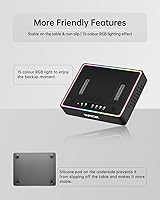
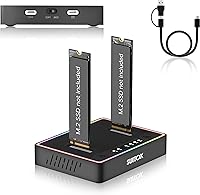
The SUITOK STK03 Dual-Bay M.2 Cloner Dock is a compact, no-fuss tool built for both offline SSD duplication and everyday USB-C drive access. It weighs barely over two ounces yet supports NVMe and SATA M.2 drives across every common form factor, from the tiny 2230 used in Surface devices all the way up to the longer 22110 industrial format. The plastic housing carries an RGB accent strip that reads more utilitarian than decorative. Sitting between a hobbyist gadget and a light professional instrument, this cloning dock requires no software, no computer, and no real technical background to operate. One button, one press, done.
Features & Benefits

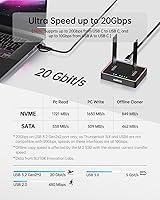
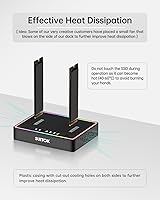
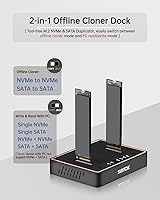
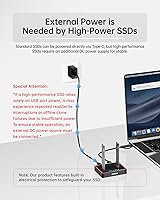
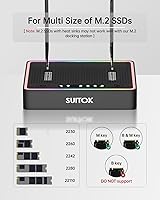
The STK03 connects via USB 3.2 Gen 2x2, giving it a 20Gbps ceiling for NVMe-to-NVMe transfers — though actual speeds depend heavily on the drives and host controller involved, so treat that number as a best-case ceiling rather than a guarantee. SATA M.2 drives are supported too, capped at the standard 6Gbps. Drive slots are completely tool-free and accept all M.2 widths without adapters. Power is flexible: USB-C bus power suits casual use, but a DC adapter is strongly recommended for stable offline cloning with fast NVMe drives. Passive ventilation cutouts help with airflow during longer sessions. It also works as a dual-bay dock for Windows, Mac, Linux, and Android when you just need file access.

Best For

This dual-bay M.2 duplicator is aimed squarely at people who need to clone drives away from a desk. IT technicians handling field repairs — swapping a failed SSD at a client site, for instance — will appreciate the offline one-button workflow and power bank compatibility. Gamers migrating a multi-terabyte PCIe Gen4 library to a new drive get the job done without reinstalling anything. First-time upgraders replacing a laptop or console SSD will find the process surprisingly approachable. One hard limit worth knowing upfront: NVMe and SATA cannot clone cross-protocol. You can do NVMe-to-NVMe or SATA-to-SATA, but not between the two — a detail that catches buyers off guard more often than it should.

User Feedback

With a 4.3-star average across 73 ratings, the STK03 earns solid marks for delivering on its core promise. Most positive reviews highlight reliable offline cloning and the convenience of not needing a laptop on-site. On the downside, a handful of users flag heat buildup during back-to-back sessions — the passive vents help, but they are not a replacement for active cooling under heavy continuous workloads. The included one-foot cable draws consistent grumbles; it works, but it feels short in many real-world setups. A few buyers were also surprised that the 20Gbps peak speed is not always achievable depending on the drive pair. Most complaints are practical rather than damning — they point to mismatched expectations more than outright product failures.

Pros

  • One-button offline cloning works without a PC, software install, or any technical setup.
  • Supports every common M.2 form factor from compact 2230 drives all the way up to 22110.
  • Tool-free slots make swapping drives fast — no screwdriver, no adapter, no fuss.
  • Power bank compatibility gives this cloning dock genuine off-grid field utility.
  • Native plug-and-play on Windows, macOS, Linux, and Android with zero driver installation.
  • Weighing just over two ounces, it fits in any toolkit without adding noticeable bulk.
  • Doubles as a dual-bay NVMe reader for everyday file access when cloning is not needed.
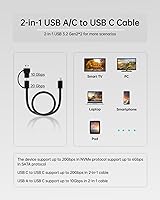
  • The 2-in-1 cable works with both USB-A and USB-C host ports, covering older and newer hardware.
  • At this price tier, the 20Gbps interface is meaningfully faster than older USB 3.1 Gen 1 docks for NVMe transfers.

Cons

  • NVMe and SATA drives cannot be cloned cross-protocol — a hard limitation many buyers miss before purchasing.
  • USB-C bus power alone is unreliable for high-performance NVMe drives during offline cloning; a DC adapter is effectively required.
  • The included cable is only one foot long, which forces most users to source a longer cable separately.
  • Passive ventilation has a real ceiling — sustained back-to-back clone sessions can push drive temps uncomfortably high.
  • LED status indicators are ambiguous enough that users have mistakenly pulled drives during active cloning.
  • Real-world transfer speeds fall noticeably short of the 20Gbps ceiling for most drive and host combinations.
  • The plastic housing scuffs with regular bag use and feels noticeably less durable than aluminum-body competitors.
  • Legacy M.2 SATA AHCI B-key drives are not supported, which is not prominently flagged before purchase.
  • No companion app, no clone verification utility, and no transfer log for users who want to confirm data integrity after cloning.

Ratings

The SUITOK STK03 Dual-Bay M.2 Cloner Dock has been scored below using AI analysis of verified global buyer reviews, with spam, bot activity, and incentivized feedback actively filtered out to ensure accuracy. Scores reflect the full picture — where this cloning dock genuinely delivers and where real users have run into friction. Both strengths and recurring pain points are weighted transparently into every category.
Offline Cloning Reliability
83%
For most straightforward NVMe-to-NVMe and SATA-to-SATA jobs, the one-button clone process works without drama. IT technicians report completing standard 500GB to 1TB drive clones on-site without needing a laptop, which is precisely the use case this dock was built for.
A cluster of users encountered failed or incomplete clones when using high-performance Gen4 drives powered solely via USB-C bus power. Stable offline cloning on demanding drives effectively requires an external DC adapter, which is not always clear from the packaging.
Transfer Speed (Real-World)
71%
29%
When paired with fast NVMe drives and a capable USB 3.2 Gen 2x2 host port, speeds are noticeably quicker than older USB 3.1 docks. Gamers moving 100GB-plus game installations reported getting the job done in a practical timeframe without babysitting the process.
The advertised 20Gbps ceiling is a best-case figure that most users never actually hit. Real-world throughput is heavily gated by the host controller and drive combination, and several buyers noted speeds that felt closer to a standard 10Gbps dock in everyday use.
Drive Compatibility
78%
22%
Support for every common M.2 form factor — from the compact 2230 found in Surface laptops to the longer 22110 industrial drives — makes this duplicator genuinely versatile. Users in mixed-device environments appreciated not needing separate tools for different drive sizes.
The hard protocol wall between NVMe and SATA is the single biggest compatibility complaint. A meaningful portion of buyers expected cross-protocol cloning and were caught off guard; the limitation is technically standard but not prominently communicated before purchase.
Ease of Use
91%
Tool-free drive slots and a single-button clone operation make this dock genuinely accessible to non-technical users. First-time upgraders swapping a laptop SSD or console storage drive consistently praised how little prior knowledge was required to get through the process.
The user manual is minimal, and edge cases — like what happens when the target drive is slightly undersized, or how to interpret the LED status indicators during a clone — left some buyers guessing. A more detailed quick-start guide would reduce confusion for newcomers.
Thermal Management
62%
38%
The side ventilation cutouts do provide measurable airflow improvement over fully sealed enclosures. For single cloning jobs or short file transfer sessions, drive temperatures stay within a range that most users found acceptable without any intervention.
Back-to-back cloning of multiple drives pushed temperatures noticeably higher, with some users reporting drives hitting 60°C and above. The passive cooling design has a clear ceiling under sustained workloads, and IT technicians running consecutive clone jobs may want to position a small external fan nearby.
Build Quality
67%
33%
The STK03 feels solid enough for a field toolkit — it does not flex or creak when drives are inserted, and the slot tolerances are tight without being frustrating. At just over two ounces, it carries without adding noticeable weight to a laptop bag.
The plastic housing gives away its mid-range positioning immediately. Users comparing it to aluminum-bodied competitors noted that it feels less premium in hand, and a few mentioned minor scuff marks appearing after regular bag use. It is functional, not durable in a rugged sense.
Power Flexibility
74%
26%
The ability to draw power from a USB-C port, a DC adapter, or even a power bank gives this dock genuine field utility. Field technicians appreciated being able to run off a laptop or a portable battery pack when working at a client site without access to a wall outlet.
Bus power via USB-C is not reliable for all NVMe drives during offline cloning — high-performance drives may stall or fail mid-clone without a dedicated power source. This creates a situation where users need to carry extra hardware to unlock the dock's primary advertised feature.
Portability
88%
At the size of a large deck of cards and weighing under 2.2 ounces, this is one of the most pocketable dual-bay M.2 duplicators available at this price tier. IT contractors consistently cited its form factor as a practical advantage when packing a repair kit for client visits.
The included USB cable is only one foot long, which limits placement flexibility on a desk and feels awkward when connecting to a laptop that is more than arm's reach away. It is not a dealbreaker, but most users end up sourcing a longer cable separately.
Cable & Accessories
54%
46%
The 2-in-1 USB-A/C to USB-C cable included in the box means the dock can connect to legacy USB-A ports without needing a separate adapter, which is a genuinely thoughtful touch for users with older hardware.
One foot is simply too short for comfortable desktop use. Buyers repeatedly flagged this in reviews, and while a longer cable is easy to source, the short length feels like a cost-cutting decision on a product where desk ergonomics actually matter during multi-hour clone sessions.
Software & Driver Experience
93%
There is nothing to install — the dock is recognized natively on Windows, macOS, Linux, and Android with no driver fuss. For users who have battled finicky driver setups with other storage accessories, the plug-and-play experience here is a genuine relief.
The tradeoff for zero software dependency is zero configurability. There is no companion app, no clone verification utility, and no way to monitor transfer progress beyond the basic LED indicators. Power users who want cloning logs or integrity checks will need to reach for separate tools.
Value for Money
76%
24%
For someone who needs to clone a drive once or twice a year and wants a reliable, portable way to do it without a PC, the STK03 hits a fair price point. IT technicians who bill hourly found that the time saved on even a single on-site job justifies the cost quickly.
Users who expected professional-grade sustained cloning performance may feel the limitations — particularly around heat and power requirements — do not justify the price when comparable or more capable options exist at similar or modestly higher price points.
Cross-Platform Compatibility
86%
Working as a dual-bay NVMe dock across Windows, Mac, Linux, and Android without any configuration makes this genuinely useful beyond just cloning. Video editors who switch between a MacBook and a Linux workstation appreciated accessing the same drives from both machines without any reconfiguration.
Older M.2 SATA AHCI B-key drives are explicitly not supported, which tripped up a handful of users with legacy hardware. The distinction between supported B+M-key SATA and unsupported B-key SATA is technical enough that the average buyer may not catch it before purchasing.
LED Status Indicators
61%
39%
LED feedback during cloning gives a basic visual cue that the process is running and, eventually, that it has completed. For simple one-drive-to-one-drive cloning jobs, most users found the indicator sufficient to know when to pull the drives.
The indicator states are limited and ambiguous — users reported difficulty distinguishing between a clone in progress, a clone that had stalled, and a completed clone, particularly in bright environments. An error state that looks similar to an active state caused a few users to pull drives prematurely.
Documentation & Support
58%
42%
SUITOK states a 12-hour response commitment for support queries, and several buyers mentioned receiving helpful direct responses when they reached out with cloning configuration questions. Responsive manufacturer support at this price tier is not guaranteed and is worth noting.
The included user manual is thin — it covers basic setup but glosses over important nuances like power requirements for different NVMe drive classes and the protocol compatibility wall. Buyers who do not read the full product listing carefully often discover key limitations only after unboxing.

Suitable for:

The SUITOK STK03 Dual-Bay M.2 Cloner Dock is a strong fit for anyone who needs to clone or transfer M.2 drives away from a desk, without a PC in the loop. IT technicians handling on-site repairs will get the most practical value here — pop in two drives, press one button, and the job runs without babysitting a laptop. Gamers who have accumulated a large PCIe Gen4 library and want to migrate to a bigger or faster drive without reinstalling everything will also find this dock a genuinely useful shortcut. Home users upgrading a laptop or Steam Deck-style console SSD for the first time will appreciate that the process requires no prior technical knowledge — the learning curve is essentially nonexistent. Photographers and video editors who work across locations and need a fast, portable way to duplicate or access project drives in the field round out the ideal audience for this tool.
Not suitable for:

If you are expecting to clone an NVMe drive directly to an M.2 SATA drive — or vice versa — the STK03 is not the right tool, and this limitation catches more buyers off guard than it should. The dock supports NVMe-to-NVMe and SATA-to-SATA cloning only; cross-protocol duplication is simply not possible regardless of how the drives are inserted. Users who plan to run consecutive, back-to-back clone sessions in a high-volume environment — think a repair shop processing a dozen drives per day — will also find the passive cooling design hits a ceiling fairly quickly under sustained workloads. Anyone relying solely on USB-C bus power from a laptop should know that high-performance NVMe drives may stall or fail mid-clone without a dedicated DC power source, which adds a dependency that is easy to overlook. Finally, buyers with older M.2 SATA AHCI B-key drives will find those drives are not supported — the dock handles B+M-key SATA, not the legacy B-key variant.

Specifications

  • Brand & Model: Manufactured by SUITOK under the model designation STK03.
  • Interface: Connects via USB-C using the USB 3.2 Gen 2x2 standard, with a theoretical maximum bandwidth of 20Gbps.
  • Supported Protocols: Compatible with NVMe (M-key) and SATA (B+M-key) M.2 drives; NVMe and SATA protocols cannot be mixed during a single cloning operation.
  • Form Factors: Accommodates all five standard M.2 drive lengths: 2230, 2242, 2260, 2280, and 22110.
  • Max Capacity: Supports up to 8TB per drive slot, for a combined total of 16TB across both bays simultaneously.
  • Cloning Method: Performs 1:1 sector-level offline duplication initiated by a single button press, with no host computer required.
  • SATA Speed: SATA III M.2 drives operate at the standard 6Gbps ceiling during both cloning and dock-mode file transfers.
  • Power Input: Accepts power via USB-C bus from a host device, or through an external DC adapter for stable high-performance offline cloning.
  • Dimensions: Measures 3.46″ in length, 2.68″ in width, and 0.63″ in height.
  • Weight: Weighs 2.18 ounces, making it practical to carry in a laptop bag or field repair kit.
  • Housing Material: Constructed from plastic with an integrated RGB light accent strip along the body.
  • Cooling Design: Features side ventilation cutouts for passive airflow to help dissipate heat during extended cloning sessions.
  • Included Cable: Ships with one 2-in-1 USB-A/C to USB-C cable measuring approximately one foot in length.
  • OS Compatibility: Recognized natively as a storage dock on Windows, macOS, Linux, and Android without requiring driver installation.
  • Drive Slots: Houses two independent tool-free M.2 drive bays that accept drives without screws or mounting hardware.
  • Cloning Requirement: The target drive capacity must be equal to or greater than the capacity of the source drive for cloning to complete successfully.
  • B-Key Limitation: Legacy M.2 SATA AHCI B-key drives are explicitly not supported; only B+M-key SATA drives are compatible.
  • Package Contents: Box includes the dock unit, one 2-in-1 USB-A/C to USB-C cable, and a printed user manual.

Related Reviews

MAIWO M.2 NVMe SSD Cloner Duplicator 4 Bay Docking Station
86%
89%
Cloning Speed
92%
Ease of Setup
87%
Build Quality
90%
Heat Dissipation
93%
Compatibility with M.2 Sizes
More
WAVLINK Dual-Bay NVMe M.2 SSD Cloner
75%
83%
Offline Cloning Reliability
78%
Transfer Speed
71%
Compatibility Range
76%
Build Quality
86%
Ease of Setup
More
AOKO 4-in-1 M.2 NVMe Hard Drive Duplicator
76%
88%
Ease of Use
83%
Drive Compatibility
86%
Cloning Speed
74%
Offline Cloning Reliability
81%
Build Quality
More
ORICO Dual M.2 NVMe SSD Enclosure
79%
88%
Build Quality
84%
Thermal Management
82%
Transfer Speed
71%
Drive Compatibility
91%
Ease of Installation
More
IO CREST SY-ENC50127 USB 3.2 Type-C Dual Bay HDD + M.2 NVMe External Enclosure
83%
88%
Performance
93%
Ease of Setup
91%
Build Quality
87%
Data Transfer Speed
90%
Cooling/Heat Management
More
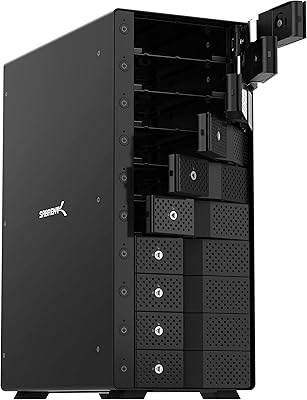
Sabrent 10-Bay USB 3.2 Gen 2 SATA Docking Station
85%
94%
Ease of Use
88%
Build Quality
79%
Cooling Performance
90%
Speed & Data Transfer
91%
Compatibility with Operating Systems
More
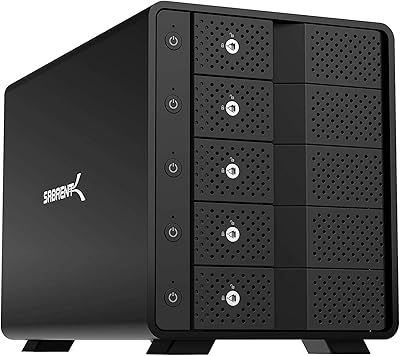
SABRENT DS-SC5B 5-Bay Hard Drive Docking Station
76%
88%
Build Quality
83%
Cooling Performance
61%
Noise Level
84%
Hot-Swap Usability
74%
Transfer Speed
More
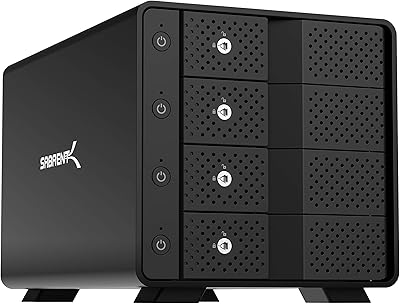
Sabrent DS-SC4B 4-Bay USB 3.2 Gen 2 Docking Station
80%
88%
Build Quality
83%
Cooling Performance
86%
Hot-Swap Reliability
74%
Transfer Speed
91%
Per-Bay Power Control
More
ICY DOCK ToughArmor MB998SP-B 8-Bay 2.5” SATA/SAS HDD/SSD Mobile Rack Enclosure for 5.25″ Bay
87%
91%
Performance
88%
Cooling Efficiency
89%
Build Quality
93%
Ease of Installation
72%
Noise Level
More
dockteck Dual Bay External Hard Drive Docking Station
84%
90%
Performance and Speed
88%
Ease of Use
85%
Build Quality
91%
Cloning Functionality
82%
Compatibility
More

FAQ

No, and this is the single most important thing to understand before buying. The SUITOK STK03 Dual-Bay M.2 Cloner Dock only supports like-for-like cloning — NVMe to NVMe, or SATA to SATA. Cross-protocol cloning between NVMe and SATA is not possible, regardless of how the drives are physically inserted. If that is your use case, you will need a different solution.
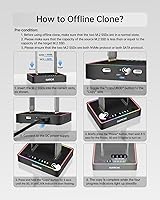
It genuinely works without a computer. Insert the source drive in slot one and the destination drive in slot two, then hold the clone button for about five seconds. The dock handles everything on its own. Just make sure you have a reliable power source — USB-C bus power from a laptop works, but a dedicated DC adapter is more dependable for high-performance NVMe drives during longer clone jobs.

Yes. The dock supports all five standard M.2 form factors, including the compact 2230 length used in Surface devices, Steam Decks, and many ultrabooks. No adapter is needed — the tool-free slot accommodates it directly alongside the full range up to 22110.

The dock uses LED indicator lights to signal cloning status. The lights show when a clone is in progress and when it has completed. That said, several users have found the indicators a bit ambiguous — the difference between an active clone and a completed one is not always obvious at a glance, especially in bright environments. It is worth reading the manual's LED guide before your first clone so you know exactly what each state looks like.

The 20Gbps figure is the interface ceiling, not a guaranteed throughput number. Real-world speeds depend heavily on the specific NVMe drives you are using and the capabilities of your host computer's USB controller. In practice, most users see speeds that are meaningfully faster than older 10Gbps docks, but do not expect to hit the theoretical maximum in everyday use.

For basic file access or transfers while connected to a PC, USB-C bus power is usually fine. For offline cloning — especially with fast Gen4 NVMe drives — a dedicated DC adapter or high-output power bank is strongly recommended. Several users have reported incomplete or stalled clones when relying on bus power alone from a laptop with power-hungry drives. Think of bus power as a convenience option, not the reliable choice for heavy-duty cloning.

For most desktop or workbench setups, one foot is genuinely short. It works, but you may find yourself placing the dock awkwardly close to your laptop or PC to keep the cable taut. Most users end up buying a longer USB-C cable separately — any quality USB 3.2 Gen 2x2 cable will do. It is a minor inconvenience rather than a serious flaw, but worth knowing upfront.

SSDs do generate heat during cloning, and the dock's passive ventilation helps but has limits. For a single clone job, temperatures are generally manageable. If you are running back-to-back clones for extended periods — like in a repair shop workflow — you may want to position a small fan nearby to keep air circulating. Some users have reported drives reaching around 60°C under sustained load, which is within spec for most SSDs but on the warmer side.

Yes. When connected to a computer, the STK03 functions as a standard dual-bay NVMe dock, and both drives appear as separate volumes simultaneously. It works natively on macOS, Windows, Linux, and Android without any drivers. This makes it useful as an everyday desk dock for accessing or transferring data between two drives, not just for cloning.

Unfortunately, no. The dock supports B+M-key SATA drives but does not support legacy M.2 SATA AHCI drives that only have a single B-key notch. If you are unsure which type you have, check the drive's product page or look at the notch pattern on the connector end — a B+M-key drive has two notches, while a B-key-only drive has just one on the left side. It is a detail worth verifying before ordering.