Overview

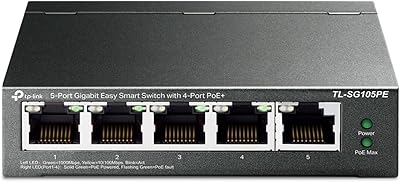
The STEAMEMO 5-Port 52W Gigabit PoE+ Switch sits in an interesting spot — it is a cloud-managed switch priced well under what you would normally pay for app-based network control. Four PoE+ ports handle the bulk of your connected devices, with a combined power budget of 52 watts and a metal chassis that feels more durable than the price suggests. An SFP slot rounds out the hardware, giving you a fiber uplink option if your setup needs it. What really distinguishes this PoE+ switch from basic unmanaged alternatives is the smartphone app, which lets you monitor and reboot ports remotely — genuinely useful for anyone managing cameras at a second location.
Features & Benefits

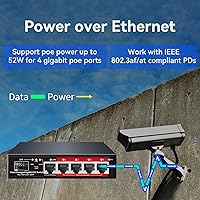
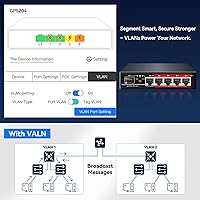
The app is where this cloud-managed switch earns its keep. From your phone, you can check each port's live status, toggle PoE on or off remotely, and receive alerts when something drops offline — no laptop or web interface required. One standout capability is Ultra-Far mode, which extends PoE delivery up to 250 meters, practical for camera runs across large properties. Basic VLAN support helps segment traffic, and per-port LED indicators give you a quick at-a-glance read on network activity without opening the app. The 4KV lightning protection on both ports and the power supply is a meaningful addition for any outdoor deployment.

Best For

This PoE+ switch makes the most sense for home setups or small offices running two to four IP security cameras — the 52W power budget is plenty for that use case, though it will stretch thin if you push it to the limit with high-draw devices. Network installers managing remote sites will appreciate the app-based reboot function more than most. The Ultra-Far mode makes this STEAMEMO switch particularly practical for outbuildings, garages, or parking areas where long cable runs are unavoidable. It is also a solid first step for anyone wanting managed-switch visibility without tackling a full enterprise interface.

User Feedback

With over 1,300 ratings averaging 4.3 out of 5, buyer sentiment is largely positive. Most people highlight how quick the app setup is, and the ability to remotely reboot a camera without a site visit comes up repeatedly as a standout convenience. On the critical side, some users find the app functional but sparse compared to polished platforms they have used before. SFP module compatibility has tripped up a handful of fiber users, so verify before committing if that slot matters to your setup. One practical note: first-time activation requires an active internet connection, which caught a few buyers off guard during offline installs.

Pros

  • Remote PoE toggling via smartphone means you can reboot a stuck camera from anywhere, no site visit needed.
  • Ultra-Far mode extends power delivery up to 250 meters, handling long outdoor cable runs with ease.
  • Metal chassis feels solid and durable despite a very accessible price point.
  • 4KV lightning protection on ports and power supply adds real peace of mind for outdoor deployments.
  • Basic VLAN support offers a level of network segmentation rarely found at this budget tier.
  • App setup is fast and straightforward, with most users up and running in minutes.
  • Stable PoE power delivery to cameras and access points gets consistent praise across user reviews.
  • The SFP slot gives you a fiber uplink option, which adds flexibility for integrating into larger networks.
  • Over 1,300 buyer ratings averaging 4.3 out of 5 reflects reliable real-world satisfaction.
  • Short-circuit, over-current, and over-voltage protection reduce the risk of connected device damage.

Cons

  • The 52W total power budget fills up fast if you push all four PoE ports with demanding devices.
  • The companion app works, but it feels thin compared to more mature managed-switch platforms.
  • SFP module compatibility is inconsistent — some third-party modules have failed to be recognized.
  • First-time activation requires an active internet connection, which can block offline or staged installs.
  • No SNMP support or advanced traffic analytics limits usefulness in more demanding IT environments.
  • Per-port LED indicators are helpful but the app lacks detailed diagnostic depth for troubleshooting.
  • Only four PoE ports means you will quickly outgrow this cloud-managed switch in expanding deployments.
  • QoS configuration options are minimal, which matters if you are mixing latency-sensitive devices on the same switch.

Ratings

Our AI-generated scores for the STEAMEMO 5-Port 52W Gigabit PoE+ Switch were produced by analyzing verified global buyer reviews, with spam, bot-submitted, and incentivized feedback actively filtered out before scoring. Each category reflects the honest distribution of real user experiences — strengths and frustrations alike — so you get a transparent picture of where this cloud-managed switch genuinely delivers and where it falls short.
Value for Money
91%
At its price point, getting cloud management, VLAN support, gigabit speeds, and PoE+ all in one compact unit is difficult to argue with. Buyers repeatedly note they expected far less for what they paid, and the metal build reinforces that impression from the moment it arrives.
The value calculation shifts if you need the SFP slot to work reliably or need to power more than three or four modest cameras — at that point, you may end up buying a second unit anyway, which erodes the savings.
App & Remote Management
74%
26%
The ability to reboot a frozen camera port from a smartphone at midnight — without physically visiting the install site — resonates strongly with home users and small installers alike. Setup through the app is quick, and port status visibility is clear enough for non-technical users to interpret confidently.
Anyone who has used Ubiquiti UniFi or similar platforms will notice the app feels bare-bones. There is no browser-based fallback, diagnostic depth is limited, and a handful of users report occasional app connectivity glitches that require re-logging in.
PoE Power Delivery
83%
Stable, consistent power to connected cameras and access points is one of the most praised aspects across the review base. Users running two or three standard IP cameras report zero dropout over extended periods, which is exactly what this switch is designed for.
The 52W shared budget is the ceiling, and it gets tight fast. Mixing even one higher-draw device — a PTZ camera or a tri-band access point — with three others will have you doing power math and potentially leaving a port unpowered.
Build Quality
78%
22%
The metal chassis punches above its weight class visually and physically. Users accustomed to flimsy plastic-bodied budget switches note the unit feels noticeably more solid, and it runs cool enough in enclosed spaces without active cooling.
While the enclosure is metal, there is no official IP rating, and the unit is not designed for direct outdoor exposure. A few users in humid or dusty environments report long-term concerns about ventilation and port oxidation.
Ultra-Far Transmission Mode
81%
19%
The 250-meter extended range mode is a genuine differentiator for users wiring cameras to outbuildings, parking lots, or gates far from the main network closet. Installers specifically call this out as a feature they would normally pay significantly more to get.
Ultra-Far mode reduces throughput as a trade-off for extended range, which makes it unsuitable for bandwidth-intensive devices on the same run. It also appears to apply broadly rather than per-port, limiting flexibility in mixed-distance deployments.
Setup & Installation
84%
The out-of-box experience is refreshingly simple for a managed switch. Plug it in, download the app, and most users are operational within ten to fifteen minutes — a stark contrast to the CLI-heavy setup that entry-level managed switches often demand.
The mandatory internet connection during first-time activation has burned a meaningful number of buyers who staged the hardware offline before the internet service was live at the site. This is not a dealbreaker but it is a real logistical snag.
Lightning & Surge Protection
79%
21%
The 4KV protection rating on both ports and the power supply gives outdoor camera installers a credible layer of defense against the surge-on-cable events that most commonly damage networking gear near storms. Several users in storm-prone regions specifically cite this as a deciding factor.
Surge protection at this level addresses induced surges effectively but offers no real defense against direct strikes or severe grid events. Users in extremely high-lightning-density areas should still consider external surge arrestors on incoming lines.
VLAN Support
66%
34%
Having any VLAN capability at this price tier is notable, and small offices using this cloud-managed switch to separate guest traffic from camera traffic appreciate having the option through the app rather than needing a separate managed switch entirely.
VLAN implementation is basic and app-controlled only, with no CLI or web UI fallback. Advanced configurations — inter-VLAN routing, dynamic VLAN assignment, or 802.1Q tagging for complex topologies — are simply outside the scope of what this switch can do.
SFP Module Compatibility
51%
49%
The presence of an SFP slot at all is a bonus in this category, and users who happen to be using compatible modules report it works cleanly as a fiber uplink into a larger switch stack or ISP hand-off point.
Compatibility with third-party SFP modules is inconsistent enough that multiple reviewers warn against counting on this slot unless you have pre-tested the specific module. It is more of a bonus feature than a reliable infrastructure component at this price.
Port Status Visibility
77%
23%
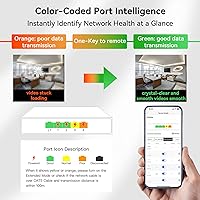
Color-coded LED indicators per port give a fast, no-app-needed read on what is connected and active. For installers doing a walk-by check or users glancing at a mounted switch, the visual feedback is intuitive and practical.
The LED color system is simple enough that distinguishing between specific fault states requires opening the app for context. There is no blinking pattern differentiation for link speed versus activity, which limits how much you can diagnose by eye alone.
Reliability & Uptime
82%
18%
Long-term reliability reports are broadly positive, with many users noting the switch has run continuously for months in camera deployments without requiring intervention beyond the occasional app-triggered reboot. The built-in fault protections appear to contribute meaningfully to this track record.
A small but consistent subset of users reports unexplained port drops or switch reboots after firmware updates, which suggests software stability is not yet fully polished. These appear isolated but are worth monitoring if uptime is critical.
Physical Footprint
86%
At 5 x 4.5 x 1.3 inches and just over a pound, this PoE+ switch fits practically anywhere — a network closet shelf, behind a monitor, or zip-tied inside a cabinet. The compact form factor is consistently praised by users in space-limited environments.
The compact size comes with no built-in mounting solution. There are no rack ears, wall-mount slots, or included brackets, so users who want a clean permanent installation need to improvise or source their own hardware.
App Reliability
68%
32%
For routine tasks — checking port status, toggling PoE, reviewing alerts — the app performs acceptably for the majority of users. Push notifications for port drops are a feature that home security users find practically valuable.
A recurring thread in user feedback involves the app requiring re-authentication more often than expected, and some users note that remote access lags or fails intermittently depending on server-side conditions outside the user's control.
Documentation & Support
57%
43%
The initial setup guide is clear enough for the basic installation scenario, and the app itself provides enough inline guidance for first-time users to get powered devices running without outside help.
Beyond the basics, documentation is thin. Troubleshooting edge cases, SFP compatibility, or advanced VLAN configurations is largely left to community forums and trial-and-error, and manufacturer support responsiveness receives mixed marks from users who needed help.

Suitable for:

The STEAMEMO 5-Port 52W Gigabit PoE+ Switch is a strong fit for homeowners and small-office operators who want to run a handful of IP security cameras without paying a premium for managed networking gear. If you have ever had to physically restart a frozen camera at an awkward hour, the app-based remote reboot alone justifies the purchase. Network installers handling multiple low-budget client sites will also find real value here — being able to check port status and cycle power from your phone without rolling a truck is a practical time-saver. The Ultra-Far transmission mode makes this cloud-managed switch especially well-suited for properties where cameras or access points sit far from the main building, such as detached garages, barns, or parking areas. Small businesses wanting a first taste of network segmentation through basic VLAN support, without committing to enterprise-grade complexity or cost, will also feel right at home with this switch.
Not suitable for:

The STEAMEMO 5-Port 52W Gigabit PoE+ Switch is not the right tool if your deployment demands more than four powered devices, since the 52W total budget will run short quickly with higher-draw equipment like PTZ cameras or dual-band access points running at full load. Power users who rely on fiber uplinks should approach carefully — real-world reports of inconsistent SFP module compatibility make this a risky choice if that slot is central to your setup rather than just a nice-to-have. Anyone planning an installation in a location without reliable internet access at the time of setup will hit a wall, as the first-time device activation requires a live internet connection and cannot be completed offline. IT professionals or network engineers accustomed to platforms like Ubiquiti, Cisco, or Netgear's managed lines will find the companion app notably limited in depth and diagnostic capability. If you need robust QoS controls, detailed traffic analytics, or SNMP support, this switch simply does not offer that level of management sophistication.

Specifications

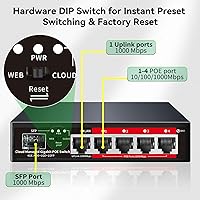
  • Total Ports: The switch provides 4 PoE+ RJ45 ports, 1 standard Gigabit uplink RJ45 port, and 1 SFP slot for a fiber uplink connection.
  • PoE Standard: All four powered ports comply with IEEE 802.3af and IEEE 802.3at (PoE+), automatically detecting and supplying appropriate power to connected devices.
  • PoE Power Budget: The total shared power budget across all four PoE+ ports is 52W, which must be divided among all actively powered devices simultaneously.
  • Data Rate: All RJ45 ports support 10/100/1000 Mbps auto-negotiation, delivering full Gigabit throughput when connected to compatible devices and cabling.
  • Ultra-Far Mode: When Ultra-Far transmission mode is enabled, the switch can deliver PoE power and data over cable runs of up to 250 meters, beyond the standard 100-meter Ethernet limit.
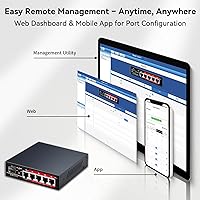
  • Management: The switch is managed exclusively through a dedicated cloud-based mobile application available for both iOS and Android devices.
  • VLAN Support: Basic VLAN configuration is supported, allowing users to segment network traffic across ports directly through the mobile app.
  • Lightning Protection: Both the RJ45 ports and the internal power supply include 4KV surge protection to guard against lightning-induced voltage spikes on connected cabling.
  • Fault Protection: Built-in short-circuit, over-current, and over-voltage protection mechanisms help prevent damage to connected devices in the event of a wiring fault.
  • SFP Interface: The single SFP slot supports 1.25G fiber uplink modules, enabling integration with fiber-based backbone networks; third-party module compatibility is not guaranteed.
  • Case Material: The outer enclosure is constructed from metal, providing improved heat dissipation and mechanical durability compared to plastic-bodied alternatives in this price range.
  • Dimensions: The unit measures 5 x 4.5 x 1.3 inches, making it compact enough for shelf, wall, or rack-adjacent mounting in tight spaces.
  • Weight: The switch weighs 1.3 pounds, light enough for flexible placement without dedicated mounting hardware in most small deployments.
  • Port Indicators: Each port has an LED status indicator that uses color coding — green, orange, and unlit states — to communicate link speed and activity at a glance.
  • Power Supply: The unit ships with a built-in power supply, so no external power adapter or injector is required for standard PoE operation.
  • Internet Requirement: An active internet connection is required during the initial device activation and app registration process before the switch can be used in a managed capacity.
  • Best Seller Rank: This switch holds the number 22 position in the Amazon Computer Networking Switches category, reflecting strong and consistent sales volume.
  • User Rating: The product carries an average rating of 4.3 out of 5 stars based on 1,351 customer ratings at the time of this review.

Related Reviews
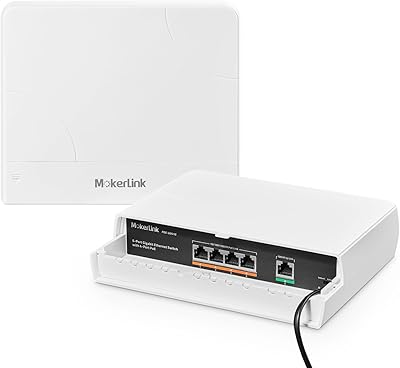
MokerLink POE-G041GO Outdoor Gigabit PoE Switch

81%
93%
Ease of Setup
84%
PoE Power Delivery
78%
Build Quality
76%
Weather Resistance
88%
Value for Money
More
YuLinca 6-Port Gigabit PoE Switch with 4 PoE+ Ports
87%
95%
Ease of Installation
88%
PoE Functionality
91%
Build Quality
87%
Performance and Speed
94%
Fanless Operation (Noise)
More
MokerLink 5-Port Gigabit POE Switch
86%
94%
Ease of Setup
88%
Performance
85%
Build Quality
75%
PoE Power Output
91%
Fanless Design (Noise Level)
More
Tenda TEG1105P 5-Port Gigabit PoE Switch
82%
96%
Ease of Setup
91%
Value for Money
74%
PoE Power Delivery
88%
Build Quality
89%
Thermal Performance
More
Cudy GS1005P 5-Port Gigabit PoE Switch
80%
91%
Value for Money
94%
Ease of Setup
87%
Build Quality
82%
PoE Performance
97%
Noise Level
More
NETGEAR GS305EP 5-Port PoE Gigabit Switch
79%
91%
Ease of Setup
78%
PoE Performance
97%
Noise Level
67%
Management Interface
72%
Build Quality
More
AUMOX PRO SG305P 5-Port PoE Gigabit Switch
78%
88%
Build Quality
93%
Ease of Setup
79%
PoE Performance
97%
Noise Level
91%
Value for Money
More
LINOVISION POE-Switch0504GD 5-Port Gigabit PoE Switch
78%
93%
DC Input Versatility
61%
PoE Compatibility
82%
Build Quality
89%
Redundant Power Design
74%
Port Count & Layout
More
TP-Link TL-SG105PE 5-Port Gigabit PoE Switch
79%
91%
Value for Money
84%
PoE Performance
93%
Ease of Setup
76%
Network Management
62%
Web Interface
More
TP-Link TL-SG1005P
TP-Link TL-SG1005P
85%
96%
Ease of Setup
83%
PoE Power Delivery
91%
Build Quality
98%
Noise Level
89%
Gigabit Throughput
More

FAQ

It depends on what cameras you are using. Most standard PoE IP cameras draw between 5W and 15W each. With a 52W total budget shared across four ports, you can comfortably run three to four low-to-mid draw cameras simultaneously. Just avoid mixing in high-draw devices like PTZ cameras or dual-radio access points without checking the total wattage first.

No, ongoing internet access is not required for day-to-day switching and PoE operation. The internet connection is only mandatory the first time you activate and register the device through the app. After that initial setup, the switch will continue to pass traffic and supply power even without internet, though remote app management features will obviously not function offline.

Generally yes — it follows standard IEEE 802.3af and 802.3at protocols, so it works with any camera or device that is PoE or PoE+ compliant regardless of brand. Hikvision, Dahua, Reolink, and similar brands all work without issue in typical deployments.

This is where some caution is warranted. The SFP slot is designed for standard 1.25G fiber modules, but a number of users have reported that certain third-party modules are not recognized reliably. If fiber connectivity is important to your setup, it is worth testing your specific module before committing to a full installation.

Ultra-Far mode typically applies to the switch as a whole rather than being selectable on a per-port basis, which means enabling it affects transmission behavior across connected ports. Keep in mind that this mode is designed for long cable runs, and it achieves extended range partly by reducing data throughput, so it is best reserved for situations where the cable distance genuinely demands it.

It is a fair bit simpler. The app gives you the essentials — port status, remote PoE toggling, connectivity alerts, and VLAN configuration — but it does not offer the depth of traffic analytics, QoS tuning, or diagnostic tools that platforms like Ubiquiti UniFi provide. For a home camera setup or a small remote site, it covers the bases well. For anything more complex, you will likely find it limiting.

Based on available information, management is handled entirely through the mobile app. There does not appear to be a local web-based interface, which means if you prefer browser-based administration or need to manage the switch from a desktop without a phone, that is a real limitation to factor in.

The unit is compact and light enough that wall mounting is physically feasible, but it does not ship with dedicated wall-mount brackets or hardware. Some users improvise with adhesive mounts or small shelving, so it is doable if you are handy, just not an out-of-the-box installation option.

In most real-world scenarios, yes — 4KV surge protection is a meaningful safety layer for installations where cables run outdoors or through walls exposed to the elements. It will not protect against a direct lightning strike, but it handles the induced surges that travel along cable lines during nearby strikes, which is the far more common scenario that damages networking equipment.

The switch has built-in overload protection, so it will not simply fry itself or your devices. In practice, when the total draw approaches the ceiling, lower-priority ports may lose power or drop PoE delivery to stay within safe limits. It is worth planning your layout so the total wattage of all connected devices stays comfortably below 52W rather than right at the edge.