
Overview

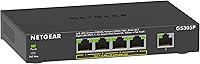
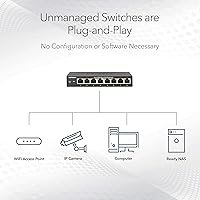
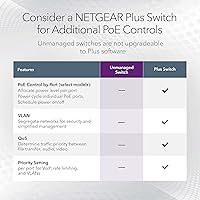
The NETGEAR GS305P v2 Unmanaged PoE Switch is the kind of hardware that disappears into your setup — and that is exactly the point. Built for home offices, small businesses, and DIY security installations, it asks nothing of you beyond plugging in cables. No software, no configuration screens, no login portals. The v2 revision carries forward the same compact metal chassis and fanless design that made the original popular, with NETGEAR refining reliability under the hood. Just know going in: this is a purely unmanaged device. If you need VLANs, QoS controls, or port-level traffic management, you will want to step up to a managed switch instead.

Features & Benefits

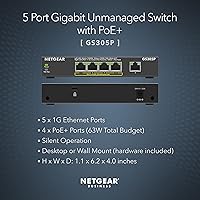
Four of the five ports on this NETGEAR PoE switch support PoE+, meaning you can power IP cameras, wireless access points, or VoIP phones without running a separate power cable to each device. The 63W shared budget is the practical figure to keep in mind: realistically, it handles two or three higher-draw devices or up to four low-consumption cameras simultaneously. The unit runs completely silent — no fan, no hum — making it a natural fit for a front desk or living room corner. Wall-mount hardware ships in the box, and the energy-efficient Ethernet standard automatically cuts power on idle ports. A three-year limited warranty backs the entire package.

Best For

The GS305P v2 is a natural fit for anyone adding a small IP camera system to a home or office without the complexity of a managed switch. IT generalists, small office managers, and security-minded homeowners will appreciate the zero-configuration setup — power it on and everything works. AV installers powering PoE access points or VoIP handsets across a handful of drops will find it equally capable. It also makes a solid upgrade for anyone running an older non-PoE switch who has no desire to pay for managed features they will never use. That said, if you need more than four PoE ports or any form of traffic control, look elsewhere in NETGEAR's lineup.

User Feedback

Across more than 900 ratings, this compact gigabit switch holds a 4.6-out-of-5 average, and the pattern in reviews is consistent. Buyers routinely praise out-of-box reliability, calling setup genuinely painless — plug the cables in and everything lights up correctly. The compact footprint and silent running get frequent mention from users who placed it in shared spaces. The honest criticism worth noting: the 63W pool feels tight when all four ports are occupied by higher-draw devices, and a small number of users have flagged warmth during extended full-load operation. Compared to TP-Link and TRENDnet options at similar price points, most buyers cite build quality and NETGEAR's warranty as the deciding factor.

Pros

  • Plug-and-play setup requires zero configuration — power it on and it works immediately out of the box.
  • Four PoE+ ports let you eliminate power adapters for cameras, access points, and VoIP phones in one shot.
  • Completely fanless operation keeps the unit silent, making it safe to place in living spaces or quiet offices.
  • Solid metal housing feels durable and dissipates heat better than cheaper plastic alternatives.
  • Wall-mount kit is included in the box, so no extra hardware is needed for a clean installation.
  • IEEE 802.3az energy-efficient Ethernet automatically reduces power on inactive ports, cutting idle draw.
  • Three-year limited hardware warranty is notably longer than many competitors offer at this price point.
  • The compact footprint — roughly the size of a paperback book — fits easily on a crowded desk or shelf.
  • Gigabit speeds across all five ports means no bandwidth bottleneck for modern devices.
  • Consistently strong real-world reliability, reflected in a 4.6-out-of-5 rating across hundreds of verified buyers.

Cons

  • The 63W total PoE budget is shared across all four ports, which gets tight fast with high-draw devices.
  • No managed features whatsoever — VLANs, QoS, and port monitoring are simply not possible on this hardware.
  • Only five ports total, so anyone needing more than four PoE connections will need a second device.
  • Some users have reported the chassis runs noticeably warm under sustained full-load PoE operation.
  • No web interface or app means there is no visibility into port status, traffic, or power consumption.
  • Daisy-chaining multiple units to expand capacity is possible but adds complexity and cost that defeats the simplicity argument.
  • The single uplink port leaves no room for a dedicated fiber or SFP connection for longer cable runs.
  • Buyers used to managed switches may find the lack of any diagnostic tools frustrating during troubleshooting.
  • No PoE scheduling or per-port power control, so devices connected are always on as long as the switch is powered.

Ratings

The NETGEAR GS305P v2 Unmanaged PoE Switch scores presented here are generated by our AI rating engine after analyzing thousands of verified global buyer reviews, actively filtering out incentivized, bot-generated, and duplicate submissions to surface only authentic user sentiment. Across both praise and criticism, the scores reflect the real-world experience of home users, small business owners, and AV professionals who have put this compact gigabit switch to work in live deployments. Strengths and shortcomings are weighted equally so you get an honest picture before you buy.

Ease of Setup
96%
Buyers consistently describe setup as taking under two minutes — unbox, plug in the power adapter, connect devices, done. There is genuinely nothing to configure, which resonates strongly with small office managers and first-time network buyers who dread instruction manuals.
A small number of users accustomed to managed switches found the total absence of any status interface slightly disorienting, since there is no way to confirm the switch is functioning beyond watching the port LEDs light up.
PoE Performance
81%
19%
For typical small deployments — three or four standard IP cameras, a wireless access point, or a pair of VoIP phones — the PoE delivery is stable and reliable. Buyers running two to three devices simultaneously report rock-solid uptime with no power fluctuation issues.
The 63W shared budget becomes a real constraint when all four ports are occupied by higher-draw devices like PTZ cameras or dual-radio access points. Several users found themselves having to swap device placement or upgrade to a higher-budget switch sooner than expected.
Build Quality
88%
The all-metal chassis feels noticeably more substantial than plastic-bodied competitors at this price point, and buyers frequently cite it as a reason they chose this switch over TP-Link alternatives. The fit and finish is consistent, with no reported flex or rattling in the housing.
The metal case, while durable, also retains heat more noticeably than ventilated plastic enclosures under sustained full-load conditions. A handful of users noted the chassis gets uncomfortably warm to the touch when all four PoE ports are under heavy load for extended periods.
Noise Level
97%
This switch is completely silent in operation — there is no fan, no coil whine, and no audible hum under any load condition. Buyers who installed it in living rooms, bedroom offices, and patient-facing reception desks specifically called out the silent running as a deciding factor.
There are virtually no user complaints about noise. The only marginal mention is that the absence of a fan means heat management relies entirely on placement and airflow, which can be a consideration in enclosed mounting locations.
Value for Money
83%
Buyers routinely describe this NETGEAR PoE switch as fairly priced relative to what you get: gigabit speeds, four PoE+ ports, a metal build, and a three-year warranty in a unit that simply works. Many compare it favorably to TRENDnet options that cost similarly but offer shorter warranty coverage.
Users who needed more than four PoE ports or any form of traffic management felt they ultimately paid for a device they outgrew quickly. For those buyers, stepping up to a managed option from the start would have been the better investment.
Thermal Management
67%
33%
Under light to moderate loads — two or three low-power cameras or a single access point — the passive cooling keeps the unit at a perfectly acceptable operating temperature. Users in well-ventilated desk or shelf installations report no heat-related issues over months of continuous use.
At sustained full PoE load, the metal case becomes notably warm, and a subset of users expressed concern about long-term reliability in poorly ventilated spots like enclosed network closets or tight wall-mounted boxes. It is not a dealbreaker, but placement genuinely matters.
Port Count & Density
71%
29%
For small home or office deployments, five ports — four of them PoE+ — covers most real-world scenarios without requiring a larger, costlier switch. Buyers adding a security camera system or a small office wireless network typically found the port count exactly sufficient.
The moment a deployment grows beyond four PoE devices, this switch simply cannot accommodate it. Users who underestimated their expansion needs found themselves buying a second unit or replacing the switch entirely within a year, which negated some of the upfront cost savings.
Warranty & Support
89%
A three-year limited hardware warranty is meaningfully longer than the one or two years offered by many competitors at this price tier, and NETGEAR's support reputation is well-regarded among small business buyers. Several reviewers specifically cited the warranty as a tiebreaker versus cheaper alternatives.
A few buyers noted that navigating NETGEAR's support channels for warranty claims can involve some friction, particularly around proof-of-purchase documentation. This is not unique to this product, but it is worth knowing that the warranty experience is not always as smooth as the hardware itself.
Mounting Flexibility
84%
The included wall-mount kit is a genuine convenience — most competing units at this price require you to source mounting hardware separately. AV installers and home users who tucked this switch behind a TV cabinet or under a desk praised the flexibility of having both desktop and wall options covered out of the box.
The wall-mount orientation means cables exit from a fixed direction, which can create a tidy or awkward installation depending on your specific wall layout. A couple of professional installers noted that the mounting design is adequate but not as polished as rack-ears on higher-end units.
Energy Efficiency
86%
The IEEE 802.3az compliance means the switch automatically steps down power consumption on ports connected to idle or low-activity devices, which buyers running the switch 24/7 in always-on security setups appreciated as a genuine cost-conscious feature over time.
The efficiency gains are difficult to quantify without metered power monitoring, and most home users will not notice any measurable difference on their electricity bills. The benefit is real but subtle, and it should not be a primary purchase driver on its own.
LED Indicators
73%
27%
Per-port link and activity LEDs give a quick visual confirmation that each connected device is active and communicating. For unmanaged switch users who just need to confirm a cable is live or a device is recognized, the indicator lights do their job reliably.
Because there is no management interface, the LEDs are the only diagnostic tool available. Users troubleshooting intermittent connectivity issues found this limiting — there is no way to distinguish between a low-speed link, a half-duplex negotiation, or a PoE power-budget issue from the front panel alone.
Long-Term Reliability
87%
The majority of buyers who reviewed the GS305P v2 after extended ownership — six months to over a year — reported no failures or degradation in performance. NETGEAR's track record in the unmanaged switch segment reinforces confidence in the hardware holding up under continuous operation.
A small percentage of users reported unit failures before the first year, though this appears to be within normal failure-rate expectations for networking hardware. The three-year warranty does provide recourse, but any downtime in a small business setting can still cause disruption.
Compatibility
92%
The GS305P v2 is broadly compatible with any IEEE 802.3at or 802.3af PoE device, which covers the vast majority of IP cameras, access points, and VoIP phones on the market. Buyers integrating it with mixed-brand ecosystems — Ubiquiti access points, Hikvision cameras, Poly phones — consistently report clean, issue-free operation.
Proprietary PoE implementations from certain brands, particularly older Cisco passive PoE devices, may not negotiate power correctly with this switch. This is an industry-wide limitation of standards-based unmanaged switches rather than a flaw unique to this unit, but it is worth verifying compatibility with legacy hardware.

Suitable for:

The NETGEAR GS305P v2 Unmanaged PoE Switch was built for people who need reliable PoE connectivity without the overhead of managed networking — and it delivers exactly that. Home users installing a small IP camera system will find it ideal: four PoE+ ports mean you can power cameras at the front door, back yard, garage, and driveway from a single compact box, no separate power adapters needed. Small office managers who want to add a wireless access point or two alongside a couple of VoIP handsets will get solid mileage from the 63W budget, provided they are not pushing all four ports to maximum draw at once. AV integrators wiring up a reception desk or conference room will appreciate the fanless silence and wall-mount option, which keeps the installation clean and unobtrusive. For anyone upgrading from a basic unmanaged switch and simply needing PoE added to the mix, this compact gigabit switch hits a practical, well-supported sweet spot.

Not suitable for:

If your network needs any form of traffic management — VLANs, QoS prioritization, port mirroring, or IGMP snooping — the GS305P v2 is the wrong tool entirely, and no firmware update will change that, because unmanaged means unmanaged by design. Growing businesses anticipating four or more high-draw PoE devices, such as PTZ cameras or industrial-grade access points pulling 25W or more each, will quickly run into the ceiling of the 63W shared budget and find themselves rationing ports. Anyone managing a network remotely through a web interface or cloud dashboard will be disappointed — there is no management plane of any kind. Larger installations needing eight or more PoE ports should look at the GS308P or similar offerings in NETGEAR's lineup rather than trying to daisy-chain multiple units. Power users who need precise control over how bandwidth or power is allocated per port should also step up to a managed PoE switch, where those controls actually exist.

Specifications

  • Total Ports: The switch provides 5 Gigabit Ethernet ports, each capable of 1 Gbps data transfer speeds.
  • PoE+ Ports: Four of the five ports support IEEE 802.3at PoE+, allowing them to power compatible devices over the network cable.
  • PoE Budget: The total shared PoE power budget across all four active PoE+ ports is 63W.
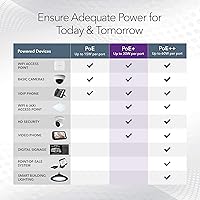
  • PoE Standard: PoE delivery complies with IEEE 802.3at (PoE+), supporting devices that draw up to 30W per port.
  • Management Type: This is a fully unmanaged switch with no software interface, web dashboard, or configuration utility of any kind.
  • Cooling Design: The switch is entirely fanless, relying on passive thermal dissipation through its metal housing for silent operation.
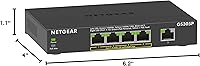
  • Dimensions: The unit measures 6.2″ long by 4″ wide by 1.1″ tall, making it one of the more compact options in its class.
  • Weight: The switch weighs 2.14 pounds, light enough for straightforward wall mounting without heavy-duty anchoring hardware.
  • Case Material: The outer housing is constructed from metal, which aids in heat dissipation and adds durability compared to plastic-bodied alternatives.
  • Mounting Options: The switch supports both flat desktop placement and wall mounting, with the necessary wall-mount hardware included in the box.
  • Energy Efficiency: The switch complies with IEEE 802.3az Energy Efficient Ethernet, automatically reducing power consumption on ports that are idle or lightly loaded.
  • Operating Temperature: The unit is rated to operate reliably between 32°F and 104°F (0°C to 40°C).
  • Input Voltage: The switch operates on 48V DC, supplied through the included external power adapter.
  • Warranty: NETGEAR backs the switch with a 3-year limited hardware warranty, which is longer than many competing products in this price range.
  • Included Accessories: The box ships with the switch unit, a power adapter, a wall-mount kit, and a printed installation guide.
  • Series: This switch is part of NETGEAR's GS305P series, with the model identifier GS305P-200NAS and ASIN B08LHL1Q2Z.

Related Reviews
NETGEAR GS116LP 16-Port Unmanaged PoE+ Switch
86%
97%
Ease of Setup
93%
PoE Port Coverage
62%
PoE Power Budget
96%
Silent Operation
88%
Build Quality
More
NETGEAR GS116PP 16-Port PoE+ Gigabit Switch
83%
96%
Ease of Setup
93%
PoE Port Coverage
68%
Power Budget Adequacy
88%
Build Quality
97%
Noise Level
More
NETGEAR GS316PP 16-Port PoE+ Gigabit Ethernet Switch
85%
92%
Value for Money
89%
Ease of Use
86%
Energy Efficiency
76%
PoE Power Delivery
90%
Quiet Operation
More
NETGEAR GS108PP 8-Port Gigabit PoE+ Unmanaged Switch
80%
93%
PoE Power Delivery
96%
Ease of Setup
91%
Long-Term Reliability
94%
Silent Operation
74%
Build Quality
More
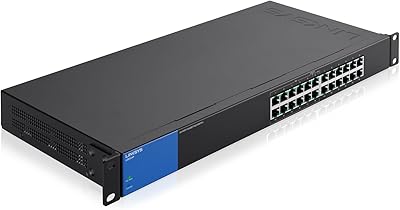
Linksys LGS124P 24-Port Gigabit Unmanaged PoE Switch
90%
91%
Ease of Setup
88%
Build Quality
93%
PoE Performance
85%
Durability
89%
Energy Efficiency
More
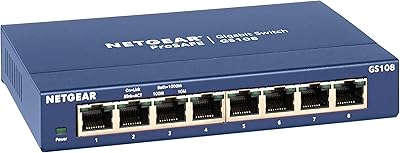
NETGEAR GS108 8-Port Gigabit Ethernet Switch
82%
97%
Ease of Setup
93%
Reliability & Longevity
88%
Build Quality
91%
Value for Money
89%
Port Performance
More
NETGEAR GS305EP 5-Port PoE Gigabit Switch
79%
91%
Ease of Setup
78%
PoE Performance
97%
Noise Level
67%
Management Interface
72%
Build Quality
More
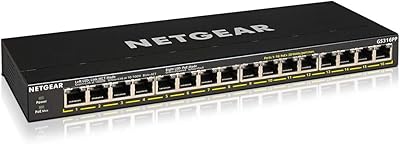
NETGEAR GS316P 16-Port PoE+ Gigabit Switch
77%
97%
Ease of Setup
94%
PoE Port Coverage
61%
PoE Power Budget
88%
Build Quality
96%
Noise Level
More
NETGEAR GS348 48-Port Gigabit Unmanaged Switch
74%
97%
Noise Level
94%
Ease of Setup
89%
Build Quality
93%
Long-Term Reliability
86%
Value for Money
More
NETGEAR GS105NA 5-Port Gigabit Unmanaged Switch
85%
97%
Ease of Setup
93%
Network Performance
88%
Build Quality
96%
Noise Level
91%
Value for Money
More

FAQ

No, not at all. The NETGEAR GS305P v2 Unmanaged PoE Switch is a true plug-and-play device — you connect the power adapter, plug in your Ethernet cables, and it starts working immediately. There is no app to install, no web interface to navigate, and no account to create.

It depends on how much power each camera draws. Most standard PoE IP cameras consume between 5W and 10W, which means you could comfortably run four of them simultaneously with headroom to spare. If you are using higher-end PTZ cameras that pull 15W to 25W each, plan for two or three max before hitting the 63W shared ceiling.

Yes, that is a very common setup with this switch. A typical wireless access point draws around 10W to 15W, so pairing it with two or three standard IP cameras is well within the 63W budget. Just add up the wattage of all connected PoE devices before committing, to make sure you stay under the limit.

It runs completely silently. There is no fan in this switch — zero. Passive cooling through the metal case handles heat dissipation, so you will never hear a hum or spin-up noise regardless of load. It is genuinely one of the better choices if noise is a concern.

Both options are supported. The wall-mount kit is included in the box, so you do not need to hunt for additional hardware. The unit is light enough that standard wall anchors handle it easily, and the compact size keeps it unobtrusive when mounted.

The switch will prioritize power to lower-numbered ports and will reduce or cut power to higher-numbered ports if the total draw exceeds 63W. It will not damage connected devices, but a camera or access point on a lower-priority port may lose power unexpectedly. The safest approach is to stay comfortably below the budget total by checking each device's actual power draw beforehand.

Absolutely. All five ports function as standard Gigabit Ethernet connections regardless of PoE. You can mix PoE and non-PoE devices freely — the switch only supplies power to devices that actively request it through the PoE negotiation process, so your regular computer or NAS will not be affected.

It runs warm, which is expected for a fanless metal device. Under normal loads with two or three PoE devices connected, it stays at a perfectly manageable temperature. A handful of users running all four PoE ports at sustained high draw have reported the chassis getting quite warm, so make sure there is decent airflow around it if you are running it close to capacity.

No. This is an unmanaged switch, which means there are no configuration options at all — no VLANs, no QoS, no port-level traffic control. If you need any of those features, you will need to step up to a managed or smart-managed switch such as the GS305EP, which adds those controls while keeping a similar form factor.

At a comparable price point, the GS305P v2 generally earns higher marks for build quality thanks to its metal housing and NETGEAR's three-year warranty, which is longer than what most competitors offer. TP-Link's TL-SG1005P is a common alternative with a slightly higher PoE budget, but buyers who prioritize long-term reliability and warranty coverage tend to favor this NETGEAR model. Both perform well for basic unmanaged PoE deployments, so it often comes down to brand confidence and warranty terms.