Overview

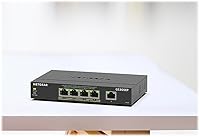
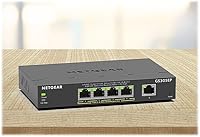
The NETGEAR GS305EP 5-Port PoE Gigabit Switch occupies a practical middle ground in the networking market — capable enough for users who want real configuration options, yet simple enough that you won't need a certification to operate it. Unlike a bare unmanaged switch, this PoE switch lets you segment traffic, prioritize devices, and monitor your network through a browser-based interface. It runs completely silent thanks to a fanless design, making it a natural fit for living rooms, reception areas, or any space where fan noise would be unwelcome. You can set it on a desk or mount it to a wall, and a 3-year limited warranty offers reassurance that is genuinely uncommon at this price point.
Features & Benefits

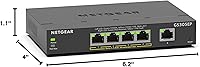
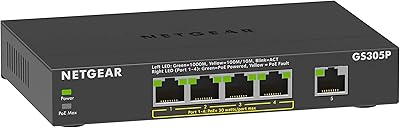
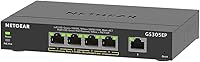
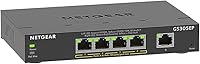
All five ports run at full gigabit speeds, so wired devices never feel throttled. The real draw is the four PoE+ ports — they share a combined 63W power budget, which is enough to run a couple of security cameras alongside a wireless access point. Just keep in mind that 63W is the total available across all four ports, not per port. The Easy Smart Managed Essentials interface handles basic VLAN segmentation, QoS prioritization, IGMP snooping, and storm control through a clean web UI. Add IEEE 802.3az energy efficiency that cuts power draw during idle periods, and you have a capable little unit in a 6.2″ × 4″ footprint.

Best For

This compact gigabit switch really shines in specific scenarios. Home lab enthusiasts who want VLAN support without buying enterprise-grade gear will appreciate the lite managed features without the accompanying price tag. Small business owners running a handful of IP cameras or a single access point will find the PoE budget more than adequate for those modest demands. AV installers and smart-home integrators gravitate toward it because it is silent and easy to tuck away on a wall. One practical note: this unit is designed for US and Canada only, so international buyers should look elsewhere. Network newcomers who find CLI management intimidating will feel right at home here.

User Feedback

Across nearly 1,850 ratings and a 4.7-out-of-5 average, the GS305EP earns its marks primarily for easy setup and quiet day-to-day operation — two things buyers mention repeatedly in long-term ownership reviews. The web interface draws consistent praise for being approachable, even from users who have never touched a managed switch before. On the downside, a handful of reviewers feel the management software looks a bit dated next to newer competitor platforms. The 63W shared power budget also surfaces occasionally: users trying to run four high-draw PoE devices simultaneously can brush against that ceiling, so planning your device load in advance is genuinely worth the effort. Overall, long-term reliability appears solid.

Pros

  • All five ports deliver full gigabit speeds, keeping modern wired devices running without any bottlenecks.
  • Four PoE+ ports mean you can power cameras, access points, or VoIP phones without extra adapters cluttering your setup.
  • The fanless design makes this PoE switch genuinely silent — a real advantage in homes, offices, or AV installations.
  • Basic VLAN, QoS, IGMP snooping, and storm control are all included, giving meaningful network control without complexity.
  • Setup is straightforward enough that network beginners can have it running in minutes straight out of the box.
  • Wall or desktop mounting flexibility makes it easy to tuck away in almost any space.
  • IEEE 802.3az energy efficiency automatically reduces power draw during idle periods, keeping running costs low.
  • A 3-year limited hardware warranty is a meaningful commitment that stands out in this product category.
  • Long-term reliability reviews from multi-year owners suggest this is a unit built to last in light-duty deployments.
  • At its price point, the GS305EP delivers a feature set that would have cost significantly more just a few years ago.

Cons

  • The 63W PoE budget is shared across all four ports, so running four high-draw devices simultaneously can hit the ceiling fast.
  • The management software interface looks dated compared to newer competitors and has not kept pace visually.
  • No CLI access means experienced network administrators will find the management options too limited for serious work.
  • The plastic housing feels functional rather than premium, which may give pause in environments where durability is a concern.
  • Region-locked to US and Canada only, making it a non-starter for international buyers.
  • Only five ports total — anyone anticipating network growth will outgrow this switch quickly.
  • No SFP fiber uplink port limits integration into larger or more complex network infrastructures.
  • Web interface occasionally draws criticism for being slow to respond during configuration changes.
  • No rack-mount option means it does not fit cleanly into professional rack-based deployments.
  • Customer support experiences from some buyers suggest resolution times can be inconsistent for warranty claims.

Ratings

The NETGEAR GS305EP 5-Port PoE Gigabit Switch scores below are generated by AI after analyzing thousands of verified global user reviews, with spam, bot activity, and incentivized feedback actively filtered out. The results reflect a balanced picture — genuine strengths are recognized, but real frustrations are not glossed over. Where buyers consistently flagged trade-offs, those findings are transparently represented in each category score.

Ease of Setup
91%
Reviewers across skill levels — from first-time switch buyers to seasoned home lab enthusiasts — consistently describe the initial setup as refreshingly painless. Plugging in and getting devices online takes minutes, and the web interface loads without requiring any driver installation or app download.
A small number of users encountered initial difficulty locating the switch's default IP address, particularly when their router's DHCP assignment was not immediately obvious. The included documentation could do more to walk beginners through that first login step.
PoE Performance
78%
22%
For typical home and small office deployments — a couple of IP cameras plus a wireless access point — the PoE delivery is reliable and consistent. Devices power up cleanly, and there are no widespread reports of unstable power delivery under moderate loads.
The 63W shared budget becomes a genuine constraint when all four ports are loaded with higher-draw devices simultaneously. Users running four power-hungry PoE+ devices at once report hitting the ceiling, and NETGEAR's per-port power allocation can feel rigid compared to some competitors.
Noise Level
97%
The completely fanless design earns near-universal praise from users who placed this PoE switch in bedrooms, living rooms, or home offices. Several long-term owners specifically mention that silent operation was the deciding factor in their purchase, and none have reported any audible noise even after years of continuous use.
There is essentially no criticism here tied to noise — this is one of the GS305EP's clearest wins. The only theoretical downside is that fanless designs can run warmer in poorly ventilated enclosures, though heat-related complaints are rare in user feedback.
Management Interface
67%
33%
For buyers coming from a fully unmanaged switch, the browser-based interface feels like a meaningful upgrade — VLAN setup, QoS rules, and IGMP snooping are all accessible without any command-line knowledge. Network beginners frequently describe the layout as approachable and logically organized.
More experienced users and those familiar with competing platforms consistently describe the interface as visually dated and occasionally sluggish when applying configuration changes. It lacks the polish of newer web UIs from brands like TP-Link Omada, which becomes noticeable if you are regularly logging in to adjust settings.
Build Quality
72%
28%
The plastic housing is solid enough for desk or wall-mounted use in a typical office or home environment, and the unit feels well-assembled without any flex or rattling. Its light weight is genuinely useful for wall installations where a heavier metal chassis would require more substantial anchoring.
There is no getting around the fact that the all-plastic construction feels less premium than metal-housed competitors, particularly at second glance. Users who have handled metal-body switches from other brands in the same price range sometimes note the GS305EP feels less substantial, even if it functions identically.
Port Count & Layout
63%
37%
For a targeted small-network use case — a handful of wired devices plus a few PoE-powered peripherals — five ports covers the basics adequately. The port spacing is reasonable, and full-size plugs seat without blocking adjacent ports.
Five ports is a hard ceiling with no expansion path, and users who underestimate their future needs find themselves shopping for a replacement sooner than expected. The absence of an SFP uplink port is also a limitation for anyone wanting to integrate this switch into a larger fiber-based infrastructure.
Value for Money
84%
Buyers regularly point out that getting VLAN support, QoS, storm control, and PoE+ delivery in a silent, wall-mountable unit at this price is genuinely difficult to match from other brands. Multi-year owners feel the purchase has aged well given the consistent performance and minimal maintenance required.
A handful of reviewers feel that similarly priced competitors now offer a more modern management interface or a slightly higher PoE budget for close to the same cost, which makes the value proposition feel slightly less clear-cut than it was at launch.
Long-term Reliability
88%
Owners who have run this compact gigabit switch continuously for two or more years rarely report hardware failures. The fanless design eliminates the most common failure point in networking hardware, and the overall failure rate implied by long-term reviews is notably low.
There is a modest pool of reviews describing units that stopped functioning or showed port-level issues after the warranty period, though this appears to be a minority experience. NETGEAR's warranty support response consistency also draws occasional criticism.
Energy Efficiency
86%
IEEE 802.3az compliance means the switch automatically scales down power consumption on ports that are idle or carrying light traffic, which adds up meaningfully for a device that runs continuously. Users focused on reducing home network power draw appreciate this as a practical, low-effort benefit.
Energy savings, while real, are not dramatically significant at the scale of a five-port switch — the difference in electricity cost is unlikely to be noticeable on a monthly bill. This is more of a responsible engineering choice than a headline feature.
Mounting Flexibility
82%
18%
The ability to wall mount or use flat on a desk — with hardware included for both — is something installers and home users alike mention as a genuine convenience. AV and smart-home installers particularly value being able to tuck the unit behind a wall panel or inside an equipment closet.
The wall-mount ears are functional but basic, and a few installers note they would prefer a sturdier dedicated mounting bracket for permanent commercial installations. There is no rack-mount option, which limits where this unit can live in a more formal IT environment.
Compatibility
89%
The GS305EP works with any IEEE 802.3af or 802.3at compliant PoE device regardless of brand, which means buyers are not locked into a NETGEAR ecosystem. Third-party cameras, access points, and phones all connect and receive power reliably across the board.
The unit is region-locked to the US and Canada, which is a hard compatibility wall for international buyers. There is no workaround — the power adapter and hardware certification are both North America-specific, making it unsuitable for overseas use.
Warranty & Support
74%
26%
A three-year limited hardware warranty is a meaningful commitment for a switch in this category, offering buyers genuine peace of mind that extends well beyond the one-year coverage common among budget competitors. Most straightforward warranty claims are handled without significant friction.
Customer support quality appears inconsistent based on user reports — some buyers describe smooth, responsive service, while others recount slow response times and difficulty escalating issues. The support experience seems to vary based on the nature of the claim and the support channel used.
Web Interface Speed
61%
39%
For occasional configuration tasks — setting up a VLAN once, adjusting QoS rules for a new device — the interface is functional and gets the job done without requiring any technical background beyond basic networking concepts.
Users who log in more regularly to tweak settings describe the interface as noticeably slow to load and apply changes, particularly on older browser versions. This is not a dealbreaker for set-and-forget deployments, but it becomes an irritant for anyone who actively manages the switch on a recurring basis.

Suitable for:

The NETGEAR GS305EP 5-Port PoE Gigabit Switch is a strong fit for anyone who needs to power a small collection of network devices — think IP cameras, a wireless access point, or a VoIP phone — without running separate power adapters to each one. Home lab enthusiasts who have outgrown basic unmanaged switches will find the browser-based management interface gives them meaningful control over traffic segmentation and device prioritization without demanding any command-line expertise. Small business owners operating a modest security setup or a single-floor office network will likely find the four PoE+ ports more than sufficient for their day-to-day needs. AV integrators and smart-home installers will appreciate that the unit runs completely silently and can mount flush to a wall, keeping installations tidy. It is also a practical choice for US and Canadian buyers specifically, since the hardware is certified and supported for use in North America.
Not suitable for:

Buyers with more demanding or growing network needs should think carefully before committing to the GS305EP. The 63W total PoE budget is shared across all four PoE+ ports — not allocated individually — so anyone planning to run four power-hungry devices simultaneously may find themselves constrained. This compact gigabit switch is also not a full managed switch; it lacks the advanced routing features, granular ACL controls, and robust CLI access that IT professionals or larger deployments typically require. International buyers outside the US and Canada should look elsewhere, as the unit is region-locked and not designed for use in other markets. Those who prioritize a modern, polished management interface may find the web UI feels behind the curve compared to newer platforms from competing brands. Finally, anyone expecting to expand beyond five total ports will need a different solution, since there is no stacking or uplink expansion available here.

Specifications

  • Total Ports: The switch includes 5 x Gigabit Ethernet ports, all capable of 1000 Mbps data transfer speeds.
  • PoE+ Ports: Four of the five ports support PoE+, allowing them to deliver power directly to compatible network devices.
  • PoE Budget: The total shared PoE power budget across all four PoE+ ports is 63W.
  • Management Type: Network configuration is handled through NETGEAR's Easy Smart Managed Essentials browser-based interface, requiring no command-line knowledge.
  • Management Layer: The switch operates at Layer 2, supporting basic switching functions including VLAN segmentation and traffic prioritization.
  • VLAN Support: Basic VLAN configuration is supported, allowing users to segment network traffic between different device groups.
  • QoS: Quality of Service controls are available to prioritize traffic from latency-sensitive devices such as VoIP phones or cameras.
  • IGMP Snooping: IGMP snooping is supported to optimize multicast traffic and reduce unnecessary network load on non-participating ports.
  • Storm Control: Built-in storm control helps protect the network from broadcast, multicast, and unicast traffic storms.
  • Auto DoS Protection: Automatic Denial of Service protection is included to guard against common network-level attack patterns.
  • Cooling System: The switch uses a fully fanless design, producing zero audible noise during normal operation.
  • Mounting Options: The unit supports both desktop placement and wall mounting, with hardware included for both configurations.
  • Dimensions: The switch measures 6.2″ in length, 4″ in width, and 1.1″ in height, making it genuinely compact for shelf or wall installation.
  • Weight: The unit weighs approximately 1 kg, keeping it lightweight enough for wall mounting without additional structural support in most cases.
  • Case Material: The housing is constructed from plastic, which contributes to the low overall weight while maintaining a clean appearance.
  • Energy Standard: The switch complies with IEEE 802.3az, which automatically reduces power consumption on ports with low or no traffic activity.
  • Data Transfer Rate: All five ports support a maximum data transfer rate of 1000 Mbps (1 Gigabit per second).
  • Warranty: NETGEAR covers this switch with a 3-year limited hardware warranty from the date of purchase.
  • Region: This switch is designed and certified for use in the United States and Canada only.
  • Model Number: The official model number for this switch is GS305EP-100NAS.

Related Reviews

NETGEAR GS305P v2 5-Port Gigabit Ethernet PoE Switch
87%
93%
Ease of Setup
89%
PoE Power Delivery
94%
Noise Level (Fanless Design)
85%
Build Quality
91%
Energy Efficiency
More
MokerLink POE-G041GO Outdoor Gigabit PoE Switch
81%
93%
Ease of Setup
84%
PoE Power Delivery
78%
Build Quality
76%
Weather Resistance
88%
Value for Money
More
YuLinca 6-Port Gigabit PoE Switch with 4 PoE+ Ports
87%
95%
Ease of Installation
88%
PoE Functionality
91%
Build Quality
87%
Performance and Speed
94%
Fanless Operation (Noise)
More
MokerLink 5-Port Gigabit POE Switch
86%
94%
Ease of Setup
88%
Performance
85%
Build Quality
75%
PoE Power Output
91%
Fanless Design (Noise Level)
More
STEAMEMO 5-Port Gigabit PoE+ Switch 52W
87%
91%
Value for Money
88%
Performance & Speed
89%
Ease of Setup
87%
Build Quality & Durability
90%
Network Stability
More
Tenda TEG1105P 5-Port Gigabit PoE Switch
82%
96%
Ease of Setup
91%
Value for Money
74%
PoE Power Delivery
88%
Build Quality
89%
Thermal Performance
More
Cudy GS1005P 5-Port Gigabit PoE Switch
80%
91%
Value for Money
94%
Ease of Setup
87%
Build Quality
82%
PoE Performance
97%
Noise Level
More
NETGEAR MS105 5-Port Multi-Gigabit Unmanaged Switch
76%
96%
Plug-and-Play Setup
88%
Multi-Gig Port Performance
91%
Build Quality & Materials
94%
Fanless & Noise Level
67%
Value for Money
More
NETGEAR GS308PP 8-Port PoE+ Gigabit Ethernet Switch
85%
93%
Setup & Installation
88%
Performance & Reliability
90%
PoE+ Functionality
84%
Build Quality & Design
91%
Noise Level (Fanless Design)
More
NETGEAR GS316PP 16-Port PoE+ Gigabit Ethernet Switch
85%
92%
Value for Money
89%
Ease of Use
86%
Energy Efficiency
76%
PoE Power Delivery
90%
Quiet Operation
More

FAQ

It is shared. The 63W total is split across all four PoE+ ports combined, not allocated individually per port. If you plan to connect four power-hungry devices like PTZ cameras or dual-band access points simultaneously, you will want to add up their wattage requirements first to make sure you stay within that budget.

No dedicated app is required. The NETGEAR GS305EP 5-Port PoE Gigabit Switch is managed through a standard web browser — you just type in the switch's IP address and log in. It works on most modern browsers without any plugins or downloads.

Officially, no. This unit is designed and certified for use in the US and Canada only, and the included power adapter reflects North American electrical standards. Using it in other regions is not supported and could create compatibility or safety issues.

It works with any device that supports the IEEE 802.3at (PoE+) standard, regardless of brand. IP cameras, wireless access points, VoIP phones, and other PoE-compatible devices from third-party manufacturers should connect and receive power without any issues.

Completely silent. The GS305EP has no fan at all, so there is no noise whatsoever during normal use. This makes it a practical choice for living rooms, bedrooms, or any office where a humming or whirring device would be noticeable.

Not quite. It sits in a middle tier often called smart-managed or lite-managed. You get useful features like basic VLAN, QoS, and storm control, but you do not get the full routing capabilities, detailed ACL controls, or CLI access that a true managed switch provides. For most home and small office needs, the included feature set is more than adequate.

Yes, wall mounting is a supported option and the necessary hardware is included in the box. The unit is small and light enough that a standard wall mount installation is straightforward, and many installers tuck it behind a TV or inside an AV cabinet.

That depends on how much power each device draws. A typical indoor IP camera uses around 7 to 10W, and a standard Wi-Fi access point might draw 10 to 15W. With a 63W shared budget, you could comfortably run three or four low-to-mid-draw devices simultaneously. Just avoid assuming you can max out all four ports with high-wattage devices at once.

For basic use — simply connecting devices and getting them online — you can plug it in and it will work without any configuration at all. The management features like VLANs and QoS are there if you want them, but they are entirely optional. Many users never log into the interface at all.

Based on reviews from owners who have used the GS305EP for two or more years, reliability appears solid. There are relatively few reports of hardware failures, and the unit seems to hold up well in always-on, low-maintenance environments. The 3-year warranty also provides a reasonable safety net if something does go wrong.

Where to Buy