

Overview

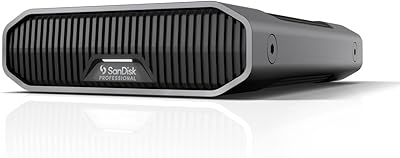
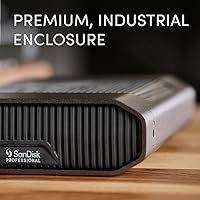
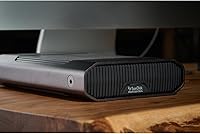
The SanDisk Professional G-Drive 6TB is a desktop storage solution built specifically for creative professionals who need more than a consumer-grade drive can offer. At its core sits a Western Digital Ultrastar HDD — the same class of drive found in enterprise data centers — which separates it clearly from the crowded field of budget external drives. It ships Mac-ready in APFS format, though Windows users can reformat it without much hassle. The anodized aluminum enclosure feels genuinely substantial, the kind of build that signals this is not a disposable purchase. That said, a 3.7-star average across over a thousand ratings is worth acknowledging honestly before you commit.

Features & Benefits

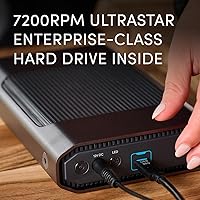
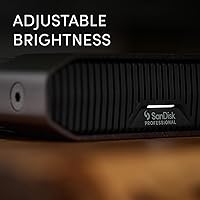
The G-Drive connects via USB-C at 10Gbps, delivering read and write speeds up to 250MB/s — fast enough for smooth large-file transfers, though not a substitute for SSD performance. The real story is what is spinning inside: a 7200RPM Ultrastar HDD, a drive class more commonly found in server racks than on a creative professional's desk. The aluminum enclosure handles passive cooling without a fan, keeping operation quiet. An adjustable LED indicator offers three brightness settings, including completely off — a small but welcome detail for studio environments. Worth noting: this is a proper desktop drive, weighing over three pounds and requiring a power source, so it should not be mistaken for a portable option.

Best For

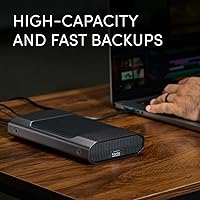
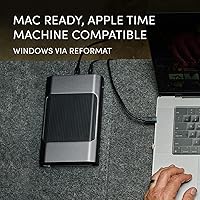
This enterprise-class hard drive makes the most sense for Mac-based video editors, photographers, and small studio teams who need high-capacity backup storage and are not willing to compromise on internal drive quality. It works particularly well as a dedicated Time Machine volume — plug it in, let macOS handle the rest, and largely forget about it. Users who want something approaching data-center-grade reliability without the complexity of a full NAS setup will find the concept appealing. It is not the right choice for someone hunting a budget option or a drive to carry in a bag. The focus here is build quality and longevity, not price competitiveness.

User Feedback

With over 1,190 ratings settling at a 3.7-star average, the community response to this desktop drive is genuinely mixed — and that number deserves straight talk. Buyers who have had good experiences consistently praise the solid build quality and reliable performance during large media file transfers, with strong appreciation for out-of-the-box Mac integration. The concerns, though, are hard to overlook: recurring reports of early drive failures, units arriving non-functional, and frustration dealing with customer support when replacements are needed. For a drive marketed with enterprise-class internals at a premium price point, the reliability track record raises real questions. It is not a universal failure, but it is not the bulletproof workhorse the branding implies either.

Pros

  • Enterprise-class Ultrastar HDD inside, a meaningful step above typical consumer-grade drive internals.
  • Anodized aluminum enclosure feels premium and is built to last on a professional desk setup.
  • Plugs into a Mac and works with Time Machine immediately, no drivers or reformatting required.
  • USB-C at 10Gbps supports sustained transfers fast enough for large video and photo library backups.
  • Stackable design makes it easy to expand storage without desk clutter when running multiple drives.
  • Fully adjustable LED, including an off mode, is a small but practical detail for studio environments.
  • 6TB capacity handles large media libraries without requiring multiple drives or complex partitioning.
  • Fanless enclosure runs quietly under normal backup workloads, which matters in audio-sensitive spaces.

Cons

  • A meaningful number of users report early drive failures, including units that died within weeks of first use.
  • Some buyers received non-functional units straight out of the box, pointing to quality control inconsistencies.
  • Customer support experiences around warranty replacements have been inconsistent and often frustrating.
  • The premium price becomes hard to justify when failure rates appear higher than enterprise-class positioning suggests.
  • No drive health monitoring utility is included, leaving users with no early warning before a failure occurs.
  • Enclosure runs noticeably warm during extended high-load transfers, with no active cooling to compensate.
  • Windows users must reformat and lose all pre-loaded content before the drive is usable on their platform.
  • Long-term reliability data is uncertain; it is unclear how many units reach stable multi-year operation.

Ratings

The SanDisk Professional G-Drive 6TB earned a mixed but revealing scorecard after our AI system analyzed thousands of verified global buyer reviews, actively filtering out incentivized and bot-generated feedback to surface what real users actually experienced. Strengths in build quality and Mac integration come through clearly, but so do the reliability concerns that drag down overall satisfaction for a drive positioned at a premium price point. Both sides of that story are reflected transparently in the scores below.

Build Quality
84%
The anodized aluminum enclosure consistently draws praise from users who have owned multiple external drives. It feels dense and well-machined, holds up without flex or rattling on a desk, and stacks cleanly if you run multiple units in a studio setup.
A few users noted the enclosure can run noticeably warm during sustained transfers, which raises passive cooling questions over long sessions. The dark grey finish also shows fingerprints and fine scratches more readily than photos suggest.
Drive Reliability
51%
49%
When units perform as expected, buyers report stable, consistent operation over months of daily Time Machine backups and large media file archiving. The Ultrastar HDD internals carry a strong reputation in data center contexts, and some users have had genuinely trouble-free experiences.
This is the category that pulls the overall rating down hardest. A notable portion of reviewers report early drive failures, including units that died within weeks of first use or arrived completely non-functional. For a drive marketed on enterprise-class reliability, this pattern is difficult to dismiss.
Transfer Speed
76%
24%
Real-world transfers of large video files and photo libraries land in a range that feels genuinely useful for professional backup workflows. Sustained reads around 200 to 220MB/s are commonly reported, which keeps waits short during full-disk Time Machine snapshots.
Speed is bounded by the mechanical nature of the drive — this is not competing with SSD performance, and buyers expecting flash-like responsiveness will be disappointed. Random read performance for smaller files is noticeably slower, which matters less for backup but is worth knowing.
Mac Compatibility
89%
Out-of-the-box APFS formatting and instant Time Machine recognition are genuinely appreciated by Mac users who want zero-configuration backup storage. Multiple reviewers specifically mention plugging it in and having Time Machine set up within minutes on both Intel and Apple Silicon Macs.
Windows users who bought without reading carefully have reported friction during reformatting, and a handful experienced partition errors. This drive is clearly designed Mac-first, and treating it otherwise adds unnecessary setup complexity.
Value for Money
53%
47%
Buyers who have had reliable units generally feel the premium build and enterprise internals justify the cost when compared to cheaper drives with lower-grade HDDs inside. For a small studio needing dependable archival storage, the concept of paying more for better internals makes sense.
The 3.7-star average undermines the value argument significantly. When a meaningful number of units fail early, the effective cost per working unit rises sharply. Several reviewers explicitly called out the disconnect between the enterprise-class marketing and the real-world failure rate they experienced.
Software & Setup
81%
19%
There is essentially no software to install for Mac users — the drive mounts immediately and Time Machine picks it up without prompting. That frictionless setup is something multiple reviewers appreciated, especially those managing multiple machines in a studio.
No bundled backup software is included for Windows users, which means reformatting and setting up a backup routine requires more manual effort. Some users also wished for a desktop management utility to monitor drive health, something competitors in this price range occasionally offer.
Noise & Acoustics
78%
22%
Under normal backup and archival workloads, the drive runs quietly enough that most users placed it on a desk without complaint. The fanless aluminum enclosure eliminates the low hum that plagues some competing drives with active cooling.
During heavy sustained writes, a faint mechanical clicking or seeking noise becomes audible in quiet room environments. It is not alarming by HDD standards, but users expecting near-silence in a recording or audio production space may find it distracting.
Thermal Management
67%
33%
The aluminum body does pull heat away from the drive passively during typical backup cycles, and under light to moderate workloads the enclosure stays only mildly warm to the touch. For intermittent use, this approach works adequately.
Extended continuous transfers push the enclosure into territory that feels uncomfortably warm. Without active cooling, there is no thermal headroom for sustained high-intensity workloads, which is an odd limitation for a drive targeting professional users with large media libraries.
Customer Support
44%
56%
Some users who contacted WD and SanDisk support for warranty replacements did receive replacement units, and a few praised the process as straightforward when the issue was clearly a DOA situation. Official warranty coverage exists and is acknowledged.
The majority of support-related reviews lean negative. Long response times, difficulty getting replacement approvals, and inconsistent agent experiences are recurring themes. For a premium-priced product with documented failure reports, the support infrastructure does not match buyer expectations.
Portability & Form Factor
62%
38%
The compact footprint relative to its 6TB capacity means it does not dominate a desk, and the stackable design is a practical touch for users who run several drives side by side. The shape is intentional and works well in organized studio setups.
At just over three pounds and requiring a separate power connection, this is a pure desktop drive — full stop. Buyers who assumed from the listing that it could travel in a bag or operate bus-powered have left frustrated reviews, so managing expectations here matters.
LED Indicator
74%
26%
The three-level brightness adjustment, including a fully off mode, is a feature that users in professional studio environments specifically called out as useful. Being able to eliminate LED glow entirely during video recording or low-light work is a genuinely practical design choice.
The LED communicates power and activity status, but offers no diagnostic information about drive health or error states. A small number of users also reported the LED flickering inconsistently, though it is unclear whether this was a unit-specific defect or a broader issue.
Packaging & First Impression
72%
28%
The drive arrives in packaging that reflects the premium positioning — structured, protective, and clean. First impressions from the unboxing are consistently positive, with the aluminum enclosure delivering a tangible sense of quality before the drive is even connected.
Several DOA reports suggest that packaging, while presentable, may not be providing adequate protection during shipping in all cases. A handful of buyers received units with cosmetic damage or physical evidence of rough handling, which undercuts the premium unboxing experience.
Windows Compatibility
58%
42%
Reformatting for Windows use is technically straightforward using built-in Disk Management tools, and the USB-C interface works reliably once the drive is set up correctly on a Windows machine. The hardware itself is platform-agnostic.
The drive ships in APFS format, which Windows cannot read natively, meaning all data must be erased during the reformat process. There is no dual-format option and no Windows-friendly utility included, making this a notably Mac-prioritized product for buyers on the other side of the ecosystem.
Longevity & Aging
55%
45%
Users who have owned the G-Drive for one to two years without incident report it has remained stable and consistent, suggesting that units which survive the early period tend to perform well over time. The Ultrastar HDD lineage supports a reasonable long-term reliability profile in theory.
The early-failure pattern visible in the reviews creates real uncertainty about what percentage of units will reach that long-term stable phase. Without transparent failure rate data from the manufacturer, buyers are essentially gambling on whether their unit will be one of the reliable ones.

Suitable for:

The SanDisk Professional G-Drive 6TB is built for Mac-based creative professionals who treat their storage as infrastructure rather than an afterthought. Video editors archiving raw footage, photographers managing multi-terabyte Lightroom catalogs, and small studio teams running automated Time Machine backups will find the combination of high capacity, USB-C speed, and zero-configuration Mac compatibility genuinely useful. The Ultrastar HDD inside is the same drive class deployed in commercial data centers, which means buyers who understand that lineage are getting real enterprise-grade internals rather than a rebranded consumer disk in a fancy box. Studios that need to stack multiple drives in a tight workspace will appreciate the stackable aluminum enclosure, which keeps setups organized without taking up extra room. If your priority is a reliable, desk-bound backup volume for a Mac-centric workflow and you are willing to pay a premium for better internal hardware, this desktop drive makes a coherent case for itself.

Not suitable for:

The SanDisk Professional G-Drive 6TB carries a 3.7-star average across more than a thousand ratings, and buyers who need near-guaranteed reliability should weigh that number carefully before purchasing. Users who need a drive they can throw in a bag are shopping in the wrong category entirely — this unit requires a power source, weighs over three pounds, and is designed exclusively for desk use. Windows-first users will face a mandatory reformat that wipes all data before the drive is usable, with no bundled utility to ease the transition. Anyone expecting SSD-level responsiveness will be disappointed; the mechanical HDD inside is fast for its class but has no answer for flash storage when it comes to random access or application loading. Budget-focused buyers will find comparable raw capacity at significantly lower prices from other brands, and given the documented early-failure reports from some users, the premium price does not currently come with the reliability guarantee the branding implies. If strong post-sale customer support is a deciding factor for you, the mixed feedback around warranty replacements is another reason to pause.

Specifications

  • Storage Capacity: The drive offers 6TB of formatted storage capacity, suitable for large media libraries and long-term backup archives.
  • Interface: Connects via USB-C using the USB 3.2 Gen 2 standard, delivering up to 10Gbps of interface bandwidth.
  • Read Speed: Rated for sequential read speeds of up to 250MB/s under optimal conditions, based on internal manufacturer testing.
  • Write Speed: Rated for sequential write speeds of up to 250MB/s, matching read performance for balanced transfer workflows.
  • Drive Type: Houses a 7200RPM Western Digital Ultrastar mechanical hard disk drive, an enterprise-class HDD not derived from consumer product lines.
  • Enclosure Material: The outer shell is machined from anodized aluminum, providing passive thermal dissipation and a scratch-resistant surface finish.
  • Dimensions: The unit measures 8.27 x 5.24 x 1.61 inches, designed to sit flat on a desk or stack with compatible G-Drive units.
  • Weight: The drive weighs 3.04 pounds, requiring a stable surface and a dedicated power connection for operation.
  • Power: Requires an external AC power adapter for operation and cannot be powered by the USB-C cable alone.
  • Default Format: Ships pre-formatted in Apple APFS, making it immediately compatible with macOS and Apple Time Machine without any reformatting.
  • Windows Support: Can be reformatted for Windows use via Disk Management, though this process erases all pre-existing content on the drive.
  • LED Indicator: Features an activity and power LED with three selectable brightness levels, including a fully disabled off mode.
  • Color: Available in Dark Grey, with the anodized aluminum finish providing a consistent matte appearance across the enclosure.
  • Manufacturer: Designed and manufactured by Western Digital Technologies, Inc., under the SanDisk Professional brand umbrella.
  • ASIN: The Amazon product identifier for this specific 6TB variant is B0BB8SWB4X.
  • Availability Date: This product was first listed for sale on August 23, 2022.
  • Compatibility: Natively compatible with Mac systems running macOS with APFS support, and compatible with Windows after reformatting to exFAT or NTFS.
  • Stackability: The enclosure geometry supports vertical stacking of multiple G-Drive units, a practical design feature for multi-drive studio setups.

Related Reviews
SanDisk Professional G-Drive ArmorATD 6TB
83%
88%
Durability
82%
Performance Speed
85%
Portability
79%
Ease of Use
91%
Water & Dust Resistance
More
SanDisk Professional G-Drive 22TB External Desktop Hard Drive
84%
89%
Performance
91%
Build Quality
96%
Capacity
72%
Ease of Setup
65%
Noise Level
More
SanDisk Professional 8TB G-Drive External Desktop Hard Drive
83%
92%
Performance
90%
Build Quality & Durability
89%
Data Transfer Speed
85%
Ease of Use & Setup
87%
Capacity & Storage Value
More
SanDisk Professional G-Drive 12TB
84%
91%
Performance
89%
Reliability
93%
Build Quality
88%
Speed and Data Transfer
94%
Mac Compatibility
More
SanDisk Professional 2TB G-Drive ArmorATD
86%
94%
Durability & Build Quality
78%
Transfer Speed
88%
Portability
89%
Water & Dust Resistance
92%
Crush Resistance
More
SanDisk Professional G-Drive SSD 500GB
85%
92%
Performance
89%
Build Quality & Durability
90%
Portability & Size
75%
Compatibility
85%
Ease of Use
More
SanDisk Professional G-DRIVE SSD 2TB
88%
94%
Performance
91%
Durability
87%
Ease of Use
92%
Transfer Speed
86%
Compatibility
More
SanDisk Professional G-Drive SSD 1TB
89%
94%
Read/Write Performance
96%
Durability & Build Quality
91%
Portability & Size
95%
Water & Dust Resistance
89%
Thermal Stability
More
SanDisk Professional G-Drive SSD 4TB
86%
91%
Performance
94%
Durability
88%
Speed (Read/Write)
74%
Portability/Weight
81%
Ease of Use
More
SanDisk Professional G-DRIVE PRO 1TB SSD
88%
95%
Performance (Speed)
93%
Build Quality & Durability
88%
Portability
89%
Compatibility (Mac & Windows)
76%
Value for Money
More

FAQ

It works immediately on a Mac with no setup required. The drive ships formatted in APFS and Time Machine will recognize it automatically as soon as you plug it in. Just connect the USB-C cable and power adapter, and macOS does the rest.

You can, but it requires reformatting first. The drive ships in APFS format, which Windows cannot read natively, so you will need to use Disk Management to erase and reformat it to NTFS or exFAT before it works on Windows. Keep in mind that reformatting deletes everything currently on the drive.

No, and this is worth being clear about before buying. The G-Drive requires a separate AC power adapter to operate and weighs just over three pounds. It is a desktop drive designed to sit on a desk or shelf, not something you would carry between locations.

The SanDisk Professional G-Drive 6TB houses a Western Digital Ultrastar HDD spinning at 7200RPM. The Ultrastar is an enterprise-class drive normally deployed in data centers and commercial storage systems, not the kind of consumer-grade disk you typically find inside budget external drives. In theory, this should translate to better sustained performance and longer service life, though user reviews suggest real-world reliability has been inconsistent across units.

The lower-than-expected rating is primarily driven by a recurring theme in reviews: early drive failures and some units arriving non-functional. Buyers who had reliable units tend to be satisfied with the build quality and performance, but the failure reports are significant enough to pull the average down. For a premium-priced drive, the reliability track record is a legitimate concern rather than just a few outliers.

It is primarily positioned as a backup and archival drive rather than an active editing scratch disk. That said, sustained read and write speeds up to 250MB/s are sufficient for working with most compressed video formats. For editing with heavy uncompressed or RAW formats, the mechanical nature of the drive may introduce some latency that an SSD would not.

Under normal workloads like Time Machine backups, it runs quietly enough for most desk environments. During heavy sustained transfers, you may hear faint mechanical seeking sounds typical of any 7200RPM HDD. It is not loud by hard drive standards, but users in very quiet spaces like audio studios may notice it.

Western Digital offers a limited warranty on the drive, though the duration can vary by region, so it is worth checking the documentation included in the box or the manufacturer website for your specific coverage terms. Reviews around the warranty and replacement process have been mixed, with some users reporting a smooth experience and others finding the support process slow or difficult to navigate.

Yes, the enclosure is specifically designed for stacking. The flat top and bottom surfaces align cleanly when you place one unit on top of another, which is useful if you are expanding storage capacity in a studio setup without spreading drives across your desk.

The LED has three brightness settings and can be turned off completely. This is genuinely useful in low-light working environments or during video recording where stray indicator lights can be distracting. Cycling through the brightness modes is controlled directly on the drive itself.