Overview

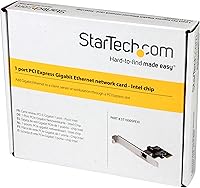
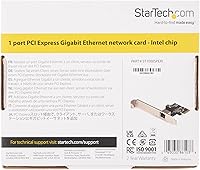
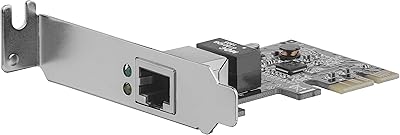
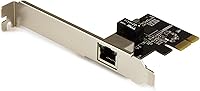
The StarTech ST1000SPEXI PCIe Gigabit Network Card is exactly what it sounds like: a no-fuss hardware upgrade that adds or replaces a Gigabit Ethernet port on any desktop with an open PCIe slot. StarTech has built a solid reputation among IT professionals for producing dependable networking peripherals, and this card fits squarely in that tradition. The real draw is the Intel I210-AT chipset — enterprise-grade silicon that cheaper cards simply don't offer. This isn't a feature-packed consumer gadget. It's a mid-range reliability purchase aimed at buyers who've been burned by flaky onboard networking and want something they can install and genuinely forget about.
Features & Benefits

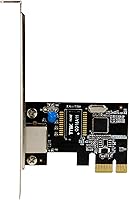
The heart of this Intel PCIe NIC is its Intel I210-AT chipset — mature, enterprise-tested silicon with well-maintained drivers across Windows and Linux, which matters a lot when OS updates roll around. It occupies a single PCIe x1 slot, leaving your larger slots free. The RJ-45 port handles 10/100/1000 Mbps auto-negotiation, so it works fine on older switches or modern gigabit gear. PXE boot support is a real benefit for IT admins managing network imaging workflows, but most home users can ignore that entirely. The bundled MAC Address Changer and Wi-Fi Auto Switch utilities are present but not particularly useful for the typical buyer picking up this card.

Best For

The StarTech gigabit adapter earns its keep in a few specific situations. The most common: your motherboard's onboard Ethernet died and you need a driver-stable replacement fast. It's also a natural pick for home lab and small business setups where network reliability matters more than raw cost savings. Linux users running Proxmox, TrueNAS, or other virtualization stacks will particularly appreciate the Intel chipset — driver support in the Linux kernel for the I210 has been excellent for years. If you've been fighting dropped connections or high CPU usage from a generic Realtek NIC, this card is a practical fix. Casual home users who just need basic internet probably don't need to spend this much.

User Feedback

Buyers consistently praise how easy this network card is to get running — on Windows it's usually recognized immediately, and on Linux the kernel driver handles it without manual intervention. Long-term stability is the most-cited strength; users who switched from onboard Realtek adapters frequently note the difference in uptime and connection consistency. The honest downside is the asking price: cheaper PCIe NICs exist, and not everyone feels the Intel premium is justified for basic home use. A handful of buyers have noted occasional BIOS recognition quirks on older motherboards, though these appear rare. Overall sentiment leans strongly positive — most describe it as a long-term reliability purchase they don't regret.

Pros

  • Intel I210-AT chipset delivers enterprise-grade stability that generic NICs simply cannot match.
  • Plug-and-play on Windows and modern Linux — no manual driver hunting required.
  • In-kernel Linux driver support means OS updates almost never break this network card.
  • Fits in any PCIe x1, x4, x8, or x16 slot, making it compatible with nearly every modern desktop.
  • PXE boot support is a genuine time-saver for IT admins running network imaging workflows.
  • Significantly lower CPU overhead compared to onboard Realtek adapters under sustained network load.
  • Multi-year reliability track record makes it a cost-effective long-term investment for always-on systems.
  • Clean passthrough support in Proxmox, KVM, and ESXi — a known win for virtualization users.
  • Auto-negotiates across 10/100/1000 Mbps, so it works on older switches without manual configuration.

Cons

  • Priced noticeably higher than budget PCIe NICs that handle basic home use just as well.
  • Bundled software utilities feel underdeveloped and offer limited practical value for most buyers.
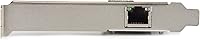
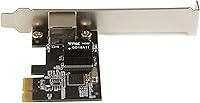
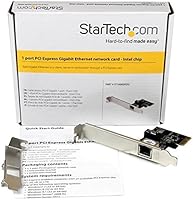
  • Low-profile bracket availability is unclear at retail, creating fitment uncertainty for slim chassis users.
  • Older motherboards may require BIOS updates or manual PCIe configuration for the card to be recognized.
  • Warranty duration is not prominently communicated, leaving some buyers uncertain about post-purchase coverage.
  • PXE boot support adds to the price but is completely irrelevant for the majority of home users.
  • Minimal included documentation means edge-case troubleshooting relies heavily on community forums.
  • The performance premium over cheaper NICs is invisible in casual everyday desktop use.

Ratings

The StarTech ST1000SPEXI PCIe Gigabit Network Card scores below are generated by AI after analyzing thousands of verified buyer reviews worldwide, with spam, bot-submitted, and incentivized feedback actively filtered out. This Intel-chipset network card attracts a technically savvy audience, and their feedback is unusually detailed — which makes the scores here particularly reliable. Both the genuine strengths and the real friction points are reflected as honestly as possible.
Driver Stability & OS Compatibility
94%
The Intel I210-AT chipset has mature, in-kernel driver support on Linux, meaning users running Proxmox, TrueNAS, or Ubuntu Server rarely need to touch a configuration file. On Windows, the card is typically recognized immediately after seating. Long-term driver continuity across OS updates is a recurring theme in positive reviews.
A small number of users on older Linux distributions or niche BSD-based systems have reported needing to manually specify driver parameters. This is an edge case, but worth knowing if you are running something outside the mainstream.
Connection Reliability & Uptime
92%
Users who switched from onboard Realtek adapters consistently cite a dramatic improvement in connection stability, particularly in setups that run 24/7 like home servers or small business workstations. Dropped connections and random link renegotiations that plagued cheaper NICs simply stopped happening for most buyers.
A handful of reviewers noted occasional link drops when connected to older or budget-tier managed switches, though it is unclear whether the card or the switch was at fault. Under very heavy sustained throughput in virtualized environments, a few users saw minor instability.
Installation Ease
91%
Physical installation is about as simple as PCIe cards get — seat it, screw it down, boot up. Most Windows users report the card is fully functional before they even visit a driver page. Linux users particularly appreciate that no third-party driver compilation is required on modern kernels.
A few buyers with very compact mini-tower cases mentioned the card fit was tighter than expected, and one or two noted the included bracket configuration did not suit their chassis without additional hardware they did not anticipate needing.
Value for Money
67%
33%
Buyers who understand what Intel silicon delivers in terms of driver longevity and CPU offloading tend to consider the price justified, especially in production or semi-production environments where a failed NIC costs real time. The card has been on the market long enough that its price has become more competitive over time.
This is the most common criticism across reviews. Budget-conscious buyers point out that Realtek-based PCIe NICs are available at a fraction of the cost, and for casual home internet use, the performance difference is negligible. If you just need basic connectivity, the premium is genuinely hard to justify.
Chipset Quality
96%
The Intel I210-AT is an enterprise-grade chip with a long track record in server and workstation hardware. Users in virtualization and NAS communities specifically seek out this chipset because it behaves predictably under load and supports features like hardware timestamping and VLAN tagging that cheaper chips handle poorly.
The chipset itself draws no real criticism, but some buyers feel StarTech charges a noticeable markup over what the component cost warrants. This is more a pricing critique than a chipset critique, but it does color overall satisfaction for cost-sensitive buyers.
PCIe Slot Compatibility
83%
Using a PCIe x1 interface means this card slots into virtually any open PCIe lane on a modern desktop motherboard, including x4, x8, or x16 slots running at x1. Most buyers had no compatibility issues across a wide range of Intel and AMD platform motherboards from the past decade.
A small but notable group of reviewers reported BIOS-level recognition issues on older motherboards, particularly some pre-2012 platforms. In rare cases, the card required a BIOS update or manual PCIe configuration to appear correctly, which is not ideal for users who expected a truly zero-friction install.
CPU Overhead & Network Performance
88%
One of the quieter advantages of the Intel I210-AT is its ability to offload processing from the host CPU, which matters in servers or HTPCs where every CPU cycle counts. Users running iSCSI storage or high-frequency file transfers noticed lower system CPU usage compared to their previous onboard adapters.
In purely casual desktop use, the CPU offloading benefit is essentially invisible. Buyers who purchased this card expecting a noticeable speed improvement for everyday browsing or streaming were sometimes disappointed, since gigabit throughput is gigabit throughput regardless of NIC quality at that level.
PXE Boot Functionality
87%
IT professionals managing network boot environments consistently report that PXE boot works reliably and without the configuration headaches that plague cheaper NICs. Deploying diskless workstations or running WDS-based imaging workflows is noticeably smoother with this card in the mix.
PXE boot is irrelevant to the majority of buyers, and StarTech does not make this limitation particularly clear in its marketing. Home users who discovered this feature after purchase had no practical use for it, which occasionally contributed to a feeling that they paid for functionality they would never use.
Build & Board Quality
79%
21%
The card feels solidly constructed for its weight class — the PCB is clean, components are well-seated, and the metal bracket does not feel flimsy. Users who have handled a lot of expansion cards generally describe it as above average for a single-port NIC at this price point.
It is a lightweight, compact card, and a few buyers expected more heft given the price. The physical build is functional rather than impressive, and there is nothing about the card's construction that would make it stand out in a side-by-side comparison with similarly priced alternatives.
Bundled Software Utility
41%
59%
The MAC Address Changer utility has some legitimate use in network testing and privacy-conscious setups, and the Wi-Fi Auto Switch tool can be mildly useful in laptops with both wired and wireless connections active. A niche group of buyers found at least one of the tools worth keeping installed.
The overwhelming majority of reviewers ignored the bundled software entirely or uninstalled it shortly after trying it. The utilities feel like afterthoughts — functional in a basic sense, but not polished enough to be genuinely useful. Several users described them as unnecessary bloat for a hardware-focused product.
Linux & Virtualization Support
93%
This is where the card arguably earns its reputation most clearly. Proxmox, ESXi, Hyper-V, and KVM users consistently report clean passthrough support and stable virtual machine networking. The I210 driver is a first-class citizen in the Linux kernel, which means updates rarely break anything.
A small number of ESXi users running older hypervisor versions encountered version-specific driver compatibility issues that required manual VIB installation. This is uncommon and mainly affects users running end-of-life hypervisor versions, but it is worth flagging for enterprise environments.
Documentation & Support
72%
28%
StarTech provides online documentation and a support portal that most users find adequate for basic setup questions. The brand's reputation in the IT accessories space means community resources and forum threads covering this specific model are widely available.
The included documentation is minimal — essentially a pamphlet. Users dealing with edge-case compatibility issues or advanced configuration scenarios generally had to rely on community forums rather than StarTech's official resources, which felt thin given the card's target audience of technical buyers.
Form Factor Flexibility
68%
32%
The standard PCIe form factor means this card fits comfortably in full-size and mid-tower desktops without issue. For the majority of buyers upgrading a standard desktop, the physical fit is completely unremarkable — and in this context, unremarkable is a compliment.
Buyers with small form factor or slim desktop cases found that a low-profile bracket may be needed, and the availability of that bracket with the retail package is not consistently confirmed across reviews. Some buyers had to source a low-profile bracket separately, which added friction to an otherwise simple install.
Long-Term Reliability
91%
Multiple reviewers report using this card continuously for three or more years without a single failure or performance degradation. In server environments running around the clock, that kind of track record carries real weight. The Intel chipset's maturity contributes directly to this longevity.
There is not much negative feedback specific to long-term durability, but a few users noted that StarTech does not publish a formal warranty duration prominently, which left some buyers uncertain about their coverage if the card did fail after extended use.

Suitable for:

The StarTech ST1000SPEXI PCIe Gigabit Network Card is purpose-built for buyers who prioritize dependability over price, and it earns its keep in a handful of specific scenarios. If your motherboard's onboard Ethernet port has died and you need a drop-in replacement that won't cause driver headaches six months later, this is the card to reach for. IT administrators managing fleets of desktops — especially those running PXE boot or network imaging workflows — will appreciate the Intel I210-AT chipset's proven reliability in exactly those environments. Home lab enthusiasts running Proxmox, TrueNAS, or similar virtualization platforms are arguably the card's most enthusiastic audience, because Intel's in-kernel Linux driver support means zero surprises after OS updates. Small business workstations that run around the clock and can't afford random network dropouts are also an ideal fit. Essentially, if network stability is a genuine operational concern rather than a theoretical one, this card justifies the investment.
Not suitable for:

The StarTech ST1000SPEXI PCIe Gigabit Network Card is a harder sell for buyers with straightforward, low-stakes networking needs. If you just want basic internet connectivity for a home PC used for browsing and streaming, a generic Realtek-based PCIe NIC at a fraction of the cost will do exactly the same job with no perceptible difference in day-to-day performance. Laptop users are out entirely — this is a desktop PCIe card, full stop. Anyone working with a small form factor or slim desktop chassis should verify low-profile bracket availability before buying, as fitting this card without the right bracket may require extra sourcing effort. Users on very old motherboard platforms should also check PCIe compatibility first, as a small number of pre-2012 boards have shown BIOS recognition issues. And if your budget is tight, the honest advice is to consider whether the Intel premium is genuinely warranted for your workload before committing.
Specifications

  • Manufacturer: Made by StarTech.com, a brand with a long track record in networking peripherals and IT infrastructure accessories.
  • Model Number: The official model identifier is ST1000SPEXI, used for driver downloads, warranty claims, and support requests.
  • Chipset: Powered by the Intel I210-AT, an enterprise-grade Gigabit Ethernet controller known for driver stability and low CPU overhead.
  • Interface: Uses a PCI Express x1 interface, physically compatible with PCIe x1, x4, x8, and x16 slots on desktop motherboards.
  • Port Type: Features a single RJ-45 port for standard wired Ethernet connections to routers, switches, and network hubs.
  • Network Speed: Supports 10/100/1000 Mbps auto-negotiation, automatically matching the best speed supported by the connected network device.
  • Data Transfer Rate: Maximum throughput reaches 1 Gbps (1024 Mbps), suitable for high-bandwidth local network transfers and server workloads.
  • Data Protocol: Fully compliant with IEEE 802.3 Ethernet standards, ensuring interoperability with all modern wired networking equipment.
  • PXE Boot: Supports Preboot Execution Environment (PXE) boot, enabling network-based OS deployment and diskless workstation configurations.
  • Form Factor: Standard-height PCIe expansion card measuring 6.65 x 5.55 x 1.14 inches, designed primarily for mid-tower and full-tower desktop chassis.
  • Card Weight: The card weighs 1.34 oz (approximately 38 grams), making it one of the lighter single-port PCIe NIC options available.
  • OS Support: Compatible with Windows desktop and server editions, as well as Linux distributions where the Intel I210 driver is included in the mainline kernel.
  • Bundled Software: Includes a MAC Address Changer utility and a Wi-Fi Auto Switch tool, both of Windows-only and of limited use for most buyers.
  • Compatible Devices: Designed for desktop PCs with an available PCIe slot; not compatible with laptops, all-in-ones, or systems without standard PCIe expansion slots.
  • BSR Ranking: Ranked #114 in Internal Computer Networking Cards on Amazon, reflecting sustained demand and strong sales history in its category.
  • First Available: Originally listed for sale on July 19, 2015, meaning the product has a decade-long retail history and an established user base.
  • Virtualization Support: The Intel I210-AT chipset supports SR-IOV and is recognized natively by major hypervisors including Proxmox, ESXi, and KVM without additional drivers.
  • Discontinuation Status: Confirmed as an active product — not discontinued by the manufacturer — meaning driver updates and replacement units remain available.

Related Reviews

StarTech ST1000SPEX2L 1-Port PCIe Network Card
82%
91%
Ease of Installation
88%
Connection Stability
93%
Low-Profile Compatibility
82%
OS & Driver Compatibility
94%
Value for Money
More
ULANSeN Intel 82576 Dual-Port Gigabit Network Card
81%
91%
Driver Compatibility
84%
Virtualization Support
88%
Value for Money
79%
Throughput Performance
63%
Build Quality
More
StarTech PEXUSB3S3GE USB 3.0 PCIe Card
75%
83%
Ease of Installation
78%
USB Port Performance
57%
Ethernet Reliability
61%
Build Quality
68%
Value for Money
More
BrosTrend 5Gbps PCIe Network Card
79%
91%
Installation Ease
83%
Real-World Speed Gains
58%
OS & Platform Compatibility
84%
Build & Component Quality
88%
Value for Money
More
WAVLINK 5GB PCIe Network Card
87%
89%
Installation Ease
91%
Performance (Speed)
90%
Value for Money
88%
Compatibility with OS
85%
Build Quality
More
StarTech 8-Port SATA III PCIe Expansion Card
80%
88%
Drive Detection Reliability
84%
Multi-Controller Architecture
79%
OS Compatibility
86%
Motherboard Compatibility
81%
Included Cables
More
GLOTRENDS LE8202 2-Port Gigabit PCIe Network Card
82%
88%
Driver Compatibility
91%
Ease of Installation
94%
Value for Money
86%
OS & Platform Coverage
79%
Build Quality
More
TEROW ROW076 WiFi 6 PCIe Network Card
85%
87%
Performance
90%
Installation Ease
89%
WiFi Speed & Reliability
85%
Bluetooth Connectivity
91%
Gaming Experience
More
StarTech PEX1394B3 3-Port FireWire PCIe Card
87%
91%
Data Transfer Speed
89%
Ease of Installation
93%
Compatibility with Operating Systems
84%
Build Quality
88%
Reliability
More
WAVLINK WL-WN675X3 WiFi 6E PCIe Network Card
78%
83%
WiFi Performance
67%
6GHz Band Usability
74%
Installation Ease
78%
Bluetooth 5.3 Performance
86%
Antenna Design & Placement
More

FAQ

In most cases, yes. On Windows 10 and 11, the Intel I210-AT chipset is recognized automatically through Windows Update. On modern Linux kernels, the igb driver that supports this chip has been included for years, so most distros will have it working before you even log in for the first time.

It fits in any PCIe slot — x1, x4, x8, or x16. PCIe is designed to be physically backward compatible in that direction. The card will run at x1 speeds regardless of which slot you use, which is all it needs for Gigabit Ethernet.

That depends on your chassis. The card ships in a standard full-height configuration. If your case only accepts low-profile cards, you will need a low-profile bracket — whether one is included in the retail package is not consistently confirmed across all units, so it is worth checking before you buy or contacting StarTech support to clarify.

If your onboard NIC uses an Intel chipset, you are probably not gaining much. Where this card shines is replacing failed onboard ports or upgrading systems with Realtek-based onboard networking. The Intel I210-AT chipset handles sustained transfers with lower CPU usage and has a significantly better track record for stability in always-on workloads.

Yes, and this is honestly one of the best use cases for the card. The Intel I210-AT is natively supported in both Proxmox VE and TrueNAS SCALE and CORE, and PCIe passthrough to VMs works cleanly. The Linux igb driver that handles it is mature, well-maintained, and unlikely to cause trouble after platform updates.

PXE boot lets a computer start up over the network instead of from a local hard drive — it is mainly used by IT departments to deploy operating system images to multiple machines at once. If you are a home user or running a single workstation, you will never use this feature. It is a genuine benefit for sysadmins managing fleets of PCs, but for everyone else it is just a spec on the box.

Most likely not — the StarTech ST1000SPEXI PCIe Gigabit Network Card has been around since 2015 and has a broad motherboard compatibility record. That said, a small number of users with pre-2012 motherboards have reported needing a BIOS update before the card is recognized. If your board is from 2013 or newer, you are almost certainly fine.
For basic home internet use, honestly, probably not. A budget Realtek card will get you online just as effectively for casual browsing or streaming. Where the Intel chip earns its keep is in environments that run 24/7, push high-bandwidth local transfers, or run Linux and need reliable long-term driver support. If that sounds like your setup, the premium makes sense.

Most buyers ignore it. The MAC Address Changer has some niche uses in network testing or privacy-conscious setups, and the Wi-Fi Auto Switch can help on a laptop that switches between wired and wireless. For a typical desktop user, neither tool adds meaningful value, and you can simply skip installing them.

It works in Windows Server as well. The Intel I210-AT is commonly deployed in server contexts, and Intel provides drivers for both desktop and server editions of Windows. Many buyers specifically choose this card for small business servers or workstation-class machines running Windows Server precisely because the Intel chipset is better suited to that kind of sustained workload.