Overview

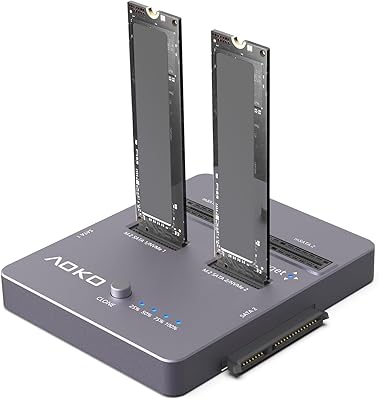
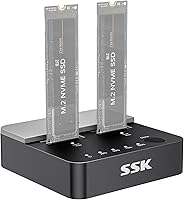
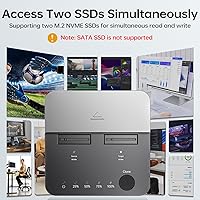
The SSK DK201 Dual-Bay NVMe SSD Cloner Enclosure is a compact, open-frame dock that handles two M.2 drives simultaneously — and can clone one to the other without a computer involved. Built around the JMS586U chip and a USB 3.2 Gen 2×2 interface, it reaches up to 20Gbps under the right conditions. At just 2.8″ × 2.8″ × 0.85″ and 90 grams, it takes up almost no bench space. One thing to get straight early: this NVMe cloner dock works with M Key and B+M Key NVMe drives only. Drop in a SATA M.2 and nothing happens — that limitation catches more buyers off guard than you might expect.
Features & Benefits

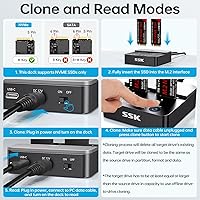
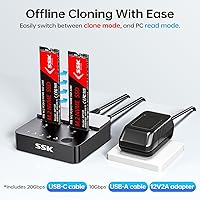
The standout capability is offline one-click cloning — hold the clone button and the dock handles the duplication entirely on its own, no laptop required. Be aware, though: the target drive is completely wiped before cloning starts, so confirm there is nothing critical on it beforehand. UASP support keeps transfers consistent under sustained load, which matters when moving hundreds of gigabytes at a stretch. S.M.A.R.T. monitoring and TRIM give you ongoing visibility into drive health and help prevent gradual performance loss. The tool-free installation is genuinely convenient — drives slot in without screws, and the open chassis helps manage temperatures, though it is not a replacement for active cooling during heavy back-to-back sessions.

Best For

This M.2 duplicator suits anyone swapping a laptop or desktop SSD who wants to migrate their existing data without reinstalling an OS from scratch. IT professionals managing multiple NVMe drives across different machines will find a fast, no-software cloning workflow useful to have on the bench. Content creators and regular backup users who move large files will appreciate the 20Gbps headroom — though actual throughput depends on the drives installed, not the interface alone. Anyone still running SATA M.2 storage should look elsewhere; the dock simply will not recognize those drives. For a pure NVMe setup, it covers the main bases without unnecessary complexity.

User Feedback

Owners of the SSK dual-bay enclosure are largely positive, with successful clones and consistent high-speed transfers cited most often as the highlights. The offline cloning function earns particular praise from users who upgraded laptops without needing a second machine. On the downside, a few reviewers noted the plastic construction feels light — it works fine, but it does not feel premium. Heat management during extended sessions came up in several reviews; the open design helps, but drives still run warm under sustained loads. A handful of buyers flagged the clone button placement as easy to press accidentally. Real-world transfer speeds tracked close to expectations for most users, though results varied based on the drives rather than the dock itself.

Pros

  • Offline one-button cloning works without a PC, software, or network connection — genuinely useful in the field.
  • Both USB-C (20Gbps) and USB-A (10Gbps) cables are included, covering most host machines right out of the box.
  • Tool-free drive installation makes swapping NVMe SSDs quick, even for users who rarely open up hardware.
  • UASP support keeps sustained transfer performance consistent under longer, higher-demand workloads.
  • S.M.A.R.T. monitoring lets you check drive health when connected to a host — handy for evaluating used NVMe drives.
  • The compact 2.8″ × 2.8″ footprint fits easily in a laptop bag or a crowded technician kit.
  • Simultaneous dual-drive access works reliably for reading and transferring data from two NVMe SSDs at once.
  • TRIM pass-through helps maintain long-term SSD performance when the dock is used as a regular external storage hub.

Cons

  • No SATA M.2 support whatsoever — misidentifying your drive type before buying is an expensive mistake.
  • The clone button has no confirmation prompt, and pressing it immediately begins wiping the target drive.
  • Plastic build feels noticeably lightweight for a device handling sensitive data operations repeatedly.
  • Real-world transfer speeds vary widely depending on the drives used — the 20Gbps ceiling is not guaranteed in practice.
  • Passive cooling is not sufficient for back-to-back cloning sessions; drives heat up and need deliberate rest periods.
  • No progress indicator or error display during standalone cloning makes troubleshooting a guessing game.
  • Included cables have minimal connector retention, which can feel insecure during sustained transfer sessions.
  • The quick-start guide omits the critical warning that cloning fully erases the target drive before copying.

Ratings

The SSK DK201 Dual-Bay NVMe SSD Cloner Enclosure was evaluated by our AI system after scanning and filtering hundreds of verified global buyer reviews, actively excluding incentivized, bot-generated, and duplicate feedback to surface what real users actually experienced. Scores reflect the full picture — where this NVMe cloner dock genuinely impresses and where it falls short — so you can make a well-informed decision before buying.
Cloning Reliability
88%
Most users report clean, successful clones on the first attempt when both drives are confirmed NVMe. IT technicians doing repeated SSD upgrades across office machines specifically highlighted how consistent and hands-free the process felt compared to software-based alternatives.
A small but notable share of buyers ran into clone failures when mixing drives from different manufacturers or using high-capacity drives near the capacity limit of the target. Troubleshooting is limited since there is no feedback display to indicate what went wrong.
Transfer Speed
83%
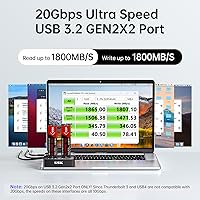
Users moving large video archives or full OS images noted that sustained speeds held up well during longer sessions, with several reporting real-world figures that came close to the interface ceiling when using high-end NVMe drives on both ends.
Actual throughput depends almost entirely on the drives installed, not the dock itself. Buyers using mid-range or older NVMe sticks saw speeds well below the 20Gbps maximum, which created some disappointment when expectations were set by the spec sheet alone.
Offline Clone Usability
91%
The single-button clone workflow is genuinely practical — users upgrading laptops in the field appreciated not needing a host PC, software installation, or an internet connection. Plug in both drives, hold the button, walk away.
The clone button sits flush and is easy to press unintentionally, which a handful of reviewers found concerning given that the process immediately begins wiping the target drive. There is no confirmation prompt or accidental-press protection built in.
NVMe Compatibility
79%
21%
M Key and B+M Key NVMe drives from major brands including Samsung, WD, and Crucial installed and were recognized without issue for the overwhelming majority of buyers. Both slots behaved identically in terms of recognition speed and stability.
The NVMe-only restriction is the single biggest source of negative reviews. Buyers who assumed their SATA M.2 drives would work arrived at frustration quickly, and SSK's product listing language, while technically accurate, did not prevent widespread confusion at purchase.
Build Quality
67%
33%
The dock is compact enough to toss in a laptop bag and light enough to forget it is there. For a tool used occasionally for cloning or periodic transfers, the construction holds up fine under normal handling conditions.
The all-plastic shell and lightweight feel left several buyers underwhelmed, particularly when compared to metal-bodied alternatives at similar price points. Under repeated use or if dropped, the chassis does not inspire confidence in long-term durability.
Thermal Management
71%
29%
The open-frame design does allow meaningful passive airflow around both drives, and users running single shorter clone jobs generally reported no heat-related issues or throttling during normal operation.
During back-to-back clone sessions or extended high-throughput transfers, drives heat up noticeably with no active cooling to compensate. A few buyers mentioned needing deliberate cooldown breaks between jobs, which is a real workflow interruption in professional settings.
Cable & Accessory Quality
72%
28%
Shipping both a USB-C 20Gbps and a USB-A 10Gbps cable in the box is a practical inclusion that most buyers appreciated, covering a wider range of host machines without requiring an extra purchase out of the gate.
The cables feel thin and the connectors have minimal retention force, which drew criticism from users who expected a more secure fit given the dock is designed for sustained data operations. The included power adapter works, but its build quality matches the budget feel of the rest of the package.
Tool-Free Installation
93%
Drives slot in with no screws, no tools, and no real learning curve. Buyers who described themselves as non-technical consistently praised this aspect, noting they had both drives seated and recognized within a couple of minutes of opening the box.
The slot retention on the M.2 connectors can feel slightly loose with shorter 2242 form factor drives, though this is a minor edge case. Standard 2280 drives seat firmly without concern.
UASP & Protocol Support
86%
UASP support made a tangible difference for users running the dock as a regular external drive reader, not just for cloning. Command queue depth improvements were noticeable in benchmarks and in real-world random read workloads during simultaneous dual-drive use.
The performance benefit of UASP is only realized on host systems and cables that support it end-to-end. Buyers using older USB 3.0 ports or the included USB-A cable at 10Gbps saw the ceiling drop significantly, and the spec sheet does not walk users through this dependency clearly.
S.M.A.R.T. Monitoring
77%
23%
Having S.M.A.R.T. data accessible through standard disk utilities when the dock is connected to a host machine is a useful quality-of-life feature, particularly for users buying used NVMe drives and wanting to assess health before committing to a clone.
The dock itself has no display or indicator lights to surface S.M.A.R.T. warnings, so the feature is only useful when a computer is involved. It adds no standalone diagnostic value during offline cloning operations.
TRIM Support
81%
19%
TRIM pass-through ensures connected SSDs do not accumulate performance-degrading stale data over time when used as a regular external drive. Power users who run the dock continuously as a secondary storage hub benefit the most from this.
TRIM only functions when the drive is connected to a host and the OS sends TRIM commands — it is not an automatic background process the dock runs on its own. Some buyers expected more active drive maintenance, which is not how the feature works in practice.
Simultaneous Dual-Drive Access
84%
Running both slots as independent volumes at the same time worked reliably for most users, with no reports of one slot starving the other of bandwidth during typical read-heavy workflows like transferring files between two NVMe drives.
Under simultaneous heavy write loads to both drives, a few users noticed aggregate throughput did not simply double — the JMS586U chip has a shared bandwidth ceiling, and pushing both drives hard simultaneously reveals that constraint faster than single-drive use.
Setup & Out-of-Box Experience
89%
The box contains everything needed to start immediately — two cables, a power adapter, and no driver installation required on modern operating systems. Buyers repeatedly noted they were up and running within minutes without consulting any documentation.
The included quick-start guide is sparse and omits important warnings, specifically the full target-drive wipe that occurs during cloning. Several users discovered this the hard way rather than from the manual, which is an avoidable frustration SSK could address with clearer printed guidance.
Value for Money
82%
18%
At its price point, the combination of 20Gbps connectivity, offline cloning, dual-bay operation, and included accessories is genuinely competitive. For occasional SSD upgrades or a light-duty NVMe docking station, it delivers solid utility without overpaying.
Buyers who expected the build quality and sustained reliability of a professional-grade dock found the plastic construction and minimal feedback mechanisms harder to justify. If cloning is a frequent, high-volume workflow, spending more on a sturdier alternative starts to make sense fairly quickly.

Suitable for:

The SSK DK201 Dual-Bay NVMe SSD Cloner Enclosure is a strong fit for anyone who regularly upgrades NVMe SSDs and wants to migrate data without touching a computer or installing cloning software. IT technicians handling SSD swaps across multiple machines will appreciate the offline, one-button workflow that keeps the process fast and repeatable. Content creators and backup-focused users who push large files frequently will find the 20Gbps interface gives them enough headroom to avoid the bottlenecks common with older USB 3.0 docks. It also works well as a permanent dual-bay NVMe reader for anyone who needs simultaneous access to two drives from a single host port. If you already own a pair of NVMe SSDs and just need a reliable, no-fuss docking and duplication station, this M.2 duplicator covers that ground without unnecessary complexity.
Not suitable for:

Buyers with SATA M.2 drives should stop here — the SSK DK201 Dual-Bay NVMe SSD Cloner Enclosure does not recognize SATA protocol drives at all, and this is the single most common source of frustration in negative reviews. If your storage setup includes any B+M Key SATA SSDs, even visually identical to NVMe variants, this dock will not work for you. Users who expect a premium, metal-built enclosure will also find the all-plastic construction underwhelming, especially if the dock is going to see heavy daily use in a professional environment. Anyone expecting true active cooling for back-to-back cloning sessions should know that the open-frame passive design has real limits — extended high-load use will require deliberate cooldown pauses. Finally, users who need a status display or diagnostic feedback during standalone cloning operations will find the minimal indicator-light interface frustrating, since there is no way to monitor progress or identify errors without a connected host.
Specifications

  • Model Number: The unit is identified by SSK as model DK201.
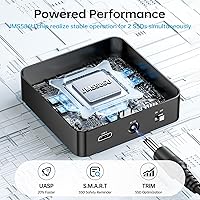
  • Controller Chip: Drive management and transfer operations are handled by the JMS586U controller chip.
  • Host Interface: Connects to a host machine via USB 3.2 Gen 2×2, delivering a maximum interface bandwidth of 20Gbps.
  • Max Transfer Rate: Peak data transfer rate is rated at up to 2000 MB/s, dependent on the NVMe drives installed.
  • Supported Protocols: Compatible with NVMe protocol only; SATA M.2 drives, regardless of physical key type, are not recognized.
  • SSD Key Support: Accepts M Key and B+M Key M.2 NVMe SSDs in both bays simultaneously.
  • Drive Capacity: Supports a maximum of two M.2 NVMe SSDs at one time, one per bay.
  • Offline Cloning: Features a standalone one-button clone function that operates without a connected host computer or software.
  • Included Cables: Ships with one USB-C cable rated at 20Gbps and one USB-A cable rated at 10Gbps.
  • Power Supply: Includes a 12V / 2A external power adapter required for operation.
  • UASP Support: Supports UASP (USB Attached SCSI Protocol) for reduced CPU overhead and improved sustained transfer consistency.
  • S.M.A.R.T. Support: Passes S.M.A.R.T. drive health data through to the host system when connected to a compatible OS.
  • TRIM Support: Supports TRIM command pass-through to help maintain long-term NVMe SSD performance over time.
  • Dimensions: The enclosure measures 2.8″ × 2.8″ × 0.85″ (length × width × height).
  • Weight: The unit weighs 90 grams (approximately 3.17 oz) without cables or drives installed.
  • Material: The chassis is constructed from plastic with an open-frame design to allow passive airflow around installed drives.
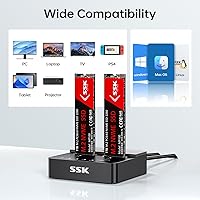
  • Compatible Devices: Works with desktop PCs and laptops that support USB 3.2 Gen 2×2 or standard USB 3.0 host ports.
  • Brand & Manufacturer: Designed and sold by SSK Corporation under the SSK brand.

Related Reviews

WAVLINK Dual-Bay NVMe M.2 SSD Cloner
75%
83%
Offline Cloning Reliability
78%
Transfer Speed
71%
Compatibility Range
76%
Build Quality
86%
Ease of Setup
More
AOKO 4-in-1 M.2 NVMe Hard Drive Duplicator
76%
88%
Ease of Use
83%
Drive Compatibility
86%
Cloning Speed
74%
Offline Cloning Reliability
81%
Build Quality
More
SSK M.2 NVMe SSD Enclosure 40Gbps USB4, 8TB
88%
94%
Data Transfer Speed
89%
Ease of Setup
91%
Build Quality
75%
Heat Management
88%
Compatibility with Mac/Windows
More
MAIWO M.2 NVMe SSD Cloner Duplicator 4 Bay Docking Station
86%
89%
Cloning Speed
92%
Ease of Setup
87%
Build Quality
90%
Heat Dissipation
93%
Compatibility with M.2 Sizes
More
IO CREST SY-ENC50127 USB 3.2 Type-C Dual Bay HDD + M.2 NVMe External Enclosure
83%
88%
Performance
93%
Ease of Setup
91%
Build Quality
87%
Data Transfer Speed
90%
Cooling/Heat Management
More
ineo C2605-NVMe M.2 NVMe SSD Enclosure
77%
88%
Write Protection Reliability
79%
Transfer Speed Performance
82%
Thermal Management
61%
Fan Noise Level
76%
Build Quality & Materials
More
Cable Matters USB4 40Gbps M.2 NVMe Enclosure
80%
88%
Data Transfer Performance
83%
Build Quality & Materials
79%
Thermal Management & Cooling
91%
Portability & Form Factor
74%
Compatibility Range
More
ICY DOCK ToughArmor MB998SP-B 8-Bay 2.5” SATA/SAS HDD/SSD Mobile Rack Enclosure for 5.25″ Bay
87%
91%
Performance
88%
Cooling Efficiency
89%
Build Quality
93%
Ease of Installation
72%
Noise Level
More
Plugable M.2 NVMe SSD Enclosure
87%
94%
Ease of Setup
92%
Data Transfer Speed
88%
Build Quality
90%
Port Compatibility
87%
Cooling & Thermal Management
More
ORICO TCM2 M.2 NVMe SSD Enclosure
78%
83%
Transfer Speed
61%
Thermal Management
74%
Build Quality
91%
Ease of Installation
86%
Cable Bundle Quality
More

FAQ

No, and this is the most important thing to confirm before buying. The SSK DK201 Dual-Bay NVMe SSD Cloner Enclosure supports NVMe protocol drives exclusively. If your M.2 SSD uses the SATA protocol — even if it physically looks identical to an NVMe drive — it will not be recognized in either bay.
No, that is one of the main reasons people buy this dock. You insert the source drive in one bay and the destination drive in the other, plug in the power adapter, make sure no data cable is connected to a host, and press the clone button. The duplication runs entirely on its own.

Yes, completely. The moment cloning begins, the target drive is fully wiped and overwritten to match the source drive exactly. Make absolutely sure you have no data on the destination you want to keep before pressing that button — there is no confirmation step and no undo.

The clone will not work. The target drive must be equal to or larger in capacity than the source. Trying to clone a 2TB drive onto a 1TB drive, for example, will fail regardless of how much data is actually on the source.

Yes, when connected to a host via USB, both drives appear as independent volumes and can be accessed simultaneously. Most users find this works well for transferring files between two NVMe drives without needing a second computer.

That depends almost entirely on the NVMe drives you are using, not the dock itself. High-end NVMe SSDs can get close to the interface ceiling, but mid-range or older drives will land well below it. Think of 20Gbps as the maximum the dock will not exceed, not a guaranteed baseline.

The drives themselves can get warm, sometimes noticeably so during back-to-back or large cloning jobs. The open-frame design helps with passive airflow, but there is no fan. If you are running multiple sequential clone sessions, give the drives a few minutes to cool down between runs.

No drivers are needed on modern operating systems. Windows 10 and 11, and recent versions of macOS, recognize the dock as a standard USB storage device automatically. Just plug in and the drives appear without any additional software.

Yes, when the NVMe cloner dock is connected to a host computer, standard S.M.A.R.T. utilities like CrystalDiskInfo on Windows or third-party tools on macOS can read health data from the drives. This is useful for checking the condition of a used drive before committing to it.

The dock is designed primarily for 2280 form factor drives, which is the standard length for most consumer NVMe SSDs. Shorter form factors like 2242 may fit physically but could feel less securely seated. Always check your drive length before assuming compatibility.