Overview

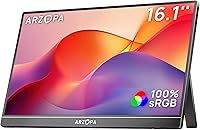
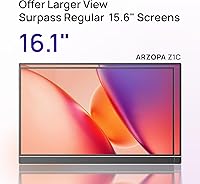
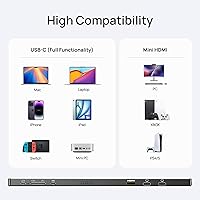
The ARZOPA Z1C 16.1″ Portable Monitor enters a crowded budget category with one practical edge over most rivals: a slightly larger screen that makes standard 15.6-inch options feel noticeably cramped by comparison. It targets remote workers and frequent travelers who need a dependable second display without a heavy investment. The integrated metal kickstand is a genuine convenience — no separate sleeve or prop required. Connectivity covers both USB-C and mini HDMI, which opens it up to a wide range of laptops, phones, and consoles. This isn't a premium panel, but at its price point, the overall value case is difficult to dismiss.

Features & Benefits

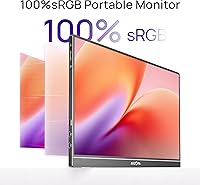
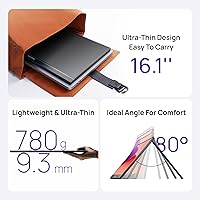
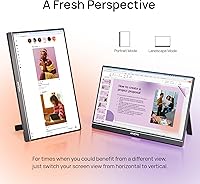
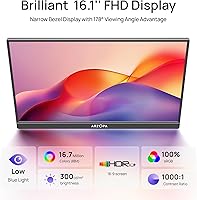
The IPS panel covers a 100% sRGB color gamut with a 1000:1 contrast ratio, producing rich, accurate color that punches above what you'd typically expect at this price. Full HD 1920×1080 resolution looks sharp at 16.1 inches, and the 178-degree viewing angle means colors stay consistent even when you're not sitting dead-center. Brightness lands at 300 nits — comfortable for most indoor use, though it struggles near bright windows. At 1.71 pounds and barely a third of an inch thick, this secondary display slips into a backpack without any fuss. The kickstand supports both landscape and portrait orientations, adding real flexibility for long documents or coding sessions.

Best For

This portable monitor makes the most practical sense for remote workers and students who want a second screen without overspending. If you regularly work from coffee shops, co-working spaces, or hotel rooms, the built-in stand and light weight keep setup refreshingly simple. It also functions well as a console companion — the Nintendo Switch and Steam Deck both connect via USB-C or HDMI, and the color accuracy is more than adequate for casual gaming. Content creators who need a rough on-the-go color check will find it useful, though it's not a replacement for a properly calibrated display. Anyone stepping up from a 15.6-inch portable screen will immediately appreciate the extra room.

User Feedback

With over 3,600 ratings averaging 4.4 out of 5 on Amazon, this portable monitor has earned a strong track record for its tier. Buyers consistently praise the build quality, noting that the metal stand feels far more substantial than the plastic kickstands common on competing models. Out-of-box picture quality draws frequent compliments, with colors described as punchy and natural without needing manual adjustment. On the downside, the 60 Hz refresh rate is a real limitation for anyone expecting smooth fast-motion gaming. A handful of users report the included mini HDMI cable is unusually short or missing entirely, and brightness in sunlit rooms draws occasional criticism — a reasonable complaint given the 300-nit specification.

Pros

  • The 16.1-inch screen offers noticeably more working space than the 15.6-inch portable monitors most competitors sell at this price.
  • Full HD IPS image quality looks vibrant and sharp straight out of the box with no manual tuning needed.
  • The metal kickstand feels genuinely solid and supports both landscape and portrait orientations without wobbling.
  • At 1.71 pounds and under a third of an inch thick, this portable monitor disappears into a backpack without adding real bulk.
  • USB-C and mini HDMI connectivity covers most modern laptops, consoles, and even smartphones without adapters.
  • The matte anti-glare surface reduces reflections in typical indoor lighting and makes text easier to read for extended sessions.
  • Portrait mode support makes it especially practical for reading long documents, coding, or browsing vertical content.
  • Over 3,600 Amazon ratings averaging 4.4 out of 5 reflects a broad and consistent level of buyer satisfaction for a budget-tier product.

Cons

  • The 60 Hz refresh rate limits fast-motion clarity and makes this a poor fit for competitive or action-heavy gaming.
  • At 300 nits, brightness falls short in sunlit rooms or near windows, making outdoor use uncomfortable.
  • The included mini HDMI cable has been reported as frustratingly short, and some units have shipped without one at all.
  • The kickstand offers a limited range of tilt angles, which can be awkward on uneven surfaces or non-standard desk heights.
  • ARZOPA is a relatively young brand with less established customer support compared to monitor industry veterans.
  • There is no built-in speaker, which adds friction for users who want audio without carrying a separate Bluetooth device.
  • The 220-volt power specification may require a voltage adapter or converter for travelers using it in countries with different standards.

Ratings

The scores below for the ARZOPA Z1C 16.1″ Portable Monitor were generated by our AI system after analyzing thousands of verified global buyer reviews, with spam, bot-submitted feedback, and incentivized reviews actively filtered out before scoring. Each category reflects the genuine consensus of real users across a wide range of use cases — from daily remote work setups to student desks and travel bags. Both the strengths that keep buyers satisfied and the friction points that generate complaints are transparently represented in every score.

Value for Money
91%
Buyers consistently describe this portable monitor as one of the better-value screens in its size class, with the metal kickstand and IPS panel feeling like features that belong on a pricier product. For students and remote workers on a budget, the balance of capability and cost is hard to argue with.
A small segment of buyers feel the value equation shifts if the included cable is short or missing, since sourcing a replacement adds unexpected cost. Those comparing it to premium brands also note the warranty and support experience don't match the price advantage.
Display Quality
83%
The 100% sRGB IPS panel earns consistent praise for producing vivid, accurate colors right out of the box without any manual calibration. Users working on presentations, spreadsheets, or photo previews report that the picture looks noticeably better than expected for a monitor at this price tier.
At 300 nits, brightness becomes a genuine limitation when working near windows or under strong overhead lighting, with several users describing the screen as visibly washed out in those conditions. It also won't satisfy professional colorists or photographers who need a certified, factory-calibrated display.
Portability
89%
At 1.71 lb and under 0.35 inches thick, this secondary display earns high marks from commuters and frequent travelers who need a second screen that genuinely fits inside a standard laptop sleeve or backpack pocket. Most users report forgetting it's in the bag until they need it.
A few buyers note that the packaged dimensions are bulkier than the slim panel suggests, making the overall footprint slightly larger than anticipated when packed with a case or sleeve. The monitor also lacks a dedicated carrying pouch, which some feel exposes the screen to scratches during transit.
Build Quality
81%
19%
The metal kickstand is the most frequently praised hardware element, with buyers noting it feels substantially more rigid than the flimsy plastic props found on competing models at similar prices. The overall chassis also holds up well to daily packing and unpacking without visible flex or creaking.
The plastic bezel and rear panel body feel noticeably less premium than the stand itself, and a handful of users report minor scuffing or finish wear after several weeks of regular travel use. The gap between the stand's quality and the rest of the build is occasionally cited as inconsistent.
Connectivity
79%
21%
Having both USB-C and mini HDMI on a single portable monitor covers a wide range of host devices, and most users report plug-and-play recognition without needing to install drivers on Windows or macOS. Console users connecting a Switch or Steam Deck through HDMI find the setup straightforward.
The mini HDMI port format requires a specific cable that isn't universally available, and multiple buyers report the included cable being too short for comfortable desk layouts or missing from the box entirely. USB-C power delivery behavior also varies slightly depending on the host device's output capability.
Ease of Setup
86%
The majority of users describe getting the monitor up and running in under two minutes, with no driver downloads required for modern laptops and devices. The integrated kickstand means there's no separate stand to assemble, which removes a common frustration point for first-time portable monitor buyers.
A minority of users on older operating systems or less common hardware report needing to manually configure display output settings before the screen is recognized. The lack of an on-screen display menu guide in the box also leaves some buyers unsure how to switch between display modes initially.
Kickstand Versatility
72%
28%
The built-in metal stand supporting both landscape and portrait orientations is a practical feature that removes the need for a separate case or prop, which users who switch between document reading and spreadsheet work particularly appreciate. Portrait mode in particular gets favorable mentions from developers and writers.
The range of available tilt angles is narrower than some buyers expect, making it difficult to find a comfortable viewing angle in certain desk or lap setups. On uneven surfaces like textured cafe tables or soft fabrics, the stand base can shift or rock, which undermines the otherwise solid hardware.
Color Accuracy
77%
23%
For general productivity, content consumption, and casual creative work, the 100% sRGB coverage produces colors that look natural and consistent without any noticeable tint shift when viewed from the side. Users working on blog graphics or social media assets describe the color rendering as reliable enough for non-critical work.
The panel is not factory-calibrated, so out-of-box Delta E values can vary between units. Buyers who have compared it side-by-side with professionally calibrated displays note that skin tones and gradients occasionally look slightly oversaturated, which limits its suitability for precision color work.
Refresh Rate
54%
46%
For office tasks, video streaming, and casual gaming at moderate pace, 60 Hz is entirely functional and the majority of productivity-focused buyers never feel limited by it during day-to-day use. Users pairing it with a Switch for RPGs or story-driven titles report no meaningful impact on enjoyment.
The 60 Hz ceiling is the most consistently cited technical disappointment among gaming-oriented buyers, with fast-action titles and competitive games showing visible motion blur and judder compared to even entry-level 120 Hz panels. Users who bought this monitor specifically as a gaming display tend to be the least satisfied overall.
Brightness Performance
61%
39%
In a controlled indoor setting with ambient lighting — a home office, a dimmed hotel room, or a shaded cafe corner — the 300 nit output is comfortable for extended sessions and text reads cleanly without eye strain at standard brightness levels.
The moment ambient light increases, brightness becomes the monitor's most talked-about weakness, with users near windows or under bright office fluorescents describing the image as noticeably dull. It performs well below average for anyone whose work environment involves variable or strong lighting conditions.
Screen Size Advantage
84%
Users upgrading from standard 15.6-inch portable monitors consistently notice the extra screen real estate immediately, particularly when running two windows side by side or working with wide spreadsheets. The 16:9 ratio at 16.1 inches hits a practical sweet spot for multitasking without becoming unwieldy to carry.
Buyers coming from larger desktop monitors may find even 16.1 inches feels cramped for extended professional use, and the size advantage over 15.6-inch rivals is real but modest — not transformative enough on its own to justify an upgrade if screen size is the only motivating factor.
Viewing Angles
82%
18%
The IPS panel's 178-degree viewing angle spec translates well into real-world use, with coworkers or collaborators being able to view the screen clearly from beside or slightly behind the user without color washout. This makes the monitor practical for brief presentations or collaborative reviews at a shared desk.
At extreme off-axis positions the image does dim slightly, which is typical for IPS at this price point rather than a specific flaw. A small number of users also report mild backlight bleed visible at very steep angles in dark room conditions, though it rarely affects normal use.
Cable & Accessories
57%
43%
When the full accessory kit arrives intact, having both a USB-C and a mini HDMI cable in the box covers most immediate connection needs without a separate purchase. The dual-cable inclusion is a thoughtful touch that most budget portable monitors skip entirely.
Reports of the mini HDMI cable being absent or shorter than 3 feet are common enough to be a recurring theme in negative reviews. Buyers who travel frequently find the short cable particularly inconvenient, since it constrains the physical placement of the monitor relative to the host device on a desk or tray table.
Brand Reliability
68%
32%
Despite being a younger brand without the industry footprint of established monitor manufacturers, ARZOPA's strong Amazon ranking and large verified review base suggest that most units perform as described and arrive without defects. Many repeat buyers mention purchasing additional units after positive first experiences.
Post-purchase support infrastructure is less developed than what larger brands offer, and buyers who encounter defective units sometimes report slower response times or less clear warranty resolution paths. For risk-averse buyers, the brand's relative newness remains a hesitation point that a longer track record would resolve.

Suitable for:

The ARZOPA Z1C 16.1″ Portable Monitor is a strong fit for remote workers, digital nomads, and students who spend time working across multiple locations and want a real productivity boost without a heavy bag or a hefty price tag. The 16.1-inch screen gives you meaningfully more room than the 15.6-inch options that dominate this category, which makes a genuine difference when you're juggling a spreadsheet alongside a browser or a video call. Students who live between dorm rooms, libraries, and cafes will appreciate that the built-in metal kickstand removes the need for any extra accessories — you unpack it, prop it up, and you're working. Casual gamers traveling with a Nintendo Switch or Steam Deck will also find this secondary display a capable companion, with color accuracy that handles most titles well. Anyone who has tolerated a cramped single-screen setup on the road and wants a straightforward, no-fuss upgrade will find a lot to like here.

Not suitable for:

The ARZOPA Z1C 16.1″ Portable Monitor is not the right call for buyers with demanding or specialized display needs. The 60 Hz refresh rate is a real ceiling — if you're into competitive gaming or fast-paced action titles, motion will look noticeably less smooth compared to even a mid-range 120 Hz display. At 300 nits of brightness, working near a sunny window or outdoors is genuinely uncomfortable, so this isn't a reliable choice for people who frequently work in bright or variable lighting environments. Professional photographers, video editors, or colorists who need a factory-calibrated, wide-gamut panel should look at purpose-built options that cost considerably more. Buyers who prioritize brand pedigree or long-term after-sales support from an established manufacturer may also hesitate, since ARZOPA is a younger brand without the service infrastructure of larger players.

Specifications

  • Screen Size: The display measures 16.1 inches diagonally, offering a wider viewing area than the 15.6-inch panels common in this portable monitor category.
  • Resolution: Native resolution is 1920×1080 pixels (Full HD 1080p), delivering sharp text and clear imagery at standard viewing distances.
  • Panel Type: An IPS (In-Plane Switching) panel is used, providing consistent color reproduction and accurate tones across the full screen.
  • Color Gamut: The display covers 100% of the sRGB color space, making colors appear rich and true-to-life for everyday content and productivity work.
  • Contrast Ratio: A 1000:1 static contrast ratio allows the screen to render deep blacks alongside bright highlights without significant contrast compression.
  • Brightness: Peak brightness is rated at 300 cd/m² (nits), which is adequate for typical indoor environments but limiting in direct sunlight or near bright windows.
  • Refresh Rate: The panel operates at a fixed 60 Hz refresh rate, suitable for office work and casual media consumption but not optimized for high-frame-rate gaming.
  • Viewing Angle: IPS technology enables up to 178 degrees of horizontal and vertical viewing angles before noticeable color shift occurs.
  • Aspect Ratio: The screen uses a standard 16:9 widescreen aspect ratio, compatible with virtually all video formats and productivity layouts.
  • Screen Surface: The display features a matte anti-glare coating that reduces reflections and makes extended reading or document work more comfortable.
  • Ports: Connectivity is provided via one USB-C port and one mini HDMI port, supporting plug-and-play connection to a wide range of host devices.
  • Weight: The monitor weighs 1.71 lb (approximately 0.78 kg), keeping the total carry load minimal for commuters and travelers.
  • Thickness: The body is approximately 0.35 inches (roughly 9 mm) thin, allowing it to slot easily alongside a laptop in most standard backpack sleeves.
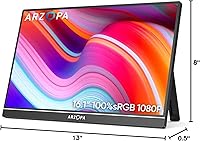
  • Dimensions: Overall product dimensions are approximately 14.96 inches wide by 8.27 inches tall, with a packaged depth of 19.29 inches including stand hardware.
  • Stand: An integrated metal kickstand is built into the rear of the monitor, supporting both landscape and portrait orientations without requiring a separate case or prop.
  • Build Material: The kickstand mechanism is constructed from metal, offering improved rigidity and wear resistance compared to the plastic stands found on many competing models.
  • Orientation: The monitor supports both landscape (horizontal) and portrait (vertical) orientations, switchable via the physical kickstand without additional mounting hardware.
  • Amazon Rating: The product holds a 4.4 out of 5 star rating based on over 3,600 verified customer ratings on Amazon as of the time of review.

Related Reviews
ARZOPA Z3FC 16.1″ QHD Portable Monitor
89%
96%
Display Clarity
94%
Color Accuracy
92%
Refresh Rate Performance
95%
Portability
88%
Build Quality
More
CAPERAVE BQ16H 16″ Portable Monitor
76%
91%
Display Clarity
86%
Refresh Rate & Gaming
78%
Connectivity & Setup
83%
Build Quality
74%
Color Accuracy
More
Newsoul M1620 16″ 4K Portable Monitor
81%
91%
Display Clarity
74%
Real-World Brightness
83%
Color Accuracy
88%
Build Quality
67%
Stand and Portability
More
MAGICRAVEN M1603 16″ 4K Portable Monitor
75%
91%
Image Sharpness
88%
Portability
86%
Connectivity
89%
Setup Experience
63%
Brightness
More
Upperizon U16LS 16″ 2K Portable Monitor
74%
91%
Display Sharpness
83%
Color Accuracy
89%
Portability
78%
Refresh Rate Performance
86%
Setup & Ease of Use
More
Veout V1 16″ Portable Monitor
76%
84%
Display Quality
91%
Portability & Form Factor
82%
Color Accuracy
88%
Setup & Compatibility
67%
Kickstand Stability
More
UPERFECT 16006DD 16″ 4K Portable Monitor
77%
83%
Brightness Performance
91%
Display Sharpness
74%
Color Accuracy
88%
Build Quality
76%
Portability
More
ARZOPA S1 Table 15.6″ Portable Monitor
76%
93%
Portability
81%
Display Quality
94%
Ease of Setup
67%
Build Quality
58%
Stand & Stability
More
LXU S11 16-inch Portable Screen Extender
71%
83%
Display Quality
88%
Aspect Ratio Utility
91%
Setup & Ease of Use
41%
Mac Compatibility
62%
Portability
More
UPERFECT 1602K 16″ 2K Portable Gaming Monitor
79%
91%
Display Clarity
88%
Gaming Performance
93%
Portability & Form Factor
84%
Connectivity
67%
Stand & Cover
More

FAQ

Yes, as long as your MacBook supports video output over USB-C (which most modern MacBook Air and MacBook Pro models do), a single USB-C cable handles both power delivery and video signal simultaneously. You won't need a separate power adapter in most cases, which keeps the setup clean and simple.

Absolutely. The mini HDMI port works well with the Nintendo Switch via the official dock, and the Steam Deck connects through USB-C. Color accuracy is solid enough for most games, though keep in mind the 60 Hz cap means you won't see frame rates above that even if your device supports higher output.

It's workable indoors under controlled lighting, but 300 nits of brightness is on the modest side. Near a sunny window or in a brightly lit office, glare and washout become real issues. The matte coating helps reduce reflections somewhat, but if you work frequently in high-ambient-light conditions, you may want to look at monitors rated closer to 400 nits or higher.

In most cases, no. The monitor is designed for plug-and-play use over USB-C or mini HDMI, so Windows, macOS, and most Android devices recognize it automatically. Some older operating systems may require a manual display settings adjustment, but driver installation is generally not needed.

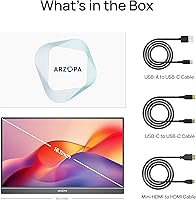
The package typically includes a USB-C to USB-C cable and a mini HDMI to HDMI cable, though several buyers have reported the mini HDMI cable being shorter than expected or occasionally missing from the package. It's worth checking your shipment immediately and reaching out to the seller if anything is absent.

Yes, and it works quite well for that purpose. The integrated kickstand supports vertical orientation, and once you rotate the display settings in your operating system, the portrait layout gives you a noticeably tall canvas that suits terminal windows, code editors, and long PDFs much better than landscape mode.

On a flat, smooth surface it holds position reliably. A few users have noted that the angle adjustment range is somewhat limited, so if your preferred tilt angle falls outside what the stand offers, you may find it slightly frustrating. On uneven surfaces like textured cafe tables, stability can be inconsistent.

It is a real difference, though not dramatic. The extra half-inch translates to a slightly wider screen that gives you a bit more breathing room when using split-screen layouts or working with spreadsheets. For buyers coming from a 15.6-inch portable monitor, the change is immediately noticeable.

No, this secondary display does not include built-in speakers. If you need audio output, you'll need to rely on your laptop's speakers, a connected Bluetooth speaker, or headphones plugged into the host device.

ARZOPA is a younger brand and doesn't have the same global service infrastructure as established names. That said, the high volume of positive reviews and strong Amazon ranking suggest most buyers don't run into serious issues. For peace of mind, it's worth purchasing through a seller that offers straightforward returns, and checking whether a warranty registration is available directly through ARZOPA's website.

Where to Buy