Overview

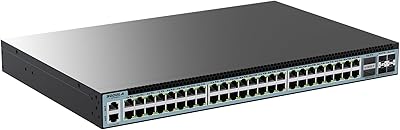
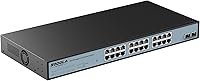
The Sodola 24-Port 2.5G Managed Network Switch arrives at a moment when multi-gig networking has stopped being niche and started becoming the logical next step for home labs and small businesses running Wi-Fi 6 APs or high-throughput NAS units. The 24+2 port layout — 24 copper RJ45 ports plus two SFP+ uplinks — gives you enough capacity to handle a dense mixed-device network without crossing into enterprise hardware territory. Sodola is not a long-established brand, but a 4.5-star rating across 653 reviews and a top-50 Amazon ranking in its category speak to genuine real-world satisfaction. The fanless passive cooling and 1U rack-mount form factor round out a package that sits well above casual plug-and-play gear.
Features & Benefits

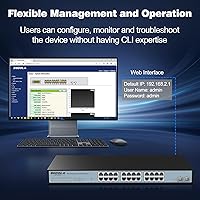
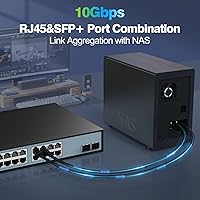
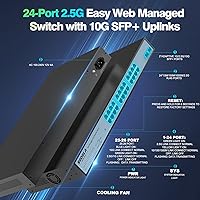
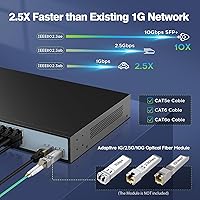
Every one of the 24 RJ45 ports auto-negotiates across 100M, 1G, and 2.5G, so you are not forced to replace older gear the moment you install this. That backward compatibility alone saves real money during a staged upgrade. The two 10G SFP+ uplinks handle aggregated traffic to a core router or high-throughput NAS without creating a new bottleneck upstream. On the management side, the web interface covers VLAN segmentation, QoS prioritization, IGMP snooping, RSTP, link aggregation, and MAC filtering — a meaningful feature set for this price tier. One caveat: the listed switching capacity appears inconsistently across official materials, so treat that specific figure with caution until independently verified. The fanless bilateral airflow keeps noise at absolute zero, which genuinely matters in quiet office or home lab installs.

Best For

This multi-gig switch occupies a genuinely useful middle ground for anyone upgrading from standard gigabit without committing to expensive 10G infrastructure. Home lab enthusiasts running Wi-Fi 6 access points, multi-gig NAS units, or 2.5G PCIe adapters will get the most from it. Small creative studios or offices with an existing rack benefit from the managed feature set and compact 1U profile. Network engineers needing VLAN segmentation or QoS policy control — but not wanting to pay enterprise prices for a secondary switch — will find it capable. That said, in thermally demanding or high-density rack environments, the passive cooling design deserves a hard look; without a fan, airflow management becomes your responsibility rather than the hardware's.

User Feedback

Across more than 650 reviews, the Sodola switch holds a 4.5-star average — a score that carries real weight at that volume. Buyers consistently point to the straightforward web interface, solid metal build quality, and stable 2.5G throughput under sustained load as standout positives. The most common friction point is initial setup: you must assign a static IPv4 address before the management interface becomes accessible, which catches users expecting automatic discovery off guard. A smaller number of reviewers flagged occasional edge cases around SFP+ module compatibility and link aggregation configuration. The one-year replacement warranty appears to be honored responsibly, with most buyers reporting clean resolution on defective units — though relying on long-term support from a newer manufacturer always carries some inherent uncertainty.

Pros

  • All 24 copper ports auto-negotiate across 100M, 1G, and 2.5G, protecting your existing gear investment during upgrades.
  • Dual 10G SFP+ uplinks prevent upstream bottlenecks when connecting to a high-speed NAS or core router.
  • The web management interface covers VLAN, QoS, IGMP snooping, RSTP, and link aggregation — a serious feature set at this price.
  • Completely fanless operation means zero acoustic noise, a real advantage in home offices and quiet lab environments.
  • Solid all-metal chassis feels durable and dissipates heat passively without relying on moving parts.
  • 1U rack-mount design fits cleanly into standard home lab or small business rack setups.
  • A 4.5-star average across 653 reviews reflects consistent real-world satisfaction, not a handful of early adopters.
  • Backward compatibility with legacy 1G and 100M devices means no forced wholesale network replacement.
  • One-year replacement warranty has generally been honored without major friction, based on buyer-reported experiences.
  • Ranked in the top 50 of its Amazon category, suggesting strong ongoing adoption relative to competing options.

Cons

  • Initial setup requires manual IPv4 address configuration before the web interface is even accessible — not beginner-friendly.
  • Sodola is a relatively new brand with limited long-term support history, which adds some uncertainty for mission-critical deployments.
  • The published switching capacity figure is inconsistently stated across official materials, which undermines confidence in the spec sheet.
  • Passive cooling can become a liability in thermally dense rack environments where ambient temperatures run consistently high.
  • SFP+ module compatibility is not guaranteed across all third-party transceivers, requiring verification before purchase.
  • Link aggregation configuration has occasional edge-case issues reported by users with more complex topologies.
  • Only a one-year warranty is included, which is shorter than what some competing managed switches offer at similar price points.
  • No Layer 3 routing functionality, limiting usefulness for environments that need inter-VLAN routing at the switch level.
  • The web UI, while functional, lacks the polish and depth of documentation found on more established managed switch brands.
  • No included SFP+ modules — uplink ports are ready but the transceivers are an additional purchase you need to plan for.

Ratings

The Sodola 24-Port 2.5G Managed Network Switch scores below are generated by our AI review engine after analyzing verified global buyer feedback, actively filtering out incentivized, bot-generated, and unverified submissions to surface what real users actually experienced. With over 650 confirmed reviews processed, the scores reflect an honest picture — strong throughput and value where the hardware delivers, and transparent acknowledgment of the setup friction and brand maturity gaps that genuinely affect some buyers.
Network Performance
91%
Users running 2.5G NAS units, Wi-Fi 6 APs, and high-throughput workstations consistently report stable, full-speed connections without drops or link renegotiation under sustained load. For home lab and small office environments, the actual throughput matches the advertised multi-gig capability in practice.
A small number of users noticed inconsistent link speeds when mixing legacy 100M devices on the same switch, occasionally requiring manual port configuration to stabilize. Edge cases in link aggregation under heavy simultaneous traffic have also been flagged by more advanced users.
Build Quality
88%
The all-metal chassis feels solid and purposeful — users rack-mounting it in home lab setups note it does not flex or rattle, and the fit-and-finish is noticeably better than cheaper plastic-bodied alternatives at this price point. Port sockets feel secure and hold RJ45 connectors firmly.
A few reviewers pointed out that the chassis runs noticeably warm during extended operation in poorly ventilated enclosures, which is an inherent limitation of passive cooling rather than a defect. The physical labeling on some ports has been reported to fade over time in warmer rack environments.
Setup Experience
63%
37%
Once the initial IPv4 address configuration hurdle is cleared, most users find the web interface intuitive enough to navigate without consulting the manual extensively. Experienced network administrators generally get the switch operational within minutes of first access.
The requirement to manually assign a static IPv4 address on your computer before the management interface becomes accessible is a recurring pain point — it is not industry-standard behavior and catches less experienced buyers completely off guard. The printed manual provides minimal guidance on this specific prerequisite step.
Web Management Interface
76%
24%
For a switch at this price tier, the feature coverage in the web GUI is genuinely competitive — VLAN segmentation, QoS policy assignment, IGMP snooping, and link aggregation are all accessible without needing CLI access or third-party software. Home lab users appreciate having managed features without paying managed-switch premiums.
The interface lacks the depth of documentation and visual polish found on more established brands like Netgear or TP-Link at comparable price points. Some users report that navigating between configuration sections feels slightly inconsistent, and the GUI does not always surface error messages clearly when a configuration is rejected.
Value for Money
89%
Getting 24 auto-negotiating 2.5G copper ports plus dual 10G SFP+ uplinks with a full managed feature set in a fanless 1U metal chassis represents strong value in the current multi-gig networking market. Buyers who previously priced out 2.5G switches from established enterprise brands consistently cite this as a compelling alternative.
The one-year warranty is shorter than several competing options, which chips away at the long-term value proposition for buyers who expect three or more years of guaranteed coverage. Factoring in potential transceiver costs for the SFP+ uplinks — not included — slightly increases the real upfront investment.
Noise Level
94%
The complete absence of internal fans means this switch produces zero operational noise under any normal load condition, which is a meaningful advantage for users running rack-mounted equipment in home offices, bedrooms, or shared workspaces where fan whine from other equipment is already an annoyance.
The fanless design is genuinely silent, but users in warm climates or compact rack enclosures occasionally report the chassis surface getting uncomfortably hot to the touch during long sessions. In those scenarios, silence comes at the cost of thermal confidence.
SFP+ Compatibility
67%
33%
Standard 10G SFP+ DAC cables and several widely available third-party transceivers work reliably for most users, and buyers running direct-attach copper connections to a NAS or upstream router report stable 10G link speeds without any special configuration.
Compatibility is not universal — a recurring minority of users report that specific third-party optical transceivers are not recognized or produce unstable links, requiring either module substitution or firmware investigation. No official compatibility list is prominently published, which puts the research burden on the buyer.
VLAN & QoS Configuration
78%
22%
For users needing basic to intermediate VLAN segmentation — separating IoT devices from workstations, or isolating a guest Wi-Fi network — the configuration process is manageable and produces reliable results. QoS prioritization for VoIP or video traffic has also been noted to work as expected in straightforward setups.
More complex VLAN topologies involving multiple tagged trunks and QoS policies applied simultaneously have produced inconsistent behavior for a portion of advanced users. Documentation for troubleshooting these edge cases is sparse, and community support resources for Sodola specifically are still limited compared to larger brands.
Thermal Management
71%
29%
In open racks with reasonable ambient temperature — typical of a home lab or small office server closet — the passive bilateral airflow keeps operating temperatures within acceptable ranges and the switch runs reliably over extended periods without throttling or shutdown events.
Dense rack environments with limited airflow expose the limits of passive-only cooling, with some users measuring surface temperatures that warrant concern during summer months or in equipment rooms without dedicated cooling. There is no thermal monitoring exposed through the web interface to help users track this proactively.
Port Density
93%
Twenty-four multi-gig copper ports in a single 1U unit is a high density for this price class, and users building out home labs or small office networks appreciate being able to connect all their devices — workstations, APs, NAS, servers — through a single managed switch without daisy-chaining.
The switch offers no expansion beyond the 26 fixed ports, so buyers who anticipate significant network growth may find themselves planning a second switch sooner than expected. There is no modular uplink slot for future-proofing beyond the two fixed SFP+ ports.
Brand Reliability
68%
32%
Sodola has built a credible track record through volume — 653 reviews at a 4.5-star average is not a thin sample, and the practical consistency of that rating across diverse use cases suggests the hardware is genuinely delivering on its core promises for the large majority of buyers.
Sodola lacks the multi-decade engineering reputation of brands like Cisco, Netgear, or Ubiquiti, and buyers deploying this in environments where long-term firmware support and vendor accountability matter will feel that gap. The manufacturer's support communication has been described as slow by a subset of warranty claimants.
Warranty & Support
61%
39%
Most users who pursued warranty replacements for defective units report that Sodola honored the one-year policy without requiring excessive back-and-forth, and defective units were replaced rather than repaired in the majority of documented cases.
One year is a notably short warranty period for managed networking hardware — many competitors offer two or three years as standard. Response times from support have been inconsistent, and the lack of an established knowledge base or active community forum means buyers often turn to third-party forums for troubleshooting help.
Rack Mount Ease
84%
The 1U form factor slots cleanly into standard 19-inch racks, and users report a straightforward mounting process with no unexpected fitment issues. The compact depth also works well in shallow-depth wall-mount racks common in small office and home lab environments.
Rack ears and mounting screws are not always included depending on the unit batch, which a small number of buyers discovered only after unboxing. The included documentation does not always make clear whether mounting hardware is in the package, leading to some frustration at first install.
Backward Compatibility
92%
The auto-negotiation across 100M, 1G, and 2.5G on every copper port is well-implemented — users connecting older gigabit devices alongside newer multi-gig hardware report that the switch handles the mixed environment cleanly without requiring per-port manual configuration in typical scenarios.
A small number of users with very old or non-standard network adapters encountered auto-negotiation failures that required manual speed and duplex locking through the web interface to resolve. This is a minor issue but worth noting for anyone running legacy industrial or embedded network devices.

Suitable for:

The Sodola 24-Port 2.5G Managed Network Switch is a strong fit for home lab enthusiasts, prosumer network builders, and small business IT managers who are ready to step up from standard gigabit without jumping to the cost and complexity of full 10G infrastructure. If you are running Wi-Fi 6 access points, a multi-gig NAS, or 2.5G-capable workstations, this switch gives you the port density and uplink headroom to actually feed those devices at their rated speeds. The web-based management interface — covering VLAN, QoS, link aggregation, and IGMP snooping — makes it genuinely useful for anyone who needs network segmentation or traffic prioritization without paying for enterprise hardware. Creative studios or small offices that need a quiet, rack-mounted switch will appreciate the completely fanless operation. Users with a mixed environment of older 1G devices and newer 2.5G gear will also benefit from the auto-negotiating ports, which let you migrate at your own pace rather than all at once.
Not suitable for:

Buyers who need plug-and-play simplicity should approach the Sodola 24-Port 2.5G Managed Network Switch with realistic expectations — the management interface requires you to manually configure a static IPv4 address before you can even log in, which is a friction point that trips up less experienced users. If your rack runs hot or you are stacking multiple switches in a dense, poorly ventilated enclosure, the passive fanless cooling design may struggle under sustained thermal load, since there is no active mechanism to compensate for a warm environment. Organizations that depend on long-term vendor support contracts, guaranteed firmware update cycles, or enterprise-grade SLAs should look toward established names, as Sodola is a newer manufacturer without that depth of track record. Buyers who need more than two 10G uplinks, or who require advanced routing features like Layer 3 functionality, will find this switch too limited regardless of port count. Finally, anyone with a strict SFP+ module compatibility requirement should verify their specific transceivers are supported before purchasing, as occasional incompatibility issues have surfaced in user feedback.
Specifications

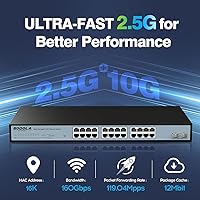
  • RJ45 Ports: The switch includes 24 copper RJ45 ports, each auto-negotiating across 100M, 1G, and 2.5G speeds for broad device compatibility.
  • SFP+ Uplinks: Two 10G SFP+ uplink ports are provided for high-speed fiber or DAC connections to upstream routers, servers, or NAS units.
  • Total Port Count: The unit offers 26 ports in total — 24 multi-gig copper ports plus 2 dedicated 10G fiber uplinks.
  • Switching Capacity: The switch operates at a switching capacity officially listed by the manufacturer at 120Gbps, though some product materials reference a higher figure that remains unverified.
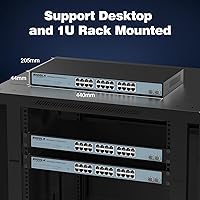
  • Form Factor: The chassis follows a standard 1U rack-mount profile, designed to fit directly into any 19-inch equipment rack.
  • Dimensions: Physical dimensions measure 17.32 x 8.07 x 1.73 inches, consistent with a full-width 1U rack unit footprint.
  • Weight: The unit weighs 5.89 pounds, making it manageable for a single person to rack-mount without assistance.
  • Chassis Material: The enclosure is constructed from metal, providing structural rigidity and passive heat dissipation without relying on plastic panels.
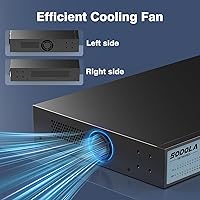
  • Cooling System: Cooling is handled entirely through passive bilateral airflow with no internal fans, resulting in completely silent operation under normal conditions.
  • Management Type: The switch is web-managed via a browser-based GUI; initial access requires a manually configured static IPv4 address before login is possible.
  • Supported Protocols: Management features include VLAN (802.1Q), QoS, IGMP snooping, RSTP, link aggregation (802.3ad), and MAC address filtering.
  • In the Box: Each unit ships with the switch itself, one power cord, and a printed user manual; no SFP+ transceivers are included.
  • Warranty: Sodola covers this switch with a one-year replacement warranty applicable to verified manufacturing defects or quality failures.
  • Manufacturer: The switch is manufactured by Shenzhen Hongyavision Technology Co., Ltd., operating under the Sodola brand.
  • Amazon Rank: At the time of evaluation, this switch held a Best Sellers Rank of #40 in the Computer Networking Switches category on Amazon.
  • User Rating: The switch carries a 4.5-star average rating based on 653 customer reviews, reflecting strong and consistent buyer satisfaction.
  • Power Input: The unit uses a standard AC power connection via the included power cord; no external power brick or PoE input is involved.
  • PoE Support: This switch does not provide Power over Ethernet output on any port and is not rated as a PoE or PoE+ switch.
  • Layer Support: The switch operates at Layer 2 of the OSI model and does not support Layer 3 inter-VLAN routing or static routing features.
  • Release Date: The product was first made available for purchase on February 29, 2024, making it a relatively recent entry in the managed switch market.

Related Reviews

Sodola 6-Port 2.5G Managed Switch
88%
88%
Performance
93%
Ease of Setup
85%
Build Quality
89%
Energy Efficiency
84%
Compatibility
More
VIMIN 6-Port 2.5G Unmanaged Network Switch
83%
88%
Throughput Performance
84%
Build Quality
93%
Setup & Ease of Use
67%
SFP+ Port Usability
96%
Fanless Noise Level
More
Sodola 48-Port 2.5GbE L3 Managed Switch
71%
94%
Port Density & Speed
91%
Value for Money
88%
Uplink Flexibility
86%
Layer 3 Feature Set
52%
Ease of Setup
More
XikeStor 16-Port 2.5G L3 Managed Ethernet Switch
85%
92%
Port Variety and Flexibility
85%
Ease of Setup
88%
Traffic Management Features
90%
Build Quality
84%
Cooling and Thermals
More
HPE Instant On 1830 8-Port PoE Switch
82%
91%
Ease of Setup
74%
PoE Performance
88%
Build Quality
77%
Management Software
83%
Value for Money
More
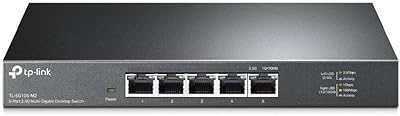
TP-Link TL-SG105-M2 5-Port 2.5G Unmanaged Switch
82%
91%
Throughput Performance
96%
Ease of Setup
88%
Build Quality
71%
Thermal Management
63%
Port Count & Expandability
More
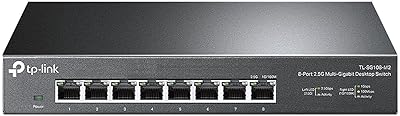
TP-Link TL-SG108-M2 8-Port 2.5G Multi-Gigabit Network Switch
89%
93%
Ease of Setup
89%
Network Performance
91%
Build Quality
96%
Noise Level (Fanless Design)
87%
Compatibility with Cat5e Cables
More
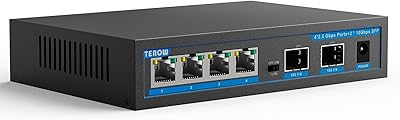
TEROW 4-Port 2.5G 2-Port SFP+ Network Switch
81%
93%
Value for Money
96%
Ease of Setup
88%
Port Performance & Link Stability
71%
SFP+ Port Compatibility
84%
Build Quality & Materials
More
ienRon 6-Port 2.5Gb PoE Switch with 2-Port 10Gb SFP+
85%
86%
Performance
91%
Ease of Setup
88%
PoE Power Delivery
84%
Build Quality
93%
Fanless Operation
More
Goalake 8-Port 2.5G Ethernet Switch
80%
91%
Port Count & Configuration
88%
Throughput & Switching Performance
93%
Ease of Setup
79%
Build Quality & Materials
96%
Fanless & Noise Level
More

FAQ

Yes, and this catches a lot of people off guard. Before you can log into the browser-based GUI, you need to manually set a static IPv4 address on your computer that puts it on the same subnet as the switch's default management IP. The switch does not use DHCP for its own management address, so automatic discovery will not work out of the box. Once you are on the right subnet, the web interface is straightforward to navigate.

No replacement needed. All 24 copper ports auto-negotiate across 100Mbps, 1Gbps, and 2.5Gbps, so your older gigabit gear connects and works normally. You only get the 2.5G speed bump on devices that actually support it, like newer NAS units, Wi-Fi 6 access points, or 2.5G PCIe adapters. It is a genuine mixed-environment switch.

It is genuinely silent under normal operating conditions — there are no fans at all, so there is no mechanical noise source. The passive bilateral airflow design handles heat dissipation through the chassis itself. Keep in mind that in a very hot or poorly ventilated rack environment, passive cooling has its limits, so make sure the rack has reasonable airflow around the unit.

The ports are designed to work with standard 10G SFP+ transceivers and DAC cables, but compatibility is not universal across every third-party module on the market. A small number of users have reported issues with specific modules. It is worth checking community forums or contacting Sodola support with your exact transceiver model before purchasing if that connectivity is critical to your setup.

You will need a separate router or firewall for inter-VLAN routing. The Sodola 24-Port 2.5G Managed Network Switch operates at Layer 2, which means it can create and enforce VLAN segmentation, but it cannot route traffic between those VLANs on its own. This is standard for managed switches in this price class — a Layer 3 switch capable of inter-VLAN routing typically costs significantly more.
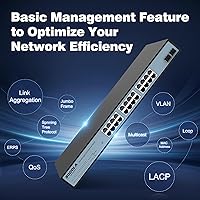
For standard LACP setups, most users find the configuration process manageable through the web interface. That said, a small number of reviewers have hit edge cases in more complex topologies, particularly when combining link aggregation with certain VLAN configurations. If your setup is relatively typical — two ports bonded for uplink redundancy or bandwidth, for example — it should work without much trouble.

Passive cooling works well in open or well-ventilated rack environments, but it can be stressed in dense, poorly ventilated setups where ambient rack temperatures run high. There is no active fan to compensate when things get warm. If your rack runs hot, consider leaving a 1U gap above or below the switch for airflow, or ensure the rack has proper ventilation panels or a dedicated cooling unit.

The box includes the switch itself, one power cord, and a printed user manual. No SFP+ transceivers or DAC cables are included, so if you plan to use the 10G uplink ports, budget for those separately. Most users doing copper-only deployments across the 24 RJ45 ports are ready to go immediately after configuration.

Based on buyer feedback, most warranty claims for defective units have been resolved with a replacement without major friction. The one-year warranty covers manufacturing defects. That said, Sodola is a newer brand without the deep support infrastructure of long-established networking manufacturers, so response times and processes may vary. Keeping purchase documentation on hand is advisable.

It is legitimately useful for small business deployments, particularly for offices that need managed features like VLAN segmentation and QoS but do not want to pay for enterprise-tier hardware. Creative studios, small IT teams, and professional home offices running 2.5G NAS or Wi-Fi 6 infrastructure are all realistic use cases. Where it falls short for business use is long-term vendor support and the absence of Layer 3 routing — if those matter for your operation, a more established brand with a support contract is the safer path.