Overview

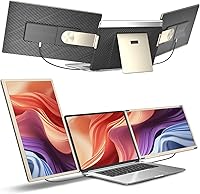
The Siaviala S6 15.6″ Triple Portable Monitor Extender arrives at a moment when working from a single laptop screen feels genuinely limiting for anyone who moves between locations regularly. This triple screen extender attaches two 15.6″ panels directly to laptops sized between 13″ and 17.3″, giving you three active displays without hauling a separate monitor bag. Setup is plug-and-play — USB-C or HDMI connections, no driver installs, and all necessary cables are included. Compatible with Windows, macOS, Android, and even gaming consoles, the range of supported devices is broad. That said, Siaviala themselves acknowledge that certain laptop configurations may encounter compatibility issues, so it is worth checking your port specs before buying.
Features & Benefits

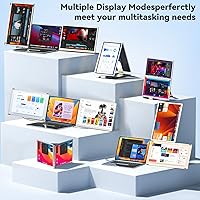
What makes the S6 monitor attachment genuinely useful day-to-day starts with the screens themselves. Each of the two 15.6″ panels runs at 1920×1080 resolution with a matte finish that cuts glare in brighter environments. Brightness sits at 300 cd/m², which holds up well in most indoor settings. You get 11 configuration modes — horizontal, vertical, portrait — so you can arrange your workspace around what you are actually doing rather than a fixed layout. Each display has its own brightness and volume controls, and there are built-in speakers per panel. You can also detach the two screens and use them independently with separate devices, which is a flexible option most competitors skip entirely.

Best For

This portable dual-panel setup makes the most sense for people whose work genuinely demands more than one window open at a time. Remote professionals and developers working across code editors, terminal windows, and documentation will notice the biggest payoff — no more constant alt-tabbing between apps. It also works well for people running back-to-back video calls who want a dedicated screen for participants while keeping their primary workspace untouched. Frequent travelers who need more screen space but draw the line at packing a separate monitor bag will find this appealing too. Students and creatives doing layout or research work in non-office settings round out the core audience for this kind of attachment.

User Feedback

Most buyers who use this triple screen extender for productivity tasks come away satisfied with how quickly it gets running — easy setup is consistently praised across reviews. The benefit of three screens is real and tangible, even if the brand's claim of tripling output reads more like marketing shorthand than a measured result. The honest concern centers on weight: at 5.26 lbs, this is not something you drop into a bag without noticing. Some users with older laptops report only one panel activating via USB-A, a known limitation worth flagging. Color reproduction suits documents and spreadsheets fine, but it falls short for color-critical design work. After-sales support earns consistent praise for its response speed.

Pros

  • Adds two full 15.6″ FHD screens to any compatible laptop with no driver installation required.
  • All necessary cables come included in the box — no separate shopping trip needed.
  • Over 11 layout configurations let you arrange the screens to match your actual workflow.
  • Each panel has independent brightness and volume controls, which is more useful than it sounds.
  • Built-in speakers on both panels mean one fewer peripheral to pack.
  • The two screens can detach and be used independently with separate devices.
  • Matte panel finish reduces glare in brightly lit environments like coffee shops or hotel lobbies.
  • Compatible with Windows, macOS, Android, and gaming consoles, covering most use cases.
  • Brand offers 24/7 after-sales support and a one-year warranty, with reported fast response times.
  • Setup takes minutes for most users — plug in, configure display settings, and go.

Cons

  • At 5.26 lbs, this triple screen extender adds noticeable weight to any laptop bag.
  • Some older laptops only activate one panel, and USB-A ports are limited to power delivery only.
  • Color accuracy at 80% NTSC falls short for anyone doing serious photo or video work.
  • The folded dimensions make it bulkier than a standard laptop sleeve, complicating packing.
  • No wireless connection option — you are always managing physical cables at your desk.
  • Laptop compatibility is not guaranteed; buyers need to verify USB-C port capabilities before purchasing.
  • The attachment mechanism may not sit perfectly flush on all laptop chassis shapes and sizes.
  • Built-in speakers are a convenience feature, not a quality audio solution — expect basic sound.
  • Running three displays simultaneously can strain laptop GPUs and increase fan activity noticeably.
  • The brand is relatively new, which means long-term durability data from real-world use is still limited.

Ratings

The scores below reflect AI-driven analysis of verified global buyer reviews for the Siaviala S6 15.6″ Triple Portable Monitor Extender, with spam, bot-generated, and incentivized feedback actively filtered out before scoring. Each category is evaluated against real-world usage patterns reported by remote workers, developers, and frequent travelers who purchased and used this device. Both consistent strengths and recurring frustrations are transparently factored into every score you see here.

Setup & Ease of Use
88%
Most buyers report being up and running within five minutes of opening the box — plug in the cables, adjust display settings, and the screens are active. No driver downloads or configuration wizards required, which is a genuine relief when you are setting this up in a hotel room before a morning meeting.
A subset of users, particularly those on older Windows machines or non-standard USB-C implementations, hit a wall immediately with one panel not responding. The setup experience is great when it works, but the lack of a clear compatibility checker before purchase leaves some buyers troubleshooting instead of working.
Display Quality
74%
26%
At 1920×1080 across a 15.6″ panel, text stays sharp enough for long coding or writing sessions, and the matte finish genuinely cuts down on reflections in office lighting. Brightness at 300 cd/m² holds up well in typical indoor environments like coffee shops and co-working spaces.
The 80% NTSC color gamut is where this portable dual-panel setup shows its limitations — colors appear slightly washed out compared to higher-end panels, and anyone accustomed to a quality IPS display will notice the difference. It is adequate for productivity, but falls noticeably short for photo review or video color work.
Portability & Travel Suitability
61%
39%
The folded footprint is compact enough to slide into most laptop bags alongside the computer itself, and the single-attachment design means fewer loose components rattling around. For travelers who truly need three screens and have accepted that it will not be weightless, this is the most compact solution in its class.
At 5.26 lbs, this is not something you will forget is in your bag — it makes a meaningful difference on long airport walks or commutes. Several frequent flyers mention reconsidering whether to bring it on shorter trips, which suggests the weight-to-benefit calculation does not always land in the product's favor.
Device Compatibility
63%
37%
The range of supported devices is genuinely broad — Windows, macOS, Android, Switch, PS4, and Xbox are all covered, making this more versatile than most competitors that focus solely on laptop use. Buyers who want to connect it to a gaming console or Android phone for a quick secondary screen report it working without drama.
Laptop compatibility is the most reported pain point across buyer reviews. Machines with limited USB-C port capabilities, older Intel integrated graphics, or non-DisplayPort-Alt-Mode USB-C ports frequently result in only one panel activating, or a persistent no-signal error. The brand acknowledges this, but clearer pre-purchase guidance would prevent a lot of frustration.
Build Quality
77%
23%
The plastic housing feels more solid than the price tier might suggest, and the hinge mechanism holds screen angles reliably during stationary use. Buyers who use this across regular hotel and office stays report no structural degradation after several months of weekly packing and unpacking.
The attachment clamp shows some flex on wider or thicker laptop lids, and a few users note slight wobble when the laptop is nudged during use. As a relatively new brand, there is limited data on how the hinges and clamp hold up beyond the 12-month warranty window.
Cable Management
58%
42%
Including all necessary cables in the box is a practical decision that competitors do not always match — most buyers can connect everything without a separate hardware run. The variety of cable types covered (USB-C, HDMI-to-USB-C, USB-A-to-USB-C) accommodates a range of laptop port configurations.
Managing three active cables on a desk or in a hotel room gets messy quickly, and there is no integrated cable routing or clip system built into the attachment. Several buyers note that the cables feel thinner than expected, raising durability concerns with repeated bending at the connectors over time.
Configuration Flexibility
83%
With over 11 layout modes, the S6 monitor attachment adapts well to different work scenarios — developers tend to favor portrait mode on one panel for vertical code scrolling, while analysts prefer side-by-side horizontal layouts for comparing data sheets. The ability to switch orientations without tools is a practical strength.
Finding the right configuration for your specific laptop height and desk setup requires some trial and error that the included instructions do not fully guide you through. A few configurations also result in slight screen overlap or awkward angles depending on the laptop's hinge position.
Productivity Impact
81%
19%
Users who rely on multiple open windows for their work — developers, analysts, writers managing research alongside drafts — consistently report a tangible reduction in time spent switching between applications. Having a dedicated screen for a video call while keeping two others free for active work is frequently cited as a specific workflow improvement.
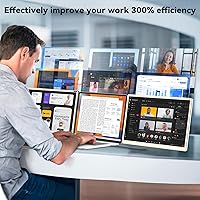
The productivity gain is highly dependent on your specific workflow — buyers who primarily use a single maximized application at a time see limited benefit. The brand's claimed productivity multiplier is marketing language, and buyers who purchase expecting dramatic output changes may feel the real-world improvement is more incremental than transformational.
Built-in Audio
52%
48%
Having speakers on each panel removes the need to carry a separate Bluetooth speaker for casual audio during travel, which is a convenience most buyers appreciate more than they expected. For video calls and basic YouTube playback, the audio is functional and saves desk space.
Sound quality from the built-in speakers is thin and low-volume — music listening or any audio-critical task is a poor experience. Buyers who expected the speakers to replace even a modest external speaker were consistently disappointed, and most end up using headphones or a separate audio device regardless.
Value for Money
69%
31%
For remote professionals who genuinely use triple displays daily on the road, the per-use cost works out reasonably given the absence of any equivalent packaged alternative at the same size and configuration count. The warranty and responsive support add tangible value to the overall purchase proposition.
At its price point, buyers expect consistent dual-panel activation across all supported devices, and that expectation is not always met. Those who end up with only one functional panel on their specific laptop feel they paid a premium price for a standard portable monitor, which is a hard outcome to defend.
After-Sales Support
86%
Siaviala's support team is one of the more consistently praised aspects of this product — buyers dealing with no-signal errors or single-panel issues report receiving helpful, specific responses within a day. The 24/7 availability means troubleshooting does not have to wait until business hours in a specific time zone.
While response times are praised, some buyers report that the resolution offered for compatibility issues is either a cable swap suggestion or a partial refund rather than a full fix. Support can guide you through workarounds, but it cannot override a hardware limitation in your specific laptop's USB-C implementation.
Power Consumption Impact
59%
41%
For buyers who work near power outlets, the battery drain issue is largely irrelevant — the setup functions as a reliable stationary workstation. Users in office hotels or co-working spaces with desk power access report this as a non-issue in their daily use pattern.
Running two additional FHD panels visibly accelerates battery drain, and laptop fans often spin up noticeably under the added GPU load. Buyers expecting to use this on a transatlantic flight without a power connection will likely see their battery life cut by a substantial margin compared to single-screen operation.
Glare & Viewing Comfort
78%
22%
The matte anti-glare coating performs well in the kinds of environments this device is actually used in — brightly lit hotel rooms, airport lounges, and office spaces with overhead fluorescent lighting. Long work sessions feel noticeably less fatiguing than on glossy-panel alternatives in similar conditions.
Matte coatings naturally reduce the perceived vibrancy of colors and fine image detail compared to glossy counterparts, which some buyers find disappointing when watching video content. Users coming from high-gloss laptop displays may find the perceived image quality a step down even at matching resolution.

Suitable for:

The Siaviala S6 15.6″ Triple Portable Monitor Extender is a strong fit for remote professionals who regularly work from hotels, co-working spaces, or client sites and need a real multi-screen setup without shipping a monitor ahead. Developers who keep code, a terminal, and documentation open simultaneously will feel the difference immediately — three active displays remove a surprising amount of friction from that kind of workflow. It also suits people who run frequent video calls and want a dedicated screen for the call itself while keeping their primary display free for actual work. Frequent travelers who have already accepted that they cannot match a full desk setup but still want something meaningfully better than a single laptop screen will find this a practical compromise. Students working on research-heavy projects or light creative tasks in non-desk environments round out the sweet spot.
Not suitable for:

Anyone expecting a weightless travel accessory should stop and reconsider — adding 5.26 lbs to a laptop bag is a real daily commitment, and the bulk when folded is not trivial either. The Siaviala S6 15.6″ Triple Portable Monitor Extender is also a poor match for graphic designers, photographers, or video editors who depend on accurate color reproduction, since 80% NTSC coverage is adequate for documents and spreadsheets but not for color-critical work. Buyers with older laptops or machines that lack full-featured USB-C ports should verify compatibility carefully before purchasing, as some configurations result in only one panel activating or no signal at all. If your laptop sits at a fixed desk all day, a conventional external monitor will almost certainly deliver better image quality and ergonomics for less money. This attachment is purpose-built for mobility, and buyers who do not genuinely move around regularly will not get fair value from it.
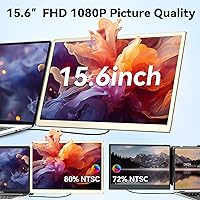
Specifications

  • Panel Size: Each of the two extended screens measures 15.6″ diagonally, giving you two full-sized additional displays alongside your laptop.
  • Resolution: Both panels run at 1920×1080 FHD resolution, delivering sharp enough detail for documents, code, spreadsheets, and video calls.
  • Brightness: Each screen is rated at 300 cd/m², which performs adequately in typical indoor environments but may struggle in very bright outdoor settings.
  • Color Gamut: The panels cover 80% of the NTSC color space, suitable for productivity and general media consumption but not for professional color grading work.
  • Surface Finish: Both screens feature a matte anti-glare coating that helps reduce reflections in office lighting and brighter indoor spaces.
  • Aspect Ratio: The standard 16:9 aspect ratio on both panels ensures compatibility with typical widescreen content and application layouts.
  • Configurations: The attachment supports over 11 distinct layout configurations, including horizontal, vertical, and portrait orientations for each panel.
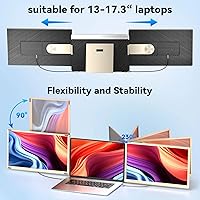
  • Laptop Fit: The clamp mechanism is designed to accommodate laptops with screen sizes ranging from 13″ to 17.3″.
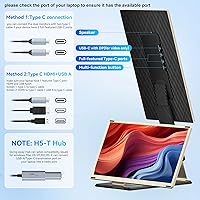
  • Connectivity: Connection is handled via USB-C to USB-C or HDMI to USB-C cables; the USB-A to USB-C cable included is for power delivery only, not display signal.
  • Driver Requirement: No additional drivers or software need to be installed; the device is recognized as a display output as soon as it is connected.
  • Cables Included: The package ships with 2× USB-C to USB-C cables, 2× HDMI to USB-C cables, and 2× USB-A to USB-C cables to cover most connection scenarios.
  • Built-in Audio: Each panel includes its own integrated speaker, providing basic stereo audio output without requiring a separate external speaker.
  • Display Controls: Onboard multi-function keys allow independent adjustment of brightness, contrast, and volume for each screen individually.
  • Weight: The complete assembly weighs 5.26 lbs, which adds meaningful heft to a laptop bag and is worth factoring into any travel setup decision.
  • Folded Dimensions: When folded for transport, the unit measures approximately 1.5 × 8 × 5 inches, making it compact but still noticeably thicker than a standard laptop sleeve.
  • Compatible Devices: Beyond Windows and macOS laptops, the attachment also works with Android phones, Nintendo Switch, PS4, and Xbox via appropriate cable connections.
  • Warranty: Siaviala covers this product with a one-year limited warranty backed by a 24/7 after-sales support team reachable for technical assistance.
  • Model Number: The unit is officially designated as the siaviala S6, which is the identifier to reference when contacting support or searching for firmware information.

Related Reviews
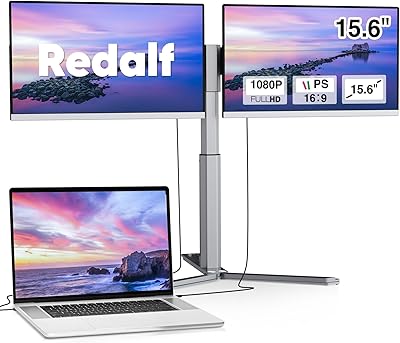
Redalf Z2 15.6″ Triple Portable Monitor
71%
84%
Display Quality
62%
Portability
53%
Compatibility
77%
Setup & Ease of Use
74%
Build Quality
More
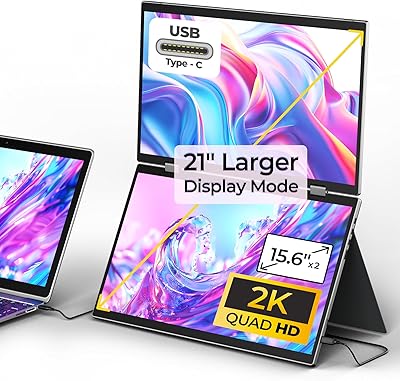
YUBWVO Portable Dual Monitors 15.6” 2K Screen Extender
87%
91%
Display Quality
93%
Portability
94%
Ease of Setup
87%
Build Quality
84%
Adjustability (Brightness/Color Settings)
More
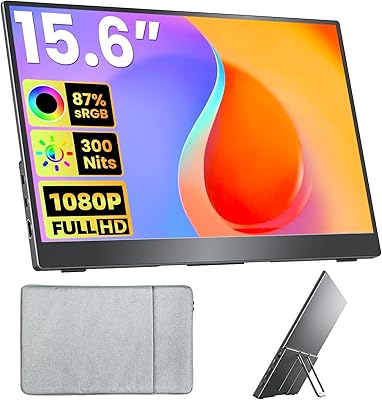
Topmonitor P15.6/2.5K 15.6-inch Portable Monitor
77%
91%
Image Sharpness
87%
Color Accuracy
93%
Portability
82%
Connectivity
88%
Value for Money
More
Upperizon U156LH 15.6″ Portable Monitor
72%
82%
Build Quality
78%
Display Quality
89%
Portability
71%
Connectivity
86%
Value for Money
More
InnoView INVPM406 15.6-inch Portable Monitor
75%
91%
Ease of Setup
83%
Display Clarity
78%
Portability & Build
62%
USB-C Compatibility
88%
Value for Money
More
Westinghouse 15.6 Inch Portable Monitor
82%
88%
Display Quality
92%
Portability
86%
Connectivity Options
94%
Ease of Setup
80%
Build Quality
More
VILVA V156F1 15.6-inch Portable Monitor
69%
74%
Display Quality
61%
Portability
82%
Connectivity & Compatibility
67%
Build Quality
83%
Value for Money
More
ARZOPA S1 Table 15.6″ Portable Monitor
76%
93%
Portability
81%
Display Quality
94%
Ease of Setup
67%
Build Quality
58%
Stand & Stability
More
Verbatim 15.6″ Portable Touchscreen Monitor
68%
83%
Build Quality
78%
Display Quality
71%
Touch Performance
76%
Portability
86%
Connectivity
More
Acer PM161Q 15.6-inch Portable Monitor
70%
91%
Portability
78%
Display Clarity
52%
Glare & Screen Surface
88%
Connectivity
89%
Setup Experience
More

FAQ

It works with both macOS and Windows laptops, as well as Android devices. The key requirement is that your laptop has a USB-C port that supports DisplayPort Alt Mode or a full-featured HDMI output. Most modern MacBooks and Windows ultrabooks meet this requirement, but older machines or budget laptops sometimes do not — it is worth checking your port specs before purchasing.

No driver installation is required. You simply connect the panels using the included cables, and your operating system should recognize the additional displays within a few seconds. From there, you configure the layout through your standard display settings, the same way you would with any external monitor.

Possibly, but it depends on your specific laptop and port capabilities. Some single USB-C port setups can still drive both displays, while others will only activate one panel. The included HDMI-to-USB-C cable provides an alternative connection path if your laptop also has an HDMI port, which helps in single USB-C scenarios. If you are unsure, Siaviala's support team can help you figure out the right cable combination for your machine.

The USB-A to USB-C cable is included solely for power delivery — it does not carry any display signal. If your laptop does not have enough power output through its USB-C ports to run both panels, you can use this cable to draw power from a USB-A port or a USB charger to supplement. It is not a display connection option.

Honestly, not as a primary editing display. The 80% NTSC color gamut is fine for everyday tasks and casual media viewing, but professional photo and video editors who need accurate color representation should look at monitors with wider gamut coverage, such as those hitting 95% DCI-P3 or higher. For sorting images or rough cuts on the road it will do, but for final color work, the panels are a limitation.

The clamp mechanism is designed to grip the back of your laptop lid, and most users report it stays in place on a desk during normal use. That said, this is not a rigid docking station — if you are moving the laptop frequently while the panels are attached, some wobble is expected. It is best used as a stationary setup once you have arrived at your destination rather than something you carry around open.

Yes, it will. Driving two additional 15.6″ FHD displays draws meaningful power from your laptop, and you should expect noticeably shorter battery life compared to running your laptop screen alone. For longer sessions away from a power outlet, keeping a charger handy is strongly advisable.

Yes. The two panels can be used independently, and you can detach one and connect it as a standalone external monitor for a different device entirely. This also makes it useful as a shareable screen for a colleague sitting across from you in a meeting or co-working session.

The build is generally described as solid for its category, with a plastic housing that keeps weight manageable. It is not ruggedized or designed to take drops, so a proper carry case is recommended. Given that it is a product from a relatively new brand, long-term durability data from heavy-use travelers is still limited — but initial user reports are generally positive about the construction holding up through regular commutes and hotel stays.

Siaviala advertises 24/7 support and a one-year warranty, and buyer feedback suggests their response time is genuinely fast — often within 24 hours. Common issues like one screen not activating or a no-signal error tend to have known fixes that support can walk you through. If the issue turns out to be a hardware defect, the warranty covers replacement. It is one of the more consistently praised aspects of this product across real user reviews.