

Overview

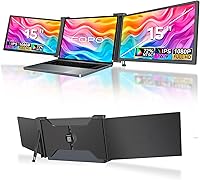
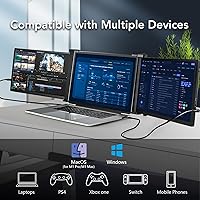
The FOPO S17 15″ Triple Portable Monitor is one of the more practical answers to a problem frequent travelers know well: how do you maintain a real multi-screen workflow when you're away from your desk? This laptop screen expander attaches to 15-to-17.3-inch laptops and adds two flanking 15-inch IPS panels, giving you three screens without a cart full of gear. Compatibility matters here — it works with Windows and macOS, but only on M1 Pro and M1 Max chips. M1 base, M2, Microsoft Surface, and Chromebook users are out. The kit arrives complete with cables, a carry bag, and screen protectors, so no separate purchases are needed.

Features & Benefits

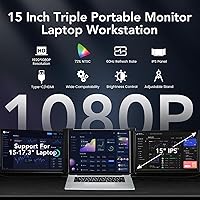
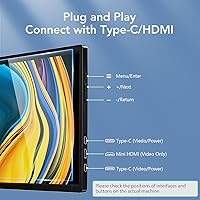
Each of the two external panels runs at 1920x1080 on an IPS screen — sharp enough for spreadsheets, code, and video calls, though 72% NTSC coverage means color-sensitive design work will look slightly muted compared to a wide-gamut display. The rotation range is genuinely useful: the left panel swings up to 235 degrees and the right up to 180, so flipping a screen toward a colleague during a meeting is straightforward. A push-button rear stand extends to stabilize the whole assembly, which matters more than it sounds when you have three screens balanced on a laptop hinge. Both USB-C and HDMI connections are supported, and the included cables handle both video and power.

Best For

This triple monitor extender makes the most sense for Windows users who work across multiple documents or apps simultaneously — think developers switching between a terminal, browser, and documentation, or analysts who need a dashboard open while writing a report. It's also a decent pick for students presenting work without a projector, since the rotating panels make it easy to turn a screen toward a small audience. Travelers who want to leave their office monitor at home will appreciate the extra screen space, though at just under 8 pounds, the full setup is no featherweight. Console gamers can also connect a Switch or Xbox, making it a versatile display beyond just productivity.

User Feedback

With a 3.9-star average across 121 reviews, the FOPO S17 lands in solidly mixed territory — not a clear winner, not a disappointment. Setup speed is the most consistent compliment; buyers mention that the plug-and-play experience on Windows is genuinely hassle-free. The criticism that shows up most often is compatibility confusion: buyers who didn't read the fine print discovered their Mac wasn't supported after the fact. Build quality is divisive — some users report hinge wobble and concerns about long-term durability. Color accuracy rarely draws strong complaints for general use, but creatives find the limited gamut frustrating. The carry bag gets a lukewarm reception overall.

Pros

  • Plug-and-play setup on Windows requires no driver installation — you're up and running in minutes.
  • Two full 15-inch IPS panels add serious screen real estate without requiring a second bag.
  • Both USB-C and HDMI inputs are supported, giving flexibility across different laptop port configurations.
  • The left panel's 235-degree rotation range makes sharing your screen with a colleague genuinely practical.
  • Everything needed to get started ships in the box — cables, screen protectors, carry bag, and cleaning cloth.
  • The extendable rear stand with push-button release keeps the assembly stable without constant readjusting.
  • Works with Xbox, Nintendo Switch, and Android devices, making it useful beyond just laptop productivity.
  • For Windows users on a 15-to-17.3-inch machine, the triple-screen experience is hard to replicate at this price tier.

Cons

  • Compatibility is a real minefield — M1 base, M2, Surface, and Chromebook users are all locked out.
  • At just under 8 pounds fully assembled, it's too heavy to feel genuinely portable for commuters or light travelers.
  • The 72% NTSC color gamut is a clear limitation for anyone doing photo editing or color-graded video work.
  • Hinge durability concerns appear in multiple reviews, with some users reporting wobble after regular use.
  • Mac support is narrow and confusingly marketed — only M1 Pro and M1 Max qualify, which frustrates buyers who assumed broader compatibility.
  • The carry bag receives lukewarm feedback and is not seen as a premium protective solution for travel.
  • With a 3.9-star average, this triple monitor extender sits in mixed-review territory rather than being a consensus recommendation.
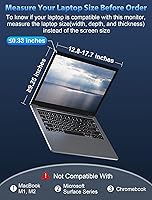
  • Laptop thickness must not exceed 0.33 inches, which rules out some chunkier older machines without warning.
  • Screen wobble during typing has been noted when the stand is extended on uneven surfaces.

Ratings

Our scores for the FOPO S17 15″ Triple Portable Monitor were generated by an AI system trained to analyze verified buyer reviews from global markets, actively filtering out incentivized submissions, duplicate accounts, and bot-generated feedback to surface only authentic user experiences. Each rating reflects a balanced synthesis of what real owners consistently praised and what they repeatedly flagged as frustrating — neither inflated by enthusiasm nor dragged down by isolated edge cases. The scorecards below are intended to give you an honest, category-level read before you commit to a purchase.

Setup & Ease of Use
84%
Windows users consistently report that this laptop screen expander is operational within minutes of unboxing — plug in the USB-C cable, let the OS detect the new displays, and you are working across three screens without touching a driver page or a settings menu. That frictionless experience is one of the most cited reasons buyers say the unit earns a permanent spot in their daily workflow.
The smooth setup story applies almost exclusively to Windows users on supported hardware. Mac users who fall outside the M1 Pro and M1 Max chip window hit a complete dead end, and even supported users report that getting cable management tidy across three screens takes several sessions before it stops feeling awkward.
Build Quality
61%
39%
For light desk use on a stable surface, the frame holds together adequately — the push-button rear stand feels deliberate rather than cheap, and the panel hinges move with enough resistance to feel controlled during initial setup and adjustment.
Hinge durability is the most consistent structural concern across buyer feedback — users who travel frequently report loosening over time, and screen wobble during active typing sessions appears in enough reviews to be a credible pattern rather than an outlier complaint. The overall construction does not inspire confidence for daily packing and unpacking cycles.
Display Quality
77%
23%
The IPS panels at Full HD resolution look clean and sharp for the work most buyers throw at them — reading code, reviewing documents, running a video call on the side screen, or keeping a reference browser tab open all hold up without noticeable pixelation or color fringing at normal working distances.
The 72% NTSC gamut makes itself known when you put reference images or color-saturated content on these panels — colors look visibly less vivid than on a wide-gamut display, and buyers who moved from a high-quality primary monitor often describe the side screens as looking slightly flat by comparison.
Compatibility
52%
48%
For Windows users on a 15-to-17.3-inch machine, compatibility is genuinely solid — the plug-and-play behavior works reliably across a broad range of Windows 10 and 11 configurations, and Android device users also report dependable connections via USB-C without additional setup steps.
Compatibility is the single most damaging aspect of the buyer experience for this product — M1 base, M2, Microsoft Surface, and Chromebook users are entirely locked out, and the Mac chip restrictions are specific enough that a meaningful portion of buyers only discover the limitation after delivery, resulting in returns and frustrated reviews.
Portability & Weight
58%
42%
The unit folds into a contained footprint and ships with a carry bag, which makes it workable for buyers who move between a home desk and a fixed office location a few times a week without needing to pack it into overhead storage.
At 7.88 pounds, this is one of the heavier options in the portable monitor extender category — buyers who commute on foot, travel through airports regularly, or carry their kit on public transit consistently describe the cumulative weight as a real fatigue factor over anything longer than a short walk.
Color Accuracy
63%
37%
For productivity-focused tasks — spreadsheets, writing, coding, dashboard monitoring — the color rendering is consistent and adequate across both panels, and most buyers working in standard office applications report no meaningful visual discomfort from the limited gamut during long work sessions.
Photographers, video editors, and designers who evaluate color in their deliverables will find the 72% NTSC coverage a genuine limitation — saturation appears visibly compressed on both screens, and skin tones in particular can look slightly off compared to a properly profiled wide-gamut display.
Connectivity Options
81%
19%
Supporting both USB-C and HDMI inputs on each panel is a practical design choice — most laptop users will have at least one compatible port without needing a dongle, and the included cable sets cover both connection types so buyers are not forced to source anything separately before getting started.
HDMI carries video signal only and cannot deliver power to the unit, meaning users who rely solely on HDMI still need to manage a separate power cable alongside their video connection — a minor inconvenience in isolation, but one that contributes to desk cable clutter across three screens.
Stand Stability
67%
33%
On a firm, flat desk surface the rear stand does its job reliably — the push-button extension mechanism seats securely, and the three-screen assembly stays put during normal typing and scrolling sessions without requiring constant repositioning or adjustment throughout the day.
On softer or uneven surfaces — padded desk mats, couch armrests, or irregular table tops — wobble becomes noticeable during typing, which is an inherent limitation of a single rear support point spanning the full width of a three-panel assembly that weighs nearly 8 pounds.
Value for Money
71%
29%
For Windows users specifically, the pricing sits in a defensible spot — two 15-inch IPS panels, a complete dual-cable kit for each screen, screen protectors, and a carry bag represent a reasonable bundle compared to assembling an equivalent portable multi-monitor setup from separate components.
The value calculation shifts significantly for buyers who encounter compatibility issues or who expected build quality to match the mid-range price point — the hinge concerns and below-average color gamut make the purchase feel harder to justify for anyone outside the core Windows productivity use case.
Screen Rotation
79%
21%
The rotation range — up to 235 degrees on the left panel and 180 on the right — gives the FOPO S17 a genuinely practical advantage for anyone who presents work to clients or colleagues, since you can flip a screen toward another person across a table without moving the whole setup.
The asymmetric rotation limits mean the right panel cannot match the full repositioning range of the left, which frustrates users who want equal flexibility on both sides — particularly those who alternate between left-facing and right-facing screen sharing depending on where colleagues are seated.
Box Contents
74%
26%
The accessory package is thorough for a mid-range product — two USB-C cables, two HDMI cables, a cleaning cloth, screen protectors, protective caps, and a carry bag are all included, which means buyers can realistically set up the unit on day one without an accessory run.
The carry bag is consistently described in user reviews as thin and minimally padded — functional for organized storage at a fixed desk but not reassuring for anyone who plans to move the unit frequently, where the screens and hinges need more protection than the bag provides.
Multi-device Support
76%
24%
HDMI inputs on each panel make this triple monitor extender genuinely useful beyond laptop productivity — Nintendo Switch, Xbox, and Android smartphones all connect reliably, which adds a layer of versatility that buyers who use the unit at a hotel desk or shared space find worthwhile.
Multi-device support comes with its own caveats — iOS connectivity is limited, console audio requires a separate output, and the overall gaming or entertainment experience is functional rather than polished, meaning buyers who prioritize entertainment use should weigh those gaps before purchasing.
Brightness & Visibility
69%
31%
At 300 cd/m², the panels are comfortable for extended indoor work sessions across typical environments — conference rooms, home offices, and co-working spaces all fall within a range where the brightness is adequate without causing eye strain over a full working day.
In brighter settings — near windows, in sunlit open-plan offices, or outdoors — the glossy screen surface introduces glare that the 300 cd/m² output cannot overcome, and buyers who expected to use the unit in varied lighting conditions report the screens become frustratingly difficult to read outside controlled indoor environments.

Suitable for:

The FOPO S17 15″ Triple Portable Monitor was built for a specific kind of worker: someone who genuinely needs multiple windows open at once and refuses to sacrifice that setup just because they're away from their desk. Windows laptop users with machines between 15 and 17.3 inches will get the most out of it — particularly developers juggling a code editor, terminal, and browser simultaneously, or analysts who need live dashboards alongside a working document. It's also a strong pick for consultants or account managers who present to small groups on the road, since the wide rotation range on both panels lets you flip a screen toward a client without awkward repositioning. Students writing research papers while referencing sources, or writers who keep notes and drafts open side by side, will find the added real estate genuinely changes how they work. If you occasionally want to wind down with a Switch or connect a smartphone for media, the HDMI and USB-C inputs make that straightforward without any extra hardware.

Not suitable for:

There is a long list of buyers who should stop and check compatibility before getting anywhere near a purchase, and this is not an exaggeration. The FOPO S17 triple monitor extender explicitly does not work with Apple M1 base chip, M2, Microsoft Surface, or Chromebook — and that incompatibility has caught enough buyers off guard to become the single most recurring complaint in user reviews. Mac users need to confirm they are on an M1 Pro or M1 Max specifically; every other Mac configuration is out. Beyond compatibility, this laptop screen expander is also the wrong tool for anyone doing color-critical creative work — the 72% NTSC gamut is adequate for documents and data but will look noticeably flat for photo editing or video grading. At just under 8 pounds for the full assembly, it is also not the right call for someone who wants a truly lightweight travel kit; this is desk-adjacent portability, not backpack-friendly minimalism. Buyers who need ultra-thin laptop compatibility should also check the 0.33-inch thickness limit before assuming their machine qualifies.

Specifications

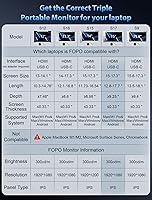
  • Panel Size: Each of the two external screens measures 15 inches diagonally, matching the display footprint of a typical mid-size laptop.
  • Resolution: Both external panels run at 1920x1080 Full HD, delivering a pixel density suitable for documents, code, spreadsheets, and standard video content.
  • Panel Type: IPS (In-Plane Switching) technology is used across both external displays, providing wider viewing angles compared to TN panels.
  • Aspect Ratio: All panels operate at a 16:9 widescreen aspect ratio, consistent with the majority of modern laptop displays.
  • Brightness: Each panel reaches a maximum brightness of 300 cd/m², which is adequate for indoor and shaded environments but may wash out in direct sunlight.
  • Color Gamut: Color coverage is rated at 72% NTSC, which is sufficient for general productivity and media consumption but falls short for professional color-critical work.
  • Left Panel Rotation: The left external panel supports a rotation range of 0 to 235 degrees, allowing it to face forward, sideways, or partially rearward for sharing.
  • Right Panel Rotation: The right external panel rotates from 0 to 180 degrees, offering a wide but slightly more limited range than the left side.
  • Connectivity: Both USB-C (video and power) and mini HDMI (video only) inputs are supported, with all necessary cable types included in the box.
  • Compatible Laptops: The extender is designed for laptops with screen sizes between 15 and 17.3 inches, a body length of 12.8 to 17.7 inches, height of at least 9.25 inches, and a lid thickness of 0.33 inches or less.
  • Supported Systems: Compatible operating systems include Windows, Android, and macOS — but macOS support is strictly limited to M1 Pro and M1 Max chip configurations only.
  • Incompatible Systems: The extender explicitly does not support Apple M1 (base), M2, Microsoft Surface Series, or Chromebook devices.
  • Item Weight: The full assembly weighs 7.88 pounds, which places it firmly in the desk-adjacent portability category rather than ultralight travel gear.
  • Dimensions: The unit measures approximately 1 x 15.55 x 9.65 inches when folded, making it comparable in footprint to a large laptop sleeve.
  • Box Contents: The package includes the triple monitor unit, one power adapter, two USB-C to USB-C cables, two HDMI to mini HDMI cables, two USB-C to USB-A power cables, a carry bag, a cleaning cloth, a hook-and-loop fastener, six protective caps, and two screen protectors.
  • Model Number: The official model designation for this unit is S17, as assigned by the manufacturer.
  • Manufacturer: This product is designed and manufactured by SHENZHEN E-Tech Digital Technology Co. Ltd., based in China.
  • Stand Mechanism: A built-in rear stand with a push-button release extends to support the full three-screen assembly and folds flat for storage and transport.

Related Reviews
Redalf Z2 15.6″ Triple Portable Monitor
71%
84%
Display Quality
62%
Portability
53%
Compatibility
77%
Setup & Ease of Use
74%
Build Quality
More
AYY A15G1B 15-inch Portable Monitor
74%
91%
Setup & Plug-and-Play Ease
78%
Display Quality
93%
Portability & Form Factor
88%
Value for Money
69%
Smart Cover & Stand
More
Upperizon U156LH 15.6″ Portable Monitor

72%
82%
Build Quality
78%
Display Quality
89%
Portability
71%
Connectivity
86%
Value for Money
More
Westinghouse 15.6 Inch Portable Monitor
82%
88%
Display Quality
92%
Portability
86%
Connectivity Options
94%
Ease of Setup
80%
Build Quality
More
Anyuse PM1561P 15.6-inch Portable Monitor
74%
91%
Portability & Form Factor
84%
Image Clarity
72%
Setup & Compatibility
74%
Build Quality & Durability
61%
Brightness & Outdoor Usability
More
ZSCMALLS 15.6-inch 4K Portable Monitor
70%
88%
Display Sharpness
52%
Brightness
93%
Portability
86%
Connectivity
77%
Value for Money
More
UFYQL 15.6-inch FHD Portable Monitor
76%
91%
Portability & Form Factor
84%
Display Clarity
54%
Brightness & Outdoor Usability
93%
Connectivity & Setup
67%
Kickstand Stability
More
CAPERAVE CF15 15.6-inch Portable Monitor
70%
83%
Portability & Build
76%
Display Quality
51%
Brightness
91%
Setup & Ease of Use
82%
Value for Money
More
ARZOPA S1 Table 15.6″ Portable Monitor

76%
93%
Portability
81%
Display Quality
94%
Ease of Setup
67%
Build Quality
58%
Stand & Stability
More
DEPGI 15.6″ Portable Gaming Monitor
81%
88%
Display Quality
91%
Gaming Performance (Refresh Rate & Response Time)
89%
Portability
84%
Value for Money
77%
Build Quality
More

FAQ

It depends entirely on which chip your MacBook uses. The FOPO S17 15″ Triple Portable Monitor is only compatible with M1 Pro and M1 Max configurations — not the base M1, not M2, and not any later Apple Silicon. If you're unsure which chip you have, check under the Apple menu and select About This Mac before purchasing.

No driver installation is required on supported Windows systems — you plug in the cables and the screens are recognized automatically. On compatible Macs, the process is similarly straightforward, though it's worth confirming your chip is M1 Pro or M1 Max before assuming plug-and-play will work.

The full assembly weighs just under 8 pounds, which is substantial. It's more realistic for someone who commutes between fixed locations — say, a home office and a co-working space — than for someone packing light through airports. If you're looking for something featherweight, this triple monitor extender isn't it.

Yes, both consoles are compatible via the HDMI input. This makes the unit useful as a portable gaming display as well, not just a productivity tool. Keep in mind that HDMI on these panels carries video only, so you'll still need separate audio output.

The clamp mechanism won't seat properly on lids thicker than 0.33 inches, which rules out older or bulkier laptop designs. It's worth measuring your lid thickness before ordering — this is a hard physical constraint, not a guideline.

Honestly, not really. The 72% NTSC gamut is fine for looking at photos casually or working in general productivity apps, but if color accuracy matters for your output — retouching, color grading, print design — you'll likely find the panels look a bit flat or undersaturated. A wide-gamut display would serve that use case much better.

Yes, the panels can be positioned independently, and you aren't required to use both simultaneously. If you only need one extra screen, you can fold the second panel back out of the way or simply not connect the cable for that side.

The rear stand with its push-button release does a reasonable job of keeping things steady on a flat, firm surface. On a slightly uneven surface — like a soft desk mat or a couch — some users report noticeable wobble, particularly when typing quickly. It's not a dealbreaker for most, but it's worth knowing if you work in varied environments.

The box includes two USB-C to USB-C cables, two HDMI to mini HDMI cables, and two USB-C to USB-A cables for power, along with a carry bag, cleaning cloth, screen protectors, and protective caps. For supported systems, everything you need to get started is in the package — no additional accessories are required.

User feedback on the carry bag is mixed — most describe it as functional for organized storage rather than a robust protective case. If you're frequently moving this laptop screen expander between locations, consider a padded sleeve or case for added protection, especially for the screens themselves.