Overview

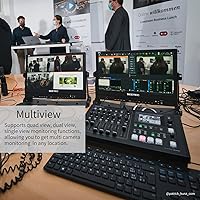
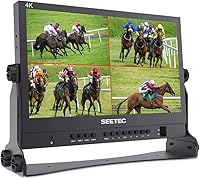
The SEETEC ATEM156 15.6″ Broadcast Director Monitor is a purpose-built tool aimed squarely at live streaming operators and video switcher users who need to monitor multiple camera sources from a single screen. Its quad-split display is the feature that separates it from typical field monitors — instead of cycling through inputs one at a time, you see all four simultaneously. It pairs naturally with the ATEM Mini Pro ecosystem, though it works with other HDMI switchers too. Priced well below professional broadcast gear, this director monitor occupies a practical middle ground — capable enough for real productions, accessible enough that a solo operator or small team can actually justify the investment. It is not a color-grading reference display.
Features & Benefits

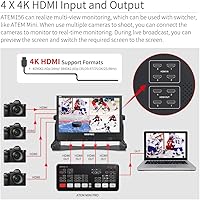
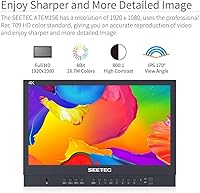
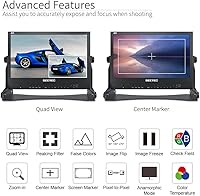
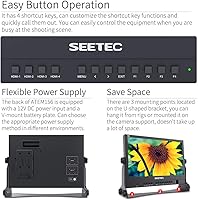
The headline feature is the four HDMI inputs and outputs — plug in up to four camera feeds, preview all of them in a quad-split layout, and loop signals out to downstream recorders or displays without interruption. The 15.6″ IPS panel delivers 1920×1080 resolution with a 170° viewing angle, meaning colors stay accurate even if you are not sitting dead-center. Focus-assist tools like Peaking Focus, False Color, and Pixel-to-Pixel mode add genuine production value for camera operators pulling focus on set. Power flexibility is a real advantage: run it off a standard 12V adapter at a desk or drop in a V-mount battery for portable events. Customizable front-panel shortcut keys keep common functions within quick reach.

Best For

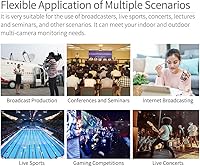
This broadcast monitor makes the most sense for solo live streaming operators who are running an ATEM Mini Pro or a similar compact switcher and cannot afford a dedicated video engineer watching separate feeds. It is a strong fit for event videographers, house-of-worship AV teams, and small studio setups where budget matters but multi-view functionality is non-negotiable. The V-mount battery compatibility makes it workable for run-and-gun shoots where AC power is not guaranteed. The HDMI loopthrough appeals to operators who need to simultaneously feed a confidence monitor or stream encoder. Where it falls short: if you work outdoors in bright conditions or need SDI connectivity, this director monitor is probably not the right tool.

User Feedback

Across its 167 ratings, the ATEM156 holds a 4.3-star average — a score reflecting genuine satisfaction alongside some real reservations. Users consistently praise the screen clarity and build quality for the price, and the plug-and-play experience within the ATEM Mini ecosystem gets frequent positive mentions. On the downside, the 250 cd/m² brightness draws criticism from anyone working in well-lit or outdoor environments — it simply washes out. There is also a known issue with HDCP-protected signals: if your source device outputs HDCP, you will need a separate HDMI splitter to strip that flag before the monitor can display the image. The included accessories — V-mount plate, bracket, and cables — are generally well received as practical additions.

Pros

  • Quad-split display shows all four HDMI sources at once — no input-switching required during live production.
  • Plug-and-play setup with the ATEM Mini Pro is fast and consistently reliable across reported user experiences.
  • Four HDMI loopthrough outputs let you feed downstream recorders or confidence monitors without signal splitters.
  • V-mount battery plate support makes this director monitor genuinely viable for location shoots without AC power.
  • Built-in Peaking Focus, False Color, and Pixel-to-Pixel tools reduce the need for a separate dedicated camera monitor.
  • IPS panel holds accurate color across a 170-degree viewing angle, useful when shared between two operators.
  • Customizable front-panel shortcut keys cut down the time spent navigating menus during live broadcasts.
  • Solid build quality and practical included accessories make the out-of-box experience feel complete for the price tier.
  • At its price point, the combination of multi-view monitoring and signal loopthrough is genuinely hard to match.

Cons

  • Screen brightness washes out noticeably in well-lit rooms and becomes nearly unusable in outdoor conditions.
  • HDCP-protected signal sources cause a blank screen — a workaround splitter purchase is required and not disclosed upfront.
  • No SDI connectivity limits usefulness in broadcast or corporate AV environments where HDMI is not the standard.
  • Front-panel buttons have no backlighting, making them difficult to locate quickly in dark event spaces.
  • Fixed quad-split layout cannot be reconfigured — no dominant main view or picture-in-picture option is available.
  • No on-screen audio metering means operators cannot visually confirm audio levels alongside their video feeds.
  • The included HDMI cable is too short for many real-world production table setups.
  • V-mount battery is not included despite battery operation being a prominently marketed feature.
  • Glossy screen surface picks up reflections in mixed-lighting environments more than a matte finish would.

Ratings

The SEETEC ATEM156 15.6″ Broadcast Director Monitor has been evaluated by our AI rating system after analyzing verified buyer reviews from global markets, with spam, bot activity, and incentivized feedback actively filtered out. Scoring reflects the real-world experiences of live streaming operators, event videographers, and small studio teams who put this broadcast monitor to work in actual productions. Both the standout strengths and the genuine frustrations are represented transparently in the scores below.
Multi-View Display Functionality
91%
The quad-split layout is the core reason most people buy this monitor, and it consistently delivers. Being able to see all four HDMI sources simultaneously during a live event — without toggling inputs — is a genuine workflow improvement for solo operators running an ATEM Mini Pro setup.
The split-view layout is fixed and not user-configurable in terms of source arrangement, which frustrates some operators who prefer a dominant main view with smaller sub-feeds. A picture-in-picture or customizable layout mode is notably absent.
HDMI Input and Output Flexibility
88%
Having four HDMI inputs and four corresponding outputs in a monitor at this price tier is legitimately rare. Users regularly loop signals out to confidence monitors, stream encoders, or projectors simultaneously, which makes this director monitor punch above its category.
There is no SDI connectivity, which limits its usefulness in more established broadcast environments where SDI cabling is the norm. Operators working on larger productions may find the HDMI-only architecture a hard blocker.
Image Clarity and Panel Quality
83%
The IPS panel renders accurate, consistent color across a wide 170-degree viewing angle, which matters when the monitor is positioned to the side of a production desk or shared between two operators. At 1080p on a 15.6-inch screen, the image is sharp and detailed enough for confident source monitoring.
The contrast ratio of 800:1 is on the lower end for professional monitoring work. In scenes with heavy shadows or highlights, some users note that the image lacks the depth they would expect from a dedicated broadcast reference display.
Brightness and Ambient Light Performance
58%
42%
In a controlled indoor setting — a studio, a church AV booth, or a darkened event space — the 250 cd/m² brightness is adequate. The image reads clearly and colors look accurate under those conditions, which covers the majority of real use cases for this type of monitor.
Step outside or into a venue with large windows and the screen becomes genuinely difficult to read. Multiple buyers specifically flag outdoor events and bright conference rooms as problematic. This is not a monitor you can use on a sunny outdoor stage without shading.
ATEM Mini Ecosystem Compatibility
93%
The plug-and-play experience with the ATEM Mini Pro is consistently praised. Users report that connecting their switcher and cameras requires no special configuration — the quad display activates immediately, which is exactly what you want when setting up quickly before a live stream.
The tight optimization around the ATEM ecosystem means users with other switcher brands occasionally report minor signal handshake delays or display quirks. It works with non-Blackmagic hardware, but the experience is clearly tuned for that specific workflow.
Focus Assist Tools
79%
21%
Peaking Focus, False Color, and Pixel-to-Pixel mode give camera operators practical tools for confirming exposure and focus without a separate dedicated monitor. For run-and-gun shoots where every piece of gear has to justify its place, having these built in is a tangible benefit.
The implementation of False Color in particular gets mixed reviews — some users find the color mapping less intuitive than what they have seen on higher-end monitors like SmallHD or Atomos units. The tools are functional but not best-in-class.
Build Quality and Durability
81%
19%
The physical construction is consistently described as solid for the price category. The chassis feels sturdy enough for regular transport between event venues, and the included aluminum-bracketed case option adds meaningful protection for operators on the move.
The screen surface uses a glossy finish, which some users find picks up reflections more than they would like in mixed-lighting environments. A few buyers also report that the front-panel buttons feel slightly plasticky under repeated daily use.
Power Options and Portability
84%
The dual power system — standard 12V DC or V-mount battery plate — is genuinely appreciated by mobile operators. Being able to run the monitor entirely off a V-mount battery during outdoor ceremonies or locations without accessible power outlets gives it real versatility.
The V-mount battery itself is not included, which surprises some buyers given the prominent marketing of battery compatibility. For operators who do not already own V-mount batteries, this adds an unplanned cost to get the full portable setup running.
HDCP Signal Compatibility
47%
53%
For users whose signal chain does not involve HDCP-protected sources — which describes most camera-direct and switcher-direct setups — this limitation is completely irrelevant and the monitor works without issue.
Anyone feeding a signal from a streaming box, game console, or HDCP-enabled device will hit a blank screen. The official workaround requires purchasing a separate HDMI splitter to strip the HDCP flag, which is an awkward and underpublicized caveat that catches buyers off guard.
Included Accessories
76%
24%
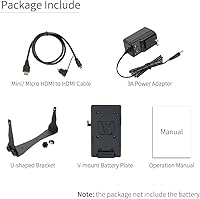
The package includes a V-mount battery plate, a U-shaped bracket, a mini/micro HDMI to HDMI cable, and a 3A power adapter — a reasonably complete out-of-box kit that lets most users get operational without an immediate accessory run.
The HDMI cable included is relatively short, and buyers setting up across a wider production table often need a longer replacement immediately. The bracket, while functional, offers limited angle adjustment compared to articulating arms most professionals already use.
Control Panel and Shortcut Keys
73%
27%
The ability to assign shortcut functions to front-panel buttons is a practical touch that speeds up switching between display modes during live production. Operators who take time to configure these report noticeably faster access to tools like Peaking and False Color.
The button layout is not backlit, which becomes a real inconvenience in dark event spaces. Several users mention having to fumble for the right button during live broadcasts, particularly when switching monitoring modes under time pressure.
Setup and Ease of Use
87%
Setup time is minimal for the target audience. Most users have all four sources displaying in a quad split within minutes of unboxing, and the menu system is straightforward enough that experienced AV operators rarely need to consult the manual.
The menu navigation is less intuitive for users who are new to dedicated broadcast monitors. Some buyers report that accessing deeper settings requires cycling through multiple menu layers, and the documentation provided does not always explain the more advanced functions clearly.
Value for Money
82%
18%
Compared to professional-tier multi-view monitors from broadcast-specific brands, the ATEM156 costs a fraction of the price while delivering the core functionality most small-scale live production operators actually need. For its target user, the cost-to-capability ratio is strong.
At its price point, buyers do expect a slightly higher brightness spec and ideally a matte screen option. The gap between this monitor and the next tier up becomes more apparent for operators whose productions are growing in scale and lighting complexity.
Audio Monitoring
66%
34%
The 3.5mm stereo headphone output gives operators a basic way to monitor program audio directly from the monitor, which is useful during single-operator setups where juggling multiple devices is impractical.
There are no dedicated audio level meters on screen, and the audio monitoring capability is limited to headphone output only — no speaker is built in. For operators who need visual audio metering alongside their video feeds, this is a notable gap.

Suitable for:

The SEETEC ATEM156 15.6″ Broadcast Director Monitor was built for a specific kind of operator, and when it lands in the right hands, it genuinely earns its place in a production kit. Solo live streamers who run an ATEM Mini Pro and need to watch all four camera feeds simultaneously — without a dedicated video engineer on hand — will find this director monitor solves a real problem at a price that does not require a broadcast budget. Event videographers covering weddings, conferences, or church services will appreciate how quickly it integrates into an existing HDMI-based switcher setup, with no complex configuration required before the cameras roll. Small AV teams running a fixed studio or a house-of-worship production booth will get the most out of its loopthrough outputs, which let them feed confidence monitors or recording devices from the same signal chain. Anyone already invested in the Blackmagic ATEM ecosystem will find this broadcast monitor feels like a natural, purposeful extension of that workflow.
Not suitable for:

The SEETEC ATEM156 15.6″ Broadcast Director Monitor is a poor fit for anyone whose productions regularly take place outdoors or in brightly lit venues — the 250 cd/m² panel simply cannot compete with ambient light, and squinting at a washed-out screen during a live event is not a workable solution. Operators in established broadcast or corporate AV environments where SDI cabling is standard will hit a hard wall immediately, since there is no SDI input or output of any kind. If your signal chain includes HDCP-protected sources — game consoles, streaming boxes, or certain presentation devices — expect a frustrating blank screen until you source a separate HDMI splitter to strip that protection layer. Anyone who needs a color-accurate reference display for grading or critical monitoring work should look elsewhere; this is a production-assist monitor, not a calibrated display. Professionals who expect audio metering, backlit controls, or a configurable multi-view layout will find those omissions add up quickly on a demanding shoot.
Specifications

  • Screen Size: The display measures 15.6″ diagonally using an IPS LCD panel technology.
  • Resolution: Native resolution is 1920×1080 pixels, delivering full HD 1080p image quality across the panel.
  • Aspect Ratio: The panel uses a standard 16:9 widescreen aspect ratio suited to modern video production formats.
  • Brightness: Maximum luminance is rated at 250 cd/m², adequate for controlled indoor environments but limited outdoors.
  • Contrast Ratio: The panel has a contrast ratio of 800:1, providing reasonable depth for production monitoring use.
  • Viewing Angle: IPS technology enables a 170-degree viewing angle in both horizontal and vertical directions with minimal color shift.
  • HDMI Inputs: Four full-size HDMI input ports accept simultaneous multi-source signals for quad-split display monitoring.
  • HDMI Outputs: Four HDMI output ports allow signal loopthrough to downstream recorders, encoders, or additional displays.
  • Audio Output: A single 3.5mm stereo headphone jack provides direct program audio monitoring from the connected source.
  • Focus Assist: Built-in tools include Peaking Focus, False Color exposure overlay, and Pixel-to-Pixel mapping mode.
  • Power Input: The monitor accepts 12V DC power via the included 3A adapter for standard desktop or studio operation.
  • Battery Mount: An included V-mount battery plate enables location use with compatible V-mount batteries, sold separately.
  • Control Interface: A front-panel button layout supports customizable shortcut key assignments for rapid access to monitoring functions.
  • Screen Surface: The panel uses a glossy screen surface finish, which may increase reflections in mixed or bright ambient lighting.
  • Unit Dimensions: The monitor body measures 372×262×28.4 mm without the optional aluminum protective case.
  • Unit Weight: Without the aluminum case, the monitor weighs 1.57 kg, making it portable for event and location use.
  • Shipping Weight: The complete boxed package weighs approximately 6.99 lbs including all included accessories.
  • Included Accessories: Package contains a V-mount battery plate, U-shaped mounting bracket, mini/micro HDMI to HDMI cable, and 3A power adapter.

Related Reviews

Topmonitor P15.6/2.5K Portable Monitor 15.6-inch 2560×1680
86%
94%
Display Quality
90%
Portability/Size/Weight
91%
Color Accuracy
87%
Connectivity (USB-C, HDMI)
85%
Build Quality
More
Upperizon 15.6″ Portable Monitor
86%
88%
Display Quality
93%
Portability
85%
Color Accuracy
90%
Ease of Setup
92%
Connectivity
More
LUMIPIX 15.6-Inch Portable Monitor
84%
91%
Portability
89%
Display Quality
93%
Ease of Setup
87%
Connectivity
84%
Build Quality
More
UPERFECT 15.6-inch 4K Monitor
86%
93%
Display Quality
88%
Portability & Weight
91%
Color Accuracy
85%
Ease of Setup
75%
Brightness Performance
More
UFYQL 15.6″ FHD Portable Monitor
84%
88%
Display Quality
95%
Portability & Weight
80%
Build Quality
90%
Ease of Setup
85%
Connectivity & Compatibility
More
Verbatim 15.6″ Portable Touchscreen Monitor
85%
94%
Display Quality
91%
Portability
82%
Touchscreen Performance
89%
Connectivity
77%
Build Quality
More
CAPERAVE 15.6-inch Portable Monitor
85%
88%
Display Quality
92%
Portability
93%
Setup and Ease of Use
90%
Compatibility
80%
Gaming Performance
More
ARZOPA S1 15.6″ Portable Monitor
86%
90%
Display Quality
93%
Portability & Weight
88%
Connectivity & Compatibility
91%
Setup & Ease of Use
85%
Build Quality
More
ZSCMALLS 15.6″ 4K Portable Monitor
87%
91%
Display Quality
95%
Portability & Weight
89%
Color Accuracy
84%
HDR Performance
93%
Ease of Setup
More
Westinghouse 15.6 Inch Portable Monitor
82%
88%
Display Quality
92%
Portability
86%
Connectivity Options
94%
Ease of Setup
80%
Build Quality
More

FAQ

Yes, and that is genuinely one of its strongest selling points. Connect your cameras to the ATEM Mini Pro, run an HDMI cable from the switcher to one of the inputs, and the quad-split display activates without any special configuration. Most users have it up and running within a few minutes of unboxing.

Yes. The SEETEC ATEM156 15.6″ Broadcast Director Monitor supports simultaneous use of all four HDMI inputs and all four HDMI outputs. This means you can monitor four live sources on screen while looping each signal out to a recorder, encoder, or secondary display at the same time — a genuinely useful capability for complex setups.
This is where you need to be careful. Many streaming boxes and game consoles output HDCP-protected HDMI signals, and this director monitor will display a blank screen if it detects HDCP encryption. The workaround is to run the signal through an HDMI splitter first, which strips the HDCP flag before it reaches the monitor. It works, but it is an extra step and an extra purchase that is not always made clear upfront.

Honestly, not really. The 250 cd/m² brightness is fine for indoor venues — studios, church AV booths, conference rooms with controlled lighting — but in direct sunlight or a brightly lit outdoor setting, the image washes out significantly. If outdoor use is a regular requirement for you, a higher-brightness monitor in the 1000 nit range would serve you better.

No, the V-mount battery plate is included but the battery itself is not. This catches some buyers off guard because battery operation is prominently featured in the product description. If you plan to run this broadcast monitor on battery power at events, factor in the additional cost of purchasing a compatible V-mount battery separately.

Unfortunately, no. The quad-split layout is fixed, displaying all four sources in equal-sized quadrants. There is no picture-in-picture mode or configurable dominant main view option. If you need a flexible multi-view layout with a larger program output window, you would need to look at a more advanced director monitor at a higher price point.

No, this monitor is HDMI-only on both inputs and outputs. There is no SDI connectivity of any kind. For productions that rely on SDI cabling — which is common in larger broadcast and corporate AV setups — this is a hard limitation and a reason to consider a different monitor.

They are a legitimate time-saver for single-operator shoots. Peaking Focus highlights sharp edges in color so you can confirm focus at a glance, False Color gives you a rough exposure map, and Pixel-to-Pixel mode maps the source signal at its native resolution. They are functional tools, though users familiar with higher-end monitors from brands like SmallHD note that the False Color implementation is less refined than what they are used to.

No, the control buttons are not backlit. This is a recurring frustration among users who operate in dark venues like wedding receptions, theatrical events, or concert productions. Fumbling for the right button during a live broadcast without any visual guidance on the panel is a real inconvenience that is worth knowing about before you buy.

Most users describe the build as solid and reassuring for the price tier — it does not feel like a fragile consumer device. The included U-shaped bracket and optional aluminum case add meaningful protection for transport. At just over 1.5 kg without the case, it is light enough to pack comfortably for regular event work. The glossy screen is the main vulnerability to watch; a screen protector is worth considering if it will be sliding in and out of a bag frequently.