Overview

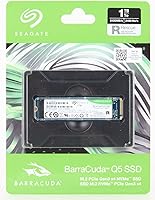
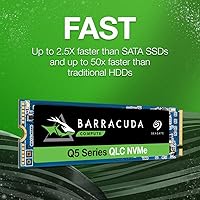
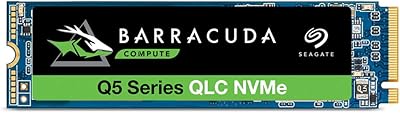
The Seagate BarraCuda Q5 1TB NVMe SSD sits squarely in the accessible end of the NVMe market — a solid entry from a brand that has shipped storage hardware for decades. It runs on a PCIe Gen3 x4 interface in the standard M.2 2280 form factor, so it slots into most modern laptops and desktops without fuss. The drive mainly targets people still running a spinning hard disk or an older SATA SSD who want a meaningful speed boost without spending a fortune. One honest caveat upfront: it uses 3D QLC NAND, which carries trade-offs under sustained heavy writes. The included 1-year Rescue Services is a genuine perk that few competitors at this tier bother to offer.

Features & Benefits

The numbers look strong on paper — sequential reads up to 2400 MB/s and writes up to 1800 MB/s — but what that actually means day-to-day is that Windows boots noticeably faster and large game installs that once crawled now finish in a fraction of the time. NVMe over PCIe Gen3 x4 genuinely outpaces SATA bandwidth in real tasks, not just synthetic tests. That said, the QLC NAND architecture means sustained write speeds can dip once the cache fills — this matters if you regularly move huge files, but most casual users will rarely hit that ceiling. The free DiscWizard software makes cloning an old drive straightforward, even for someone who has never swapped storage before.

Best For

This NVMe drive makes the most sense for someone still running a traditional spinning hard disk — the difference in boot and load times is stark enough to feel like a completely different machine. It also suits laptop owners who have a free M.2 PCIe slot and want faster app launches without rebuilding their whole system. Light workloads like web browsing, document work, and gaming libraries are squarely in its wheelhouse. Where it falls short is in heavy sequential writes — tasks like continuous 4K video encoding or large database operations will expose the QLC limits. Before buying, confirm your system has an M.2 slot that supports PCIe NVMe, not just SATA M.2, since the two are not interchangeable.

User Feedback

Across a large pool of verified buyers, the BarraCuda Q5 1TB earns consistently high marks, with most praise centered on how noticeable the speed jump feels coming from a hard drive. Installation gets called out repeatedly as painless, and DiscWizard handled data migration cleanly for most users. The Rescue Services coverage also draws genuine appreciation — not something reviewers typically highlight for a storage drive. On the critical side, a smaller number of technically inclined users flag that sustained write speeds drop under prolonged heavy loads, which aligns with the QLC architecture. Long-term endurance questions surface occasionally, though for typical everyday use the drive appears consistently reliable.

Pros

  • Boot times drop dramatically for anyone upgrading from a spinning hard disk.
  • Sequential read speeds up to 2400 MB/s make large file transfers and game loads noticeably faster.
  • The M.2 2280 form factor fits the vast majority of modern desktops and laptops.
  • Free DiscWizard software makes cloning an old drive straightforward, even for beginners.
  • The 1-year Rescue Services is a rare and genuinely useful perk at this price tier.
  • Installation is physically simple — a single screw and the drive is seated.
  • 1TB of capacity covers most everyday users without needing to manage storage constantly.
  • The BarraCuda Q5 1TB comes from a brand with a long track record in consumer storage.
  • Verified buyers consistently describe real-world performance gains, not just benchmark improvements.
  • Competitive pricing makes this NVMe drive an accessible entry point into faster storage.

Cons

  • Sustained write speeds drop once the SLC cache fills, which matters for heavy workloads.
  • QLC NAND has lower write endurance than TLC alternatives, a concern for long-term heavy use.
  • No included heatsink, which may be a consideration in thermally constrained builds.
  • DiscWizard software feels dated and lacks the polish of third-party cloning tools.
  • Only a 1-year Rescue Services window — not a substitute for a proper backup strategy.
  • No official rated TBW figure is prominently advertised, making endurance comparisons harder.
  • Relies on a DRAM-less or minimal cache design that can expose limitations under mixed workloads.
  • Not suitable for systems with only a SATA M.2 slot, which can trip up less experienced buyers.

Ratings

The scores below were generated by AI after analyzing thousands of verified buyer reviews worldwide, with spam, bot-submitted, and incentivized feedback actively filtered out to ensure the results reflect genuine ownership experiences. The Seagate BarraCuda Q5 1TB NVMe SSD earns strong marks overall, particularly from everyday users upgrading aging hardware, though a few technical trade-offs prevent a clean sweep across the board. Both the strengths and the honest pain points are reflected here so you can make a fully informed decision.
Sequential Read Speed
88%
Buyers consistently report that day-to-day tasks that once felt sluggish — booting Windows, launching Chrome with a dozen tabs, or loading a large game — feel dramatically faster. The jump from a spinning hard disk is stark enough that most users describe it as transformative for their machine.
While peak reads impress in typical workloads, users transferring very large sequential files occasionally note that real-world throughput does not always match the rated ceiling, particularly on systems with other bottlenecks in the storage pipeline.
Sequential Write Speed
74%
26%
For moderate write tasks like installing games, downloading large software packages, or saving documents, the drive handles things quickly and without hesitation. Most home users simply never push it hard enough to notice any weakness here.
Once the SLC write cache is exhausted during sustained heavy writes — think copying hundreds of gigabytes or encoding long video projects — speeds drop noticeably. This is a direct consequence of the QLC NAND architecture and is a real concern for power users.
Value for Money
91%
At its price point, getting NVMe PCIe Gen3 speeds plus a 1-year data recovery service is a combination that is hard to beat. Buyers who came from HDDs or old SATA drives feel they got significantly more than what they paid for.
Users who compare it directly against TLC-based NVMe drives at a similar or slightly higher price point occasionally feel the endurance trade-off makes the value less clear-cut for workstation or prosumer use cases.
Ease of Installation
93%
The slim M.2 2280 form factor slots in with a single screw, and multiple buyers specifically called out how physically simple the installation process was — even for first-timers who had never opened a PC before. The DiscWizard cloning tool removed the OS reinstall step for most users.
A small number of buyers were caught off guard discovering their system had a SATA-only M.2 slot, which is incompatible. This is a compatibility issue rather than a product flaw, but it generated frustrated reviews from unprepared buyers.
Real-World Boot Performance
87%
Users upgrading from traditional hard disks describe boot times dropping from over a minute to under 15 seconds. Application launches and file opens that used to involve noticeable waiting now feel near-instant, which is the single most praised aspect across the review base.
Buyers already running a mid-range SATA SSD report a less dramatic subjective improvement in boot and launch times compared to HDD upgraders, since the gains in everyday responsiveness are more incremental at that starting point.
Build Quality & Reliability
82%
18%
The drive runs cool and stable under typical workloads, and the vast majority of long-term buyers report no failures or errors after extended use. Its compact, solid construction gives it a premium feel despite the accessible price tier.
QLC NAND inherently carries lower rated write endurance than TLC alternatives, which introduces some uncertainty for buyers planning to use the drive heavily over many years. Long-term reliability data for heavy write users remains a watch point.
Sustained Workload Performance
59%
41%
For the target audience — everyday home and office users — sustained performance is rarely a concern since typical workloads stay well within the cache window where the drive performs confidently and consistently.
Technical users running benchmarks or workloads that exhaust the cache report a clear and measurable drop in write throughput. For video editors, data scientists, or anyone moving large datasets regularly, this degradation is a genuine operational pain point.
Software & Bundled Tools
76%
24%
DiscWizard successfully handled data migration for the majority of buyers who used it, sparing them a full OS reinstall. The 1-year Rescue Services subscription is genuinely valued — several buyers mentioned it as a deciding factor in their purchase.
DiscWizard's interface feels dated compared to modern cloning alternatives, and a handful of users encountered compatibility hiccups on newer Windows builds. The Rescue Services window is also limited to one year, which some buyers feel is too short.
Thermal Management
78%
22%
Under typical home and office use, the drive maintains comfortable temperatures without requiring a heatsink. Buyers in mid-tower cases with decent airflow report no thermal throttling during normal operation.
In compact laptops or tight mini-ITX builds with limited airflow, temperatures can climb during sustained workloads. No heatsink is included in the box, which means users in thermally constrained environments need to source one separately.
Compatibility
83%
The standard M.2 2280 footprint means this drive fits the overwhelming majority of modern desktops and laptops that have an NVMe slot. Most buyers had no compatibility issues and found it recognized immediately by their system.
The drive requires a PCIe NVMe-capable M.2 slot and will not work in SATA-only M.2 implementations. This trips up a small but notable number of buyers, particularly those with older budget motherboards or entry-level laptops.
Packaging & Unboxing
71%
29%
The drive arrives securely packaged with no reports of transit damage across the review base. For a component purchase, buyers generally feel the presentation is appropriate for the price tier.
The packaging is purely functional with no accessories included beyond the drive itself — no mounting screw, no installation guide, and no heatsink. Budget-minded buyers who expect a complete kit may need to source a motherboard screw separately.
Brand Trust & Support
84%
Seagate's long history in the storage market gives buyers confidence at the point of purchase. The Rescue Services backing adds a tangible layer of assurance that the brand stands behind this drive beyond a standard warranty.
Seagate's broader brand reputation carries some historical baggage from reliability issues in older product lines, which a portion of technically informed buyers still reference when evaluating trust. Customer support response times have drawn mixed feedback in some regions.
Capacity Adequacy
86%
1TB strikes the right balance for most home users — it comfortably houses a full OS install, a suite of everyday applications, and a decent library of games or media without requiring constant storage management.
Heavy media collectors, game library hoarders, or users storing large uncompressed files will find 1TB fills up faster than expected. The absence of a 2TB option at a similarly competitive price point has been noted by buyers who wish they had more headroom.

Suitable for:

The Seagate BarraCuda Q5 1TB NVMe SSD is a strong fit for everyday PC users who are still running a traditional spinning hard disk and want a transformative speed upgrade without a steep price tag. If your machine boots slowly, takes forever to open applications, or struggles with basic multitasking, swapping in this drive will make a tangible difference from day one. It is equally well-suited for laptop owners who have an open M.2 PCIe NVMe slot and want snappier performance for office work, web browsing, and gaming. First-time SSD buyers will appreciate the bundled DiscWizard software, which makes migrating data from an old drive approachable even without technical experience. The included 1-year Rescue Services is a meaningful safety net for anyone who keeps important files on their primary drive and wants some protection against accidental data loss.

Not suitable for:

The Seagate BarraCuda Q5 1TB NVMe SSD is not the right tool for users whose workflows involve sustained, heavy sequential writes over long periods. Content creators regularly working with large 4K video files, photographers batch-processing RAW images, or anyone running demanding database operations will likely encounter the cache exhaustion that QLC NAND is prone to, causing write speeds to drop noticeably. Power users who prioritize long-term endurance and consistent performance under pressure should look toward TLC-based NVMe drives, which handle sustained workloads more reliably. This drive also will not function in systems that only have a SATA-keyed M.2 slot — PCIe NVMe compatibility is a hard requirement, so checking your motherboard or laptop specs before purchasing is essential. If your storage needs exceed 1TB today, it is worth considering whether a higher-capacity option upfront saves the hassle of upgrading again soon.

Specifications

  • Brand: Manufactured by Seagate, a well-established storage brand with decades of consumer and enterprise drive production.
  • Series: Part of the BarraCuda Q5 lineup, Seagate's accessible NVMe series aimed at everyday PC upgrades.
  • Model Number: The exact model identifier for this drive is ZP1000CV3A001.
  • Capacity: Offers 1TB (1000 GB) of usable storage, with actual formatted capacity slightly lower as is standard across the industry.
  • Interface: Connects via NVMe over PCIe Gen3 x4, delivering significantly higher bandwidth than SATA-based drives.
  • Form Factor: Uses the M.2 2280 format, measuring 3.15 x 0.87 x 0.08 inches and compatible with standard M.2 slots in desktops and laptops.
  • NAND Type: Built with 3D QLC (Quad-Level Cell) NAND flash, which prioritizes storage density and cost efficiency over maximum write endurance.
  • Sequential Read: Rated for sequential read speeds of up to 2400 MB/s under optimal conditions.
  • Sequential Write: Rated for sequential write speeds of up to 1800 MB/s, though speeds can decrease during sustained heavy write operations once cache is exhausted.
  • Weight: Weighs just 0.247 ounces, making it negligible in terms of system weight impact.
  • Compatible Devices: Designed for internal installation in both desktop PCs and laptops that feature an M.2 PCIe NVMe-compatible slot.
  • Installation Type: Internal drive only — it is not designed for external or portable use.
  • Included Software: Ships with access to Seagate DiscWizard, a free data migration and cloning utility for Windows systems.
  • Rescue Services: Includes a 1-year subscription to Seagate Rescue Data Recovery Services, covering accidental data loss scenarios.
  • Release Date: First made available on November 10, 2020, and has since accumulated a substantial verified buyer review base.

Related Reviews
Seagate Barracuda Q5 500GB NVMe SSD

79%
88%
Read Performance
67%
Write Performance
92%
Value for Money
91%
Installation Experience
79%
Build Quality
More
RONGSHU 1TB NVMe SSD
87%
91%
Performance
94%
Read Speed
89%
Write Speed
88%
Installation Ease
75%
Thermal Management
More
Crucial P5 1TB NVMe SSD
84%
91%
Read Performance
88%
Write Performance
86%
Random I/O Responsiveness
71%
Thermal Management
94%
Installation Ease
More
Addlink S91 1TB NVMe SSD
89%
94%
Performance & Speed
88%
Compatibility with Devices
85%
Ease of Installation
91%
Read Speed (Max)
85%
Write Speed (Max)
More
KingSpec XG7000 1TB NVMe SSD
88%
93%
Performance in Gaming
90%
Ease of Installation
94%
Read Speed
88%
Write Speed
85%
Thermal Management
More
GiGimundo G7400 1TB NVMe SSD
86%
92%
Performance
94%
Speed (Read/Write)
84%
Thermal Management
88%
Compatibility with Gaming PCs
72%
Compatibility with PS5
More
HP EX920 1TB NVMe SSD
86%
91%
Performance
88%
Reliability
92%
Value for Money
84%
Build Quality
90%
Installation Ease
More
Samsung 980 1TB NVMe M.2 SSD
83%
91%
Read Speed Performance
78%
Write Speed Performance
83%
Value for Money
89%
Build & Reliability
94%
Installation Ease
More
WD_BLACK SN8100 1TB NVMe SSD
89%
95%
Performance
90%
Reliability
94%
Speed (Read/Write)
88%
Installation & Setup
92%
Endurance (TBW)
More
WD_BLACK 1TB SN7100 NVMe SSD
89%
94%
Read Speed Performance
89%
Write Speed Performance
92%
Power Efficiency
91%
Endurance and Longevity
87%
Value for Money
More

FAQ

It will, as long as your laptop has an M.2 slot that supports PCIe NVMe. The key thing to check is that your slot is not SATA-only M.2, because the two are physically similar but electrically different. Check your laptop manual or manufacturer spec page before ordering.

The difference is dramatic. Boot times that used to take a minute or more typically drop to under 15 seconds, and applications launch almost instantly. For most people coming from a spinning HDD, this is the single biggest performance upgrade they can make to an existing machine.

For everyday tasks like browsing, office work, gaming, and general file storage, QLC NAND performs perfectly well and you will not notice any drawback. Where it matters is sustained heavy writing — if you are regularly copying hundreds of gigabytes at a time or encoding long video files, speeds can dip once the cache fills. Casual users rarely hit that ceiling.

Yes — Seagate includes access to DiscWizard, which is a Windows-based cloning tool that lets you copy your existing drive to the new one without reinstalling your operating system. It is not the most modern interface, but it gets the job done reliably for straightforward migrations.

It is a 1-year data recovery service from Seagate that covers accidental data loss — things like accidental deletion, corruption, or drive failure. You ship the drive to Seagate and they attempt to recover your files. It is a genuine added value, though it should not replace keeping your own regular backups.

No. The PS5 requires an M.2 NVMe drive that meets Sony's specific speed and form factor requirements, and this drive does not meet the minimum read speed threshold Sony recommends. It is best suited for desktop and laptop PC use only.

A heatsink is not required for typical use, and most everyday workloads will not push temperatures into a concerning range. If you are installing it in a high-performance gaming rig or a system with poor airflow, a low-profile heatsink is a cheap precaution worth considering.

For typical home or office use, the drive should comfortably last several years. QLC NAND has lower rated write endurance than TLC alternatives on paper, but for users who are primarily reading data rather than constantly writing large amounts, real-world longevity is generally not an issue.

Technically you can place an M.2 NVMe drive into a compatible USB enclosure, but this drive is designed and rated as an internal drive. Performance in an enclosure will be bottlenecked by the USB connection, and that setup is not officially supported or warranted by Seagate.

For a primary system drive, 1TB is comfortable for the majority of everyday users — it handles a full Windows or macOS installation, a suite of applications, a decent game library, and a reasonable amount of personal files. If you store large media collections or work with uncompressed video, you may find yourself managing space more carefully.

Where to Buy