Overview

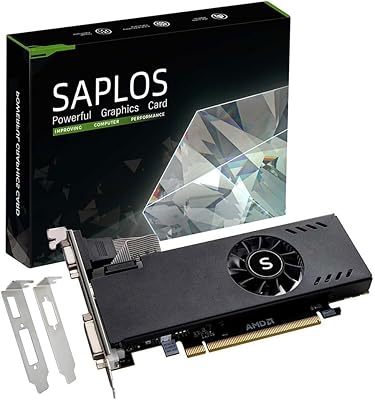
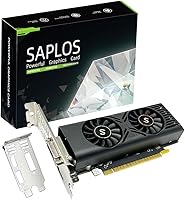
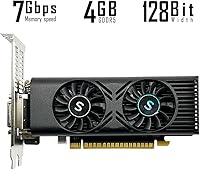
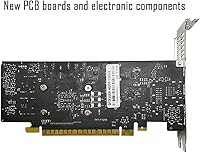
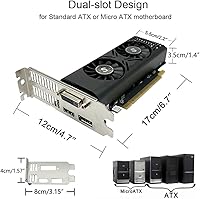
The SAPLOS GTX 1050 4GB Graphics Card is a third-party GPU built on NVIDIA's Pascal architecture — a chip that dates back to 2016 but still holds genuine utility in the right hands. SAPLOS positions it as an entry-level option for systems that need a dedicated GPU without demanding a new power supply or a larger case. The card's low-profile dual-slot design means it fits cleanly into ATX, M-ATX, and ITX builds without drama. Just be clear-eyed about what you are buying: this is not a card for pushing modern titles at high settings. It is a practical, no-fuss upgrade for machines that need basic but real graphical capability.

Features & Benefits

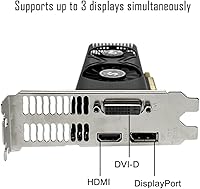
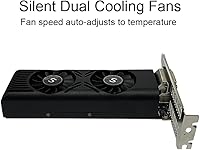
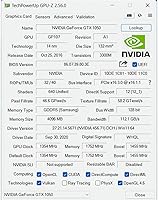
The card carries 4GB of GDDR5 VRAM across a 128-bit memory bus — sufficient for 1080p gaming in older or lighter titles and perfectly capable for HD video playback. Its 640 CUDA cores run at a boost clock of 1354 MHz, which will not win any benchmarks but does deliver smooth enough performance in games from a few years back. A genuinely practical touch is the semi-passive cooling: the dual fans sit completely silent at idle and only spin up once temperatures approach 60°C, making this a surprisingly quiet card for a home office or living room PC. HDMI, DisplayPort, and DVI-D outputs round things out, supporting up to three displays simultaneously with no external power connector required.

Best For

This GTX 1050 card makes the most sense for anyone breathing new life into an older desktop running on integrated graphics — office machines, hand-me-down family PCs, or home theater builds all come to mind. Casual gamers revisiting older libraries or playing lighter indie titles at 1080p will find it capable enough for the job. The triple-output support also makes it a reasonable pick for budget multi-monitor productivity setups. That said, be honest with yourself: if you want to run modern AAA titles, push past 1080p, or handle GPU-intensive creative work like video rendering, this SAPLOS GPU will let you down. It is a stop-gap, not a long-term gaming foundation.

User Feedback

Sitting at 4.6 stars across nearly 100 ratings, this budget graphics card has earned a reputation that largely matches its positioning. Buyers consistently point to effortless installation as a highlight — no extra power cables, no complicated setup — and the quiet idle behavior draws genuine appreciation from users in noise-sensitive environments. On the other side, a portion of reviewers note that temperatures climb noticeably under sustained gaming load, and those expecting modern gaming performance tend to walk away underwhelmed. A few mention minor inconsistencies in packaging, though driver compatibility appears reliable for most. The overall picture is a card that delivers on its promise when expectations are calibrated correctly from the start.

Pros

  • No external power connector needed — just slot it in and the system handles the rest.
  • Semi-passive cooling keeps the card completely silent during everyday desktop and light media use.
  • Supports up to three monitors simultaneously via HDMI, DisplayPort, and DVI-D outputs.
  • Low-profile dual-slot form factor fits comfortably in ATX, M-ATX, and ITX builds.
  • 4GB GDDR5 VRAM handles 1080p media playback and older game libraries without breaking a sweat.
  • Strong user satisfaction rating reflects reliable plug-and-play performance for its intended use case.
  • DirectX 12 support keeps it compatible with a wide range of software and older game titles.
  • Lightweight at under 10 ounces — easy to handle and install without tools or hassle.
  • A practical choice for anyone replacing a dead GPU in a machine that does not justify a major spend.

Cons

  • Pascal architecture dates to 2016, so long-term driver and software support will eventually become a concern.
  • 128-bit memory bus creates a noticeable bottleneck compared to even modestly newer budget cards.
  • Temperatures can climb under sustained gaming load, which may trigger audible fan spin-up over time.
  • Not compatible with Mini-ITX cases despite the low-profile design — an easy assumption to get wrong before purchasing.
  • Limited headroom for GPU-accelerated creative work like video encoding or 3D rendering pipelines.
  • Buyers expecting smooth performance in post-2020 titles at any setting will likely be disappointed.
  • Packaging inconsistencies have been flagged by some buyers, raising minor concerns about shipping quality control.
  • The 640 CUDA core count trails behind newer entry-level options available at a comparable price point.

Ratings

Our editorial team trained an AI model on verified global purchase reviews for the SAPLOS GTX 1050 4GB Graphics Card, actively filtering out incentivized, duplicate, and bot-generated submissions to surface what genuine buyers actually experienced. The scores below reflect both the real strengths that earned this budget GPU its strong satisfaction ratings and the honest pain points that tempered enthusiasm in specific use cases. Expect a transparent picture — nothing is inflated to make the card look better than it is.

Value for Money
83%
For buyers who need a working dedicated GPU on a constrained budget, this card punches at the right level. The no-external-power-connector design means no PSU upgrade is needed, which saves real money for those on older systems with modest power supplies.
As GPU pricing shifts and newer entry-level options become available, the value equation gets tighter. Buyers who stretch just slightly further in budget could land a card with meaningfully better longevity and performance.
Gaming Performance
61%
39%
Casual gamers revisiting older libraries — think RPGs and open-world titles from the mid-2010s — will find the card holds up reasonably well at 1080p on medium settings. Lighter competitive titles like Valorant also run without major issues.
Modern AAA titles expose the card's age quickly. Sustained frame rates in anything released after 2021 are inconsistent at best, and users who expected smooth 60fps in current games were frequently disappointed.
Installation Ease
93%
This is arguably where the card earns its strongest marks. No power cables, no BIOS fiddling — buyers consistently describe a slot-in-and-go experience that takes under 15 minutes even for first-time builders. Driver setup via NVIDIA's site is equally painless.
A small number of users in very compact or older OEM cases ran into minor clearance or bracket alignment issues. Nothing insurmountable, but not quite as effortless for every machine as the plug-and-play promise implies.
Cooling & Noise
78%
22%
The semi-passive fan mode is a genuinely appreciated feature in real-world use. In a home office or living room PC, the card runs completely silent during browsing, video streaming, and light productivity work — fans simply do not spin below around 60°C.
Under sustained gaming loads, temperatures climb and the fans become audible. A handful of reviewers noted that prolonged sessions pushed temperatures higher than expected, suggesting the cooler is adequate but not particularly aggressive.
Multi-Monitor Support
86%
Three simultaneous display outputs — HDMI, DisplayPort, and DVI-D — is a genuine differentiator at this price level. Productivity users setting up dual or triple-monitor workstations found the card handled the configuration without any complex setup required.
Running three displays under heavier workloads does noticeably impact GPU headroom. For gaming across multiple screens this card simply lacks the horsepower, so the multi-monitor value is really only realized in productivity and media contexts.
Build Quality
74%
26%
The card feels solidly constructed for its weight class. At just under 10 ounces it is light to handle, and the PCIe bracket and cooler assembly feel durable enough that buyers are not worried about long-term physical integrity inside the case.
A few buyers flagged inconsistencies in packaging upon delivery — minor cosmetic scuffs or loosely packed accessories. The card itself appeared undamaged in reported cases, but it is a pattern worth noting for quality control expectations.
VRAM Adequacy
66%
34%
4GB of GDDR5 is sufficient for 1080p gaming in older titles and handles HD and 4K video playback through hardware decoding without breaking a sweat. For HTPC use in particular, the memory capacity is more than enough.
The 128-bit memory bus is the real limiting factor here, not just the raw capacity. Memory-bandwidth-sensitive tasks — including some modern games even at lower resolutions — reveal the bottleneck faster than the 4GB figure alone would suggest.
Driver Stability
81%
19%
NVIDIA's Pascal driver support is mature and well-tested across Windows 10 and 11. The overwhelming majority of users reported stable operation from day one with no crashes, black screens, or compatibility conflicts after a standard driver install.
Pascal is aging in NVIDIA's driver roadmap, and long-term support will eventually be reduced. A small number of users on less common system configurations reported needing to roll back to older driver versions for stability.
Form Factor Versatility
79%
21%
The low-profile dual-slot design genuinely expands where this GPU can live. ATX, M-ATX, and ITX case owners can all fit it without modification, which matters a lot when upgrading a prebuilt or compact office machine that was not designed with a discrete GPU in mind.
The card explicitly does not fit Mini or ultra-slim cases, and a few buyers discovered this only after purchase. The distinction between ITX-compatible and Mini-ITX-not-compatible is a genuine source of confusion that catches some buyers off guard.
1080p Media Playback
91%
For home theater PC setups, this budget graphics card is close to ideal. Hardware-accelerated decoding handles 4K streaming and local video files with ease, and the silent idle fans mean movie nights are not interrupted by coil whine or fan noise.
There is little to criticize in this specific context. The only edge case is that very high-bitrate 4K HDR content on older players may occasionally stutter, though this is more a software and codec concern than a hardware limitation.
Thermal Management
67%
33%
Semi-passive cooling is a thoughtful design choice that keeps the card quiet and cool during everyday workloads. Temperatures under light loads stay comfortably low, and the fans respond quickly when the thermal threshold is reached.
At sustained full load the cooling solution is stretched. Extended gaming sessions push temperatures into ranges that are within spec but not comfortable margins, and the fans cannot keep up the way a more robust cooler on a pricier card would.
Longevity & Relevance
52%
48%
For a machine that does not need to handle demanding workloads for the next three or four years, this SAPLOS GPU buys time without requiring a full system overhaul. It is a reasonable short-term bridge for aging platforms.
The Pascal architecture is genuinely old, and software — including games, creative tools, and even some browsers — is increasingly optimized for newer GPU generations. Buyers should go in expecting a two-to-three year useful window, not a long-term investment.
Compatibility Range
84%
PCI Express 3.0 x16 is near-universal in desktop motherboards from the past ten-plus years, meaning almost any desktop with an available slot can run this card. The absence of a power connector requirement extends that compatibility to systems with small or basic PSUs.
Compatibility with very old platforms — pre-2010 motherboards or systems with PCIe 1.0 slots — can introduce bandwidth limitations, though these are edge cases. Integrated graphics laptops and Mini-form-factor desktops remain incompatible regardless.

Suitable for:

The SAPLOS GTX 1050 4GB Graphics Card is a solid fit for anyone who needs a reliable dedicated GPU without overhauling their entire system. It makes the most sense in older desktops running on integrated graphics — think a hand-me-down family PC, a basic home theater setup, or a compact office machine that just needs to drive a display or two properly. Casual gamers who play older indie titles, classic RPGs, or games from the mid-2010s at 1080p on medium settings will find the performance adequate for relaxed sessions. The no-power-connector design is a real practical advantage for anyone working with a modest PSU, and the low-profile form factor opens the door for use in M-ATX and ITX cases where space is genuinely tight. Multi-monitor users on a budget also have a compelling reason to consider it, since the card drives up to three screens simultaneously across HDMI, DisplayPort, and DVI-D — a rare convenience at this price tier.

Not suitable for:

The SAPLOS GTX 1050 4GB Graphics Card is the wrong tool if you are shopping for modern gaming performance, and it is worth being direct about that. Anyone hoping to run current AAA titles at smooth frame rates — even at 1080p — will hit a wall quickly; the Pascal architecture is nearly a decade old and shows it in demanding workloads. Content creators who rely on GPU-accelerated tasks like video encoding, 3D rendering, or working in applications such as DaVinci Resolve will find the card's 4GB VRAM and narrow memory bus a persistent bottleneck. It is also not the right fit for buyers planning to step up to 1440p or 4K resolutions, or anyone who games competitively and needs consistent high frame rates. If your system is relatively modern and you are simply looking to upgrade your GPU tier, the money is better spent on a current-generation entry-level card that will serve you meaningfully longer.

Specifications

  • GPU Chip: Powered by the NVIDIA GeForce GTX 1050, a Pascal-architecture chip originally released in 2016 and still capable in light workloads.
  • VRAM: Equipped with 4GB of GDDR5 video memory, providing enough headroom for 1080p gaming and HD media playback.
  • Memory Bus: Uses a 128-bit memory bus, which is functional for entry-level tasks but narrower than what newer budget cards typically offer.
  • CUDA Cores: Contains 640 CUDA cores for parallel processing, suited to lighter rendering and older game engines.
  • Boost Clock: Reaches a GPU boost clock of 1354 MHz, delivering stable frame rates in less demanding applications and older titles.
  • Interface: Connects via a PCI Express 3.0 x16 slot, compatible with the vast majority of desktop motherboards produced in the last decade.
  • Power Supply: Draws power entirely through the PCIe slot and requires no external power connector, making it compatible with low-wattage power supplies.
  • Display Outputs: Offers three video outputs — one HDMI, one DisplayPort, and one DVI-D — enabling simultaneous connection of up to three monitors.
  • Max Displays: Supports up to three independent displays at once, useful for basic multi-monitor productivity or entertainment setups.
  • Cooling System: Features a dual-fan semi-passive cooling design that keeps fans off during idle and light loads, spinning up only when temperatures exceed roughly 60°C.
  • Form Factor: Built as a low-profile dual-slot card measuring 6.69 x 4.72 inches, fitting comfortably in standard and compact cases.
  • Case Compatibility: Compatible with ATX, M-ATX, and ITX cases but explicitly not suited for Mini-ITX or Mini cases due to physical slot constraints.
  • Weight: Weighs just 9.9 ounces, making it one of the lighter discrete GPU options available for desktop systems.
  • DirectX Support: Supports DirectX 12, ensuring compatibility with a wide range of current and legacy software titles.
  • Brand: Manufactured and sold under the SAPLOS brand, a third-party GPU vendor building cards on licensed NVIDIA silicon.
  • Dimensions: Card body measures 6.69 inches in length and 4.72 inches in height, with a dual-slot thickness for the cooler assembly.

Related Reviews
SRhonyra GTX 1050 Ti 4GB Graphics Card
74%
91%
Multi-Monitor Output
87%
Setup & Installation
83%
Driver Stability
71%
Resolution Performance
78%
Thermal Performance
More
ASUS GTX 1050 Ti 4GB Graphics Card
82%
67%
Gaming Performance
93%
Power Efficiency
91%
Noise & Acoustics
88%
Thermal Management
86%
Build Quality
More
GPVHOSO GTX 750Ti 4GB Graphics Card
75%
71%
Value for Money
52%
Gaming Performance
89%
Power Efficiency
81%
Multi-Monitor Support
86%
Installation Ease
More
PNY GeForce GTX 1650 4GB GDDR6 Graphics Card
85%
87%
Gaming Performance (1080p)
92%
Value for Money
84%
Cooling & Thermals
90%
Setup & Installation
82%
Noise Levels
More
MSI GTX 970 Gaming 4G Graphics Card
74%
78%
1080p Gaming Performance
86%
Thermal Management
84%
Noise Level
53%
VRAM Adequacy
89%
Build Quality
More
ASUS GeForce GTX 1650 Dual-Fan 4GB Graphics Card
84%
88%
Performance at 1080p
91%
Cooling Efficiency
92%
Value for Money
80%
VR Gaming Experience
85%
Multi-Display Support
More
SAPLOS Radeon RX 550 4GB Graphics Card
81%
91%
Ease of Installation
88%
Compatibility
86%
Multi-Monitor Support
74%
Value for Money
58%
Gaming Performance
More
GIGABYTE GeForce GTX 1650 Super Graphics Card
75%
78%
Gaming Performance
86%
Thermal Management
88%
Noise Level
51%
VRAM Capacity
67%
Value for Money
More
MSI GeForce GTX 1650 D6 AERO ITX 4GB Graphics Card
85%
85%
Performance at 1080p
88%
Noise Levels
87%
Cooling Efficiency
90%
Ease of Installation
79%
VR Performance
More
ASUS TUF GTX 1650 OC Graphics Card
81%
74%
1080p Gaming Performance
91%
Build Quality
78%
Thermal Management
86%
Noise Level
88%
Driver Stability
More

FAQ

No, and that is genuinely one of its most practical advantages. This GTX 1050 card draws all its power through the PCIe slot on your motherboard, so there is no 6-pin or 8-pin connector needed. A system with a 300W or even modest off-brand PSU should handle it without issue.

It depends on your expectations. Lighter competitive titles like Valorant will run reasonably well at 1080p on lower settings. GTA V is playable but you will want to dial back visual quality. Anything more demanding than that — newer open-world games, for example — will struggle to hit consistent smooth frame rates.

Most likely yes, as long as the desktop has a free PCI Express x16 slot and is not an ultra-slim or Mini form factor chassis. The low-profile design helps here. That said, always double-check your case dimensions before purchasing, as some manufacturer-built desktops use proprietary layouts.

Yes, the card supports up to three simultaneous displays using the HDMI, DisplayPort, and DVI-D outputs together. Just keep in mind that running three screens at once increases the GPU workload, so for demanding tasks you may notice some performance trade-offs.

During idle and light use the fans do not spin at all, so the card is completely silent in those conditions. Under a sustained gaming load the fans will kick in, and some users report they become noticeable at higher temperatures. It is not unusually loud for its class, but do not expect whisper-quiet operation during long gaming sessions.

The GTX 1050 Ti carries 4GB of VRAM on a slightly wider memory bus and a modestly higher core count, which translates to roughly 10 to 20 percent better performance in most workloads. If you can find a 1050 Ti at a similar price, it is generally the smarter buy. If this SAPLOS GPU is meaningfully cheaper in your region, the gap may not matter much for very light use.

Yes. NVIDIA's Pascal drivers are compatible with Windows 11, and most users report no major issues installing and running the card under Microsoft's current OS. Just download the latest driver from NVIDIA's official site rather than relying on whatever ships on an included disc.

It should fit standard ITX cases, but not Mini or ultra-compact Mini-ITX enclosures. The card is low-profile, which is the key requirement for most ITX builds, but always verify your case's GPU length clearance against the card's 6.69-inch length before ordering.

Absolutely — this is actually one of the strongest use cases for it. It handles 4K video playback smoothly using hardware decoding, supports HDMI output for TV connection, and the silent idle fans mean you will not hear anything during a movie. It is a very clean fit for an HTPC setup.

It is about as straightforward as GPU installation gets. Power off the machine, open the case, remove the PCIe slot cover, slide the card into the x16 slot until it clicks, secure the bracket screw, close the case, boot up, and install the driver from NVIDIA's website. No power cables to route, no additional steps. Most first-timers complete it in under 15 minutes.