Overview

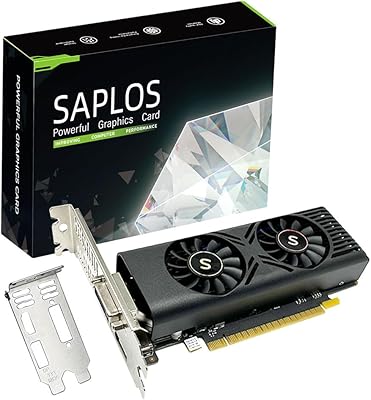
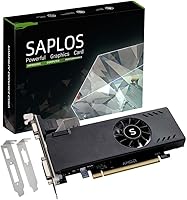
The SAPLOS Radeon RX 550 4GB Graphics Card is the kind of upgrade that makes sense for a very specific type of buyer — someone running an older desktop on integrated graphics who needs a real GPU without overhauling their whole system. It doesn't pretend to be a gaming powerhouse. What it does offer is a no-fuss installation experience, since it draws power entirely from the PCIe slot with no external connector required. The included low-profile and standard brackets mean it fits in compact SFF and mini-ITX cases as easily as full-size towers, giving budget-conscious buyers meaningful flexibility right out of the box.
Features & Benefits

With 4GB of GDDR5 memory running at an effective 6000 MHz over a 128-bit bus, this low-profile RX 550 handles 1080p productivity work and light gaming without issue. The triple-output setup — HDMI, DVI-D, and VGA — supports up to three monitors at once, which is genuinely useful for office multitasking or trading desks. At just 50W board power, it runs entirely off the PCIe slot, so most systems with a decent PSU need no further upgrades. A dual-fan aluminum heatsink keeps thermals stable and noise low. DirectX 12 and Vulkan support give it modern API compatibility that you wouldn't necessarily expect at this price tier.

Best For

This entry-level GPU makes the most sense for people coming from integrated graphics in an older office PC or pre-built desktop — the visible improvement in display output will feel substantial, even if the card itself is modest by current standards. It's also a natural fit for slim SFF cases and mini-ITX builds where a full-height card won't physically clear the chassis. Need two or three monitors off a system with a modest power supply? This handles it without requiring a PSU swap. Light gaming in older or less demanding titles is workable at 1080p, and everyday tasks like CAD work, image editing, and video playback run noticeably better than on integrated graphics alone.

User Feedback

The SAPLOS RX 550 holds a strong average rating, with most buyers highlighting how straightforward the install was — particularly those who had never swapped in a GPU before. The plug-and-play nature earns consistent praise. The bracket swap process gets more mixed feedback: some find it simple, others mention it takes a bit of careful maneuvering. On the downside, buyers hoping for meaningful gaming headroom often find the card falls short on newer titles, and more recent budget alternatives have closed the gap in raw performance. A small number of users flagged minor concerns around driver setup and build consistency, though the majority report no problems out of the box.

Pros

  • No external power connector needed — just slot it in and the system handles the rest.
  • Fits slim and small form factor cases that most GPUs simply cannot accommodate.
  • Drives up to three monitors simultaneously via HDMI, DVI-D, and VGA outputs.
  • A massive real-world improvement over integrated graphics for everyday desktop tasks.
  • At 50W board power, it will not stress older or low-wattage power supplies.
  • Dual-fan cooling keeps the card quiet even under sustained load.
  • Comes with both standard and low-profile brackets, so no extra hardware hunting is needed.
  • DirectX 12 and Vulkan support keep it compatible with modern software and APIs.
  • The installation process is straightforward enough for first-time GPU buyers.
  • Holds a strong user rating with consistently positive feedback on compatibility and ease of use.

Cons

  • Struggles noticeably with modern AAA games, even at 1080p low settings.
  • The 128-bit memory bus limits performance headroom compared to wider-bus alternatives.
  • Newer budget GPUs from AMD and Nvidia offer better performance at similar price points.
  • The bracket swap process can be fiddly for buyers with larger hands or cramped cases.
  • Driver installation occasionally causes friction for less experienced users.
  • VGA maximum resolution caps at 1920x1200, which may be limiting on newer monitors.
  • Not suited for GPU-accelerated workloads like 3D rendering or machine learning tasks.
  • Only a PCIe x8 slot connection, which could be a limitation in certain older motherboard configurations.
  • A small number of buyers have flagged inconsistency in build quality across units.
  • The performance gap versus more current entry-level cards has widened since this GPU launched in 2021.

Ratings

Our AI scoring system analyzed verified global buyer reviews for the SAPLOS Radeon RX 550 4GB Graphics Card, actively filtering out incentivized, bot-generated, and duplicate submissions to surface what real users actually experienced. The scores below reflect an honest synthesis of both what this card does well and where it falls short, weighted by review depth and purchase verification. Strengths in compatibility and ease of installation stand alongside transparent acknowledgment of its performance ceiling and competitive limitations.

Ease of Installation
91%
Buyers — including many who had never installed a GPU before — consistently praised how uncomplicated the process was. No external power connector means there are no cables to route or PSU connectors to source, and most users reported being up and running within fifteen minutes of opening the box.
A recurring minor frustration involves the bracket swap from standard to low-profile height, which requires patience and a steady hand in tight SFF cases. A small number of first-timers found the screw tolerances snug enough to cause brief confusion.
Compatibility
88%
The PCIe x8 3.0 interface paired with backward compatibility means this card slots into a wide range of older and newer motherboards without fuss. Buyers upgrading slim office desktops and HP or Dell pre-built systems reported strong out-of-the-box compatibility with minimal configuration needed.
A handful of users with very old or non-standard motherboard slot configurations noted reduced functionality, and a few reported needing to disable onboard graphics manually before the card was recognized properly.
Multi-Monitor Support
86%
For office users who need two or three screens off a single card without spending much, this low-profile RX 550 genuinely delivers. The presence of HDMI, DVI-D, and VGA on a single bracket means users can mix legacy and modern monitors without adapters in many setups.
The VGA output caps at 1920x1200, which is limiting for anyone pairing it with a higher-resolution older display. Users running three monitors simultaneously also noted that graphical tasks become noticeably sluggish when all three screens are active and in heavy use.
Value for Money
74%
26%
For its intended use case — replacing integrated graphics in a SFF or office desktop without touching the power supply — the SAPLOS RX 550 offers a meaningful functional upgrade at a price point most buyers found acceptable. Users upgrading from Intel UHD or AMD Vega integrated graphics described the improvement as substantial for everyday tasks.
The real tension is that newer budget alternatives from AMD and Nvidia have continued to close the gap at similar price levels, making the value proposition harder to justify for anyone who shops around. Buyers who researched the market reported feeling the card is priced at the high end of what its 2021-era specs warrant in 2024.
Gaming Performance
58%
42%
For casual gaming on older or less demanding titles — think indie games, older RPGs, or esports-style games at modest settings — the SAPLOS RX 550 is serviceable at 1080p. Users playing titles like Minecraft, League of Legends, or older strategy games reported smooth enough experiences for relaxed sessions.
Any attempt at modern AAA titles exposes this card's hard limits quickly. Frame rates in graphically demanding games drop to uncomfortable levels even at low settings, and the 128-bit memory bus creates a bottleneck that no driver update can resolve. This is not a card for anyone who takes PC gaming seriously.
Thermal Performance
83%
The dual-fan setup with an aluminum heatsink keeps the card stable under sustained load, and buyers running it in compact cases reported temperatures that stayed within a comfortable range. The full-PCB shroud design also helped keep dust accumulation from becoming an issue over time.
Under prolonged gaming sessions in poorly ventilated SFF cases, a few users observed the fans spinning up audibly more than expected for such a low-power card. This was more a case management issue than a card design flaw, but worth noting for buyers with especially tight or poorly airflowed enclosures.
Noise Level
84%
The dual fans run slowly under typical workloads, and most users described the card as effectively silent during office use, video playback, and light productivity tasks. Several buyers specifically called out the quiet operation as a reason they chose this card for a shared or open-plan workspace.
Under heavier load, the fans become more perceptible — not loud by any measure, but noticeable in a quiet room. Users who push the card harder than its intended workload occasionally found the fan ramp-up more noticeable than they expected.
Build Quality
71%
29%
The card feels solid for its weight class, and the full-PCB plastic shroud gives it a more complete, protected look than bare-board budget alternatives. Most buyers received units that felt well-assembled and showed no obvious defects out of the box.
A small but consistent portion of reviewers flagged inconsistencies in build quality across units — loose fan connectors, minor flex in the PCB, or cosmetic imperfections. For a card in this price tier from a lesser-known brand, this is not surprising, but it does introduce a small degree of unit-to-unit variability.
Driver Experience
69%
31%
AMD's Adrenalin driver suite is generally stable and well-supported, and most buyers had no issues getting the card recognized and running within minutes of installation on Windows 10 or 11. Automatic driver detection through Windows Update worked for a portion of users without any manual steps.
A recurring complaint involves fresh driver installs requiring more manual steps than buyers expected, particularly on older systems. Some users encountered display output issues until they sourced the correct AMD driver version directly from AMD's website rather than relying on bundled or auto-detected options.
Form Factor Flexibility
89%
Shipping with both standard and low-profile brackets is a practical decision that saves buyers from having to source aftermarket parts, and it was consistently noted as a thoughtful inclusion by buyers across SFF and full-tower builds alike. The physical dimensions make it one of the more versatile options in the low-profile GPU category.
The card is dual-slot, which in very compact SFF cases can create clearance issues with adjacent components like RAM slots or storage connectors. A minority of users in ultra-compact builds had to reseat or reroute components to accommodate the dual-slot footprint.
Productivity & Office Use
87%
For spreadsheet work, video conferencing, document editing, and general desktop productivity across multiple screens, this entry-level GPU performs comfortably and reliably. Buyers who previously struggled with laggy multi-monitor setups on integrated graphics described a noticeable, immediate improvement.
Users who tried running GPU-accelerated workflows — such as video encoding in Adobe Premiere or complex 3D modeling in Blender — found the card's VRAM and bandwidth constraints became apparent faster than expected. It handles office tasks well but is not a substitute for a proper workstation GPU.
DirectX & API Support
82%
18%
DirectX 12, Vulkan, and OpenGL 4.6 support means this card works with the full spectrum of modern software rendering pipelines, which matters for users running productivity tools that leverage GPU compute. Buyers using CAD software and media applications appreciated not hitting legacy API compatibility walls.
While API support is broad on paper, the underlying hardware limits how much benefit users actually derive from modern APIs. DirectX 12 titles still run poorly at high settings regardless of API compatibility, because the bottleneck is raw compute and memory bandwidth, not software support.
Power Efficiency
93%
A 50W board power draw with zero supplementary connectors is genuinely impressive for a card that supports three simultaneous displays and handles 1080p workloads. Buyers in regions with high electricity costs or running the card in older systems with modest PSUs specifically called out the low draw as a meaningful advantage.
The efficiency advantage comes partly because the card simply does not push hard — users who wanted more performance were not able to extract it through overclocking or power limit adjustments in a meaningful way. The power ceiling is the performance ceiling.
Packaging & Accessories
76%
24%
The inclusion of both bracket types is the standout accessory win, and most buyers found the packaging adequate for safe shipping. Cards generally arrived in good condition with all listed components present.
A small but notable number of buyers reported receiving packages where the low-profile bracket was missing, requiring them to contact SAPLOS support for a replacement — a minor but avoidable friction point that added delays for SFF users who needed that bracket to proceed with installation.

Suitable for:

The SAPLOS Radeon RX 550 4GB Graphics Card is a practical pick for anyone running an older desktop or a pre-built office PC that never shipped with a dedicated GPU. If you are living with integrated Intel or AMD graphics and wondering why videos stutter or why you cannot drive a second monitor, this card solves both problems without requiring you to touch your power supply or learn complicated installation steps. It is particularly well-suited to slim or small form factor desktops where a standard-height card would not physically fit — the included low-profile bracket handles that without any extra sourcing. Home office users who need two or three screens for spreadsheets, video calls, or trading platforms will find the triple-output setup genuinely useful. Even modest 1080p gaming on older or lighter titles is workable, making it a reasonable all-rounder for buyers whose needs sit firmly in the productivity and casual-use category.
Not suitable for:

If your primary goal is gaming at a serious level, the SAPLOS Radeon RX 550 4GB Graphics Card is not the right tool for the job. Modern AAA titles at 1080p will push this card well past its comfort zone, and chasing higher frame rates or 1440p resolution will result in consistent disappointment. Buyers who already have a mid-range or better GPU installed will see no meaningful upgrade path here — this card is a step up from integrated graphics, not a replacement for something already competent. Creative professionals running GPU-accelerated rendering, machine learning workloads, or high-resolution video editing at scale will hit the memory bandwidth ceiling quickly. It is also worth noting that newer budget options from both AMD and Nvidia have narrowed the value gap at this price tier, so shoppers with any flexibility in their budget should compare the current market before committing.
Specifications

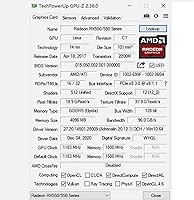
  • GPU Chip: Built on the AMD Radeon RX 550 Lexa architecture using a 14nm manufacturing process with 512 stream processors.
  • Memory: Equipped with 4GB of GDDR5 memory running at an effective speed of 6000 MHz.
  • Memory Bus: Uses a 128-bit memory bus width, appropriate for 1080p productivity and light gaming workloads.
  • Core Clock: Base GPU clock speed is 1183 MHz, with no external boost clock specified by the manufacturer.
  • Board Power: Draws just 50W of power entirely through the PCIe slot, requiring no supplementary power connector.
  • PSU Requirement: A minimum 400W system power supply is recommended for stable operation.
  • PCIe Interface: Connects via a PCI Express x8 3.0 slot, compatible with most modern and legacy desktop motherboards.
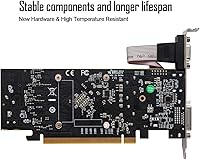
  • Display Outputs: Features three outputs: one HDMI, one DVI-D, and one VGA port, supporting up to three monitors simultaneously.
  • Max Resolution: Maximum resolution is 3840x2160 pixels over HDMI, 2560x1600 over DVI-D, and 1920x1200 over VGA.
  • API Support: Compatible with DirectX 12, Vulkan, OpenGL 4.6, OpenCL, DirectCompute, and DirectML.
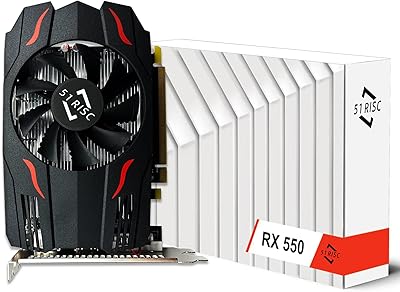
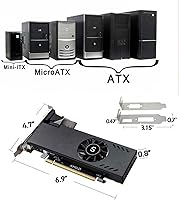
  • Form Factor: Low-profile dual-slot design measuring 6.89 x 4.72 x 0.79 inches and weighing 10.6 ounces.
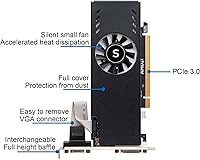
  • Cooling System: Cooled by dual fans paired with an aluminum heatsink that covers the full PCB to manage heat and block dust ingress.
  • Bracket Options: Ships with both a standard full-height bracket and a low-profile bracket, enabling installation in SFF and full-size cases alike.
  • Multi-Display: Supports up to three simultaneous display outputs across its HDMI, DVI-D, and VGA ports.
  • Chipset Brand: The GPU chipset is manufactured by AMD, with the board and electronic components assembled by SAPLOS.
  • Release Date: First made available for purchase on September 26, 2021, under ASIN B09H5RTCWD.
  • Market Rank: Holds a Best Sellers Rank of approximately #997 in the Computer Graphics Cards category on Amazon.

Related Reviews

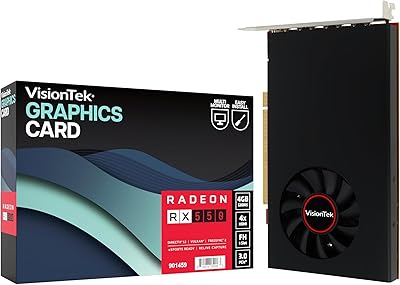
51Risc Radeon RX 550 4GB Graphics Card
81%
92%
Value for Money
85%
Gaming Performance (1080p)
88%
Power Efficiency
84%
Compatibility with Older PCs
89%
Compact Size
More
VisionTek Radeon RX 550 4GB Graphics Card
77%
91%
Multi-Monitor Output
93%
Installation Ease
44%
Gaming Performance
89%
Power Efficiency
82%
Build & Form Factor
More
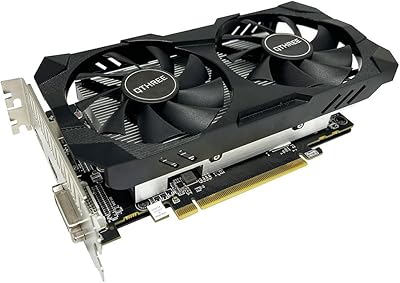
QTHREE Radeon RX 560 XT 8GB Graphics Card
68%
57%
Gaming Performance
61%
Value for Money
72%
VRAM & Memory Capacity
78%
Thermal Management & Cooling
67%
Build Quality & Physical Construction
More
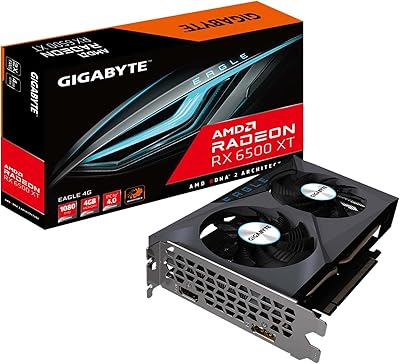
GIGABYTE Radeon RX 6500 XT Eagle 4GB Graphics Card
83%
92%
Value for Money
88%
Gaming Performance (1080p)
90%
Cooling System Efficiency
63%
4K Performance
84%
Build Quality
More
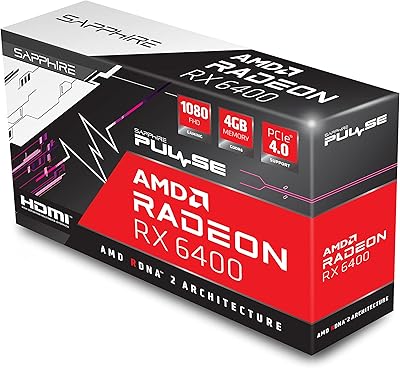
Sapphire Pulse AMD Radeon RX 6400 4GB Graphics Card
85%
91%
Value for Money
85%
Gaming Performance (1080p)
87%
Cooling System (Noise/Effectiveness)
92%
Compact Size for Small PC Builds
90%
Ease of Installation
More
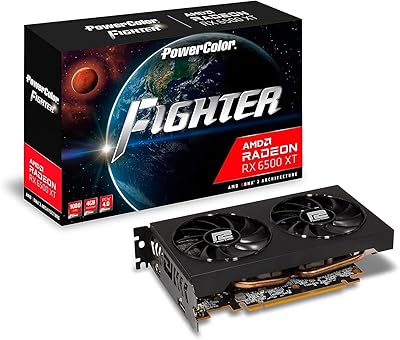
PowerColor Fighter AMD Radeon RX 6500 XT 4GB Graphics Card
82%
91%
Value for Money
89%
1080p Gaming Performance
85%
Build Quality
88%
Power Efficiency
84%
Setup & Installation
More
PowerColor AMD Radeon RX 550 2GB GDDR5 Low Profile Graphics Card
83%
91%
Value for Money
85%
Performance for Basic Gaming
96%
Low-Profile Design for Compact Builds
89%
Ease of Installation
92%
Power Efficiency
More
SAPLOS GTX 1050 4GB GDDR5 Graphics Card
83%
92%
Value for Money
85%
Performance for Gaming
90%
Cooling & Noise
88%
Build Quality
91%
Ease of Installation
More
AMD Radeon RX 6950 XT Graphics Card
72%
92%
4K Gaming Performance
94%
VRAM Capacity & Bandwidth
51%
Power Consumption
48%
Physical Size & Case Fit
67%
Driver Stability
More
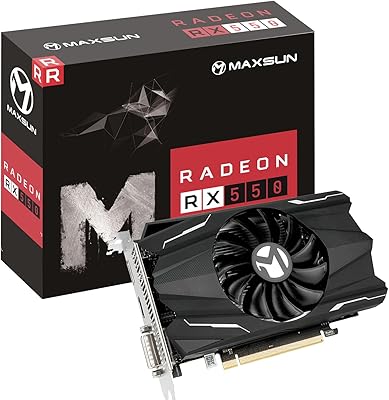
Maxsun Radeon RX 550 4GB Graphics Card
78%
83%
Value for Money
61%
Gaming Performance
91%
Installation & Setup
78%
Noise Level
79%
Build Quality
More

FAQ

Almost certainly not. This low-profile RX 550 draws only 50W and pulls all of that power directly from the PCIe slot — there is no external connector to worry about. As long as your system has a power supply rated at 400W or above, you should be fine without any changes.

It is specifically designed with that in mind. The box includes both a standard bracket and a low-profile bracket, so you can swap to whichever fits your case. Most SFF and mini-ITX builds that accept a dual-slot card will accommodate it without issue — just check your case's maximum card length against the 6.89-inch measurement to be sure.

Yes. The card has three active output ports — HDMI, DVI-D, and VGA — and supports up to three simultaneous displays. This makes it a genuinely useful option for multi-monitor office setups, especially in systems that previously relied on a single integrated graphics output.

It depends entirely on what you want to play. Older titles and less demanding games run reasonably well at 1080p on lower settings. If you are hoping to play modern AAA games at high frame rates or high quality settings, this card will struggle — it is not built for that kind of workload, and expectations should be set accordingly.

It is a straightforward process, though it requires a small screwdriver and a bit of patience. You remove the screws holding the existing bracket to the card, swap it out for the low-profile version included in the box, and reattach. Most buyers report completing it in a few minutes, though the tolerances can be tight so take your time and do not force anything.

Yes, AMD provides driver support for the RX 550 under Windows 11 through its Adrenalin software suite. You can download the appropriate driver directly from AMD's website after installation. A small number of users have noted that driver setup requires a couple of extra steps on fresh installs, so downloading drivers ahead of time is a good idea.

Absolutely. This entry-level GPU is one of the more approachable cards to install precisely because it needs no external power connection. You seat it in the PCIe slot, secure the bracket screw, connect your monitor cable, and install the driver. There are plenty of step-by-step video guides available online specific to this card if you want visual reassurance.

In most cases, yes. The card uses a PCIe x8 3.0 interface, which is backward compatible with PCIe x16 and older PCIe 2.0 slots. If your motherboard has an available PCIe x4 slot only, the card will seat physically but may not perform at its rated capacity. Check your motherboard specs if you are unsure.

Most users describe this card as quiet, especially compared to older single-fan designs. The dual-fan setup combined with a 50W power draw means the card rarely needs to spin its fans aggressively. Under typical office or light gaming conditions, you are unlikely to notice it over normal desktop ambient noise.

For basic video playback, light editing in software like Premiere or DaVinci Resolve at 1080p, and 3D CAD applications like AutoCAD, it performs meaningfully better than integrated graphics and handles everyday workloads capably. That said, if you are doing heavy GPU-accelerated rendering, working with 4K timelines regularly, or running complex simulations, the 4GB of VRAM and 128-bit bus will eventually become a bottleneck.