Samsung M70B 43″ 4K Smart Monitor



Overview
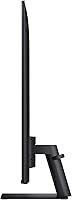
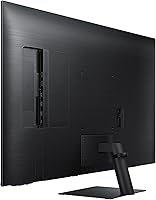
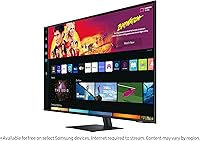
The Samsung M70B 43″ 4K Smart Monitor occupies an interesting middle ground — part large-screen display, part streaming device, part desktop workstation, all in a single 43-inch panel. The core pitch is simple: browse, stream, and video call with no PC required. Build quality is clean; slim bezels keep the aesthetic tidy whether you are desk-mounting or wall-hanging, and the included stand and remote feel well-made for the price. LG MyView and Amazon Fire TV monitors are the natural comparisons in this category. One honest caveat upfront: at 60Hz and 4ms, this is a casual-use panel, not a competitive gaming display.
Features & Benefits
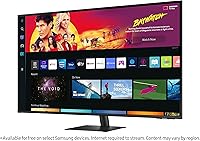
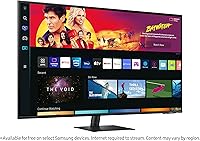
The picture quality holds up well for streaming — 4K HDR10 content looks crisp and vivid, a real step up from a typical laptop screen. Tizen OS provides solid access to Netflix and YouTube and Samsung TV Plus out of the box, though the app catalog is narrower than you would find on a dedicated smart TV. The USB-C connection is arguably the most practical feature for desk users; one cable handles both display output and laptop charging. Far Field Voice for Alexa and Bixby works reasonably well at a distance, though accuracy drops in noisier rooms. SmartThings integration is a genuine perk for Samsung smart home households and largely irrelevant to everyone else.
Best For
This all-in-one display is built for a specific type of buyer, and it is worth being clear about that. Work-from-home users with limited desk space will appreciate having productivity, video calls, and entertainment all handled by one screen. Cord-cutters who want a large-format panel in a bedroom or second room — without the installation commitment of a proper TV — will find it fits naturally. Students and apartment dwellers benefit most from the combined footprint. The payoff grows significantly if you are already in the Samsung ecosystem — Galaxy phone users and SmartThings households unlock noticeably more of what the software side offers. Casual gamers who prioritize screen size over frame rates will also be satisfied.
User Feedback
Across more than 1,200 ratings, the M70B lands at 4.2 stars — an honest reflection of a monitor that does most things competently without standing out in any single area. Buyers regularly highlight picture clarity and USB-C convenience as the strongest points. The complaints, however, are consistent: the built-in speakers routinely disappoint for a screen this size, described by many as thin and underpowered. The SlimFit Camera is another sore point — it is not included in every retail configuration, which surprises buyers who assumed it shipped in the box based on promotional images. Occasional Tizen lag and a limited app selection round out the recurring frustrations, while long-term reliability appears generally solid for most owners.
Pros
- One USB-C cable connects a laptop, charges it, and drives the full 4K display simultaneously.
- At 43 inches, the screen size is large enough to genuinely replace both a monitor and a secondary TV.
- 4K HDR10 streaming content looks sharp and vibrant, especially in a controlled lighting environment.
- Built-in Alexa with Far Field Voice allows hands-free media control from across the room.
- AirPlay 2 lets Apple device users mirror iPhones, iPads, and Macs wirelessly without extra hardware.
- Tizen OS loads fast and the interface is intuitive enough for non-technical users to navigate without a manual.
- VESA 100×100mm compatibility gives flexibility for wall mounting or third-party monitor arms.
- Samsung DeX support lets Galaxy phone users run a desktop-style workspace directly on the M70B.
- SmartThings integration is genuinely convenient for controlling smart home devices from a central screen.
- Long-term hardware reliability is solid, with most buyers reporting stable performance over two-plus years.
Cons
- Built-in speakers are noticeably thin and distorted at volume — an external speaker is almost mandatory.
- The Tizen app library has real gaps; certain streaming services are missing or region-restricted.
- The SlimFit Camera does not ship in every retail configuration despite appearing prominently in product images.
- 60Hz refresh rate makes this all-in-one display unsuitable for fast-paced or competitive gaming.
- Brightness in well-lit or sunlit rooms falls short of what a dedicated TV or premium monitor can deliver.
- Occasional Tizen software freezes require a full power cycle to resolve — reported consistently by long-term owners.
- SmartThings and IoT hub features offer almost no practical value outside the Samsung smart home ecosystem.
- USB-C power delivery may not fully charge larger, power-hungry laptops under sustained heavy workloads.
- Onboard processor struggles with demanding multitasking, limiting the PC-free productivity use case.
- Remote PC access and DeX setup involve more technical steps than most casual buyers expect from the out-of-box experience.
Ratings
The Samsung M70B 43″ 4K Smart Monitor has been scored by our AI system after analyzing thousands of verified global buyer reviews, with spam, bot activity, and incentivized feedback actively filtered out. The scores below reflect the real-world consensus — where this all-in-one display genuinely delivers and where it falls short — so you can make a clear-eyed purchase decision.
Picture Quality
Smart Platform & App Selection
USB-C Connectivity
PC-Free Productivity
Gaming Performance
Voice Assistant Performance
SmartThings & IoT Integration
Build Quality & Design
Audio Quality
SlimFit Camera Usability
Wireless Display & AirPlay
Setup & Ease of Use
Value for Money
Long-Term Reliability
Suitable for:
The Samsung M70B 43″ 4K Smart Monitor was built for people who want one screen to handle everything — and that buyer profile is more specific than it sounds. Work-from-home professionals with limited desk space will find real value here: a single USB-C cable connects a laptop, handles charging, and fills a 43-inch 4K panel, which is a genuinely practical setup for back-to-back video calls and document work. Cord-cutters who want a large streaming screen in a bedroom or apartment without bolting a full TV to the wall are another natural fit, especially since Tizen OS runs Netflix and YouTube without any extra hardware. Students sharing a small living space benefit most, using this all-in-one display as a monitor by day and a streaming hub by night. Samsung Galaxy device owners and SmartThings smart home users will also get meaningfully more out of the software features than buyers outside that ecosystem.
Not suitable for:
The Samsung M70B 43″ 4K Smart Monitor is the wrong purchase for several clearly defined buyer types, and being honest about that saves real frustration. Competitive or even moderately serious gamers should look elsewhere — 60Hz with no variable refresh rate support is a hard ceiling that no amount of screen size compensates for in fast-paced titles. Buyers who want a dedicated home theater display will find the built-in speakers embarrassingly underwhelming for a panel this size and will likely be disappointed by the brightness limitations compared to QLED or OLED alternatives at similar price points. Pure productivity users who already own a laptop or desktop and just need a sharp external display can find more capable monitors with better color accuracy and panel specs without paying for smart features they will never use. Anyone expecting a full smart TV app ecosystem — including access to every major streaming service — should verify regional Tizen app availability carefully before buying, since the catalog has notable gaps compared to Roku or Google TV platforms.
Specifications
- Screen Size: The panel measures 43 inches diagonally, providing a large viewing area suited for both desk work and casual entertainment.
- Resolution: Native resolution is 3840×2160 pixels (4K UHD), delivering sharp detail for streaming content and document editing at typical desk distances.
- Panel Type: Uses an LED-backlit LCD panel, which provides solid brightness uniformity but does not offer the per-pixel contrast control of OLED technology.
- Refresh Rate: The display runs at a fixed 60Hz, which is adequate for productivity and streaming but falls short of what dedicated gaming monitors offer.
- Response Time: Rated at 4ms response time, making it suitable for casual use and video playback but not optimized for competitive or fast-paced gaming.
- HDR Support: Supports HDR10, enabling compatible streaming content to render with expanded contrast and color range compared to standard dynamic range output.
- Operating System: Runs Samsung Tizen OS, the same platform used on Samsung smart TVs, providing access to built-in streaming apps and the Universal Guide interface.
- Connectivity: Ports include one USB-C, one or more HDMI inputs, three USB 2.0 ports, one USB 3.0 port, with wireless options via Wi-Fi and Bluetooth.
- Voice Assistants: Supports both Amazon Alexa and Samsung Bixby with Far Field Voice detection, enabling hands-free commands from across the room.
- Smart Features: Includes SmartThings IoT hub, AirPlay 2 for Apple device mirroring, Samsung DeX for Galaxy mobile-to-desktop workflow, and Samsung TV Plus free streaming.
- Aspect Ratio: Standard 16:9 widescreen aspect ratio, consistent with most streaming content, productivity software, and console gaming formats.
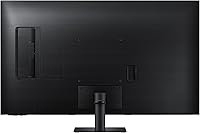
- Dimensions: With the stand attached, the unit measures 9.7″ deep, 38″ wide, and 24.8″ tall, requiring a reasonably deep and wide desk surface.
- Weight: The monitor weighs 23.4 pounds with stand, which is on the heavier side for a desk monitor and relevant for wall-mount load rating checks.
- VESA Mount: Compatible with the 100×100mm VESA standard, allowing use with a wide range of third-party wall mounts and monitor arms.
- Power Supply: Operates on AC 100–240V input, making it compatible with standard power outlets in North America, Europe, and most international markets.
- Operating Temp: Rated for use in environments between 10°C and 40°C (50°F to 104°F), covering typical indoor residential and office conditions.
- Model Number: The official Samsung model identifier is LS43BM702UNXZA, which should be referenced when searching for compatible accessories or warranty support.
- Color & Finish: Available in Black with a matte finish on the housing, which minimizes fingerprints on the rear casing and reduces glare on the bezel.
- Included Items: The retail package includes the monitor, stand, remote control, and power cable; the SlimFit Camera is not included in all configurations and must be verified at purchase.
- Launch Date: The M70B series was first made available in May 2022, meaning software updates and long-term owner feedback are available for buyers researching reliability.
Related Reviews
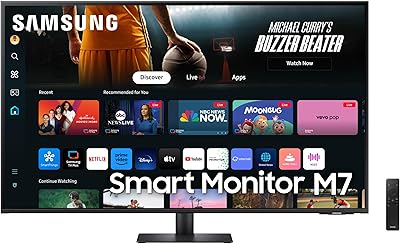
Samsung 43-Inch M7 4K UHD Smart Monitor
Samsung 43″ Odyssey Neo G7 Gaming Monitor
Samsung M8 32-Inch 4K Smart Monitor
Samsung U8000F 43-inch 4K Smart TV
Samsung 43-inch Q8F QLED 4K Smart TV
Samsung The Frame 43-Inch 4K Smart TV
ViewSonic VX4381-4K 43-inch 4K Monitor
Samsung S80UA 27″ 4K UHD IPS Monitor
Samsung S8 27-inch 4K IPS Monitor