Overview

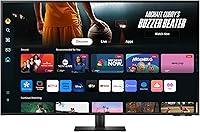
The Samsung 43-Inch M7 4K UHD Smart Monitor offers a dynamic and versatile display suitable for both professional and personal use. This 43-inch monitor provides crisp 4K UHD resolution, making it ideal for detailed work, immersive gaming, and high-quality streaming. With features like Samsung TV Plus, it offers access to live TV and on-demand content without the need for a separate device. Additionally, the built-in speakers and SolarCell remote add both functionality and sustainability, making this a well-rounded choice for any tech-savvy user. Whether for work or leisure, this smart monitor has something for everyone.
Features & Benefits

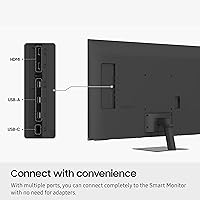
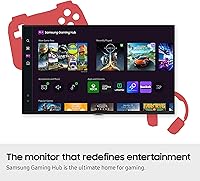
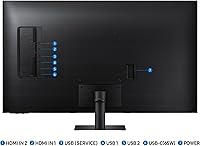
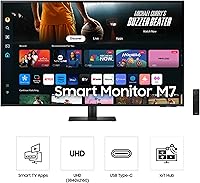
The 4K UHD resolution of this Samsung smart monitor delivers impressive visual clarity, bringing all content to life with vivid detail. Its multiple ports, including USB-C, HDMI, and USB-A, ensure easy connectivity to various devices, while also supporting fast data transfer and device charging. For gamers, the Samsung Gaming Hub provides a PC-less gaming experience, and the monitor’s low vision accessibility tools cater to users who need screen magnification or color adjustments. The eco-friendly SolarCell remote is a standout feature, helping to reduce reliance on disposable batteries.

Best For

This 43-inch monitor is best suited for users who need a large, high-quality display for multitasking and productivity. It also caters to gamers who want an easy setup without relying on a PC or console. People who enjoy streaming will appreciate the built-in access to Samsung TV Plus and other smart TV features. Additionally, those who prioritize sustainability will find the SolarCell remote a major draw, reducing the need for disposable batteries. Its balance of performance, features, and eco-friendliness makes it a great all-in-one choice for many types of users.

User Feedback

Overall, users are impressed by the vivid image quality and versatility of this monitor, particularly its smart features and seamless integration with Samsung TV Plus. However, some note that the initial setup can be a bit challenging, especially with calibrating the color settings. Despite this, the monitor’s large screen size and multi-device connectivity earn praise, especially for those using it for both work and leisure. The SolarCell remote is also appreciated for its ease of use and sustainable design. On the downside, a few users mention that the built-in speakers could be louder for a more immersive experience.

Pros

  • The 4K UHD resolution provides clear, vibrant visuals, making it ideal for high-detail work and immersive gaming.
  • USB-C and multiple ports ensure easy connectivity with various devices, reducing the need for adapters.
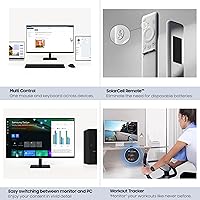
  • The SolarCell remote offers an eco-friendly solution for controlling the monitor without frequent battery replacements.
  • Samsung Gaming Hub allows for PC-less gaming, making it a great option for casual gamers who prefer a simple setup.
  • The built-in speakers offer decent sound quality, suitable for casual use and streaming.
  • Vision accessibility tools provide added convenience for users with low vision, improving usability for a wider range of users.

Cons

  • The 60Hz refresh rate may not satisfy gamers who prefer faster response times for competitive gaming.
  • Some users report that the Tizen OS can be slow or buggy, which may affect the user experience with apps.
  • The 43-inch screen may be too large for small workspaces, making it less suitable for users with limited desk space.
  • The built-in speakers lack depth and power, which may not meet the needs of those seeking immersive audio experiences.
  • Initial setup and calibration can be confusing, particularly for users unfamiliar with smart monitors.
  • The monitor’s limited height adjustability might not offer the optimal viewing angles for all users.

Ratings

After analyzing verified user feedback from multiple platforms and languages worldwide, the reviews for the Samsung 43-Inch M7 4K UHD Smart Monitor show a mix of strong performance and occasional pain points. Our analysis filtered out spam, bot, incentivized, and off-topic reviews, ensuring only genuine and high-quality feedback informed the scores. While users appreciate its versatility, image quality, and eco-friendly features, some note challenges with setup and sound quality. Both strengths and weaknesses are reflected in the final ratings, offering a balanced view from diverse sources.
Display Quality
94%
Users consistently praise the vibrant 4K UHD resolution, with many noting that the display offers crisp, clear visuals for both work and entertainment. The large 43-inch screen size provides ample space for multitasking and viewing content in high definition, making it ideal for productivity and immersive media experiences.
Some users report that the brightness levels could be better for optimal viewing in very bright rooms. A few buyers also mention that the color calibration requires some fine-tuning out of the box to achieve the best results, especially for professional photo and video editing tasks.
Value for Money
89%
Many users find this monitor offers great value for the price, especially considering its 4K resolution and smart TV features. The built-in speakers and eco-friendly SolarCell remote are additional perks that enhance the overall experience without increasing the cost.
A few customers feel that while the monitor performs well, the pricing could be more competitive compared to similar models in the market, especially when considering that there are cheaper 4K monitors available without the smart TV functionality.
Gaming Performance
86%
Gamers appreciate the seamless PC-less gaming experience offered by the Samsung Gaming Hub. The 4K resolution, coupled with the large display, makes for an immersive gaming environment, while the easy connectivity options allow for quick setup with minimal hassle.
Some users mention that the refresh rate of 60Hz might not be enough for fast-paced, competitive gaming. Additionally, a few buyers report experiencing occasional lag or input delay, which detracts from the overall gaming performance, especially for high-speed titles.
Ease of Setup
75%
25%
For most users, the setup process is relatively straightforward, with clear instructions and the ability to connect quickly via USB-C or HDMI. The wireless Wi-Fi and Bluetooth connectivity options also make it easy to integrate into home or office environments.
Several users find the initial setup a bit cumbersome, especially when it comes to calibrating the display and connecting to Wi-Fi or streaming apps. Some also report issues with the Tizen OS, finding it unintuitive or slower than expected, which can make the process feel frustrating.
Eco-Friendly Features
92%
A standout feature for many buyers is the SolarCell remote, which eliminates the need for disposable batteries. The monitor's energy-efficient design is also a plus for those conscious of their environmental impact, making this product an appealing choice for eco-friendly consumers.
While the SolarCell remote is a great eco-conscious feature, a few users note that it requires ample lighting to charge effectively. Some also feel that the remote's range could be improved for more consistent performance in larger rooms.
Sound Quality
68%
32%
The built-in 10W speakers offer decent sound quality for casual use, providing clear audio for basic tasks like watching videos or streaming shows. It’s a convenient feature for those who don’t want to invest in separate external speakers.
Many users are disappointed with the sound quality, as the built-in speakers tend to lack depth and bass. For those who prioritize audio quality, an external sound system may be necessary to achieve a richer, more immersive sound experience.
Connectivity Options
88%
The variety of connectivity options, including USB-C, HDMI, and Bluetooth, make it easy to connect this device to a wide range of devices, from laptops to gaming consoles. The inclusion of both wired and wireless connections provides flexibility for different setups.
Some users mention that while the USB-C port is convenient, it would have been better if it supported higher data transfer speeds for use with more demanding devices. Additionally, a few buyers report that connecting multiple devices simultaneously can occasionally cause connectivity issues or interference.
Build Quality
90%
The build quality of the monitor is solid, with a sleek and modern design that fits well in most work and home environments. It feels sturdy and is built to last, even with frequent adjustments to the tilt or angle of the screen.
A few users note that while the monitor is sturdy, the stand could be more adjustable. Some would prefer more flexibility in height adjustment, as the fixed stand can make it challenging to find the optimal viewing position for certain desk setups.
Software/Smart Features
85%
The Tizen operating system provides a smooth experience for streaming and accessing various apps like Netflix, Hulu, and YouTube directly from the monitor. Many appreciate the convenience of having these features built into the device without needing a separate streaming box.
Some users find the Tizen OS a bit slow or buggy at times. While the apps are generally useful, occasional crashes or delays when switching between them can be frustrating, especially when users are looking for a seamless experience.
Vision Accessibility Features
91%
The monitor offers excellent accessibility features, such as adjustable text sizes and high-contrast modes, making it more user-friendly for individuals with low vision. This focus on inclusivity is a significant plus for many buyers.
Although the accessibility options are appreciated, a few users feel that the implementation could be more advanced. For example, some would like to see more customization options or the addition of voice control features to further enhance accessibility.
Customer Support
78%
22%
When customers have had issues, some have reported receiving helpful support from Samsung's customer service team, especially for troubleshooting setup and connectivity problems. Warranty coverage is another plus for buyers who may experience issues down the line.
However, a number of users mention that customer support can be slow to respond, and issues with setup or calibration are sometimes not resolved in a timely manner. Some feel that a more proactive approach to problem-solving would improve the overall support experience.
Long-Term Durability
80%
20%
Users have noted that the device holds up well over time, with no significant wear and tear reported after extended use. The solid build quality contributes to its durability, even with regular adjustments and use for both work and entertainment.
While the monitor seems durable, a few customers express concerns about the potential for screen burn-in or fading over time, especially with heavy use of static images or over prolonged hours of gaming or watching movies.
Size and Weight
83%
The 43-inch screen size offers a large and immersive display, making it perfect for multitasking, streaming, or gaming. The weight is manageable for its size, and most users find it easy to move or adjust as needed in various setups.
A few users mention that the monitor's size can be overwhelming for smaller workspaces or desks. Additionally, while the weight is manageable, it may still require assistance for setup, especially if you plan on wall-mounting it.
Overall Satisfaction
88%
Overall, most users are satisfied with this monitor’s performance, especially considering its 4K resolution, eco-friendly features, and versatility for work and entertainment. Its ease of connectivity and the convenience of built-in smart features add to its appeal.
However, a few customers feel that some of the minor drawbacks—such as the sound quality and occasional connectivity issues—detract from the overall satisfaction. Despite this, most still consider it a good value for the price.

Suitable for:

The Samsung 43-Inch M7 4K UHD Smart Monitor is ideal for users who need a large, high-quality display for both work and entertainment. Its 4K resolution, smart TV features, and built-in SolarCell remote make it a versatile option for office environments, gaming, and streaming. Professionals working with detailed visuals, such as graphic designers or video editors, will appreciate the sharpness and color accuracy. Gamers who want a large screen without the hassle of a PC will find the Samsung Gaming Hub particularly useful. Additionally, those with eco-conscious values will enjoy its energy-efficient features, especially the solar-powered remote, which aligns with sustainable lifestyles.
Not suitable for:

However, this monitor may not be the best fit for users with specific performance needs. Gamers seeking ultra-fast refresh rates for competitive gaming may be disappointed with the 60Hz refresh rate, which can cause lag in fast-paced games. The built-in speakers also lack the depth and volume required for those looking for a more immersive sound experience. Additionally, users with smaller spaces might find the 43-inch screen overwhelming, and the limited height adjustability may hinder optimal viewing angles. Some buyers also report that the Tizen OS can be slow or buggy at times, which could be frustrating for those who value smooth app performance.

Specifications

  • Screen Size: The display is 43 inches diagonally, offering a large screen ideal for multitasking and entertainment.
  • Resolution: It features a 4K UHD resolution (3840 x 2160), delivering sharp and detailed visuals for a high-quality viewing experience.
  • Panel Type: The monitor uses a VA (Vertical Alignment) panel, providing good contrast and color accuracy.
  • Aspect Ratio: The display has a 16:9 aspect ratio, which is standard for most multimedia and productivity tasks.
  • Refresh Rate: It supports a 60Hz refresh rate, suitable for general use but may be limiting for fast-paced gaming.
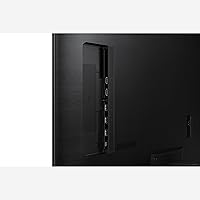
  • Ports: The monitor includes USB-C, HDMI, and USB-A ports, offering versatile connectivity for various devices.
  • Speakers: It comes with built-in 10W speakers, providing basic audio for general use and streaming.
  • Operating System: The monitor runs on Samsung's Tizen OS, enabling smart features like app access and streaming services.
  • SolarCell Remote: Included is a SolarCell remote, which uses solar energy for charging, eliminating the need for disposable batteries.
  • Gaming Hub: The monitor supports Samsung's Gaming Hub, allowing you to stream games without needing a PC or console.
  • Connectivity: It supports both wireless Wi-Fi and Bluetooth connectivity, making it easy to connect to external devices without cables.
  • Vision Accessibility: This monitor includes vision accessibility tools such as screen magnification and high-contrast modes, catering to users with low vision.
  • Dimensions: The dimensions of the monitor are 9.7 x 38 x 24.8 inches, making it a relatively large display for desk setups.
  • Weight: The monitor weighs approximately 23.4 pounds, which is manageable for most users but may require support for mounting.
  • Power Consumption: The monitor is designed to be energy-efficient, especially with the eco-friendly SolarCell remote.
  • Compatibility: It is compatible with a wide range of devices, including laptops, consoles, and mobile devices via USB-C and HDMI.
  • Mounting: The monitor can be wall-mounted using a compatible VESA mount, providing flexibility in how you position it.
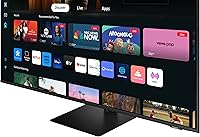
  • Smart TV Features: With Samsung TV Plus integration, you can enjoy free live TV and on-demand content directly on the monitor.

FAQ

To set up this monitor, simply connect it to your power source, then use the included USB-C or HDMI cable to link it to your computer or other device. Follow the on-screen prompts to connect to Wi-Fi, and you'll be ready to start using it. If you want to stream content, make sure to connect your accounts to apps like Samsung TV Plus.

This monitor offers multiple connectivity options, including USB-C, HDMI, and USB-A ports, allowing you to connect a variety of devices like laptops, game consoles, and USB accessories. It also supports wireless connections via Bluetooth and Wi-Fi.

Yes, the Samsung 43-Inch M7 4K UHD Smart Monitor features Samsung's Gaming Hub, allowing you to stream games directly without the need for a PC or console. You can access games via cloud gaming services like Xbox Cloud Gaming or others compatible with the device.

Yes, the monitor comes with built-in 10W speakers, providing basic audio for casual use. While the sound quality is sufficient for most everyday activities, audiophiles or users looking for a deeper sound experience may want to consider external speakers or a soundbar.

The SolarCell remote is an eco-friendly controller that uses solar energy to recharge. It eliminates the need for disposable batteries, offering a sustainable solution for controlling the monitor. Simply place it in a well-lit area to keep it charged.

Unfortunately, the Samsung 43-Inch M7 4K UHD Smart Monitor does not offer height adjustability. While the monitor can be tilted, users looking for flexible ergonomic adjustments should consider using a separate stand or mount that allows height customization.
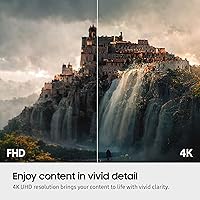
This monitor is highly versatile, making it ideal for multitasking, streaming, gaming, and office work. Its large 43-inch screen size is perfect for users who need a spacious display for productivity, while its 4K resolution ensures sharp visuals for both work and entertainment.

Generally, this monitor is compatible with most modern devices via USB-C, HDMI, and wireless connections. However, some users have noted occasional issues with certain apps or software on the Tizen operating system. Be sure to check app compatibility before purchase if you plan to use specific programs.

Yes, this monitor includes vision accessibility tools to assist users with low vision. It offers features like screen magnification and high-contrast settings, making it a good option for those who need extra support in visual accessibility.

One common limitation is the 60Hz refresh rate, which may not be sufficient for competitive gamers who prefer faster screen responsiveness. Additionally, some users have reported difficulty with initial setup and calibration, especially when connecting to Wi-Fi or syncing certain apps.