Overview

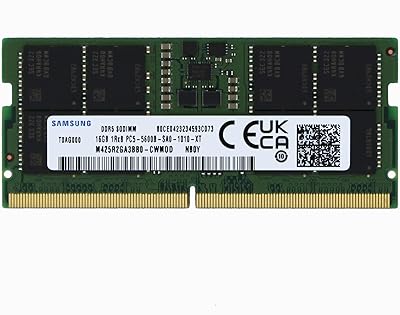
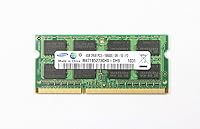
The Samsung M471B5273CH0-CH9 4GB DDR3 RAM is a 204-pin SO-DIMM module built specifically for laptops and compact systems that still run on DDR3 memory. Running at 1333MHz, it covers everyday computing comfortably — think web browsing, document editing, and keeping a handful of tabs open without slowdown. Samsung has kept this stick available since 2014, which tells you something: there are still plenty of machines out there that need it. Just be clear about what this is. It's not an upgrade for enthusiasts chasing performance numbers. It's a practical, compatibility-first purchase for anyone trying to squeeze more life out of aging hardware.

Features & Benefits

This 4GB SO-DIMM stick runs on the PC3-10600 standard at 1.5V operating voltage, which is right in line with what most DDR3-era laptops and compact desktops expect. That broad compatibility is genuinely useful — you're not dealing with exotic power requirements or finicky timing configurations. At 1333MHz, the bandwidth isn't going to impress anyone benchmarking today, but for keeping Chrome, a PDF, and a spreadsheet open simultaneously, it does the job without complaint. Installation is about as simple as it gets: pop the panel, slide the stick in at the correct angle, press down until it clicks. Samsung's proven DRAM reliability means you're unlikely to be troubleshooting random crashes a few weeks in.

Best For

This laptop memory upgrade makes the most sense for people with machines from roughly 2010 to 2014 — the kind of laptop that shipped with 2GB of RAM and now struggles to run a modern browser. Bumping up to 4GB is enough to notice a real difference: faster boot times, less freezing when switching between tasks, and a generally more responsive feel during everyday use. IT shops and repair technicians also keep a few of these on hand for client refurbs. One critical point worth repeating: DDR3 and DDR4 are not interchangeable. Before ordering, check your laptop's manual or a compatibility tool to confirm your motherboard actually supports DDR3 1333MHz SO-DIMM.

User Feedback

Across several hundred ratings, this Samsung DDR3 module holds a strong average, and the pattern in the reviews is pretty consistent. Most buyers — particularly those upgrading Dell, HP, and Lenovo laptops — report smooth first-time installation and an immediate improvement in day-to-day responsiveness. Early failure rates appear low, which tracks with Samsung's reputation in the DRAM space. That said, not every experience is positive. A notable share of critical reviews trace back to compatibility mismatches — buyers who assumed their laptop supported this spec without checking first. There's also no documentation included in the packaging, which leaves less confident DIYers without any guidance. Verify your specs before purchasing and you'll very likely join the satisfied majority.

Pros

  • Samsung's proven track record in DRAM manufacturing means you're getting a reliable, well-tested component.
  • The 204-pin SO-DIMM form factor slots directly into most DDR3 laptops with zero modification needed.
  • Upgrading from 2GB to 4GB produces a real, noticeable improvement in everyday multitasking and responsiveness.
  • Standard 1.5V voltage ensures broad compatibility across a wide range of older consumer laptops.
  • This laptop memory upgrade has been available since 2014 and remains in production, a sign of sustained demand.
  • Installation is a genuine DIY job — no special tools or technical expertise required.
  • Low reported failure and DOA rates give buyers confidence in long-term reliability.
  • Priced accessibly enough that it makes financial sense to upgrade rather than replace aging hardware.

Cons

  • No compatibility documentation is included in the package, leaving less experienced buyers without guidance.
  • DDR3 is a legacy standard — this 4GB SO-DIMM stick will not work in any system requiring DDR4 memory.
  • 4GB is a tight ceiling for modern multitasking; heavy browser users or anyone running cloud apps may still feel constrained.
  • There is no official compatibility checker tool linked or provided, making pre-purchase verification entirely the buyer's responsibility.
  • Compatibility mismatches are among the most common complaints, often from buyers who skipped checking their motherboard specs.
  • Being a single 4GB stick, dual-channel memory configurations require purchasing a second matching module separately.
  • As an older memory standard, long-term availability is not guaranteed — sourcing it further down the line could become harder.

Ratings

The Samsung M471B5273CH0-CH9 4GB DDR3 RAM has been evaluated by our AI system after analyzing hundreds of verified global buyer reviews, with spam, bot-submitted, and incentivized feedback actively filtered out. Scores reflect the honest distribution of real user experiences — strengths and frustrations alike — so you get a transparent picture of what this laptop memory upgrade actually delivers in day-to-day use.

Compatibility Range
78%
22%
The vast majority of buyers — particularly those with older Dell, HP, and Lenovo laptops — report that this 4GB SO-DIMM stick drops in without any fuss. The standard 1.5V DDR3 spec means it plays well with a wide range of motherboards from the 2010–2015 era.
A meaningful minority of buyers ran into compatibility mismatches, most of which could have been avoided with pre-purchase verification. The absence of any included guide or compatibility lookup tool makes this a recurring frustration, especially for less technically confident buyers.
Installation Ease
91%
Buyers consistently describe installation as refreshingly straightforward — remove the panel, slide the module in at an angle, press down until it clicks. Most users report the whole process taking under ten minutes even on their first attempt.
No documentation is included in the package, so complete beginners may feel unsupported. A small number of buyers noted that locating the RAM slot on their specific laptop model required some independent research before they felt confident proceeding.
Performance Improvement
83%
For users upgrading from a factory-default 2GB configuration, the day-to-day difference is genuinely tangible — browsers load faster, switching between tasks stops causing freezes, and boot times tighten up noticeably. On Windows 7 and Linux, 4GB covers everyday workloads comfortably.
Users running modern browsers with many extensions or juggling multiple applications simultaneously will find 4GB starts to feel limiting. On Windows 10, the headroom is thinner than ideal, and a handful of buyers reported that their older laptop still felt sluggish under heavier use.
Build & Reliability
88%
Samsung's reputation in DRAM manufacturing is well-earned, and buyers reflect that trust in their reviews. DOA reports are rare, and long-term failure rates appear low — many users mention the module running without issue for years after installation.
Because this is an OEM-grade component, there is no retail warranty card or dedicated support channel included. Buyers who receive a defective unit are dependent entirely on the seller's return policy rather than any direct Samsung consumer guarantee.
Value for Money
86%
At its price point, this Samsung DDR3 module makes a compelling case for extending the life of an aging laptop rather than replacing it. Getting a noticeable performance bump from a trusted brand without overpaying for DDR4 hardware you cannot even use is exactly the kind of practical value budget-conscious buyers appreciate.
A few buyers pointed out that similar-spec DDR3 modules occasionally surface at lower prices from lesser-known brands. While Samsung's reliability justifies a small premium, the price gap can feel harder to rationalize when you are upgrading a laptop that is already several years old.
Speed & Bandwidth
67%
33%
For the use cases this module is designed for — office work, web browsing, media playback, and light multitasking — 1333MHz provides stable and consistent throughput. Users report smooth performance in these everyday scenarios without throttling or instability.
By current standards, 1333MHz is well behind the curve. Users who expected any kind of snappy performance uplift beyond basic tasks were disappointed, and those running memory-hungry applications quickly found the bandwidth a limiting factor rather than an asset.
Packaging & Presentation
61%
39%
The module arrives well-protected in anti-static packaging, which is the right priority for sensitive electronics. Buyers note the product itself is exactly as described, with no signs of damage or mishandling on arrival in the vast majority of cases.
The packaging is purely functional and includes nothing beyond the bare module — no installation guide, no compatibility reference, and no protective carrying case. For a product where compatibility is the single biggest risk factor, the lack of any supporting documentation feels like a missed opportunity.
Brand Trust
92%
Samsung carries significant weight with buyers in the RAM space, and this module benefits directly from that credibility. Reviewers frequently cite the Samsung name as the deciding factor over cheaper alternatives, and that confidence is broadly validated by low failure reports.
A handful of buyers noted concern about counterfeit modules in the marketplace, particularly when purchasing through third-party sellers. While the genuine product holds up well, the brand's popularity also makes it a target for fakes, which introduces a layer of purchasing risk.
Form Factor Fit
84%
The 204-pin SO-DIMM format is the correct match for the laptop segment this module targets, and buyers confirm it physically fits the intended systems without issue. Its compact dimensions cause no clearance problems in slim or standard-depth laptop chassis.
Desktop users occasionally purchase this by mistake, not realizing SO-DIMM and standard DIMM slots are incompatible. This is an education gap rather than a product flaw, but it contributes to a recurring pattern of preventable negative reviews.
Thermal Performance
79%
21%
Operating at 1.5V within a standard DDR3 thermal envelope, this 4GB SO-DIMM stick runs cool under typical workloads. Buyers report no overheating complaints or thermal throttling during normal use in well-ventilated laptops.
In older laptops with degraded cooling systems, any additional hardware can contribute to heat buildup — though this is a system-level issue rather than a module-specific one. No buyers reported the RAM itself as a heat source, but it is worth noting in the context of already-warm machines.
Upgrade Scalability
58%
42%
For laptops with two RAM slots, pairing this module with an identical second stick enables dual-channel operation, which marginally improves memory bandwidth. Some buyers took this route and reported a slight additional improvement in responsiveness.
4GB is a ceiling that modern computing environments reach quickly. Users hoping to scale beyond this single module may find that their older laptop's motherboard caps total RAM at 8GB or less, limiting the long-term upgrade path significantly.
Documentation & Support
43%
57%
The product listing on most platforms includes the core technical specifications needed to assess compatibility, which experienced buyers find sufficient. For technically confident users, the lack of in-box documentation is a non-issue.
There is no included installation guide, no compatibility matrix, and no manufacturer support pathway for end consumers. This is the single most consistent frustration in negative reviews, and it disproportionately affects first-time upgraders who need the most guidance.
Longevity & Durability
87%
Buyers who have run this Samsung DDR3 module for multiple years report it continues to function without degradation. Samsung's manufacturing consistency in DRAM is reflected in a very low rate of post-installation failures reported across the review pool.
As DDR3 ages further into legacy status, finding a replacement or compatible pair down the line may become increasingly difficult. The long-term ecosystem around this memory standard is shrinking, which is a practical consideration for anyone counting on multi-year use.

Suitable for:

The Samsung M471B5273CH0-CH9 4GB DDR3 RAM is a smart, no-nonsense pick for anyone trying to breathe new life into a laptop from the early-to-mid 2010s era. If your machine shipped with just 2GB and now crawls through basic tasks like loading a browser with a few tabs or running a lightweight office suite, this upgrade addresses exactly that bottleneck. It's particularly well-suited to Windows 7, Windows 8, and Linux users on aging Dell, HP, Lenovo, or similar consumer laptops that still have usable DDR3 SO-DIMM slots. IT technicians and repair shops will also find it a reliable staple to keep in stock — it's the kind of part you reach for when a client needs a quick, affordable performance fix on an older machine. Budget-conscious buyers who want Samsung-grade dependability without paying for DDR4 hardware they cannot even use will feel confident in this choice.

Not suitable for:

If your laptop or desktop was built after 2015 or supports DDR4 memory, this 4GB SO-DIMM stick is simply the wrong part — DDR3 and DDR4 are physically and electrically incompatible, so there is no workaround. Gamers, video editors, or anyone running memory-intensive workloads should also look elsewhere; 4GB at 1333MHz is not going to hold up under pressure from modern games, creative applications, or virtual machines. Users who want to future-proof their system will find that investing in this module extends the life of hardware that is, realistically, nearing the end of its practical lifespan. Standard desktop tower owners need to be aware that this is a SO-DIMM form factor designed for laptops and compact systems, not full-size DIMM slots. And if your machine needs more than 4GB to run comfortably — say, for running multiple browser-based tools simultaneously — a single stick of this capacity may not fully solve the problem on its own.

Specifications

  • Brand: Manufactured by Samsung, one of the world's largest and most established DRAM producers.
  • Model Number: The exact model designation is M471B5273CH0-CH9, an OEM-grade DDR3 SO-DIMM module.
  • Capacity: This module provides 4GB of DDR3 SDRAM, suitable for basic multitasking and everyday computing workloads.
  • Memory Type: DDR3 SDRAM — a third-generation double data rate memory standard common in laptops built between 2009 and 2015.
  • Speed: Operates at 1333MHz, corresponding to the PC3-10600 memory standard with a peak transfer rate of roughly 10,600 MB/s.
  • Form Factor: 204-pin SO-DIMM, the compact format used in laptops, mini-PCs, and certain all-in-one desktop systems.
  • Voltage: Runs at a standard 1.5V, which is the conventional operating voltage for non-low-voltage DDR3 modules.
  • ECC Support: Non-ECC (no error-correcting code), meaning it is designed for consumer and prosumer machines rather than servers or workstations.
  • Dimensions: The module measures 3.15 x 1.97 x 0.35 inches, consistent with the standard SO-DIMM physical footprint.
  • Weight: Weighs approximately 0.01 ounces, making it one of the lightest upgradeable components you can add to a laptop.
  • Compatibility: Designed for laptops and compact desktops that support DDR3 1333MHz SO-DIMM memory; not compatible with DDR4 or full-size DIMM slots.
  • Channel Support: Can be used in single-channel mode alone or paired with an identical module for dual-channel operation, depending on motherboard support.
  • Availability: First listed in January 2014 and has remained continuously available, reflecting sustained demand for DDR3 legacy upgrades.
  • Discontinued: As of the latest available data, this module has not been discontinued by Samsung and remains in the market.
  • CAS Latency: Operates at CL9 latency, which is standard and expected for DDR3-1333 modules of this generation.

Related Reviews
Samsung 8GB DDR3 PC3L-12800 SODIMM RAM
78%
93%
Installation Ease
91%
Brand & Chip Reliability
87%
Value for Money
76%
Performance Impact
62%
Mac Compatibility Range
More
Samsung M378A5244CB0-CRC 4GB DDR4 Desktop RAM
71%
93%
Ease of Installation
88%
System Compatibility
91%
Reliability & Stability
76%
Everyday Performance
74%
Value for Money
More
Samsung Chromebook 3 11.6″ Laptop
67%
83%
Value for Money
67%
Performance
72%
Build Quality
78%
Battery Life
58%
Display Quality
More
Samsung Chromebook Plus V2 64GB
74%
88%
Portability & Build Quality
83%
Display Quality
91%
Built-in Stylus
67%
Performance for Everyday Tasks
74%
Chrome OS Experience
More
Samsung Chromebook 4+ 15.6″, Intel Celeron N4000, 4GB RAM, 64GB eMMC
79%
89%
Value for Money
82%
Display Quality
90%
Battery Life
88%
Portability
85%
Ease of Use
More
A-Tech 4GB DDR3 1066MHz Desktop RAM Kit
79%
88%
Value for Money
84%
Compatibility
91%
Installation Ease
67%
Performance Impact
92%
Legacy System Fit
More
Samsung Chromebook 4 11.6″ Laptop
72%
83%
Value for Money
78%
Build Quality
62%
Performance
44%
Storage Capacity
67%
Battery Life
More
Samsung 16GB DDR4 3200MHz SODIMM Laptop RAM
82%
93%
Reliability & Longevity
91%
Installation Ease
83%
System Compatibility
78%
Real-World Performance
84%
Value for Money
More
Samsung 8GB DDR3 1600MHz SO-DIMM Laptop RAM
79%
88%
Value for Money
93%
Installation Ease
71%
Compatibility
92%
Reliability & Longevity
82%
Performance Impact
More
NEMIX RAM 16GB DDR3 1600MHz SODIMM
86%
88%
Performance Boost
91%
Ease of Installation
85%
Compatibility
90%
Energy Efficiency
84%
Build Quality
More

FAQ

The key things to check are memory type, form factor, and speed. Your laptop must support DDR3 (not DDR4), use a 204-pin SO-DIMM slot, and be rated for 1333MHz. The easiest way to confirm is to look up your laptop model in its manufacturer's specifications page or use a free tool like Crucial's compatibility checker. If your machine shipped with DDR3 RAM originally, there is a strong chance this 4GB SO-DIMM stick will fit right in.

Only if it is a compact or all-in-one desktop that uses SO-DIMM slots — standard tower desktops use full-size DIMMs, which are physically different and incompatible with this module. If you are unsure, check your desktop's manual or motherboard specifications before purchasing.

No. DDR3 and DDR4 are not interchangeable — they differ in pin count, voltage, and physical notch position, so a DDR3 module cannot be inserted into a DDR4 slot. If your laptop was built after 2015, it almost certainly requires DDR4, so check your specs carefully before ordering.

Yes, it is one of the more beginner-friendly hardware upgrades you can do. Most laptops require just a small Phillips screwdriver to remove the bottom panel, after which you locate the RAM slot, insert the module at a roughly 45-degree angle, and press it down until it clicks into place. Plenty of free video tutorials are available for specific laptop models if you want a visual walkthrough.

Potentially yes, if your laptop has two RAM slots and both support DDR3 1333MHz SO-DIMM. Adding a matching second module would give you 8GB and could also enable dual-channel mode, which slightly improves memory bandwidth. Check your laptop's maximum supported RAM capacity and number of slots before buying a second stick.

If you are upgrading from 2GB, the difference will be very noticeable in everyday use — things like switching between browser tabs, opening documents, and loading applications will feel significantly more responsive. You are not going to turn an old laptop into a powerhouse, but you will eliminate much of the sluggishness caused by a memory bottleneck. For light daily tasks, 4GB is a meaningful step up.

Warranty coverage can vary depending on the seller rather than Samsung directly, as this is sold as an OEM component. It is worth checking the specific seller's return and warranty policy before purchasing. Samsung as a brand has a strong reputation for DRAM reliability, and reported failure rates on this module are low.

It is the bare minimum for Windows 10 and technically below the recommended threshold for Windows 11, which officially requires 4GB but performs better with more. For older laptops running Windows 7 or Linux, 4GB is genuinely comfortable. If your laptop can support 8GB, that would give you more headroom for modern operating systems.

Based on buyer feedback, this 4GB SO-DIMM stick is frequently used to upgrade older Dell Inspiron and Latitude models, HP Pavilion and ProBook laptops, and Lenovo ThinkPad and IdeaPad machines from the 2010 to 2014 period. Compatibility ultimately depends on your specific model's memory specifications, so always verify before purchasing.

Most reputable sellers offer returns within a standard window, so check the return policy before buying. If the module is physically incompatible, the laptop simply will not power on or will not recognize the new memory — nothing will be permanently damaged by an incompatible DDR3 module inserted into the wrong slot type, as the notch alignment prevents incorrect insertion. Always verify compatibility upfront to avoid the hassle.