Overview

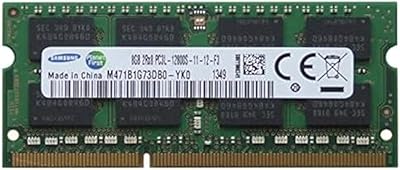
The Samsung 8GB DDR3 PC3L-12800 SODIMM RAM is a no-nonsense memory upgrade for a generation of Apple computers that still earn their keep. People hold onto 2011 and 2012 Macs for good reason — the hardware is sturdy, the machines are fully user-serviceable, and with the right upgrade, performance can feel meaningfully sharper. Samsung carries real credibility here: the company has historically been an OEM memory supplier to Apple, so you're not gambling on an off-brand chip. The kit also uses the low-voltage DDR3L spec, which is important for proper compatibility with these specific Mac models. Realistic takeaway: this is a legacy upgrade, not a speed demon, but it's exactly what these machines were designed to accept.

Features & Benefits

This Mac RAM upgrade ships as a matched pair — two 4GB sticks — which matters because running memory in dual-channel mode gives a genuine bandwidth advantage over a single 8GB module. The 1600MHz speed is exactly right for the supported Mac models, hitting the PC3L-12800 standard cleanly. Running at just 1.35 volts, the low-voltage design means less heat generated inside the chassis, which is particularly relevant for MacBook Pros where thermals matter. Installation couldn't be simpler: remove the bottom panel, swap the sticks, and power on. No driver configuration, no OS tweaks needed — the machine recognizes the new memory immediately.

Best For

This SODIMM kit is most relevant to a specific, well-defined group of users. If you own a 2012 MacBook Pro — the non-Retina model with the removable bottom panel — this is one of the most cost-effective upgrades available. The same holds for 2011 and 2012 Mac Mini owners hitting multitasking slowdowns, or 2012 iMac users who've noticed modern macOS feeling heavier than it once did. Workloads that benefit most are RAM-hungry ones: keeping many browser tabs open, running a virtual machine, doing casual video exports. One important note: always verify your exact Mac model identifier before buying. This kit is not compatible with Retina MacBook Pros or any Apple Silicon machine.

User Feedback

Across close to 500 ratings, this Mac RAM upgrade holds a 4.6-star average — a strong signal for a niche component. The most common theme in positive reviews is how immediately noticeable the improvement is, with buyers reporting smoother multitasking and reduced beach-balling within minutes of booting up. Reviewers also consistently mention zero POST errors and the kit being recognized correctly by the system without any fiddling. On the downside, a handful of buyers ran into incompatibility issues because they didn't confirm their exact Mac model before ordering — a preventable mistake, but it shows up in a few negative reviews. Shipping and packaging feedback is mostly unremarkable. For legacy Mac users, the overall satisfaction rate runs high.

Pros

  • Samsung's history as an OEM memory supplier to Apple means these chips meet the same quality bar as factory-installed Mac RAM.
  • The matched 2x4GB dual-channel configuration provides better memory bandwidth than a single 8GB module would.
  • Low-voltage 1.35V operation keeps thermals in check, which matters on MacBook Pros running warmer over time.
  • Installation requires only a Phillips screwdriver and a few minutes — no technical expertise needed.
  • Buyers consistently report zero POST errors and immediate system recognition on boot.
  • A 4.6-star average across nearly 500 ratings is a strong trust signal for a niche legacy component.
  • No driver setup or software configuration is required after installing this Mac RAM upgrade.
  • Solid pick for anyone who wants a brand-name chip rather than rolling the dice on a generic alternative.

Cons

  • Strictly compatible with only a small set of 2011–2012 Mac models — one wrong assumption means a return.
  • 8GB can still feel limiting for users running memory-intensive workflows or multiple virtual machines simultaneously.
  • Not usable in Retina MacBook Pros or any Mac with non-removable, soldered memory.
  • DDR3 is a legacy standard, and sourcing authentic sticks from reputable sellers is becoming less reliable over time.
  • A small number of buyers have flagged inconsistent packaging, with sticks occasionally arriving with minimal protective cushioning.
  • Some 2012 Mac models actually support up to 16GB, so this kit may underdeliver for users who need the maximum.
  • Performance gains are capped entirely by the host machine — the Mac itself remains the limiting factor, not the RAM.
  • Users on Apple Silicon or any post-2013 Mac will find this SODIMM kit completely incompatible and unusable.

Ratings

Our scores for the Samsung 8GB DDR3 PC3L-12800 SODIMM RAM were generated by AI after systematically analyzing verified global buyer reviews, with spam, bot activity, and incentivized submissions actively filtered out before any scoring was applied. Each category below reflects what real users experienced across the full ownership cycle — from the moment the package arrived to months of daily use on supported Mac hardware. Both the strengths that drove this kit to a strong overall rating and the friction points that frustrated a meaningful subset of buyers are represented here without softening either side.
Installation Ease
93%
Buyers across all three compatible Mac models consistently describe the physical installation as one of the easiest hardware upgrades they have attempted. Removing the bottom panel, swapping the sticks, and booting up takes under ten minutes with just a basic screwdriver — no software, no configuration, and no guesswork required afterward.
A small subset of first-time hardware upgraders found the process intimidating without a visual guide, since the kit ships with no printed instructions. Those unfamiliar with the SODIMM insertion angle occasionally reported uncertainty about whether the sticks had seated fully and correctly.
Brand & Chip Reliability
91%
Samsung's history as an OEM memory supplier to Apple gives this kit a credibility edge that generic DRAM brands cannot match. Buyers who have run these sticks for multiple years consistently report zero failures, no memory errors in diagnostics, and no system instability attributable to the modules themselves.
A very small number of buyers received sticks that failed on arrival or within the first few weeks — though at this volume of sales, such cases appear isolated rather than systemic. Returns for genuine defects are generally processed without major friction, but the rare failure still disrupts an otherwise smooth experience.
Value for Money
87%
For extending the life of a capable older Mac, the asking price relative to the performance improvement is widely considered excellent by buyers who faced the alternative of tolerating a sluggish machine or spending significantly more on a replacement. Most reviewers describe it as an obvious call in retrospect.
A few buyers noted that genuine Samsung DRAM commands a small premium over generic alternatives, narrowing the value gap for budget-focused shoppers. Buyers who purchased and then discovered an incompatibility also felt the return process eroded the overall value proposition noticeably.
Performance Impact
76%
24%
Users upgrading from the original 4GB factory configuration describe a genuinely noticeable change in day-to-day responsiveness — browser-heavy workflows, app switching, and casual multitasking all feel substantially smoother. Mac Mini users running the machine as a full desktop workstation frequently described the improvement as immediate and tangible.
Buyers already running 8GB or more saw minimal benefit, and those expecting dramatic speed gains were occasionally disappointed once they realized the legacy CPU and a slow spinning hard drive remained real performance ceilings. This Mac RAM upgrade removes one bottleneck; it cannot address the others.
Mac Compatibility Range
62%
38%
For buyers with exactly the right machine — the non-Retina 2012 MacBook Pro, the 2012 iMac, or the 2011–2012 Mac Mini — compatibility is reported as flawless, with the system correctly recognizing and configuring the memory from the very first boot without any intervention.
The narrow compatibility window is the single largest driver of negative reviews for this SODIMM kit. Buyers who did not verify their exact Mac model identifier before purchasing frequently ended up in return situations that could have been avoided entirely with clearer upfront guidance from the product listing.
Thermal Efficiency
84%
The 1.35V low-voltage operation keeps heat generation meaningfully lower than standard 1.5V DDR3 would produce in the same slots. MacBook Pro users in particular noticed their machines running cooler during extended sessions, with fans spinning up less frequently under typical productivity workloads.
The thermal improvement is real but subtle — buyers expecting a dramatic drop in chassis heat or fan activity were sometimes surprised by how modest the difference felt during demanding tasks. The benefit is most appreciated over long cumulative sessions rather than short casual use.
Dual-Channel Configuration
82%
18%
Shipping as a matched 2x4GB pair means buyers get dual-channel bandwidth out of the box without any configuration. The performance advantage over a single 8GB module is measurable in memory-intensive operations and represents the optimal setup approach for all three supported Mac models.
Buyers who already owned a single 4GB stick and only needed one additional module to reach 8GB total could not take full advantage of the kit format, effectively paying for two sticks when one would have sufficed. The dual-channel benefit, while genuine, is not always perceptible during light everyday workloads.
System Stability
89%
The vast majority of buyers report completely stable operation after installation — no kernel panics, no memory errors in diagnostics, and no unexpected crashes attributable to the new sticks. Running Apple Hardware Test consistently returns clean results for most units in normal operating conditions.
A handful of buyers encountered intermittent instability that was ultimately traced back to incomplete seating of one stick rather than a defective module. These incidents were rare, but they reinforce the importance of pressing both sticks firmly and evenly until the retention clips lock on both sides.
Specification Accuracy
68%
32%
For buyers who understand PC3L-12800 and DDR3L before purchasing, the modules perform exactly to specification with no gap between what is listed and what is delivered. The 1600MHz rated speed is correctly recognized and reported by the Mac EFI on all supported systems.
The product listing incorrectly states a memory speed of 3400MHz — PC3L-12800 DDR3L runs at 1600MHz, and this discrepancy has confused buyers into expecting a faster spec than what was actually delivered. It is a listing error rather than a hardware flaw, but it is a notable inaccuracy that unnecessarily undermines buyer confidence.
Packaging Quality
64%
36%
The sticks arrived safely for the large majority of buyers, with standard anti-static sleeve protection providing adequate shielding against electrostatic discharge during transit. Most reviews noted the modules were in perfect physical condition on arrival with no visible handling damage.
A recurring complaint is that the protective packaging feels minimal for a component of this sensitivity and price. Several buyers received modules with inadequate cushioning inside an oversized outer box, raising legitimate concerns about transit handling even when the sticks ultimately functioned correctly.
Listing & Compatibility Clarity
57%
43%
Buyers who read the product title carefully — which explicitly names the 2012 MacBook Pro, iMac, and Mac Mini — generally had no compatibility surprises and found the stated use case accurate. When the listed information is followed precisely, purchase satisfaction runs consistently high.
The compatibility guidance is not prominent or detailed enough to prevent avoidable returns, and the incorrect speed figure in the product data compounds the confusion. Multiple negative reviews trace directly to buyers purchasing for an unsupported Mac model, pointing to a need for much clearer upfront warnings in the listing itself.
Long-term Durability
86%
Buyers who have run this Mac RAM upgrade for two or more years report no degradation in system performance or memory reliability over time. Samsung's manufacturing consistency means the chips tend to hold up well through the typical daily stress cycles of a supported Mac used for productivity work.
Because this is a legacy product segment, fewer buyers are positioned to report on extended multi-year durability compared to current-generation components, so the long-term picture is drawn from a relatively smaller pool of sustained feedback. Older Mac chassis that run consistently hot may introduce additional thermal stress on the modules over time.

Suitable for:

The Samsung 8GB DDR3 PC3L-12800 SODIMM RAM is a well-targeted upgrade for anyone still running a supported 2011–2012 Apple machine who wants to extend its productive life without spending much. Owners of the non-Retina 2012 MacBook Pro stand to gain the most from day one — keeping a dozen browser tabs open, working across multiple apps, or running light virtual machines all become noticeably more comfortable with the extra memory headroom. The 2011 and 2012 Mac Mini is another strong candidate, particularly for users running it as a desktop workstation or media hub where multitasking responsiveness matters. 2012 iMac owners who have upgraded to a newer macOS version and started noticing sluggishness will find this Mac RAM upgrade worthwhile and straightforward to install. If your workload is anything from casual productivity to light creative tasks and you simply want your aging Mac to feel less bottlenecked, this SODIMM kit hits the right target.

Not suitable for:

Anyone working outside the specific list of compatible 2011–2012 Mac models should stop before purchasing, because the Samsung 8GB DDR3 PC3L-12800 SODIMM RAM has zero compatibility with Retina MacBook Pros, Macs with soldered memory, or any Apple Silicon machine released from 2020 onward. If your Mac is a 2013 model or later, this kit will not physically function in your machine regardless of how it is configured. Power users pushing demanding workloads — 4K video editing, heavy 3D rendering, or running several virtual machines side by side — may also find that 8GB still feels constrictive even after the upgrade; those users should investigate whether their specific Mac model supports a 16GB configuration before settling here. Anyone expecting a step up to modern DDR4 or DDR5 performance tiers will be disappointed — this is a legacy spec doing a specific and narrow job. Finally, buyers who cannot or do not want to open their machine themselves will find that no Apple Store or authorized service center will install third-party RAM for them on these older models.

Specifications

  • Brand: This kit is manufactured by Samsung, a tier-one DRAM producer and a known OEM memory supplier to Apple.
  • Total Capacity: The kit provides 8GB of total RAM, delivered as two individual 4GB SODIMM modules in a single package.
  • Memory Type: Modules use DDR3L low-voltage technology operating under the PC3L-12800 standard, which is distinct from standard 1.5V DDR3.
  • Clock Speed: Memory runs at 1600MHz, which is the correct rated specification for compatible 2011–2012 Apple hardware.
  • Form Factor: Both sticks use the SODIMM form factor, designed specifically for laptops and compact desktop systems such as the Mac Mini.
  • Operating Voltage: Modules operate at 1.35 volts, which is lower than standard DDR3 and contributes to reduced heat output inside the host machine.
  • Configuration: The matched two-stick setup enables dual-channel memory operation, providing better bandwidth than installing a single 8GB module would.
  • Model Number: The official Samsung model designation for this kit is DDR3-PC3L-12800-2X4GB.
  • Compatible Devices: Supported machines include the non-Retina 2012 MacBook Pro, the 2012 iMac, and the 2011–2012 Mac Mini.
  • Dimensions: Each module measures approximately 3.3 x 3.2 x 0.4 inches, conforming to the standard SODIMM physical footprint.
  • Weight: The complete two-stick kit weighs approximately 1.13 ounces total.
  • Driver Requirement: No drivers or software configuration are required; supported Macs detect and configure the new memory automatically on first boot.
  • Average Rating: This kit holds a 4.6 out of 5 star average based on 481 buyer ratings, placing it among the more consistently well-reviewed memory upgrades in its category.
  • Bestseller Rank: At the time of evaluation, this kit ranked #3,182 in the Amazon Computer Memory category, reflecting sustained demand for a legacy product.

Related Reviews
Adamanta 16GB DDR5 5600MHz SODIMM Laptop RAM
78%
88%
Value for Money
74%
Compatibility
91%
Installation Ease
83%
Performance Gain
87%
Silicon Quality
More
Samsung 16GB DDR4 3200MHz SODIMM Laptop RAM
82%
93%
Reliability & Longevity
91%
Installation Ease
83%
System Compatibility
78%
Real-World Performance
84%
Value for Money
More
Samsung 8GB DDR4 3200MHz SO-DIMM Laptop RAM
83%
86%
Performance
79%
Compatibility
91%
Value for Money
93%
Installation Ease
89%
Reliability
More
Samsung 8GB DDR3 1600MHz SO-DIMM Laptop RAM
79%
88%
Value for Money
93%
Installation Ease
71%
Compatibility
92%
Reliability & Longevity
82%
Performance Impact
More
Timetec 8GB DDR4 2400MHz SODIMM Laptop RAM
78%
91%
Value for Money
88%
Installation Ease
74%
Compatibility
86%
Performance Improvement
83%
Reliability
More
NEMIX RAM 16GB DDR3 1600MHz SODIMM
86%
88%
Performance Boost
91%
Ease of Installation
85%
Compatibility
90%
Energy Efficiency
84%
Build Quality
More
Crucial 8GB DDR4-2400 SODIMM Laptop RAM
84%
91%
Value for Money
93%
Installation Ease
77%
Performance Impact
73%
Compatibility Range
94%
Long-term Reliability
More
Timetec Pinnacle 8GB DDR4 3200MHz Laptop RAM
83%
93%
Value for Money
78%
Compatibility
91%
Ease of Installation
86%
Performance Gain
88%
Build & Reliability
More
KLEVV DDR4 8GB 3200MHz SODIMM Laptop RAM
87%
88%
Performance
90%
Compatibility
94%
Ease of Installation
92%
Value for Money
85%
Stability during Regular Use
More
Crucial Basics 8GB DDR4 2666MHz SODIMM RAM
85%
88%
Performance Boost
93%
Ease of Installation
91%
Compatibility with Laptops
85%
Power Efficiency (Battery Life)
92%
Overall Value for Money
More

FAQ

It depends on which 2012 MacBook Pro you have. This Mac RAM upgrade is compatible with the non-Retina 2012 MacBook Pro, which has a removable bottom panel and user-accessible memory slots. The Retina version from that same year has soldered RAM and cannot accept any aftermarket memory. Before purchasing, confirm your exact model identifier in the About This Mac screen — do not rely on the year alone.

No. Retina MacBook Pros, all MacBook Airs, and any Mac released from 2013 onward either have soldered memory or require a completely different memory standard. Apple Silicon machines are entirely incompatible as well. The compatibility window for this SODIMM kit is narrow and intentional — it covers a specific slice of 2011–2012 Apple hardware and nothing outside of that.

Click the Apple menu, choose About This Mac, and then open System Report. Under the Memory section you can see your current RAM type, speed, and how many slots are populated. You can also cross-reference your Mac model identifier against Apple's technical specifications pages online to verify the exact memory standard your machine requires before spending anything.

For the non-Retina 2012 MacBook Pro, you will need a small Phillips-head screwdriver to remove the bottom panel. The RAM slots themselves are accessible without any additional tools once the panel is off — the sticks just press in at an angle and lock into place with small retention clips. The whole process typically takes under ten minutes if you follow a reputable step-by-step guide.

Technically yes, but you would be leaving performance on the table. Installing both sticks lets the machine run in dual-channel mode, which gives the memory controller more bandwidth to work with. Single-channel mode with one stick works fine, but the full benefit of this kit only kicks in when both modules are seated. There is no real reason to use only one.

For everyday workloads — browsing, email, documents, media playback — 8GB holds up well on the macOS versions these machines officially support. If you are running virtual machines or keeping a large number of applications open simultaneously, you will likely still see memory pressure warnings. Worth noting: some of the compatible Mac models support up to 16GB total, so heavier users should check their specific machine's ceiling before settling on this kit.

DDR3L is a lower-voltage variant of standard DDR3, running at 1.35V rather than the usual 1.5V. For the supported Apple machines, the low-voltage spec is what the hardware is designed to use, so DDR3L is the correct choice rather than just a nice-to-have. In practice it also generates slightly less heat inside the chassis, which is a minor but real benefit for compact machines like the Mac Mini.

If your Mac is currently running 4GB or less, most users describe the difference as immediately noticeable — apps feel more responsive, switching between them is smoother, and beach-balling under normal use drops significantly. If you are already on 8GB, the improvement will be minimal. Keep in mind the rest of the machine determines the ceiling: this upgrade removes a bottleneck, but a slow spinning hard drive or aging CPU will still limit overall performance.

Samsung typically covers its memory products with a manufacturer warranty, though the specific terms and duration vary by region and seller. It is worth confirming warranty details directly with the seller before purchasing. Samsung is an established manufacturer with known support channels, and genuine defective module reports appear to be uncommon based on buyer feedback.

Start by reseating both modules — remove them fully and press them back in firmly until the retention clips click into place on both sides. Make sure the sticks are even and fully inserted, not sitting at a slight angle. If the problem persists, try booting with just one stick at a time in different slots to identify whether one module or one slot is the issue. Also confirm you did not accidentally leave an old incompatible stick in the second slot alongside the new ones.