Overview

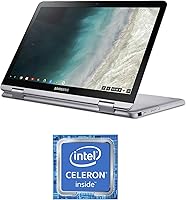
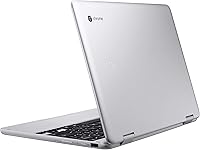
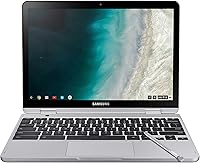
The Samsung Chromebook Plus V2 64GB sits comfortably in the mid-range 2-in-1 category, targeting students, educators, and anyone who needs a capable daily driver without the weight of a traditional laptop. At just under three pounds, it genuinely earns its portable reputation. The 12.2″ 16:10 display gives you slightly more vertical screen space than the usual widescreen format — handy for reading documents or browsing long pages. Chrome OS keeps things fast and secure, but be clear-eyed: this is a cloud-first machine. If your workflow depends on native Windows or macOS applications, this convertible will frustrate you. Stick to web apps and Google services, though, and it handles the day-to-day without complaint. The built-in stylus alone makes it stand out at this price.
Features & Benefits

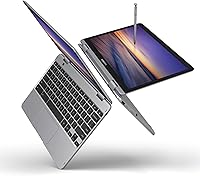
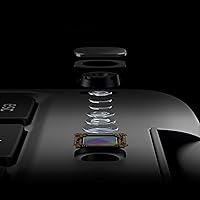
The built-in EMR pen is one of the more practical design choices here — it slots right into the body of the machine, requires no charging, and is ready the moment you need it. Many competing Chromebooks either skip a stylus entirely or sell it separately, so having it included without an upcharge is genuinely useful for note-takers. The rear-facing 13MP autofocus camera is a legitimate surprise; flip this Chrome OS convertible into tablet mode and it captures noticeably sharper images than you would expect from a budget-adjacent laptop. Storage starts at 64GB eMMC, tight but expandable via microSD. The 360-degree hinge holds firm across all four positions, and the 16:10 screen makes reading in portrait orientation feel natural.

Best For

This Samsung 2-in-1 Chromebook makes the most sense for students who take a lot of handwritten notes, Google Workspace-dependent educators, and anyone who spends most of their screen time in a browser. Remote learners will appreciate the tight integration with Google Meet, Classroom, and Drive. Commuters and travelers will notice the sub-three-pound build almost immediately — it disappears in a bag. Where it does not fit is as someone's sole machine for heavy multitasking, video editing, or any work requiring Windows-specific software. Think of it as a highly capable secondary device — one that handles the portable, on-the-go tasks while a more powerful machine stays at the desk.

User Feedback

Long-term owners consistently praise the build quality, display brightness, and pen convenience — the stylus feels like a natural inclusion rather than a marketing checkbox. The camera also draws more compliments than you would expect, with several buyers noting it outperforms front-facing cameras on pricier Chromebooks. On the downside, 4GB of RAM shows its limits with a dozen tabs open alongside a video call — stutters are real. The eMMC storage is noticeably slower than a true SSD. Chrome OS opinion splits predictably: Google ecosystem users find it refreshingly low-maintenance; those expecting a Windows substitute do not. Hinge durability comes up occasionally in longer-term reviews, which is worth keeping in mind.

Pros

  • The built-in EMR stylus is always docked and never needs charging — a real advantage over Chromebooks that omit it entirely.
  • At under three pounds, the Chromebook Plus V2 disappears in a bag and survives a full day out without feeling like a burden.
  • The 16:10 display aspect ratio gives noticeably more vertical space than standard widescreen laptops, which matters for reading and documents.
  • Chrome OS boots fast, updates silently, and stays clean — far less maintenance than a typical budget Windows machine.
  • The 13MP rear camera with autofocus is a genuine standout at this price tier, useful for scanning documents in tablet mode.
  • Battery life reliably covers a full school or work day, with most users landing between eight and nine hours of real use.
  • The 360-degree hinge holds firm across laptop, tent, and tablet positions without wobbling or requiring readjustment.
  • MicroSD expansion up to 400GB makes the storage situation manageable without buying a more expensive configuration.
  • Access to the Google Play Store meaningfully expands the app library beyond web apps alone.
  • Build quality feels solid and travel-ready without the fragility concerns common to similarly priced plastic laptops.

Cons

  • 4GB of RAM becomes a real bottleneck once you have multiple tabs, a video call, and a few Android apps running together.
  • The eMMC storage is noticeably slower than a true SSD — large file transfers drag compared to pricier alternatives.
  • No keyboard backlighting is a frustrating omission for anyone who works in dim classrooms, flights, or evening settings.
  • The hinge can lose tension over time, with some long-term owners reporting a screen that no longer holds its angle firmly.
  • Front camera quality degrades quickly in low light, making evening video calls look grainy and unflattering.
  • Speaker output is thin and tinny at higher volumes — most users end up defaulting to headphones for any serious media.
  • Chrome OS remains a hard sell for buyers who only realize its app limitations after the purchase.
  • The plastic chassis picks up surface scratches with regular daily use, aging less gracefully than metal-bodied competitors.
  • Bluetooth 4.0 is an older standard that can introduce range and latency inconsistencies with newer wireless accessories.
  • The Celeron processor has no meaningful headroom — performance does not scale up when you push the device harder.

Ratings

The Samsung Chromebook Plus V2 64GB earned its scores through AI analysis of thousands of verified global user reviews, with spam, bot activity, and incentivized feedback actively filtered out before any scoring was applied. Buyers from student dorms to corporate satellite offices weighed in, and both the genuine strengths and the recurring frustrations are reflected honestly in the numbers below. No category was softened to protect the product — if real users struggled with something, the score shows it.
Portability & Build Quality
88%
At just under three pounds, most owners report genuinely forgetting it is in their bag during long commutes or campus days. The chassis feels solid for its weight class — not premium-aluminum solid, but firm enough that users rarely worried about tossing it into a backpack daily.
A subset of long-term owners noted the plastic lid picks up hairline scratches over months of regular use. A few buyers also flagged slight flex in the keyboard deck under firm typing pressure, which can feel less reassuring during extended writing sessions.
Display Quality
83%
The 12.2″ IPS panel with its 16:10 aspect ratio draws consistent praise from users who read long documents, browse vertically, or follow along with lecture slides. Colors look accurate enough for everyday use, and viewing angles hold up well when the screen is tilted in tent or tablet mode.
Outdoor visibility is a recurring complaint — bright sunlight washes the screen out noticeably, making it a poor companion for outdoor studying. A handful of reviewers also wished for higher peak brightness during indoor use in well-lit rooms.
Built-in Stylus
91%
The fact that the pen lives inside the device and never needs charging is the detail owners appreciate most. Students and note-takers highlight how having it always docked means they actually use it regularly, unlike styluses that get lost or left behind. Precision feedback during annotation and sketching gets specific praise.
The pen barrel is on the thin side, which some users with larger hands find uncomfortable during extended writing. A small number of buyers also noted that palm rejection, while functional, occasionally registers unintended marks when writing quickly in tablet mode.
Performance for Everyday Tasks
67%
33%
For its intended audience — Google Docs, YouTube, light Android apps, and casual browsing — the Celeron processor handles the workload without obvious hesitation. Users who stay within a focused set of tabs report a smooth, frustration-free experience throughout the school or work day.
Open more than eight or nine browser tabs simultaneously, add a video call, and the cracks start to show. Users frequently cite noticeable lag during multitasking, and the 4GB RAM ceiling becomes a real constraint for anyone who works the way most modern knowledge workers actually do.
Chrome OS Experience
74%
26%
Users already living in the Google ecosystem — Drive, Meet, Classroom, Gmail — report that Chrome OS feels fast, clean, and refreshingly low-maintenance. Automatic updates and the absence of bloatware are cited as genuine quality-of-life advantages over budget Windows machines in the same price range.
The OS divide is real. Buyers who purchased expecting a Windows substitute were frequently disappointed by the inability to run native desktop applications like Adobe software or Microsoft Office locally. This frustration accounts for a disproportionate share of low-star reviews across global markets.
Rear Camera Quality
79%
21%
The 13MP autofocus world-facing camera genuinely surprises users who flip the device into tablet mode for document scanning or quick video capture. Compared to the fixed-focus, low-resolution cameras common on Chromebooks at this tier, it stands out as a practical and frequently used feature.
Low-light performance is mediocre — images taken indoors without strong ambient lighting tend to look soft and noisy. Video recording quality also lags behind what the still-photo megapixel count might suggest, with compression artifacts visible at close inspection.
Storage & Expandability
61%
39%
The microSD slot accepting cards up to 400GB gives buyers a meaningful escape valve from the modest base storage. Users who offload media, documents, and downloads to an inexpensive microSD card report that the storage situation becomes manageable fairly quickly.
The 64GB eMMC baseline fills up faster than expected, especially once Android apps from the Play Store are installed. The eMMC read and write speeds also trail a true SSD noticeably, and users transferring large files locally will feel the difference compared to a more expensive machine.
Battery Life
81%
19%
Most users consistently hit eight to nine hours of real-world use — close enough to the advertised ten hours that few felt misled. Students who carry it through a full class schedule report being able to make it home without hunting for an outlet, which is the practical benchmark that matters.
Battery longevity over the product lifecycle draws some criticism. Owners who have used the device for eighteen months or more note a meaningful drop in maximum charge capacity, which is not unusual for this battery type but worth factoring into a long-term purchase decision.
Keyboard & Typing Experience
72%
28%
Key spacing and travel are comfortable enough for extended writing sessions, and touch typists generally adapt within an hour. Several students and remote workers mention using it for long note-taking stretches without significant hand fatigue, which counts for something in this form factor.
The keyboard lacks backlighting, a notable omission that users working in dim lecture halls or during evening travel flag repeatedly. Key feedback also feels softer than expected to some buyers, particularly those coming from a higher-end laptop keyboard.
Trackpad Responsiveness
69%
31%
For basic navigation, scrolling, and casual use, the trackpad gets the job done without drawing complaints. Multi-finger gestures work consistently, and users doing light document work rarely feel the need to reach for an external mouse.
Precision dragging and fine cursor control are weaker spots — users doing any creative or detailed work in tablet mode with the trackpad find it frustrating. Palm rejection on the trackpad itself can also misfire during fast typing, causing occasional cursor jumps mid-sentence.
Hinge & Form Factor Versatility
76%
24%
The 360-degree hinge holds each position — laptop, tent, stand, tablet — with satisfying firmness out of the box. Users who regularly switch between modes for reading, watching, and typing appreciate how stable it feels at each angle without requiring manual adjustment mid-use.
Durability of the hinge over time is the most commonly raised concern among owners past the one-year mark. Some report the hinge losing tension gradually, leading to a screen that tilts more freely than intended — a legitimate reliability worry for buyers planning multi-year use.
Speaker & Audio Quality
58%
42%
Volume output is adequate for personal viewing in a quiet room, and users watching lectures or video content solo report no major issues at moderate listening levels. The speaker placement avoids the muffling problem common in tablet-mode laptops.
Audio quality is the weakest hardware element most reviewers call out. Bass is essentially absent, the soundstage is narrow and tinny at higher volumes, and group watching scenarios quickly expose the speakers' limits. Most regular media consumers end up relying on headphones almost exclusively.
Front Camera & Video Calling
63%
37%
For standard video calls over Google Meet or Zoom, the front camera delivers acceptable image clarity in decent lighting. Students attending remote classes or professionals joining routine check-in calls generally find it serviceable without needing an external webcam.
In anything less than ideal lighting, the front camera image degrades quickly — grainy, washed-out footage in dim rooms is a common complaint. Users who rely heavily on video calls for work or study often wish for the same camera quality as the rear-facing unit.
Connectivity & Ports
71%
29%
Having both USB-A and USB-C ports available makes this Chrome OS convertible more practical than Chromebooks that have gone USB-C only. Bluetooth 4.0 connects reliably to peripherals, and Wi-Fi performance in standard home and office environments draws no significant complaints.
Two USB-A ports is enough for most users but can feel tight if you regularly connect a mouse, external drive, and USB hub simultaneously. Bluetooth 4.0 is also a dated standard — users pairing with newer wireless accessories occasionally encounter range and latency inconsistencies.
Value for Money
77%
23%
For buyers who understand what Chrome OS is and are not trying to use it as a Windows replacement, the overall package — included pen, solid display, genuine portability, and all-day battery — represents strong value relative to comparable 2-in-1 Chromebooks at similar price points.
Buyers who discover the OS limitations post-purchase are significantly less satisfied with the value proposition, and this gap accounts for a notable split in sentiment. The RAM constraint also makes the device feel less future-proof than its hardware peers, tempering the long-term value argument.

Suitable for:

The Samsung Chromebook Plus V2 64GB is built for people whose digital lives run almost entirely through a browser or Google's ecosystem — and for that group, it genuinely delivers. Students at the high school or college level will find the combination of a included stylus, a taller display, and a sub-three-pound build hard to beat for note-taking, reading, and attending remote classes. Educators who rely on Google Classroom, Meet, and Drive will feel right at home, since Chrome OS keeps the machine fast, secure, and free of the maintenance headaches that plague budget Windows laptops. Travelers and daily commuters benefit from the all-day battery and the fact that this Chrome OS convertible barely registers in a shoulder bag. It also makes an excellent secondary machine for anyone who already owns a more powerful desktop or laptop and wants a lightweight companion for couch browsing, light writing, or casual media consumption.

Not suitable for:

Anyone expecting the Samsung Chromebook Plus V2 64GB to replace a Windows or macOS machine will almost certainly be disappointed — that is the single most important thing to understand before buying. If your work or studies require native desktop software like Adobe Creative Suite, AutoCAD, local Microsoft Office installs, or any industry-specific Windows application, this device simply cannot help you. Power users who regularly have a dozen tabs open alongside video calls will also run into the 4GB RAM ceiling faster than they expect, making multitasking a genuine source of frustration rather than just occasional slowdowns. The eMMC storage, while expandable, is noticeably slower than the SSDs found in competing Windows ultrabooks in a similar price range, which matters if you transfer files frequently. Buyers looking for a long-term primary device with room to grow should consider stepping up to a machine with more RAM and a faster storage interface.
Specifications

  • Display: 12.2″ IPS panel with a 1920x1200 resolution and a 16:10 aspect ratio for taller, more document-friendly viewing.
  • Processor: Intel Celeron clocked at 1.5GHz, designed for efficient everyday computing rather than demanding workloads.
  • RAM: 4GB LPDDR3 running at 2400MHz, sufficient for light multitasking within Chrome OS.
  • Storage: 64GB eMMC internal flash storage with support for microSD cards up to 400GB for additional capacity.
  • Operating System: Chrome OS with full access to the Google Play Store for Android app support.
  • Form Factor: 360-degree hinge convertible enabling laptop, tent, stand, and full tablet modes.
  • Stylus: Built-in EMR pen that requires no charging and slots directly into the device body.
  • Rear Camera: 13MP world-facing camera with autofocus, positioned for use in tablet mode for scanning and photography.
  • Battery Life: Rated for up to 10 hours of use on a single charge under typical conditions.
  • Weight: 2.98 pounds, making it one of the lighter options in the 12-inch 2-in-1 category.
  • Dimensions: Measures 11.35 x 8.2 x 0.67 inches when closed, slim enough to slip into most standard laptop sleeves.
  • Graphics: Intel HD Graphics 615 integrated GPU, capable of handling video playback and light visual tasks.
  • Ports: Two USB-A 2.0 ports and one USB-C port for charging and data transfer.
  • Wireless: Wi-Fi and Bluetooth 4.0 for wireless connectivity and peripheral pairing.
  • Memory Type: DDR3 SDRAM configuration paired with LPDDR3 low-power memory for energy efficiency.
  • Front Camera: Standard front-facing webcam suitable for video calls and conferencing in well-lit environments.
  • Color: Available in Light Titan, a neutral silver-grey finish with a matte-style surface.
  • Model Number: Official model identifier is XE520QAB-K03US for this specific 64GB Light Titan variant.

Related Reviews

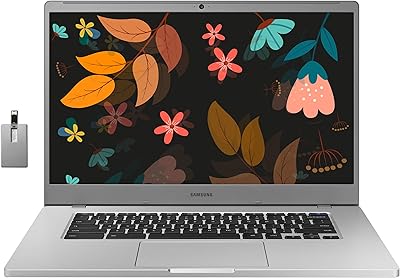
Samsung Chromebook 4+ 15.6″, Intel Celeron N4000, 4GB RAM, 64GB eMMC
79%
89%
Value for Money
82%
Display Quality
90%
Battery Life
88%
Portability
85%
Ease of Use
More
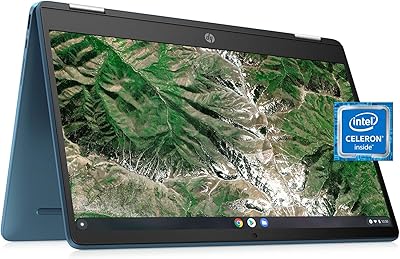
HP Chromebook 14a 64GB
82%
78%
Performance
88%
Battery Life
91%
Portability
80%
Display Quality
75%
Build Quality
More
Samsung Chromebook 4+ 15.6″
82%
88%
Battery Life
83%
Display Quality
80%
Performance for Everyday Tasks
90%
Build Quality and Durability
85%
Portability
More
Samsung Galaxy Chromebook Go 14″ 128GB
85%
78%
Performance
82%
Display Quality
94%
Portability
88%
Battery Life
81%
Build Quality
More
Samsung 970 EVO Plus 250GB SSD
89%
95%
Overall Performance
98%
Read Speed
94%
Write Speed
82%
Thermal Management
89%
Ease of Installation
More
Samsung 990 EVO Plus 4TB SSD
92%
98%
Sequential Read Speed
96%
Sequential Write Speed
91%
Thermal Management
94%
Reliability/Durability
89%
Compatibility with Systems
More
Samsung 990 EVO Plus 2TB SSD
90%
95%
Performance
93%
Read Speed
90%
Write Speed
85%
Thermal Management
92%
Build Quality
More
Samsung Galaxy Tab A9+ 11-inch 64GB
82%
82%
Display Quality
88%
Audio Performance
67%
Multitasking & Speed
86%
Build Quality & Design
73%
Storage Capacity
More
Samsung Galaxy Tab A9 64GB (SM-X110)
77%
83%
Build Quality
91%
Portability
87%
Value for Money
63%
Display Clarity
76%
System Performance
More
Acer Chromebook Plus 515 15.6-inch
84%
94%
Display Quality
88%
Battery Life
86%
Performance (Intel Core i3)
83%
Usability & Ergonomics
89%
Connectivity (Wi-Fi 6E)
More

FAQ

Not in the traditional desktop sense. Chrome OS does not support native Windows applications, so the full desktop versions of Microsoft Office or Adobe Photoshop cannot be installed. You can use Microsoft 365 through a browser or its Android app, but feature parity with the desktop version is limited. If these apps are central to your workflow, this machine is not the right fit.

Neither — the pen is built directly into the Chromebook Plus V2 and uses EMR technology, which means it draws power from the display itself rather than a battery. It slots into a dedicated slot in the chassis, so it is always with you and always ready to use without any pairing or charging steps.

For most typical college workflows — Google Docs, browsing, streaming lectures, and using Google Classroom — 4GB is workable. Where it starts to show strain is when you have many tabs open simultaneously alongside a video call or multiple Android apps. If you tend to keep a lot of things open at once, you may hit frustrating slowdowns more often than you would like.

Chrome OS has improved offline capability significantly over the years. Google Docs, Sheets, and Slides all have offline modes that sync when you reconnect. You can also download Android apps that work offline. That said, Chrome OS is fundamentally designed around internet connectivity, so a prolonged offline environment will limit what you can do compared to a traditional operating system.

The Samsung Chromebook Plus V2 64GB supports microSD cards up to 400GB, so a 256GB or 400GB card is the practical sweet spot for most users. If you plan to store media files, downloaded Android apps, or large documents locally, a 128GB card is a reasonable starting point without spending much.
Yes, and it handles both well. The 12.2″ IPS display looks sharp enough for streaming, and the Celeron processor manages HD video without stuttering. Netflix is available as an Android app through the Play Store, and YouTube runs smoothly through the Chrome browser. Just keep in mind the speakers are mediocre, so headphones will improve the experience considerably.

Out of the box the hinge feels firm and holds each position well. Over extended use — particularly after a year or more of frequent mode-switching — some owners have reported it gradually loosening, causing the screen to lean more freely than intended. It is not a universal failure, but if you plan to switch between laptop and tablet mode many times daily over several years, it is worth being aware of.

Yes, Chrome OS supports Google Cloud Print-compatible printers, and many modern printers connect directly through Wi-Fi or USB. If your printer is relatively recent, there is a good chance it will work either natively or through an Android app. Older printers without network capabilities may require a workaround or may not connect at all.

Like most lithium batteries in consumer laptops, capacity gradually decreases over time. Most owners report solid battery performance through the first year, but after 18 months or more of daily charging cycles, some notice a meaningful reduction in how long a full charge lasts. This is not unique to this device, but it is worth factoring in if you plan to use it as a primary machine for more than two years.

It is a reasonable choice for older children and middle schoolers, particularly in schools already using Google Workspace for Education. The durable hinge, lightweight build, and included pen make it practical for younger users. Chrome OS is also easier to manage and secure than Windows. For very young children, the form factor and price point may warrant a more ruggedized or lower-cost alternative instead.