Overview

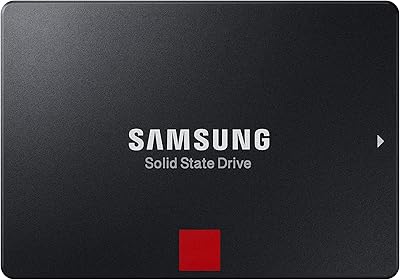
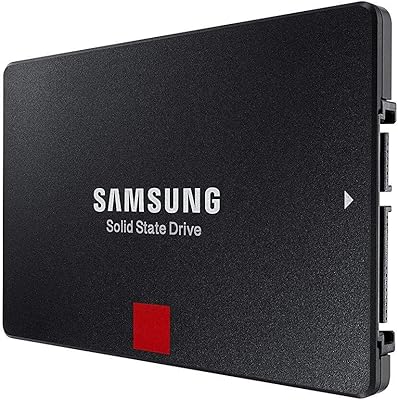
The Samsung 850 PRO 512GB Internal SSD arrived at a point when V-NAND technology was still relatively new, and Samsung positioned it firmly at the top of the consumer SATA market. This is a drive built for professionals and power users who genuinely push their systems hard — not casual browsers or light typists. It fits the standard 2.5-inch form factor, so it slots into most desktops and laptops without any hassle. The 512GB capacity hits a practical sweet spot: enough room for an OS, demanding applications, and active project files without constantly juggling space. One honest caveat — SATA III has a bandwidth ceiling, and the 850 PRO bumps right up against it, but it cannot break through the way NVMe drives now can.
Features & Benefits

What makes this Samsung SSD stand out within SATA's constraints is how consistently it performs under pressure. Sequential reads top out near 550MB/s and writes follow close behind — essentially extracting every bit of bandwidth the interface allows. More telling for daily use are the random IOPS figures: up to 100,000 read and 90,000 write, which directly translates to snappier app launches and smoother multitasking. The Samsung MEX Controller keeps performance stable even under prolonged heavy writes, something cheaper drives noticeably fail at. Hardware-level AES 256-bit encryption is baked in, with BitLocker and TCG/Opal 2.0 compliance for anyone handling sensitive data. Laptop users also benefit from DevSleep mode, which meaningfully cuts power draw compared to spinning drives.

Best For

The 850 PRO makes the most sense for people whose work genuinely stresses storage. Video editors scrubbing large files, photographers batch-processing RAW images, and animators managing heavy project caches will notice the difference in sustained write performance. Gamers who want fast boot times and quick level loading — and are fine staying on a SATA connection — will be well served. Ultrabook users benefit from DevSleep power savings during low-activity periods. For anyone upgrading from a spinning hard drive, the shift is dramatic. On the business side, IT teams handling sensitive data will value the built-in hardware encryption and enterprise compliance. This is not a casual everyday drive — it is built for demanding, continuous workloads.

User Feedback

Across nearly 9,000 ratings, this SATA drive holds a 4.6-star average — a strong result given that many of those reviewers have lived with it for years. The most consistent praise centers on long-term reliability: units still running cleanly after four or five years of daily use come up repeatedly. Real-world speeds reportedly match advertised figures closely, which is not always true of budget alternatives. The main friction point is pricing relative to the 850 EVO, which uses TLC NAND instead of MLC but costs noticeably less. For everyday users, the endurance advantage of the PRO may never fully materialize. For professionals who actually need that durability headroom, the investment tends to feel justified in hindsight.

Pros

  • MLC V-NAND delivers noticeably stronger sustained write endurance than most consumer TLC drives on the market.
  • The 10-year limited warranty is rare in this category and provides genuine long-term peace of mind.
  • Real-world speeds consistently match advertised figures, a reliability that budget alternatives often fail to deliver.
  • Hardware AES 256-bit encryption works transparently without any measurable performance penalty for the end user.
  • DevSleep mode meaningfully extends laptop battery life compared to older spinning hard drives.
  • Installation is straightforward — fits any standard 2.5-inch SATA bay in desktops and most laptops.
  • Thousands of long-term owners report units still performing reliably after four or more years of daily use.
  • The 850 PRO handles heavy, continuous workloads without the performance throttling that cheaper controllers exhibit.
  • Compatible with Windows, Linux, and Mac, covering the vast majority of real-world use environments.

Cons

  • NVMe drives now offer far higher peak speeds at competitive prices, making the SATA ceiling a real limitation.
  • The premium over the 850 EVO is hard to justify for users who never stress write endurance in practice.
  • 512GB feels restrictive for users storing large video projects, game libraries, or RAW photo archives.
  • No M.2 form factor option means this SATA drive is incompatible with modern slim laptops and many recent motherboards.
  • The 150TBW endurance rating, while strong for SATA, is modest compared to enterprise-class NVMe alternatives.
  • Buyers paying a premium price may find newer-generation drives offer better overall value in today's market.
  • Software bundled in the package (SSD Magician) has received mixed feedback regarding interface usability and update reliability.

Ratings

The scores below reflect an AI-driven analysis of verified global user reviews for the Samsung 850 PRO 512GB Internal SSD, with spam, bot submissions, and incentivized feedback actively filtered out before scoring. Each category captures both the genuine strengths buyers praise and the real frustrations that surface after extended use. Nothing has been smoothed over — the ratings reflect what actual owners experience, not what the spec sheet promises.

Real-World Read Performance
93%
Owners consistently report that everyday tasks — launching applications, booting the OS, opening large project files — feel noticeably fast and predictable. The drive hits close to its advertised read speeds in practice, which is not always the case with budget alternatives that fall short of their own claims.
SATA III puts a hard ceiling on what is achievable, and users who later upgrade to NVMe systems often describe the 850 PRO's read performance as underwhelming by comparison, even though it is technically doing everything the interface allows.
Sustained Write Throughput
88%
Content creators who write large volumes of data continuously — video editors exporting timelines, photographers running batch transfers — report that the 850 PRO holds its write speeds far more consistently than competing TLC-based drives, which tend to slow down after the cache fills.
A small number of users running extremely prolonged write sessions, such as large server backup jobs, have noted that even the 850 PRO shows slight write speed dips under extreme sustained load, though this is less pronounced than on most rivals.
Long-Term Durability
96%
This is where the 850 PRO genuinely separates itself from the crowd. Owners regularly report units running without a single issue after four, five, or even six years of daily use, which is rare in consumer storage and speaks directly to the MLC NAND's write endurance advantage.
A small percentage of early adopters reported failures within the first year, which is statistically normal for any high-volume product but worth noting. Samsung's warranty process has received mixed reviews in terms of response time depending on region.
Value for Money
57%
43%
For professional users who genuinely stress their storage — daily video exports, continuous database writes, heavy virtualization — the 10-year warranty and MLC endurance do justify the premium over time. Several IT buyers specifically noted that the total cost of ownership calculation works in the 850 PRO's favor over a multi-year deployment.
For most buyers today, the pricing is a difficult sell. NVMe drives at similar or lower price points offer dramatically faster peak speeds, and the 850 EVO handles everyday workloads at a significantly lower cost. The value argument requires a specific use-case to hold up.
Reliability & Failure Rate
91%
Across thousands of reviews spanning several years, the failure rate cited by owners is notably low. Many users specifically came back to leave updated reviews confirming the drive was still running strong years after purchase, which is an unusually strong signal for a consumer storage product.
A handful of users experienced unexpected failures outside the early burn-in period, and some reported difficulty distinguishing warranty coverage terms clearly. These cases are outliers statistically, but they do exist and should be factored into any critical-use deployment.
Installation Experience
89%
The vast majority of users — even those with limited technical experience — describe installation as straightforward. The 2.5-inch form factor fits standard bays without adapters, and Samsung's bundled Data Migration Software handles drive cloning without requiring third-party tools.
A minority of users found the migration software finicky when cloning from older HDDs with Windows system partitions, occasionally requiring a manual BIOS adjustment afterward. Nothing insurmountable, but it added friction for less experienced installers.
Encryption & Security Features
84%
IT administrators and business users consistently praise the hardware AES 256-bit encryption and TCG/Opal 2.0 compliance as genuinely useful, not just a checkbox feature. The BitLocker integration works cleanly in Windows enterprise environments without any observable performance cost.
For home users who have no need for drive encryption, this feature set is essentially invisible and adds nothing to the day-to-day experience. Some users were also unclear on how to activate encryption properly, as it requires BIOS-level setup that is not well documented in the included materials.
Power Efficiency
78%
22%
Laptop users — particularly those on Ultrabooks — report a noticeable improvement in battery life compared to their previous hard drives, with DevSleep mode doing its job during screen-off and idle periods without requiring any manual configuration.
The gains are real but moderate, and users upgrading from a more recent SATA SSD (rather than an HDD) will see minimal battery improvement. A few users also noted that DevSleep compatibility depends on both the operating system and the laptop firmware, and some older machines did not support the mode at all.
Software Bundle
63%
37%
Samsung SSD Magician provides useful health monitoring, performance benchmarking, and firmware update tools that experienced users appreciate having in one place. The Data Migration Software, when it works smoothly, genuinely simplifies the upgrade process for new owners.
Magician has received persistent criticism for a dated interface and occasional compatibility issues on certain Windows builds. Several users reported the software flagging false health warnings or failing to detect the drive correctly after system updates, which introduced unnecessary anxiety about drive status.
Compatibility
87%
The standard SATA III interface and 2.5-inch form factor mean this SATA drive works across an exceptionally wide range of systems — desktops, laptops, NAS enclosures, and even some gaming consoles with storage expansion bays. Cross-platform OS support for Windows, Linux, and Mac covers virtually every common use environment.
Newer laptops and ultrabooks increasingly ship without 2.5-inch SATA bays entirely, relying on M.2 slots instead. Buyers with modern thin-and-light systems may discover post-purchase that the drive physically has nowhere to go, which is an easy-to-overlook compatibility pitfall.
Noise & Vibration
97%
Being a solid-state drive, the 850 PRO operates in complete silence with zero vibration under all load conditions. Users who previously lived with the constant spinning and seeking sounds of HDDs describe the transition as immediately and permanently noticeable.
There is essentially nothing negative to report here — silence is the baseline for any SSD. If you are assigning noise as a decision factor, every comparable drive in this category performs equally well.
Thermal Performance
82%
18%
Under normal workloads, the drive runs cool enough that thermal throttling is a non-issue for the overwhelming majority of users. Enthusiasts running the drive in well-ventilated desktop builds report stable temperatures throughout extended use sessions.
A small number of users running the drive inside thermally constrained enclosures — certain compact NAS units or particularly tight laptop chassis — noted moderate warmth under sustained load. No failures were attributed to thermals, but it is worth considering airflow in dense builds.
Interface Future-Proofing
41%
59%
SATA III remains widely available across existing hardware, and for users maintaining older systems or building on a legacy platform, this drive connects without any compatibility concerns. Its broad support means it will keep working across a very wide installed base.
SATA is a mature and largely stagnant interface, and the industry has clearly moved toward NVMe as the default. Anyone building a new system today will almost certainly have NVMe options readily available, making a SATA purchase feel like a step backward from a longevity standpoint.

Suitable for:

The Samsung 850 PRO 512GB Internal SSD is built for users who put genuine, sustained demands on their storage every single day. Content creators — video editors cutting multi-track timelines, photographers batch-processing large RAW files, and animators working with heavy project caches — will notice real, tangible differences in how quickly the drive handles continuous write-heavy workflows. Gamers running on SATA-based systems get fast boot times and snappy game loading without needing to rebuild around an NVMe-compatible motherboard. IT professionals and business users handling sensitive data will appreciate the hardware-level AES 256-bit encryption and TCG/Opal 2.0 compliance, which few consumer-grade SATA drives offer at this level. Ultrabook and laptop users benefit from DevSleep power management, which makes a measurable difference to battery longevity during mixed-use days. Anyone upgrading from a traditional spinning hard drive will find the jump in responsiveness dramatic and immediately obvious.

Not suitable for:

If raw peak throughput is your primary goal, the Samsung 850 PRO 512GB Internal SSD is no longer the obvious answer. NVMe drives using PCIe connections now offer sequential read speeds two to six times higher, and for users building fresh systems with M.2 slots available, the performance gap is hard to ignore. Budget-conscious buyers will also find the pricing harder to justify when the 850 EVO — using TLC NAND rather than MLC — delivers strong everyday performance at a lower cost, especially for workloads that do not stress long-term write endurance. Users who need more than 512GB for a single-drive setup, such as those storing large media libraries or game collections, may find the capacity limiting relative to what similarly priced NVMe options now offer. If your system lacks a SATA port entirely, or if you are prioritizing future-proofing over compatibility with existing hardware, this drive is simply the wrong fit.

Specifications

  • Capacity: The drive offers 512GB of usable storage, suitable for operating systems, professional applications, and active project files.
  • Form Factor: Built in the standard 2.5-inch format, it fits directly into most desktop drive bays and laptop SATA slots without adapters.
  • Interface: Connects via SATA III at 6Gb/s, making it compatible with any system that has a standard SATA port.
  • Sequential Read: Achieves sequential read speeds of up to 550MB/s, which sits at the practical ceiling of what SATA III allows.
  • Sequential Write: Delivers sequential write speeds of up to 520MB/s, keeping pace with read performance for demanding write-heavy tasks.
  • Random Read IOPS: Rated at up to 100,000 random read IOPS, which directly improves application launch times and system responsiveness.
  • Random Write IOPS: Rated at up to 90,000 random write IOPS, supporting smooth multitasking even under sustained mixed workloads.
  • Controller: Powered by Samsung's proprietary 5th-generation triple-core MEX controller, designed to sustain performance without throttling under heavy load.
  • NAND Type: Uses Samsung V-NAND MLC (Multi-Level Cell) flash memory, which offers stronger write endurance than standard TLC NAND.
  • Encryption: Includes hardware-level AES 256-bit encryption with TCG/Opal 2.0 and Microsoft BitLocker support for secure data storage.
  • Warranty: Backed by a 10-year limited warranty, which is significantly longer than the 3- to 5-year coverage typical of most consumer SSDs.
  • Endurance Rating: Rated at 150TBW (terabytes written), meaning the drive is engineered to handle 150TB of total data writes over its lifespan.
  • Power Feature: Supports DevSleep mode, a low-power state that reduces energy consumption during idle periods, benefiting Ultrabook and laptop users.
  • Dimensions: Measures 3.94 x 2.76 x 0.27 inches, conforming to the standard 2.5-inch SSD profile for easy installation.
  • Weight: Weighs 2.32 ounces, light enough to have no practical impact on laptop weight or balance.
  • Voltage: Operates at 5 volts, drawing power directly from a standard SATA power connector with no external supply needed.
  • OS Compatibility: Officially supports Windows 10, 8, 7, Vista SP1 and later (32/64-bit), Windows Server 2008, Linux, and Mac operating systems.
  • Bundled Software: Includes access to Samsung SSD Magician for drive management and health monitoring, plus Samsung Data Migration Software for cloning existing drives.

Related Reviews
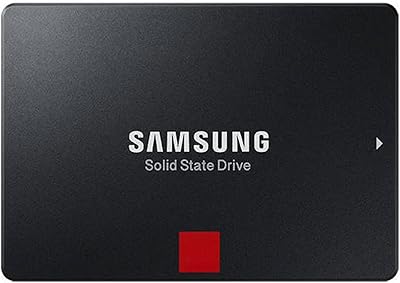
Samsung 860 Pro 512GB SSD
89%
94%
Performance
92%
Reliability
86%
Value for Money
95%
Ease of Installation
91%
Data Security
More
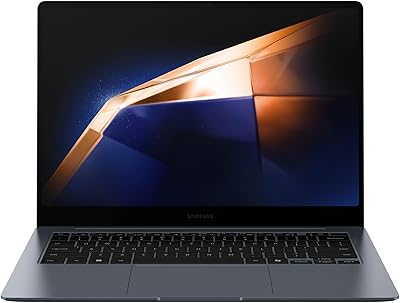
Samsung Galaxy Book4 Pro 14″ Laptop, Intel Core i7, 512GB SSD, 16GB RAM
87%
89%
Performance
94%
Display Quality
93%
Portability
87%
Battery Life
88%
Build Quality
More
SAMSUNG Galaxy Book3 Pro 14-inch Laptop, Intel Core i7-1360P, 16GB RAM, 512GB SSD
85%
90%
Performance
94%
Display Quality
85%
Battery Life
92%
Portability
88%
Build Quality
More
Samsung 9100 PRO 4TB M.2 SSD
85%
96%
Sequential Read/Write Speed
91%
Random I/O Performance
78%
Sustained Workload Stability
74%
Thermal Management
88%
Power Efficiency
More
Samsung 860 PRO 2TB SSD
87%
94%
Performance
89%
Value for Money
92%
Reliability & Durability
88%
Security Features
72%
Ease of Setup
More
Samsung 850 EVO 500GB SSD
87%
94%
Performance
91%
Speed (Read/Write)
88%
Reliability/Durability
85%
Ease of Installation
93%
Compatibility with Devices
More
Samsung 860 PRO SSD 1TB
88%
93%
Performance Speed
91%
Reliability & Lifespan
89%
Data Security (Encryption)
85%
Power Efficiency
90%
Ease of Installation
More
Samsung 990 PRO 4TB M.2 NVMe SSD
86%
93%
Read & Write Speed
91%
Random I/O Performance
67%
Thermal Management
94%
Installation & Compatibility
72%
Value for Money
More
Samsung 860 PRO 4TB Internal SSD
84%
94%
Long-Term Reliability
92%
Write Endurance
88%
Sustained Performance
53%
Value for Money
83%
Read Speed
More
Samsung 970 PRO SSD 1TB
88%
94%
Performance
92%
Speed & Data Transfer
90%
Reliability
88%
Thermal Management
87%
Ease of Setup
More

FAQ

Yes, as long as your laptop has a 2.5-inch SATA bay, the 850 PRO will fit and work without any modifications. Most laptops built in the last decade use exactly this form factor. Just check that your system supports SATA III for full speed, though it will still function at reduced speeds on older SATA II ports.

The core difference is NAND type: the PRO uses MLC flash, which handles far more write cycles over its lifetime than the TLC flash in the EVO. For most everyday users — browsing, office work, casual media — the EVO is genuinely sufficient and the endurance gap will never matter in practice. If you are writing large amounts of data daily, like a video editor or a developer running heavy builds, the PRO's longevity advantage becomes real and worth paying for.

Absolutely — that is one of the most common uses for this SATA drive. Booting from it is fast, and the system will feel consistently responsive day to day. Just connect it to a SATA III port on your motherboard and point your BIOS to it as the primary boot device.

If your motherboard has an M.2 slot with NVMe support, a modern NVMe drive will offer significantly higher peak read and write speeds — often three to five times faster in sequential transfers. For most everyday tasks the difference is less dramatic in practice, but for large file transfers or heavy creative workloads it adds up. The Samsung 850 PRO 512GB Internal SSD is still a very capable drive, but if your system supports NVMe and budget allows, it is worth considering for future-proofing.

TBW stands for terabytes written, and it represents the total amount of data the manufacturer expects you can write to the drive before the NAND starts to degrade. At 150TBW, even a fairly demanding user writing 50GB per day would take over eight years to reach that threshold. In plain terms, for most buyers this drive will outlast the system it is installed in.

No. Because the encryption is handled directly by the drive's controller in hardware, it runs transparently without placing any load on your CPU or reducing transfer speeds. You get full AES 256-bit protection with essentially no performance trade-off, which is one of the practical advantages of hardware-based encryption over software solutions.

For most desktop and laptop upgrades, yes. You physically seat the drive in the SATA bay, connect the SATA data and power cables, and then either do a fresh OS install or use Samsung's included Data Migration Software to clone your existing drive. The migration software is reasonably straightforward, though reading through a basic SSD installation guide before starting is always a good idea if you have not done it before.

Yes, it is compatible with Mac systems that have a 2.5-inch SATA drive bay, which includes many older MacBook Pros and Mac Minis. Keep in mind that newer Apple hardware uses proprietary M.2-style connectors and will not accept a standard SATA drive at all, so check your specific model before purchasing.

The 850 PRO carries a 10-year limited warranty, which is exceptional by consumer SSD standards. Samsung's warranty covers manufacturing defects and drive failure under normal use conditions. It does not cover physical damage or data recovery. For a storage device you are relying on professionally, that decade of coverage is a meaningful safety net.

Not abruptly, no. NAND flash degrades gradually, and most drives — including this one — transition to a read-only state when they approach their endurance limits rather than failing outright. This gives you time to notice the warning through monitoring software like Samsung Magician and migrate your data safely before anything is lost. It is a controlled wind-down, not a sudden cliff.

Where to Buy