
Overview

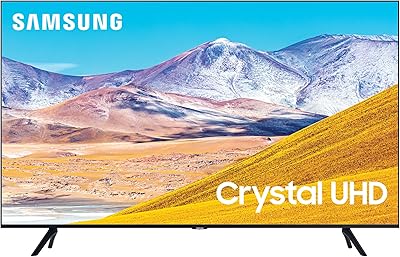
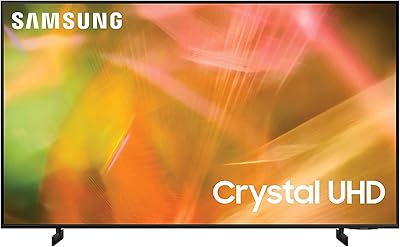
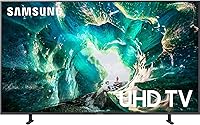
The Samsung RU8000 55-inch 4K UHD Smart TV occupies a comfortable spot in Samsung's 2019 lineup — capable enough to satisfy buyers who want strong picture quality and smart features, but positioned just below the QLED tier where prices climb steeply. The flat panel comes in a subdued Titan Gray finish, measuring just 2.3 inches deep without the stand, so it fits neatly on a console or wall-mount bracket. Running on Samsung's Tizen smart platform, the interface handles live TV and streaming apps without much friction. What sets it apart at this level is broad voice assistant support — Alexa, Google Assistant, and Bixby are all on board.

Features & Benefits

The RU8000's 4K upscaling processor does a respectable job with older HD content — cable broadcasts and Blu-ray discs look noticeably sharper than they would on a standard 1080p panel. The Slim Array backlighting improves contrast over basic edge-lit designs, though it is worth being clear: this is not a full-array local dimming setup, so black levels will not rival those on higher-end OLED or QLED screens. HDR10 support helps compatible streaming content pop with wider highlights. The 120 Hz panel handles sports and action movies with minimal blur, which is a practical advantage over 60 Hz budget alternatives. Four HDMI ports and two USB ports round out a genuinely useful connectivity setup.

Best For

This Samsung smart TV makes the most sense for households making a big leap from an older 1080p set — the improvement in everyday picture sharpness is immediately obvious, even on non-4K content thanks to upscaling. Cord-cutters will find the Tizen smart hub genuinely practical: apps load quickly, the universal guide pulls streaming and live TV into one place, and initial setup takes only a few minutes. Sports and action content benefit from the 120 Hz panel in a meaningful way. Buyers who split time between Alexa and Google Assistant devices will appreciate not having to pick sides. Just keep in mind that controlled lighting conditions get the most out of the HDR performance.

User Feedback

Buyers consistently praise the out-of-box picture quality, noting that color accuracy and sharpness are strong from the first boot without requiring extensive calibration. Setup is frequently called straightforward, and the OneRemote draws positive comments for its simplicity. On the critical side, recurring complaints center on ads appearing inside the Tizen smart hub and pre-installed apps that cannot be removed — a frustration common across Samsung's mid-range ecosystem. The built-in 2-channel speaker system is the most consistent long-term criticism; most buyers who keep this 55-inch 4K set eventually pair it with a soundbar. Long-term owners report solid reliability and regular software updates, though some note the platform feels slightly dated compared to current-generation smart TV interfaces.

Pros

  • Sharp, accurate 4K picture right out of the box — minimal calibration needed for most living rooms.
  • The 120 Hz panel handles sports and action films noticeably better than budget 60 Hz alternatives.
  • Upscaling on HD cable and streaming content is effective enough that older shows still look clean.
  • Four HDMI ports give you room for a console, soundbar, streaming stick, and a spare without any switching hassle.
  • Works with Alexa, Google Assistant, and Bixby — rare flexibility for a mid-range set in this class.
  • Tizen OS loads apps quickly and the universal content guide genuinely reduces how much you hunt around.
  • The slim flat-panel design sits tidily on a media console or mounts flush against the wall without bulk.
  • Long-term owners report solid build reliability and a consistent history of receiving software updates.
  • The OneRemote keeps the coffee table clear and covers most connected devices without extra remotes.
  • HDR10 support delivers a real visual payoff on compatible 4K streaming content in a dimmed room.

Cons

  • Ads appear directly inside the Tizen smart hub menu, which many users find intrusive and hard to ignore.
  • Pre-installed apps cannot be fully removed, leaving the smart platform feeling cluttered over time.
  • Slim Array local dimming is limited — dark scenes reveal noticeable backlight bleed in a pitch-black room.
  • The built-in 2-channel speaker system is underwhelming at this screen size; most buyers end up buying a soundbar.
  • As a 2019 model, it lacks newer gaming features like VRR and ALLM that current-generation TVs offer as standard.
  • Input lag is adequate for casual gaming but falls short for competitive or fast-reaction play.
  • Black levels cannot compete with OLED or even Samsung's own higher-tier QLED panels in the same size range.
  • The smart platform interface has aged relative to current-generation Tizen and competing OS options available today.
  • Wi-Fi connectivity has drawn occasional complaints about signal consistency in larger homes with the router at a distance.
  • At its original price tier, the value case has weakened as newer competing models have closed the feature gap.

Ratings

The Samsung RU8000 55-inch 4K UHD Smart TV earns a well-rounded but nuanced score across our rating categories, generated by AI after analyzing thousands of verified global buyer reviews with active filtering applied to remove incentivized, duplicate, and bot-generated submissions. Real strengths in picture quality and smart platform usability come through clearly in the data, but so do recurring frustrations around audio performance and software bloat. The scores below reflect the honest, unfiltered distribution of what actual owners experience day to day — not a manufacturer's ideal-conditions demo.

Picture Quality
83%
Most buyers describe a genuine and immediate improvement over their previous 1080p sets, with colors looking vivid and accurate out of the box. The 4K upscaling processor does a competent job on HD streaming and cable content, meaning even non-native 4K sources hold up well during everyday watching.
The Slim Array backlighting falls short in dark or high-contrast scenes — backlight bleed is visible in pitch-black rooms, and shadow detail is not as refined as what you get from OLED or higher-tier QLED panels. Buyers who watch a lot of dark-scene content specifically flag this as a noticeable limitation.
Motion Handling
81%
19%
The 120 Hz panel earns consistent praise from sports viewers and action film fans, who notice a clean and stable image even during fast camera pans or rapid on-screen movement. Soccer matches and basketball games in particular look significantly smoother compared to 60 Hz alternatives at a similar price point.
Samsung's motion interpolation processing, when pushed to higher settings, can produce the artificial soap-opera effect that bothers many viewers. Finding the right custom motion settings takes some trial and error, and not all buyers take the time to tune it properly before forming an opinion.
HDR Performance
72%
28%
HDR10 support delivers a noticeable difference on compatible 4K content from Netflix and Amazon — highlights in bright outdoor scenes pop with more depth than a standard SDR panel produces. For streaming-focused households, this is a meaningful upgrade without requiring a flagship-level investment.
The absence of Dolby Vision and HDR10+ support limits compatibility with certain disc and streaming titles that use those formats. Peak brightness levels also fall below what dedicated HDR monitors achieve, so the HDR impact is most convincing in a moderately dimmed room rather than a bright living space.
Smart TV Interface
76%
24%
Tizen OS loads apps quickly and the universal content guide is genuinely useful for cord-cutters who bounce between live TV and streaming services. Initial setup takes roughly fifteen minutes, and voice control via Alexa or Google Assistant works reliably for changing inputs, launching apps, and adjusting volume.
The smart hub homepage displays sponsored promotional tiles that cannot be fully removed, which many long-term owners find distracting and increasingly intrusive. The 2019 version of Tizen also feels somewhat dated compared to the cleaner interfaces now shipping on current-generation smart TVs from competing brands.
Audio Performance
54%
46%
The built-in 2-channel speaker system is adequate for dialogue-heavy content like news broadcasts and talk shows watched at moderate volume. In smaller rooms with reflective walls, the sound holds together well enough for casual daytime viewing without requiring any immediate upgrade.
For a 55-inch television at this price tier, the audio output is a consistent disappointment — thin bass, limited dynamic range, and a tendency to distort slightly at higher volume levels. The vast majority of long-term owners end up pairing it with an external soundbar, which is an expense buyers should budget for upfront.
Connectivity
88%
Four HDMI ports is a genuine practical advantage, letting buyers connect a gaming console, soundbar, streaming stick, and Blu-ray player at the same time without a switcher. Two USB ports, an optical audio output, Bluetooth, Wi-Fi, and a wired Ethernet port round out a connectivity package that covers almost every common setup scenario.
None of the four HDMI ports support the newer HDMI 2.1 standard, which limits bandwidth for future 4K 120fps gaming content. Buyers building a next-generation gaming setup should factor this in, as it becomes relevant with current console hardware.
Build & Design
79%
21%
The Titan Gray finish looks professional and understated, blending into most living room setups without drawing attention to itself. At just 2.3 inches deep without the stand, it sits flush on a media console or mounts flat against a wall with minimal protrusion.
The rear panel uses a significant amount of plastic that feels less premium than the slim front profile suggests. The stand design has a relatively narrow footprint, which makes the TV feel less stable on wider furniture surfaces than buyers sometimes expect for a 43-pound panel.
Setup & Installation
87%
The on-screen guided setup is one of the more user-friendly experiences in this category — most buyers report having the TV fully configured and streaming within twenty minutes of unboxing. The OneRemote automatically detects connected HDMI devices, which eliminates most of the remote-juggling that used to accompany new TV setups.
Buyers who want to wall-mount it need a third-party VESA bracket, and the cable management options at the rear are limited. A few users also note that Samsung account sign-in is pushed quite aggressively during setup, with no obvious way to skip it without some menu exploration.
Gaming Performance
61%
39%
Casual gaming on current-generation consoles works well enough — the 120 Hz panel keeps gameplay smooth, and four HDMI ports mean there is no need for a switch box even with multiple consoles connected. Response times for story-driven or slower-paced games are generally considered acceptable by owners.
The absence of variable refresh rate support and auto low latency mode means competitive or fast-reaction gamers will notice tearing and input inconsistency that newer TVs handle automatically. As a 2019 model, it simply was not designed with the gaming feature set that has since become a baseline expectation.
Value for Money
67%
33%
At launch, the RU8000 occupied a reasonable position in Samsung's lineup — buyers got a step above entry-level performance without paying for the full QLED premium. For buyers finding it discounted well below its original price, the picture quality and feature set still represent a fair deal for everyday use.
At its original release price, the value case was already debated, with some buyers feeling the QLED jump was worth the additional spend. Now that newer models have closed the feature gap significantly, the price-to-performance argument for this specific 2019 unit requires a meaningful discount to hold up.
Remote Control
82%
18%
The OneRemote is slim, simple, and does its job without overwhelming buyers with unnecessary buttons. Auto-detection of HDMI-connected devices means most people can genuinely set the extra remotes aside after the first week of ownership.
The remote lacks dedicated number buttons, which makes direct channel entry on live TV more cumbersome than it was on older Samsung remotes. Buyers who watch a lot of traditional cable TV specifically call this out as a daily friction point.
Long-term Reliability
78%
22%
Most long-term owners report solid hardware durability with no significant panel degradation after two or more years of regular use. Samsung has continued to push software updates to this model, keeping the smart platform functional and security-patched beyond what some comparable 2019 models from other brands received.
A subset of owners report occasional software crashes that require a full power cycle, and Wi-Fi connectivity can become intermittent on units that have not received recent firmware updates. These issues are not universal but appear frequently enough to be worth noting.
App Ecosystem
74%
26%
All major streaming apps are present and load quickly — Netflix, Disney+, Prime Video, Hulu, Apple TV, and YouTube are all available and well-integrated into the universal content guide. The Samsung app store covers most niche services as well, so the gap in available content versus competing platforms is minimal.
The app store selection is thinner than what Google TV or Fire TV-based sets offer, and a handful of regional or niche streaming services are missing entirely. Pre-installed bloatware apps that cannot be removed also consume storage and clutter the interface over time.

Suitable for:

The Samsung RU8000 55-inch 4K UHD Smart TV is a strong pick for households that are stepping up from an aging 1080p television and want an immediate, tangible improvement in everyday picture quality. Families who spend most of their TV time on Netflix, Disney+, or Prime Video will find the Tizen smart hub practical and responsive, pulling everything into one organized interface without needing an external streaming stick. Sports viewers in particular get real value from the 120 Hz panel, which keeps fast motion — soccer passes, basketball cuts, action sequences — looking clean rather than blurred. If your living room has decent curtain or blind coverage, the HDR10 performance rewards you with noticeably richer highlights during compatible content. Buyers who mix Alexa and Google Assistant devices throughout their home will also appreciate not having to compromise, since the RU8000 works with both ecosystems natively.

Not suitable for:

The Samsung RU8000 55-inch 4K UHD Smart TV is a harder sell for anyone who prioritizes deep blacks and cinematic contrast, since its Slim Array backlighting does not deliver the local dimming precision you get from full-array or OLED panels at higher price points. Dedicated home theater enthusiasts who watch a lot of dark-scene-heavy content — horror films, prestige dramas, space documentaries — will likely find the black levels disappointing compared to what the premium tier offers. Hardcore gamers chasing sub-10ms input lag or variable refresh rate support may find this 2019 model lacking features that have since become standard on newer displays. Buyers who dislike ad-supported smart TV interfaces should also think twice, as the Tizen smart hub on this generation does serve promotional content in the menu. Finally, anyone expecting satisfying audio from the built-in speakers alone will almost certainly end up needing a soundbar, which adds cost that should be factored into the overall budget from the start.

Specifications

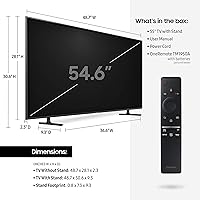
  • Screen Size: The panel measures 55 inches diagonally, with an actual viewable area of 54.6 inches.
  • Resolution: Native 4K UHD resolution of 3840 x 2160 pixels delivers four times the pixel density of a standard 1080p display.
  • Display Type: LED LCD panel with Slim Array backlighting, which provides more localized dimming control than a basic edge-lit configuration.
  • Refresh Rate: The panel runs at 120 Hz, reducing motion blur during fast-moving content such as live sports and action sequences.
  • HDR Support: Compatible with HDR10, allowing supported streaming and disc content to display expanded highlight detail and a wider luminance range.
  • Smart Platform: Runs Samsung's Tizen OS, which includes a universal content guide that aggregates live TV channels and streaming apps in one interface.
  • Voice Assistants: Supports Alexa, Google Assistant, and Samsung Bixby, allowing hands-free control without committing to a single voice ecosystem.
  • HDMI Ports: Equipped with four HDMI ports, providing enough inputs for a gaming console, soundbar, streaming stick, and an additional device simultaneously.
  • USB Ports: Two USB ports are included for connecting external storage drives or media playback devices directly to the television.
  • Connectivity: Wireless connectivity includes dual-band Wi-Fi and Bluetooth, alongside a physical Ethernet port for a wired network connection.
  • Dimensions: Without the stand, the TV measures 48.7″W x 2.3″D x 28.1″H; with the stand it measures 48.7″W x 9.3″D x 30.6″H.
  • Weight: The unit weighs 42.1 lbs without the stand and 43.0 lbs with the stand attached.
  • Speaker System: Built-in 2-channel audio output is included; no Dolby Atmos support, making an external soundbar a practical upgrade for most users.
  • Power Draw: Rated at 135 watts during normal operation, which is typical for a 55-inch 4K LED panel in this class.
  • Audio Output: Includes one Digital Audio Out optical port for connecting a soundbar or AV receiver via a direct wired connection.
  • Other Ports: One RS-232C control port is included, primarily used for commercial or custom installation control systems.
  • Color: Available in Titan Gray, a neutral dark finish that blends with most living room furniture and mounting setups.
  • Model Number: The official Samsung model identifier for this unit is UN55RU8000FXZA, used for warranty registration and part lookup.
  • Wall Mount: Compatible with third-party VESA wall mounts; no proprietary mounting system is required for installation.
  • Remote Control: Ships with Samsung's OneRemote, which is designed to auto-detect and control compatible connected devices without additional remotes.

Related Reviews
Samsung U8000F 55-inch 4K Smart TV
77%
78%
Picture Quality
84%
Value for Money
86%
Design & Build
71%
Smart TV Experience
58%
Gaming Performance
More
Westinghouse 55-inch Xumo 4K Smart TV
71%
78%
Picture Quality
74%
Smart Platform (Xumo TV)
88%
Value for Money
53%
Audio Performance
44%
Gaming Performance
More
Samsung 50-inch Crystal UHD TU8000 Smart TV
61%
61%
Picture Quality
47%
Motion Handling
78%
Smart Platform
74%
Voice Control
52%
HDR Performance
More
LG 55UP8000PUA 55-inch 4K Smart UHD TV
82%
88%
Picture Quality
85%
Smart Features
90%
Gaming Performance
92%
Value for Money
80%
Ease of Setup
More
Samsung 55-inch CU8000 4K LED Smart TV
72%
74%
Picture Quality
61%
Motion & Refresh Rate
83%
Smart TV Experience
58%
Built-in Audio
86%
Design & Build
More
Hisense 55A6H 55-Inch 4K UHD Smart Google TV
84%
94%
Display Quality
88%
Smart Features (Google TV & Alexa)
90%
Gaming Performance
85%
Sports Mode Optimization
92%
Value for Money
More
Samsung Q70A 75-inch QLED 4K Smart TV
77%
78%
Picture Quality
61%
Contrast & Black Levels
84%
Motion Handling
82%
Gaming Performance
83%
Smart TV Experience
More
Samsung 32-inch Q8F QLED 4K Smart TV
77%
88%
Picture Quality
91%
Color Accuracy
63%
Motion Handling
74%
Gaming Performance
69%
Smart TV Interface
More
Samsung The Frame LS03F 55-Inch QLED TV
79%
93%
Ambient & Art Mode
81%
Picture Quality
96%
Design & Aesthetics
91%
Cable Management
78%
Gaming Performance
More
Samsung 70-Inch Crystal UHD U8000F 4K Smart TV
86%
91%
Display Quality
88%
Value for Money
84%
Smart Features & Usability
89%
Picture Clarity & Upscaling
92%
Build Quality & Design
More

FAQ

Yes, the Tizen smart platform comes with Netflix, Prime Video, Disney+, Hulu, and other major apps pre-installed. You can also download additional apps through the Samsung app store, and the universal guide pulls content from multiple services into a single browsable feed.

It works fine for casual gaming — the 120 Hz panel keeps motion smooth and you have four HDMI ports to work with. That said, if you are a competitive gamer who cares about precise input lag figures or needs variable refresh rate support, you may find current-generation gaming TVs better suited to those needs, as this 2019 model predates those features becoming standard.

Setup is genuinely straightforward. The on-screen guide walks you through Wi-Fi connection, Samsung account sign-in, and app configuration in about ten to fifteen minutes. Most buyers report having it fully running the same day it arrives.

Yes, and honestly it is worth planning for. You can connect a soundbar via the HDMI ARC port, the optical digital audio output, or Bluetooth. The built-in 2-channel speakers are adequate for casual viewing, but a dedicated soundbar makes a meaningful difference for movies and music.

No, the RU8000 supports HDR10 but not Dolby Vision or HDR10+. For most streaming content on Netflix and Prime Video this is fine, but if you specifically want Dolby Vision compatibility you would need to look at a different model.

Unfortunately, yes. Samsung's Tizen interface on this generation shows sponsored content and promotional tiles in the smart hub home screen. Some users find it easy to ignore; others find it genuinely irritating. There is no official way to fully disable it.

For a 4K panel at 55 inches, most guidelines suggest sitting somewhere between 4.5 and 7 feet away for the resolution to have a visible impact. At that range the extra pixel density becomes noticeable, especially during detailed nature documentaries or sports broadcasts.

Yes, the TV is compatible with standard third-party VESA wall mounts. Just make sure to check the VESA hole pattern specifications before purchasing a bracket, and use a stud finder to secure it properly — at 42 lbs without the stand, you want it anchored to wall studs, not just drywall anchors.

Better than you might expect. The 4K upscaling processor does a solid job of improving standard HD signals so they look sharper on the 4K panel. It is not a perfect substitute for native 4K content, but everyday cable TV and Blu-ray discs hold up well without looking obviously soft.

It depends on what you need. The core picture quality and smart features hold up well for everyday streaming and casual viewing. Where it shows its age is in gaming-specific features, HDR format variety, and smart platform freshness compared to newer sets. If the price reflects the model year, it can still represent solid value — just go in knowing what current-generation TVs now offer as standard.