

Overview

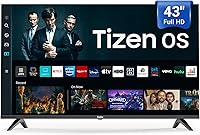
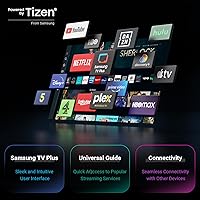
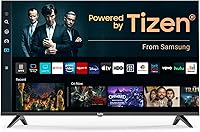
The TuTu 43Q1 43-inch 4K Smart TV enters a crowded budget market with one genuinely surprising card to play: it runs Samsung's Tizen OS, a meaningful differentiator at this price point. TuTu isn't a household name, and that warrants some healthy skepticism. This is a set aimed squarely at secondary spaces — a guest bedroom, a college dorm, a kitchen counter setup. Before you get too far into the specs, though, know this upfront: first-time activation requires a mandatory Samsung account, no exceptions. If you don't have one, you'll need to register before the TV does anything. It's not a dealbreaker, but it's worth knowing before the box is open.

Features & Benefits

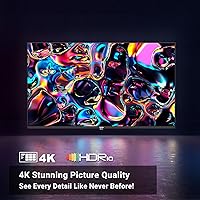
Picture quality on this budget 4K TV is honest rather than spectacular. The 4K resolution at 60Hz handles streaming content well — Netflix, YouTube, Disney+ all look crisp — but don't expect miracles from fast-moving content without MEMC engaged. That motion-compensation feature does reduce judder noticeably during sports and action scenes, though at this tier it can occasionally introduce a slight soap-opera effect, so it's worth experimenting with the settings. HDR10 support adds some contrast pop to compatible content, though it stops short of Dolby Vision territory. On the audio side, Dolby Audio keeps dialogue clear and bass grounded. Connectivity is generous too, covering HDMI, USB, Optical, Bluetooth, and Wi-Fi.

Best For

This Tizen-powered set makes the most sense in rooms where the TV is present but not the main event — a guest bedroom, a dorm room, a home office background during lunch breaks. Cord-cutters and streamers are the ideal audience, since Tizen OS handles that use case well without requiring any external hardware. Gamers who care about frame rate or input lag should look at more spec-driven rivals like the Hisense A6 or TCL S-class instead. If you already own a Samsung TV and know the Tizen interface, picking up a second screen at this price feels genuinely practical. It's a secondary screen, not a showpiece.

User Feedback

Buyers generally appreciate the Tizen OS experience — app load times feel responsive and the interface comes across as more polished than what you'd expect from a lesser-known brand. Picture quality straight out of the box earns decent marks, with many users pleasantly surprised by the sharpness. That said, recurring criticisms cluster around a few areas: speaker volume tends to feel thin at higher levels, and the stand can wobble on larger flat surfaces. The mandatory Samsung account activation also generates real frustration, with some buyers discovering it only after unboxing. Build quality is acceptable but unlikely to inspire confidence as a long-term investment.

Pros

  • Tizen OS is genuinely polished — far more intuitive than software found on many rivals at this price.
  • 4K resolution delivers crisp, detailed images for everyday streaming without any upscaling guesswork.
  • MEMC reduces motion blur noticeably during sports and fast-action content.
  • Dolby Audio keeps dialogue clear and bass solid without needing a separate soundbar for casual viewing.
  • Connectivity options are unusually generous, covering HDMI, USB, Optical, Ethernet, Bluetooth, and Wi-Fi.
  • HDR10 support adds visible contrast improvement on compatible streaming content.
  • Out-of-box picture quality earns positive marks from buyers who compared it against similarly priced sets.
  • Built-in access to Netflix, YouTube, Disney+, and more requires zero additional hardware.

Cons

  • A mandatory Samsung account is required at first activation — no account means the TV simply will not start.
  • The built-in speakers lose clarity and punch at higher volume levels, which can be frustrating in larger rooms.
  • The stand has been noted as wobbly on wide flat surfaces, raising minor concerns about long-term stability.
  • MEMC processing can introduce a soap-opera effect on certain content if left on default settings.
  • TuTu has limited brand track record, making long-term reliability and warranty support harder to evaluate.
  • No Dolby Vision support means HDR performance has a clear ceiling compared to pricier competitors.
  • The 60Hz refresh rate rules it out for anyone serious about smooth high-frame-rate gaming.
  • Build materials feel adequate rather than durable — it does not inspire confidence as a long-haul investment.

Ratings

The scores below for the TuTu 43Q1 43-inch 4K Smart TV were generated by our AI engine after analyzing verified buyer reviews from multiple global markets, with spam, bot activity, and incentivized feedback actively filtered out. Each category reflects the honest distribution of real user sentiment — not a curated highlight reel. Where buyers consistently praised something, the score rises; where friction and disappointment surfaced repeatedly, that shows up too.

Picture Quality
74%
26%
For a budget LED panel, the 4K sharpness holds up well during everyday streaming — text is crisp, colors are reasonably vivid, and HDR10 adds noticeable punch to compatible content on Netflix and Disney+. Buyers setting it up in a bedroom or secondary room tend to be genuinely satisfied with how it looks at normal viewing distances.
Black levels are a recurring limitation — dark scenes in movies can look washed out or gray rather than deep, which is a common LED ceiling. Without Dolby Vision, the HDR experience has a clear cap, and compared to same-size Hisense or TCL panels, the color accuracy lags slightly behind.
Smart TV Experience
81%
19%
Tizen OS is the standout feature here — it is a mature, well-organized platform that loads apps quickly and navigates cleanly without the sluggishness common on budget Android TV sets. Buyers familiar with Samsung's interface find themselves at home immediately, and the app library covers all the major streaming services without gaps.
The mandatory Samsung account requirement at first activation is a genuine friction point that catches buyers off guard, particularly those who prefer not to link a TV to a personal account. A handful of users also report that some third-party apps available on premium Samsung TVs are missing from this set's app store.
Motion Handling
67%
33%
MEMC delivers a real improvement for live sports and action films — fast pans and rapid on-screen movement are noticeably smoother compared to TVs at this price without any motion processing. Football, basketball, and motorsport content are the sweet spots where buyers appreciate this feature most.
Leaving MEMC on its default setting for film content tends to introduce a soap-opera effect that many buyers find distracting once they notice it. The processing also occasionally produces minor artifacts around sharp edges in fast-moving scenes, which is a known limitation of budget-tier MEMC implementations.
Audio Performance
62%
38%
Dolby Audio processing does a solid job of keeping dialogue intelligible and preventing the tinny quality that plagues many budget TV speakers. For bedroom viewing at moderate volume levels, most buyers find it perfectly adequate without needing to add external speakers right away.
Push the volume into the upper third of its range and the speakers start to sound thin and strained — bass essentially disappears and treble harshness creeps in. In any room larger than a standard bedroom, or with background noise present, the built-in audio falls noticeably short.
Value for Money
78%
22%
Getting a 43-inch 4K panel with Tizen OS, MEMC, HDR10, and Dolby Audio at this price point represents genuine value for buyers who need a capable secondary screen. Buyers who compare it to bare-bones budget TVs without smart OS integration consistently feel they got more than expected.
The value calculus shifts if you factor in the brand's limited track record — buyers accepting a lower price are also accepting more uncertainty around long-term reliability and post-purchase support. Compared to TCL or Hisense, which offer proven warranties and wider service networks, the savings come with real trade-offs.
Setup & Installation
58%
42%
The physical setup is straightforward — the two-leg stand attaches without fuss, the included accessories bag has everything needed, and the remote is functional from the first use. Buyers who already have a Samsung account report that the initial software setup moves along quickly.
The Samsung account activation requirement is the biggest setup obstacle, and it trips up a meaningful number of buyers who encounter it unexpectedly mid-setup with no bypass option. A few users also noted that the initial software update on first boot takes longer than anticipated, adding time to what should be a quick unboxing experience.
Build Quality
61%
39%
The TV's physical construction is clean-looking and acceptably slim for its price tier — bezels are thin enough to look modern, and the overall aesthetic fits without embarrassment into most room setups. At 19.66 pounds, it is easy to handle alone during wall mounting or repositioning.
The plastic chassis flexes more than it should when handled, and the overall tactile feel does not inspire long-term confidence. The stand wobbles noticeably on wider TV units, and buyers who have previously owned mid-range Samsung or Sony TVs tend to observe the quality gap immediately.
Connectivity & Ports
83%
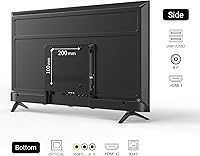
The port selection on this Tizen-powered set is one of its most practical strengths — HDMI, USB, Optical, Ethernet, RCA, and RF inputs cover virtually every real-world device connection scenario a typical household would encounter. Bluetooth and Wi-Fi add wireless flexibility without requiring any adapters.
The listing does not specify HDMI 2.1 support, which means buyers hoping to run a PS5 or Xbox Series X at 4K and high frame rates may be limited. Port placement on the back panel has also drawn some criticism for being awkward to access once the TV is wall-mounted.
Remote Control
66%
34%
The included remote covers all the essential functions cleanly, and dedicated shortcut buttons for popular streaming services reduce the number of steps needed to get to content quickly. Buyers using it as a bedroom TV find the layout comfortable for regular use.
The remote feels lightweight and plasticky in hand, and a few buyers note that the button travel feels mushy compared to remotes bundled with branded Samsung or LG TVs. IR range is adequate but not exceptional — pointing off-axis or from across a larger room occasionally requires a second attempt.
Gaming Performance
44%
56%
For casual gaming — indie titles, retro emulation, older console games — the display works fine and the image looks sharp enough at 4K. Players who are not sensitive to input lag or refresh rate limitations are unlikely to notice any serious issues during relaxed play sessions.
The 60Hz panel, absence of VRR support, and unconfirmed HDMI 2.1 compatibility make this budget 4K TV a poor fit for any performance-focused gaming use case. Input lag has not been independently measured at a favorable level, and competitive or fast-reflex gaming on this set is genuinely inadvisable.
Energy Efficiency
71%
29%
At 135 watts rated power draw, the set is neither unusually efficient nor a power hog for its size and resolution class — it sits comfortably within the expected range for a 43-inch LED 4K panel. Buyers using it as a secondary TV that runs a few hours per day will not see a significant impact on their electricity bill.
There is no automatic brightness adjustment or eco mode prominently featured in the specifications, which means power consumption stays relatively static regardless of ambient room lighting. At this price tier, energy-saving features are often deprioritized, and this set appears to follow that pattern.
Brand Reliability
51%
49%
TuTu's use of Tizen OS at least anchors the software side to a known, tested platform — buyers are not relying on an entirely unknown ecosystem for their smart TV experience. Early adopter feedback suggests the hardware performs consistently at initial launch, which is a reasonable starting point for a new brand.
TuTu carries essentially no established brand reputation in the TV market, which makes long-term reliability a genuine unknown. Warranty support, replacement parts availability, and customer service responsiveness are all factors that remain unproven, and buyers should weigh that uncertainty against the price savings honestly.

Suitable for:

The TuTu 43Q1 43-inch 4K Smart TV makes the most practical sense for buyers who need a capable, no-fuss screen for a secondary space — a spare bedroom, a college dorm, a kitchen, or a home office. If your primary use case is streaming from Netflix, YouTube, or Disney+, Tizen OS handles all of that confidently without requiring a streaming stick or any extra hardware. Cord-cutters who have already ditched cable will feel right at home here, since the interface is mature and the app library is genuinely well-stocked. Buyers who already own a Samsung TV and are comfortable with the Tizen ecosystem will find the learning curve essentially nonexistent, which makes it a smart pick-up for a second room. At this price tier, it punches above its weight in terms of software quality, even if the hardware has predictable limitations.

Not suitable for:

If you are shopping for a primary living room TV that will anchor a serious home theater setup, the TuTu 43Q1 43-inch 4K Smart TV is not the right tool for that job. The 60Hz panel and the absence of Dolby Vision or variable refresh rate support means competitive gamers and home cinema enthusiasts will hit a ceiling quickly — alternatives like the TCL S-class or Hisense A6 offer more refined picture processing at comparable or slightly higher prices. Buyers who are privacy-conscious or simply resistant to account-based ecosystems should know that activating this set requires a Samsung account, and there is no workaround offered out of the box. Those who need a loud, room-filling speaker for a large open-plan space will likely find the built-in audio underwhelming at higher volumes. In short, if you need a workhorse primary display with long-term durability expectations, it is worth spending more.

Specifications

  • Screen Size: The panel measures 43 inches diagonally, making it well-suited for bedrooms, guest rooms, and smaller living spaces.
  • Resolution: Native 4K UHD resolution of 3840x2160 pixels delivers four times the pixel density of a standard 1080p display.
  • Display Type: LED-backlit LCD panel provides reliable brightness and consistent color reproduction across the screen.
  • Refresh Rate: The native panel runs at 60Hz, which is adequate for streaming and casual viewing but not optimized for high-frame-rate gaming.
  • HDR Support: HDR10 is supported, offering improved contrast and highlight detail on compatible streaming content; Dolby Vision is not available.
  • Motion Processing: MEMC (Motion Estimation, Motion Compensation) technology is built in to reduce blur and judder during fast-moving scenes.
  • Operating System: Samsung's Tizen OS comes pre-installed, providing access to a mature smart TV platform with a broad app ecosystem.
  • Audio: Dolby Audio processing is included, enhancing dialogue intelligibility and low-frequency response through the built-in speakers.
  • Power Draw: The set is rated at 135 watts of power consumption and operates on standard 120V household current.
  • Dimensions: The TV body measures 41″ wide, 24.8″ tall, and 4.5″ deep; exact wall-mount clearance should be confirmed before installation.
  • Weight: The unit weighs 19.66 pounds without the stand, which is typical for a 43-inch LED panel of this class.
  • Wireless: Built-in Wi-Fi and Bluetooth are included for wireless streaming and peripheral connectivity without any additional adapters.
  • Wired Ports: Physical connections include HDMI, USB, RCA, Optical audio out, RF antenna, RJ45 Ethernet, and Infrared receiver.
  • Aspect Ratio: Standard 16:9 widescreen aspect ratio is used, matching the format of virtually all modern streaming and broadcast content.
  • Model Number: The official model designation is 43Q1, which should be referenced when contacting support or searching for compatible accessories.
  • In the Box: Each unit ships with the TV, two stand legs, one remote control, AAA batteries, an accessories bag, and a printed user manual.

Related Reviews

Westinghouse 43-inch 4K UHD Smart TV
83%
91%
Display Quality
92%
Value for Money
89%
User Interface & Smart Features
65%
Sound Quality
88%
Ease of Setup
More
VIZIO 43-inch 4K Smart TV V-Series
84%
89%
Display Quality
85%
Smart Features
92%
Value for Money
87%
Ease of Setup
70%
Sound Quality
More
HORION 43-inch P6D Series Smart TV
70%
83%
Smart OS Experience
74%
Picture Quality
88%
Value for Money
57%
Audio Performance
41%
Gaming Suitability
More
TCL 43S450R 43-inch 4K Smart TV
79%
83%
Picture Quality
91%
Smart TV Interface
88%
Value for Money
61%
Audio Performance
78%
Gaming Performance
More
Hisense 43R7E 43-inch 4K Roku Smart LED TV
81%
87%
Picture Quality
92%
Value for Money
91%
Ease of Setup
85%
Streaming Performance
61%
Sound Quality
More
Hisense 43″ E6 QLED 4K Smart TV

76%
88%
Picture Quality
54%
Motion Handling
83%
HDR Performance
67%
Smart TV Interface
58%
Audio Performance
More
SYLVOX 43-Inch Outdoor Smart TV QLED 4K UHD
85%
93%
Display Quality
89%
Weather Resistance
74%
Ease of Setup
78%
Sound Quality
87%
Voice Control (Google Assistant)
More
VIZIO 43-Inch M-Series 4K QLED Smart TV
84%
92%
Picture Quality
85%
Gaming Performance
89%
Ease of Use
91%
Color Accuracy
78%
Sound Quality
More
Samsung U8000F 43-inch 4K Smart TV
77%
72%
Picture Quality
88%
Value for Money
84%
Smart TV Platform
91%
Design & Build
61%
Gaming Performance
More
LG 43UM6910 43-inch 4K UHD Smart LED TV
82%
88%
Picture Quality
91%
Value for Money
85%
Streaming Performance
58%
Sound Quality
90%
Color Accuracy
More

FAQ

Yes, and this is worth knowing before you open the box. The TuTu 43Q1 43-inch 4K Smart TV requires a Samsung account to complete initial activation — you cannot skip it or bypass it during setup. If you don't already have one, registering through Samsung's website beforehand will save you some frustration on setup day.

You can use it as a basic display — plugging in a cable box, Blu-ray player, or game console via HDMI will work fine offline. However, all the smart TV features, including Tizen OS apps and streaming services, require an active internet connection. Also keep in mind the Samsung account activation during first setup does need to go through the internet.

It's fine for casual gaming, but serious gamers will likely find its limitations frustrating. The 60Hz panel doesn't support high-frame-rate modes, and there's no variable refresh rate (VRR) or AMD FreeSync support listed. If competitive gaming or smooth frame rates matter to you, it's worth looking at purpose-built gaming monitors or TVs with 120Hz panels.

Out of the box, most buyers find the picture surprisingly decent for the price — 4K sharpness is genuine, and HDR10 adds some pop to compatible content. That said, Hisense A6 and TCL S-class models have more refined picture processing and longer brand track records in this category. This Tizen-powered set holds its own for streaming, but if picture quality is your top priority, the competition is worth a close look.

It does reduce motion blur on sports and action content when enabled, which is a welcome feature at this price. The tradeoff is that MEMC can sometimes introduce a slightly artificial, over-smoothed look — what people often call the soap-opera effect. Most users find the sweet spot by turning it on for live sports and off for films.

Tizen OS comes with Netflix, YouTube, Disney+, and other major streaming platforms built in, and its app store covers a wide range of additional services. The interface is the same mature platform Samsung uses on its own branded TVs, so the app selection is meaningfully better than what you'd find on a generic Android TV budget set.

The stand uses a two-leg design, which is common at this size but does leave the TV slightly more susceptible to wobble on wide, flat surfaces compared to a center-pedestal mount. A few buyers have flagged this as a minor concern. If you're placing it on a shallow or slippery surface, a small amount of non-slip matting under each leg helps considerably.

For a typical bedroom, yes — dialogue is clear and the Dolby Audio processing keeps things balanced at moderate volumes. Where it starts to struggle is in larger rooms or when there's significant background noise, as the speakers can sound thin when pushed to their upper limits. If you're outfitting a living room or open-plan space, a soundbar would be a worthwhile addition.

The TV includes HDMI ports alongside its other wired inputs, though the listing does not specify HDMI 2.0 or 2.1 certification explicitly. For standard 4K streaming from a set-top box or game console at 60Hz, HDMI 2.0 is sufficient. If you need confirmed 4K@120Hz passthrough for a PS5 or Xbox Series X at full spec, this budget 4K TV is unlikely to deliver that.

You get the TV itself, two stand legs, a remote control with AAA batteries already included, an accessories bag with screws and mounting hardware for the stand, and a printed user manual. Everything needed to get it standing and switched on is included — no separate trips to the hardware store required for basic setup.