Samsung ViewFinity S9 27″ 5K Monitor










Overview
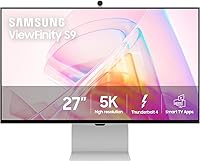
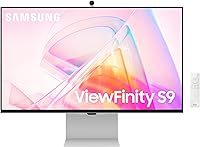
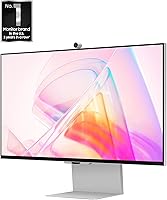
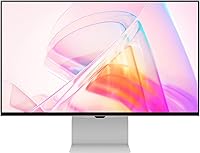
The Samsung ViewFinity S9 27″ 5K Monitor enters a competitive space occupied by the Apple Studio Display and LG UltraFine, targeting creative professionals who demand accurate, high-density visuals. At 27 inches, 5K resolution delivers a noticeably sharper image than 4K — that extra pixel density is genuinely visible when editing fine detail or reading dense text. The slim metal chassis keeps the desk looking clean, and the dual-purpose design means you can switch from a serious workstation to a streaming screen without touching another device. Worth noting upfront: the ViewFinity S9 carries a 3.2-star average, which signals real quality control issues buyers should weigh carefully before purchasing.
Features & Benefits
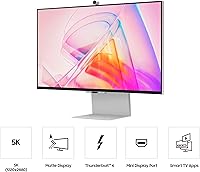
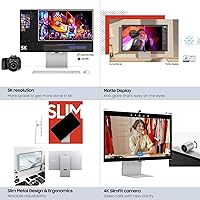
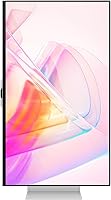
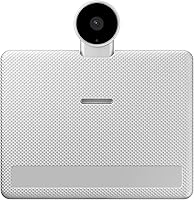
At the core of the ViewFinity S9 is a 5120×2880 panel hitting 218 PPI with 99% DCI-P3 coverage — on a 27-inch screen, that pixel density makes text razor-sharp and color gradients genuinely smooth. The matte anti-glare coating is a practical win for anyone working near windows; combined with Intelligent Eye Care's automatic brightness and blue light adjustments, it reduces real fatigue during long sessions. A single Thunderbolt 4 cable handles power, data, and video simultaneously for MacBook users — tidy and efficient. The built-in 4K SlimFit camera outperforms most clip-on webcams, and Smart Calibration lets you dial in color profiles through a smartphone app without professional equipment.
Best For
This Samsung 5K display is built for a specific kind of buyer. Photographers, video editors, and graphic designers who live inside DCI-P3 or sRGB workflows will feel the difference a factory-calibrated panel makes — especially if you have been tolerating a lesser display. Mac users chasing a clean single-cable setup will find the Thunderbolt 4 connection particularly satisfying. It also suits people who want their monitor to pull double duty: AirPlay and built-in streaming apps mean it functions as a capable entertainment screen once work hours end. This is not a gaming monitor — if refresh rate and response time are your priority, look elsewhere.
User Feedback
Buyers who receive a well-built unit tend to rave about the image quality — color accuracy and sharpness receive consistent praise, particularly from Mac users who appreciate how quickly the display initializes over Thunderbolt. The problems start with consistency. A significant number of reviewers report backlight bleed and dead pixels on arrival, and the frequency of returns and replacements is hard to ignore. Smart TV app performance divides opinion: some find it genuinely convenient; others describe noticeable lag. A fair number of buyers also raise the comparison to Apple's Studio Display, questioning whether Samsung's added features justify the difference. The manufacturing variance is a real concern at this price tier.
Pros
- Stunning 5K panel with 218 PPI makes text and fine image detail noticeably sharper than comparable 4K monitors.
- Factory color calibration with delta-E under 2 means accurate color right out of the box, no extra equipment needed.
- Thunderbolt 4 single-cable connection is a genuine convenience win for MacBook Pro users.
- Matte anti-glare coating handles ambient light well without washing out the image.
- Smart Calibration via smartphone app lets you adjust color profiles without professional tools.
- Built-in 4K SlimFit camera is a meaningful step up from most external webcams at this price.
- Apple AirPlay integration works well for extending a Mac display wirelessly without extra adapters.
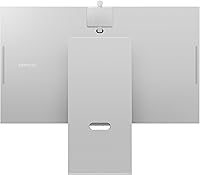
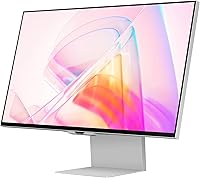
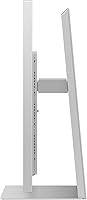
- Slim metal design looks premium and fits cleanly into minimalist desk setups.
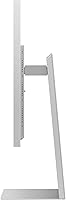
- Height adjustment, tilt, and 90-degree pivot offer real ergonomic flexibility for different workstyles.
- Samsung Gaming Hub and streaming apps make after-hours entertainment genuinely accessible.
Cons
- Reported quality control issues — including dead pixels and backlight bleed — are too frequent for a premium-priced display.
- Return and replacement rates mentioned by buyers suggest a meaningful chance of receiving a defective unit.
- Smart TV app performance can lag noticeably, making the entertainment features feel unpolished at times.
- The value proposition weakens considerably when weighed against the Apple Studio Display at a comparable price point.
- Some Mac users have encountered Thunderbolt driver quirks that undercut the plug-and-play promise.
- No high refresh rate or adaptive sync makes this a poor choice for anyone who also wants to game.
- At 27 inches, users accustomed to larger panels may find the screen size limiting for complex multi-window workflows.
- The premium price tag amplifies the frustration when a unit arrives with panel defects.
Ratings
The scores below for the Samsung ViewFinity S9 27″ 5K Monitor were generated by AI after analyzing verified buyer reviews from around the world, with spam, bot-driven, and incentivized feedback actively filtered out. Both the genuine strengths and the real frustrations buyers have encountered are reflected transparently — nothing is glossed over. The result is an honest, balanced picture of what it is actually like to own and use this display day to day.
Image Clarity & Resolution
Color Accuracy
Build Quality & Design
Quality Control & Reliability
Thunderbolt 4 Connectivity
Matte Display & Glare Handling
Built-in Camera
Smart TV Apps & Entertainment
Apple AirPlay Integration
Ergonomics & Adjustability
Smart Calibration App
Value for Money
Eye Care & Long-Session Comfort
Suitable for:
The Samsung ViewFinity S9 27″ 5K Monitor is purpose-built for creative professionals who treat color accuracy as non-negotiable. Photographers, video editors, and graphic designers working in DCI-P3 or sRGB color spaces will notice the difference a factory-calibrated, 218 PPI panel makes compared to a generic 4K display — fine detail in images and smooth color gradients are where this screen genuinely earns its keep. Mac users in particular get a compelling single-cable story: one Thunderbolt 4 connection handles video, data, and laptop charging simultaneously, which keeps the desk clean and the workflow uninterrupted. If you also want your workstation monitor to serve as an entertainment hub after hours, the built-in streaming apps and AirPlay support make that transition effortless. This is a strong fit for anyone building a minimalist, high-performance creative desk setup who values panel quality and integrated features over raw gaming performance.
Not suitable for:
The Samsung ViewFinity S9 27″ 5K Monitor is a harder sell for buyers who are not specifically invested in the Apple-adjacent creative workflow it is designed around. Gamers should look elsewhere — there is no high refresh rate, no adaptive sync feature worth highlighting, and response time is not a design priority here. Budget-conscious buyers will also want to pause: at this price tier, the 3.2-star average driven by recurring quality control reports — dead pixels, backlight bleed, and units requiring return or replacement — represents a real financial risk that is difficult to ignore. Windows power users may find the Thunderbolt and AirPlay ecosystem advantages largely irrelevant to their setup. Anyone who wants a large-format display will also be underwhelmed; 27 inches is a deliberate, desk-friendly choice, not a canvas for immersive multitasking across many open windows.
Specifications
- Panel Size: The display measures 27 inches diagonally, offering a compact footprint suited to single-monitor creative workstations.
- Resolution: Native resolution is 5120×2880 (5K), delivering significantly more on-screen detail than a standard 4K panel at this size.
- Pixel Density: At 218 PPI, text and fine image detail appear noticeably sharper than on most competing 27-inch displays.
- Color Gamut: The panel covers 99% of the DCI-P3 color space, making it well-suited for photo editing, video grading, and design work.
- Color Accuracy: Factory calibration targets a delta-E value under 2, meaning colors are accurate out of the box without manual adjustment.
- Display Surface: A matte anti-glare coating reduces reflections from ambient light sources without meaningfully degrading image clarity.
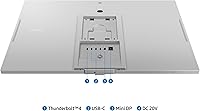
- Connectivity: The monitor includes one Thunderbolt 4 port, one DisplayPort input, and three USB 3.0 ports for peripheral connectivity.
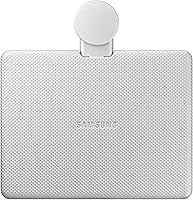
- Built-in Camera: A 4K SlimFit camera is integrated into the display, providing high-resolution video capture for conferencing without an external webcam.
- Wireless Features: Apple AirPlay is supported natively, allowing Mac and iOS users to mirror or extend their screens without additional adapters or cables.
- Smart Features: Samsung Gaming Hub and a suite of embedded streaming apps are accessible directly on the monitor without a connected source device.
- Ergonomics: The stand supports height adjustment, forward and backward tilt, and a 90-degree pivot for portrait orientation.
- VESA Mounting: The monitor is VESA mount compatible, allowing it to be attached to third-party arms or wall mounts if the included stand is not preferred.
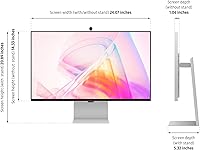
- Dimensions: With the stand attached, the monitor measures approximately 5.3 × 24.1 × 20.9 inches (depth × width × height).
- Weight: The complete unit weighs 16.3 pounds, which is typical for a 27-inch display with a metal stand assembly.
- Power: The monitor operates on AC power at 110 volts, using a standard connection compatible with North American outlets.
- Eye Care: Intelligent Eye Care automatically adjusts brightness, reduces blue light emission, and eliminates screen flicker to reduce eye strain during extended use.
- Smart Calibration: Color calibration can be performed and saved via a companion smartphone app, allowing users to set color space, temperature, luminance, and gamma without external hardware.
- Aspect Ratio: The panel uses a standard 16:9 widescreen aspect ratio.
Related Reviews
Samsung ViewFinity S8 27″ 4K Monitor
Samsung CF391 27″ Curved Monitor
Samsung S30GD 27″ FHD IPS Monitor
Samsung ViewFinity S65TC 34″ Curved Monitor
Samsung 27″ Odyssey G32A Gaming Monitor
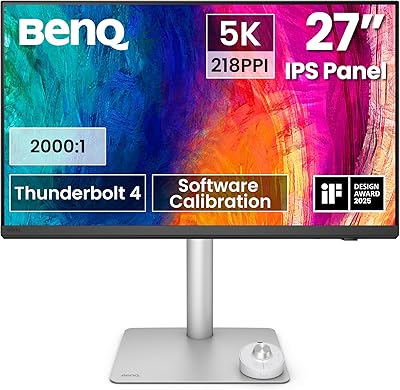
BenQ PD2730S 27″ 5K Mac Monitor
Samsung 27″ S32GF FHD IPS Monitor
Samsung S80UA 27″ 4K UHD IPS Monitor
Samsung SR35 27-inch FHD Monitor