Overview

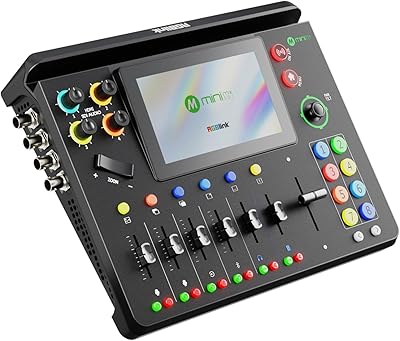
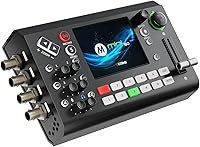
The RGBlink mini-ISO Live Stream Video Switcher is one of those rare devices that packs a genuinely professional input roster into a chassis you can carry in a small backpack. Launched in early 2025, it sits firmly in mid-premium territory — not an impulse buy, but priced for operators who need real hardware flexibility rather than software workarounds. What immediately stands out is the combination of SDI, HDMI, NDI, and UVC inputs coexisting in something that weighs just over a pound. That said, this compact switcher is not plug-and-play. The feature depth is real, and so is the learning curve that comes with it.
Features & Benefits

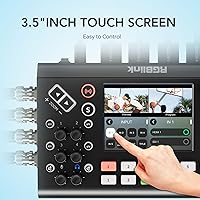
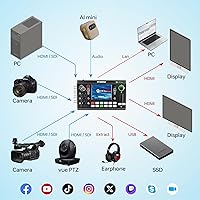
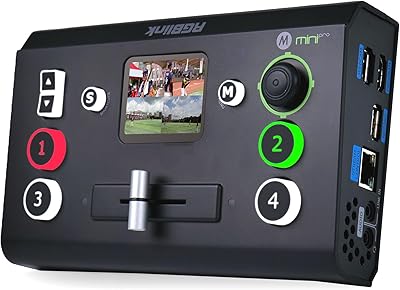
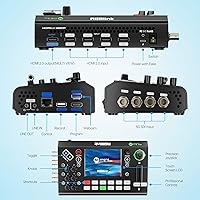
The input lineup alone sets the mini-ISO apart from most switchers in its class. You get four SDI ports, four HDMI inputs that accept 4K60 sources, plus NDI HX2 and a UVC webcam slot — ten channels total, switchable in groups of five. A 3.5-inch TFT touchscreen handles live preview and on-device settings without requiring a connected laptop. The built-in 5-axis joystick gives you direct PTZ camera control from the same surface, which matters when you are running a production solo. Chroma key, PIP compositing, logo overlays, and 15 transition effects round out the creative toolkit. H.265 encoding keeps bandwidth consumption reasonable, and you can record locally via USB simultaneously with your stream.

Best For

This all-in-one live production unit makes the most sense for buyers with specific, hardware-driven needs. Church and house-of-worship AV teams are an obvious fit — handling SDI and HDMI sources in a single box, without building out a full rack, is a genuine operational advantage. Solo event videographers will appreciate having PTZ control and multi-source switching in one hand-carriable unit. Corporate AV teams running NDI-based hybrid setups can benefit too, though the NDI license requires a separate activation step before it works. It is decidedly less suited to absolute beginners or anyone expecting instant simplicity. The payoff is real, but so is the configuration time required to unlock everything this device offers.

User Feedback

Across roughly 193 reviews, the mini-ISO holds a 4.1 out of 5 rating — solid, but the breakdown tells a more nuanced story. The most consistent praise focuses on input variety and portability: buyers repeatedly note that finding SDI, HDMI, and NDI support in a unit this compact is genuinely rare. On the critical side, the NDI activation process catches people off guard, requiring a separate license application before the feature becomes usable — a step that is not prominently flagged at purchase. Setup complexity around TAO Cloud also draws recurring complaints. Thermal performance, by contrast, earns quiet but consistent approval from longer-session users. A minority flag touchscreen responsiveness quirks, which is worth factoring into your decision.

Pros

  • Fits ten video input channels into a chassis weighing just over one pound — genuinely uncommon at this size.
  • Native SDI and HDMI support in one unit removes the need for external signal converters on mixed-camera setups.
  • The onboard 3.5-inch touchscreen lets you monitor and adjust without connecting a laptop or external display.
  • PTZ camera control via the 5-axis joystick keeps pan, tilt, and zoom management on the same surface as your switching.
  • H.265 encoding keeps upload bandwidth consumption low without sacrificing noticeable stream quality.
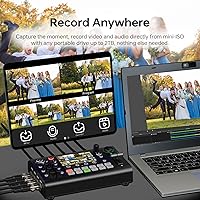
  • Simultaneous USB streaming and local recording means you capture a backup copy without any additional hardware.
  • Active cooling system keeps surface temperatures in check during extended multi-hour sessions.
  • Multi-platform RTMP streaming to up to 32 destinations at once via TAO Cloud is a strong workflow multiplier.
  • Remote control via web app and mobile app offers production flexibility for operators not sitting at the unit.

Cons

  • NDI support requires a separate license application before it is usable — it is not active straight out of the box.
  • Maximum output resolution is capped at 1080p60 despite accepting 4K source signals on the HDMI inputs.
  • TAO Cloud and web app configuration have a steeper initial setup curve than most competitors at this tier.
  • The touchscreen interface has drawn complaints about occasional responsiveness quirks under fast-paced switching conditions.
  • Only 193 reviews available at time of writing — helpful context, but not yet a deep long-term reliability dataset.
  • Switching happens in groups of five channels at a time, which may not suit workflows requiring instant access to all ten inputs simultaneously.
  • Audio output is limited to a single 3.5mm TRS program output, which can be a bottleneck in more complex audio routing scenarios.
  • New users without prior live production experience should budget meaningful time for learning before relying on this unit at a real event.

Ratings

The scores below for the RGBlink mini-ISO Live Stream Video Switcher were generated by our AI after analyzing verified buyer reviews from multiple global markets, with spam, incentivized, and bot-flagged submissions actively filtered out. The result is an honest cross-section of real operator experiences — from church AV teams to solo event videographers — reflecting both the genuine strengths and the friction points that show up repeatedly in the field. Nothing has been softened or inflated; the numbers reflect what actual buyers encountered.
Input Versatility
93%
Operators consistently single out the input lineup as the defining reason they chose this unit over competitors. Having SDI, 4K HDMI, NDI HX2, and a UVC webcam slot in one device that fits in a small bag removes the need for signal converters and extra cabling that would otherwise add cost and setup time on location.
The ten channels are only accessible in groups of five at a time, which occasionally frustrates operators who want instant access to their full source roster mid-broadcast. A small number of reviewers also note that the NDI input is non-functional until a separate license is applied for and activated.
Portability
91%
At just over one pound and roughly the footprint of a hardcover book, this compact switcher genuinely fits into the corners of a camera bag that most hardware switchers could never occupy. Event crews report being able to set up a complete 4-camera switching rig in well under 30 minutes on unfamiliar locations.
The compact chassis means limited physical control surface space, and some operators find the button layout tight during fast-paced switching sequences. Connecting multiple SDI and HDMI cables simultaneously can also make the unit feel cluttered and less portable in practice than the bare dimensions suggest.
Streaming Capability
86%
The ability to push RTMP streams to up to 32 platforms simultaneously through TAO Cloud is a meaningful operational advantage for teams running multi-destination broadcasts — something that would otherwise require dedicated encoding hardware or a high-spec PC. H.265 compression keeps bandwidth requirements manageable even on congested venue networks.
TAO Cloud setup is not intuitive for first-time users and requires a working internet connection and account configuration before it functions, which has caught some buyers off guard at their first live event. A handful of reviewers report occasional cloud connectivity hiccups that temporarily interrupted multi-platform streams.
Ease of Setup
61%
39%
Operators with prior hardware switcher experience generally get the core switching functions working within a reasonable time, and the onboard touchscreen reduces the dependency on external software for basic configuration. The web app remote control option is appreciated by teams who want a more accessible interface once initial setup is complete.
First-time switcher users consistently flag the setup process as steeper than expected, particularly around TAO Cloud account creation, NDI license activation, and web app configuration. Several reviewers explicitly recommend blocking out a full practice day before relying on this all-in-one live production unit at a real event.
Output Resolution
58%
42%
For live streaming and broadcast delivery at 1080p60 — which remains the standard output format for the vast majority of online platforms — the program output performs cleanly and without noticeable quality degradation, even when processing 4K source signals downscaled in real time.
The hard cap at 1080p output is a genuine limitation for buyers who assumed 4K HDMI inputs implied 4K output capability. At this price tier, the expectation of at least an optional 4K output path is reasonable, and the absence of it is the most commonly cited functional disappointment in negative reviews.
PTZ Camera Control
82%
18%
The 5-axis joystick delivers tactile, precise PTZ control that operators describe as natural to use after a short adjustment period, particularly for slow, cinematic camera movements during house-of-worship services or conference presentations. Having PTZ and switching on the same surface meaningfully reduces the number of devices a solo operator needs to manage.
Compatibility is limited to cameras supporting VISCA or PELCO control protocols, which excludes some newer or consumer-grade PTZ models. A minority of reviewers also note that very fine joystick movements can feel slightly imprecise during demanding live sequences.
Touchscreen Usability
69%
31%
The 3.5″ TFT display provides genuinely useful real-time source preview for up to four signals simultaneously, which removes the need for a dedicated preview monitor in compact setups. Operators running solo productions especially appreciate being able to verify signal status at a glance without switching focus to an external screen.
The display size, while impressive for the form factor, limits how much detail is visible during multi-source monitoring, and text on settings menus can require close attention to read accurately. Touchscreen responsiveness quirks — particularly in fast menu navigation — are mentioned often enough across reviews to be considered a known limitation rather than an isolated complaint.
Audio Handling
77%
23%
Eight audio input paths — including Bluetooth, analog, USB-A, and HDMI-embedded sources — cover most live production audio scenarios without requiring an external mixer for basic setups. AFV (Audio Follow Video) and manual delay adjustment give operators meaningful control over keeping audio and video synchronized across complex multi-source productions.
The single 3.5mm TRS program output is a bottleneck for operators who need to feed multiple audio destinations simultaneously, such as a recording feed and a PA system. Users with more demanding audio routing needs will likely find themselves adding an external audio interface despite the impressive input count.
Thermal Management
84%
The active cooling system earns consistent positive mentions from operators running extended multi-hour sessions — church services, corporate all-day events, and long-form streams all feature in positive thermal feedback. The engineering target of keeping the control surface below 60 degrees Celsius appears to be reliably met under real-world conditions.
The active cooling fan produces audible noise, which in quiet recording environments or small rooms can be picked up by sensitive nearby microphones. A small number of users in warm ambient environments report the fan running at consistently high speed, which raises mild long-term durability questions.
Visual Compositing
79%
21%
One-click chroma key, PIP compositing across two layers, logo overlay, and 15 transition effects give small production teams access to creative tools that previously required dedicated vision mixing hardware costing several times more. Church and event teams particularly value the chroma key for adding virtual backgrounds without a secondary computer.
The two-layer compositing limit constrains more ambitious graphic layering workflows, and buyers accustomed to software-based production environments like OBS may find the hardware compositing less flexible than they expected. Chroma key quality is described as functional rather than broadcast-grade by reviewers with professional production backgrounds.
NDI Integration
63%
37%
When fully activated, NDI HX2 integration works reliably for corporate AV teams running network-based camera sources over existing LAN infrastructure, removing the need for physical signal cabling between rooms or buildings. Teams already operating in NDI ecosystems find this a genuine workflow simplification.
The mandatory license application and activation process before NDI becomes usable is the single most commonly cited source of buyer frustration in the review pool. The process is not communicated prominently at the point of purchase, and several buyers discovered the limitation only after unboxing the unit ahead of a planned event.
Build Quality
74%
26%
The chassis feels solid and purposeful for a unit in this size and weight class, and the physical controls — T-bar, joystick, and buttons — all return consistent tactile feedback that operators trust during live production. Nothing on the exterior feels fragile or likely to fail under typical on-location handling.
The chassis is predominantly plastic rather than metal, which gives pause to buyers expecting rack-grade construction at this price point. Several reviewers transporting the unit regularly in bags without a dedicated case report cosmetic scuffing appearing faster than they anticipated.
Remote Control
72%
28%
Local-network web app control opens up genuine production flexibility for teams where the operator cannot be physically stationed at the unit — useful in fixed installations like churches or conference rooms where the switcher is mounted out of direct reach. The mobile app extends this further for quick monitoring checks.
Web app functionality is tied to local network access, making it unsuitable for remote internet-based control scenarios. Some reviewers also note that the web app interface feels less polished than the competition and requires time to learn before it becomes a reliable part of an operator's workflow.
Value for Money
71%
29%
For buyers who genuinely need the combination of SDI, HDMI, NDI, PTZ control, and onboard streaming in a portable package, the price represents a compelling consolidation of hardware that would collectively cost significantly more to assemble from separate components. The feature-to-footprint ratio is objectively strong.
Buyers who do not specifically need SDI or the full input roster may find the price harder to justify against simpler HDMI-only competitors that are easier to set up and less expensive. The 1080p output ceiling in particular makes the overall value proposition feel less compelling to users who expected 4K delivery capability at this tier.

Suitable for:

The RGBlink mini-ISO Live Stream Video Switcher is built for operators who need professional-grade input flexibility without the physical footprint of a traditional broadcast rack. Church and house-of-worship AV teams are perhaps the most natural fit — they often run a mix of legacy SDI cameras alongside newer HDMI sources, and having both handled natively in a single portable unit eliminates a lot of converter hardware and cable chaos. Event videographers and corporate AV crews managing hybrid meetings with NDI-connected sources will also find real value here, especially when weight and setup time are genuine constraints on location. Solo multi-camera streamers producing content for YouTube or Twitch can take advantage of the onboard PTZ joystick and chroma key tools to run what would otherwise require a full operator team. If your workflow demands simultaneous recording and streaming, built-in H.265 encoding and USB output handle that without an external capture device.
Not suitable for:

Buyers expecting a plug-and-play experience should look elsewhere before committing to the RGBlink mini-ISO Live Stream Video Switcher. The NDI functionality — despite being a headline feature — requires a separate license application and activation process that is not completed at purchase; skipping that step means the feature simply will not work out of the box. The device also accepts 4K sources on its HDMI inputs but outputs a maximum of 1080p60, which is a real limitation for anyone whose workflow depends on delivering or archiving in 4K. First-time switcher users without prior AV production experience may find the combination of the TAO Cloud setup, web app configuration, and onboard menu system genuinely overwhelming in the early stages. If your needs are simple — say, switching between two cameras for a basic stream — the depth here will likely feel like overkill at this price point.

Specifications

  • Video Inputs: Accepts 10 video sources: 4x SDI, 4x HDMI (up to 4K60), 1x NDI HX2, and 1x UVC/webcam, switchable in groups of five channels at a time.
  • Video Output: Maximum program output resolution is 1080p at 60fps, regardless of the resolution of connected source signals.
  • Audio Inputs: Supports 8 audio inputs covering HDMI-embedded audio, analog signals, USB-A, and Bluetooth sources for flexible audio capture.
  • Audio Output: Delivers a single program-level audio output via a 3.5mm TRS connector on the unit.
  • Onboard Display: Features a 3.5″ TFT color touchscreen for real-time preview of up to four sources and direct on-device control.
  • PTZ Control: Includes a physical 5-axis joystick enabling pan, tilt, and zoom control of compatible PTZ cameras directly from the unit.
  • Video Codec: Encodes output using H.265 (HEVC) compression for efficient bandwidth usage during streaming and local recording.
  • Streaming Output: Supports simultaneous RTMP and RTMPS streaming to up to 32 platforms at once through TAO Cloud integration.
  • Transition Effects: Offers 15 built-in transition effects for switching between video sources, plus a T-bar for manual transition control.
  • Multi-View: Supports a 6-view multi-view layout, allowing simultaneous monitoring of multiple sources on a connected external display.
  • Compositing: Provides 2-layer compositing with Picture-in-Picture (PIP), chroma key, logo overlay, and customizable layout options.
  • Remote Control: Compatible with a local-network web app and a mobile app, enabling remote production control without physical access to the unit.
  • Recording: Outputs a simultaneous USB recording stream via UVC at up to 1080p60, allowing local capture at the same time as a live broadcast.
  • Cooling System: Uses an active air cooling system engineered to keep the control panel surface temperature below 60°C during extended operation.
  • Dimensions: Measures 7.76 x 4.45 x 2.36 inches, making it one of the most compact 10-channel hardware switchers available.
  • Weight: Weighs 1.32 pounds, light enough for comfortable one-person transport and on-location deployment.
  • NDI Support: NDI HX2 input is supported but requires a separate license application and activation before the feature becomes operational.
  • Manufacturer: Designed and produced by RGBlink Science and Technology Co., Ltd., a Chinese AV hardware manufacturer specializing in video processing equipment.
  • Availability: First became available for purchase in January 2025 and currently ranks in the top 100 of the Audio and Video Selector Boxes category on Amazon.

Related Reviews

RGBlink Mini-Pro V3 4K Video Switcher
69%
83%
Build Quality
89%
Feature Set
54%
Ease of Use
41%
Documentation & Setup
76%
Streaming Performance
More
RGBlink mini-edge SDI Live Streaming Switcher
74%
93%
Input/Output Versatility
88%
Audio Integration
81%
PTZ Camera Control
86%
Streaming Performance
77%
Remote & Cloud Control
More
Blackmagic Design ATEM Mini Pro
82%
91%
Build Quality
93%
Streaming Performance
89%
Video Quality
86%
Audio Mixing
74%
Ease of Setup
More
ClearClick Video2USB
79%
91%
Ease of Setup
78%
Analog Capture Quality
74%
HDMI Capture Performance
67%
Software Usability
93%
Input Versatility
More
RGBlink mini-MX SDI
RGBlink mini-MX SDI
86%
94%
Video Switching Performance
91%
Audio Mixing Quality
89%
Touchscreen Responsiveness
87%
Connectivity Options
85%
Ease of Setup
More
Elgato Stream Deck Mini
85%
93%
Ease of Setup
88%
Build Quality
91%
Key Customization
86%
Multi-Action & Macro Depth
89%
App Integration Breadth
More
NEEWER HS60B Mini Video Light
81%
93%
Brightness Output
91%
Color Accuracy
94%
Portability & Form Factor
71%
App & Wireless Control
78%
Build Quality
More
AVerMedia Live Gamer Mini GC311
84%
91%
Video Quality (1080p60)
94%
Ease of Setup
89%
Portability/Size
90%
Latency (Pass-Through)
85%
Compatibility (Consoles & PCs)
More
Blackmagic Design ATEM Mini Extreme ISO
83%
94%
ISO Recording Capability
91%
Audio Mixing & Fairlight Integration
89%
Video Input Flexibility
87%
SuperSource & Compositing
61%
Software Learning Curve
More
Roland V-1HD HD Video Switcher
84%
88%
Ease of Use
93%
Video Quality
86%
Audio Mixing Performance
81%
Build Quality
79%
Portability
More

FAQ

NDI does not work immediately after unboxing. You need to apply for a license from RGBlink first, then import and activate it following the steps in the user manual. Budget some time for this process before your first event, because skipping it means the NDI input simply will not function.

The HDMI inputs can accept 4K60 source signals, but the program output is capped at 1080p60. If your production workflow requires delivering or archiving a native 4K output signal, this unit will not meet that requirement.

The RGBlink mini-ISO Live Stream Video Switcher supports 10 total input channels, but it switches between groups of five at a time rather than giving you instant access to all ten simultaneously. For most single-operator setups, this is not a practical limitation, but it is worth understanding before you plan a large multi-camera workflow around it.
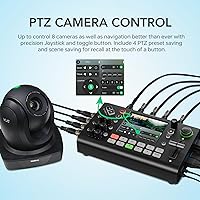
The 5-axis joystick supports PTZ control over cameras connected via VISCA or PELCO protocols, which covers most professional PTZ brands. That said, it is always worth checking your specific camera model against RGBlink's compatibility documentation before assuming it will work.

Both happen simultaneously. The mini-ISO streams your program output via RTMP while also capturing a local recording through the USB output at the same time, so you always walk away with a backup copy without any extra hardware.

Honestly, there is a real learning curve here, especially around the TAO Cloud configuration and web app setup. Experienced AV operators will get up and running relatively quickly, but complete beginners should set aside several hours of practice time before relying on this unit at a live event. The onboard manual and RGBlink's support resources are helpful, but this is not a device that configures itself.

The active cooling system is specifically designed to keep surface temperatures below 60 degrees Celsius, and user feedback on this point is generally positive. Most buyers who run extended sessions report stable performance without noticeable thermal issues. Just make sure you are not blocking the ventilation area during use.

Yes, the unit supports remote operation through both a local-network web app and a companion mobile app. You need to be on the same local network for the web app to work, so this is best suited for fixed installations or on-site event control rather than remote internet-based operation.

Vertical live broadcast mode is supported, which makes it a practical option for creators who stream portrait-oriented content to mobile-first platforms. This is a feature that many competing switchers at this size do not include.

Beyond HDMI-embedded audio from your cameras, this all-in-one live production unit accepts analog signal inputs, a USB-A audio source, and even Bluetooth audio, giving you eight total audio input paths. That flexibility is useful for connecting microphone mixers, music playback devices, or wireless audio receivers without an external audio interface.

Where to Buy