Overview

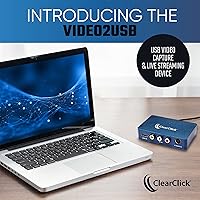
The ClearClick Video2USB is a compact capture device that does something genuinely useful: it lets you pull video from both aging analog sources and modern HDMI outputs through a single USB-C connection. If you have a shoebox full of VHS tapes or a dusty Hi8 camcorder sitting in a closet, this analog-to-digital converter was built with you in mind. Setup requires no technical background — plug it in, install the included software, and you are recording within minutes. ClearClick is a USA-based small business, and the included one-year warranty with real tech support behind it adds reassurance that cheaper no-name alternatives simply cannot match.

Features & Benefits

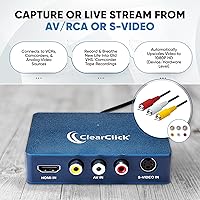
What makes this USB capture card stand out at its price point is the breadth of inputs it handles. Most budget capture devices pick a lane — HDMI or analog — but this one covers both, including RCA composite and S-Video, which is essential for older camcorders and gaming consoles. Analog footage gets automatically upscaled to HD resolution, though it is worth being clear: upscaling improves compatibility, not picture quality itself. The USB-C plug requires no driver installation, and an included USB-A adapter means older laptops are covered too. It runs on Windows, Mac, and Linux natively. Bundled software gets you started immediately, though many users eventually graduate to OBS for more control.

Best For

This analog-to-digital converter hits a sweet spot for a fairly specific group of buyers — and that is not a criticism. If you have aging VHS tapes or Hi8 camcorder footage you have been meaning to preserve, this is one of the easiest entry points available. Retro gaming streamers on a budget will appreciate the combined HDMI and AV input support, avoiding the need for two separate devices. Mac and Linux users tend to find compatible capture hardware surprisingly difficult to locate at this price range, making this USB capture card a practical pick. Archivists and small businesses digitizing legacy video libraries will also find it dependable for routine batch work.

User Feedback

With a 4.4-star rating across more than 430 real-world reviews, buyer satisfaction here is solid. Users frequently praise how straightforward the setup is — the included step-by-step instructions appear to genuinely earn their keep, particularly for less tech-savvy buyers. The most consistent criticism, worth flagging clearly, is that this capture device does not work with HDCP-protected HDMI sources. That means no capturing from streaming sticks, Blu-ray players, or cable boxes — a hardware limitation, not a software fix. Opinions on the bundled software are mixed; it handles basic recording well, but power users typically move to third-party tools. Analog capture quality gets positive marks given the price, with reasonable expectations.

Pros

  • Rare combination of HDMI, RCA composite, and S-Video inputs in one compact device.
  • Plug-and-play setup with no driver installation required — works within minutes of unboxing.
  • Native compatibility with Windows, macOS, and Linux is genuinely uncommon at this price tier.
  • Included USB-A adapter means older laptops are covered without an extra purchase.
  • Bundled software gets you capturing immediately without sourcing third-party tools first.
  • One-year warranty backed by a real USA-based support team, not an anonymous inbox.
  • Compact enough to toss in a bag for capturing footage at a relative's home.
  • The ClearClick Video2USB works across a wide range of legacy formats including VHS, Hi8, Video8, and DVD.
  • Analog footage is automatically upscaled to HD resolution for compatibility with modern screens.
  • Solid 4.4-star satisfaction rating across hundreds of verified real-world purchases.

Cons

  • HDCP-protected HDMI sources — streaming sticks, Blu-ray players, modern consoles — are completely incompatible.
  • Upscaling improves file compatibility only; grainy source tapes will still look grainy after capture.
  • No analog input cables included in the box, meaning extra purchases before you can start with legacy gear.
  • Bundled software feels dated and limits users who want bitrate control or multi-platform streaming.
  • Real-time preview has a noticeable delay, making it unsuitable for live monitoring or active gaming display use.
  • No component video input, ruling out higher-quality analog connections from certain DVD players and consoles.
  • Audio capture in electrically noisy environments can occasionally pick up faint background interference.
  • Software streaming options are narrow compared to free alternatives like OBS, which most users migrate to eventually.
  • Customer support operates on business-hours availability, meaning weekend issues may wait for resolution.
  • Performance during live streaming depends heavily on host computer specs, causing frame drops on older machines.

Ratings

The ClearClick Video2USB earns a solid overall standing among verified buyers, and these scores reflect an AI-driven analysis of real, confirmed purchaser reviews gathered globally — with spam, incentivized, and bot-generated feedback actively filtered out. Across more than 430 ratings, the picture that emerges is one of a capable, approachable capture device that genuinely delivers on its core promises while carrying a few well-documented limitations worth knowing before you buy. Strengths and pain points are both reflected transparently below.

Ease of Setup
91%
Buyers consistently describe an unusually painless first experience — plug the device into a USB port, install the bundled software, and capture is underway within minutes. Non-technical users, including retirees digitizing old home movies, specifically call out the printed step-by-step instructions as genuinely useful rather than an afterthought.
A small number of Mac users report needing to adjust system security permissions before the device is recognized, which can trip up first-timers who are not familiar with macOS privacy settings. Linux setup, while supported, occasionally requires some command-line familiarity that beginners may not have.
Analog Capture Quality
78%
22%
For VHS, Hi8, and S-Video sources, the output quality is widely considered respectable given the price tier. Users preserving family camcorder footage from the 1980s and 90s report that the results are clean enough for comfortable viewing on modern TVs and sharing digitally.
The automatic upscaling to HD resolution improves file compatibility but does not actually enhance the underlying image — grainy source tapes remain grainy. Users expecting crisp, restored-looking footage are regularly disappointed, and this distinction is not always clear from the product listing.
HDMI Capture Performance
74%
26%
For unprotected HDMI sources like older game consoles and webcams, capture at up to 1080p is clean and stable. Retro gaming streamers find it handles the job reliably without dropped frames under typical conditions.
The hard limitation here is HDCP: any HDMI source with copy protection — including streaming sticks, Blu-ray players, cable boxes, and most modern game consoles in default mode — simply will not work. This catches a meaningful portion of buyers off guard and is the single most common source of negative reviews.
Software Usability
67%
33%
The bundled capture and streaming software is functional enough to get most users recording on day one without needing to research alternatives. For basic digitization tasks, it handles file saving and format selection adequately, and the inclusion of streaming support is a genuine bonus at this price.
Beyond basic use, the software shows its limits quickly. The interface feels dated, customization options are thin, and users who want finer control over bitrate, encoding, or streaming destinations typically end up migrating to OBS or similar tools within a few weeks.
Input Versatility
93%
The combination of HDMI, RCA composite, and S-Video inputs in a single compact device is genuinely uncommon at this price point. Buyers who own a mix of legacy camcorders, DVD players, and modern gaming hardware especially appreciate not needing separate capture devices for each format.
There is no component video input, which rules out higher-quality analog connections from certain DVD players and older game consoles that support it. Buyers with more demanding analog setups may find this a frustrating gap in an otherwise broad input range.
Build Quality & Portability
72%
28%
At just over nine ounces and roughly the size of a deck of cards, this USB capture card slips easily into a laptop bag. The casing feels reasonably solid for the price tier, and buyers who travel to capture footage at relatives' homes find the compact footprint genuinely convenient.
The plastic housing does not inspire premium confidence, and a few users report that cable connections feel slightly loose after extended use. It is not a device that feels built for years of heavy daily use, though for occasional digitization sessions it holds up fine.
OS Compatibility
88%
Native support across Windows, macOS, and Ubuntu without requiring driver downloads is a real differentiator. Mac and Linux users in particular note how rare it is to find a capture device at this price that works out of the box on non-Windows systems.
Windows 12 compatibility is listed, but as an OS still rolling out, some users on early builds have reported inconsistent device recognition. macOS users on older pre-Big Sur versions are outside the supported range entirely, which affects anyone on legacy hardware.
Value for Money
84%
Measured against what it actually delivers — multi-format input support, plug-and-play operation, bundled software, and a warranty with real support — most buyers feel the price is fair. For someone digitizing a one-time collection of home tapes, it avoids the need to hire a professional service.
For buyers who specifically need HDMI capture from protected sources, or who want broadcast-grade analog quality, this device represents poor value because it fundamentally cannot meet those needs. Researching before purchasing saves a costly return.
Warranty & Customer Support
82%
18%
The one-year warranty backed by a USA-based team is mentioned positively across reviews more often than you might expect. Buyers who ran into software issues or compatibility questions report getting helpful, responsive replies rather than automated brush-offs.
Support is primarily available during business hours and via email, which means resolution times can stretch if you hit an issue on a weekend. International buyers outside the US occasionally note that warranty logistics add friction to returns or replacements.
Streaming Capability
71%
29%
The ability to live stream directly from analog or HDMI sources is an unusual feature for a device in this category and price range. Retro gaming content creators and educators find it useful for pushing live content to platforms like YouTube without a complex setup.
Streaming performance is dependent on the host computer's processing power more than the device itself, and users on older or lower-spec machines report frame drops during live sessions. The bundled software also limits streaming platform options compared to using OBS directly.
Cable & Adapter Inclusions
76%
24%
Including a full-size USB-A adapter alongside the USB-C connector is a thoughtful touch that broadens compatibility without requiring buyers to source additional accessories. Most users find they can connect to whatever laptop or desktop they own straight out of the box.
No analog input cables are included — no RCA or S-Video cables ship in the box. For buyers who have lost or discarded the original cables from their VCRs or camcorders, this means an additional purchase before they can get started, which some find frustrating given the overall positioning.
Latency During Capture
79%
21%
For digitization work — where you are simply recording rather than monitoring in real time — latency is largely a non-issue, and buyers report clean, synced audio and video in saved files. Retro gaming capture also generally produces well-synchronized recordings.
Real-time preview monitoring shows a noticeable delay, which makes this analog-to-digital converter unsuitable for use cases where you need to watch the source feed live while playing or presenting. It is a capture tool, not a live monitoring solution.
Audio Quality
77%
23%
Audio capture from both analog and HDMI sources comes through clearly with no significant hum or interference reported in typical home environments. VHS tapes with original stereo audio tracks preserve reasonably well, which matters for users archiving music recordings or spoken content.
Users in electrically noisy environments — near older appliances or unshielded power strips — occasionally report a faint background hum in analog audio captures. Bitrate options for audio within the bundled software are also limited compared to what dedicated audio software would offer.

Suitable for:

The ClearClick Video2USB was built for a very specific kind of buyer, and if you fall into that group, it genuinely earns its place. It is the right tool for anyone sitting on a collection of VHS tapes, Hi8 camcorder recordings, or S-Video source material they have been meaning to preserve before the physical media deteriorates beyond saving — the kind of project that feels urgent once you realize those tapes are not getting any younger. Parents, grandparents, and family archivists will find the plug-and-play setup approachable enough that the technical side never gets in the way of the actual goal. Budget-conscious content creators who stream retro gaming content will also appreciate the rare combination of HDMI and analog inputs in one compact device, eliminating the need to buy two separate capture cards. Mac and Linux users who have struggled to find compatible capture hardware at this price range will find this USB capture card one of the more practically supported options available. Small businesses or community organizations with a backlog of legacy video to digitize will also find it a cost-effective workhorse for routine, straightforward capture work.

Not suitable for:

There are real scenarios where this analog-to-digital converter will frustrate rather than help, and it is worth being direct about them before you buy. If your primary goal is capturing HDMI output from a streaming device, a modern game console in standard mode, a Blu-ray player, or any cable or satellite box, this device will not work — HDCP copy protection blocks capture entirely, and no software workaround changes that. Buyers expecting the analog upscaling to visually restore or sharpen old footage will also be disappointed; it makes the files compatible with modern screens but does nothing to improve the underlying image quality of a worn tape. Anyone who needs real-time monitoring with zero latency — for live presentations, gaming with a display feed, or broadcast setups — will find the preview delay genuinely disruptive. Power users who want fine-grained control over encoding, bitrate, and streaming destinations will likely outgrow the bundled software quickly and need to factor in additional tools. If you need component video input for higher-quality analog connections from certain DVD players or late-era game consoles, this USB capture card simply does not offer it, and no adapter will bridge that gap.

Specifications

  • Manufacturer: Made by ClearClick, a USA-based small business that provides direct customer support and warranty service.
  • Model Number: The official model identifier for this capture device is Video2USB.
  • Dimensions: The unit measures 3 x 2.8 x 0.9 inches, making it compact enough to fit in a jacket pocket or laptop bag.
  • Weight: This USB capture card weighs 9.1 ounces, including the device body and attached cables.
  • Color: Available in blue with a compact plastic housing designed for portable desktop use.
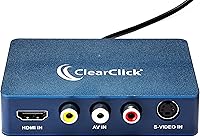
  • Input Types: Accepts HDMI, RCA composite (AV), and S-Video input signals, covering both modern and legacy video sources in a single device.
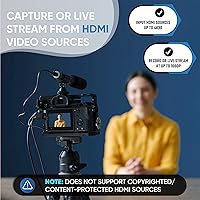
  • Max Capture Resolution: Records and live streams video at up to 1080p full HD resolution from connected sources.
  • HDMI Input Support: HDMI sources are supported at up to 4K 30 FPS input, but only from non-HDCP-protected devices — copy-protected sources are not compatible.
  • Analog Upscaling: Analog video signals from RCA and S-Video sources are automatically upscaled to HD resolution without any manual configuration required.
  • Interface: Connects to computers via USB-C, and a full-size USB-A adapter is included in the box for use with older ports.
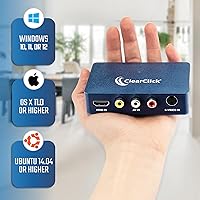
  • OS Compatibility: Works natively with Windows 10, 11, and 12, macOS 11.0 (Big Sur) or higher, and Ubuntu Linux 14.04 or higher.
  • Driver Requirement: Plug-and-play operation means no driver installation is needed — the device is recognized automatically by supported operating systems.
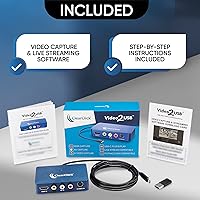
  • Included Software: Bundled video capture and live streaming software ships in the box, along with printed step-by-step setup instructions.
  • Legacy Format Support: Compatible with footage from VCR, VHS, Camcorder, Video8, Hi8, DVD players, and older gaming systems via analog inputs.
  • Streaming Support: The device supports simultaneous recording and live streaming at up to 1080p when used with compatible software.
  • Warranty: Backed by a one-year limited warranty with tech support provided directly by ClearClick's USA-based team.
  • Date Available: This capture device was first made available for purchase on February 8, 2023.

Related Reviews
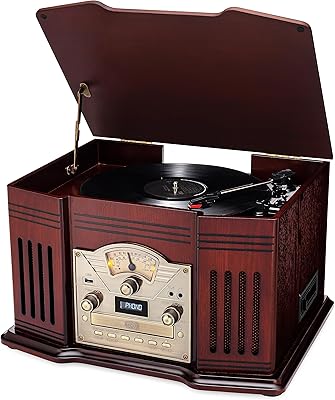
ClearClick VT33 All-in-One Turntable
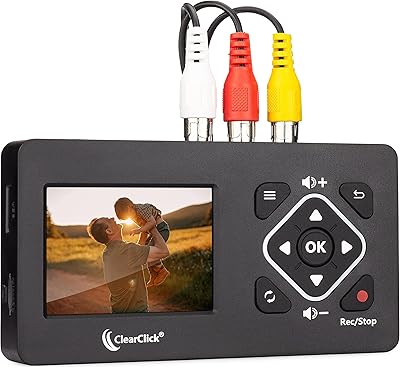
76%
84%
Build Quality & Materials
63%
Sound Quality
91%
Ease of Use
88%
Format Versatility
67%
USB Recording Function
More
ClearClick HD Video Capture Box Ultimate
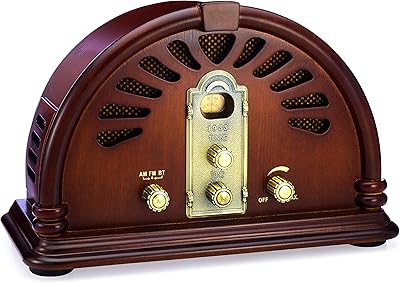
71%
88%
Ease of Setup
91%
Standalone Operation
38%
HDCP & Content Protection Handling
67%
Analog Video Quality
74%
HDMI Capture Quality
More
ClearClick Video2Digital 2.0 Mini Edition
85%
94%
Ease of Use
88%
Recording Quality
90%
Portability
95%
Setup Time
85%
Build Quality
More
ClearClick Classic Vintage Retro Style AM/FM Radio VR44
88%
89%
Sound Quality
93%
Bluetooth Connectivity
88%
Design and Build Quality
85%
Ease of Use
90%
Compactness and Size
More

FAQ

Yes, those are standard RCA composite cables, and this capture device accepts them directly through its AV input. Just plug the yellow video cable and the red and white audio cables into the corresponding ports, connect the device to your computer via USB, and you are ready to start capturing.

It depends on the console and how it is configured. For older consoles that output via RCA or S-Video, it works without issue. For modern consoles using HDMI, it will only work if the console is not outputting a copy-protected signal — and most current-generation consoles do apply HDCP by default, which blocks capture. Some consoles allow you to disable HDCP in their settings, which would make capture possible, but this varies by device and is not guaranteed.

It genuinely works on macOS 11.0 (Big Sur) and later without needing to install any drivers. Some users on newer Mac hardware have noted they need to approve the device in System Settings under Privacy and Security the first time it connects, but once that is done it runs reliably. If you are on an older macOS version below Big Sur, you would be outside the supported range.

Honestly, no — and it is worth being clear about this upfront. The device upscales the signal to HD resolution so it plays back properly on modern screens and software, but it cannot restore or enhance the original image. If the tape is grainy, faded, or tracked poorly, the captured file will reflect that faithfully. Think of it as a preservation tool, not a restoration one.

Possibly. The ClearClick Video2USB includes the USB-C to USB-A adapter, but it does not include RCA or S-Video input cables. If you still have the original cables that came with your VCR, camcorder, or gaming system, you are likely covered. If those cables have been lost over the years, you will need to pick up a set before your first capture session.

Yes, and many users eventually do exactly that. OBS Studio recognizes this analog-to-digital converter as a standard video capture source, which gives you far more control over encoding settings, streaming destinations, and recording quality than the bundled software provides. The included software is fine for getting started quickly, but OBS is the natural next step for anyone who wants more flexibility.

There is a delay in the real-time preview, which is typical for USB capture devices in this category. For digitization work where you are just recording a tape and not actively watching or interacting with it, this is not a practical problem. However, if you need to monitor a live feed with low latency — for gaming or live performance use — the delay would be disruptive.

Yes, as long as your camcorder has RCA output or S-Video output, which most Hi8 and Video8 camcorders from the 1990s do. Check the back or side of your camcorder for those ports — if it has them, this USB capture card will handle the connection and digitize the footage directly.

ClearClick is a USA-based company with a real support team, not just an automated help page, which buyers tend to appreciate. The warranty covers one year from purchase, and support is handled via email during business hours. Response times are generally described as prompt on weekdays. If you hit an issue on a Friday afternoon, you may be waiting until Monday, but the quality of support when you do reach them is consistently well-reviewed.

Ubuntu 14.04 and later are officially supported, and for most users on mainstream Ubuntu versions the device is recognized without any additional configuration. That said, Linux compatibility can vary depending on your specific distribution and kernel version, and users on less common distros may need to do some troubleshooting. For standard Ubuntu setups, the experience is described as straightforward by most who have tried it.