Overview

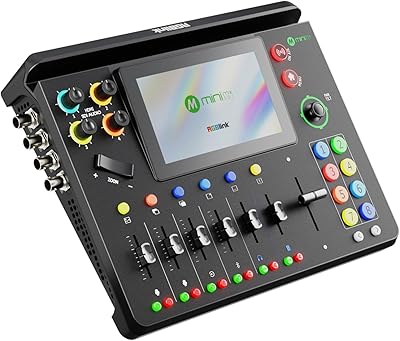
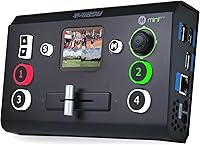
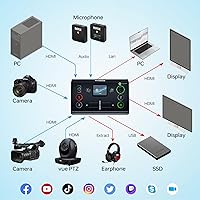
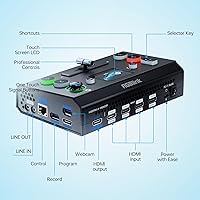
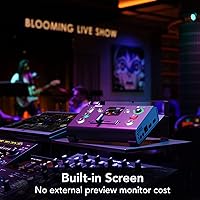
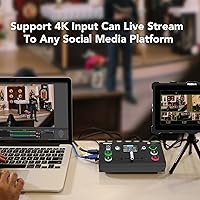
The RGBlink Mini-Pro V3 4K Video Switcher is a compact, four-input hardware mixer that sits comfortably in the mid-range of the live production market, going head-to-head with the Blackmagic ATEM Mini series. Built by Xiamen RGBlink, a Chinese AV manufacturer gaining steady traction with prosumer buyers, this compact switcher weighs just over two pounds and fits on a desk without dominating it. A built-in touchscreen and a 5-direction joystick give operators hands-on control without needing a second monitor or a laptop running alongside it. Both HDMI and USB 3.0 outputs are on board, letting you feed OBS or vMix directly — no capture card required.

Features & Benefits

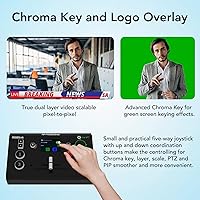
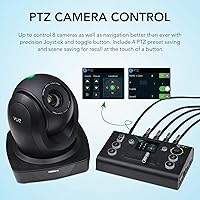
What makes this live streaming mixer stand out at its price is how much hardware capability fits into a unit you can carry in a laptop bag. Four HDMI inputs handle footage up to 4K, and the device automatically identifies color depth — RGB 4:4:4 or YUV variants — so you are not manually adjusting signal settings mid-stream. The chroma key function works in real conditions, though it performs best with a well-lit, evenly colored backdrop — treat it as a genuine tool, not a gimmick. Fourteen transition effects and a physical T-Bar slider add a tactile, broadcast-adjacent feel. PTZ camera control via VISCA protocol, with four saveable presets, rounds out a surprisingly capable package.

Best For

This compact switcher is a natural fit for church AV teams running weekly multi-camera worship services who need reliable control without a dedicated operator at every station. Independent streamers who want to move switching off a PC and into standalone hardware will appreciate the USB 3.0 output feeding OBS directly — though keep in mind that streaming output tops out at 1080p, not true 4K. Small corporate event teams, educators running live classes, and gaming event organizers managing modest productions all land comfortably in the target audience. If your setup involves three or four cameras and you want capable hardware without broadcast-level pricing, the Mini-Pro V3 is worth serious consideration.

User Feedback

Buyers consistently praise the build quality and touchscreen responsiveness, with many noting the unit feels more solid than its price suggests. On the negative side, the learning curve is real — the interface is not immediately intuitive, especially for first-time switcher users, and the documentation has drawn repeated criticism for being thin and inconsistently translated. Firmware updates have frustrated some owners, described by several as a clunky and poorly explained process. HDMI compatibility hiccups at specific resolutions surface occasionally. Buyers cross-shopping with the Blackmagic ATEM Mini tend to note that this live streaming mixer edges ahead on PTZ and chroma key, while Blackmagic holds the advantage on software ecosystem depth. RGBlink support gets mixed marks overall.

Pros

  • Hardware-based switching offloads processing from your streaming PC entirely, reducing dropped frames and CPU strain.
  • Four HDMI inputs with automatic color depth detection handle mixed camera setups without manual signal adjustments.
  • USB 3.0 output connects directly to OBS or vMix — no capture card needed, which saves both money and a USB slot.
  • The physical T-Bar slider gives tactile, broadcast-style control that purely software-based switchers simply cannot replicate.
  • PTZ camera control with four saveable presets lets a solo operator manage pan, tilt, zoom, and focus from one unit.
  • Chroma key works in real production conditions when lighting is consistent — it is not just a spec sheet bullet point.
  • At just over two pounds and smaller than a hardcover book, this live streaming mixer travels easily to offsite events.
  • Build quality earns consistent praise from buyers, with the unit feeling more solid than its price tier would suggest.
  • Six-picture multiview monitoring on a single display gives operators a clear overview of all sources before cutting.
  • Audio embedding and de-embedding support keeps external audio gear integrated cleanly without a separate mixing workaround.

Cons

  • Streaming output via USB maxes out at 1080p — the 4K input capability does not carry through to the stream.
  • Firmware updates are a recurring frustration, with buyers describing the process as poorly documented and error-prone.
  • The included documentation is thin and inconsistently translated, making the initial setup steeper than it needs to be.
  • HDMI compatibility issues at specific resolutions or refresh rates have tripped up enough buyers to be a genuine concern.
  • The interface is not intuitive for first-time switcher users — expect a real learning period before operating confidently live.
  • RGBlink customer support gets mixed reviews, with response times and resolution quality varying considerably by buyer experience.
  • The software ecosystem around this unit is shallow compared to what Blackmagic offers ATEM Mini buyers.
  • No built-in streaming encoder means you still need a laptop or PC in the chain to go live — it is not a standalone streamer.

Ratings

The RGBlink Mini-Pro V3 4K Video Switcher has been evaluated by our AI rating engine after analyzing hundreds of verified buyer reviews from global markets, with spam, bot-generated, and incentivized feedback actively filtered out. The scores below reflect a balanced picture of where this compact switcher genuinely delivers and where real-world users have run into friction. Strengths and pain points are weighted equally — no category gets a free pass.

Build Quality
83%
For a prosumer unit in this price tier, the physical construction earns consistent praise. Buyers coming from cheaper plastic switchers note the chassis feels noticeably more solid, and the touchscreen holds up well after repeated weekly use in church AV setups and recurring event deployments.
A handful of users report that the T-Bar feels slightly loose after extended use, and a few noted cosmetic scuffing on the casing after modest travel. It is durable enough for regular use, but it is not built to survive rough touring conditions without a protective case.
Feature Set
89%
For the price point, the breadth of onboard features is hard to match. PTZ control, chroma key, 14 transitions, multiview monitoring, and audio embedding together give solo operators tools that would otherwise require multiple devices or a much more expensive switcher.
Several features feel like they were included to win spec comparisons rather than polished for real-world use. Chroma key and some transition effects in particular show rough edges when pushed beyond basic applications, suggesting the hardware capability outpaces the firmware refinement.
Ease of Use
54%
46%
Once operators spend time learning the interface — typically across several practice sessions — the tactile controls feel natural. The joystick and T-Bar combination is particularly appreciated during live worship services where muscle memory matters more than menus.
The learning curve is steep, and the documentation does little to help. First-time switcher users frequently report confusion during initial setup, and the menu structure on the touchscreen is not intuitive enough to self-teach quickly. Budget extra time before going live for the first time.
Documentation & Setup
41%
59%
The hardware itself is laid out logically enough that technically experienced users can often piece together basic operation by experimentation. Some buyers with AV backgrounds report getting a working setup within an hour relying mostly on prior knowledge.
The official manual is widely criticized for being thin, inconsistently translated, and out of step with the current firmware. For buyers without a background in AV production, this is a genuine obstacle rather than a minor inconvenience, and it drags down what could otherwise be a much smoother onboarding experience.
Streaming Performance
76%
24%
For 1080p streaming via OBS or vMix, the USB 3.0 output performs reliably once configured correctly. Users running weekly church streams or corporate webcasts report stable, clean output with noticeably reduced CPU load on their host machines compared to software-only setups.
The 4K input capability is real, but the 4K streaming promise is not — USB output caps at 1080p in practice, which surprises buyers who read the product title without digging into the specs. This gap between marketed capability and actual streaming output is the most common source of post-purchase disappointment.
PTZ Camera Control
81%
19%
For setups using VISCA-compatible PTZ cameras, the four-preset recall is a practical feature that solo operators genuinely rely on. Church AV teams in particular report that snapping between a wide shot, a close-up, and a lectern angle mid-service works reliably once presets are dialed in.
VISCA-only support means cameras using other control protocols are locked out entirely. The preset count of four is also limiting for larger multi-camera setups, and a few users report occasional control lag during fast pan movements that makes precise live adjustments tricky.
Chroma Key Quality
63%
37%
In controlled environments with consistent, well-lit green or blue backdrops, the onboard chroma key produces results that are broadcast-usable for live streaming purposes. Educators and online presenters using it in dedicated home studio setups generally report satisfaction.
Any variation in backdrop lighting — shadows, wrinkles, or uneven color — exposes the limitations of the hardware keying processor quickly. It lacks the fine-tuning controls that dedicated software keyers offer, making it a practical option only when your physical setup is already close to ideal.
HDMI Compatibility
67%
33%
The automatic color depth detection handles most modern cameras and laptop HDMI outputs without any manual intervention, which reduces setup friction significantly in multi-source scenarios where you are plugging in mixed hardware.
Specific resolution and refresh rate combinations — particularly some 4K 60Hz sources — have caused signal detection issues for a meaningful subset of buyers. These compatibility quirks are not universal, but they are unpredictable enough that testing your specific sources before a live event is genuinely advisable.
Audio Handling
72%
28%
Audio embedding and de-embedding work as described, giving operators a clean path to incorporate external mixer outputs into the HDMI signal chain. Buyers who run a dedicated audio mixer alongside this unit report a tidy, manageable workflow for live event productions.
There is no dedicated audio monitoring output or headphone jack on the unit, which limits real-time audio verification during a live broadcast. Users managing audio-critical productions will still need external monitoring hardware, which adds complexity the product does not fully acknowledge.
Multiview Monitoring
78%
22%
The six-picture multiview layout on an external monitor gives solo operators a genuine safety net during live production. Being able to see all four inputs plus program and preview simultaneously is a meaningful operational advantage for one-person church or event setups.
The multiview output is tied to the same HDMI output used for program monitoring, meaning you need to actively switch between modes rather than running both simultaneously to separate displays. For operators who want a permanent multiview alongside a clean program output, that is a real workflow limitation.
Portability
86%
At 2.33 pounds and roughly the footprint of a hardcover book, this live streaming mixer fits in a laptop bag without drama. Corporate AV operators and educators who move between rooms or venues weekly report that the compact form factor genuinely changes how they think about bringing switching capability to temporary setups.
The included power supply adds bulk when packing, and the unit lacks a travel case in the box. For buyers doing frequent location work, a protective case is a practical necessity rather than an optional accessory, and that is an added cost the packaging does not acknowledge.
Firmware & Updates
44%
56%
RGBlink has released firmware updates that addressed real functional issues since the unit launched, showing at least some commitment to improving the product post-sale. Users who have successfully updated report genuine improvements to stability and feature behavior.
The update process itself is poorly documented and error-prone, with multiple buyers reporting failed attempts before succeeding. The process lacks the kind of guided, fail-safe update experience that comparable products from more established brands provide, making it anxiety-inducing rather than routine.
Value for Money
79%
21%
When you tally up the features — PTZ control, chroma key, multiview, hardware T-Bar, and capture card-free USB output — the price-to-capability ratio genuinely stands up in the prosumer market. Buyers who understand what they are getting before purchase tend to feel well-served by the transaction.
Buyers who purchased expecting broadcast-grade polish or true end-to-end 4K are significantly less satisfied, and those experiences skew the perceived value negatively. The value proposition is real but narrow — it requires buying the right product for the right use case, which the marketing does not always make clear.
Customer Support
51%
49%
Some buyers report positive direct interactions with RGBlink support staff, particularly for pre-sales technical questions where response times were reasonable and answers were accurate enough to inform purchase decisions confidently.
Post-purchase support quality is inconsistent, with response times and resolution rates varying considerably based on region and the nature of the issue. Firmware and compatibility problems in particular seem to fall into a grey zone where support responses are vague or slow, leaving buyers to rely on community forums instead.

Suitable for:

The RGBlink Mini-Pro V3 4K Video Switcher is a strong match for anyone who needs multi-camera switching in a compact, self-contained package without building a full production rack. Church AV volunteers running weekly services will find the PTZ preset controls and multiview monitoring particularly useful — it lets a single operator manage several cameras from one small unit. Independent streamers and YouTubers who are tired of juggling switching software on the same PC they are streaming from will appreciate offloading that work to dedicated hardware, with a USB 3.0 output feeding OBS or vMix directly. Small corporate event teams and educators leading live broadcasts also land squarely in the sweet spot, especially when portability between rooms or venues matters. If your production involves three or four cameras and you want real hardware control — T-Bar, joystick, touchscreen — without spending broadcast-level money, this compact switcher delivers honest value.

Not suitable for:

The RGBlink Mini-Pro V3 4K Video Switcher is not the right tool for buyers expecting true end-to-end 4K production, since streaming output via USB tops out at 1080p in practice. Anyone coming from Blackmagic's ecosystem — used to ATEM Software Control and deep third-party integrations — may find RGBlink's software support frustratingly thin by comparison. Buyers who are new to live switching and expect to be up and running in an hour should know the learning curve here is real; the interface takes time to get comfortable with, and the documentation does not help as much as it should. If VISCA-based PTZ control is not part of your setup, that feature adds no value and does not offset the interface complexity for a newcomer. Productions requiring more than four simultaneous inputs, or those that depend on robust manufacturer support being available quickly, should look elsewhere before committing.

Specifications

  • HDMI Inputs: Four HDMI inputs each support video signals up to 4K resolution, accommodating a mix of cameras, computers, and other HDMI sources simultaneously.
  • HDMI Output: One dedicated HDMI output carries the program or preview signal to an external monitor or display.
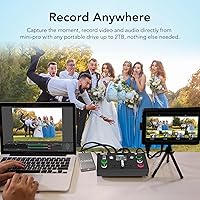
  • USB Output: One USB 3.0 output streams the program feed directly to a connected computer, enabling capture card-free use with OBS, vMix, or similar software.
  • Streaming Resolution: While inputs accept up to 4K, the USB 3.0 output to streaming software delivers footage at up to 1080p in practice.
  • Touchscreen: A 2-inch full-color touchscreen is built into the unit for on-device menu navigation and parameter adjustments without external software.
  • Physical Controls: A 5-direction joystick and a T-Bar slider are integrated into the hardware for tactile source switching and layer control.
  • Transitions: Fourteen onboard transition effects are available, selectable via the touchscreen and executed manually through the T-Bar.
  • Chroma Key: Hardware chroma key processing supports green and blue screen matting, allowing virtual background compositing directly on the device.
  • PTZ Control: PTZ camera control is supported via the VISCA protocol, with four saveable presets storing pan, tilt, zoom, and focus positions per camera.
  • Multiview: A 6-picture multiview layout displays all connected sources in either preview or program mode on a single connected monitor.
  • Color Detection: The unit automatically identifies and handles color depth formats including RGB 4:4:4, YUV 4:4:4, YUV 4:2:2, and YUV 4:2:0.
  • Audio Support: Audio embedding and de-embedding are supported, allowing external audio signals to be integrated into or extracted from the HDMI signal chain.
  • Dimensions: The unit measures 7.09 x 4.66 x 2.28 inches, making it compact enough to fit on a crowded desk or inside a laptop bag.
  • Weight: At 2.33 pounds, this live streaming mixer is light enough to transport easily between venues or rooms without dedicated carry equipment.
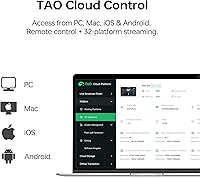
  • Software Compatibility: The USB output is compatible with major third-party streaming and recording applications including OBS Studio and vMix on Windows and macOS.
  • Manufacturer: The unit is designed and manufactured by Xiamen RGBlink Science and Technology Co., Ltd., a Chinese AV hardware company founded in 2006.
  • Model Number: The official model number is Mini-pro, with this listing corresponding to the V3 variant of the product line.
  • Availability Date: This version of the product was first made available for purchase in June 2022.

Related Reviews
RGBlink mini-edge SDI Live Streaming Switcher
74%
93%
Input/Output Versatility
88%
Audio Integration
81%
PTZ Camera Control
86%
Streaming Performance
77%
Remote & Cloud Control
More
RGBlink mini-ISO Live Stream Video Switcher
76%
93%
Input Versatility
91%
Portability
86%
Streaming Capability
61%
Ease of Setup
58%
Output Resolution
More
ClonerAlliance UHD Pro (CA-989UP)
83%
94%
Ease of Setup
89%
Recording Quality
96%
PC-Free Functionality
58%
HDMI Compatibility
62%
Audio Support
More
Blackmagic Design ATEM Mini Pro
82%
91%
Build Quality
93%
Streaming Performance
89%
Video Quality
86%
Audio Mixing
74%
Ease of Setup
More
Samsung Frame Pro 85″ Neo QLED TV
79%
83%
Picture Quality
91%
Art Mode & Display
93%
Design & Aesthetics
78%
Wireless One Connect
82%
Gaming Performance
More
Vantrue S1 Pro Max 4K+4K
79%
93%
Video Quality
91%
Night Vision Performance
74%
AI Safety Alerts (ADAS & BSD)
82%
Parking Mode
88%
Build Quality & Durability
More
Beelink Mini S12 Pro (N100, 16GB, 500GB)

83%
83%
Everyday Performance
91%
Value for Money
76%
Build Quality & Design
84%
Thermal Management & Noise
88%
Connectivity & Ports
More
Gigi Mini Pro Kit
Gigi Mini Pro Kit
83%
88%
Ease of Use
85%
Effectiveness
90%
Suitability for Sensitive Skin
87%
Portability
84%
Waxing Results
More
RGBlink mini-MX SDI
RGBlink mini-MX SDI
86%
94%
Video Switching Performance
91%
Audio Mixing Quality
89%
Touchscreen Responsiveness
87%
Connectivity Options
85%
Ease of Setup
More
Suttie 4K Video Camera DV112
82%
86%
Video Quality
91%
Ease of Use
82%
Zoom Performance
78%
Night Vision
85%
Battery Life
More

FAQ

Not on its own. The RGBlink Mini-Pro V3 4K Video Switcher does not have a built-in streaming encoder, so you still need a connected laptop or desktop running OBS, vMix, or similar software to actually push the stream to a platform. What it does is offload the switching work from that PC, which reduces the processing load considerably.

It accepts 4K input signals from your cameras, but the USB 3.0 output to your streaming software tops out at 1080p in real-world use. The 4K inputs are genuinely useful for signal quality and flexibility, but do not expect a 4K stream out the other end.

If your PTZ cameras support the VISCA protocol, yes. The compact switcher can control pan, tilt, zoom, and focus, and lets you save four presets per camera so you can snap back to a framed shot quickly. Check your camera specs for VISCA support before assuming compatibility.

Honest answer: expect a learning curve. The interface is not immediately obvious, and the included documentation is not thorough enough to fill in the gaps quickly. Most first-time users report spending a few hours with it before feeling confident going live. Watching third-party tutorial videos on YouTube speeds things up significantly.

Yes, the USB 3.0 output is recognized as a capture device on both Windows and macOS, so OBS on a Mac will pick it up without needing a separate capture card. Driver installation requirements can vary by OS version, so check RGBlink's support page for the latest compatibility notes.

It works, but with conditions. Users who have a well-lit, evenly colored backdrop report genuinely usable results. If your green screen has shadows or uneven lighting, the keying gets messy fast. Think of it as a solid bonus feature for controlled environments rather than a replacement for dedicated compositing software.

Both are capable choices for a multi-camera worship setup. The Mini-Pro V3 edges ahead on PTZ camera control and has a more tactile hardware feel with its joystick and T-Bar. The ATEM Mini counters with a more polished software ecosystem and broader third-party support. If PTZ camera management is central to your workflow, this live streaming mixer has a practical advantage there.

Yes, and that is honestly one of its strengths. The multiview display, onboard controls, and PTZ preset recall are all designed with solo operation in mind. It is not effortless on day one, but once you are familiar with the layout, managing four cameras alone is workable.

This is one of the more common complaints from buyers. The update process is functional but not polished — instructions are sparse and the steps are not always intuitive. It is worth looking for community guides or video walkthroughs before attempting an update, especially the first time.

Any standard HDMI source works in principle — laptops for presentation slides, game consoles, media players, or secondary computers. The unit handles mixed signal types across inputs, and its automatic color depth detection helps it adjust without manual configuration for each source type.

Where to Buy

TruthSeeker GearTechs
In stock $295.00