Overview

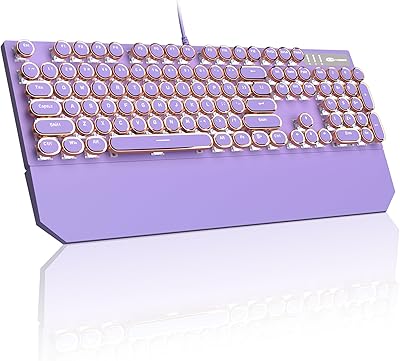
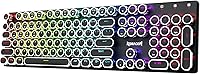
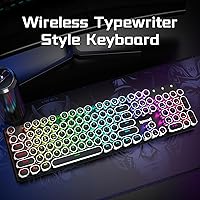
The Redragon K710 Wireless Typewriter Mechanical Keyboard lands in a curious sweet spot — it looks like something pulled from a 1920s writing desk, yet it functions like a modern wireless peripheral built for 2025. That retro round-keycap aesthetic genuinely turns heads on a desk setup, attracting a specific kind of buyer: someone who wants their workspace to say something. But looks alone don't justify a purchase. What makes the K710 worth a serious look is that it backs the style with tri-mode wireless, a solid metal panel, and a feature set that competes well above its mid-range price point.
Features & Benefits

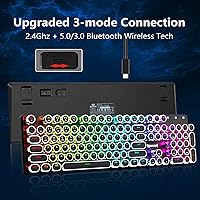
The K710's tri-mode connectivity is one of its most practical strengths — pair it to your desktop via 2.4GHz for responsive input, connect your tablet over Bluetooth, and keep USB-C as a backup when the battery dips low, all without re-pairing headaches. The blue mechanical switches deliver satisfying clicky feedback typists love, though be honest with yourself: they are audible, and not ideal for shared spaces or video calls. The round vintage keycaps take a few days to adapt to if you're coming from flat-profile keys, but they feel sturdy and distinct. The metal top panel adds genuine rigidity and desk presence without feeling overbuilt.

Best For

This retro mechanical keyboard is a natural fit for anyone building a home office or bedroom setup where blue switch noise isn't a dealbreaker. If you juggle multiple devices daily — swapping between a laptop, phone, and tablet — the ability to store three Bluetooth profiles and toggle to 2.4GHz or wired makes this genuinely useful, not just aesthetically interesting. It handles gaming well, especially in titles where precise key registration matters, though competitive players chasing sub-millisecond response times may want to look elsewhere. Desk setup enthusiasts who care as much about how a workspace looks as how it performs will find this typewriter-style board one of the more distinctive options at this price.

User Feedback

Buyers consistently praise the K710's build quality and aesthetic — the metal panel and round keycaps make a strong first impression, and most report that wireless reliability holds up well across all three connection modes. Value perception is high. That said, recurring complaints follow a predictable pattern: the blue switches are loud enough to earn comments from housemates or coworkers, and the companion software takes some patience to navigate. A handful of users mention a short adjustment period coming from standard flat keycaps. The 2 lb weight is occasionally flagged, though most buyers interpret it as a sign of solid construction rather than a drawback.

Pros

  • Tri-mode wireless covers 2.4GHz, Bluetooth 5.0, and USB-C wired in a single board.
  • The metal top panel gives the K710 a desk presence that feels well above its price bracket.
  • Three Bluetooth profiles make device-switching between a PC, tablet, and phone genuinely practical.
  • Blue switches deliver satisfying, accurate tactile feedback that heavy typists consistently praise.
  • Full 104-key anti-ghosting supports simultaneous inputs cleanly during gaming sessions.
  • Per-key RGB customization works without the software — onboard controls handle the basics independently.
  • The retro round-keycap aesthetic is distinctive enough to stand out on any desk setup.
  • USB-C charging eliminates proprietary cable frustration and keeps the desk tidy.
  • Battery life holds up well across multiple days of regular use at moderate brightness settings.
  • Value perception among buyers is high — most feel the feature set exceeds what the price suggests.

Cons

  • Blue switches are loud enough to disrupt housemates, partners, or coworkers in shared spaces.
  • The companion software interface feels dated and takes meaningful time to navigate confidently.
  • Round keycap profile requires a real adaptation period for touch typists used to flat-profile keys.
  • No on-keyboard indicator shows which Bluetooth profile or connection mode is currently active.
  • The plastic base housing feels noticeably lighter than the metal top panel, creating a slight quality mismatch.
  • Battery life drops significantly when running full RGB brightness alongside 2.4GHz simultaneously.
  • The included quick-start documentation is minimal — function key shortcuts are not labeled on the board itself.
  • At 2 lbs and full 104-key size, portability beyond room-to-room movement is impractical.
  • Bluetooth reconnection after sleep mode is slower than expected compared to competing wireless keyboards.
  • Driver installation has caused compatibility hiccups for some users on recent Windows builds.

Ratings

The scores below reflect an AI-driven analysis of verified global user reviews for the Redragon K710 Wireless Typewriter Mechanical Keyboard, with spam, bot-submitted, and incentivized feedback actively filtered out before scoring. Each category is graded on real buyer sentiment — not manufacturer claims — so both the strengths and the friction points show up honestly. Whether the K710 earns a place on your desk or falls short for your specific needs, this breakdown gives you a clear picture.

Build Quality
88%
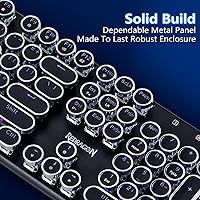
The solid metal top panel is the first thing buyers comment on when the box opens — it feels dense and purposeful, not hollow like many boards at this price. At 2 lbs, it stays planted during long typing or gaming sessions without a wrist rest anchoring it down.
A small number of users reported minor flex in the bottom plastic housing when pressing down firmly, which feels inconsistent against the premium metal top. The contrast between the sturdy panel and the lighter-weight base occasionally reads as a cost-cutting compromise.
Wireless Reliability
84%
The 2.4GHz connection in particular gets consistent praise for maintaining stable input without perceptible lag during gaming and rapid typing. Bluetooth switching between a laptop and a tablet works smoothly for most users once the pairing routine is learned.
Bluetooth 3.0 connectivity on older devices occasionally produces brief dropout complaints, and a handful of users noted that reconnection after sleep mode takes a beat longer than expected. The 2.4GHz dongle is the clear winner here — Bluetooth performance is solid but not flawless.
Typing Experience
81%
19%
Blue switches reward typists who enjoy deliberate, feedback-rich keystrokes — each press gives a satisfying tactile bump and audible click that makes long writing sessions feel engaging rather than numbing. Users who type fast report high accuracy thanks to the clear actuation feedback.
The round keycap profile takes adjustment time, especially for touch typists accustomed to flat SA or OEM profiles — some users reported minor finger fatigue and missed keys during the first week. This is a real adaptation curve, not just a minor quirk.
Noise Level
52%
48%
For solo home office setups or bedroom gaming rigs, the click sound is considered a feature rather than a flaw — it adds to the vintage typewriter character and gives sessions a satisfying, almost rhythmic sound.
In shared spaces, open-plan offices, or during video calls, these switches are genuinely disruptive. Multiple reviews from remote workers mention partner or roommate complaints, and several buyers returned the board specifically because of the noise in a co-working context.
RGB & Lighting
77%
23%
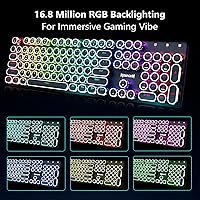
Twenty preset lighting modes give enough variety to suit both subtle productivity setups and flashier gaming rigs. Per-key RGB customization via software opens up detailed personalization, and the round keycaps actually diffuse light in an interesting way that looks different from standard keyboards.
The companion software is functional but not polished — users describe the interface as dated and slightly unintuitive for first-timers. Onboard controls cover the basics, but accessing deeper customization without the app requires memorizing function key combinations that are not always intuitive.
Multi-Device Connectivity
82%
18%
The ability to store three Bluetooth device profiles alongside a dedicated 2.4GHz slot makes this genuinely practical for users juggling a PC, tablet, and phone daily. Switching between a work laptop and a personal desktop mid-afternoon is a real use case this board handles with minimal friction.
Device switching requires pressing specific function key combos that take time to memorize, and there is no visual indicator on the keyboard confirming which profile is active. Users who switch frequently found the lack of profile feedback mildly frustrating until it became muscle memory.
Aesthetic & Desk Presence
93%
Among retro-style keyboards in this price range, the K710 stands out visually — the round keycaps and metal panel genuinely evoke a vintage typewriter look without feeling like a costume. Desk setup enthusiasts consistently call it one of the most eye-catching keyboards they have owned at this tier.
The aesthetic is polarizing by design — buyers expecting a more conventional gaming keyboard look may find the round keycaps visually busy. The black colorway is the only available option, which limits how well it pairs with lighter or neutral-toned desk setups.
Keycap Quality
74%
26%
The round keycaps feel solid and show no early signs of shine or wear based on early user reports, which is a positive indicator for longevity. The profile is distinctive enough that users genuinely enjoy the tactile novelty after settling into it.
Touch typists with years of flat-profile muscle memory will face a real adjustment period — missed keys and slight accuracy dips are common in the first days of use. Some users with larger hands found the round edges less comfortable for extended sessions compared to standard keycap shapes.
Software & Customization
63%
37%
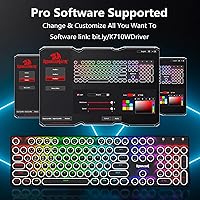
The software does unlock useful features — macro assignment, custom lighting profiles, and keybinding adjustments are all accessible once you get past the setup. For users willing to invest an hour learning it, the payoff in personalization is real.
Initial setup is clunky, and the software does not always detect the keyboard immediately on first install. Several users on the more recent Windows builds reported needing a driver reinstall before macros would register correctly — a frustration that feels unnecessary at this stage.
Battery Life
71%
29%
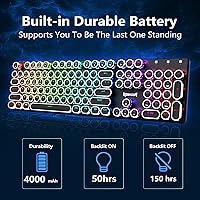
Most users report the battery lasting comfortably through several days of regular use with RGB at moderate brightness, which makes it practical for a desk that does not have a permanent USB-C cable attached. The fact that charging happens via USB-C is convenient and eliminates the need for proprietary cables.
Running the keyboard at full RGB brightness with 2.4GHz active shortens battery life noticeably, and exact runtime figures vary enough across reviews to suggest inconsistency between units. A small number of buyers reported faster battery drain than expected within the first month of use.
Gaming Performance
76%
24%
Full 104-key anti-ghosting means simultaneous key presses register cleanly, which matters in action games and MOBAs where multiple inputs overlap. The 2.4GHz mode provides enough responsiveness for casual to mid-level competitive gaming without perceptible input delay.
Hardcore competitive gamers who track polling rates and latency down to milliseconds will find more purpose-built options in this price range. The K710 is not positioned as a performance-first gaming board, and buyers who treat it that way may come away underimpressed.
Value for Money
86%
At its price point, the combination of tri-mode wireless, a metal panel, per-key RGB, and a genuinely distinctive look is hard to match. Most buyers feel they received more keyboard than the price implied, which is the clearest signal of strong value perception.
A few users who compared it directly to entry-level competitors felt the software shortcomings and noise level were meaningful trade-offs that reduced the value equation somewhat. It is excellent value for the right buyer — but buyers outside the target use case may feel they overpaid.
Portability & Weight
61%
39%
The rechargeable battery and wireless modes mean the K710 can travel without a cable, which some users appreciated for moving between rooms or taking it to a friend's setup.
At 2 lbs, this is not a keyboard you will casually toss in a bag for café work — it is a desk-centric board. Users who hoped to use it portably found the weight and full-size 104-key layout made it impractical for anything beyond room-to-room movement.
Setup & Out-of-Box Experience
79%
21%
Wired mode works immediately on plug-in, and Bluetooth pairing follows a straightforward function key sequence that most users get working within a few minutes. The included dongle for 2.4GHz connects without any driver installation in most cases.
The manual is minimal, and the function key combinations for switching modes or adjusting settings are not printed on the keyboard itself. New users often spend time hunting for the shortcut reference card or turning to online resources before getting fully up and running.

Suitable for:

The Redragon K710 Wireless Typewriter Mechanical Keyboard is a strong match for anyone who works or games from a private space — a home office, a bedroom setup, or a dedicated den — where the clicky blue switches are a feature rather than a social problem. If you regularly bounce between devices throughout the day, the tri-mode wireless setup genuinely earns its place: connect to your desktop via 2.4GHz for responsive input, keep your tablet on a Bluetooth profile, and your phone on a third — all without re-pairing every time. Desk setup enthusiasts who treat their workspace as an extension of their personality will appreciate that the retro round-keycap aesthetic is not just a gimmick; it holds up visually day after day in a way that cheaper novelty keyboards do not. Casual to mid-level gamers who want full anti-ghosting and reliable wireless without sacrificing character will find the K710 covers both bases competently. It also suits multi-device professionals — writers, developers, or content creators — who type heavily and enjoy the tactile reinforcement of a clicky switch during long sessions.
Not suitable for:

The Redragon K710 Wireless Typewriter Mechanical Keyboard is not the right call for anyone working in a shared or open-plan environment — the blue switches are audibly loud, and that is not something you adapt your way out of. If you attend frequent video calls, have a partner working nearby, or sit in a quiet office, this board will cause friction well before it earns appreciation. Competitive gamers who prioritize polling rate precision and the absolute minimum input lag should also look elsewhere; the K710 is a capable casual gaming keyboard, but it was not engineered for esports-level performance demands. Buyers coming from years of flat-profile keycap use should know the round keycap shape requires a genuine adjustment period — if you need to be at full typing speed immediately, that learning curve is a real cost. Finally, anyone who wants a lightweight, portable keyboard for café work or travel will find the 2 lb full-size layout impractical outside a fixed desk context.
Specifications

  • Switch Type: Blue mechanical switches with tactile bump and audible click, rated for medium actuation force suitable for both typing and gaming.
  • Key Layout: Full-size 104-key layout covering all standard alphanumeric, function, and numpad keys.
  • Connectivity: Tri-mode connection: USB-C wired, Bluetooth 5.0 and 3.0 (up to 3 paired devices), and 2.4GHz wireless via included USB dongle.
  • Anti-Ghosting: Full 104-key anti-ghosting support allows all keys to be pressed simultaneously without input conflicts.
  • Backlighting: Per-key RGB with 20 onboard preset modes, 4 adjustable brightness levels, and variable animation speed control.
  • Top Panel: Solid metal top plate construction providing rigidity, stability, and a premium desk-ready appearance.
  • Keycap Style: Round retro typewriter-profile keycaps designed to evoke a vintage aesthetic while maintaining standard key spacing.
  • Battery: Built-in rechargeable nonstandard battery; charges via USB-C cable included in the box.
  • Weight: Approximately 2 lbs (around 907g), reflecting the solid metal panel construction.
  • Dimensions: 4.5″ wide x 1.2″ tall x 17″ long, fitting a standard full-size keyboard footprint on most desks.
  • Bluetooth Profiles: Stores up to 3 Bluetooth device profiles simultaneously, switchable via FN+Q, FN+W, and FN+E key combinations.
  • 2.4GHz Mode: 2.4GHz wireless mode is activated via FN+R and uses the included USB-A nano dongle for low-latency wireless input.
  • Compatible Devices: Compatible with PC, laptop, gaming console, smartphone, and tablet across Windows, macOS, Android, and iOS platforms.
  • RGB Colors: Supports full per-key RGB with 7 solid color presets including red, green, blue, yellow, purple, cyan, and white.
  • Software: Optional companion software available for custom lighting profiles, macro assignment, and keybinding remapping beyond onboard controls.
  • Lighting Control: Core lighting adjustments including mode, brightness, and speed can be controlled directly on the keyboard without installing any software.
  • Release Date: First made available in April 2025 as an updated version of the Redragon FLARE PRO line.
  • Manufacturer: Designed and manufactured by Redragon, a peripherals brand focused on accessible gaming and productivity hardware.

Related Reviews
Merdia Wireless Mechanical Keyboard
83%
90%
Connectivity Options
88%
Typing Experience
86%
RGB Customization
84%
Build Quality
91%
Battery Life
More
Redragon BK7114 Wireless Keyboard
85%
91%
Typing Experience
89%
Connectivity Options
85%
Design and Build Quality
93%
Quietness of Keypress
88%
Compatibility with Multiple Devices
More
RYMEK Typewriter Style Mechanical Keyboard
87%
92%
Typing Experience
89%
Build Quality
85%
Design and Aesthetics
91%
Bluetooth Connectivity
88%
Durability
More
YUNZII B303 Wireless Typewriter Keyboard
82%
88%
Design & Aesthetics
78%
Typing Comfort
82%
Bluetooth Connectivity
85%
Portability
79%
Build Quality
More
Logitech MX Mechanical
81%
88%
Typing Feel & Switch Quality
91%
Noise Level
86%
Build Quality & Materials
93%
Battery Life
87%
Multi-Device Connectivity
More
Pauroty 60% Wireless Mechanical Keyboard
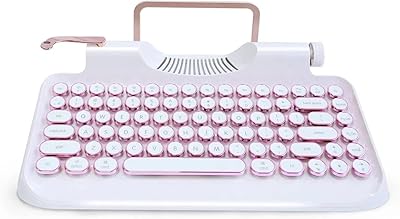
86%
88%
Connectivity Options
75%
Battery Life
93%
Portability
84%
Ergonomics
91%
RGB Customization
More
MageGee Typewriter Mechanical Keyboard
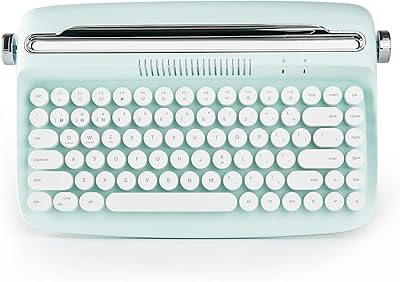
77%
93%
Aesthetic & Visual Design
81%
Build Quality
78%
Typing Feel & Switch Performance
61%
Sound Level
83%
Keycap Quality & Durability
More
Keychron K8
Keychron K8
80%
91%
Typing Feel & Switch Quality
88%
Noise Level
86%
Multi-Device Connectivity
67%
Build Quality & Materials
72%
Battery Life
More
NocFree Wireless Ergonomic Split Mechanical Keyboard
84%
89%
Ergonomics & Comfort
85%
Build Quality
91%
Customization Options
80%
Battery Life
88%
Connectivity & Compatibility
More
Logitech POP Keys Mechanical Wireless Keyboard
87%
88%
Overall Satisfaction
90%
Typing Comfort
85%
Customization Options
92%
Battery Life
75%
Bluetooth Connectivity
More

FAQ

Switching is handled through function key combos: FN+Q, FN+W, and FN+E cycle through your three saved Bluetooth profiles, while FN+R jumps to the 2.4GHz dongle connection. It takes a few days to memorize, but once it clicks it becomes second nature. Just note there is no on-keyboard indicator confirming which mode is active, so you will know by which device responds.

Yes, genuinely loud — this is not an exaggeration. Blue switches produce an audible click on both the downstroke and upstroke, and in a quiet room or shared office they are noticeable from several feet away. If you share a workspace, take calls frequently, or have a partner working nearby, this board will cause friction. It is best suited for solo setups where the sound is a feature rather than a problem.

Most users report an adjustment period of roughly three to seven days, particularly if you are coming from flat OEM or SA profile keycaps. The curved edges change the landing angle of your fingertips slightly, which can cause minor accuracy dips and some finger fatigue early on. Stick with it — most buyers say the feel becomes comfortable and the distinctive typing sound becomes part of the appeal.

Absolutely. The keyboard works fully out of the box for typing, gaming, and wireless connectivity without any software installed. The onboard controls handle lighting mode changes, brightness, and animation speed through function key shortcuts. The companion app is only needed if you want to set up custom macros, create unique per-key lighting layouts, or remap specific keys.

Battery life varies depending on your usage, but most users report several days of moderate use with RGB at mid-brightness before needing a charge. Running full-brightness RGB alongside 2.4GHz wireless simultaneously is the fastest way to drain it. Charging via USB-C is convenient, and the keyboard can be used wired while charging if you run low mid-session.

It is genuinely both, though it leans lifestyle over competitive gaming. Full anti-ghosting across all 104 keys means multi-key inputs register cleanly, and 2.4GHz wireless keeps latency low enough for casual to mid-level gaming. Where it falls short is for esports-oriented players who track polling rates and demand sub-millisecond response consistency — that crowd will want a purpose-built gaming board instead.

Yes, it pairs over Bluetooth 5.0 with iOS and Android devices without any special setup. Just put the keyboard into Bluetooth pairing mode using the FN+Q, W, or E combination, find it in your device's Bluetooth settings, and connect. It registers as a standard HID keyboard, so most shortcuts and function keys work as expected on both platforms.

The round typewriter-profile keycaps use a standard MX-compatible stem, so technically most MX keycap sets will physically fit. However, the retro round profile is part of what makes this board visually distinctive, and swapping to flat keycaps changes the entire aesthetic. If you want to replace just a few keys for accent colors, that is straightforward — but full keycap set swaps work better with sets specifically designed for MX switches.

Yes, the three Bluetooth profiles are stored on the keyboard and do not need to be re-paired after powering off. When you switch back to a saved profile, the keyboard reconnects to the previously paired device automatically, assuming that device has Bluetooth enabled and is in range. Reconnection after sleep mode can occasionally take a few extra seconds compared to some competing keyboards.

The metal construction applies to the top plate — the visible surface where the keys sit — while the bottom housing is plastic. This is a common construction approach at this price point and is why the keyboard feels solid on top but slightly lighter underneath. The metal plate does most of the work in terms of rigidity and desk stability, and most users find the overall feel premium enough that the mixed construction is not a dealbreaker.