Overview

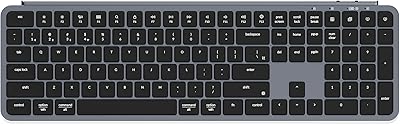
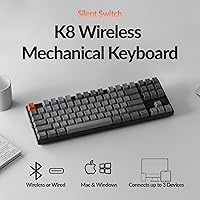
The Keychron K8 sits in an interesting middle ground — a tenkeyless mechanical keyboard priced for serious buyers who don't want to commit to a fully custom build. Dropping the numpad shaves real estate off your desk without sacrificing the keys most people actually use day to day. The Silent Red switch variant signals a clear design intent: this board is built for environments where noise matters, whether that's a shared office or a bedroom late at night. And while Keychron clearly designed it with Mac users in mind, Windows support is genuinely well thought-out, not an afterthought.

Features & Benefits

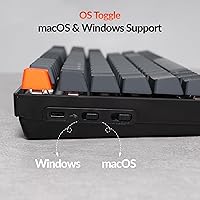
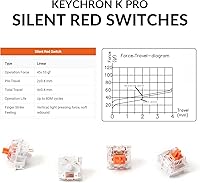
The Bluetooth 5.1 pairing is one of this board's most practical strengths — link a MacBook, an iPad, and a Windows PC simultaneously and switch between them with a single keypress. In wired mode, the USB-C connection runs at a 1000 Hz polling rate, which is genuinely useful for gaming rather than just a spec box tick. The factory pre-lubed Silent K Pro Red switches feel noticeably smooth straight out of the box — no break-in period required. Battery life holds up well with the backlight off, but expect more frequent charging if you keep the white LED running consistently at higher brightness.

Best For

Keychron's quiet wireless board makes most sense for people who type a lot in environments where keyboard noise genuinely bothers others — open-plan offices, coworking spaces, shared apartments. If you bounce between a Mac and a Windows machine daily, or toss an iPad into the mix, the multi-device pairing removes a real daily friction point. It also suits anyone chasing a compact desk setup without giving up a standard typing layout. Casual gamers wanting one board for both productivity and light gaming will find the wired mode more than capable. It's a solid entry point into mechanical keyboards without overwhelming complexity.

User Feedback

Buyers respond well to this TKL keyboard overall — a 4.5-star average reflects consistent praise for out-of-box switch quality and reliable multi-device Bluetooth pairing. People switching from membrane boards frequently highlight how smooth the typing feel is with zero setup required. On the critical side, the ABS plastic frame draws comments about feeling less substantial than metal-chassis rivals, and the white-only backlight is a real limitation for anyone expecting RGB at this price point. Battery complaints tend to cluster around users who leave the backlight on continuously. Windows-only users occasionally mention that the Mac-oriented key labeling takes a short adjustment period.

Pros

  • Factory pre-lubed silent switches deliver a smooth, quiet typing feel straight out of the box.
  • Bluetooth multi-device pairing lets you switch between three devices with a single keypress.
  • The TKL layout frees up meaningful desk space without removing keys most people actually use.
  • Wired USB-C mode with a 1000 Hz polling rate holds up well for casual to mid-level gaming.
  • Both Mac and Windows keycap sets are included — no extra purchases needed to match your OS.
  • The 4000 mAh battery lasts several workdays comfortably when the backlight is kept off or low.
  • Weighing under 1.7 lb, the K8 is easy to carry between home and office without much thought.
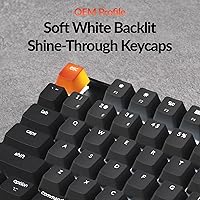
  • The white LED backlight and shine-through keycaps give the board a clean, minimal desk aesthetic.
  • Setup is genuinely fast — Bluetooth pairing and OS switching work without any driver installation.

Cons

  • The ABS plastic frame feels noticeably less substantial than metal-chassis rivals at a similar price.
  • White-only LED backlight is a real limitation when competitors offer full RGB for the same cost.
  • No key remapping or macro programming support — what you get out of the box is what you keep.
  • Battery endurance drops significantly when the backlight runs at medium or high brightness continuously.
  • Switches are not hot-swappable, so changing the feel requires soldering or buying a different model.
  • Some users report occasional Bluetooth re-pairing hiccups after extended idle periods, mainly on Windows.
  • The included USB-C cable is basic — no braiding, no right-angle connector, no premium feel.
  • No low-battery indicator until charge is critically depleted, which catches users off guard mid-session.
  • The Mac-oriented key labeling creates a short but real adjustment curve for Windows-primary users.

Ratings

The Keychron K8 has been evaluated by our AI rating system after analyzing verified buyer reviews from multiple global markets, with spam, bot activity, and incentivized submissions actively filtered out. Scores reflect a genuine cross-section of real-world use cases — from daily office typists and Mac-primary professionals to casual gamers who need one board for everything. Both the standout strengths and the honest frustrations are weighted into every category below.

Typing Feel & Switch Quality
91%
The factory pre-lubed Silent K Pro Red switches consistently impress buyers who have used unlubed switches before — the difference is immediately noticeable. Most users describe the typing experience as soft and controlled, with no scratchy feedback even during extended writing sessions.
A small but vocal group of enthusiasts finds the linear feel too light for their preference, wishing for a tactile option in this same quiet profile. Those coming from clicky switches occasionally need a week or two to adjust to the lack of physical feedback.
Noise Level
88%
For open-plan offices and shared living spaces, this board delivers on its core promise — neighbors and coworkers consistently stop noticing the typing sounds within a day. The combination of pre-lubed switches and the silent mechanism makes it genuinely unobtrusive during video calls.
It is not completely silent — bottoming out firmly still produces a muffled thud that sensitive microphones will pick up. Users expecting near-zero sound in a recording environment may need additional desk padding or foam modification.
Multi-Device Connectivity
86%
Switching between a MacBook, a Windows desktop, and an iPad throughout the workday is where this board genuinely earns its keep. Pairing is stable across devices and the channel-switch response time is fast enough that it rarely breaks workflow rhythm.
A portion of users report occasional re-pairing hiccups after the keyboard has been idle for extended periods, particularly with Windows machines. It is not frequent enough to be a dealbreaker, but it does surface more than once in long-term ownership reviews.
Build Quality & Materials
67%
33%
The overall assembly feels solid — there is no flex in the frame during normal typing, and the keycaps sit evenly without wobble. For buyers coming from budget membrane boards, the construction quality registers as a genuine step up.
The ABS plastic chassis is the most divisive element in user feedback. Side by side with metal-framed competitors at a comparable price, it reads as less premium, and some users note a faint hollow sound when striking keys near the edges of the board.
Battery Life
72%
28%
With the backlight turned off or kept at low brightness, the 4000 mAh battery comfortably lasts through several workdays before needing a charge — a realistic and appreciated outcome for desk workers who forget to plug in overnight.
Running the white LED at medium-to-high brightness cuts battery endurance significantly, with some users reporting a need to charge every one to two days under heavy backlit use. The board does not display a low-battery warning until charge is critically depleted, which catches people off guard.
Mac Compatibility & Layout
89%
Mac users report that the native multimedia key layout feels natural from day one, with no remapping required for common actions like screen brightness, media controls, and Mission Control. The included Mac-specific keycaps complete the look cleanly.
The Mac-first identity creates a mild adjustment period for Windows-primary users, who occasionally find the labeling and default function layer unintuitive at first. Most adapt within a few days, but it is worth noting for anyone who uses Windows exclusively.
Windows Compatibility
74%
26%
The included Windows keycap set and dedicated layout mode mean the board functions properly out of the box on Windows, and most standard shortcuts work as expected once the OS switch is toggled. Buyers who primarily use Windows find it functional without major complaints.
The lack of dedicated software for Windows-side key remapping is a recurring pain point — what the K8 Pro offers through QMK support is simply absent here. Power users who want to remap keys or program macros will hit a hard wall.
Backlight & Aesthetics
61%
39%
The white LED backlight paired with shine-through keycaps delivers a clean, minimal desk aesthetic that many buyers actively prefer over flashy RGB setups. It looks sharp in low-light environments and photographs well in workspace photos.
At this price tier, white-only illumination is a genuine limitation — several direct competitors offer full RGB for the same or lower cost. Users who enjoy personalizing their setup or matching lighting themes will find this board restrictive.
Keycap Quality
69%
31%
The shine-through keycaps are functional and legible, and the legends stay crisp at typical backlight brightness levels. Most everyday users find them perfectly adequate for long-term daily typing.
The ABS keycap material is prone to developing shine on the most-used keys after several months of heavy use. Enthusiasts who prefer PBT keycaps for their texture and durability will likely want to swap these out eventually.
Wireless Stability
83%
Day-to-day Bluetooth performance is reliable — the connection holds steady across typical office distances and through standard obstacles like monitor stands and desk dividers. Most users never experience a dropout during normal use.
A minority of users working in RF-dense environments, such as crowded offices or apartments with many nearby wireless devices, report slightly more frequent brief disconnections. Wired mode eliminates this entirely and is the recommended path for competitive gaming.
Wired Performance
92%
In USB-C wired mode the keyboard performs without complaint — the 1000 Hz polling rate is on par with dedicated gaming keyboards, and input response is consistent even during fast-paced sessions. Gamers who want wireless flexibility but zero compromise in wired mode get exactly that.
The included USB-C cable is functional but unremarkable — it gets the job done without any premium braiding or right-angle connector. Users who care about cable aesthetics typically replace it quickly.
Layout & Desk Footprint
87%
Removing the numpad makes a tangible difference on smaller desks — there is noticeably more room for mouse movement, and the ergonomic arm position feels more natural for extended sessions. The 87-key layout retains all the function row and navigation keys that matter most.
Users who work regularly with spreadsheets or numerical data entry miss the numpad and find workarounds tedious over time. The TKL trade-off is well understood, but it does narrow the audience compared to a full-size board.
Out-of-Box Experience
84%
Setup is genuinely quick — the board arrives ready to use with both keycap sets included, a USB-C cable in the box, and Bluetooth pairing that takes under a minute. For buyers who dislike assembly or configuration, this is appreciated.
There is no quick-start guide that explains the Bluetooth channel switching clearly, which leads to early confusion for first-time mechanical keyboard buyers. A few online searches resolve it quickly, but it is an unnecessary friction point.
Value for Money
78%
22%
The combination of pre-lubed silent switches, dual connectivity, and reliable multi-device pairing represents solid value for buyers who would otherwise pay separately for switch lubing or a Bluetooth adapter. For the target audience, the feature-to-price ratio lands well.
Buyers aware of the broader mechanical keyboard market will note that the K8 Pro offers hot-swap support and QMK programmability for a moderate price premium — making the standard K8 feel slightly limited for those with any interest in customization long-term.
Portability
76%
24%
At under 1.7 lb the board is light enough to slide into a laptop bag without much thought, and the wireless operation means one less cable to manage on the go. Remote workers who rotate between home and office find it practical to carry daily.
There is no carrying case included, and the ABS chassis picks up scratches in transit without protection. The board is not designed with portability as a primary use case, so buyers who travel frequently may want to source a sleeve separately.

Suitable for:

The Keychron K8 is a strong fit for anyone who types a lot in environments where noise is a real consideration — open-plan offices, shared apartments, or late-night sessions where a clicky board would genuinely bother people nearby. Mac users who also need to hop between a Windows machine or an iPad throughout the day will find the three-device Bluetooth setup removes a daily friction point that most single-device keyboards simply cannot address. If your desk is on the smaller side and a full-size board has always felt like it crowds your mouse space, the tenkeyless layout here is a practical solution rather than a compromise. Casual gamers who want one board that handles both spreadsheets and weekend gaming sessions without switching equipment will find the wired mode's polling rate holds up well for most titles. It also makes a genuinely good entry point for someone curious about mechanical keyboards — the switches are pre-lubed and ready to impress without requiring any DIY work before first use.

Not suitable for:

The Keychron K8 is not the right choice for buyers who rely on a numpad daily — accountants, data entry workers, and anyone who lives in spreadsheets will find its absence a persistent annoyance that no workaround fully solves. If RGB lighting and the ability to program custom macros or remap keys are important to you, this board falls short; those features belong to the K8 Pro, which is a meaningfully different product despite the similar name. Power users and hobbyists who want to experiment with switch swapping without soldering should look at the hot-swappable variants in Keychron's lineup instead. The ABS plastic build will also disappoint buyers who associate a premium typing experience with a metal chassis — side by side with aluminum-framed competitors, the material difference is noticeable. Finally, anyone in a heavily RF-congested environment who cannot tolerate any wireless variability should use this board exclusively in wired mode or consider a wired-only alternative.

Specifications

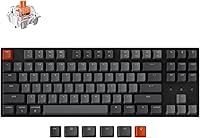
  • Layout: 87-key tenkeyless (TKL) layout omitting the numpad while retaining the full function row and navigation cluster.
  • Switch Type: Keychron Silent K Pro Red linear switches, factory pre-lubed for reduced friction and quieter actuation out of the box.
  • Connectivity: Bluetooth 5.1 supporting up to 3 paired devices simultaneously, plus USB-C wired mode for direct connection.
  • Polling Rate: 1000 Hz polling rate available exclusively in wired USB-C mode, ensuring low-latency input response.
  • Battery: 4000 mAh rechargeable lithium polymer battery, charged via the USB-C port on the top edge of the board.
  • Backlight: White LED backlight with shine-through keycaps; single color only, no RGB or per-key lighting customization.
  • Frame Material: ABS plastic case and frame construction throughout the body and base of the keyboard.
  • Keycap Material: ABS shine-through keycaps with printed legends, compatible with standard MX-style switch stems.
  • Dimensions: The board measures 14.1″ in length, 4.84″ in width, and 1.65″ in height without the adjustable feet extended.
  • Weight: The keyboard weighs 1.63 lb without the USB-C cable, making it practical for transport between home and office.
  • OS Support: Officially compatible with macOS and Windows; both keycap sets and corresponding layout modes are included in the box.
  • Included Keycaps: The package includes a full macOS keycap set pre-installed plus a spare Windows-compatible keycap set for easy swapping.
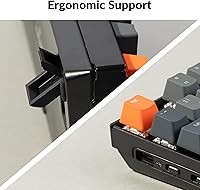
  • Adjustable Feet: Two-level adjustable rear feet allow the typing angle to be raised for a more ergonomic hand position.
  • Connection Port: USB-C port located on the upper-left edge of the board, compatible with standard USB-C cables.
  • Key Count: The board has exactly 87 keys covering alphanumerics, function row, navigation, and modifier keys.
  • Bluetooth Version: Bluetooth 5.1 provides stable wireless range and faster device-switching response compared to older Bluetooth standards.
  • Hot-Swap Support: This variant does not support hot-swappable switches; changing switches requires desoldering the existing ones.
  • Availability Date: The keyboard became available for purchase in January 2025 as part of Keychron's updated K-series lineup.

Related Reviews
Pinsliee K8 RGB PC Speaker
73%
62%
Sound Quality
88%
RGB Lighting
81%
Value for Money
93%
Ease of Setup
67%
Build Quality
More
VisionX K8 64MP Digital Camera
82%
87%
Image Quality
92%
Ease of Use
85%
Video Performance
75%
Zoom Quality
60%
Low Light Performance
More
Keychron C2 Wired Mechanical Keyboard
84%
91%
Typing Experience
89%
Build Quality
88%
Customization Options
84%
Ergonomics
90%
Compatibility
More
KLIM K8 Cassette Tape Player
83%
76%
Sound Quality
85%
Recording Functionality
80%
Build Quality
91%
Portability
88%
Ease of Use
More
Keychron B6 Pro
Keychron B6 Pro
80%
93%
Battery Life
88%
Wireless Connectivity
71%
Typing Experience
91%
Mac Compatibility
67%
Build Quality
More
Keychron V1 75% Mechanical Keyboard
82%
83%
Build Quality
81%
Typing Feel
74%
Switch Performance
93%
Customization & Firmware
91%
Hot-Swap Functionality
More
Keychron B1 Pro Wireless Bluetooth Keyboard
86%
88%
Overall Performance
91%
Typing Experience
93%
Battery Life
89%
Portability & Size
84%
Build Quality
More
Keychron K4 Bluetooth Wireless Mechanical Keyboard
86%
91%
Build Quality
88%
Battery Life
85%
Typing Experience
90%
Connectivity & Versatility
82%
RGB Backlighting
More
Keychron K2 V2 Wireless Mechanical Keyboard
87%
88%
Overall Performance
85%
Typing Experience
90%
Battery Life
92%
Build Quality
80%
Portability
More
QSC K8.2 Active 8″ Powered Loudspeaker
88%
93%
Performance
88%
Sound Clarity & Bass
90%
Build Quality & Durability
86%
Connectivity & Compatibility
87%
Ease of Setup & Use
More

FAQ

The keyboard has dedicated Bluetooth channel keys on the function layer — typically accessed by holding Fn and pressing one of the top-row keys labeled BT1, BT2, or BT3. Press the key for the device you want and the board reconnects within a second or two. If a device is not already paired, holding that channel key for a few seconds puts the board into pairing mode.

For most open-plan environments, yes. The silent linear switches dampen both the downstroke and the upstroke, so the sound profile is closer to a soft thud than the sharp click you get from standard mechanical switches. It will not be completely inaudible if you bottom out hard, but coworkers sitting nearby typically stop noticing it within a day or two.

Officially it is listed for macOS and Windows, but in practice it functions as a standard HID keyboard on Linux and Chrome OS as well. Most keys work without any special configuration, though some function-layer shortcuts tied to macOS or Windows-specific actions may not map perfectly without manual remapping at the OS level.

With the backlight completely off, most users get between one and two weeks of regular office use before needing to charge. Keep the white LED running at medium brightness throughout the day and that drops to roughly two to three days. If you leave it on high brightness continuously, expect to charge every day or two.

No — this particular board uses soldered switches. If you want to change switches down the line without any soldering work, you would need to look at the K8 Pro or K8 Max variants, both of which offer hot-swap PCBs that let you pull and replace switches with a puller tool in minutes.

No drivers are required — it connects as a standard plug-and-play keyboard on both macOS and Windows. There is no companion software for this variant, which means everything works immediately but also means there is no built-in way to remap keys or program macros. If that level of customization matters to you, the Pro version is worth considering.

The K8 Pro adds hot-swap switch support, QMK and Via compatibility for full key remapping and macro programming, and RGB backlighting. This standard variant trades those customization features for a simpler, more approachable experience at a lower price point. If you just want a reliable quiet wireless keyboard without tinkering, the standard version is fine — but hobbyists who anticipate wanting to modify the board should budget up for the Pro.

Yes, the switches use a standard MX-compatible stem, so the vast majority of aftermarket keycap sets on the market will fit without any compatibility issues. The board uses a standard TKL layout with no unusual key sizing in the modifier row, which makes finding replacement sets straightforward.

Yes — it pairs with iPads, Android tablets, and smartphones just like any Bluetooth keyboard would. The macOS layout translates reasonably well to iPadOS since both share a similar command structure. On Android, the board works as a standard Bluetooth HID keyboard and most shortcuts function as expected.

The frame is rigid enough that flex is not a practical concern during normal typing. The ABS construction does produce a slightly hollow sound when striking keys near the edges compared to a metal-chassis board, but there is no structural give that would affect accuracy or comfort during extended use.