
Overview

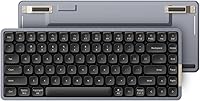
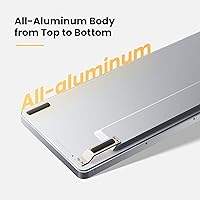
The Lofree Flow84 arrived in late 2023 as something genuinely hard to categorize — part enthusiast mechanical keyboard, part sleek low-profile board that wouldn't look out of place next to a MacBook. Built around an all-aluminum unibody, it feels immediately substantial in a way that plastic competitors simply don't. At 75% layout, it trims the fat without sacrificing usability, keeping arrow keys and most shortcuts intact. It connects via both Bluetooth and USB-C wired, which covers most workflows without fuss. This aluminum keyboard sits at an interesting crossroads: it asks whether you really need to choose between portability, aesthetics, and a satisfying mechanical typing experience.

Features & Benefits

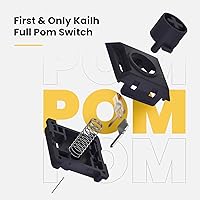
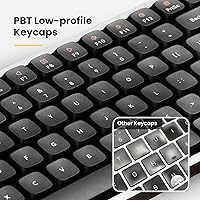
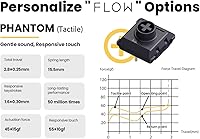
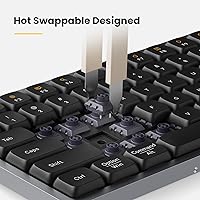
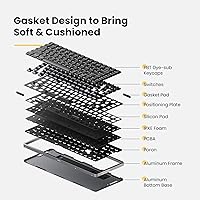
The standout here is the Kailh Full POM switch — a low-profile switch built entirely from POM plastic, which means it self-lubricates with use and gets noticeably smoother over time rather than degrading. Pair that with a gasket-mount design — essentially a layer of cushioning between the switches and the frame that softens each keystroke and reduces the harsh, clacky resonance you get from rigid-plate boards — and the typing feel is genuinely muted and pleasant. The sockets are hot-swappable, so switching between tactile and linear flavors requires no soldering. PBT keycaps with five-sided dye-sublimation legends look sharp and hold up. Battery life reaches around 40 hours on a charge, which is practical rather than just a spec-sheet boast.

Best For

This low-profile mechanical keyboard makes the most sense for people who spend long hours typing and want something that feels more considered than a stock office keyboard but doesn't dominate their desk. Writers and coders who hop between a Mac and a Windows machine will appreciate the multi-device Bluetooth support — up to three paired devices — and the dedicated key remapping for both operating systems. Minimalist setup builders will find the aluminum finish and compact footprint worth the investment. It's also a smart pick for anyone curious about low-profile switches who wants the flexibility to swap them out if the feel isn't quite right. Be honest though: if you're committed to full-height switches, reduced key travel will take real adjustment.

User Feedback

Among verified buyers, the most consistent praise centers on build quality — people expect something solid when they see the aluminum casing, and the Flow84 actually delivers on that expectation. The gasket-mount typing sound earns specific compliments; reviewers describe it as quiet and thocky rather than sharp or tinny. On the critical side, a handful of users flagged occasional Bluetooth reconnection issues after the board sits idle — worth noting for anyone who hot-desks regularly. The sidelit-only RGB setup also drew disappointment from buyers expecting per-key illumination; the lighting looks attractive, but it isn't what enthusiasts accustomed to full RGB boards would expect. Sitting at 4.2 out of 5 across over 300 ratings, the reception is positive but reflects a board that comes close to excellent rather than definitively landing there.

Pros

  • All-aluminum unibody construction feels genuinely premium and holds up to daily carry without flex or rattle.
  • The gasket-mount design softens each keystroke noticeably, reducing fatigue during long writing or coding sessions.
  • Kailh Full POM switches improve in smoothness over time — a rare quality in the low-profile category.
  • Hot-swap sockets let you change switch types without tools or soldering, making it easy to dial in your preferred feel.
  • Three-device Bluetooth pairing makes switching between a Mac, Windows PC, and tablet fast and reliable.
  • Battery lasts several workdays on a single charge when RGB is kept modest, and refills quickly via USB-C.
  • The compact 75% layout preserves arrow keys and essential shortcuts while freeing up meaningful desk space.
  • PBT keycap legends remain sharp and fade-resistant after months of heavy daily use.
  • The typing sound profile is muted and office-friendly — colleagues are unlikely to notice it across a room.
  • Works natively with both macOS and Windows without requiring any software installation or driver setup.

Cons

  • No companion software means zero support for custom key remapping, macro creation, or RGB pattern control.
  • Sidelit-only RGB is a real gap for buyers expecting per-key programmable lighting at this price point.
  • Bluetooth can be slow to wake after idle periods, which interrupts workflow at inconvenient moments.
  • Low-profile key travel requires a genuine adjustment period for anyone coming from standard-height mechanical boards.
  • Compatible replacement or upgrade keycap sets in low-profile format are harder to find than standard options.
  • The aluminum body adds weight compared to similarly sized plastic keyboards, which matters for ultralight travel setups.
  • No travel pouch or carrying case is included despite the portable size and premium positioning.
  • Third-party low-profile switch selection is narrower than the standard hot-swap ecosystem, limiting tuning options.

Ratings

The scores below for the Lofree Flow84 were generated by our AI engine after analyzing verified global buyer reviews, actively filtering out incentivized, bot-flagged, and duplicate submissions to surface genuine user sentiment. The result is a transparent breakdown that reflects both what this aluminum keyboard genuinely gets right and where real-world buyers ran into frustration. Expect an honest picture, not a highlight reel.

Build Quality
93%
The all-aluminum unibody consistently draws praise from buyers who have owned multiple keyboards at this price range. It feels planted on a desk rather than shifting around, and the absence of flex or creak — even during extended heavy typing sessions — gives it a durability impression that plastic competitors rarely match.
A small number of users reported minor finishing inconsistencies on the aluminum edges, particularly around the USB-C port area. These are cosmetic rather than structural concerns, but at this price tier, buyers reasonably expect flawless machining throughout.
Typing Feel
91%
The gasket-mount construction — which sandwiches a cushioning layer between the switch plate and the frame — meaningfully softens each keystroke in a way that most buyers did not expect from a low-profile board. Combined with the self-lubricating POM switches, the result is a smooth, forgiving keystroke that improves noticeably after a break-in period.
Buyers migrating from full-height mechanical keyboards consistently flag the reduced key travel as an adjustment. For some, the shallow stroke never fully clicks psychologically, and a portion of reviewers ultimately preferred returning to standard-height switches despite the technical quality of the POM design.
Switch Quality
88%
The Kailh Full POM switches are a genuine novelty in the low-profile space — the all-POM construction means they lubricate themselves incrementally with use, which buyers who kept journals of their experience described as a perceptible improvement in smoothness over two to four weeks of daily use.
The switch selection is limited at purchase to the available variants, and while hot-swap helps address this, sourcing compatible low-profile switches beyond Lofree's own ecosystem can be tricky. A few buyers also noted the tactile variant feels subtler than full-height tactile switches, which may disappoint those expecting a pronounced bump.
Wireless Performance
78%
22%
Bluetooth connectivity across up to three paired devices is a practical strength for users bouncing between a MacBook, a Windows desktop, and a tablet. Most buyers reported fast, reliable switching and a stable connection throughout standard office-distance use within the 15-meter rated range.
A recurring complaint involves the board needing to re-pair or wake slowly after sitting idle for an extended period, which interrupts workflow in a way that feels unpolished. This appears more pronounced on certain operating system configurations and has been reported consistently enough that it qualifies as a real-world friction point rather than an isolated issue.
Hot-Swap Functionality
86%
The hot-swap sockets are well-implemented — switches seat and release cleanly without requiring a specialized low-profile puller in most cases. Buyers who wanted to experiment with linear versus tactile feels appreciated being able to do so without committing to a soldering project or buying an entirely new board.
Compatibility is narrower than standard hot-swap keyboards since only low-profile switch formats fit the sockets. Users coming from the broader enthusiast mechanical market found the switch selection pool more limited, and a few noted that repeated swapping over time introduced slight socket looseness on individual keys.
Battery Life
84%
The 40-hour rated battery life holds up reasonably well in real-world use, with buyers who work eight-hour days reporting charging intervals of around four to five days when RGB effects are kept minimal. Charging to full in roughly three hours via USB-C is genuinely convenient compared to proprietary charging solutions.
Running RGB effects, particularly the sidelit mode at higher brightness, cuts the battery life substantially — some users reported dropping to around 15 to 20 hours under sustained backlit use. The 2000mAh cell is adequate but not generous, and heavy RGB users will find themselves reaching for the cable more often than the spec suggests.
RGB and Backlighting
61%
39%
The sidelit RGB does create an attractive ambient glow around the keyboard's perimeter that looks genuinely polished in a dark or dim workspace. For buyers who primarily want atmospheric desk lighting rather than per-key customization, the effect is visually clean and not garish.
Buyers expecting per-key RGB programmability were clearly disappointed, and this came up often enough in reviews to represent a meaningful expectation mismatch at this price point. The backlight is white only rather than full color, and the RGB is confined to the side trim — which feels like a compromise that enthusiasts accustomed to boards half the price will find hard to accept.
Keycap Quality
89%
The five-sided dye-sublimation printing on the PBT keycaps produces legends that remain sharp and legible after months of use, with no visible fading reported among long-term reviewers. The surface texture strikes a well-liked balance between grip and smoothness, and the low-profile height feels cohesive with the board's overall proportions.
The keycap height is inherently polarizing — users with larger hands or those accustomed to sculpted keycap profiles sometimes find the flatter, uniform low-profile caps less ergonomically natural over very long sessions. Replacement low-profile PBT keycap sets from third-party vendors are also harder to find than standard-height options.
Portability
87%
At 1.25 lbs and roughly 12.44″ by 4.96″, the Flow84 slips into a laptop bag without significant weight penalty. Remote workers and frequent travelers who tested it as a daily-carry keyboard appreciated having a board that felt substantial on a desk but didn't punish them in transit.
The aluminum body, while a build-quality asset, does add more weight than similarly sized plastic keyboards. Buyers who prioritize the absolute lightest travel setup noted that other compact boards achieve a smaller carry footprint, and the lack of an included travel pouch was a minor but repeated complaint.
Mac and Windows Compatibility
83%
Dedicated function-key remapping for both macOS and Windows — toggled via Fn key combinations — means the board adapts to either OS without needing third-party software. Mac users in particular commented that the key layout and shortcuts felt natural from day one, which is not a given for keyboards primarily marketed toward Windows users.
The key labeling defaults to a Windows-centric layout visually, which can feel slightly off for Mac-only users who prefer seeing Mac-specific symbols printed on the keycaps. Some also noted that the Fn layer behavior required a short learning period to memorize, and the lack of dedicated software for full remapping customization limits power users.
Noise Level
88%
The gasket-mount design's practical effect on sound is one of the most frequently praised aspects across reviews. Users who work in open offices or shared spaces noted that colleagues rarely reacted to the typing noise, and the overall sound profile — described by buyers as a soft, low-pitched thud rather than a sharp clack — suits professional environments well.
The board is not silent, and buyers who expected near-silent performance comparable to a membrane keyboard were occasionally surprised. The tactile switch variant, in particular, produces a more audible bump that a small number of users found louder than anticipated for a gasket-mounted low-profile design.
Value for Money
74%
26%
The combination of an aluminum body, gasket mount, hot-swap sockets, and POM switches in a single package at this price range genuinely stands out compared to what budget and mid-range boards typically offer individually. Buyers who had previously owned two or three cheaper keyboards tended to view the Flow84 as a consolidating upgrade worth the cost.
At this price point, buyers expect a complete package, and the sidelit-only RGB and absence of per-key lighting customization software leave a noticeable gap versus competitors offering full RGB programmability at similar or lower prices. For buyers who prioritize lighting flexibility, the value equation weakens considerably.
Software and Customization
55%
45%
For buyers who simply want the board to work out of the box without any configuration, the plug-and-play experience is actually quite smooth. The hardwired Mac and Windows mode switching handles the most common cross-platform scenario without any software dependency, which a portion of buyers actively appreciated.
There is no dedicated companion app for remapping keys, adjusting RGB patterns, or creating macros, which is a real limitation for enthusiasts who expect that level of control at this price tier. Multiple reviewers explicitly flagged this gap as something that needs addressing, particularly given that competing boards in the same range often include at least basic customization software.
Desk Aesthetics
92%
The minimalist aluminum finish — available in clean colorways — photographs and looks exceptionally well in desk-setup communities, and buyers who invested in broader workspace aesthetics consistently noted it as one of the better-looking compact keyboards they have owned. The side RGB trim adds understated visual interest without clashing with neutral setups.
The aesthetic is decidedly utilitarian-minimalist, which suits many buyers but leaves those who prefer more expressive or colorful keycap aesthetics with limited out-of-box options. The keycap color palette is restrained, and without robust third-party low-profile keycap availability, personalizing the look beyond the stock configuration is genuinely difficult.

Suitable for:

The Lofree Flow84 is a strong match for writers, coders, and office professionals who want the tactile satisfaction of a mechanical keyboard without the desk footprint or noise of a full-size board. If you regularly split your time between a Mac and a Windows machine — or even throw a tablet into the mix — the three-device Bluetooth switching is a genuinely practical feature that removes daily friction. Minimalist desk-setup builders will find the aluminum build and restrained aesthetic a natural fit alongside premium monitors and clean cable management. Remote workers and frequent travelers will appreciate having a board that feels substantial at a hotel desk but doesn't add meaningful weight to a laptop bag. Keyboard enthusiasts who are curious about low-profile switches but aren't ready to commit blindly will value the hot-swap sockets, which allow real experimentation without a soldering iron. If your priority is a board that looks refined, types quietly, and works reliably across multiple devices, this aluminum keyboard covers that ground well.

Not suitable for:

Buyers who have strong opinions about per-key RGB lighting and expect full programmable illumination should look elsewhere — the Lofree Flow84 offers sidelit RGB trim and a white backlight, which is visually attractive but not what dedicated lighting enthusiasts are after. If you are deeply committed to full-height mechanical switches and have built your typing preferences around a pronounced tactile bump or long key travel, the low-profile format here will likely feel compromised no matter how good the underlying switch engineering is. Power users who rely on custom remapping, macro layers, or per-key configuration through dedicated software will hit a wall quickly, since there is no companion app to speak of. Gamers who prioritize anti-ghosting performance, polling rate specifications, and aggressive RGB aesthetics will find the feature set misaligned with their needs. Budget-conscious buyers comparing value purely on features per dollar may find competing boards at lower prices offer more lighting flexibility and software control, making the premium here harder to justify if build quality and switch technology are not your primary criteria.

Specifications

  • Layout: 75% compact layout with 84 total keys, retaining dedicated arrow keys and a function row for full productivity use.
  • Switch Type: Kailh Full POM low-profile switches, available in tactile or linear variants, constructed entirely from POM material for self-lubricating performance.
  • Mount Type: Gasket-mount design that cushions the switch plate with a flexible layer, reducing typing harshness and sound resonance compared to rigid-plate alternatives.
  • Hot-Swap: All 84 key sockets are hot-swappable, allowing switch replacement without soldering tools, compatible with low-profile switch formats.
  • Body Material: Full aluminum alloy unibody construction from top to bottom, providing structural rigidity and a premium surface finish.
  • Keycap Material: PBT keycaps with five-sided dye-sublimation printing for sharp, fade-resistant legends and a textured, fingerprint-resistant surface.
  • Connectivity: Dual-mode connectivity via Bluetooth 5.0 (up to 3 paired devices) and USB-C wired connection, compatible with Windows, macOS, iOS, and Android.
  • Bluetooth Range: Rated wireless operating distance of up to 15 meters under standard line-of-sight conditions.
  • Battery: Built-in 2000mAh lithium polymer battery with a rated working time of up to 40 hours per charge under typical use conditions.
  • Charging: Charges via USB-C port with a full charge time of approximately 3 hours from empty.
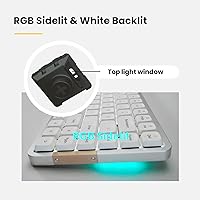
  • Backlighting: White per-key backlight combined with RGB sidelit trim around the keyboard perimeter; backlight and side lighting are independently adjustable.
  • Dimensions: Physical footprint measures 12.44″ in length, 4.96″ in width, and 0.96″ in height.
  • Weight: Complete unit weighs 1.25 lbs, inclusive of the aluminum body and installed battery.
  • Multifunction Keys: Includes 16 dedicated multifunction keys accessible via the Fn layer for media control, system shortcuts, and OS-switching commands.
  • OS Switching: Fn+N activates Windows and Android system function key behavior; Fn+M activates macOS and iOS function key behavior.
  • Charging Port: USB-C charging and wired data port located on the top edge of the keyboard for cable management flexibility.
  • Bluetooth ID: Device broadcasts as Flow84@Lofree for identification during the initial pairing process on all supported platforms.
  • Compatible Systems: Officially supported on Windows, macOS, iOS, and Android operating systems without requiring third-party drivers or software installation.

Related Reviews
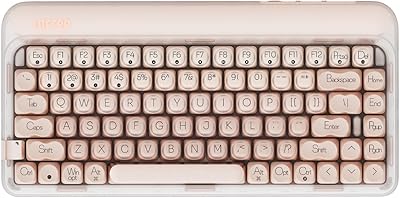
LOFREE DOT Foundation Mechanical Keyboard
84%
88%
Design & Aesthetic
85%
Typing Experience
91%
Customization Options
83%
Battery Life
87%
Build Quality
More
LOFREE Touch PBT Wireless Mouse OE909
85%
88%
Connectivity Performance
91%
Ergonomics and Comfort
90%
Tracking Accuracy
85%
Battery Life
89%
Build Quality
More
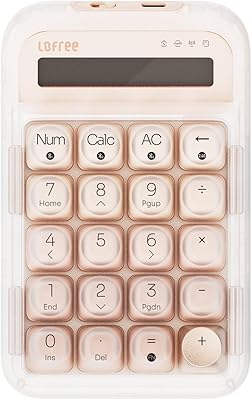
LOFREE Foundation Tri-Mode Wireless Numpad
87%
95%
Connectivity Reliability
91%
Mechanical Key Feel
94%
Ease of Switching Devices
88%
Build Quality
80%
Backlight Visibility
More
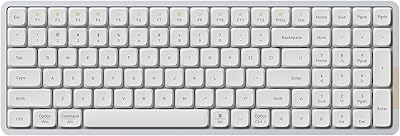
LOFREE Flow Low Profile Mechanical Keyboard
85%
91%
Typing Experience
89%
Build Quality
94%
Connectivity
88%
Customization Options
85%
Ergonomics
More

FAQ

Yes, the board supports up to three saved Bluetooth profiles that you can switch between using dedicated key combinations. Fn+M activates Mac and iOS function key behavior, while Fn+N handles Windows and Android. In practice, switching takes about a second and most users set it up once and rarely need to touch it again.

Think of it as a thin cushioning layer between the internal switch plate and the outer aluminum frame. Instead of each keystroke transmitting force directly into a hard surface, the gasket absorbs some of that impact. The practical result is a softer, less fatiguing feel and a noticeably quieter, lower-pitched sound compared to standard rigid-plate keyboards of the same type.

Honestly, for most people there is an adjustment period of at least a few days. The key travel is shallower than what you're used to, which can feel imprecise at first, especially for fast typists who bottom out their keystrokes forcefully. Most users adapt within a week, but a small percentage genuinely prefer the feel of full-height switches and never fully warm to the low-profile format — it's worth being realistic about that before purchasing.

Currently, no dedicated software is available for this board. Key behavior is controlled through hardwired Fn layer combinations, and the RGB lighting options are adjusted directly on the keyboard rather than through an app. This simplifies setup for most users but is a real limitation if you want custom macros, per-key lighting assignments, or saved profiles.

It is noticeably quieter than most full-height mechanical keyboards, largely because the gasket mount absorbs a significant portion of the sound. The tactile variant produces a soft thud rather than a sharp clack. That said, it is not a silent keyboard — if your office runs whisper-quiet or you sit in a shared space with noise-sensitive colleagues, you may still want to consider dampening mods or opting for the linear switch variant.

The sockets accept low-profile switches in the Kailh low-profile footprint format. This includes Lofree's own switch offerings as well as other Kailh low-profile compatible switches. Standard full-height MX-style switches will not fit. The third-party selection in this format is narrower than the regular hot-swap ecosystem, so it is worth researching available options before purchasing with the intent to swap.

Under light to moderate use with backlighting off or at low brightness, real-world users report getting close to that figure over several workdays. However, running the RGB sidelight at higher brightness settings noticeably reduces endurance — some users reported dropping to 15 to 20 hours under sustained RGB use. If battery longevity matters to you, keeping the lighting minimal will make a meaningful difference.

Yes, though the gap is subtler than with full-height switches. The tactile variant has a gentle bump feedback midway through the keystroke that provides typing confirmation without a loud click. The linear version is smooth from top to bottom with no bump, which some users find faster and less fatiguing for long sessions. If you are unsure, the hot-swap capability lets you try both without buying a second board.

Both modes work well, and wired USB-C operation is fully supported as a primary connection method. Some users actually prefer wired for situations requiring guaranteed low latency, such as extended typing sessions where any Bluetooth wake delay would be disruptive. The USB-C cable is not permanently attached, so switching between modes is straightforward.

It is primarily decorative. The sidelit RGB creates a pleasant ambient glow around the keyboard's perimeter and looks clean in dim workspace setups, but it does not illuminate individual keycaps in different colors. The backlight itself is white only, which is functional for key visibility in low light. If your main interest in RGB is per-key color customization or reactive lighting effects, this board will not deliver that experience.