Overview

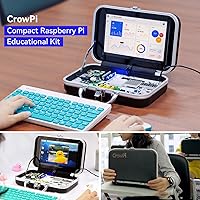
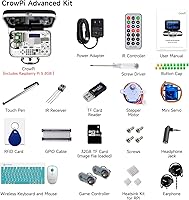
The ELECROW CrowPi Pi 5 8GB Learning Kit is best described as a complete learning station — not a bare board or a simple case with a screen bolted on. Elecrow's CrowPi line has earned genuine credibility among Pi enthusiasts over several product generations, and this iteration benefits from that accumulated refinement. Everything arrives pre-assembled and ready to power up, removing the usual scavenger hunt for compatible components and cables. That said, realistic expectations matter: this is a prototyping and education platform, not a machine you would use as a primary computer. The price reflects a serious commitment to structured learning, not a casual entry point.

Features & Benefits

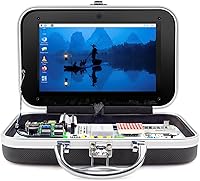
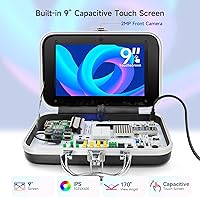
The 9-inch HD touchscreen is the first thing that stands out — most Pi kits at any price point ship with a smaller display or none at all, so this inclusion genuinely changes how you interact with projects. Equally impressive is the development board packing 19 pre-wired sensors, including PIR, ultrasonic, and IR modules, meaning you can start experimenting with motion detection or distance sensing without touching a jumper wire. The 21 structured lessons walk you through real terminal commands and actual Python code, not drag-and-drop blocks. The Pi 5's 8GB of RAM ensures the platform won't bottleneck ambitious projects as your skills grow, and four USB ports plus Bluetooth handle peripherals without compromise.

Best For

This CrowPi kit hits a specific sweet spot — it works best for young teens and adults ready to move past tutorial videos and into hands-on hardware work. Parents shopping for a STEM gift will appreciate that nothing extra is required out of the box: no scrounging for compatible displays, no separate sensor shopping. For classrooms or coding clubs, the consistent hardware setup is a genuine operational advantage, since every student works with an identical environment, which simplifies instruction considerably. Hobbyists moving on from Scratch or visual coding tools will find the transition to Python genuinely supported here. Complete beginners, though, should expect some initial software configuration before the lessons fully click.

User Feedback

Sitting at 4.3 stars across several hundred reviews, the all-in-one Pi 5 kit earns its rating largely through build quality and first impressions. Buyers consistently note how well the ABS enclosure holds up and how satisfying it is to open the box and immediately start working. The lesson structure draws praise for being genuinely instructive rather than superficial. On the critical side, a handful of reviewers mention that initial OS configuration is not quite as plug-and-play as the packaging implies. More experienced makers flag that the 21 lessons are outgrown faster than expected. Gift buyers dominate the glowing reviews, while self-directed learners tend to be more measured, noting the curriculum ceiling arrives sooner than the price might suggest.

Pros

  • All 19 sensors arrive pre-wired, so you can run real experiments in minutes rather than hours.
  • The 9-inch HD touchscreen is unusually generous for a Pi learning kit at this price tier.
  • The included Raspberry Pi 5 with 8GB of RAM gives serious processing headroom for ambitious future projects.
  • Twenty-one structured lessons provide a clear, progressive path from zero to writing actual Python code.
  • Four USB ports and Bluetooth connectivity mean you are never fighting for connections with everyday peripherals.
  • The all-in-one design eliminates the component shopping list that typically overwhelms first-time Pi buyers.
  • An integrated camera expands project possibilities well beyond what most competing kits offer at this level.
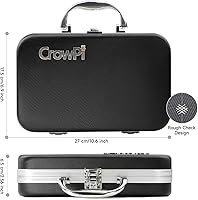
  • The ABS enclosure is sturdy enough for classroom and travel use without requiring careful babying of the hardware.
  • Consistent hardware across units makes this CrowPi kit a practical, low-friction choice for group learning environments.
  • Build quality draws consistent praise from buyers across a wide range of technical experience levels.

Cons

  • Some OS-level configuration is typically required before the lessons become fully accessible right out of the box.
  • The 21 lessons have a hard ceiling — intermediate users are likely to outgrow the curriculum within weeks.
  • No microSD card is included, requiring an extra purchase before you can even complete the initial setup.
  • The fixed hardware layout limits customization for makers who prefer modular or breadboard-based experimentation.
  • Very young children or complete non-coders may still find the terminal-based lesson format unexpectedly challenging.
  • Experienced developers will find the structured lesson content too elementary to justify the overall investment.
  • Buyers comfortable sourcing components separately could potentially assemble comparable hardware at a lower total cost.
  • Touchscreen responsiveness has drawn occasional criticism, with some users reporting sluggish or imprecise input.
  • Software and OS updates can introduce compatibility friction that the included documentation does not always address.

Ratings

The scores below for the ELECROW CrowPi Pi 5 8GB Learning Kit were generated by AI after analyzing hundreds of verified buyer reviews from global markets, with automated filters applied to remove incentivized, spam, and bot-generated feedback. Each rating reflects what real users consistently praised and where genuine frustrations surfaced, giving equal weight to both sides of the ownership experience. No score has been inflated to flatter the product — this is an honest, data-driven picture of how this kit actually performs in buyers' hands.

Build Quality
88%
The ABS enclosure consistently earns praise from buyers who have carried this CrowPi kit to classrooms, coding clubs, and maker meetups. Components feel firmly seated rather than rattling loose, and the overall assembly is solid enough that most users describe it as something they can confidently hand to a teenager without constant worry about damage.
A small number of reviewers note that certain sensor connectors feel slightly less premium than the enclosure itself, and the touchscreen bezel has drawn occasional comments about fit and finish not quite matching the price point. It is durable rather than refined — functional, but not what you would expect from a top-tier consumer device.
Value for Money
72%
28%
Buyers who factor in the cost of sourcing a Raspberry Pi 5 separately — plus individual sensors, a display, and a case — often find the all-in-one Pi 5 kit represents genuine savings in both money and time. For gift-givers especially, the bundled ready-to-learn format removes all the research burden, which many reviewers treat as a meaningful part of the overall value.
Self-directed learners and experienced makers are more skeptical — if you can source a Pi 5 and components yourself, you can assemble something comparable for less. The structured lessons also have a ceiling that advanced users hit quickly, making the curriculum feel like a poor return on a significant investment if you already know your way around a terminal.
Out-of-Box Experience
79%
21%
Opening the box and finding a fully assembled, pre-wired kit — rather than a pile of components — earns consistent praise, especially from buyers who purchased it as a gift. The 9-inch screen and integrated camera are immediately visible and functional, giving first-time users a genuine sense of capability from the moment they power it on.
The experience hits a snag when users discover no microSD card is included — you cannot boot the device at all without one. Some reviewers also report that the OS setup process, particularly flashing the operating system image, requires more technical confidence than the packaging implies for a truly beginner-oriented product.
Lesson Content Quality
81%
19%
The 21 structured lessons stand out for teaching real-world coding skills — you write Python, run terminal commands, and interact with physical sensors rather than clicking through drag-and-drop interfaces. Buyers with children new to programming report that the progression feels logical and results are immediately tangible, which keeps engagement high through the early lessons.
The curriculum has a well-documented ceiling — a motivated learner can work through all 21 lessons in a matter of days or weeks, and there is no built-in progression beyond that point. Reviewers with any prior coding background, even from online tutorials, often find the content moves too slowly or covers ground they already know well.
Sensor Variety
91%
Nineteen pre-wired sensors in a single unit is genuinely impressive — PIR motion detection, ultrasonic ranging, IR reception, light sensing, and more are all accessible without soldering or breadboarding. Students and hobbyists consistently highlight that having this variety immediately available lets them focus on writing and understanding code rather than debugging wiring problems.
The fixed hardware layout that makes setup so clean also limits flexibility — you cannot easily swap in a different sensor, add a custom module, or reconfigure the board for non-lesson projects. Makers who enjoy the iterative, experimental side of hardware work will find the integrated design restrictive once they have outgrown the included curriculum.
Display Quality
67%
33%
The 9-inch screen size earns genuine appreciation — most Raspberry Pi learning kits ship with smaller displays or no integrated screen at all, so seeing a larger panel built into the enclosure feels like a real advantage when running Python scripts and navigating a desktop OS during lessons.
Touch responsiveness is the recurring complaint — multiple reviewers describe input that feels sluggish or imprecise compared to a tablet or modern smartphone screen. For basic lesson navigation it is workable, but users doing anything requiring precise tap accuracy, such as using a code editor directly on the display, report noticeable frustration.
Software & Setup
61%
39%
Once the OS is configured and the lesson software is running, the guided experience flows reasonably well — the pre-wired sensors interact reliably with the lesson scripts, and users who push through the initial setup friction report a noticeably smoother experience than building a comparable Pi project entirely from scratch.
Getting to that point is where this CrowPi kit loses points. Flashing the OS, configuring settings, and ensuring lesson dependencies are properly installed requires comfort with command-line basics that some buyers — especially those purchasing as a gift for a child — simply do not have, and the included documentation does not always bridge that gap adequately.
Portability
83%
The all-in-one enclosure design earns real praise from users who transport the CrowPi 5 learning station between home and classrooms or coding club sessions. There are no loose display cables, no bag of jumper wires, and no detached camera module to manage — everything travels as one self-contained unit.
At nearly 6.85 pounds when packaged, it is not lightweight by any standard, and buyers expecting something they can slip into a standard laptop bag may find the footprint more cumbersome than anticipated. The package dimensions mean it occupies a significant portion of a school backpack on a regular commute.
Connectivity
86%
Four USB ports — two at USB 2.0 speed and two at USB 3.0 — combined with Bluetooth give users a genuinely practical peripheral setup for real-world coding practice. Connecting a keyboard, mouse, USB storage drive, and a Bluetooth device simultaneously is straightforward without needing a separate hub.
No dedicated wired ethernet port is listed for the enclosure, which means users in environments with unreliable Wi-Fi may encounter friction during lessons requiring internet access or OS updates. A number of reviewers also note that the initial Bluetooth pairing process for wireless keyboards and mice was less straightforward than expected on first setup.
Hardware Performance
89%
The Pi 5 with 8GB of RAM handles multitasking comfortably — running a Python script, a terminal window, and a browser simultaneously does not result in the sluggishness that plagued older Pi 3 or Pi 4 based kits under similar workloads. Users specifically mention that script execution and compilation times feel noticeably snappy compared to previous Pi-based learning setups.
For its intended educational purpose the performance headroom is more than adequate, but buyers expecting video editing, gaming, or demanding creative workloads will hit the inherent limits of the ARM architecture quickly. The Pi 5 is impressively capable for a single-board computer, but it is not a laptop substitute, and some buyers discover that the hard way.
Learning Curve
74%
26%
The structured lesson format does a good job of scaffolding complexity — earlier lessons introduce components and basic code reading before asking users to write and run scripts independently. Buyers who have watched a child progress from total confusion to confidently running sensor-triggered Python programs in a few weeks describe the pacing as well-judged.
The initial OS setup and software configuration phase sits before the first lesson, and for many buyers that is where the experience first stumbles. Younger learners or those with no prior exposure to terminal environments may find the jump from unboxing to lesson one is bigger than the product marketing suggests.
Expandability
58%
42%
The four USB ports and Bluetooth connection do provide meaningful avenues for external expansion — adding peripherals, connecting to networks, or running custom scripts that go beyond the included lessons is entirely possible once a user has built up the foundational skills the CrowPi lessons provide.
The fixed, pre-wired development board is the main limitation here — you cannot reorganize the sensor layout, add a custom component to the board itself, or modify the physical hardware without disrupting the tidy integrated design. For makers who want to graduate to their own circuit experiments, the enclosed format eventually becomes a constraint rather than a feature.
Documentation Quality
69%
31%
The bundled lessons come with step-by-step written instructions covering component identification, basic circuit awareness, and code execution in a logical order. Reviewers who followed the lessons sequentially report that the written guides are clear enough to keep a motivated beginner moving forward through early material without constant external help.
Beyond the structured lessons, documentation for customization, OS troubleshooting, and advanced use cases is thin. A handful of reviewers specifically mention that when something goes wrong during setup — such as an OS compatibility issue after a system update — the official resources fall short, leaving users to rely on community forums for answers.

Suitable for:

The ELECROW CrowPi Pi 5 8GB Learning Kit is genuinely well-suited for anyone who wants to learn hardware programming without spending weeks sourcing and wiring individual components. Parents looking for a serious, structured STEM gift will find it covers everything from unboxing to writing and running real code in a single package. Teens and young adults who have dabbled in Scratch or similar visual tools and are ready to step into Python and terminal-based work will get real mileage from the 21 included lessons. Educators and coding club organizers benefit from the consistent, repeatable hardware environment — every student works with the same sensors, the same display, and the same board, which removes a major logistical headache. Hobbyists who want a portable prototyping platform they can carry to a meetup or set up on a kitchen table without cable chaos will also appreciate how self-contained the whole setup is.

Not suitable for:

If you are an experienced maker or developer already comfortable with Linux, GPIO wiring, and Python, the ELECROW CrowPi Pi 5 8GB Learning Kit will feel limiting fairly quickly — the 21 lessons are designed for newcomers, and you will exhaust the structured curriculum long before you exhaust the hardware. Budget-conscious buyers should weigh their options carefully, since someone willing to source a Raspberry Pi 5, individual sensors, and a display separately could assemble a comparable setup for less, sacrificing convenience and curated lesson content in the process. This kit is not a desktop replacement, so do not buy it expecting to browse the web, edit documents, or run productivity software day to day without friction. If a child is very young or has zero prior coding exposure, the terminal-based lessons may still present a steep learning curve despite the guided material. Buyers hoping for a truly zero-configuration experience should also know that some OS-level setup is typically required before the lessons are fully accessible.

Specifications

  • Included SBC: The kit ships with a Raspberry Pi 5 single-board computer featuring 8GB of RAM, ready for configuration.
  • CPU: The Raspberry Pi 5 runs on an ARM Cortex-based quad-core processor suited for multitasking educational and prototyping workloads.
  • Display: A built-in 9″ HD touchscreen provides a generously sized, touch-enabled interface for OS navigation and hands-on project interaction.
  • Camera: An integrated camera module is built directly into the unit, enabling image-capture and basic computer-vision projects without extra hardware.
  • Sensors: The development board includes 19 pre-wired sensor types covering PIR motion, ultrasonic distance, infrared, light sensing, and additional modules.
  • Enclosure: The outer chassis is constructed from solid ABS plastic, providing durable protection for all internal components during transport and daily use.
  • USB Ports: The unit provides 2 USB 2.0 ports and 2 USB 3.0 ports, supporting simultaneous connection of keyboards, mice, and storage devices.
  • Wireless: Bluetooth wireless connectivity is built in, allowing pairing with compatible peripherals without occupying a USB port.
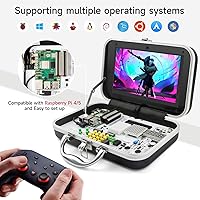
  • Supported OS: The platform is compatible with Debian-based Raspberry Pi OS, Ubuntu, and Windows 10 IoT Core operating systems.
  • Lessons: Twenty-one structured programming lessons are included, progressing from component identification through code reading and hands-on terminal execution.
  • Storage: A microSD card for the operating system is not included in the package and must be purchased separately before initial boot.
  • Power: One lithium-ion battery is required for operation; the specific battery type should be confirmed in the official product documentation before purchase.
  • Package Weight: The complete packaged kit weighs 6.85 pounds, accounting for the board, integrated enclosure, display, and all included accessories.
  • Package Dimensions: The shipping box measures 15.24 x 13.62 x 5.24 inches, sized to safely contain and protect all components during transit.
  • Product Series: This unit belongs to Elecrow's CrowPi product family, specifically the crowpi1 generation updated for Raspberry Pi 5 compatibility.

Related Reviews
Vilros Raspberry Pi 5 8GB Starter Kit
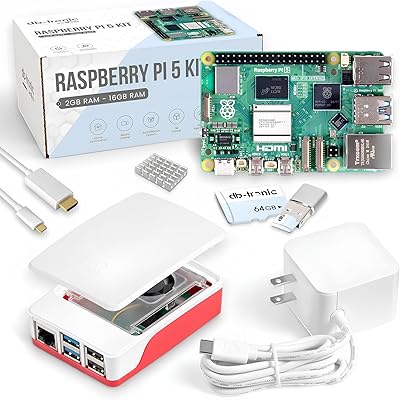
80%
93%
Ease of Setup
89%
Thermal Performance
91%
Build Quality
67%
Value for Money
88%
Cooling System Design
More
Raspberry Pi 5 8GB Starter Kit 64GB Edition
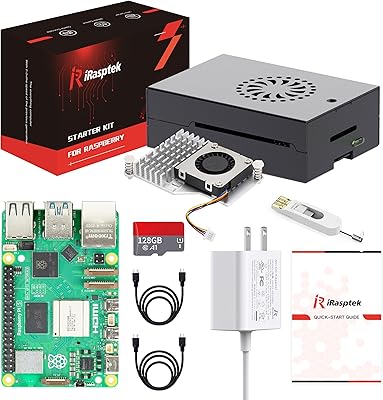
87%
88%
Performance
91%
Setup and Installation
83%
Cooling Efficiency
87%
Build Quality
92%
Value for Money
More
iRasptek Raspberry Pi 5 Starter Kit 8GB RAM 128GB SSD Edition
85%
91%
Performance
88%
Build Quality & Durability
86%
Cooling & Thermal Management
94%
Ease of Setup
90%
Storage Speed & Reliability
More
CanaKit Raspberry Pi 5 Starter Kit PRO (8GB RAM, 128GB)
87%
94%
Ease of Assembly
91%
Cooling Performance
93%
Processing Power & Speed
78%
Value for Money
96%
Multitasking Capability
More
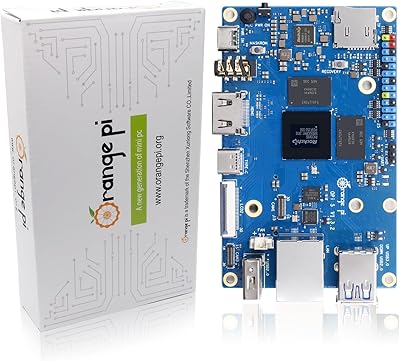
Orange Pi 5 8GB Single Board Computer
73%
91%
Raw CPU Performance
83%
AI & NPU Capability
88%
Storage & I/O Speed
47%
Connectivity & Wireless
62%
Thermal Management
More
RasTech Raspberry Pi 5 8GB Kit
84%
93%
CPU Performance
91%
Power Supply Compatibility
72%
Thermal Management
84%
Value for Money
88%
PCIe Expandability
More
Vilros Raspberry Pi 5 4GB Starter Kit
82%
92%
Ease of Setup
89%
Cooling Performance
91%
Build Quality
84%
Value for Money
74%
RAM Adequacy
More
Vilros Raspberry Pi 4 Starter Kit 8GB
82%
93%
Out-of-Box Readiness
88%
Value for Money
84%
Thermal Management
86%
Accessory Completeness
89%
Power Supply Quality
More
CanaKit Raspberry Pi 4 8GB Extreme Kit 128GB
84%
94%
Kit Completeness
91%
Thermal Management
93%
RAM & Multitasking Performance
71%
Storage — microSD Speed & Reliability
89%
Power Supply Quality
More
CanaKit Raspberry Pi 5 Starter Kit MAX 16GB 256GB
83%
93%
Bundle Completeness
78%
Value for Money
81%
Thermal Management
67%
Storage Performance
94%
Power Supply Quality
More

FAQ

Almost everything is in the box — the Raspberry Pi 5, the CrowPi enclosure with its 9-inch touchscreen, and all 19 sensors pre-wired and ready to go. The one thing you will need to source separately is a microSD card for the operating system. Beyond that, you should be able to get powered up without any additional shopping.

It is not completely plug-and-play, so it is worth being upfront about that. You will need to flash an OS image onto a microSD card, which involves a few steps that can catch total beginners off guard. Elecrow provides documentation to guide you through it, but budget 30 to 60 minutes for setup before the structured lessons become fully accessible. Once that initial hurdle is cleared, the experience is significantly smoother.

The ELECROW CrowPi Pi 5 8GB Learning Kit includes the Raspberry Pi 5 with 8GB of RAM — that is a major part of what justifies the price. You are not purchasing just a case or a sensor board with an empty slot; the Pi itself comes bundled in.

It works best for motivated teens around 13 and up, as well as adults at any coding experience level who are new to hardware programming. Younger children who have only done visual or block-based coding may find the terminal-based lessons challenging without adult guidance alongside them. That said, a patient parent or educator working with a younger child can make it accessible earlier than the recommended age might suggest.

It genuinely bridges both. The 21 structured lessons have you interacting with physical sensors and components while writing and running real Python code in the terminal. Learning to code in a context where you can see the physical result — a sensor triggering, a light responding — tends to make concepts stick far better than purely screen-based tutorials.

Probably not from the structured lessons alone. The 21 included lessons are aimed at beginners, and an intermediate or advanced user will likely work through them in a weekend. The hardware itself — a Pi 5 with a 9-inch screen and 19 sensors in a tidy enclosure — still has practical value as a prototyping platform, but the educational content has a clear ceiling that experienced users will hit quickly.

You are not locked in at all. The CrowPi 5 learning station supports standard Raspberry Pi OS (Debian-based), Ubuntu, and Windows 10 IoT Core, giving you real flexibility once you have worked through the bundled content. The pre-loaded material includes lesson-specific software, but the underlying OS is fully accessible and behaves like any standard Pi setup.

For that use case, it works well. Everything is integrated into one enclosure — no loose wires, no separate display to carry, no bag of jumper cables to manage. At around 6.85 pounds, it is not ultralight, but it fits comfortably in a backpack for a short commute to a classroom or club session, and the solid ABS housing handles that kind of regular transport without issues.

The screen size draws consistently positive reactions — 9 inches is genuinely generous compared to most Pi kits. Touch responsiveness, however, has received some criticism from users expecting tablet-level precision. It functions well for navigating the OS and working through lessons, but it is not the silky experience of a premium consumer tablet. For learning and prototyping purposes, it is more than adequate.

It is one of the more thoughtfully structured options for exactly that scenario. The all-in-one Pi 5 kit removes the friction of figuring out what components to buy and how to wire them, and the 21 lessons provide a clear starting point rather than leaving the recipient staring at a blank desktop wondering what to do next. Gift buyers represent a significant share of the positive reviews for precisely this reason — the self-contained nature makes it a complete, confidence-building package rather than a pile of parts.